
SSK 361 - Shredder SENCOR - Free user manual and instructions
Find the device manual for free SSK 361 SENCOR in PDF.


| Product Type | Paper Shredder |
| Brand | Sencor |
| Model | SSK 361 |
| Shred Type | Cross-Cut |
| Shred Size | 4 x 40 mm |
| Security Level | P-4 |
| Sheet Capacity | 8 sheets (70 gsm) |
| Feed Width | 220 mm |
| Bin Volume | 15 liters |
| Dimensions (W x D x H) | 350 x 200 x 300 mm |
| Weight | 3.5 kg |
| Power Supply | 220-240 V, 50/60 Hz |
| Power Consumption | 180 W |
| Noise Level | 70 dB |
| Shreds | Paper, credit cards, staples |
| Functions | Auto start/stop, reverse, manual forward |
| Overheat Protection | Yes, automatic shutdown |
| Safe Operation | Safety lock switch |
| Maintenance | Oil shredder blades periodically |
| Included Accessories | User manual, warranty card |
Frequently Asked Questions - SSK 361 SENCOR
User questions about SSK 361 SENCOR
0 question about this device. Answer the ones you know or ask your own.
Ask a new question about this device
Download the instructions for your Shredder in PDF format for free! Find your manual SSK 361 - SENCOR and take your electronic device back in hand. On this page are published all the documents necessary for the use of your device. SSK 361 by SENCOR.
USER MANUAL SSK 361 SENCOR
natural_image
Black SECON handwashing device with control buttons and a circular vent (no visible text or symbols on body)User's manual PAPER SHREDDER
Before operating this unit, please read all instructions.
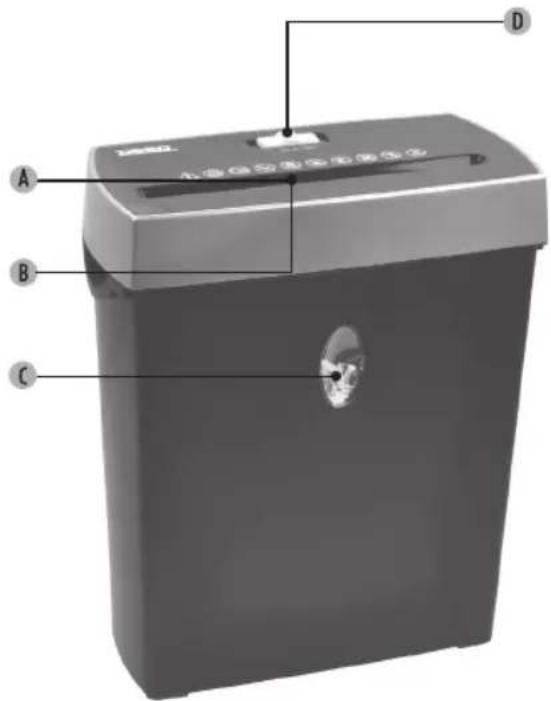
A Card entry
B Paperentry
C See-trough window
D Engine reverse / Off / Automatic
| Attention! Risk for injury | Risk for injury | Risk for injury | Risk for injury | Risk for injury | Danger of electric shock and damage | Attention! Attention! |
 |  |  |  |  |  |  |
| Read instructions before use! | Read the safety instructions to avoid electric shock and/or serious injuries! | Do not reach into the paper feed with fingers or other body parts. | Pay attention that hair is not entering the paper feed. | Children should be supervised to ensure that they do not play with the appliance. | Protect the appliance against moisture like rain and humidity, keep aerosol products away | Ensure that clothing, ties, hair, jewellery or other small objects are not in close proximity to the paper feed. |

Sharp edges, do not touch.
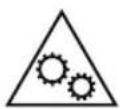
This symbol indicates a risk of injury from moving parts. Do not touch any moving parts, such as cutting blade, during operation.
SAFETY INSTRUCTIONS
Read the operating manual carefully before starting up the shredder!
- Ensure that the voltage and frequency of the power supply correspond to the data on the rating plate!
Incorrect voltage may result in destruction of the unit!
- The socket must be easily accessible
- Do not open the housing lid! This can cause serious injury like electric shock! The inner parts cannot be maintained.
- Repairs are to be effected by qualified after-sales service staff only, or else the warranty of this machine is no longer valid. The safety devices must not be removed or manipulated.
INSTALLATION
- Put the plug in a power socket
- This shredder has a built-in safety mechanism that requires the waste bin to be correctly inserted into the shredder. Lining the waste bin with a plastic bag will interfere with this safety precaution and may keep the shredder from functioning.
OPERATION
Remove all staples and paper clips! This will extend the shredders life. Max. capacity = 6 sheets at the same time (80 g/m ^2 )!
- Set the switch to „AUTO“.
- The shredder switches on automatically when a sheet of paper is fed into feed aperture. It stops once the sheet has passed through.
- Do not set the switch to REVERSE (REV) when shredding a Credit Card, otherwise the shredder may be damaged. The shredder cannot shred paper and a Credit Card at the same time and can only shred one Credit Card at once.
- When shredding small material like Credit Cards or receipts, insert them in the middle of the paper feed opening.
WHAT TO DO WHEN A PAPER JAM OCCURS
- a. If the shredder fails because of a paper jam, set the switch to REVERSE (REV).
b. Toggle between FORWARD (FWD) and REV if jammed paper is not released by simply setting to REV.
When switching from FWD to REV, always stop momentarily to prevent possible damage to the motor.
- Remove the rejected paper and feed less sheets into the shredder. Never pull paper out of the shredder, this will damage the cutters.
- Should it occur that the shredder does not react to anything then it is very likely that the motor is overheated. Try the previous steps again after 30 to 40 minutes.
CAUTION!
- a. This shredder is designed for short operation. If it runs for too long or overheats, the shredder switches off automatically and must be cooling down for several minutes before it is ready to resume operation. 2 minutes on, 20 to 30 minutes off.
b. Do not exceed the maximum cutting capacity! - Keep hands and fingers away from the feed opening. Serious injury may result. Be careful with long hair and with neck-ties, bracelets, and other jewellery.
- Do not expose the shredder to rain or humidity
-
Do not operate the machine unsupervised
-
Always turn off the shredder by unplugging the machine before moving or cleaning. Cleaning only with a damp cloth!
- Do not use in the vicinity of inflammable liquids or gasses. Do not use in the vicinity of corrosive materials.
- Empty the bin and oil the shredder frequently for smooth, trouble free operation.
- Never allow the shredder to remain in a jammed condition with the power turned on.
- Do not alter the plug!
NOTE:
The shredder is only suitable for shredding paper and Credit Cards (not other materials like labels, cardboard or plastics)! Never shred envelopes, labels or anything with glue or any sticky substance as this will lead to paper jams.
Do not open the housing lid! This can cause serious injury like electric shock! Warranty on the machine will become invalid once a non qualifi ed person intervenes with the machine.
TECHNICAL DATA
Sheet capacity: 6 (A4/80 g/m ^2 )
Feed width: 220 mm
Shred size: 4 × 38 mm
Shreds a document in: app. 410 pieces
Bin Capacity 11 L
Shred speed: 2,2 m/min
Power: 230V/50 Hz 150 W
INSTRUCTIONS AND INFORMATION REGARDING THE DISPOSAL OF USED PACKAGING MATERIALS
Dispose of used packaging material at a site designated for waste in your municipality.
DISPOSAL OF USED ELECTRICAL AND ELECTRONIC EQUIPMENT
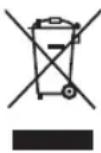
This symbol on products or original documents means that used electric or electronic products must not be added to ordinary municipal waste. For proper disposal, renewal and recycling hand over these products to determined collection points. Or as an alternative in some European Union states or other European countries you may return your products to the local retailer when buying an equivalent new product.
Correct disposal of this product helps save valuable natural resources and prevents damage to the environment caused by improper waste disposal. Ask your local authorities or collection facility for more details.
In accordance with national regulations penalties may be imposed for the incorrect disposal of this type of waste.
For business entities in European Union states
If you want to dispose of electric or electronic appliances, ask your retailer or supplier for the necessary information.
Disposal in other countries outside the European Union
This symbol is valid in the European Union. If you wish to dispose of this product, request the necessary information about the correct disposal method from the local council or from your retailer.

This product meets all the basic requirements of EU directives that apply to it.
Changes in the text, design and technical specifications may change without prior notice and we reserve the right to make these changes.
Manufacturer: Fast ČR, a. s., U Sanitasu 1621, CZ 251 01 Říčany
SENCOR®
EN Warranty conditions
Warranty card is not a part of the device packaging.
This product is warranted for the period of 24 months from the date of purchase to the end-user. Warranty is limited to the following conditions. Warranty is referred only to the customer goods using for common domestic use. The claim for service can be applied either at dealer's shop where the product was bought, or at below mentioned authorized service shops. The end-user is obligated to set up a claim immediately when the defects appeared but only till the end of warranty period. The end user is obligated to cooperate to certify the claiming defects. Only completed and clean (according to hygienic standards) product will be accepted. In case of eligible warranty claim the warranty period will be prolonged by the period from the date of claim application till the date of taking over the product by end-user, or the date the end-user is obligated to take it over. To obtain the service under this warranty, end-user is obligated to certify his claim with duly completed following documents: receipt, certificate of warranty, certificate of installation.
This warranty is void especially if apply as follows:
■ Defects which were put on sale.
■ Wear-out or damage caused by common use.
The product was damaged by unprofessional or wrong installation, used in contrary to the applicable instruction manual, used in contrary to legal enactment and common process of use or used for another purpose which has been designed for.
■ The product was damaged by uncared-for or insufficient maintenance.
■ The product was damaged by dirt, accident of force majeure (natural disaster, fire, and flood).
■ Defects on functionality caused by low duality of signal, electromagnetic field interference etc.
■ The product was mechanically damaged (e.g. broken button, fall).
■ Damage caused by use of unsuitable media, fillings, expendable supplies (batteries) or by unsuitable working conditions (e.g. high temperatures, high humidity, quakes).
■ Repair, modification or other failure action to the product by unauthorized person.
■ End-user did not prove enough his right to claim (time and place of purchase).
■ Data on presented documents differs from data on products.
Cases when the claiming product cannot be identified according to the presented documents (e.g. the serial number or the warranty seal has been damaged).
Authorized service centers
Visit www.sencor. for detailed information about authorized service centers. com
_
| _
一
1
PŘEHDLED
| 2017 | 2016 | |
| Cost of sales | 3,459 | 3,380 |
| Gross margin | 1.4% | 1.4% |
| Net sales | 3,459 | 3,380 |
| Earnings per share: | ||
| Basic | 0.41 | 0.40 |
| Diluted | 0.41 | 0.40 |
| Earnings per share (basic) | 0.41 | 0.40 |
| Earnings per share (diluted) | 0.41 | 0.40 |
| 2017 | 2016 | |
| Cost of sales | 3,459 | 3,380 |
| Gross margin | 1.4% | 1.4% |
| Net sales | 3,459 | 3,380 |
| Earnings per share: | ||
| Basic | 0.41 | 0.40 |
| Diluted | 0.41 | 0.40 |
| Earnings per share (basic) | 0.41 | 0.40 |
| Earnings per share (diluted) | 0.41 | 0.40 |
| Earnings per share (basic) margin | 0.41 | 0.40 |
| Earnings per share margin (diluted) | 0.41 | 0.40 |
- SAFETY INSTRUCTIONS
- Read the operating manual carefully before starting up the shredder!
- INSTALLATION
- OPERATION
- WHAT TO DO WHEN A PAPER JAM OCCURS
- CAUTION!
- NOTE:
- TECHNICAL DATA
- INSTRUCTIONS AND INFORMATION REGARDING THE DISPOSAL OF USED PACKAGING MATERIALS
- DISPOSAL OF USED ELECTRICAL AND ELECTRONIC EQUIPMENT
- For business entities in European Union states
- Disposal in other countries outside the European Union
- SENCOR®
- EN Warranty conditions
- This warranty is void especially if apply as follows:
- Authorized service centers
- PŘEHDLED
Brand : SENCOR
Model : SSK 361
Category : Shredder