Infinity - Pregnant BLOW - Free user manual and instructions
Find the device manual for free Infinity BLOW in PDF.


| Brand | BLOW |
| Model | Infinity |
| Product Type | Portable Bluetooth Speaker |
| Dimensions (approx.) | 20 x 10 x 10 cm |
| Weight (approx.) | 500 g |
| Power Source | Built-in rechargeable battery, 5V USB charging |
| Battery Life (approx.) | 6 hours |
| Wireless Connectivity | Bluetooth 5.0 |
| Sound Output | 10W RMS |
| Additional Functions | FM radio, AUX input, MicroSD card support |
| Controls | Buttons on unit: power, volume, track, play/pause, mode |
| Material | Plastic with fabric grille |
| Color Options | Black, White |
| Water Resistance | IPX4 (splash proof) |
| Accessories Included | USB charging cable, AUX cable, user manual |
| Maintenance | Clean with soft dry cloth; do not use solvents |
| Safety Precautions | Avoid exposure to rain or liquids; do not disassemble; keep away from heat |
| Certifications | CE, RoHS |
Frequently Asked Questions - Infinity BLOW
User questions about Infinity BLOW
0 question about this device. Answer the ones you know or ask your own.
Ask a new question about this device
Download the instructions for your Pregnant in PDF format for free! Find your manual Infinity - BLOW and take your electronic device back in hand. On this page are published all the documents necessary for the use of your device. Infinity by BLOW.
USER MANUAL Infinity BLOW
natural_image
Exterior view of a black and blue fitness device with glowing blue circular design (no text or symbols visible)Bluetooth speaker with wireless microphone
5: Microphone Input/ Guitar Input
6:REPEAT (repetitive playing): Press to select repeat mode.
7: VOLUME: adjust master volume level
8:MENU(control BASS/Treble/MIC Volume)
9:MEGA BASS
10: Light mode switching and on/off, short switch to get different mode, long press to on/off the light
11:Next sound(under USB/TF/BT mode)
12: EQ : Press to changed EQ ( 5 styles : Pop, Rock, Jazz, Classical, Flat).
13:Play/pause under USB/TF/BT, Long press to get Microphone priority
14:RECORDING:
Record:
- Insert a USB/MICRO SD (TF) Card drive into the speaker
- Connect your microphone to the product with a 14 " jack or connect the wire less mic with the packing
- Press and hold the key button for 2 seconds.
- The speaker will announce "Starting Recording" to indicate recording start
- Press the button to stop recording.
- A record in WAV format will be created in USB/MICRO SD (TF) Card Playback:
- Press and trigger (not hold) the ● button to enter record play back mode
- Record in the USB/MICRO SD (TF) Card's "RECORD" folder will be played and looped
- Press next / previous to navigate recording.
15: Previous sound(under USB/TF/BT mode)
16: MIC PRI: Press to enable/disable mic priority over music function.
17: ECHO+ (MIC): increase microphone echo.
18: Mode: Short press for switching Line-in mode,
FM mode, Bluetooth mode, USB mode. Long press to ON/OFF voice prompt.
19: MIC: adjust Microphone volume level
20: ECHO- (MIC): Reduce microphone echo.
21: LED Display
Remote control
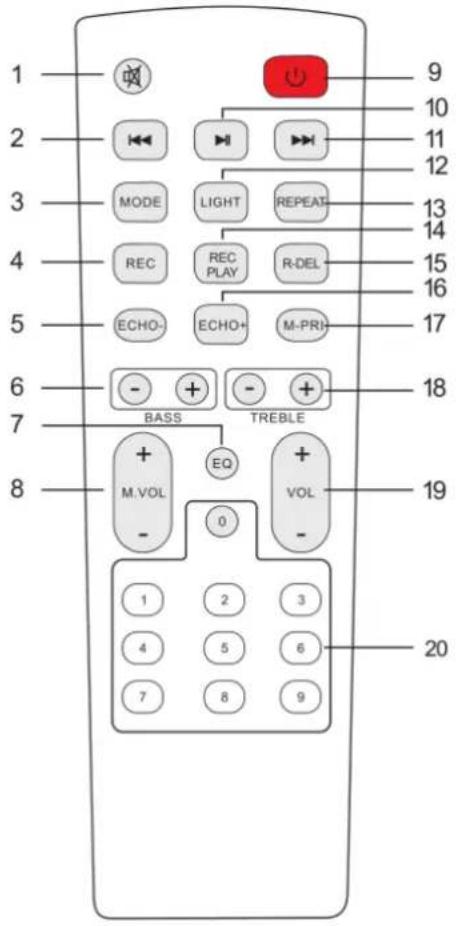
1.Mute
Available to be mute at any mode
2.Previous Song/station
Under USB/TF card mode - previous song.
Under BT connection mode- previous song.
Under FM mode- previous station.
3.Mode
Press shortly to skip to Wireless BT/LINE IN/USB/TF/FM mode.
- Record function
Under USB/TF card mode, press "REC" button to record
5.Echo-
6.BASS+/-
7.EQ function
8. Microphone Volume+/-
9. Stand by
10.Pause&Play
11. Next song/station
Under USB/TF card mode - next song.
Under BT connection mode- next song.
Under FM mode- next station.
12.Light mode
13.Repeat function
14. Record play
15. Record delete
16.Echo+
17. Microphone priority
18. Treble+/-
19.Main Volume+/-
20.Number buttons
Under USB/TF mode to choose songs
OPERATING INSTRUCTIONS
- Wireless BT Pairing Mode:
Press MODE or Blue button on the unit or the remote control until BT is selected.
- Put the cell phone within 20 meters;
- Activate the BT features on your cell phone so that the cell phone starts to search for the BT device. Please refer to the users' manual for details
- Select the correct model No. (TMS-605)The device found by the cell phone;
- Shortly press PLAY/PAUSE button to play or pause music. Short press
“” or “” key to select the previous or next track.
•LINE IN MODE:
Press MODE button on the unit or the remote control until LINE is selected. Play the music of the device connected to the LINE input.
- USB Mode:
- After start up, press MODE to select "USB" and insert the USB device. The unit will automatically read and play the music in the USB device.
- Press " " key shortly to pause or play.
- Shortly press " " key to the previous song.
- Shortly press " " key to the next song.
- FM Mode:
- Press MODE button on the unit or the remote control until FM function is selected.
- Press key to make "Auto Search"; Press again to exit "Auto Search" Mode
- Shortly press " " key to the previous station.
- Shortly press " " key to the next station.
- TWS (True Wireless Stereo)method of use :
Power on 2 units, both switch to "Bluetooth Mode".
-
Long Press on one unit, it will show "SLAU" on LED display, then 2 units will connect automatically.
-
Under TWS mode, you can adjust the main volume/play/pause/next song/previous song to control 2 speakers at the same time.
-
If to disconnect TWS, long press again on the host or deputy model.
| Wyprodukowano w ChRL dla:PROLECH Sp. z o.o.Stary Puznów 58B, 08-400 Garwolin, Polska www.blow.com.pl | Manufactured in P.R.C. for:PROLECH Sp. z o.o.Stary Puznów 58B, 08-400 Garwolin, Poland www.blow.com.pl |
| Serwis:Serwis BLOWStary Puznów 58B, 08-400 Garwolin, Polska www.blow.com.pl | Service:BLOW ServiceStary Puznów 58B, 08-400 Garwolin, Poland www.blow.com.pl |
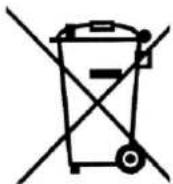
Electrical equipment marked with the bin icon cannot be disposed of along with ordinary municipal waste. Such equipment should be collected and recycled.
CE
Producent: Prolech Sp. z o.o., Stary Puznów 58B, 08-400 Garwolin, Polska
The product meets the requirements of the directives: 2014/30/EU, 2014/35/EU, 2011/65/EU, (EU) 2015/863. The declaration of conformity is available for download from the website www.prolech.com.pl


HIGH QUALITY




Brand : BLOW
Model : Infinity
Category : Pregnant