
AD639SR - Loudspeaker Tema - Free user manual and instructions
Find the device manual for free AD639SR Tema in PDF.


| Product Type | Portable Bluetooth Speaker |
| Brand | Tema |
| Model | AD639SR |
| Dimensions (approx.) | 8.5 x 8.5 x 8.5 cm |
| Weight | 320 g |
| Power Supply | Built-in rechargeable lithium battery (3.7V, 1200mAh) |
| Battery Life | Up to 6 hours (depending on volume) |
| Charging Time | 2-3 hours |
| Connectivity | Bluetooth 5.0, AUX input, TF card slot |
| Output Power | 5W |
| Frequency Response | 100 Hz – 20 kHz |
| Main Functions | Hands-free calling, volume control, play/pause, track skip |
| Maintenance & Cleaning | Wipe with a soft dry cloth; do not use liquids. Keep away from moisture. |
| Safety Precautions | Do not disassemble, expose to high temperatures, or immerse in water. |
| Spare Parts & Repairability | Not user-serviceable. Contact Tema authorized service center for repairs. |
| General Information | Full user manual available for free download on notice-facile.com |
Frequently Asked Questions - AD639SR Tema
User questions about AD639SR Tema
0 question about this device. Answer the ones you know or ask your own.
Ask a new question about this device
Download the instructions for your Loudspeaker in PDF format for free! Find your manual AD639SR - Tema and take your electronic device back in hand. On this page are published all the documents necessary for the use of your device. AD639SR by Tema.
USER MANUAL AD639SR Tema
"IP COMMUNICATION AND SECURITY COMPANY"
WWW.TEMATLC.IT
AD639SR
VoIP SIP PoE Call Repeater


natural_image
Top-down view of a round object with a glowing orange interior, possibly a food item or container (no visible text or symbols)
natural_image
Close-up of a metallic circular object with concentric rings, mounted on a white surface with a striped pattern in the background (no visible text or symbols)
natural_image
Red circular device with black frame, no visible text or symbolsAudio Over IP Network Series
"SlpComStage"
Products for VoIP SIP LAN networking Communications, Paging Amplifiers Systems and Audio Applications. Zone Announcements, Night Ringer, Multicast general call, Background music, Standard SIP call or Emergency call, SD memory with pre-recorded messages, Relays for LAN drives.
PRODUCT MANUAL
Version HW 1.0 - Version SW 1.0

| Revision | Date | Revision reason | Prepared | Checked/Approved |
| 0 07/01/2021 | First release | MM, DP DP, FL |

DICHIARAZIONE DI CONFORMITÀ CE DECLARATION OF CONFORMITY CE
We, TEMA TELECOMUNICAZIONI SRL Via C. Girardengo, 1/4 - 20161 MILANO
declare under our sole responsibility that the product:
Type or model AD639SR
and accessories --
to which this declaration relates is in conformity with the essential requirements and other relevant requirements of the R&TTE Directive (1999/5/EC, 2006/95/EC, 2004/108/EC).
The product is in conformity with the followings standards and/or other normative documents:
HEALT & SAFETY EN 60950-1:2006 +A11:2009 +A1:2010 +A12:2011
EMC EN 55022:2010, EN 55024:2010, EN 61000-3-2:2006 EN 61000-3-3 :2008
MILANO, 07 Jan 2021
The crossed-out wheeled bin symbol below indicates that this electronic equipment is intended to be disposed in a separate collection and not in an unsorted municipal waste, in order to provide for the treatment of WEEE (Waste Electrical and Electronic Equipment) using best available recovery and recycling techniques. Specific treatment for WEEE is indispensable in order to avoid the dispersion of pollutants and other hazardous substances into the waste stream, while recycling leads to reduction of disposal of waste and the negative impacts on environment and human health. That is, priority is given to reuse of WEEE in its components, subassemblies and consumables. As the final holder, the user has an important role in contributing to reuse, recycling and other forms of recovery of WEEE and is responsible to return this waste in the collection facilities set up by EC Member States and to fulfill other duties in compliance with Directive 2002/96/EC and local laws.

natural_image
Symbol of a trash bin crossed with no text or labels

TEMA TELECOMUNICAZIONI is a certified company


UNI EN ISO 9001:2015
RECOMMENDATIONS
- It is recommended to read this entire manual before proceeding to the installation of the device.
- The installation and commissioning of the device can only be performed by specialized technicians.
- The device is accurately manufactured and tested. In any case, the product is not recommended for use where an error of operations can cause property damage and/or injury to persons.
- It is expressly not recommended maintenance inside the device which must be carried out by Tema Telecomunicazioni, the removal of the closures will invalidate the warranty and makes accessible internal parts with risk of electric shock.
- Tema Telecomunicazioni accepts no responsibility for damage to property and/or persons resulting from incorrect use of the equipment or by procedures that do not comply with the instructions in this manual. Tema Telecomunicazioni reserves the right to make modification to the technical and functional specifications at any time and without any notice.
- Products powered via PoE (Power over Ethernet) may only be connected with cables coming from the internal network company (inside the building), are not allowed connections LAN cables coming from outside the building.
- Use for this device only and exclusively original spare parts and consumables supplied by Tema Telecomunicazioni. The company is not responsible for damage caused by the use of materials not supplied by the same.
- Do not expose the unit to direct sunlight, protect from heat, dust, humidity and chemicals.
- Tema Telecomunicazioni reserves the right to vary the product characteristics for improvement without prior notice. Check the WWW.TEMATLC.IT website for any updates to the latest firmware, manuals, and technical documentation.
- This document is property of Tema Telecomunicazioni, It is forbidden any duplication and reproduction, even partial, as well as storage on any medium without written permission of Tema Telecomunicazioni.

This symbol in the descriptions indicates a general warning or a damage danger to equipment or people.

This symbol in the descriptions indicates useful information or a suggestion for the optimization of the device functionality.
INDEX PAGE
- PRESENTATION .... 5
- AVAILABLE MODELS AND ACCESSORIES....6
- FEATURES AND PERFORMANCE .... 7
- PACKING LIST 7
- TECHNICAL SPECIFICATIONS....8
- OPERATION....9
6.1. DEVICE CONNECTION DIAGRAMS....9 - OPERATING MODES....10
7.1. CALLS TO DEVICES....10
7.2. RELAY FUNCTION 10
7.3. CALLS GENERATED FROMAD639SR FOR THE ACQUISITION OF EXTERNAL CONTACTS FOR SPECIAL SIGNALINGS...... 10 - INSTALLATION OF THE DEVICE 11
8.1. CONNECTING THE AD639SR INTERNAL MODULE.... 11 - PROGRAMMING 13
9.1. PREPARATION FOR THE SYSTEM PARAMETERS PROGRAMMING.... 13
9.2. ACCESS TO PROGRAMMING....14
9.3. NETWORK PARAMETERS....15
9.4. SIP PARAMETERS....16
9.5. DAY/NIGHT MODE....17
9.6.ALARM INPUT SETTINGS....18
9.7. MULTICAST 20
9.8. AUTOMATIC ANNOUNCEMENTS....21
9.9. MAINTENANCE....23
9.10. DIAGNOSTIC LOGS....24
9.11. MULTICAST AUDIO STREAMING FOR ANNOUNCEMENTS.... 25 - APPENDIXES....26
10.1. FAQ FREQUENTLY ASKED QUESTIONS 26
10.2. APPENDIX3: USE OF THE AUDACITY SOFTWARE FOR AUDIO FILES RECORDING 29
10.3. APPENDIX4: CABLING OF A UTP RJ45NETWORK CABLE ACCORDING TO THE STANDARDEIA568B.... 30
1. PRESENTATION
AD639SR is a IP SIP telephone call repeater which is registered on the VoIP PBX with its own telephone number and inserted in the night ringtone group or in any group where you want to repeat the phone call routed on that group. When an incoming call arrives, the system reproduces a warning sound from the powerful internal speaker. The system already has several call tones in memory that can be selected during the configuration, some of which show an increase in volume over time: they start with a low volume that increases progressively in case of no response. The default tone can be replaced by another by choosing from those supplied, or it can be freely registered by the user and loaded into the system via web browser with simple operations. The volume can be adjusted as desired.
AD639SR can be powered directly on the same LAN cable if it comes from a PoE switch, or from a PoE injector or 230Vac external power supply, both in the Tema catalog. Power supplies from PoE switches and external power supply can coexist. AD639SR incorporates an efficient 40W amplifier (with external power supply, 10W in PoE), in D-class.
The programming of the systems takes place remotely via LAN with few operations and in a few minutes:
1) Connect AD639SR in a LAN socket to a PoE switch with standard cat. 5/6 cable, or to a generic switch by powering it with an external power supply.
2) Connect with a browser and assign an IP address and the credentials of the LAN network.
3) Register into IP-PBX the number assigned to AD639SR in the space reserved for SIP account.
4) Enter the number assigned to AD639SR in the night group of the PBX, or divert incoming calls (in the absence of the PO) to the number assigned to AD639SR.
Some models of AD639SR can be supplied with a LED or FLASH Xenon optical indicator in different colors, to add a light signal to the acoustic signal. The luminous indicators are also available separately and can also be mounted later on outside the device, with the power supply available from the device itself and controlled by one of the 2 internal relays integrated in the system.
AD639SR is also equipped with an External contact input with multiple functions, for example: it provides for making a SIP call to a programmed IP address (peer2peer call) and informing the operator of the event with a specific voice message. The signal can be repeated a programmable number of times, the operator can interrupt the sequence with a code from the keyboard. Other examples of use will follow in this manual.
Multicast Audio Streaming for music and announcements broadcast. AD639SR handles 1 multicast channel in LAN for background music and announcements broadcasting. The generation of musical programs in streaming audio can be managed from a PC of the LAN/WAN network with the Tema "ADAM" management software or with the dedicated Tema Encoder AD615/S.
Total remote management via LAN, integrated Web Server. Programming, configuration, loading and listening to audio files, firmware release update, audio volume adjustment, backup and restore the configuration, device reboot.
AD639SR is part of the series of Audio over IP Tema “SipComStage” products tested and compatible with the most popular brands of PBX and Asterisk-based systems.
Other IP SIP Speakers from the "SipComStage" series

2. AVAILABLE MODELS AND ACCESSORIES

AD63+SR
Without
flashing light

natural_image
Top-down view of a brown circular object with a yellow center, possibly a device or sensor component (no visible text or symbols)AD63+SR/LA
With orange LED
flashing light

natural_image
Close-up of a metallic circular device with concentric rings, placed above a striped screen (no visible text or symbols)AD63+SR/FT
With transparent Xenon FLASH flashing light

AD63+SR/FR
With red Xenon FLASH flashing light

natural_image
Color wheel with multiple overlapping circles in red, green, yellow, and blue (no text or symbols)AD63+SR/LM
With multicolor RGB LED flashing light

AD6++/RT
Adjustable support in horizontal and vertical, grey color, 5 kg capacity

AA-3+P4
PoE injector 230Vac/48Vdc 0,5A.

AA-3+E3
DIN Power Supply 220Vac/24Vdc-1,5A

AD6++/L10A
Flashing orange LED, for external connection
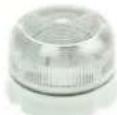
AD6++/X10B
FLASH transparent
Xenon flashing light,
for external connection

AD6++/X10B
Flashing red Xenon FLASH, for external connection

AD6++/L10M
Multicolor RGB LED flashing light, external installation
3. FEATURES AND PERFORMANCE
• 30W (10W PoE) IP wall speaker for indoor or outdoor installation with IP56 protection
• 40W power audio output
• 1 RX Multicast channel for Music/Announcements broadcast
• 2 remote-controlled relays via LAN network or following the incoming telephone call
• 1 multi-function external contact input
- Possibility of broadcast a pre-recorded announcement, associated with the available input
- Alert service with dedicated messages following an external event
- Independent adjustment of audio volumes: multicast, ringtone
- Customizable audio files
- Great versatility combined with ease of use and programming
• P2P SIP Peer to Peer mode for alarm reporting
- Power supply via PoE (Power over Ethernet) 802.af with a single UTP cable for the connection or from an external power supply, even simultaneously
- Programming via integrated Web Server interface and password protection
- Possibility of software/firmware update via LAN
- Integration with local LAN, Ethernet LAN 100 BaseT port with RJ45 connector
- Possibility of issuing pre-recorded announcements at set times (up to 5 for each day of the week)
- Possibility of issuing a daily pre-recorded announcement, at a set time or manually
a
a
a
4. PACKING LIST
The systems are supplied with the parts included in the following list:
• One AD639SR device
- A printed system documentation, installation, programming, use manual
• A CD-ROM with complete documentation
5. TECHNICAL SPECIFICATIONS
| LAN | TCP/IP Network 10/100BaseTx |
| Protocols | SIP 2.0, RFC 3261 |
| RTP Multicast audio Streaming | G711μ, G711a, G722, L16 from 16 to 44 kHz |
| Connection | SIP Server (IP-PBX) or P2P (Peer To Peer) |
| Power Supply | PoE, PoE Injector and/or external Ac/Dc power supply |
| PoE | 802.3af class 0 12,95W |
| External Power Supply (Opt.) | 230Vac / 12Vdc -1A, 24Vdc - 2A |
| Technology | 580MHz MIPS CPU Microprocessor |
| Memory | 128MB Ram, 32MB storage Flash |
| Programming | practical Web interface and password |
| Messages/Sounds | prerecorded in the internal memory |
| Audio File Format | Windows .wav – 8K – 16 bit |
| Duration | 60sec each |
| Bandwidth | 350Hz – 6KHz |
| Power | D- Class Amplifier 40W on 4 Ohm |
| Acoustic pressure | 100dB A (SPL) |
| Dispersion angle | 110° @ 2KHz |
| Audio communication | Unidirectional |
| Inputs from buttons or external contacts | 1 for alter/alarm |
| Integrated relais | 2 |
| Relays load capacity | Max 30Vdc – 1,5A |
| Signalings | Active Call Led |
| Installation | Wall mount, adjustable with optiona accessory |
| Container material | Halogen free EN60754-2 Technopolymer |
| Storage temperature | From -20° to +65°C |
| Operating temperature | From -20° to +55°C |
| Relative humidity | Up to 90% non-condensing |
| Dimensions | 119 x 70 x 59 mm (H xW x D) |
| Weight | 1,8 Kg |
| Warranty | 2 years, possibility of extension (Option) |
| Compatibility | CE, ROHS |
6. OPERATION
In Stand-by and correctly configured, the system waits for incoming calls. When a call arrives, the device plays the programmed ring tone, at the set volume, without ever answering. The purpose is to repeat the warning of an incoming call (for example when the switchboard is in night mode or to repeat the signal in noisy environments).
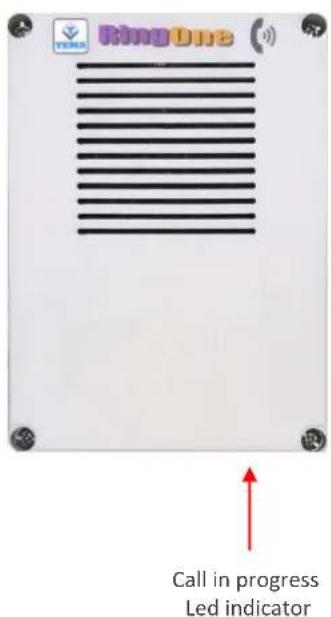
On the PBX it is needed to create a call group that also contains the user number used for AD639SR. The activation of the ringer is also associated with the lighting of the front led and the flashing light (if provided).
During the call it is possible to configure the system to operate its own internal relays to which it is possible to connect an external flashing light that increases its warning effectiveness (AA-699xxx see Tema catalog).
It is also possible to use the device for Multicast streaming sound broadcast. In this case the RTP audio broadcast on the network is reproduced amplified (to a different volume than that used for the ringer, useful for background music or warning messages).
Finally, the status change of an incoming alarm is always monitored, to which it is possible to associate a user to call and a message to be played to the answer of the called.
6.1. Device connection diagrams
- SIP telephone call repeater with PoE direct power supply
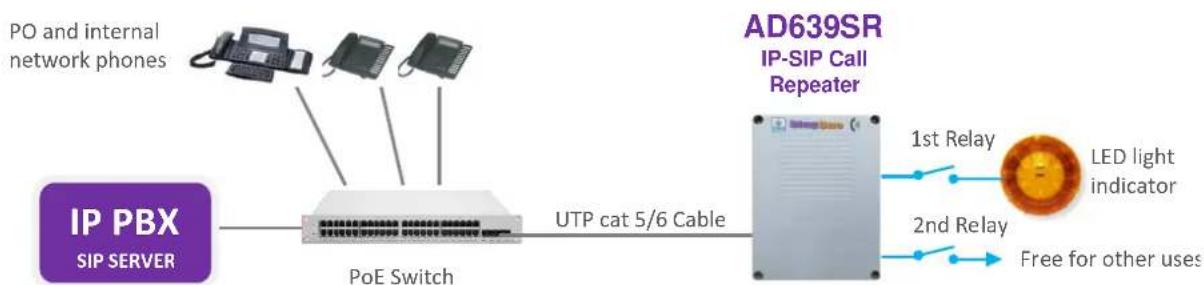
flowchart
graph LR
    A["PO and internal network phones"] --> B["PoE Switch"]
    C["IP PBX SIP SERVER"] --> B
    B --> D["UTP cat 5/6 Cable"]
    D --> E["AD639SR IP-SIP Call Repeater"]
    E --> F["1st Relay"]
    E --> G["2nd Relay"]
    F --> H["LED light indicator"]
    G --> I["Free for other uses"]
- SIP telephone call repeater with PoE injector or external 230Vac power supply

flowchart
graph LR
    A["IP PBX SIPSERVER"] --> B["Generic Switch"]
    B --> C["PO and internal network phones"]
    B --> D["PoE Injector"]
    D --> E["UTP cat 5/6 Cable"]
    E --> F["AD639SR IP-SIP Call Repeater"]
    F --> G["1st Relay"]
    F --> H["2nd Relay"]
    F --> I["Free for other uses"]
    B --> J["External Power Supply 230Vac/24Vdc/30W Cod. Tema AA-39E3"]

Note: for other applications of AD639SR and insertion diagrams see the FAQ section in the Appendices at the end of this manual
7. OPERATING MODES
7.1. Calls to devices
The AD639SR device must be registered to a SIP PBX. It is normally inserted in the night ring group but can also be called directly with its number. In any case, however, it will never reply (the only purpose is the activation of the ringer and the eventual light signal).
Using the ADAM software or a microphone base and the AD615 codec it is possible to broadcast an announcement in streaming (in unidirectional mode).
7.2. RELAY function
The internal relays can be used to connect any external flashers. In programming it is possible to decide whether they should be activated during the ringing of the incoming call and it is possible to choose also in which mode (flashing, steady, etc).
If they are not programmed to be activated during the call, they can only be controlled using the Tema ADAM software.
7.3. Calls generated from AD639SR for the acquisition of external contacts for special signalings
These are the calls that the system generates on the line connected to itself to warn after the trigger of the alarm input contact by the connected equipment (auxiliary devices or a button made available to users in the proximity of the device), for the details of the operation see paragraph 9.6.
8. INSTALLATION OF THE DEVICE
8.1. Connecting the AD639SR internal module
Once the necessary equipment has been prepared for fixing the AD639SR device, it is first necessary to make the connections for its operation.
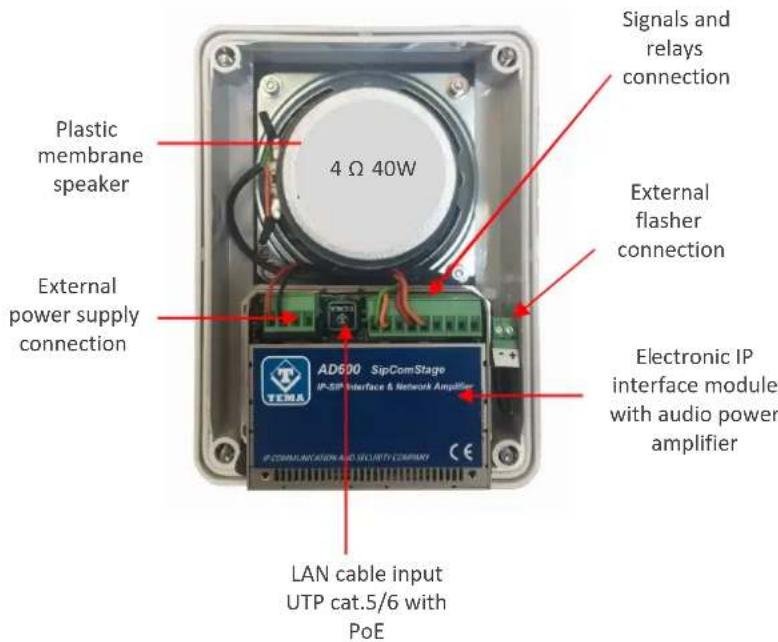
Inside AD639SR there is an electronic module for managing the communication functions on the VoIP network and for amplifying the audio signal. The connection of the signal cables from the field must be carried out by qualified technical personnel, operate verifying that no cable is live, also strictly comply with the indications of the voltage and current values for the power supplies and other parts of the system.
Follow the instructions given in the block diagram for the correct electrical connection of the system. On the following page, the detail of each terminal will be shown.

1 Removable 4-pole terminal block (screw connector connected to the electronic module)
+Vout Terminal from which it is possible to withdraw power, POSITIVE
- (GND) Terminal from which it is possible to withdraw power, NEGATIVE
A Terminal to power the system, polarity irrelevant
C Terminal to power the system, polarity irrelevant

At the "+Vout" output there is a +12Vdc voltage when the device is powered via PoE, otherwise, at this output the voltage will be the same as at the terminals A-C. The use of "+Vout" is permitted as long as it is not exceeded a maximum 200mA current consumption and the load has a protection on the input current. Improper use of this output will permanently damage the unit.
2 RJ45 LAN port (present on the electronic module)
AD639SR requires a LAN cable to connect to the LAN network. If the cable also carries PoE power supply, it will not be necessary to supply the module with other power sources (for max 10W power). For higher powers it will be necessary to power AD639SR with a 24Vdc 2A or max 18Vac 2.5A power source.
See also appendix 2 at the end of the manual for the correct wiring of the LAN cable to the RJ45 connector.

Devices powered via PoE (Power over Ethernet) may only be connected with cables coming from inside the building, they are not allowed connections to LAN cables coming from outside the building.
3 Removable 9-pole terminal block (screw connector connected to the electronic module)
9 SP1+ Output terminal 1st Class-D amplifier, connected to the internal loudspeaker, positive front
8 SP1- Output terminal 1st Class-D amplifier, connected to the internal loudspeaker, negative front
7 K1.NC K1 relay terminal – NC normally closed contact
6 K1.CC K1 relay terminal – CC central contact (maximum contacts load max 30V 1.5A)
5 K1.NA K1 relay terminal – NO normally open contact
4 K2.CC K2 relay terminal – CC central contact (maximum contacts load max 30V 1.5A)
3 K2.NA K2 relay terminal - NO normally open contact
2 GND Terminal related to the system power supply negative, for the alarm contact
1 ING1 Terminal for detecting the alarm contact

To terminals 1 (ING1) and 2 (GND) must only be connected a relay contact or a button free from any voltage to prevent permanent damage to the device.

Relay K1 is pre-wired to supply power to terminal 4 which supplies an external flashing light, relay K2 is free for other uses by the user.
4 Removable 2-pole terminal block (connector connected to the cable leaving the module)
- Connect here the positive of the flashlight or external device
- (GND) Connect here the negative of the flashlight or external device

The power supplied by this terminal is protected and limited to 300mA maximum current, do not connect devices with a higher power consumption as internal protection would be activated.
9. PROGRAMMING
9.1. Preparation for the system parameters programming
Programming is done via the WEB interface. To gain access, simply connect an Ethernet cable from a PC or from a switch to the LAN port of AD639SR.
The system comes with active DHCP (dynamic setting of the network address) so the IP address is automatically assigned by the local DHCP server. To find out the assigned IP address, or, in the absence of a local DHCP server to be able to program one, use the appropriate TEMA network device scan program called "devicescan-tema.exe".

This software will show all Tema devices in the LAN network with their respective serial numbers, MAC address, IP address, description of the devices. By double clicking on the device it will be possible to manually change the IP address and the Netmask.
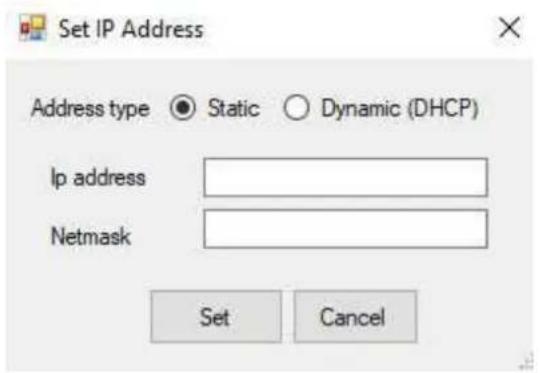
Please note that of the network setting is changed from Dynamic to Static, you will need to make sure you are using the same subnet configured on your computer.
9.2. Access to programming
To program the device, it is sufficient to use a standard browser such as Explorer, Firefox, Chrome or others. The user/password with which to connect are master/master. Once logged in, it is possible to change the administrative password for the maximum safety of your device, see par.9.9
The use is very simple and intuitive, it is always visible on the left the menu for selecting the functions to be programmed, while on the right is shown the configuration window that is currently active. Any change will be confirmed by pressing the "Apply" or "Save" buttons. Closing the browser or changing the page without selecting those buttons will make lost any change.
As soon as you access the device, a mask will be shown that summarizes the general status of the system:
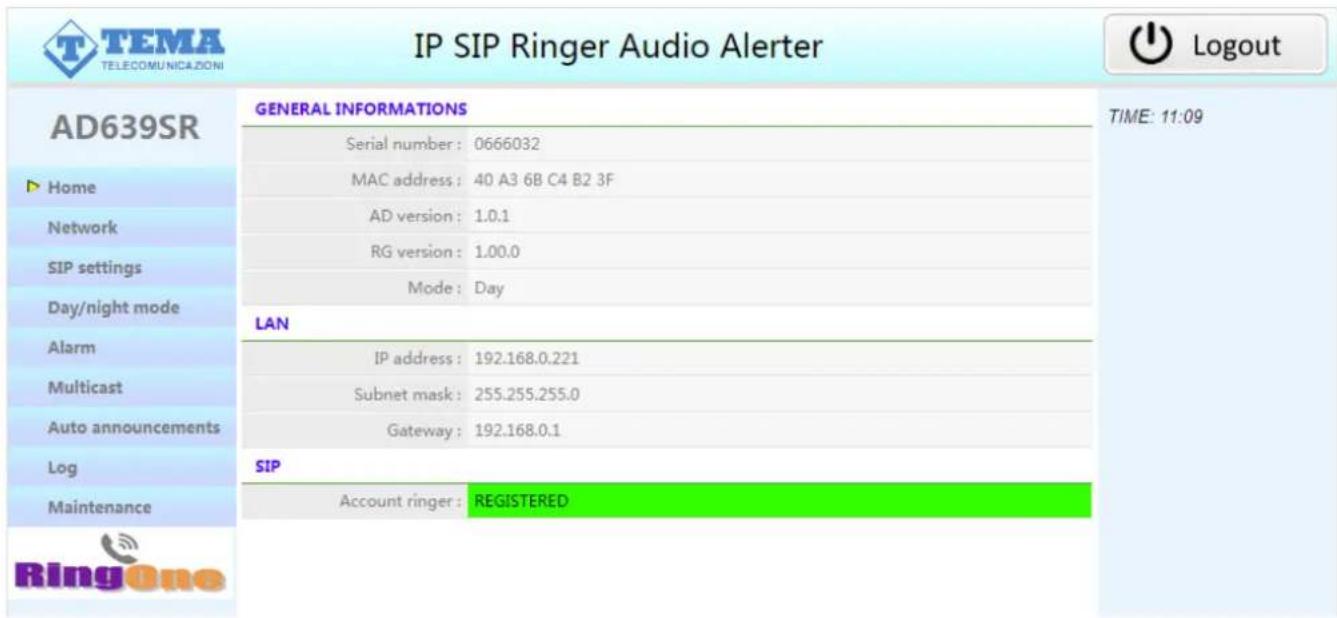
Any changes do not require restarting the device (except the change of IP address, and the software update).
9.3. Network parameters
On this page it is possible to set the network parameters, such as IP address, netmask, etc.:
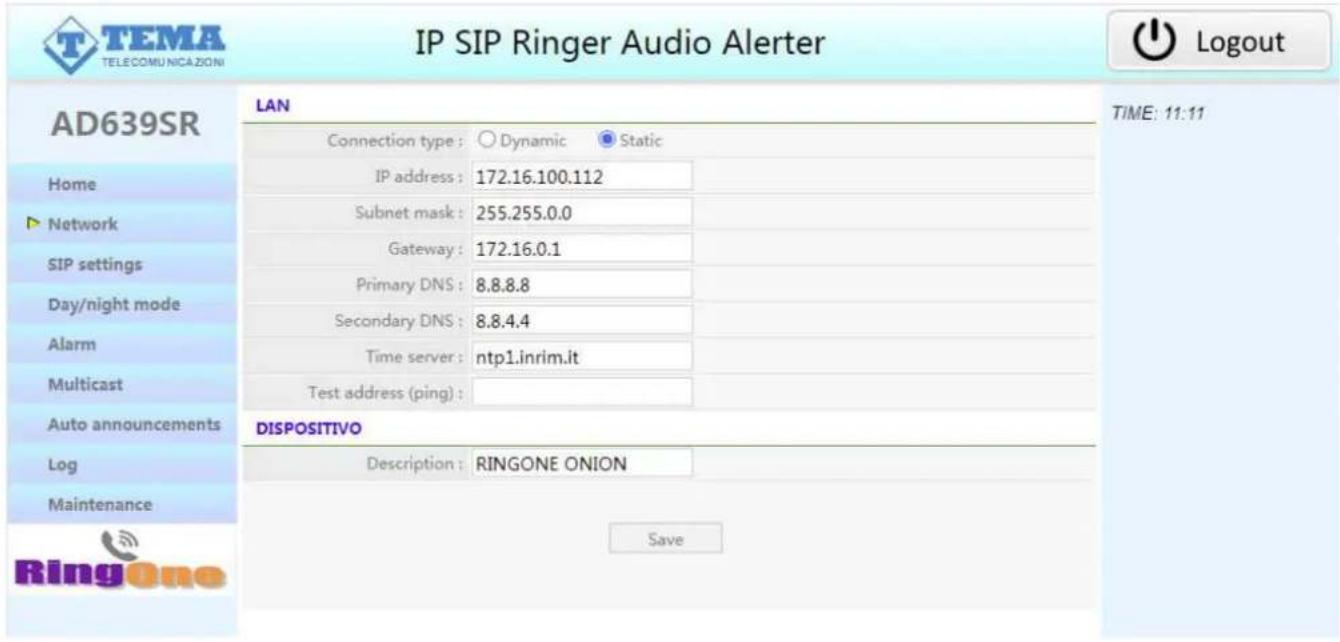
In case you choose the static network configuration, gateway and DNS are only needed if you want the device to have the ability to access the Internet (for example to get the current date / time, in the example from the site ntp1.inrim.it).
The changes to the network settings are taken over by the device until the next reboot. Once you have completed the configuration steps so be sure to reboot the system and if necessary, change the network segment of your computer so that it can connect to the new address.
- Connection type: indicate the type of connection, Dynamic (DHCP) or Static.
• IP Address: indicate the IP address you want to assign to AD639SR. - Subnet mask: indicate the subnet mask you want to assign to AD639SR
- Default gateway: indicate the gateway that can allow AD639SR to connect to the internet.
• Primary/Secondary DNS Server: indicate the addresses of the two DNS servers to be used. - Time server: indicate the address of the server you want to use to have the time synchronization of the device.
- Test address (ping): if entered, this address is used by the system to verify the correct functioning of the network connection. It is advisable to enter the address of your pbx, first checking that it responds to ping requests.
• Device description: text that will appear on the search mask of the Adam software.
9.4. SIP parameters
Once the network parameters have been set correctly, you must configure the connection with the VoIP SIP PBX:

- SIP server address: specify the IP address of the SIP PBX to which AD639SR should connect.
- Port: is the port number of the SIP PBX with which AD639SR must operate. Generally it is the 5060, but some stations use a different port.
- Domain: enter the domain to which register the system.
- Outbound proxy: some PBXs require that the extension number to call is followed by the proxy address. In most cases this field can be left empty.
- Local port: generally the 5060 port is used, but it is possible to specify a different number (i.e. for particular routing tables).
- Expiration: indicates how many seconds the device should check the correct registration of the client.
- User/password: credentials for the registration of the extension (which obviously must have been already created on the PBX).
- Ringer volume: it is possible to set the volume used to reproduce the sound of Night Ringer. It is also the volume used to reproduce the prerecorded announcements.
- Ringer type: it is possible to choose up to 6 pre-programmed ring tones in the device plus a customizable one (that coincides with the default one). It is possible to change it in the maintenance page, see par.9.9
- Test Ring ON-Test Ring OFF: buttons that activate the ringer for the purpose of testing the sound emitted.
- Increasing volume: with this option, the volume will start low and will increase, due to no response over time, until reaching the maximum volume set in "Ringtone volume".
- Relay 1-2 activation: it is possible to choose whether the 2 relays are to be activated during the call and in which mode.
9.5. Day/Night mode
The system can activating the day/night operating mode automatically (as long as it is synchronized with a time server) or manually. The day/night mode, as you can see in the next paragraph, is used to differentiate the numbers to call in the event of an incoming alarm:
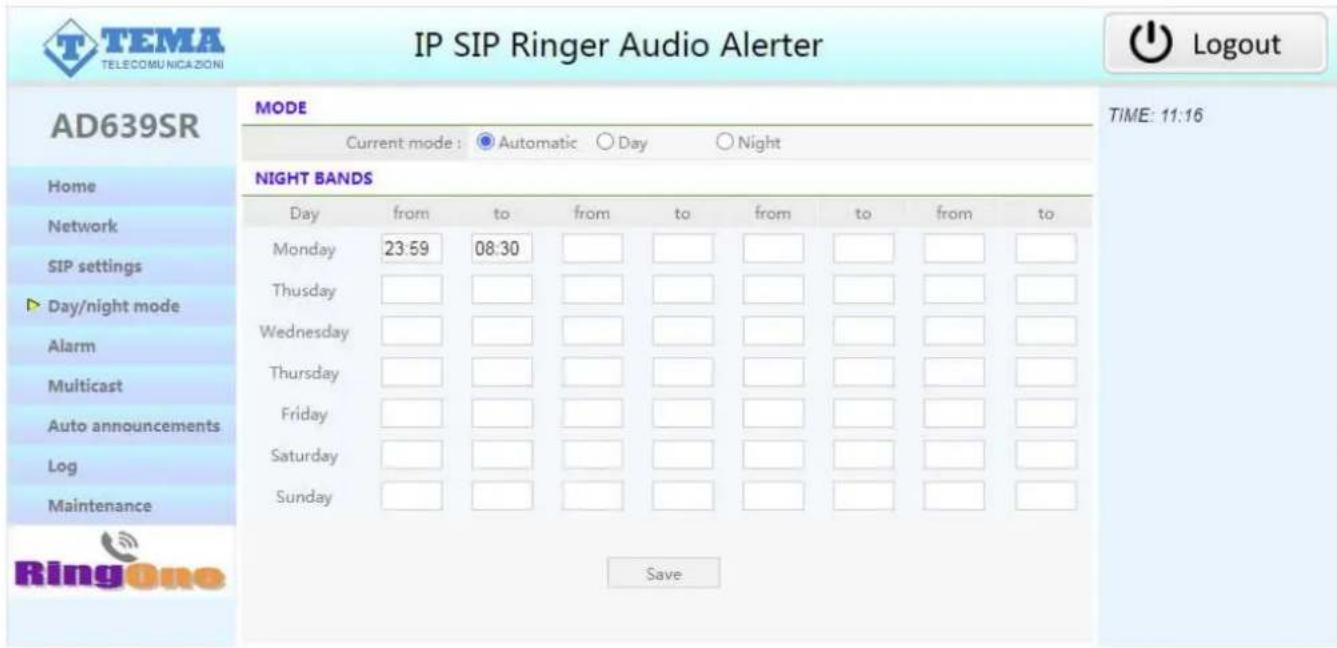
It is possible to select the automatic mode (in this case the time bands set in the following table come into operation, outside the time bands set the system is in "day" mode) or manual and in this case the switch from day to night it takes place only through the programming web page.
The current mode is visible on the main page (Home).
9.6. Alarm input settings
In this page it is possible to program the behavior of the acquisition input of the external contact (Terminal 1-2 of the 9-pole terminal block).
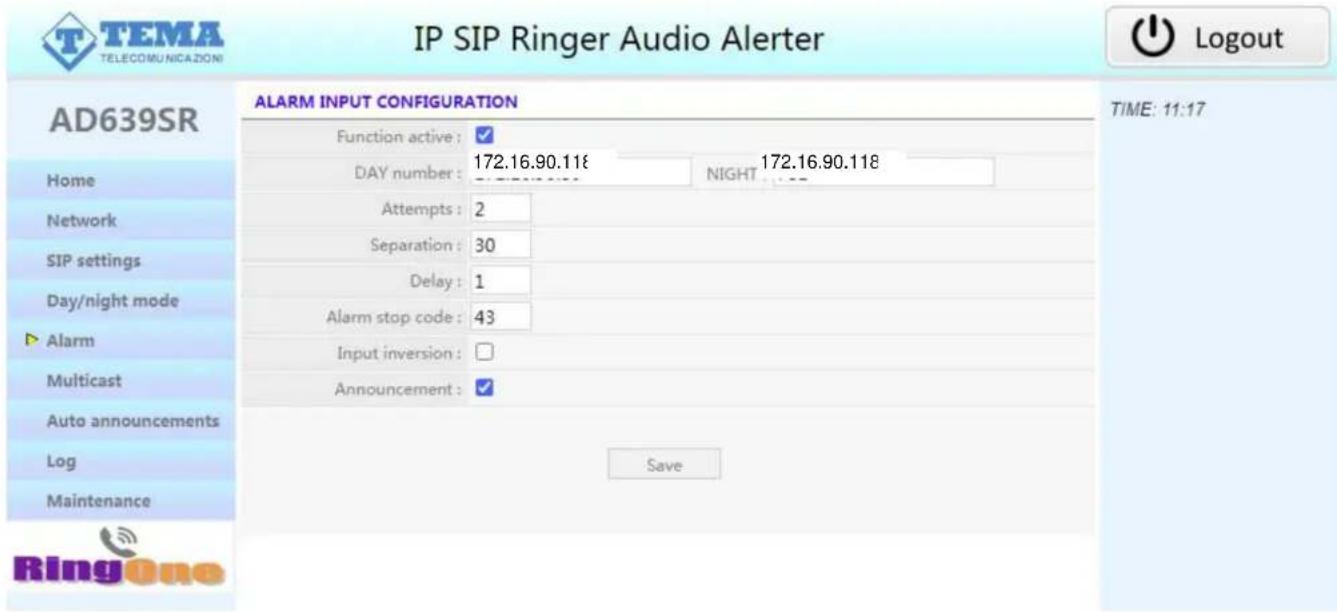
• Function active: indicates whether to monitor the status of the alarm input or not
• DAY/NIGHT number: IP address of the phone to contact in day or night mode when the alarm occurs.
• Attempts: number of call attempts (max 999).
• Separation: separation, in seconds, between one call attempt and another (max 999).
- Delay: is the minimum time, in seconds, before the input status change is evaluated. It can be used, for example, to mask a door indicator left open after the visitor has entered. Assuming that the maximum time that the pedestrian entrance must remain open is 30 seconds, only at the end of this time a warning telephone call would be sent to the staff in charge.
• Alarm stop code: code to dial on the called telephone to accept and silence the alarm (max 3 digits).
- Input inversion: normally the contact is open and the alarm occurs when the contact is closed. Activating this flag it is possible to instruct the device to behave in the opposite way (the contact is normally closed and the alarm occurs at opening).
- Announcement: the activation of the input (of the contact connected to him) causes the broadcast of a pre-recorded message on the local speaker before the call is made, see par.9.9.
The system can generate a VoIP call to alert, after triggering the alarm input contact (from auxiliary devices or from a button made available in the vicinity) an appointed operator.
A prerecorded message is played back to the called party. It is possible to invert this logic, so the triggering of the signaling can occur following the opening of the contact connected to the input.
AD639SR continuously monitors the status of the contact and in the event of activation it will begin to call the person who will manage the situation detected on the programmed telephone number and reproduce the message associated with the event. It is possible to define an acquisition / acknowledgment code for the alarm signal that the person called must enter to inform the device of the taking of the alarm signal as notified. If the called number proves to be busy or does not answer or in any other case where AD639SR does not receive the acquisition / acknowledgment code anyway, at the end of each single call attempt it returns in stand-by and it is ready for a new alarm notification.
When the AD639SR receives the acknowledgment code, the alarm condition signaling stops and no further notification calls will be made. To be able to be triggered again the notification phase of an activation, the condition
that had triggered the previous notification must return to stand-by. To Only following the occurrence of a new contact activation condition, the notification cycle with notification calls restarts. In practice: if a connected contact closes and its activation is detected, AD639SR starts making alert calls.
In the event that the person called by the system reply and correctly enters the acknowledgment code, the alert calls will be terminated. To trigger a new cycle, the contact must reopen and close again.
The alarm text message can be modified in the "Maintenance" page.
9.7. Multicast
In the multicast mode, AD639SR will listen to the specified address/port, and can reproduce on its speaker any received audio streaming. This function has a lower priority than the normal telephone operation of the system (outgoing or incoming calls will block or prevent the reproduction of the audio stream).
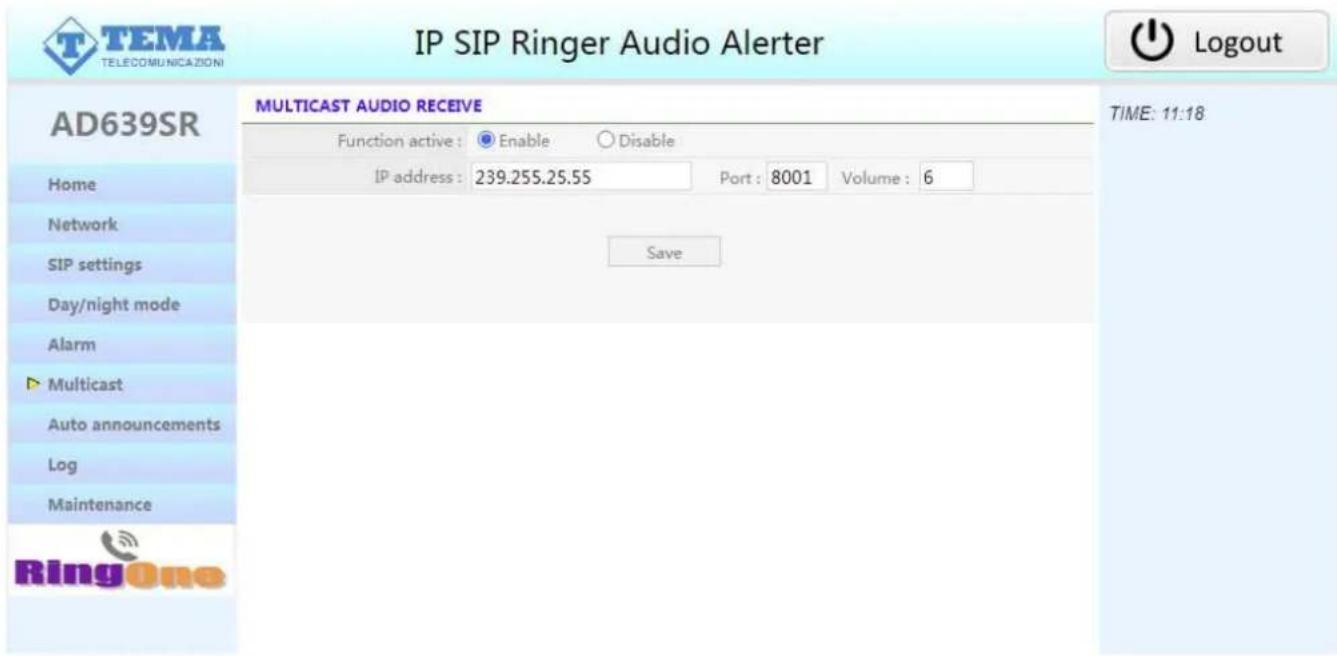
It is possible to program the volume of the Multicast audio, normally it will be low if the system is used to play background music or higher if it is used for the broadcast of announcements (for example in combination with a Tema AD696/BM microphone base).
9.8. Automatic announcements
It is possible to schedule announcements at set times on the local speaker.

it is possible to automate the diffusion of a daily announcement (which will take place at the set time) for each day. It will be reproduced for the number of repetitions, with separation between a message and the other given by the number of seconds set. It is also possible to manually activate the message (with the "Activate now" button) or stop playback (with the "Stop" button). If the manual activation mode is only used, it is not necessary to indicate the start time.
The message can be modified in the "Maintenance" page. Audio files must be .wav 8KHz – 16 bit format.
Periodic activation from table:
if this function is activated it is possible to indicate in the table below, for each day of the week, up to five different times.
Periodic activation from file:
it is possible to upload a text file in "csv" format (easily editable with "Excel") that contains, for each day of the year, up to 5 times in which to make the announcement diffusion. To compile the file simply download the default one already present (and empty), modify it and re-upload it.
Notice: do not change the written months, are used by the device to index itself in the document.
| A | B | C | D | E | F | G | H | I | J | K | L | M | N | O | |
| 250 | 28 | ||||||||||||||
| 251 | 29 | ||||||||||||||
| 252 | 30 | ||||||||||||||
| 253 | 31 | ||||||||||||||
| 254 set | |||||||||||||||
| 255 | 1 | ||||||||||||||
| 256 | 2 | ||||||||||||||
| 257 | 3 | ||||||||||||||
| 258 | 4 | ||||||||||||||
| 259 | 5 | ||||||||||||||
| 260 | 6 | ||||||||||||||
| 261 | 7 09:00-1 | 12:30-2 | |||||||||||||
| 262 | 8 | ||||||||||||||
| 263 | 9 | ||||||||||||||
| 264 | 10 | ||||||||||||||
| 265 | 11 | ||||||||||||||
| 266 | 12 | ||||||||||||||
| 267 | 13 | ||||||||||||||
| 268 | 14 | ||||||||||||||
In the example it was indicated that on September 7 (of each year) message 1 should be reproduced at 09:00, message 2 at 12:30 and message 3 at 17:30.
It is possible to program messages from 1 to 6, but the AD639SR system only uses message number 1.
NOTE:
since the device does not have its own internal clock, the automatic diffusion of messages can take place only if it is synchronized with a time server (which can be one into the local network or any other on the internet, see the "Network parameters").
9.9. Maintenance
On this page it is possible to check the current firmware version, update software, and backup / restore the system configuration:

Messages
In this window it is possible to change/listen to the messages. The "Alarm" message is the one reproduced during the activation of the alarm: when the callee answers, the message is reproduced several times until the stop code is entered or a timeout expires. "SIP Alert Call Button" function.
The “alarm announce” message is reproduced on the local loudspeaker when the relative option is active in the alarm programming screen (par. 9.6) and when the corresponding input is activated. The message is broadcasted before making a call to a telephone.
Finally the "Night Ringer" message is the one reproduced during the general night call (par. 9.4)
Configuration
You can back up the current configuration or restore a previously saved one. It is also possible to reset the configuration to the factory value.
Master user password
By default, the configuration page is accessible using as user/password master/master. The user cannot be changed while his password is. To be able to change it, you must enter the old password and the new password with confirmation..

Make a note of the new credentials introduced in order to be able to log back into the system later!
Firmware
Any new firmware or libraries can be loaded through this section. Any updates are released by Tema's technical laboratory to correct any malfunctions or to extend the services. To update, simply select the file to upload, upload it to the device and restart it. The restart key can be used even if you are not updating..
9.10. Diagnostic logs
To identify small configuration problems, it is possible to activate a diagnostic summary on the activity of the VoIP channel of the device.
![IP SIP Ringer Audio Alerter AD639SR Home Network SIP settings Day/night mode Alarm Multicast Auto announcements Log Maintenance RingOne ACTIVITY LOG 07/02/21 15:10:00 [-] M: emissione annuncio giornaliero 07/02/21 15:10:00 [-] M: setvol 50 (0-37) 07/02/21 15:10:00 [-] M: /www/ann1.wav 07/02/21 15:10:00 [-] M: ampli ON 07/02/21 15:10:00 [-] L: sip_hungup 07/02/21 15:10:02 [-] M: setvol 70 (0-37) 07/02/21 15:10:10 [-] M: ripetizione annuncio giornaliero 07/02/21 15:10:10 [-] M: setvol 50 (0-37) 07/02/21 15:10:10 [-] M: /www/ann1.wav 07/02/21 15:10:10 [-] L: sip_hungup 07/02/21 15:10:12 [-] M: setvol 70 (0-37) 07/02/21 15:10:20 [-] M: ampli OFF 07/02/21 15:10:42 RNG : status:Registration on sip:172.16.0.88:5060 failed: no response timeout 07/02/21 15:12:43 RNG : status:Registration on sip:172.16.0.88:5060 failed: no response timeout 07/02/21 15:14:44 RNG : status:Registration on sip:172.16.0.88:5060 failed: no response timeout 07/02/21 15:16:45 RNG : status:Registration on sip:172.16.0.88:5060 failed: no response timeout 07/02/21 15:18:46 RNG : status:Registration on sip:172.16.0.88:5060 failed: no response timeout 07/02/21 15:20:47 RNG : status:Registration on sip:172.16.0.88:5060 failed: no response timeout 07/02/21 15:22:48 RNG : status:Registration on sip:172.16.0.88:5060 failed: no response timeout 07/02/21 15:24:49 RNG : status:Registration on sip:172.16.0.88:5060 failed: no response timeout 07/02/21 15:26:50 RNG : status:Registration on sip:172.16.0.88:5060 failed: no response timeout 07/02/21 15:28:51 RNG : status:Registration on sip:172.16.0.88:5060 failed: no response timeout](/content/2026/05/993939/images/a4df3af0fa26a7fe6edb11e610013d99e5f225cae30b14518fd0c9db1ebf0d1b.jpg)
The system keep the history of activities, that will be deleted when it. The system keeps an activity history, which is deleted when it exceeds about 1 MB in size. To facilitate diagnostics, it is also possible to delete the entire log to start from scratch with the "Clean" button.
9.11. Multicast Audio Streaming for announcements
In a LAN, the Multicast term indicates the possibility of distributing information to a group of terminals. Multicast uses class D addresses ranging from 224.x.x.x to 239.x.x.x. In our case AD639SR is able to receive audio in Multicast and reproduce it amplified. The audio can be generated from a PC software application (for example Adam or VLC) or directly from an IP SIP phone. The received audio in streaming is useful for reproducing voice announcements, also called "Paging". Obviously the streaming is unidirectional, in the sense that the audio stream is sent from the source to the destination but not vice versa. Streaming audio can be sent to several terminals at the same time (all of which have the same Multicast address) or only to specific distinct terminals (each with its own Multicast address). Only one audio reception address can be programmed (unlike other Tema speakers which allow up to 16 multicast addresses), with its own playback volume. The audio supported by this mode is in the G.711 (aLaw or μLaw), G722 or linear 16 bit high quality format (proprietary format, spread through the AD615/S with an AD696/BM microphone base, a phone with function keys for multicast transmissions or an Intercom AA-540).
Example 1
In a plant, there are two systems, connected to the same network switch. From a suitable phone, it is possible to make a voice announcement via multicast address 239.255.12.42:
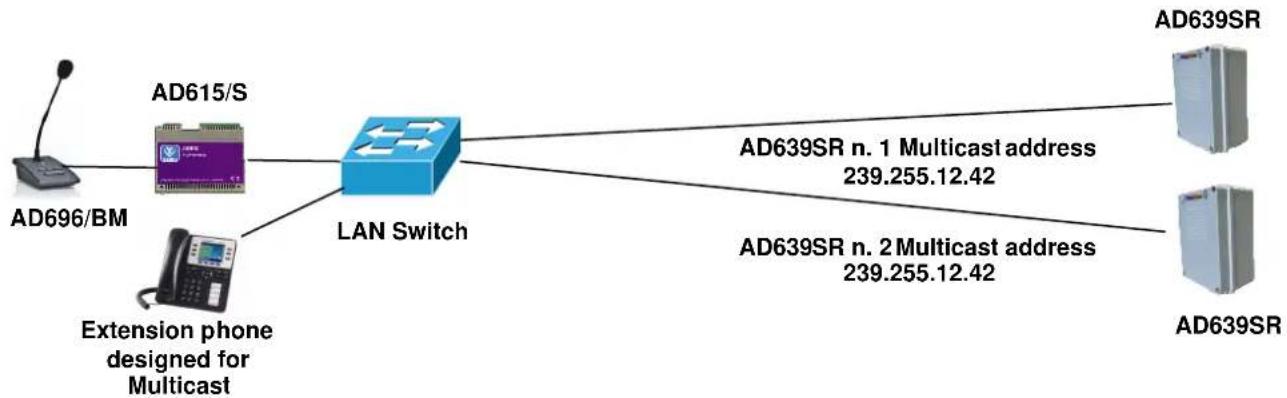
flowchart
graph LR
    A["AD696/BM"] --> B["LAN Switch"]
    C["AD615/S"] --> B
    D["Extension phone designed for Multicast"] --> B
    B --> E["AD639SR n. 1 Multicast address 239.255.12.42"]
    B --> F["AD639SR n. 2 Multicast address 239.255.12.42"]
Both systems will play the announcement audio message. Many more devices than those given in the example can be connected, since there are no limits.
Example 2
In the plant there are two systems with different Multicast addresses.
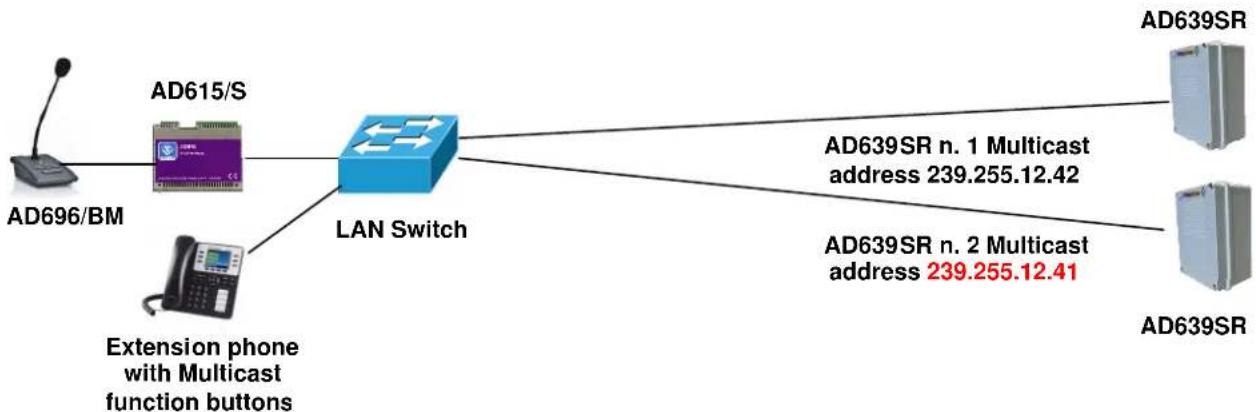
flowchart
graph LR
    A["AD696/BM"] --> B["LAN Switch"]
    C["AD615/S"] --> B
    D["Extension phone with Multicast function buttons"] --> B
    B --> E["AD639SR n. 1 Multicast address 239.255.12.42"]
    B --> F["AD639SR n. 2 Multicast address 239.255.12.41"]
The phone, selecting to send the multicast voice to one or other address of the terminal, will decide which device must broadcast the streaming message.
10. APPENDIXES
10.1. FAQ Frequently Asked Questions
Can AD639SR be installed outdoor?
Yes, the enclosure is IP56 protected (if correctly installed) and operates in a temperature range from -20^ to +55^ C.
How can be AD639SR powered?
The AD639SR can be powered directly from the UTP LAN cable via a PoE switch, otherwise it can be powered at 230Vac with a PoE injector or an external power supply, both in the Tema catalog. Note: for maximum power the external 230Vac power supply is suggested.
AD639SR works with an Asterisk VoIP PBX?
Yes. AD639SR has also been tested with all the PBXs of the most prestigious brands such as: SIEMENS - AVAYA - ALCATEL - PANASONIC - SAMSUNG - NEC - 3CX - CISCO CUCM - LG - WILDIX - AASTRA - ASCOM - NITSUKO - SELTA - PHILIPS - MITEL and ASTERISK BASED SYSTEMS
How can be installed and put into service?
Few minutes:
1) Connect AD639SR in a LAN socket to a PoE switch with standard category 5/6 cable, or to a generic switch by powering it with the external power supply.
2) Connect with a browser and assign an IP address and the credentials of the LAN network.
3) Register in the IP-PBX the number assigned to AD639SR in the space reserved for the SIP account
4) Enter the number assigned to AD639SR in the PBX night group, or divert incoming calls (in the absence of the P.O.) to the number assigned to AD639SR.
Upon the arrival of an incoming telephone call to the PBC the same will be repeated at high volume by AD639SR with sounds freely chosen by the customer in the device. A luminous indicator or a "Flash" available in the catalog can be connected to the system to add a light signal in addition to the acoustic signal.
Is the sound played as a call repeater fixed?
No, it is possible to replace it at any time remotely via Web Browser between different supplied audio files. It is also possible to insert one customized by the customer in the 8KHz-16bit wav audio format as specified in the technical manual.
Can the file also be a part of a piece of music?
Of course, the ideal duration is 30-60 seconds, but if longer is needed, it is possible to get up to 8 minutes.
And if, despite the considerable power of the AD639SR, it is insufficient for large premises or warehouses?
It is possible to connect another AD639SR, or more systems, to another location to cover the entire area, it is sufficient only a LAN socket with PoE and the registration of additional devices in the specific group of the VoIP PBX. In this case it is preferable to program the same tone sound in all devices.
I can't get a UTP cable to the place where I need to install AD639SR, can I use a Wi-Fi link?
Yes, AD639SR is a normal LAN network terminal, in this case it is needed a client access point with the LAN RJ45 output to AD639SR and a power supply (for example model AA-39E3) connected to a 230Vac network socket in the immediate proximity.
I do not want the sound at high volume, I am interested that when a phone call arrives only a light signal is activated, is it possible?
Of course, it is sufficient to program the volume of the internal amplifier to zero to cancel any sound on the arrival of a call and activate only the relay that activates the light signal which can be a classic LED or FLASH with white and red or other colors.

natural_image
Three red and orange industrial warning light components (no text or symbols visible)Can AD639SR be used simultaneously as a repeater of the doorphone call button at the entrance?
Yes, simultaneously with the function of repeater of telephone calls and with diversified tones.

flowchart
graph LR
    A["IPaPBxSIP$SERVERa"] --> B["PoE Switch"]
    B --> C["UTP cat 5/6 cable"]
    C --> D["AD639SR IP-SIP Call Repeater"]
    D --> E["1st Relay"]
    D --> F["2nd Relay"]
    D --> G["LED light indicator"]
    D --> H["Repeated external Doorphone button"]
    E --> I["Free for other uses"]
... and as a deterrent and alarm signaling?
Yes, as an alternative to the function described above, AD639SR has an alarm input to activate a deterrent announcement locally, at the end it makes a phone call to a programmed number by sending a warning message.

flowchart
graph LR
    A["IPaPBXa SIPSERVERa"] --> B["PoE Switch"]
    B --> C["UTP cat 5/6 cable"]
    C --> D["AD639SR IP-SIP Call Repeater"]
    D --> E["LED light indicator"]
    D --> F["1st Relay"]
    D --> G["2nd Relay"]
    D --> H["Free for other uses"]
    I["Infrared barrier"] --> D
    J["Manual button"] --> D
    K["Camera with Motion Detection alarm"] --> D
What else can AD639SR do?
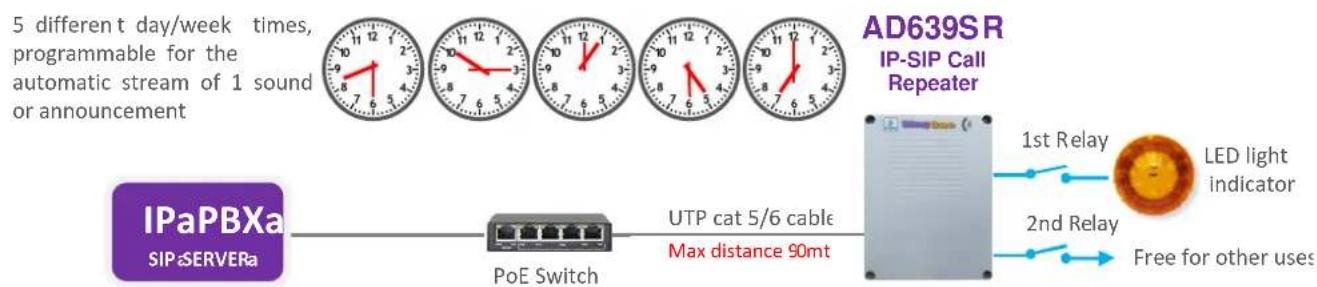
A further function of the system is that of being able to program up to 5 daily schedules in which to transmit a sound or an announcement of warning and information. For example in a school it can reproduce the sound of the bell for the beginning and the end of the lessons, in a factory the notice of beginning/end of the working time. It is possible to import a .csv/excel file for an annual programming.
flowchart
graph LR
    A["IPaPBXa SIP SERVERa"] --> B["PoE Switch"]
    B --> C["UTP cat 5/6 cable Max distance 90mt"]
    C --> D["AD639SR IP-SIP Call Repeater"]
    D --> E["LED light indicator"]
    D --> F["1st Relay"]
    D --> G["2nd Relay"]
    D --> H["Free for other uses"]
Is it possible to use AD 639R as a message announcer?
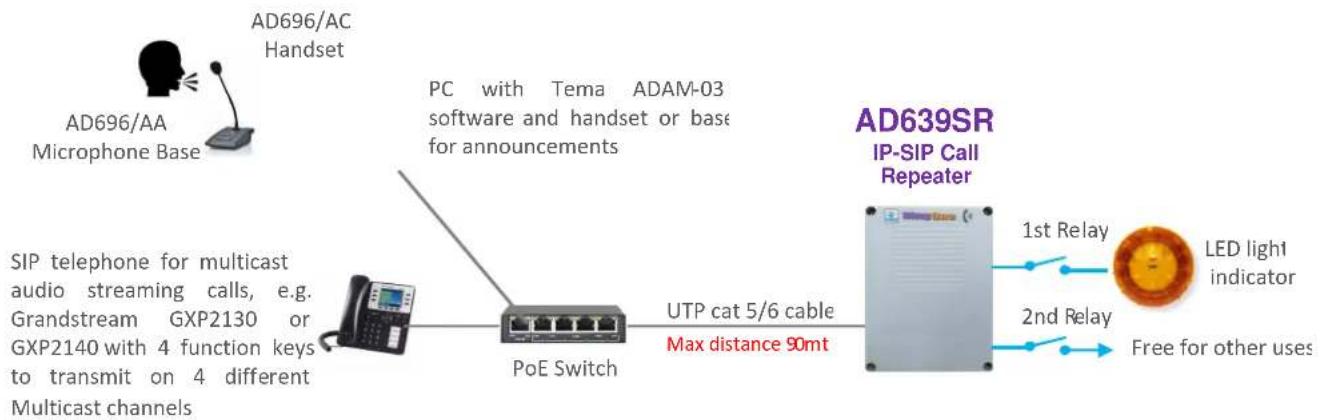
Of course, by connecting a microphone base and an Encoder in the Tema catalog it is possible to create an efficient and powerful audio system for announcements with Chime without laying additional cables since the system uses the existing LAN network.

flowchart
graph LR
    A["AD696/BM Microphone Base"] --> B["AD615/S Multicast Encoder"]
    B --> C["PoE Switch"]
    C --> D["UTP cat 5/6 cable Max distance 90mt"]
    D --> E["AD639SR IP-SIP Call Repeater"]
    E --> F["LED light indicator"]
    E --> G["Free for other uses"]
    style A fill:#f9f,stroke:#333
    style E fill:#ccf,stroke:#333
    style F fill:#cfc,stroke:#333
    style G fill:#fcc,stroke:#333
Or it is also possible to make announcements from the TEMA ADAM software or from phones that can manage Multicast transmissions.
flowchart
graph LR
    A["AD639SR IP-SIP Call Repeater"] -->|1st Relay| B["LED light indicator"]
    A -->|2nd Relay| B
    A -->|Free for other uses| B
    C["POE Switch"] -->|UTP cat 5/6 cable Max distance 90mt| A
    D["AD696/AA Microphone Base"] --> E["PC with Tema ADAM-03 software and handset or base for announcements"]
    F["SIP telephone for multicast audio streaming calls, e.g. Grandstream GXP2130 or GXP2140 with 4 function keys to transmit on 4 different Multicast channels"] --> A
Using the AD 639SR to drive loads at 230Vac up to 4KW
If you want to drive 230Vac loads with currents up to 16A, it is needed to connect a power repeater relay (Tema code AA-36) as shown in the diagram. For correct connection refer to the AA-36 technical manual.

10.2. Appendix 3: Use of the AUDACITY software for audio files recording
For recording your audio files, it is possible to use one of the free softwares such as AUDACITY downloadable for free from the link http://www.audacityteam.org/ remembering to record and save audio files in .WAV format at 8KHz-16Bit Mono, other audio file formats will not work with the AD600 series devices. Below there are some informations about basic operations. For more information on the AUDACITY program, please refer to the manufacturer program guide.
Proceed as follows to record a message from the built-in microphone or connected to the PC.
- Select the 8,000Hz sampling rate, click Start Recording and start talking.
- To end the recording, click on Stop recording, listen to the recorded audio, and then repeat recording if not optimal. To delete the previous recording, simply select the audio track (crawl from start to finish), press the "Delete" button and repeat the recording. With this procedure it is also possible to delete small parts of silence or sound inside the track.
- To save the recording click on "File", "Export Audio", give a name and select in the "WAV (Microsoft) 16-bit PCM format" drop-down list. The saved file is ready to be used on all devices in the AD600 series or used with the VLC program (see previous appendix) to be sent as Multicast audio streaming.
The AUDACITY software allows a large number of audio signal processing such as: amplification/reduction of audio levels, duplication of track parts, elimination of silences, insertion of DTMF tones or tones, noise reduction, etc. For optimal use please refer to the product manual.
NOTE: TEMA provides you with its own internal recording studio for the creation of professional prompts with multilingual speakers from texts on customer specifications.

10.3. Appendix 4: Cabling of a UTP RJ45 network cable according to the standard EIA568B
  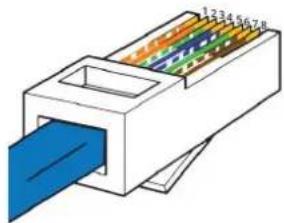  | Pin Signal Connector 1 Connector 2 | |||
| 1 | TX+ | White/Orange | White/Orange | |
| 2 | TX- | Orange Orange | ||
| 3 | RX+ | White/Green | White/Green | |
| 4 | PoE- | Blue | Blue | |
| 5 | PoE- | White/Blue | White/Blue | |
| 6 | RX- | Green | Green | |
| 7 | PoE+ | White/Brown | White/Brown | |
| 8 | PoE+ | Brown | Brown | |
| NB: if the cable colors are different, the right matches must be maintained. | ||||
- Cut the sheath (about one centimeter) to discover the wires.
- To facilitate the process it is possible, by exploiting the elasticity of the sheath, to pull the wires some additional millimeter. (Hold with one hand the wires and with the other pull the smoothing sheath).
• Straighten the wires previously individually pair twisted.
• Compose the color sequence following the pattern.
• Level the length of the cables into place. - Insert the tightened wires into RJ45 connector holding them between your fingers until they are channeled into the guides inside the connector itself.
- Push well until the wires will touch the bottom of the connector (check in transparency that all the wires are in place).
- Make sure that the sheath has penetrated into the connector for at least 8 mm so that it can also be crimped.
- Place the connector in the crimping tool and tighten all the way. Should be audible a click caused by the outer stop.
- Repeat exactly all the above steps to crimp the cable on the other side.
Notes


- AD639SR
- VoIP SIP PoE Call Repeater
- Audio Over IP Network Series
- "SlpComStage"
- PRODUCT MANUAL
- DICHIARAZIONE DI CONFORMITÀ CE DECLARATION OF CONFORMITY CE
- RECOMMENDATIONS
- INDEX PAGE
- PRESENTATION
- AVAILABLE MODELS AND ACCESSORIES
- FEATURES AND PERFORMANCE
- PACKING LIST
- TECHNICAL SPECIFICATIONS
- OPERATION
- Device connection diagrams
- OPERATING MODES
- Calls to devices
- RELAY function
- Calls generated from AD639SR for the acquisition of external contacts for special signalings
- INSTALLATION OF THE DEVICE
- Connecting the AD639SR internal module
- Removable 4-pole terminal block (screw connector connected to the electronic module)
- RJ45 LAN port (present on the electronic module)
- Removable 9-pole terminal block (screw connector connected to the electronic module)
- Removable 2-pole terminal block (connector connected to the cable leaving the module)
- PROGRAMMING
- Preparation for the system parameters programming
- Access to programming
- Network parameters
- SIP parameters
- Day/Night mode
- Alarm input settings
- Multicast
- Automatic announcements
- Periodic activation from table:
- Periodic activation from file:
- NOTE:
- Maintenance
- Messages
- Configuration
- Master user password
- Firmware
- Diagnostic logs
- Multicast Audio Streaming for announcements
- Example 1
- Example 2
- APPENDIXES
- FAQ Frequently Asked Questions
- Can AD639SR be installed outdoor?
- How can be AD639SR powered?
- AD639SR works with an Asterisk VoIP PBX?
- How can be installed and put into service?
- Few minutes:
- Is the sound played as a call repeater fixed?
- Can the file also be a part of a piece of music?
- And if, despite the considerable power of the AD639SR, it is insufficient for large premises or warehouses?
- I can't get a UTP cable to the place where I need to install AD639SR, can I use a Wi-Fi link?
- I do not want the sound at high volume, I am interested that when a phone call arrives only a light signal is activated, is it possible?
- Can AD639SR be used simultaneously as a repeater of the doorphone call button at the entrance?
- ... and as a deterrent and alarm signaling?
- What else can AD639SR do?
- Is it possible to use AD 639R as a message announcer?
- Using the AD 639SR to drive loads at 230Vac up to 4KW
- Appendix 3: Use of the AUDACITY software for audio files recording
- Appendix 4: Cabling of a UTP RJ45 network cable according to the standard EIA568B
Brand : Tema
Model : AD639SR
Category : Loudspeaker