
11FFSCAL01 - Kitchen scale FRIGIDAIRE - Free user manual and instructions
Find the device manual for free 11FFSCAL01 FRIGIDAIRE in PDF.


| Product Type | Kitchen Scale |
| Brand | Frigidaire |
| Model | 11FFSCAL01 |
| Dimensions (W×D×H) | 200 × 200 × 14 mm (approx.) |
| Net Weight | 470 g (approx.) |
| Display Type | LCD |
| Measurement Units | g, fl.oz, lb:oz, ml |
| Measurement Range | 5000 g / 176.4 fl.oz / 11 lb:0.4 oz / 5000 ml |
| Minimum Weight | 2 g / 0.1 oz |
| Division (Resolution) | 1 g / 0.1 fl.oz / 0.1 oz / 1 ml |
| Accuracy | ± (3% of full scale + 1 digit) |
| Power Source | 2 × CR2032 batteries (3V each, total 6V) |
| Auto-Off Time | Approx. 1 minute after stabilization or after clearing |
| Working Temperature | 5°C to 40°C (41°F to 104°F) |
| Storage Temperature | -20°C to 60°C (-4°F to 140°F) |
| Working Humidity | ≤90% RH |
| Storage Humidity | ≤90% RH |
| Accessories Included | 2 × CR2032 batteries, User Manual |
| Warranty | 1 year limited warranty |
| Tare Function | Yes (with icon display) |
| Unit Selection Button | Yes |
| Overload Indication | "EEEE" display |
| Low Battery Indication | "Lo" symbol |
| Automatic Shutdown | Yes |
| Cleaning Instructions | Wipe with slightly damp cloth; do not immerse |
Frequently Asked Questions - 11FFSCAL01 FRIGIDAIRE
User questions about 11FFSCAL01 FRIGIDAIRE
0 question about this device. Answer the ones you know or ask your own.
Ask a new question about this device
Download the instructions for your Kitchen scale in PDF format for free! Find your manual 11FFSCAL01 - FRIGIDAIRE and take your electronic device back in hand. On this page are published all the documents necessary for the use of your device. 11FFSCAL01 by FRIGIDAIRE.
USER MANUAL 11FFSCAL01 FRIGIDAIRE
Kitchen Scale 11FFSCAL01
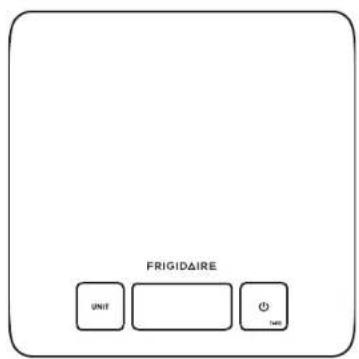

Electrolux Home Products, Inc. 10200 David Taylor Drive Charlotte, NC 28262
TEL:1-800-944-9044 www.frigidaire.com
- Thank you very much for selecting the Frigidaire Kitchen Scale, 11FFSCAL01.
- Please read the user manual carefully and thoroughly to ensure the safe usage of this product, and keep the manual for further reference in case you have questions.
Table of Contents
Table of Contents
Symbol Meaning
Symbol Meaning 2
Overview
Device Components 3
Function Indication 3
LCD Display 4
Initial Start-Up
Insert the Batteries 5
Changing the Weight Unit 6
Daily Measurement
Daily Measurement 7
Measuring with Tare Function 8-9
Troubleshooting 10
Specifications 11
Maintenance 11
Warranty 12
FCC Regulations 13
Symbol Meaning
❤️ Symbol Meaning
The warning signs and symbols are essential to ensure your correct and safe use of this product and protect you and others from injury. Please kindly find the meanings of the warning signs and symbols, which you may encounter, as follows:
| Symbol for "Caution - Must Read" | FC | "Symbol for "COMPLIES WITH USA REQUIREMENTS" | |
| Symbol for "DIRECT CURRENT" | Symbol for "ENVIRONMENT PROTECTION – Waste electrical products should not be disposed of with household waste. Please recycle where facilities exist. Check with your local authority or retailer for recycling advice." | ||
| Symbol for "MANUFACTURER" |
♥ Care
- Please do not put the scale on carpet.
- Please put the weighted object in the center of the scale platform to obtain a more accurate weight.
- Wait to put items on the scale until it is turned on.
- If the scale is not being used for a long period, please remove the batteries.
- Clean the scale with a slightly damp cloth. DO NOT immerse the scale in water or use chemical/abrasive cleaning agents.
- Do not leave the scale in a damp environment.
Overview
♥ Device Components
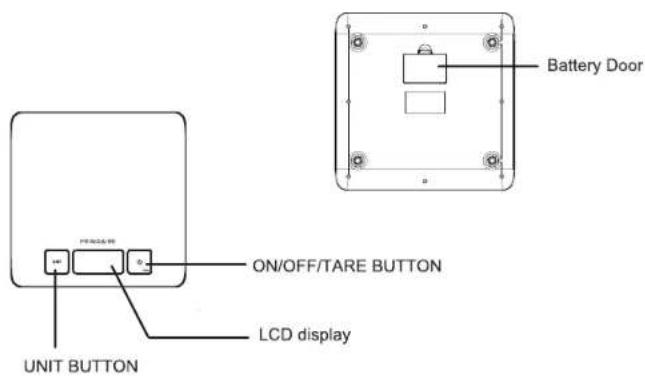
♥ Function Indication

Press ON/OFF/TARE button to switch on. Press ON/OFF/TARE button to clear weight on the platform. Press ON/OFF/TARE button for 2s to turn off.

Press UNIT button to select your desired weight unit.
♥ Items included:
- Kitchen Scale 11FFSCAL01
- 2 x CR2032 batteries (3V per each)
- User Manual
Initial Start-Up
Initial Start-Up
♥ LCD Display
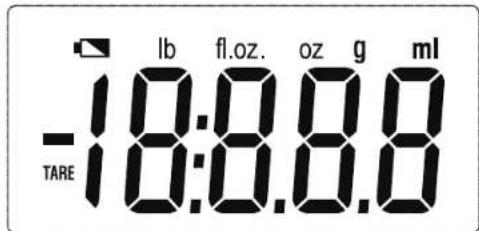
| TARE | Tare Function | lb oz | Weight Unit (Pound) |
| ml | Volume Unit (Millilitre) | g | Weight Unit (Gram) |
| fl.oz. | Volume Unit (Ounce) | Negative value |
♥ Insert the Batteries
- Open the battery door in the back of the scale.
- Insert the batteries (2x CR2032) into the battery compartment according to the polarity indications marked inside the compartment. Two extra batteries are included for your future use.
- Close the battery door. The LCD displays as below:

CAUTION
- When the symbol "Lo" appears, the device will power off soon. Then you shall replace with a new set of batteries. Please replace both batteries at the same time. Do not mix the old batteries with the new one. Worm batteries are hazardous waste. Do NOT dispose of them together with the household garbage. - Please refer to the local ordinances and recycling instructions regarding disposal of the worn batteries. In order to achieve the best performance and protect your monitor, please use the authorized/specified batteries.
Initial Start-Up
Daily Measurement
♥ Changing the Weight Unit
In weighing mode, press the UNIT button to select your desired unit (g, fl.oz., lb:oz, ml). The units will be displayed in the LCD display. (The default unit is g)
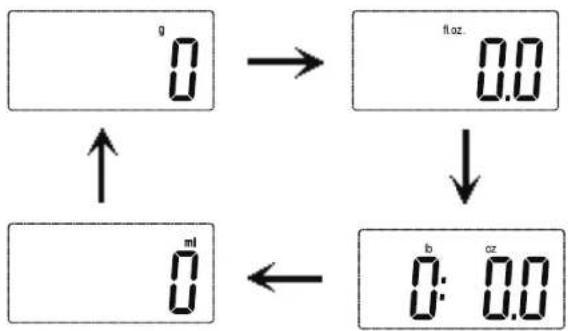
flowchart
graph TD
    A["0"] --> B["0.0"]
    B --> C["0:0.0"]
    C --> D["0"]
    D --> E["ml"]
    E --> F["↑"]
    F --> A

CAUTION
When finishing the unit selection, you may start to weigh according to the weighing procedure below. If there is not any operation and the weight is steady in weighing mode, the scale will turn off automatically after about 1 minute. Or you can press and hold the ON/OFF/TARE button for about 2s to turn it off.
♥ Daily Measurement
- Place the scale on a solid surface and ensure that it is level.
- Do not put any thing on the scale.
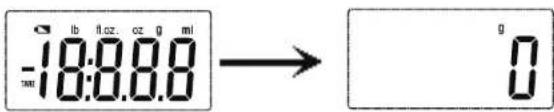
- Press the ON/OFF/TARE button lightly to enter the weighing mode.
- You can start to weigh when "0" is shown on the LCD.
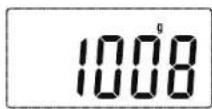
- Put the item in the middle of the scale, the weight data will be shown.

CAUTION
If there is no operation, the scale will turn off automatically in about 1 minute. Or you can press and hold the ON/OFF/TARE button for about 2s to turn it off.
Daily Measurement
Daily Measurement
♥ Measuring with Tare Function
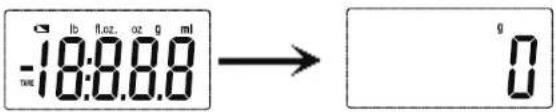
- When the scale is off, press the ON/OFF/TARE button to enter the weighing mode. You can start to weigh when "0" is shown on the LCD.
- Put the container on the scale, then put the things in the container, the weight data will be shown.
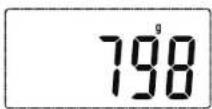
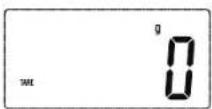
- Press the ON/OFF/TARE button, the LCD will display "0".

CAUTION
When the weight is less than 600g, press the ON/OFF/TARE button, the icon "Tare" won't appear.
- Now add another item to weigh onto the scale. The LCD will show the weight of the newly added item.
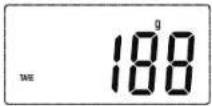
- If you remove the item added to the scale, the LCD will again show zero. But if you remove all items from the scale, the LCD will show a negative value indicated by a minus sign.
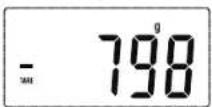
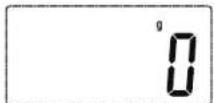
- When it shows the negative value, press the ON/OFF/TARE button again, it will clear to zero, and the "TARE" icon will disappear.
- If there is no operation, the scale will turn off automatically in about 1 minute. Or you can press and hold the ON/OFF/TARE button for 2 seconds to turn off the scale.
Troubleshooting
♥ Troubleshooting
| Problem | Root Cause | Solution |
| The LCD display is dim or displays Lo | The power is not enough. | Please replace with 2xCR2032 new batteries. |
| The device isn't on when you press the start button. | The batteries are dead. | Please replace with 2 x CR2032 new batteries. |
| The batteries are not inserted correctly. | Please insert the batteries correctly. | |
| The LCD displaysEEEE | Weight overload. | Please remove the weight on the scale to protect the loadcells. The maximum weight for this scale is 11 lbs 0.4 oz. |
| The LCD displaysout2 | Scale has weight on it when is was turned on . Scale should be empty when turned on. | Remove the things from the scale, wait until it displays zero,then you can start weighing. |
| The measurement is not accurate/LCD display un5t . | The weight is unstable when you turn on the scale. | Keep the weight stable when you turn on the scale. |
Specifications
♥ Specifications
| Product Name | Kitchen Scale (11FFSCAL01) |
| Dimension | Whole size: 200×200×14mm (Approximately) |
| Net Weight | Approximately 470g |
| Display | LCD |
| Measurement Unit | g/ fl.oz/ lb:oz/ ml |
| Measurement Range | 5000 g/176.4 fl.oz/11 lb:0.4 oz/5000 ml |
| Minimal Weight | 2g/0.1 oz |
| Division | 1g / 0.1 fl.oz/0.1 oz/1 ml |
| Accuracy | F.S*3‰+1d |
| Working Environment | Temperature: 5°C to 40°C Relative Humidity: ≤90% RH Atmospheric pressure: 86kPa to 106kPa |
| Storage Environment | Temperature: -20°C to 60°C Relative Humidity: ≤90% RH Atmospheric pressure: 50kPa to 106kPa |
| Power Source | 6V (2 xCR2032 batteries) |
| Auto-Off | About 1 minute after clearing, or about 1 minute after the weight is stable. |
| Accessories | 1. 2 x CR2032 batteries2. User Manual |
| Mode of Operation | Continuous Operation |
About the Accuracy of This Product
This product passes strict inspection before delivery and therefore its accuracy is guaranteed by the manufacturer.
Please refer to the above table for the descriptions on accuracy.
WARNING: No modification of this equipment is allowed.
Maintenance
FCC Regulations
♥ Maintenance
When carrying out usual maintenance, please ensure practice of the following Do's and Don'ts:
• DO use a dry soft cloth to wipe the dust.
- DO use a damp soft cloth, dipped into water and wrung out, to wipe the dirt. Then use a dry soft cloth to dry up the device.
- DON'T wash the device with water or immerse it in water.
- DON'T use aerosol, abrasive or other chemicals to wipe the dirt in avoidance of discolor or other chemicals to wipe the dirt, as this will discolor the unit, or cause it to malfunction.
- DON'T disassemble this device. If you have problems, please contact Frigidaire.(Please refer to Warranty for contact information)
♥ Limited Warranty
- This Frigidaire product is warranted to be free from defects in materials and workmanship for a period of 1 year from the date of purchase.
- If this product is found to be defective, return with receipt or proof of purchase to place of purchase for replacement.
- If you do not receive satisfaction from the place of purchase, please contact our Customer Service Department: Phone: 800-944-9044; Website: www.frigidaire.com.
- This warranty gives you specific legal rights, and you may also have other rights which vary from state to state. Electrolux Home Products, Inc. shall not be liable for consequential or incidental damages, improper installation, service call cost, installation or reinstallation cost, or by failure due to normal wear.
- Some states do not allow the exclusion or limitation of incidental or consequential damages, so the above limitation or exclusion may not apply to you.
Electrolux Home Products, Inc. 10200 David Taylor Drive Charlotte, NC 28262
TEL:1-800-944-9044 www.frigidaire.com
♥ FCC Regulations
FCC User Guide Information
Radio Frequency Interface Requirements - FCC
NOTE: This equipment has been tested and found to comply with the limits for a Class B digital device, in accordance with Part 15 of the FCC rules. These limits are designed to provide reasonable protection against harmful interference in a residential setting. This equipment generates, uses, and radiates radio frequency energy and, if not installed and used in accordance with the instructions, may cause harmful interference to radio communications. However there is no guarantee that interference will not occur in a particular installation. If this equipment does cause harmful interference to radio or television reception, which can be determined by turning the equipment off and on, the user is encouraged to try to correct the interference by one or more of the following measures:
- Reorient or relocate the receiving antenna;
- Increase the separation between the equipment and receiver;
- Connect the equipment into an outlet on a circuit different from that to which the receiver is connected;
- Consult the dealer or an experienced radio/ TV technician for help.
Radio Transmitters (Part 15)
This device complies with Part 15 of the FCC Rules. Operation is subject to the following two conditions: (1) this device may not cause harmful interference, and (2) this device must accept any interference received, including interference that may cause undesired operation.
Changes or modifications not expressly approved by the party responsible for compliance could void the user's authority to operate the equipment.
- Table of Contents
- Symbol Meaning
- Overview
- Initial Start-Up
- Daily Measurement
- ❤️ Symbol Meaning
- ♥ Care
- ♥ Device Components
- ♥ Function Indication
- ♥ Items included:
- ♥ Insert the Batteries
- CAUTION
- ♥ Changing the Weight Unit
- ♥ Daily Measurement
- ♥ Measuring with Tare Function
- Troubleshooting
- Specifications
- Maintenance
- FCC Regulations
- ♥ Maintenance
- ♥ Limited Warranty
- ♥ FCC Regulations
- FCC User Guide Information
- Radio Frequency Interface Requirements - FCC
- Radio Transmitters (Part 15)
Brand : FRIGIDAIRE
Model : 11FFSCAL01
Category : Kitchen scale