ACX-BT1 - Bluetooth Receiver AudioControl - Free user manual and instructions
Find the device manual for free ACX-BT1 AudioControl in PDF.


| Product Type | Bluetooth Receiver |
| Brand | AudioControl |
| Model | ACX-BT1 |
| Bluetooth Version | 5.0 |
| Bluetooth Profiles | A2DP, AVRCP |
| Audio Codecs | aptX, SBC, AAC |
| Output Connections | 3.5mm analog, RCA (via included cable) |
| Power Supply | USB 5V/1A or 12V DC (with adapter) |
| Dimensions (W x H x D) | 3.5 x 2.5 x 0.8 inches |
| Weight | 2.5 oz |
| Range | Up to 30 ft (10 meters) |
| Frequency Response | 20Hz - 20kHz |
| Signal-to-Noise Ratio | >95 dB |
| Total Harmonic Distortion | <0.1% |
| LED Indicator | Blue: connected, flashing: pairing |
| Controls | Multi-function button (pairing, reset) |
| Material | Plastic with soft-touch finish |
| Color | Black |
| Warranty | 2 years |
| Certifications | FCC, CE, RoHS |
| Special Features | Auto-reconnect, noise isolation |
| Installation | Plug and play, in-line or hideaway |
Frequently Asked Questions - ACX-BT1 AudioControl
User questions about ACX-BT1 AudioControl
0 question about this device. Answer the ones you know or ask your own.
Ask a new question about this device
Download the instructions for your Bluetooth Receiver in PDF format for free! Find your manual ACX-BT1 - AudioControl and take your electronic device back in hand. On this page are published all the documents necessary for the use of your device. ACX-BT1 by AudioControl.
USER MANUAL ACX-BT1 AudioControl
AudioControl®
Making Good Sound Great™
Features
- Compact, elegant design with no buttons or switches
- aptX™ HD Support
- BT v4.1 chip set
• All-weather IPX5 rated
• Universal design works with any amplifier or device with line level (RCA) inputs - Unique remote turn-on output circuit
• Pacific Northwest freshness built-in!
ACX-BT1
BLUETOOTH RECEIVER WITH APTX™ HD SUPPORT
Important Safety Instructions
- Read these instructions.
- Keep these instructions.
- Heed all warnings.
- Follow all instructions.
- Do not submerge this apparatus in water.
- Clean only with a dry cloth.
- Do not block any ventilation openings. Install in accordance with the manufacturer's instructions.
- Do not install near any heat sources such as mufflers, silencers, exhaust pipes, or other apparatus (including amplifiers) that produce heat.
- WARNING: Improper installation may lead to permanent injury or death. Installation of the apparatus must be done with great care by qualified personnel, to prevent damage to fuel lines, power and other electrical wiring, hydraulic brake lines, and other systems, that might compromise vehicle safety.
- Provide +12v and ground wiring of sufficient size to ensure adequate current to the receiver. For the ACX-BT1, this means 16-22 gauge wire.
- Use rubber grommets to protect wiring whenever passing wires through metal openings or bulkheads.
- Only use attachments/accessories specified by the manufacturer.
-
Refer all servicing to qualified service personnel. Servicing is required when the apparatus has been damaged in any way, such as the power input terminals are damaged, liquid has been spilled or objects have fallen into the apparatus, the apparatus has been exposed to rain or moisture, does not operate normally, or has been dropped.
-
Fuses shall be replaced only with the correct type and fuse value, and only when the apparatus is powered off.
- Exposure to high sound pressure levels may lead to permanent hearing loss. Take every precaution to protect your hearing.

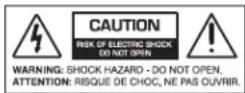
The lightning flash with arrowhead symbol within an equilateral triangle is intended to alert the user to the presence of uninsulated "dangerous voltage" within the product's enclosure, that may be of sufficient magnitude to constitute a risk of electric shock to persons.

The exclamation point within an equilateral triangle is intended to alert the user of the presence of important operating and maintenance (servicing) instructions in the literature accompanying the appliance.
Caution: to reduce the risk of electric shock, do not disassemble the apparatus, other than to remove the top panel to access the controls. There are no
user-serviceable parts inside. Refer servicing to qualified personnel.
Recycling notice: If the time comes and this apparatus has fulfilled its destiny, do not throw it out into the trash. It has to be

carefully recycled for the good of mankind, by a facility specially equipped for the safe recycling of electronic apparatus. Please contact your local or state recycling leaders for assistance in locating a suitable nearby recycling facility. Or, contact us and we might be able to repair it for you.
Remote, Power, and Output Connections
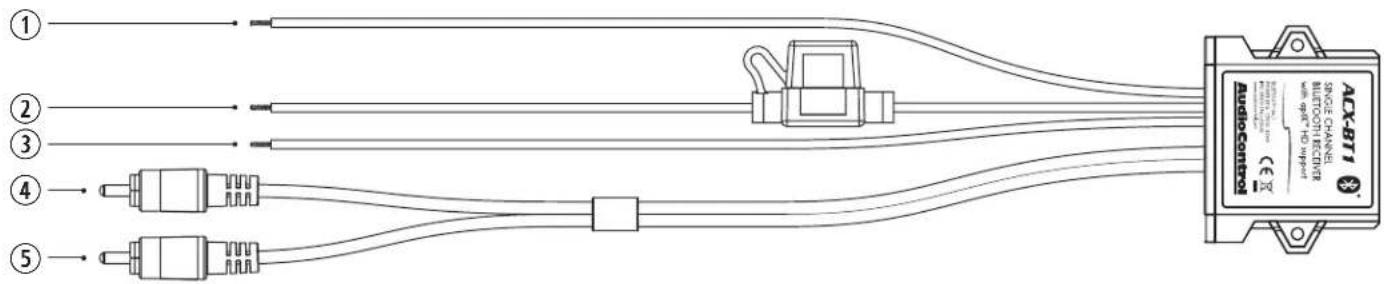
- Remote Turn-On Output (Blue) – This 12v DC/20mA remote output is designed to turn on a connected amplifier. This output is only active after audio has begun playing and will remain active for approximately 7 seconds after audio playback has ceased.
- 12 Volt Power Input (Fused @ 2A) (Red) – Connect this lead to an accessory (switched) power source from your vehicle. If no switched power source is available, a rocker or toggle switch could also be used to turn the unit on/off.
Note: Depending on the vehicle type and application, you may wish to connect this lead to a constant 12V power source instead. Be aware that if the unit is connected in this manner that there will be a small amount of constant current drawn from the connected power source.
- Ground Input (Black) – Connect this lead to a solid ground connection from your vehicle.
- Left RCA line level output (Gray) – This RCA lead connects to the LEFT low-level input of your amplifier or source unit.
- Right RCA line level output (Blue) – This RCA lead connects to the RIGHT low-level input of your amplifier or source unit.
AudioControl®
Making Good Sound Great"
Quick Start
Here are a few general steps to get your ACX-BT1 Bluetooth Receiver up and running:
- Undo the +12V and Ground connections to the vehicle battery before making any connections to the Bluetooth receiver.
- Pick a mounting location that will provide access to the controls and connections, provide plenty of good ventilation, and also protect the Bluetooth receiver from heat, moisture, and dirt.
- The ACX-BT1 can be securely mounted using the two mounting holes located in each side.
- Before drilling any holes, take every precaution to prevent any damage to fuel lines, power and other electrical wiring, hydraulic brake lines, and other systems, that might compromise vehicle safety.
- When making connections, designate red RCA plugs as right (the ACX-BT1 uses a blue connector for the right channel), and designate white, black, or gray plugs as left. This is a good idea for all signal connections made in your audio system. The key is consistency. Stick with the same color coding and you'll reduce possible problems.
- Use quality interconnect cables.
- Connect the +12V input terminal of the unit to an accessory (switched) power source from your vehicle. Use 16-22 gauge
wire. Connect the Ground terminal of the unit to a solid ground connection from your vehicle using the same wire gauge as the +12V power wire.
- Connect the audio outputs of the unit to a signal processor or amplifier.
Bluetooth Pairing and Streaming:
- After the ACX-BT1 is powered up, you will see a small blue LED flashing quickly from within the unit.
- Open the Bluetooth settings or connections on your mobile device.
- Find the device called "AudioControl BT1" and tap or click on it to pair your device.
- Once paired, the blue LED will illuminate continuously.
- Open your favorite music application and hit play on your favorite jam.
- Once music (or any sound) is playing, the red LED will shine forth from within the ACX-BT1.
- Enjoy your new Bluetooth streaming device and the sonic bliss you're about to experience.
- Enjoy the drive!
AudioControl®
Making Good Sound Great"
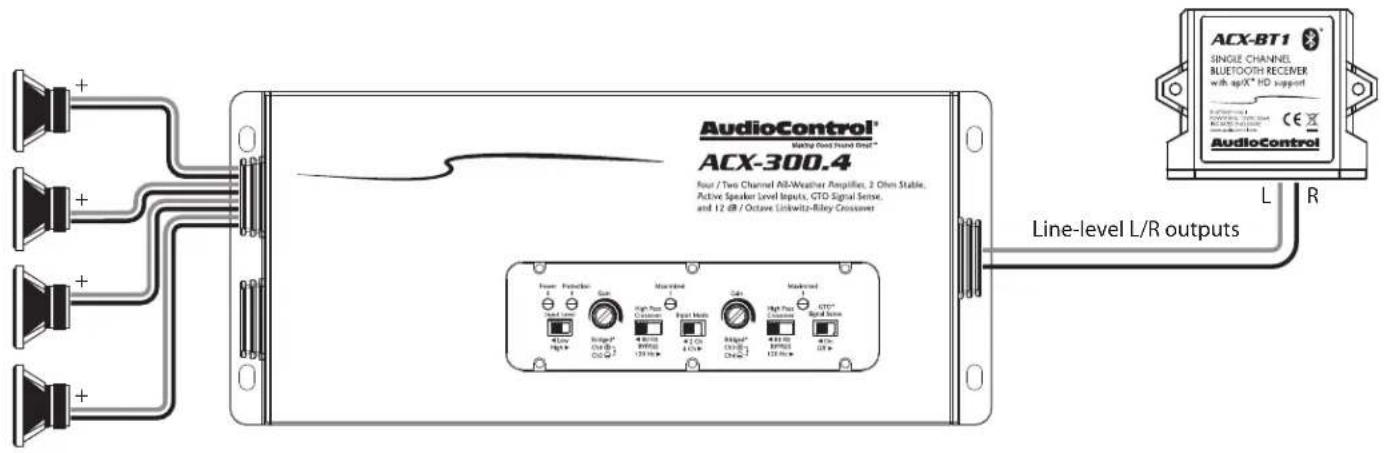
System #1: Head-unit-less All-Weather System
AudioControl®
Making Good Sound Great™
Specifications
All specifications are measured at 14.4 VDC (standard automotive voltage). As technology advances, AudioControl reserves the right to continuously change our specifications, like our Pacific Northwest weather, although we are working on changing that as well.
ACX-BT1 Bluetooth Receiver
Nominal Output Level....1.5 Vrms
S/N Ratio 95 dBa
Maximum Data Rate ..... 10+ meters (depending on environment)
Current Draw 35 mA
Recommended Power / Ground Wire Gauge 16-22 Gauge
Fuse Rating 2 A
Weight 0.2 lbs.
Dimensions.... 2.0"L X 2.5"W X 0.7"H
©2021 AudioControl. All rights reserved.
Warranty
For details of the limited warranty for your ACX-BT1, please visit the following
page on our website: http://www.audiocontrol.com/warranty
Please keep your receipt in a safe place.
AudioControl, Inc.
22410 70th Avenue West
Mountlake Terrace, WA 98043 USA
Phone 425-775-8461
email: sound.great@audiocontrol.com
Brand : AudioControl
Model : ACX-BT1
Category : Bluetooth Receiver