
Champion KD-1X3CS - Separator Key Digital - Free user manual and instructions
Find the device manual for free Champion KD-1X3CS Key Digital in PDF.


| Product Type | HDMI Distribution Amplifier (Splitter) |
| Model | Champion KD-1X3CS |
| Brand | Key Digital |
| Inputs | 1 x HDMI (Type A, 19-pin female) |
| Outputs | 3 x HDMI (Type A, 19-pin female) |
| Maximum Bandwidth | 10.2 Gbps (TMDS) |
| Supported Resolutions | 480i/p, 720p, 1080i/p (up to 1080p/60), VESA up to 1920x1200 |
| Audio Support | Dolby TrueHD, Dolby Digital Plus, DTS-HD Master Audio, 2Ch PCM |
| 3D Support | Yes, passes 3D stereoscopic signals |
| HDCP Compliance | Yes, fully compliant |
| EDID Control | Rotary switch with internal library (e.g., 1080i/p, 3D, DVI modes) or copy from connected display |
| Power Supply | External 5V DC @ 1A, 100-240V AC 50/60Hz |
| Dimensions (W x H x D) | 5.5 x 1 x 2.75 inches |
| Weight | 0.9 lb (approx. 408 g) |
| Enclosure Material | Metal chassis |
| LED Indicators | Input and output status LEDs on front panel |
| Accessories Included | HDMI cable clip, power supply, operating instructions, warranty card |
| Warranty | 3 years limited parts and labor |
| DVI Compatibility | Yes, via DVI-to-HDMI adapters (video only) |
| Installation | Desktop or wall-mountable; ensure ventilation |
| Safety Compliance | Use only provided power supply; avoid moisture |
Frequently Asked Questions - Champion KD-1X3CS Key Digital
User questions about Champion KD-1X3CS Key Digital
0 question about this device. Answer the ones you know or ask your own.
Ask a new question about this device
Download the instructions for your Separator in PDF format for free! Find your manual Champion KD-1X3CS - Key Digital and take your electronic device back in hand. On this page are published all the documents necessary for the use of your device. Champion KD-1X3CS by Key Digital.
USER MANUAL Champion KD-1X3CS Key Digital
natural_image
Portrait of an older man with glasses and mustache, wearing a collared shirt (no text or symbols visible)Key Digital ^® , led by digital video pioneer Mike Tsinberg, develops and manufactures high quality, cutting-edge technology solutions for virtually all applications where high quality video imaging is important. Key Digital ^® is at the forefront of the video industry for Home Theater Retailers, Custom Installers, System Integrators, Broadcasters, Manufacturers, and Consumers.
Champion Series™
HDMI® Distribution Amplifiers
Operating Instructions

KD-1X2CS
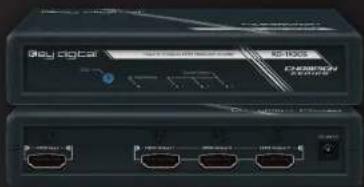

KD-1X3CS
Key digital®
Key Digital Systems : 521 East 3rd Street : Mount Vernon, NY 10553
Phone: 914,667,9700 Fax: 914,668,8666 Web: www.keydigital.com
Key digital
The Experts in Digital Video Technology and Solutions™
HDMI®
Table of Contents
Introduction 1
Quick Setup Guide 2
DVI Applications for KD-1X2CS, KD-1X3CS, KD-1X4CS 3
Installation and Operation 3
EDID Control Settings 4
Mechanical / Technical Specifications 5
Terminology 6
Important Product Warnings & Safety Instructions 7
How to Contact Key Digital ^® 8
Warranty Information 9
Always follow the instructions provided in this Operating Manual.
© 2012 Key Digital, Inc. All rights reserved.
Introduction
Key Digital® Champion Series™ HDMI Distribution Amplifiers are designed and engineered to offer the best in quality, performance, and reliability while providing a cost effective HDMI/DVI distribution solution. The KD-1X2CS, KD-1X3CS, KD-1X4CS HDMI Distribution Amplifiers provide single input to multiple output distribution and maintain crystal-clear, pristine picture and sound quality. Champion Series™ Distribution Amplifiers are a transparent solution for all digital video/audio distribution applications and support all HD and SD video standards, including 1080p/60. KD-1X2CS, KD-1X3CS, KD-1X4CS Distribution Amplifiers feature status-monitoring LEDs and support for advanced HDMI 3D feature.
About the KD-1X2CS, KD-1X3CS, KD-1X4CS
Distribution of one HDMI input to 2/3/4 HDMI outputs
Supports all SD, HD, and VESA (VGA, SVGA, XGA, WXGA, SXGA, UXGA) resolutions up to 1080p (60Hz & 50Hz)
»SD & HD: 480i, 480p, 720p, 1080i, 1080p
»VESA / DVI: From 640x480p up to 1920x1080p
EDID Control featuring internal library settings or auto EDID selection of display
Supports signal rates up to 10.2 Gb per second
Supports HDMI and DVI
Compliant with HDCP copyright protection
Compliant with all HDM versions
Auto Sensing and Formatting for HDMI and DVI Output Devices connected
1 Key Technology authenticates topology of connected source and displays
Input and Output status indicated by LED lights
Default EDID for 1080i or 1080p systems (EDID Control)
Supports lossless compressed digital audio: »Dolby® TrueHD, Dolby® Digital Plus and DTS™-HD Master Audio
Advanced HDMI ^® Features
3D – Capability to pass 3D stereoscopic signal formats
Accessories
External power supply: 5V 1A
HDMI Lacing Clip
Operating Instructions
Warranty Card


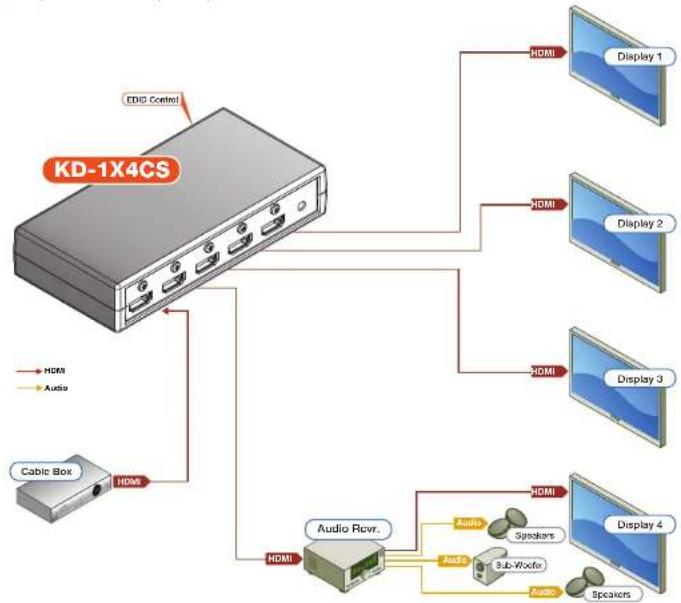
Quick Setup Guide
Step 1: Find a safe and convenient location to mount or place your KD-1X2CS, KD-1X3CS, KD-1X4CS unit
Step 2: Begin with the KD-1X2CS, KD-1X3CS, KD-1X4CS unit and all input/output devices turned off with power cables removed
Step 3: Connect your HDMI or DVI source to the input port of your KD-1X2CS, KD-1X3CS, KD-1X4CS unit
Step 4: Connect your HDMI or DVI displays to the output port of your KD-1X2CS, KD-1X3CS, KD-1X4CS unit
Step 6: Connect power to the KD-1X2CS, KD-1X3CS, KD-1X4CS unit
Step 7: Power on input/output devices
flowchart
graph TD
    A["KD-1X4CS"] -->|CDIC Control| B["HDMI"]
    A --> C["Cable Box"]
    A --> D["Audio Rxrv."]
    D --> E["HDMI"]
    D --> F["Audio"]
    D --> G["Sub-Wxfo"]
    D --> H["Speaker"]
    D --> I["Audio"]
    D --> J["Display 1"]
    D --> K["Display 2"]
    D --> L["Display 3"]
    D --> M["Display 4"]
    D --> N["Audio"]
DVI Applications for KD-1X2CS, KD-1X3CS, KD-1X4CS
KD-1X2CS, KD-1X3CS, KD-1X4CS Distribution Amplifiers can also be used with DVI sources and displays. For these applications, use dual-link DVI to HDMI adapters. Note that while HDMI supports both video and audio over an HDMI cable, DVI supports only video.

flowchart
graph LR
    A["14.0V Bus"] --> B["KD-1X4CS"]
    B --> C["16.0V Display"]
    B --> D["20.0V Display"]
    C --> E["Display 1"]
    C --> F["Display 2"]
    C --> G["Display 3"]
    C --> H["Display 4"]
Note: No signal conversion is done on the KD-1X2CS, KD-1X3CS, KD-1X4CS. If input signal is HDMI output signal will be HDMI. If input signal is DVI output signal will be DVI.
Installation and Operation
Before permanently securing the unit for final installation of cabling behind walls or ceilings, test for
proper operation of the unit and the cables in your system. It is recommended that you leave enough ventilation space to provide sufficient airflow and cooling, especially if you are going to leave the unit powered at all times.
An optional HDMI cable clip (included) enables a method for securing HDMI cables the KD-1X2CS, KD-1X3CS, KD-1X4CS units and helps defeat intermittent or complete signal loss due to poor connection.

Active Input / Output LED Indicators
The front LED indicators indicate that a valid HDMI / DVI connection is made between the KD-1X2CS, KD-1X3CS, KD-1X4CS unit and each Input / Output.

EDID Control Settings
At times, your HDMI sources and display may not synchronize properly. This is when EDID* control should be utilized. KD-1X2CS, KD-1X3CS, KD-1X4CS Distribution Amps feature an internal library of default settings that ensure that your HDMI source's output is compatible with the display devices.
Please reset the unit by either unplugging and plugging the HDMI connections, or via a power cycle for the new settings to take effect.
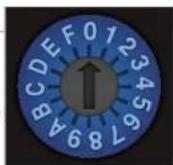
Rotary EDID Control Switch
Rotary EDID Settings:
| KD-1X2CSEDID Settings | |
| 0 Copy EDID fromHDMI Output 1 | KD-1X3CSEDID Settings |
| 1 1080i, 2Ch Audio | 0 Copy EDID fromHDMI Output 1 |
| 2 1080i, Dolby/DTS 5.1 | 1 1080i, 2Ch Audio |
| 3 1080i, 2ch Audio | 2 1080i, Dolby/DTS 5.1 |
| 4 1080p, Dolby/DTS 5.1 | 3 1080i, 2ch Audio |
| 5 1080p, HD Audio | 4 1080p, Dolby/DTS 5.1 |
| 6 1080p, 2ch Audio | 5 1080p, HD Audio |
| 7 3D, 2ch Audio | 6 1080p, 2ch Audio |
| 8 3D, Dolby/DTS 5.1 | 7 3D, 2ch Audio |
| 9 3D, HD Audio | 8 3D, Dolby/DTS 5.1 |
| A 1280x1024 DVI | 9 3D, HD Audio |
| B 1920x1080 DVI | A 1280x1024 DVI |
| C 1920x1200 DVI | B 1920x1080 DVI |
| D 1080p, 2Ch Audio | C 1920x1200 DVI |
| E 1080p, 2Ch Audio | D 1080p, 2Ch Audio |
| F Copy EDID fromHDMI Output 2 | E Copy EDID fromHDMI Output 3 |
| F Copy EDID fromHDMI Output 2 | |
KD-1X3CS
EDID Settings
F Copy EDID from HDMI Output 2
KD-1X4CS
EDID Settings
0 Copy EDID from HDMI Output 1
1 1080i, 2Ch Audio
2 1080i, Dolby/DTS 5.1
3 1080i, 2ch Audio
4 1080p, Dolby/DTS 5.1
5 1080p, HD Audio
6 1080p, 2ch Audio
7 3D, 2ch Audio
8 3D, Dolby/DTS 5.1
9 3D, HD Audio
A 1280x1024 DVI
B 1920x1080 DVI
C 1920x1200 DVI
D Copy EDID from HDMI Output 4
E Copy EDID from HDMI Output 3
F Copy EDID from HDMI Output 2
Mechanical / Technical Specifications
| Inputs 1 HDMI Connection | |
| Outputs 2/3/4 HDMI Connectors | |
| Bandwidth TMDS bandwidth 10.2 Gb/s | |
| Compliance with HDMI Standard | Fully licensed and compatible with all HDMI and HDCP technologies |
| Link Single Link: 1080p/60, 12 bit color depth, 1920x1200 max | |
| Deep Color Support Supports digital video formats in Deep Color Mode at up to 12 bits/color | |
| Lossless Compressed Digital Audio | Supports lossless compressed digital audio:Dolby® TrueHD, Dolby® Digital Plus and DTS™-HD Master Audio |
| DDC Signal (Data) Input | DDC Signal: 5 Volts p-p (TTL) |
| HDMI Video/Audio Signal | Input Video Signal: 1.2 Volts p-p |
| HDMI Connector HDMI | Connector: Type A, 19 Pin Female |
| I2C Communication | EDID and HDCP Bi-Directional Transparency from Display to Source |
| EDID Control | Active outputs connected via HDMI, or from internal library of default EDID settings |
| Power Source | 5 Volt DC @ 1 Amp, 100-240 VAC, 50-60 Hz |
| Dimensions | KD-1x2CS: W = 3.75", H = 1", D = 2.5"KD-1x3CS: W = 5.5", H = 1", D = 2.75"KD-1x4CS: W = 5.5", H = 1", D = 2.75" |
| Weight | KD-1X2CS - 0.5 lbKD-1X3CS - 0.9 lbKD-1X4CS - 0.9 lb |
* EDID (Extended display identification data) is a data structure provided by a display to describe its capabilities to a source device.
Terminology
Below is a list of terms and acronyms that reoccur in this Owner's Manual and are commonly referred to in the A/V Industry:
| CEC Consumer Electronics Control | An optional protocol used in HDMI systems that allows HDMI devices to pass control functions along to all devices within the system. |
| DVI Digital Video Interface | A digital interface standard created by the Digital Display Working Group (DDWG) to convert analog video signals into digital video signals to accommodate digital monitors. Typically used for PC monitors, the video portion of HDMI is compatible with DVI using simple adapters. |
| EDID Extended Display Identification Data | A VESA standard data format that contains basic information about a monitor and its capabilities. Information includes vendor information, maximum image size, color characteristics, factory pre-set timings, frequency range limits, and character strings for the monitor name and serial number. |
| VESA Video Electronics Standards Association | An international standards body for computer graphics founded in the late 1980s by NEC Horne Electronics and eight other video display adapter manufacturers. |
| HDCP High-Bandwidth Digital Content Protection | The copy protection scheme adopted for use with HDMI/DVI. |
| HDMI High-Definition Multimedia Interface | An uncompressed, all-digital audio/video interface that supports over one cable standard, enhanced, and high-definition video, and multi-channel audio. |
| IR Infrared IR, like the infrared | remote control. Simply point the front of an IR remote control unit towards the IR sensor on the product to be controlled. |
| LED Light Emitting Diode | Small light bulbs that illuminate to indicate a selection, and are used as status indicators |

Important Product Warnings:
- Connect all cables before providing power to the unit.
- Test for proper operation before securing unit behind walls or in hard to access spaces.
- If installing the unit into wall or mounting bracket into sheet-rock, provide proper screw support with bolts or sheet-rock anchors.

Safety Instructions:
Please be sure to follow these instructions for safe operation of your unit.
- Read and follow all instructions.
- Heed all warnings.
- Do not use this device near water.
- Clean only with dry cloth.
- Install in accordance with the manufacturer's instructions.
- Do not install near any heat sources such as radiators, heat registers, stoves, or other apparatus (including amplifiers) that produce heat.
- Only use attachments/accessories specified by the manufacturer.
- Refer all servicing to qualified service personnel. Servicing is required when the device has been damaged in any way including:
Damage to the power supply or power plug
Exposure to rain or moisture

Power Supply Use:
You MUST use the Power Supply provided with your unit or you VOID the Key Digital® Warranty and risk damage to your unit and associated equipment.
How to Contact Key Digital®
System Design Group (SDG)
For system design questions please contact us at:
Phone: 914-667-9700
E-mail: sdg@keydigital.com
Key Digital Trainings
For questions about Key Digital® Trainings please contact us at:
Phone: 914-667-9700
E-mail: training@keydigital.com
Customer Support
For customer support questions please contact us at:
Phone: 914-667-9700
E-mail: customersupport@keydigital.com
Technical Support
For technical questions about using Key Digital ^® products, please contact us at:
Phone: 914-667-9700
E-mail: tech@keydigital.com
Marketing and Public Relations:
For marketing and public relations information, please contact us at:
Phone: 914-667-9700
E-mail: marketing@keydigital.com
Repairs and Warranty Service
Should your product require warranty service or repair, please obtain a Key Digital® Return Material Authorization (RMA) number by contacting us at:
Phone: 914-667-9700
E-mail: rma@keydigital.com
Feedback
Please email any comments/questions about the manual to:
E-mail: customersupport@keydigital.com

Warranty Information
All Key Digital ^® products are built to high manufacturing standards and should provide years of trouble-free operation. They are backed by a limited three-year parts and labor warranty.
- Champion Series™
- Operating Instructions
- Key digital®
- Key digital
- Table of Contents
- Introduction
- About the KD-1X2CS, KD-1X3CS, KD-1X4CS
- Advanced HDMI ® Features
- Accessories
- Quick Setup Guide
- DVI Applications for KD-1X2CS, KD-1X3CS, KD-1X4CS
- Installation and Operation
- Active Input / Output LED Indicators
- EDID Control Settings
- KD-1X3CS
- EDID Settings
- KD-1X4CS
- Terminology
- Important Product Warnings:
- Safety Instructions:
- Power Supply Use:
- How to Contact Key Digital®
- System Design Group (SDG)
- Key Digital Trainings
- Customer Support
- Technical Support
- Marketing and Public Relations:
- Repairs and Warranty Service
- Feedback
- Warranty Information
Brand : Key Digital
Model : Champion KD-1X3CS
Category : Separator