
ZH507+ - Projector OPTOMA - Free user manual and instructions
Find the device manual for free ZH507+ OPTOMA in PDF.


| Product Type | Projector |
| Brand | OPTOMA |
| Model | ZH507+ |
| Display Technology | DLP |
| Light Source | Laser |
| Brightness | 5000 lumens |
| Native Resolution | WUXGA (1920 x 1200) |
| Contrast Ratio | 300,000:1 |
| Light Source Life | 30,000 hours |
| Power Supply | 100-240 V, 50/60 Hz |
| Power Consumption | 350 W (standard mode) |
| Dimensions (W x D x H) | 33.0 x 26.0 x 13.0 cm |
| Weight | 5.5 kg |
| Key Features | High brightness projection, vertical and horizontal keystone correction, optical zoom, manual focus, 3D compatibility |
| Connectivity | HDMI (x2), VGA, USB-A, RS-232, RJ45, 3.5mm audio input, audio output |
| Maintenance and Cleaning | Regular cleaning of the air filter with a vacuum cleaner or compressed air |
| Safety | Automatic shutdown when no signal, password lock, Kensington anti-theft security |
| Spare Parts and Repairability | Replaceable air filter, remote control, set of batteries; repair by authorized center |
| General Information | Indoor use, ceiling mountable (mount not included) |
Frequently Asked Questions - ZH507+ OPTOMA
User questions about ZH507+ OPTOMA
0 question about this device. Answer the ones you know or ask your own.
Ask a new question about this device
Download the instructions for your Projector in PDF format for free! Find your manual ZH507+ - OPTOMA and take your electronic device back in hand. On this page are published all the documents necessary for the use of your device. ZH507+ by OPTOMA.
USER MANUAL ZH507+ OPTOMA
natural_image
Line drawing of a projector with control panel and speaker grille (no text or symbols)Table des matières
SÉCURITÉ .... 4
"WARNING: MOUNT ABOVE THE HEADS OF CHILDREN." Additional warning against eye exposure for close exposures less than 1 m.
This Class B digital apparatus complies with Canadian ICES-003.
natural_image
Line drawing of a cable with two connectors, labeled 'Fiche d'alimentation' below (no other text or symbols)
CONFIGURATION ET INSTALLATION
natural_image
Line drawing of a person sitting in a chair watching a small screen on a desk (no text or symbols present)natural_image
Line drawing of a person sitting in a chair facing a wall-mounted device, no text or symbols presentnatural_image
Line drawing of a person sitting in a chair watching a projector screen (no text or symbols)natural_image
Line drawing of a person sitting in a chair watching a projector mounted on a wall, with no text or symbols present.natural_image
Circular diagram showing six different washing machines arranged in a ring, with red arrows indicating rotation or cycle (no text or symbols)natural_image
Exterior view of a double boiler with red prohibition symbol (no text or labels)
[Configuration du sens de la projection]
[Installation du dongle Wi-Fi]
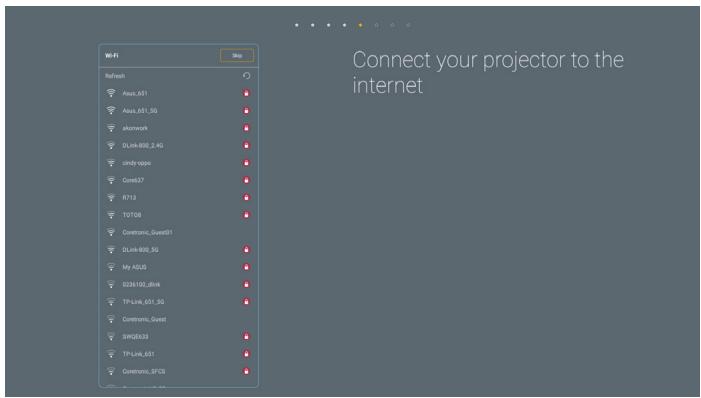
[Optoma Management Suite]
UTILISER LE PROJECTEUR
Marche
▶ Mode Image HDR / Mode image HLG
Apps
UTILISER LE PROJECTEUR
UTILISER LE PROJECTEUR
UTILISER LE PROJECTEUR
Creative Cast
UTILISER LE PROJECTEUR
Optoma Management Suite (OMS)
flowchart
graph LR
    A["Sign up and login to the Optoma Management Suite website"] --> B["Enter serial number"]
    B --> C["Confirm PIN code"]
    C --> D["Q7K5143KAAAEC0008"]
    D --> E["Go to Device page and Add a new device using the serial number above."]
    E --> F["Confirm the PIN code is the same on the device and the website."]
    F --> G["Back"]
    F --> H["Exit"]
UTILISER LE PROJECTEUR
| Résolution | V [Hz] | H [Hz] |
| 1280x1024 | 75,0 | 80,0 |
| 1152x870 | 75,0 | 68,7 |
B0/Timing standard (1080P)
| Résolution | V [Hz] | H [Hz] | Rapport d'aspect |
| 1280x720 | 60,0 | - | 16:09 |
| 1280x800 | 60,0 | - | 16:10 |
| 1280x1024 | 60,0 | - | 05:04 |
| 640x480 | 120,0 | - | 04:03 |
| 800x600 | 120,0 | - | 04:03 |
| 1024x768 | 120,0 | - | 04:03 |
| 1280x800 | 120,0 | - | 16:10 |
| 1920x1200 | 60,00 | - | 16:10 |
| Résolution | V [Hz] | H [Hz] |
| 1920x1080 | 60,0 | 67,5 |
B1/Mode vidéo
| VIC | Résolution | V [Hz] |
| 1 | 640x480p 4:3 | 60,0 |
| 2 | 720x480p 4:3 | 60,0 |
| 3 | 720x480p 16:9 | 60,0 |
| 4 | 1280x720p 16:9 | 60,0 |
| 5 | 1920x1080i 16:9 | 60,0 |
| 6 | 720(1440)x480i 4:3 | 60,0 |
| 7 | 720(1440)x480i 16:9 | 60,0 |
| 16 | 1920x1080p 16:9 | 60,0 |
| 17 | 720x576p 4:3 | 50,0 |
| 18 | 720x576p 16:9 | 50,0 |
| 19 | 1280x720p 16:9 | 50,0 |
| 20 | 1920x1080i 16:9 | 50,0 |
| 21 | 720(1440)x576i 4:3 | 50,0 |
| 22 | 720(1440)x576i 16:9 | 50,0 |
| 31 | 1920x1080p 16:9 | 50,0 |
| 32 | 1920x1080p 16:9 | 24,0 |
| 34 | 1920x1080p 16:9 | 30,0 |
| 93 | 3840 x 2160p 16:9 | 24,00 |
| 94 | 3840 x 2160p 16:9 | 25,00 |
| 95 | 3840 x 2160p 16:9 | 30,00 |
| 96 | 3840 x 2160p 16:9 | 50,00 |
| 97 | 3840 x 2160p 16:9 | 60,00 |
| 98 | 4096 x 2160p 256:135 | 24,00 |
| 99 | 4096 x 2160p 256:135 | 25,00 |
| 100 | 4096 x 2160p 256:135 | 30,00 |
| 101 | 4096 x 2160p 256:135 | 50,00 |
| 102 | 4096 x 2160p 256:135 | 60,00 |
INFORMATIONS SUPPLÉMENTAIRES
B1/Timing détaillé
| Résolution | V [Hz] |
| 1920 x 1080 | 60,00 |
| 1366 x 768 | 60,00 |
Analogique
| B0/Timing établi | ||
| Résolution | V [Hz] | H [Hz] |
| 720x400 | 70,0 | 31,5 |
| 640x480 | 60,0 | 31,5 |
| 640x480 | 66,6 (67) | 34,9 |
| 640x480 | 72,0 | 37,9 |
| 640x480 | 75,0 | 37,5 |
| 800x600 | 56,0 | 35,1 |
| 800x600 | 60,0 | 37,9 |
| 800x600 | 72,0 | 48,1 |
| 800x600 | 75,0 | 46,9 |
| 832x624 | 75,0 | 49,1 |
| 1024x768 | 60,0 | 48,4 |
| 1024x768 | 70,0 | 56,5 |
| 1024x768 | 75,0 | 60,0 |
| 1280x1024 | 75,0 | 80,0 |
| 1152x870 | 75,0 | 68,7 |
B0/Timing standard
| Résolution | V [Hz] | H [Hz] | Rapport d'aspect |
| 800x600 | 120,0 | - | 04:03 |
| 1024x768 | 120,0 | - | 04:03 |
| 1280x800 | 60,0 | - | 16:10 |
| 1280x1024 | 60,0 | - | 05:04 |
| 1280x720 | 60,0 | - | 16:09 |
| 640x480 | 120,0 | - | 04:03 |
B0/Timing détaillé
| Résolution | V [Hz] | H [Hz] |
| 1920x1080 | 60,0 | 67,5 |
B1/Timing détaillé
| Résolution | V [Hz] |
| 1366x768 | 60,0 |
| 1280x800 | 120,0 |
| 1920x1200 | 60,0 |
INFORMATIONS SUPPLÉMENTAIRES
natural_image
Technical line drawing of a heat exchanger or cooling unit with internal grid structure (no text or symbols)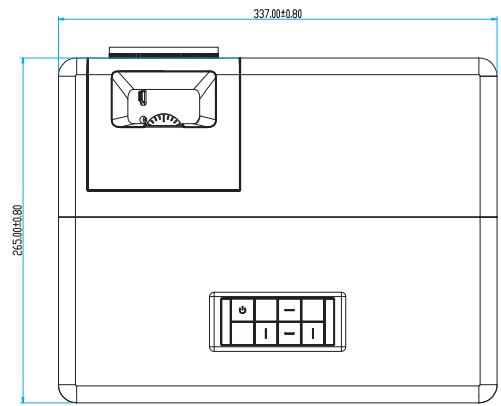
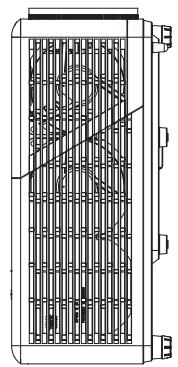
natural_image
Technical line drawing of a heat exchanger or cooling unit with internal grid structure and mounting brackets (no text or symbols)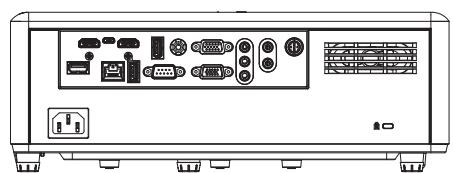
natural_image
Front view of a rectangular electronic device rear panel with ports and connectors (no visible text or symbols)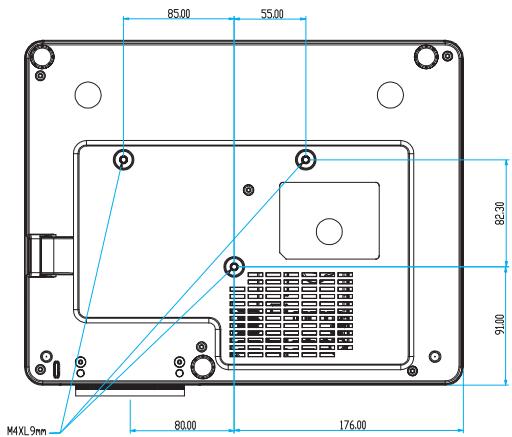
Unité : mm
47697 Westinghouse Drive,
Fremont, CA 94539, USA
www.optomausa.com
888-289-6786
510-897-8601
services@optoma.com
Canada
47697 Westinghouse Drive,
Fremont, CA 94539, USA
www.optomausa.com
888-289-6786
510-897-8601
services@optoma.com
Amérique Latine
47697 Westinghouse Drive,
Fremont, CA 94539, USA
www.optomausa.com
888-289-6786
510-897-8601
services@optoma.com
Europe
Unit 1, Network 41, Bourne End Mills,
Hemel Hempstead, Herts,
HP1 2UJ, United Kingdom
www.optoma.eu
service@tsc-europe.com
Benelux BV
Randstad 22-123
1316 BW Almere
Les Pays-Bas
www.optoma.nl
+31 (0) 36 820 0252
+31 (0) 36 548 9052
France
Bâtiment E
81-83 avenue Edouard Vaillant
92100 Boulogne Billancourt, France
+33 1 41 46 12 20
+33 1 41 46 94 35
savoptoma@optoma.fr
Espagne
C/ José Hierro,36 Of. 1C
28522 Rivas VaciaMadrid,
Espagne
+34 91 499 06 06
+34 91 670 08 32
Allemagne
Am Nordpark 3
41069 Mönchengladbach
Germany (Allemagne)
+49 (0) 2161 68643 0
https://www.optoma.com/kr/
Japon
https://www.optoma.com/jp/
Taiwan
https://www.optoma.com/tw/
Chine
5F, No. 1205, Kaixuan Rd.,
Changning District
Shanghai, 200052, China
+86-21-62947376
+86-21-62947375
www.optoma.com.cn
Australie
https://www.optoma.com/au/
- Table des matières
- SÉCURITÉ .... 4
- CONFIGURATION ET INSTALLATION
- UTILISER LE PROJECTEUR
- Marche
- ▶ Mode Image HDR / Mode image HLG
- Apps
- Creative Cast
- Optoma Management Suite (OMS)
- INFORMATIONS SUPPLÉMENTAIRES
- Canada
- Amérique Latine
- Europe
- Benelux BV
- France
- Espagne
- Allemagne
- Japon
- Taiwan
- Chine
- Australie
Brand : OPTOMA
Model : ZH507+
Category : Projector