
ZH400 - Projector OPTOMA - Free user manual and instructions
Find the device manual for free ZH400 OPTOMA in PDF.


| Product Type | DLP Laser Projector |
| Brand | OPTOMA |
| Model | ZH400 |
| Native Resolution | WUXGA (1920 x 1200) |
| Brightness | 4000 lumens ANSI |
| Display Technology | DLP 0.48" |
| Light Source | Laser phosphor |
| Light Source Life | Up to 30,000 hours |
| Contrast Ratio | 300,000:1 |
| Keystone Correction | Vertical and horizontal ±30° |
| Zoom | 1.1x manual |
| Dimensions (W x D x H) | 337 x 265 x 108 mm |
| Net Weight | Approximately 4.5 kg |
| Power Supply | AC 100-240V, 50/60 Hz |
| Power Consumption (Standby) | < 0.5 W |
| Video Inputs | HDMI (x2), VGA (x1), Composite |
| USB Ports | USB-A (power 1.5A), USB-B (service) |
| Network Functions | RJ45 (remote control) |
| Built-in Speaker | 1 x 15W |
| Noise Level (Eco Mode) | 29 dB |
| Maintenance | Regular air filter cleaning |
| Security | Password lock, automatic shutdown |
| Available Spare Parts | Air filter, remote control, power cable |
| Repairability Score | 7.3/10 (estimated) |
Frequently Asked Questions - ZH400 OPTOMA
User questions about ZH400 OPTOMA
0 question about this device. Answer the ones you know or ask your own.
Ask a new question about this device
Download the instructions for your Projector in PDF format for free! Find your manual ZH400 - OPTOMA and take your electronic device back in hand. On this page are published all the documents necessary for the use of your device. ZH400 by OPTOMA.
USER MANUAL ZH400 OPTOMA
natural_image
Line drawing of a projector with visible internal components and ventilation grille (no text or symbols)TABLE DES MATIÈRES
SÉCURITÉ .... 4
IEC 60825-1:2014, EN 60825-1:2014+A11:2021, EN 50689:2021 CLASS 1 CONSUMER LASER PRODUCT RISK GROUP 2, Complies with 21 CFR 1040.10 and 1040.11 except for conformance as a Risk Group 2 LIP as defined in IEC 62471-5:Ed.1.0. For more information see Laser Notice No. 57, dated May 8, 2019.
IEC 60825-1:2014 等級1雷射產品RG2危險等級
IEC 60825-1:2014 1类激光产品RG2危险等级

"WARNING: MOUNT ABOVE THE HEADS OF CHILDREN." Additional warning against eye exposure for close exposures less than 1 m.
This Class B digital apparatus complies with Canadian ICES-003.
https://www.optoma.com/support/download

INTRODUCTION
natural_image
Line drawing of a person sitting in a chair watching a small screen on a desk (no text or symbols present)natural_image
Line drawing of a person sitting in a chair facing a wall-mounted device, no text or symbols presentnatural_image
Line drawing of a person sitting in a chair watching a projector screen (no text or symbols)natural_image
Line drawing of a person sitting in a chair watching a wall-mounted screen (no text or symbols)natural_image
Exterior view of a multi-level industrial machine with red X-shaped prohibition symbol (no text or labels)
natural_image
Illustration of a hand using a tool to adjust eyeglasses with red arrows indicating motion (no text or symbols)
Marche
UTILISER LE PROJECTEUR
natural_image
Technical line drawing of a projector with a circular lens and mounting base (no text or symbols)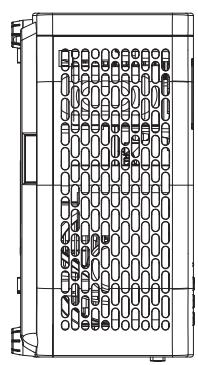
natural_image
Technical line drawing of a mechanical component with internal grid pattern (no text or symbols)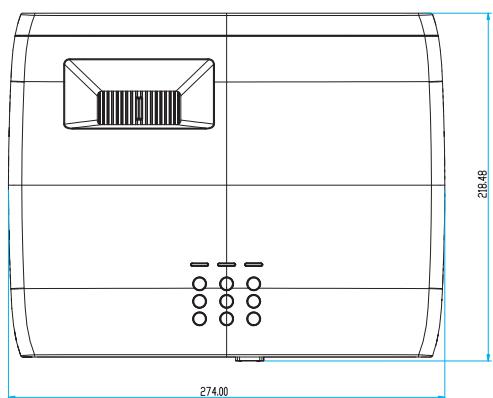
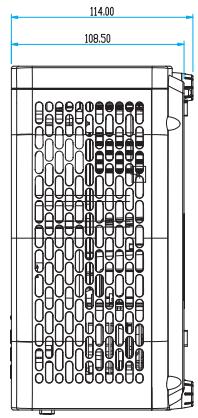
natural_image
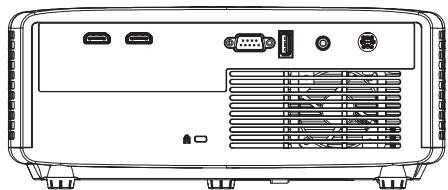
Front view of a projector rear panel with ports and ventilation slots (no text or symbols visible)M4*10 mm
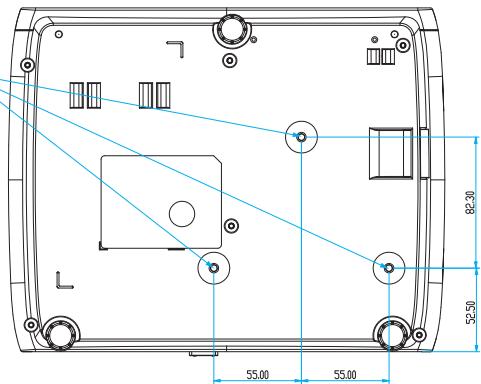
Unité : mm
https://www.optoma.com/jp/
ÉTATS-UNIS
Optoma Technology, Inc.
47697 Westinghouse Drive.
Fremont, Ca 94539
888-289-6786
510-897-8601
services@optoma.com
Taiwan
https://www.optoma.com/tw/
Canada
Optoma Technology, Inc.
47697 Westinghouse Drive.
Fremont, Ca 94539
888-289-6786
510-897-8601
services@optoma.com
Chine
Room 2001, 20F, Building 4,
No.1398 Kaixuan Road,
Changning District
Shanghai, 200052, Chine
+86-21-62947376
+86-21-62947375
www.optoma.com.cn
Amérique Latine
Optoma Technology, Inc.
47697 Westinghouse Drive.
Fremont, Ca 94539
888-289-6786
510-897-8601
services@optoma.com
Australie
https://www.optoma.com/au/
Europe
Unit 1, Network 41, Bourne End Mills
Hemel Hempstead, Herts,
HP1 2UJ, United Kingdom
www.optoma.eu
+44 (0) 1923 691 800
+44 (0) 1923 691 888
https://www.optoma.com/kr/
Brand : OPTOMA
Model : ZH400
Category : Projector