
Alisa - Scale Xavax - Free user manual and instructions
Find the device manual for free Alisa Xavax in PDF.


| Product Type | Digital Bathroom Scale |
| Brand | Xavax |
| Model | Alisa |
| Dimensions | Approx. 30 x 30 x 2 cm |
| Weight | Approx. 1.5 kg |
| Power Source | 2 x AAA batteries (not included) |
| Measurement Range | 2 kg to 150 kg (5 lb to 330 lb) |
| Display | LCD, 4-digit |
| Units | kg, lb, st (switchable) |
| Auto-off | Yes, after approx. 10 seconds of inactivity |
| Overload Indicator | Yes, displays "Err" |
| Low Battery Indicator | Yes, displays "Lo" |
| Platform Material | Tempered glass |
| Non-slip Feet | Yes, 4 rubber pads |
| Cleaning | Wipe with a soft, damp cloth; do not immerse |
| Safety | Auto shut-off for battery conservation; anti-slip design |
| Reparability | Not user-serviceable; only battery replacement |
| Spare Parts | Batteries are standard, other parts not available |
| Country of Origin | China |
| Warranty | 1 year limited |
Frequently Asked Questions - Alisa Xavax
User questions about Alisa Xavax
0 question about this device. Answer the ones you know or ask your own.
Ask a new question about this device
Download the instructions for your Scale in PDF format for free! Find your manual Alisa - Xavax and take your electronic device back in hand. On this page are published all the documents necessary for the use of your device. Alisa by Xavax.
USER MANUAL Alisa Xavax
natural_image
Digital kitchen scale with digital display showing 65.0°C (no text or symbols on the device itself)Distributed by Hama GmbH & Co KG
D-86651 Monheim/Germany
+49 9091 502-0
www.xavax.eu
00092677/07.11
00092677

Bedienungsanleitung
Operating Instruction
CARE AND ATTENTION
- Place your scales on a hard, flat surface to ensure the greatest accuracy I would delete this.
• Always weigh yourself on the same scales placed on the same floor surface. Uneven floors may affect the readings.
• Always weigh yourself without clothing or footwear, and before meals. The first thing in the morning is the best time. - Your scales round up or down to the nearest 100g/0.2lb/¼ st if you weigh yourself twice and get two different readings, your weight lies between the two readings.
- When the scale is on, if you put it on the floor after it resets zero, the scale will display "1.5kg" (this is the weight of scale, the range is 1.4kg-2.5kg). Please wait until it is off automatically, then turn it on again.
- Clean your scale with a damp cloth but do not allow water to get inside the scales. Do not use any chemical cleaning agents.
- Do not allow your scales to become saturated with water as this can damage the electronics.
- Do not store the scales in an upright position when not in use as this will drain the batteries.
- Remove the batteries if the scales are not going to be used for a long period of time.
- Treat your scales with care-it is a precision instrument, do not drop of jump up or down on them.
Your new electronic personal scales have been designed to accurately indicate your weight gain or loss over a period of time and should give you many years of service under normal use.
SPECIFICATIONS
• Equipped with a High Precision "Strain-Gauge" Sensor.
• Capacity 150 kg (330lb/24st)
• Division 100g/0.2lb/ % st
- LCD Display
• Auto-On
• Automatic Zero Resetting
• Automatic Switch off
• Over load indicator
- Low Battery Indicator
POWER SUPPLY
Included Lithium Battery (CR2032), please remove the insulation sheet from the battery contacts before using. Replace the batteries when the "Low Battery Indicator" shows.
OPERATING INSTRUCTIONS
Step 1:
Put the scale on a hard & flat surface (avoid carpet or any soft surface).
Step 2:
Gently step on the scale. Put your feet evenly on the scale without moving and wait while the scale computes weight. Your correct weight will then be displayed in the following:
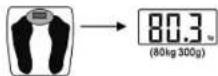
"unit key" = Use the Button "unit key" on the backside to select a weight scale to use: Metric(kg), Pounds(lb), or Stones(ST)
AUTOMATIC SWITCH OFF
When you step off the scales, it will automatically switch off. (If no weighing is carried out while the zero is being displayed, the scales will automatically switch themselves off after approximately 6 seconds.)
OVERLOAD INDICATOR
When the scales are overloaded (over 150kg/330lb/24st), the following will appear on the screen: "Ecc".
BATTERY CHANGE INDICATOR
When the batteries need replacing, the following will appear on the screen: "10". Please open the back board of the scales, then take the batteries carefully out of the battery compartment. Please push the metal sheet outwards using your finger nails or a sharp instrument. The battery will pop out. Do not bend the contact back while you do this, or they may break. Dispose of the old batteries in a safe place! Do no place on fire!
Important notes:
- Caution: do not step on the scales with wet feet or when the surface is damp – danger of slipping.
- You should protect the scales from impact, damp, dust, chemicals and extreme variations in temperature and keep it away from sources of heat (ovens, heaters).
F Mode d'emploi
ENTRETIEN ET CONSIGNES

Brand : Xavax
Model : Alisa
Category : Scale