
Infra - Scale Xavax - Free user manual and instructions
Find the device manual for free Infra Xavax in PDF.


| Product Type | Digital Body Scale |
| Brand | Xavax |
| Model | Infra |
| Dimensions (approx.) | 30 x 30 x 2 cm |
| Weight | 1.5 kg |
| Power Supply | 2 x AAA batteries (not included) |
| Display | LCD screen |
| Maximum Capacity | 180 kg / 396 lb |
| Graduation | 0.1 kg / 0.2 lb |
| Measurement Units | kg, lb, st |
| Functions | Weight, BMI calculation, body fat, water, muscle mass |
| Auto-On | Step-on activation |
| Auto-Off | After 10 seconds of inactivity |
| Memory | Stores up to 10 user profiles |
| Material | Tempered glass, steel |
| Platform | Anti-slip surface |
| Maintenance | Wipe with a damp cloth; do not immerse |
| Safety | Use on hard, flat surface; avoid excessive impact |
| Spare Parts | Batteries (standard AAA) |
| Reparability | Spare parts available from manufacturer; user-serviceable battery |
Frequently Asked Questions - Infra Xavax
User questions about Infra Xavax
0 question about this device. Answer the ones you know or ask your own.
Ask a new question about this device
Download the instructions for your Scale in PDF format for free! Find your manual Infra - Xavax and take your electronic device back in hand. On this page are published all the documents necessary for the use of your device. Infra by Xavax.
USER MANUAL Infra Xavax
Operating Instructions
Bedienungsanleitung
Mode d'emploi

Content
Explanation of Warning Symbols and Notes.....2
Package Contents 2
Safety Notes 2
Controls and Displays 3
Getting Started....3
Operation 4
Care and Maintenance....6
Warranty Disclaimer 6
Service and Support....7
Technical Data 7
Thank you for choosing a Xavax product.
Take your time and read the following instructions and information completely. Keep these operating instructions in a safe place for future reference.
1. Explanation of Warning Symbols and Notes

Warning
- This symbol is used to indicate safety instructions or to draw your attention to specific hazards and risks.

Note
• This symbol is used to indicate additional information or important notes.

Risk of electric shock
- This symbol indicates product parts energized with a dangerous voltage of sufficient magnitude to constitute a risk of electric shock.
2. Package Contents
• Body fat scales with removable display
- 2 AAA batteries
• 1 6F22 nine-volt battery
• Information sheet about disposal
• These operating instructions
3. Safety Notes
- This device is intended for private, non-commercial use only.
- Protect the device from dirt, moisture and overheating, and only use it in dry locations.
- Do not drop the device and do not expose it to any major shocks.
- Do not operate the device outside of its operating limits as defined in the technical specifications.
- Do not open the device or continue to operate it if it becomes damaged.
- Keep the packaging material out of the reach of children due to the risk of suffocation.
- Dispose of packaging material immediately according to locally applicable regulations.
- Do not modify the device in any way. Doing so voids the warranty

Caution
- Persons with medical implants (e.g. pacemakers) may not use this device because it may interfere with the operation of this implant.

Caution
- Caution: do not step on the scales with wet feet or when the surface is damp – danger of slipping.
- You should protect the scales from impact, damp, dust, chemicals and extreme variations in temperature and keep it away from sources of heat (ovens, heaters).

Warning - batteries
- When inserting batteries, note the correct polarity (+ and - markings) and place
• The batteries accordingly. Failure to do so could result in the batteries leaking or exploding.
• Do not short-circuit the batteries.
• Do not recharge the batteries. - Do not throw the batteries in a fire.
- Keep batteries out of the reach of children.
- Do not allow children to change batteries without supervision.
- If the device is not used for a long period of time, remove the batteries.
4. Controls and Displays
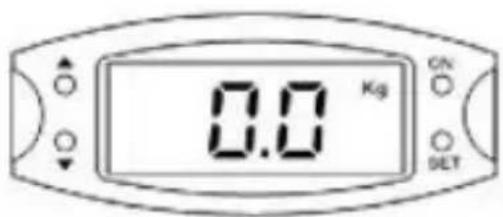
• ON button: Turning the body fat scales on and off
- SET button: Menu selection and confirmation
- ▲ and ▼ buttons: Selecting the input source
5. Getting Started
5.1 Insert the batteries:
• To insert or change the batteries, open the battery cover on the back of the device, insert two AAA batteries with the correct polarity into the battery compartment. Then close the battery compartment fully.
- To insert or change the display batteries, open the battery cover on the back of the display, insert a nine-volt battery with the correct polarity into the battery compartment. Then close the battery compartment fully.

Note
- Before using the scales for the first time or after moving the scales they must be restarted. Without restarting them, the measurements could be incorrect.
5.2. Setting up the body fat scales
- Place the scales on a clean, even floor surface with little vibration to ensure a reliable and precise measurement.
- Make sure that the scales are stable and do not tilt.
- You can attach the three anti-slip feet as shown in the picture for additional stability.


Note
• Always stand in the centre of the scale in order to avoid accidents.
6. Operation
6.1 Measuring body weight:
Option 1 (without removing the display):
- The scales turn on automatically when you step on them. Your weight flashes on the display while you are being weighed.
- Wait until the display is no longer flashing. Once the scales have measured your weight, it is displayed for 25 seconds.
- Then the scales turn off automatically.

Option 2 (remove the display):
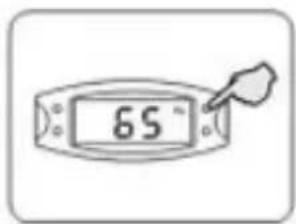
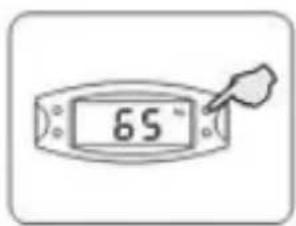
- Take the display in your hand and press the "ON" button.
- Step onto the scales and stand still.
- Your weight flashes on the display while you are being weighed.
- Wait until the display is no longer flashing. Once the scales have measured your weight, it is displayed for 25 seconds.
- Then the scales turn off automatically.
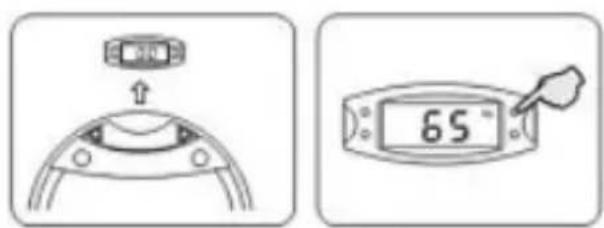
Option 3:
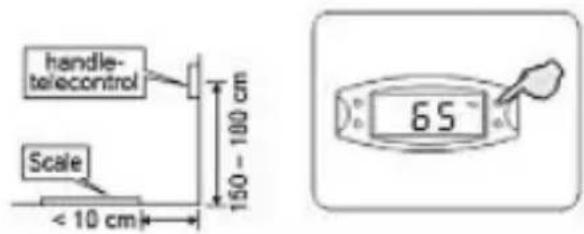
- Remove the display from the scales and attach it securely to the wall.
- Press the "ON" button, step on the scale and then stand still.
- Your weight flashes on the display while you are being weighed.
- Wait until the display is no longer flashing. Once the scales have measured your weight, it is displayed for 25 seconds.
- Then the scales turn off automatically.

Note
- The procedures listed above are not suitable for measuring your body weight. The procedure for determining your body weight, body fat percentage and water level will be explained below.
6.2. Measuring body weight, body fat and body water level
• To measure your body weight, body fat and body water level, you must first set up your personal profile.
- Remove the display from the scales and follow these steps.
Step 1: Select your personal data code
- First press the "ON" button and then the "SET" button. The personal data code is flashing. You can then use the ▲ and ▼ buttons to set your personal data code in the lower left part of the display and then confirm it with the "SET" button.

Step 2: Select your gender
- Use the ▲ and ▼ buttons to select your gender (female/male) and then confirm it by pressing the "SET" button.
Step 3: Enter your height
- Use the ▲ and ▼ buttons to enter your height (cm) and press the "SET" button to confirm (Range: from 100 cm to 225 cm)
Step 4: Select your age
- Use the ▲ and ▼ buttons to enter your age and press the "SET" button to confirm (Range: from 10 to 80 years old)
Step 5: Select the unit
- Use the ▲ and ▼ buttons to select the unit you would like to use and press the "SET" button to confirm (Options: kilograms or pounds)
Step 6: Confirm your entries
- Once you have entered all of the data it is all shown in the display once again.
- When you use the scales the next time, simply select your personal profile number and then confirm by pressing the "SET" button.
- When the display shows your personal data you can use the scales.
Step 7: Weighing
- Press the "ON" button to turn the device on.
- Use the ▲ / ▼ buttons to select your personal data code. The stored information is displayed. Confirm your data code by pressing the "SET" button. When the display shows the number "8", you can step on the scale.
- Your weight flashes on the display while you are being weighed.
- Wait until the display is no longer flashing. Once the scales have measured your weight, place both thumbs on the measuring plates on the display as shown.
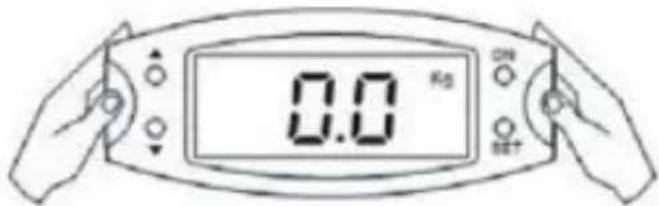
- Remain standing on the scale. The numbers "0000" are displayed one after another from left to right. Your body fat percentage and water level are now displayed. Next, the values for your weight, body fat percentage and water level are displayed one after another. (Four times in total in this order)

Note
- The red LED is located in the upper left corner of the scales housing.
- Once you have switched on the scales, the LED is lit light red.
- When the LED is on, the removable display can be connected to the scales via infrared in order to display the results wirelessly.

6.3. Error messages
- When the error message "EEEE" is shown, the scale is overloaded.
- The error message "Err" indicates that the body fat measurement was not done correctly or that the body fat percentage is greater than 50%.
- The error message "LO" indicates that the battery is dead. Replace the battery as soon as possible.

Note
- In order to ensure precise measurement, we recommend that you weigh yourself every day at the same time (e.g. in the morning right after waking up).
- When the weight displayed by the scales seems to be incorrect, check that the contact between battery and the contacts is in proper working order. If you haven't used the scales in a long time, change the battery and try again.
6.4 Evaluating the measurements
6.4.1. Body fat levels
| Age | Male | |||
| Body fat percentage | ||||
| Low | Health | High | Extra high | |
| 12 – 20 | <15% | 15 – 21% | 21 – 26% | >26% |
| 21 – 42 | <17% | 17 – 23% | 23 – 28% | >28% |
| 43 – 65 | <18% | 18 – 24% | 24 – 29% | >29% |
| 65 – 100 | <19% | 19 – 25% | 25 – 30% | >30% |
| Age | Female | |||
| Body fat percentage | ||||
| Low | Health | High | Extra high | |
| 12 – 20 | <18% | 18 – 28% | 28 – 33% | >33% |
| 21 – 42 | <20% | 20 – 30% | 30 – 35% | >35% |
| 43 – 65 | <21% | 21 – 31% | 31 – 36% | >36% |
| 65 – 100 | <22% | 22 – 32% | 32 – 37% | >37% |
6.4.2 Water levels
| Age | Male | Female | Index condition | Capacity: 37.8 - 66.0% |
| <=30 | 66.0 - 60.5% | 66.0 - 59.9% | Extra high | |
| 60.4 - 57.1% | 59.8 - 56.4% | High | ||
| 57.0 - 53.6% | 56.3 - 53.0% | Health | ||
| 53.5 - 50.2% | 52.9 - 48.6% | Lower | ||
| 50.1 - 37.8% | 48.5 - 37.8% | Low | ||
| >30 | 66.0 - 59.1% | 66.0 - 55.0% | Extra high | |
| 59.0 - 55.7% | 54.9 - 51.6% | High | ||
| 55.6 - 52.3% | 51.5 - 48.1% | Health | ||
| 52.2 - 48.8% | 48.0 - 44.7% | Lower | ||
| 48.7 - 37.8% | 44.6 - 37.8% | Low |

Note
- Due to differences in geographical regions and locations, the standards of the percentages of body fat and water levels can vary. Please only use the tables provided as a reference.
7. Care and Maintenance
- Only clean this product with a slightly damp, lint-free cloth and do not use aggressive cleaning agents. Make sure that water does not get into the scales.
8. Warranty Disclaimer
Hama GmbH & Co. KG assumes no liability and provides no warranty for damage resulting from improper installation/mounting, improper use of the product or from failure to observe the operating instructions and/or safety notes.
9. Service and Support
Please contact Hama Product Consulting if you have any questions about this product.
Hotline: +49 9091 502-115 (German/English)
Further support information can be found here: www.xavax.eu
10. Technical Data
The high-precision sensors ensure accurate weighing to allow you to precisely monitor your weight.
| i | Max. weight | 150 kg |
| i | Scale division | 100 g |
| i | Units of measurement | kilograms (kg), pounds (lb) |
| i | Low battery and overload warning | |
| i | Automatic shutdown | |
| i | Function buttons: | ON button: Switching on and off SET button: Menu selection and confirmation ▲ and ▼: Selecting the input source |
| i | Power supply | 2 AAA batteries 1 6F22 nine-volt battery |
Inhalt

Hinweis

Hinweis
| Age | Male | |||
| Body fat percentage | ||||
| Low | Health | High | Extra high | |
| 12 – 20 | <15% | 15 – 21% | 21 – 26% | >26% |
| 21 – 42 | <17% | 17 – 23% | 23 – 28% | >28% |
| 43 – 65 | <18% | 18 – 24% | 24 – 29% | >29% |
| 65 – 100 | <19% | 19 – 25% | 25 – 30% | >30% |
| Age | Female | |||
| Body fat percentage | ||||
| Low | Health | High | Extra high | |
| 12 – 20 | <18% | 18 – 28% | 28 – 33% | >33% |
| 21 – 42 | <20% | 20 – 30% | 30 – 35% | >35% |
| 43 – 65 | <21% | 21 – 31% | 31 – 36% | >36% |
| 65 – 100 | <22% | 22 – 32% | 32 – 37% | >37% |
| Age | Male | Female | Index condition | Capacity: 37.8 - 66.0% Water percentage division: 0.1% |
| <=30 | 66.0 - 60.5% | 66.0 - 59.9% | Extra high | |
| 60.4 - 57.1% | 59.8 - 56.4% | High | ||
| 57.0 - 53.6% | 56.3 - 53.0% | Health | ||
| 53.5 - 50.2% | 52.9 - 48.6% | Lower | ||
| 50.1 - 37.8% | 48.5 - 37.8% | Low | ||
| >30 | 66.0 - 59.1% | 66.0 - 55.0% | Extra high | |
| 59.0 - 55.7% | 54.9 - 51.6% | High | ||
| 55.6 - 52.3% | 51.5 - 48.1% | Health | ||
| 52.2 - 48.8% | 48.0 - 44.7% | Lower | ||
| 48.7 - 37.8% | 44.6 - 37.8% | Low |

Hinweis
9. Service and Support

Remarque
Méthode 3 :

Remarque
| Age | Male | |||
| Body fat percentage | ||||
| Low | Health | High | Extra high | |
| 12 – 20 | <15% | 15 – 21% | 21 – 26% | >26% |
| 21 – 42 | <17% | 17 – 23% | 23 – 28% | >28% |
| 43 – 65 | <18% | 18 – 24% | 24 – 29% | >29% |
| 65 – 100 | <19% | 19 – 25% | 25 – 30% | >30% |
| Age | Female | |||
| Body fat percentage | ||||
| Low | Health | High | Extra high | |
| 12 – 20 | <18% | 18 – 28% | 28 – 33% | >33% |
| 21 – 42 | <20% | 20 – 30% | 30 – 35% | >35% |
| 43 – 65 | <21% | 21 – 31% | 31 – 36% | >36% |
| 65 – 100 | <22% | 22 – 32% | 32 – 37% | >37% |
| Age | Male | Female | Index condition | Capacity: 37.8 - 66.0% Water percentage division: 0.1% |
| <=30 | 66.0 - 60.5% | 66.0 - 59.9% | Extra high | |
| 60.4 - 57.1% | 59.8 - 56.4% | High | ||
| 57.0 - 53.6% | 56.3 - 53.0% | Health | ||
| 53.5 - 50.2% | 52.9 - 48.6% | Lower | ||
| 50.1 - 37.8% | 48.5 - 37.8% | Low | ||
| >30 | 66.0 - 59.1% | 66.0 - 55.0% | Extra high | |
| 59.0 - 55.7% | 54.9 - 51.6% | High | ||
| 55.6 - 52.3% | 51.5 - 48.1% | Health | ||
| 52.2 - 48.8% | 48.0 - 44.7% | Lower | ||
| 48.7 - 37.8% | 44.6 - 37.8% | Low |

Remarque

Nota
Opción 3:
| Age | Male | |||
| Body fat percentage | ||||
| Low | Health | High | Extra high | |
| 12 – 20 | <15% | 15 – 21% | 21 – 26% | >26% |
| 21 – 42 | <17% | 17 – 23% | 23 – 28% | >28% |
| 43 – 65 | <18% | 18 – 24% | 24 – 29% | >29% |
| 65 – 100 | <19% | 19 – 25% | 25 – 30% | >30% |
| Age | Female | |||
| Body fat percentage | ||||
| Low | Health | High | Extra high | |
| 12 – 20 | <18% | 18 – 28% | 28 – 33% | >33% |
| 21 – 42 | <20% | 20 – 30% | 30 – 35% | >35% |
| 43 – 65 | <21% | 21 – 31% | 31 – 36% | >36% |
| 65 – 100 | <22% | 22 – 32% | 32 – 37% | >37% |
| Age | Male | Female | Index condition | Capacity: 37.8 - 66.0% Water percentage division: 0.1% |
| <=30 | 60.0 - 60.5% | 66.0 - 59.9% | Extra high | |
| 60.4 - 57.1% | 59.8 - 56.4% | High | ||
| 57.0 - 53.6% | 56.3 - 53.0% | Health | ||
| 53.5 - 50.2% | 52.9 - 48.6% | Lower | ||
| 50.1 - 37.8% | 48.5 - 37.8% | Low | ||
| >30 | 66.0 - 59.1% | 66.0 - 55.0% | Extra high | |
| 59.0 - 55.7% | 54.9 - 51.6% | High | ||
| 55.6 - 52.3% | 51.5 - 48.1% | Health | ||
| 52.2 - 48.8% | 48.0 - 44.7% | Lower | ||
| 48.7 - 37.8% | 44.6 - 37.8% | Low |

Nota

Примечание
Способ 3
| Age | Male | |||
| Body fat percentage | ||||
| Low | Health | High | Extra high | |
| 12-20 | <15% | 15-21% | 21-26% | >26% |
| 21-42 | <17% | 17-23% | 23-28% | >28% |
| 43-65 | <18% | 18-24% | 24-29% | >29% |
| 65-100 | <19% | 19-25% | 25-30% | >30% |
| Age | Female | |||
| Body fat percentage | ||||
| Low | Health | High | Extra high | |
| 12 – 20 | <18% | 18 – 28% | 28 – 33% | >33% |
| 21 – 42 | <20% | 20 – 30% | 30 – 35% | >35% |
| 43 – 65 | <21% | 21 – 31% | 31 – 36% | >36% |
| 65 – 100 | <22% | 22 – 32% | 32 – 37% | >37% |
| Ago | Male | Female | Index condition | Capacity: 37.8 - 66.0%Water percentage division: 0.1% |
| <=30 | 66.0 - 60.5% | 66.0 - 59.9% | Extra high | |
| 60.4 - 57.1% | 59.8 - 56.4% | High | ||
| 57.0 - 53.6% | 56.3 - 53.0% | Health | ||
| 53.5 - 50.2% | 52.9 - 48.6% | Lower | ||
| 50.1 - 37.8% | 48.5 - 37.8% | Low | ||
| >30 | 66.0 - 59.1% | 66.0 - 55.0% | Extra high | |
| 59.0 - 55.7% | 54.9 - 51.6% | High | ||
| 55.6 - 52.3% | 51.5 - 48.1% | Health | ||
| 52.2 - 48.8% | 48.0 - 44.7% | Lower | ||
| 48.7 - 37.8% | 44.6 - 37.8% | Low |

Примечание

Avvertenza
Possibilità 3:

Avvertenza
| Age | Male | |||
| Body fat percentage | ||||
| Low | Health | High | Extra high | |
| 12 – 20 | <15% | 15 – 21% | 21 – 26% | >26% |
| 21 – 42 | <17% | 17 – 23% | 23 – 28% | >28% |
| 43 – 65 | <18% | 18 – 24% | 24 – 29% | >29% |
| 65 – 100 | <19% | 19 – 25% | 25 – 30% | >30% |
| Age | Female | |||
| Body fat percentage | ||||
| Low | Health | High | Extra high | |
| 12 - 20 | <18% | 18 - 28% | 28 - 33% | >33% |
| 21 - 42 | <20% | 20 - 30% | 30 - 35% | >35% |
| 43 - 65 | <21% | 21 - 31% | 31 - 36% | >36% |
| 65 - 100 | <22% | 22 - 32% | 32 - 37% | >37% |
| Ago | Male | Female | Index condition | Capacity: 37.8 - 66.0% Water percentage division: 0.1% |
| <=30 | 66.0 - 60.5% | 66.0 - 59.9% | Extra high | |
| 60.4 - 57.1% | 59.8 - 56.4% | High | ||
| 57.0 - 53.6% | 56.3 - 53.0% | Health | ||
| 53.5 - 50.2% | 52.9 - 49.6% | Lower | ||
| 50.1 - 37.8% | 49.5 - 37.8% | Low | ||
| >30 | 66.0 - 59.1% | 66.0 - 55.0% | Extra high | |
| 59.0 - 55.7% | 54.9 - 51.6% | High | ||
| 55.6 - 52.3% | 51.5 - 48.1% | Health | ||
| 52.2 - 49.8% | 48.0 - 44.7% | Lower | ||
| 48.7 - 37.8% | 44.6 - 37.8% | Low |

Avvertenza

Aanwijzing
Mogelijkheid 3:
| Age | Male | |||
| Body fat percentage | ||||
| Age | Female | |||
| Body fat percentage | ||||
| Low | Health | High | Extra high | |
| 12 – 20 | <18% | 18 – 28% | 28 – 33% | >33% |
| 21 – 42 | <20% | 20 – 30% | 30 – 35% | >35% |
| 43 – 65 | <21% | 21 – 31% | 31 – 36% | >36% |
| 65 – 100 | <22% | 22 – 32% | 32 – 37% | >37% |
| Ago | Male | Female | Index condition | Capacity: 37.8 - 66.0% Water percentage division: 0.1% |
| <=30 | 66.0 - 60.5% | 66.0 - 59.0% | Extra high | |
| 60.4 - 57.1% | 59.8 - 56.4% | High | ||
| 57.0 - 53.6% | 56.3 - 53.0% | Health | ||
| 53.5 - 50.2% | 52.9 - 48.6% | Lower | ||
| 50.1 - 37.8% | 48.5 - 37.8% | Low | ||
| >30 | 66.0 - 59.1% | 66.0 - 55.0% | Extra high | |
| 59.0 - 55.7% | 54.9 - 51.6% | High | ||
| 55.6 - 52.3% | 51.5 - 48.1% | Health | ||
| 52.2 - 48.8% | 48.0 - 44.7% | Lower | ||
| 48.7 - 37.8% | 44.6 - 37.8% | Low |

Aanwijzing

Υπόδειξη
Δυνατότητα 3:
| Age | Male | |||
| Body fat percentage | ||||
| Low | Health | High | Extra high | |
| 12-20 | <15% | 15-21% | 21-26% | >26% |
| 21-42 | <17% | 17-23% | 23-28% | >28% |
| 43-65 | <18% | 18-24% | 24-29% | >29% |
| 65-100 | <19% | 19-25% | 25-30% | >30% |
| Age | Female | |||
| Body fat percentage | ||||
| Low | Health | High | Extra high | |
| 12-20 | <18% | 18-28% | 28-33% | >33% |
| 21-42 | <20% | 20-30% | 30-35% | >35% |
| 43-65 | <21% | 21-31% | 31-36% | >36% |
| 65-100 | <22% | 22-32% | 32-37% | >37% |
| Age | Male | Female | Index condition | Capacity: 37.8 - 66.0%Water percentage division: 0.1% |
| <=30 | 66.0 - 60.5% | 66.0 - 59.9% | Extra high | |
| 60.4 - 57.1% | 59.8 - 56.4% | High | ||
| 57.0 - 53.6% | 56.3 - 53.0% | Health | ||
| 53.5 - 50.2% | 52.9 - 48.6% | Lower | ||
| 50.1 - 37.8% | 48.5 - 37.8% | Low | ||
| >30 | 66.0 - 59.1% | 66.0 - 55.0% | Extra high | |
| 59.0 - 55.7% | 54.9 - 51.6% | High | ||
| 55.6 - 52.3% | 51.5 - 48.1% | Health | ||
| 52.2 - 48.8% | 48.0 - 44.7% | Lower | ||
| 48.7 - 37.8% | 44.6 - 37.8% | Low |

Υπόδειξη

Wskazówki
Możliwość 3:
Krok 2: wybór płci
| Age | Male | |||
| Body fat percentage | ||||
| Low | Health | High | Extra high | |
| 12 – 20 | <15% | 15 – 21% | 21 – 26% | >26% |
| 21 – 42 | <17% | 17 – 23% | 23 – 28% | >28% |
| 43 – 65 | <18% | 18 – 24% | 24 – 29% | >29% |
| 65 – 100 | <19% | 19 – 25% | 25 – 30% | >30% |
| Age | Female | |||
| Body fat percentage | ||||
| Low | Health | High | Extra high | |
| 12 – 20 | <18% | 18 – 28% | 28 – 33% | >33% |
| 21 – 42 | <20% | 20 – 30% | 30 – 35% | >35% |
| 43 – 65 | <21% | 21 – 31% | 31 – 36% | >36% |
| 65 – 100 | <22% | 22 – 32% | 32 – 37% | >37% |
| Age | Male | Female | Index condition | Capacity: 37.8 - 65.0% Water percentage division: 0.1% |
| <=30 | 60.0 - 60.5% | 60.0 - 59.9% | Extra high | |
| 60.4 - 57.1% | 59.8 - 56.4% | High | ||
| 57.0 - 53.6% | 56.3 - 53.0% | Health | ||
| 53.5 - 50.2% | 52.9 - 48.6% | Lower | ||
| 50.1 - 37.8% | 48.5 - 37.8% | Low | ||
| >30 | 66.0 - 59.1% | 66.0 - 55.0% | Extra high | |
| 59.0 - 55.7% | 54.9 - 51.6% | High | ||
| 55.6 - 52.3% | 51.5 - 48.1% | Health | ||
| 52.2 - 48.8% | 48.0 - 44.7% | Lower | ||
| 48.7 - 37.8% | 44.6 - 37.8% | Low |

Wskazówki

Megjegyzés

Megjegyzés
6.3. hibaüzenetek
| Age | Male | |||
| Body fat percentage | ||||
| Low | Health | High | Extra high | |
| 12-20 | <15% | 15-21% | 21-26% | >26% |
| 21-42 | <17% | 17-23% | 23-28% | >28% |
| 43-65 | <18% | 18-24% | 24-29% | >29% |
| 65-100 | <19% | 19-25% | 25-30% | >30% |
| Age | Female | |||
| Body fat percentage | ||||
| Low | Health | High | Extra high | |
| 12 – 20 | <18% | 18 – 28% | 28 – 33% | >33% |
| 21 – 42 | <20% | 20 – 30% | 30 – 35% | >35% |
| 43 – 65 | <21% | 21 – 31% | 31 – 36% | >36% |
| 65 – 100 | <22% | 22 – 32% | 32 – 37% | >37% |
| Age | Male | Female | Index condition | Capacity: 37.8 - 66.0% Water percentage division: 0.1% |
| <=30 | 60.0 - 60.5% | 66.0 - 59.9% | Extra high | |
| 60.4 - 57.1% | 59.8 - 56.4% | High | ||
| 57.0 - 53.6% | 56.3 - 53.0% | Health | ||
| 53.5 - 50.2% | 52.9 - 48.6% | Lower | ||
| 50.1 - 37.8% | 48.5 - 37.8% | Low | ||
| >30 | 66.0 - 59.1% | 66.0 - 55.0% | Extra high | |
| 59.0 - 55.7% | 54.9 - 51.6% | High | ||
| 55.6 - 52.3% | 51.5 - 48.1% | Health | ||
| 52.2 - 48.8% | 48.0 - 44.7% | Lower | ||
| 48.7 - 37.8% | 44.6 - 37.8% | Low |

Megjegyzés

Upozornění
Způsob 3:

Upozornění
| Age | Male | |||
| Body fat percentage | ||||
| Low | Health | High | Extra high | |
| 12-20 | <15% | 15-21% | 21-26% | >26% |
| 21-42 | <17% | 17-23% | 23-28% | >28% |
| 43-65 | <18% | 18-24% | 24-29% | >29% |
| 65-100 | <19% | 19-25% | 25-30% | >30% |
| Age | Female | |||
| Body fat percentage | ||||
| Low | Health | High | Extra high | |
| 12 – 20 | <18% | 18 – 28% | 28 – 33% | >33% |
| 21 – 42 | <20% | 20 – 30% | 30 – 35% | >35% |
| 43 – 65 | <21% | 21 – 31% | 31 – 36% | >36% |
| 65 – 100 | <22% | 22 – 32% | 32 – 37% | >37% |
| Age | Male | Female | Index condition | Capacity: 37.8 - 66.0%Water percentage division: 0.1% |
| <=30 | 60.0 - 60.5% | 66.0 - 59.9% | Extra high | |
| 60.4 - 57.1% | 59.8 - 56.4% | High | ||
| 57.0 - 53.6% | 56.3 - 53.0% | Health | ||
| 53.5 - 50.2% | 52.9 - 48.6% | Lower | ||
| 50.1 - 37.8% | 48.5 - 37.8% | Low | ||
| >30 | 66.0 - 59.1% | 66.0 - 55.0% | Extra high | |
| 59.0 - 55.7% | 54.9 - 51.6% | High | ||
| 55.6 - 52.3% | 51.5 - 48.1% | Health | ||
| 52.2 - 48.8% | 48.0 - 44.7% | Lower | ||
| 48.7 - 37.8% | 44.6 - 37.8% | Low |

Upozornění

Poznámka
- Nikdy nestúpajte na hrany váhy, hrozi nebezpečenstvo zranenia!
6. Prevádzka
6.1 Meranie telesnej hmotnosti:
Spôsob 3:

Upozornenie
| Age | Male | |||
| Body fat percentage | ||||
| Low | Health | High | Extra high | |
| 12 – 20 | <15% | 15 – 21% | 21 – 26% | >26% |
| 21 – 42 | <17% | 17 – 23% | 23 – 28% | >28% |
| 43 – 65 | <18% | 18 – 24% | 24 – 29% | >29% |
| 65 – 100 | <19% | 19 – 25% | 25 – 30% | >30% |
| Age | Female | |||
| Body fat percentage | ||||
| Low | Health | High | Extra high | |
| 12 – 20 | <18% | 18 – 28% | 26 – 33% | >33% |
| 21 – 42 | <20% | 20 – 30% | 30 – 35% | >35% |
| 43 – 65 | <21% | 21 – 31% | 31 – 36% | >36% |
| 65 – 100 | <22% | 22 – 32% | 32 – 37% | >37% |
| Age | Male | Female | Index condition | Capacity: 37.8 - 66.0%Water percentage division: 0.1% |
| <=30 | 60.0 - 60.5% | 66.0 - 59.9% | Extra high | |
| 60.4 - 57.1% | 59.8 - 56.4% | High | ||
| 57.0 - 53.6% | 56.3 - 53.0% | Health | ||
| 53.5 - 50.2% | 52.9 - 48.6% | Lower | ||
| 50.1 - 37.8% | 48.5 - 37.8% | Low | ||
| >30 | 66.0 - 59.1% | 66.0 - 55.0% | Extra high | |
| 59.0 - 55.7% | 54.9 - 51.6% | High | ||
| 55.6 - 52.3% | 51.5 - 48.1% | Health | ||
| 52.2 - 48.8% | 48.0 - 44.7% | Lower | ||
| 48.7 - 37.8% | 44.6 - 37.8% | Low |

Nota
Possibilidade 3:

Nota
6.3. Mensagens de erro
| Age | Male | |||
| Body fat percentage | ||||
| Low | Health | High | Extra high | |
| 12 – 20 | <15% | 15 – 21% | 21 – 26% | >26% |
| 21 – 42 | <17% | 17 – 23% | 23 – 28% | >28% |
| 43 – 65 | <18% | 18 – 24% | 24 – 29% | >29% |
| 65 – 100 | <19% | 19 – 25% | 25 – 30% | >30% |
| Age | Female | |||
| Body fat percentage | ||||
| Low | Health | High | Extra high | |
| 12 – 20 | <18% | 18 – 28% | 28 – 33% | >33% |
| 21 – 42 | <20% | 20 – 30% | 30 – 35% | >35% |
| 43 – 65 | <21% | 21 – 31% | 31 – 36% | >36% |
| 65 – 100 | <22% | 22 – 32% | 32 – 37% | >37% |
| Age | Male | Female | Index condition | Capacity: 37.8 - 66.0% Water percentage division: 0.1% |
| <=30 | 66.0 - 60.5% | 66.0 - 59.9% | Extra high | |
| 60.4 - 57.1% | 59.8 - 56.4% | High | ||
| 57.0 - 53.6% | 56.3 - 53.0% | Health | ||
| 53.5 - 50.2% | 52.9 - 48.6% | Lower | ||
| 50.1 - 37.8% | 48.5 - 37.8% | Low | ||
| >30 | 66.0 - 59.1% | 66.0 - 55.0% | Extra high | |
| 59.0 - 55.7% | 54.9 - 51.6% | High | ||
| 55.6 - 52.3% | 51.5 - 48.1% | Health | ||
| 52.2 - 48.8% | 48.0 - 44.7% | Lower | ||
| 48.7 - 37.8% | 44.6 - 37.8% | Low |

Nota

Uyarı
Olanak 3:
6.3. Hata mesajları
| Age | Male | |||
| Body fat percentage | ||||
| Low | Health | High | Extra high | |
| 12 – 20 | <15% | 15 – 21% | 21 – 26% | >26% |
| 21 – 42 | <17% | 17 – 23% | 23 – 28% | >28% |
| 43 – 65 | <18% | 18 – 24% | 24 – 29% | >29% |
| 65 – 100 | <19% | 19 – 25% | 25 – 30% | >30% |
| Age | Female | |||
| Body fat percentage | ||||
| Low | Health | High | Extra high | |
| 12 – 20 | <18% | 18 – 28% | 28 – 33% | >33% |
| 21 – 42 | <20% | 20 – 30% | 30 – 35% | >35% |
| 43 – 65 | <21% | 21 – 31% | 31 – 36% | >36% |
| 65 – 100 | <22% | 22 – 32% | 32 – 37% | >37% |
| Age | Male | Female | Index condition | Capacity: 37.8 - 66.0% |
| <=30 | 66.0 - 60.5% | 66.0 - 59.9% | Extra high | |
| 60.4 - 57.1% | 59.8 - 56.4% | High | ||
| 57.0 - 53.6% | 56.3 - 53.0% | Health | ||
| 53.5 - 50.2% | 52.9 - 48.6% | Lower | ||
| 50.1 - 37.8% | 48.5 - 37.8% | Low | ||
| >30 | 66.0 - 59.1% | 66.0 - 56.0% | Extra high | |
| 59.0 - 55.7% | 54.9 - 51.6% | High | ||
| 55.6 - 52.3% | 51.5 - 48.1% | Health | ||
| 52.2 - 48.8% | 48.0 - 44.7% | Lower | ||
| 48.7 - 37.8% | 44.6 - 37.8% | Low |

Uyarı

Indicatie

Varianta 3:
6.3. Mesaje de erori

Hänvisning
Möjlighet 3:

Hänvisning
6.3. Felmeddelanden
| Age | Male | |||
| Body fat percentage | ||||
| Low | Health | High | Extra high | |
| 12 – 20 | <15% | 15 – 21% | 21 – 26% | >26% |
| 21 – 42 | <17% | 17 – 23% | 23 – 28% | >26% |
| 43 – 65 | <18% | 18 – 24% | 24 – 29% | >29% |
| 65 – 100 | <19% | 19 – 25% | 25 – 30% | >30% |
| Age | Female | |||
| Body fat percentage | ||||
| Low | Health | High | Extra high | |
| 12 – 20 | <18% | 18 – 28% | 28 – 33% | >33% |
| 21 – 42 | <20% | 20 – 30% | 30 – 35% | >35% |
| 43 – 65 | <21% | 21 – 31% | 31 – 36% | >36% |
| 65 – 100 | <22% | 22 – 32% | 32 – 37% | >37% |
| Age | Male | Female | Index condition | Capacity: 37.8 - 66.0%Water percentage division: 0.1% |
| <=30 | 66.0 - 60.5% | 66.0 - 59.9% | Extra high | |
| 60.4 - 57.1% | 59.8 - 56.4% | High | ||
| 57.0 - 53.6% | 56.3 - 53.0% | Health | ||
| 53.5 - 50.2% | 52.9 - 48.6% | Lower | ||
| 50.1 - 37.8% | 48.5 - 37.8% | Low | ||
| >30 | 66.0 - 59.1% | 66.0 - 55.0% | Extra high | |
| 59.0 - 55.7% | 54.9 - 51.6% | High | ||
| 55.6 - 52.3% | 51.5 - 48.1% | Health | ||
| 52.2 - 48.8% | 48.0 - 44.7% | Lower | ||
| 48.7 - 37.8% | 44.6 - 37.8% | Low |

Hänvisning

Ohje
Vaihtoehto 3:
| Age | Male | |||
| Body fat percentage | ||||
| Low | Health | High | Extra high | |
| 12 - 20 | <15% | 15 - 21% | 21 - 26% | >26% |
| 21 - 42 | <17% | 17 - 23% | 23 - 28% | >28% |
| 43 - 65 | <18% | 18 - 24% | 24 - 29% | >29% |
| 65 - 100 | <19% | 19 - 25% | 25 - 30% | >30% |
| Age | Female | |||
| Body fat percentage | ||||
| Low | Health | High | Extra high | |
| 12 – 20 | <18% | 18 – 28% | 28 – 33% | >33% |
| 21 – 42 | <20% | 20 – 30% | 30 – 35% | >35% |
| 43 – 65 | <21% | 21 – 31% | 31 – 36% | >36% |
| 65 – 100 | <22% | 22 – 32% | 32 – 37% | >37% |
| Age | Male | Female | Index condition | Capacity: 37.8 - 66.0%Water percentage division: 0.1% |
| <=30 | 60.0 - 60.5% | 60.0 - 59.0% | Extra high | |
| 60.4 - 57.1% | 59.8 - 56.4% | High | ||
| 57.0 - 53.6% | 56.3 - 53.0% | Health | ||
| 53.5 - 50.2% | 52.9 - 48.6% | Lower | ||
| 50.1 - 37.8% | 48.5 - 37.8% | Low | ||
| >30 | 66.0 - 59.1% | 66.0 - 55.0% | Extra high | |
| 59.0 - 55.7% | 54.9 - 51.6% | High | ||
| 55.6 - 52.3% | 51.5 - 48.1% | Health | ||
| 52.2 - 48.8% | 48.0 - 44.7% | Lower | ||
| 48.7 - 37.8% | 44.6 - 37.8% | Low |

Ohje

- CONTENT
- EXPLANATION OF WARNING SYMBOLS AND NOTES
- WARNING
- NOTE
- RISK OF ELECTRIC SHOCK
- PACKAGE CONTENTS
- SAFETY NOTES
- CAUTION
- WARNING - BATTERIES
- CONTROLS AND DISPLAYS
- GETTING STARTED
- 5.1 INSERT THE BATTERIES
- SETTING UP THE BODY FAT SCALES
- OPERATION
- 6.1 MEASURING BODY WEIGHT
- MEASURING BODY WEIGHT, BODY FAT AND BODY WATER LEVEL
- STEP 2: SELECT YOUR GENDER
- STEP 3: ENTER YOUR HEIGHT
- STEP 4: SELECT YOUR AGE
- STEP 5: SELECT THE UNIT
- STEP 6: CONFIRM YOUR ENTRIES
- STEP 7: WEIGHING
- ERROR MESSAGES
- 6.4 EVALUATING THE MEASUREMENTS
- CARE AND MAINTENANCE
- WARRANTY DISCLAIMER
- SERVICE AND SUPPORT
- TECHNICAL DATA
- INHALT
- HINWEIS
- REMARQUE
- NOTA
- ПРИМЕЧАНИЕ
- СПОСОБ 3
- AVVERTENZA
- POSSIBILITÀ 3
- AANWIJZING
- ΥΠΌΔΕΙΞΗ
- WSKAZÓWKI
- MEGJEGYZÉS
- HIBAÜZENETEK
- UPOZORNĚNÍ
- ZPŮSOB 3
- POZNÁMKA
- PREVÁDZKA
- 6.1 MERANIE TELESNEJ HMOTNOSTI
- SPÔSOB 3
- UPOZORNENIE
- MENSAGENS DE ERRO
- UYARI
- OLANAK 3
- HATA MESAJLARI
- INDICATIE
- VARIANTA 3
- MESAJE DE ERORI
- HÄNVISNING
- FELMEDDELANDEN
- OHJE
Brand : Xavax
Model : Infra
Category : Scale