
T8341 - Motion detector AXIS - Free user manual and instructions
Find the device manual for free T8341 AXIS in PDF.


| Product Type | Motion Detector (Z-Wave) |
| Power Source | 1x CR123 3V Lithium Battery |
| Battery Life | 1 year (10 triggers/day) |
| Range (Line of Sight) | Up to 100 meters |
| PIR Detection Coverage | Up to 10m x 110° (at 1.8m mounting height, 25°C) |
| Warm-up Time | Approximately 2 minutes |
| Operating Frequency | 908.42 MHz (US) / 922.5 MHz (JP) |
| Z-Wave Compatibility | Z-Wave Plus, supports inclusion/exclusion, association groups |
| Auto Inclusion | Yes, upon first power-up or after factory reset |
| Manual Inclusion/Exclusion | Press tamper switch 3 times within 1.5 seconds |
| Sensitivity Level (Config #3) | Adjustable 1 (low) to 10 (high), default 6 |
| Re-trigger Interval (Config #4) | 5 to 3600 seconds, default 180 seconds |
| Lux Level (Config #5) | 1% to 100%, default 20% |
| On-Off Duration (Config #6) | 5 to 3600 seconds, default 15 seconds |
| Association Groups | Group 1 (1 controller node) and Group 2 (4 end devices) |
| Tamper Switch | Yes, used for inclusion/exclusion and test mode |
| LED Indicator | Red LED for warm-up, inclusion/exclusion, test, and low battery |
| Wake-up Interval | 10 minutes to 1 day, default 4 hours |
| FCC ID | FU5SP817 |
Frequently Asked Questions - T8341 AXIS
User questions about T8341 AXIS
0 question about this device. Answer the ones you know or ask your own.
Ask a new question about this device
Download the instructions for your Motion detector in PDF format for free! Find your manual T8341 - AXIS and take your electronic device back in hand. On this page are published all the documents necessary for the use of your device. T8341 by AXIS.
USER MANUAL T8341 AXIS
HowtoprogramtheZ-Wavedevice....7
Z-Waveconfiguration....10
Troubleshooting....12
Specifications....13
Solutionoverview

natural_image
Line drawing of a mechanical component with a curved cable and circular housing, emitting sound waves (no text or symbols)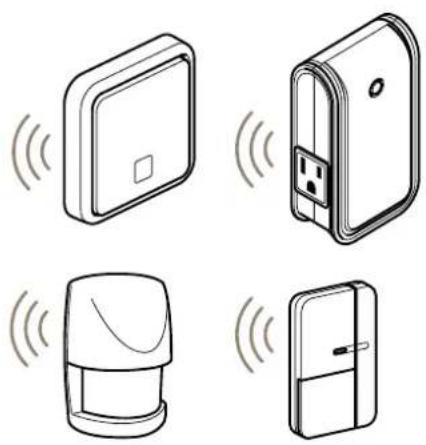
The device Z-Wave® enabled and fully compatible with any Z-Wav-enabled network device can setup Z-Wave network to communicate directly with other end devices such as lighting controllers, ortoreport directly to a Z-Wave controller like the AXISM5065PTZ Network Camera.
Productoverview

natural_image
Line drawing of a device with a curved line and labeled component (1), no text or symbols present- PIRsensorwindow(LEDindicatorinside)
2.Tamperswitch

HowtoaddadevicetoaZ-WaveNetwork
Autoinclusion
ThemotionsensorsupportstheautoinclusionfeaturewhereitwillautomaticallyenterInclusionmodewhenfirstpoweredup. Thiswillalsoapplywhenpoweredupafterafactoryreset.
- Useascrewdrivertodetachthebatterycover.
- PuttheAXISM5065camera(orotherZ-Wavecontroller) into inclusion mode.
- Insert1CR1233V batteries into the battery compartment with the correct polarity. The LED on the devices should turn ON
4.EnterPINnumberintotheZ-Wavecontroller.ThePINnumbercanbefoundonthedevice.Seewhereintheinstallation guide. - The inclusion process should be completed when the LED stops blinking
- Performtestbeforeyourefitthebatterycover.SeeHowtotesttheZ-WaveDevice.
Manualinclusion
YoucanalsochoosetomanuallyaddtheZ-Wavedevicetoacontroldevice.Pleasefollowthestepsdescribedbelow.
Note
Forbestresults,excludethedevicebeforestartingtheinclusionprocess.Formoredetailsseetheinstallationguide.
- Useascrewdrivertodetachthebatterycover.
- PuttheAXISM5065camera(orotherZ-Wavecontroller)intoinclusionmode.
- Insert1CR1233V batteries into the battery compartment with the correct polarity. The LED on the devices should turn ON
- Pressthetamperswitch3timeswithin1.5secondstoputtheunitintolearning(inclusion/exclusion)mode.
5.EnterPINnumberintotheZ-Wavecontroller.ThePINnumbercanbefoundonthedevice.Seewhereintheinstallation guide.
6.TheinclusionprocessshouldbecompletedwhentheLEDstopsblinking. - Performtestbeforeyourefitthebatterycover.SeeHowtotesttheZ-WaveDevice.
Manualexclusion
- Useascrewdrivertodetachthebatterycover.
2.Pressthetamperswitch3timeswithin1.5secondstoputtheunitintolearning(inclusion/exclusion)mode.
3.TheexclusionprocessshouldbecompletedwhentheLEDstopsblinking - Refitthebatterycover.
HowtotesttheZ-Wavedevice
Warm-up
Itwilltakethemotionsensorapproximately2minutestowarmupafterthebatteryisinserted.DuringthisperiodtheLEDbehindthe lenswillturnon.WhentheredLEDturnsoff,thewarm-upprocedureiscompletedandthedeviceisreadytodetect.
- ThiswillnotaffecttheInclusion/Exclusionprocess.
- Afteryouremovethebatteries, wait5secondsbeforeyourefitthem.
Quicktest
- If the tamperswitch is not pressed after inclusion, the device will enter "Test mode" to allow you to test the device before it is mounted on the wall.
- If movement is detected during "Testmode", the LED on them, the motion sensor will light up once indicating that the unit is working properly. Retrigger time is about 5 sec.
3.Toexit"Testmode"andenternormalmode,simplypressthetamperswitchformorethan10seconds. - When the PIRist riggered during normal modethered LED will not lightup, and retrigger time is based on setup value.
Note
Important Make sure you have created Z-Wave controller-event linked the battery-status signal that way you will get an notification or a LED indication when a device run on low battery power.
HowtoprogramtheZ-Wavedevice
Note
ProgrammingZ-WavedevicesusingaZ-Wavecontrollerisrecommendedforexperiencedusersonly.
Z-WaveGroup
ThedetectorsupportseitheroneoftwoZ-WaveAssociationGroups:
Group1: Associationwith1Controllernode.
Group2: Associationwith4nodes(i.e.enddevicessuchassmartplugsandotherlightingcontrollers).Thisallowsthedetectorto transfercommandsdirectlytoenddeviceswithouttheparticipationofthecontroller. Thisastheeffectthatwhenthedetector triggers, alldevicesassociatedwithdetectorwillbeoperated.
Note
Association-groupsupportcanvaryamongZ-WaveControllers.TheAXISM5065supportsZ-WaveAssociationGroup1.
Group1 commands:
- Whenthe device is powered up and already is a part of a Z-Wavenetwork, the unit will send a Notification Report to thenode in Group 1.
- When the detectors senses a movement, the unit will send a notification Report to then nodes of Group 1. Once the movement is stopped, a Notification Report will besent againto Group 1.
- Whenthedetector'sstatusischanged, the device will check its battery status simultaneously. If the battery level drop to an unacceptable level, the device will lemita Battery report to thenodes of Group 1.
- WhenyouperformaFactoryReset, theunitwillsendDeviceResetLocallyNotificationtothenodeofGroup1.
Group2commands:
- Whenthedetectoristriggered, the unit will send BASIC_SET command which contains a valuetothenodes of Group 2.
Z-WavePlus® info
| RoletypeNodetypeInstallerIcon | UserIcon | ||
| SlaveSleepingreport | Z-WavePlusnode | SensorNotificationDeviceType (HomeSecurity) | SensorNotificationDeviceType (HomeSecurity) |
Version
| Protocollibrary | 3(Slave_Enhance_232_Library) |
| Protocolversion | 4.3D(6.71.01) |
Manufacturer
| ManufacturerID | ProductID | ProductType | |
| 0x0364 | |||
AGI(AssociationGroupInformation)table
| GroupProfileCommandClassEtCommand | (List)Nbytes | GroupName(UTF-8) | |
| 1 | General | BatteryReportNotificationReportDeviceResetLocallyNotification | Lifeline |
| 2 | ControlBasicSetPIRControl | ||
Notification
| EventTypeEventEventParameters | Length | EventParameters | ||
| Thepowerisappliedforthefi0x00 time | 0x080x01 | |||
| PIRTriggerON 0x080x00 | 0x07 | |||
| PIRTrigger0x08 0x000x01 | 0x07 | |||
| Tamperswitchbeingprex080x01 than10seconds | 0x07 | |||
| Tamperswitchbeingprex080x01 than10secondsandreleased | 0x07 |
Battery
| BatteryReport(value) | Description |
| 20 ~ 100 | BatteryLevel(%) |
| 0xFF |
Commandclasses
Thisproductsupportsthefollowingcommandclasses:
COMMAND_CLASS_ZWAVEPLUS_INFO_V2
COMMAND_CLASS_ASSOCIATION_V2
COMMAND_CLASS_ASSOCIATION_GRP_INFO
COMMAND_CLASS_TRANSPORT_SERVICE_V2
COMMAND_CLASS_VERSION_V2
COMMAND_CLASS_MANUFACTURER_SPECIFIC_V2
COMMAND_CLASS_DEVICE_RESET_LOCALLY
COMMAND_CLASS_POWERLEVEL
COMMAND_CLASS_SECURITY
COMMAND_CLASS_SECURITY_2
COMMAND_CLASS_SUPERVISION
COMMAND_CLASS_FIRMWARE_UPDATE_MD_V4
COMMAND_CLASS_BATTERY
COMMAND_CLASS_WAKE_UP_V2
•COMMAND_CLASS_NOTIFICATION_V4
•COMMAND_CLASS_CONFIGURATION
Wakeupcommandclass
AfterthedetectorhasbeenincludedintoaZ-Wavenetworkitwillgotosleep,butitwillsendawake-upnotificationcommand tothecontrollerperiodicallyatapresetperiod.Themotiondetectorwillstayawakeforatleast10secondsandthengobackto sleeptoconservebatterylife.
Thetimeintervalbetweenwakeupnotificationcommandscanbesetinthewakeupcommandclassbasedontherangevaluesbelow:
| Minimumwakeupinterval | 600s(10minutes) |
| Maximumwakeupinterval | 86400s(1day) |
| Defaultwakeupinterval | 14400s(4hours) |
| Wakeupintervalstepseconds | 600s(10minutes) |
Z-Waveconfiguration
The following information is for some one that has some experience in setting up a Z-Wavesystem, or some one that has a computer software running a Z-Wave controller. Please get familiar with the software of the Z-Wave controller before getting started.
Tominimizepowerconsumptionofthebattery,RFonthedeviceisswitchedoffasdefault.Inordertostartthesetupprocess,please pressthetamperswitchoncetoturnontheRFpowerfor30seconds.YoucanthenseetheLEDstarttoblinkeverysecond.Ifsetup isnotfinishedwithin30seconds,pleasepressthetamperswitchonemoretimetocontinuethesetup
- Basicsetlevel
WhenaBasicSetCommanddissentandcontainsavalue,thereceiverwillprocessit.Forexample,alampmodulewould receiveaBasicSetcommandwhichdeterminesthedimlevel.
Example:
1-99:ON(BinarySwitchDevice)
DimLevel(MultilevelSwitchDevice)
| FunctionParameternumber | Size | Range | Default | |
| BasicSetlevel | 1 | 1~9999 |
- Sensitivitylevel(PIRsensoronly)
Foroptimalefficiency, it is recommended to test the detector's response to movements from the farthest end of the coverage area when you use it for the first time. If movements cannot be detected accurately, simply adjust the sensitivity level with the Configuration Parameter #3. This parameter can be configured with a value from 1 to 10, where 1 means lowsensitivity and 10 means highest sensitivity.
| FunctionParameternumber | Size | Range | Default |
| Sensitivitylevel | 3 | 1~106 |
• Re-triggerintervalsetting(PIRsensoronly)
The configuration parameter used to adjust there-trigger interval after the detector has been triggered as configuration parameter #4. No response will be made during this interval if a movement is detected. The time interval can be set between 5 seconds to 3,600 seconds.
| FunctionParameternumber | Size | Range | Default | |
| Retriggerinterval | 4 | 2 | 5~3600(sec) | 180 |
•Luxlevel
Youcansetapercentagefortheluxlevelwhichdetermineswhenthelightsensorwillbeactivated.Iftheambient illuminationdropsbelowthesetpercentage,andapersonmovesacrossorwithintheprotectedarea,thedetectorwill emitaZ-WaveONcommand(i.e.BasicSetcommand(Value=BasicSetLevel))tothecontrollerandactivateconnected modulesandlighting.Thepercentagecanbesetbetween1%to100%.
| FunctionParameternumber | Size | Range | Default | |
| Luxlevel | 5 | 1~100%20 | ||
On-offduration
Theon-offdurationsettingcanbeusefulifthedetectorisconnectedtoamoduleorlighting. Thedurationdetermineshowlongthe module/lightingshouldstayON.Forinstance,aLampModuleturnsoff100secsafterithasbeenturnedon. Thedurationcanbe configuredtolastbetween5to3600seconds.
Z-Waveconfiguration
| FunctionParameternumber | Size | Range | Default |
| On20ffDuration | 6 | 5~3600(sec) | 15 |
Troubleshooting
ThetablebelowexplainsthestatusintheZ-WavecontrolleraswellastheLEDindicationonthedevice.
| Action/Status | DescriptionLEDindication | |
| NonodeIDTheZ-Wavecontrollercouldnotfindthedevice anddidnotprovideanodeID. | 2-secondon,2-secondofffor2minutes. | |
| FactoryReset(Thisprocedureshould onlybeusedwhen thecontrollerisnot responding.) | 1.Pressthetamperswitch3timeswithin1.5 secondstoputthedeviceintoexclusionmode. | |
| 2.Within1secondofstep1,pressthetamper switchagainandholduntilLEDisoff(about 5seconds). | ||
| 3.NodeIDsexcluded.Thedevicereverts tofactorydefaultstateandwillbein auto-inclusionmodefor4minutes. | 2-secondon,2-secondofffor2minutes. | |
| Failedorsuccessfulresultsinincluding/excludingthelDcanbeviewedonaZ-Wavecontroller. | ||
Tablebelowliststypicalproblemsencountered:
| Symptom | PossiblecauseRecommendation | |
| Cannotcarryoutinclusion andassociation. | 1.Thedeviceisstillconnected,orhas beenaccidentallyincluded,toaprevious network.2.TheenteredPINcodeisincorrect3.Thebatteryhasrunoutofpower.4.Batterypolarityisreversed.5.Detectorismalfunctioning. | 1.Excludethedevicebefore includingitagain.2.Makesureyouhaveentered thecorrectPINcode3.Replacethebattery.4.Refitthebatterywiththe correctpolarity.5.Ensurethedetectorisworking properly. |
| Cannotcontrolthe connectedmodules. | 1.Thedeviceisstillconnected,orhas beenaccidentallyincluded,toaprevious network.2.Thebatteryhasrunoutofpower.3.Detectorismalfunctioning. | 1.Excludethedevicebefore includingitagain.2.Replacethebattery.3.Ensurethedetectorisworking properly. |
| Thedetectorisnot functioningproperly. | 1.Thedeviceisstillconnected,orhas beenaccidentallyincluded,toaprevious network.2.Thebatteryhasrunoutofpower.3.Thedetectorismountedabovearadiator orheater.4.Detectorismalfunctioning. | 1.Excludethedevicebefore includingitagain.2.Replacethebattery.3.Removethesourceof interferenceorreposition itsmountinglocation.4.Ensurethedetectorisworking properly. |
| Theeventlistisnotworking properly. | 1.Thedeviceisstillconnected,orhas beenaccidentallyincluded,toaprevious network.2.Thecontroller'sfirmwareisoutdated.3.Thebatteryhasrunoutofpower. | 1.Excludethedevicebefore includingitagain.2.Makesurethecontrollerhas thelatestfirmware3.Replacethebattery. |
Note
Forbestresults,excludethedevicebeforestartingtheinclusionprocess.Formoredetailsseetheinstallationguide.
Specifications
Tfindtheatestversionofthproduct'slatasheetgddtheproducpagomaxis.comandocatSupportDocumentation.
Specifications
| Battery | CR1233.0VLithiumBattery |
| Batterylife | 1year* |
| RangeUpto100meterslineofsight | |
| WarmuptimeAbout2minutes | |
| PIRdetectioncoverage | Upto10mx1 10°(at1.8mmountingheight Et 25°C) |
| Operatingfrequency | 908.42MHz(US),922.5MHz(JP) |
| FCCIDFU5SP817 |
Specificationsaresubjecttochangewithoutnotice
*measuredat10triggersperday
- Solutionoverview
- Productoverview
- HowtoaddadevicetoaZ-WaveNetwork
- Autoinclusion
- Manualinclusion
- Note
- Manualexclusion
- HowtotesttheZ-Wavedevice
- Warm-up
- Quicktest
- HowtoprogramtheZ-Wavedevice
- Z-WaveGroup
- Commandclasses
- Wakeupcommandclass
- Z-Waveconfiguration
- - Basicsetlevel
- - Sensitivitylevel(PIRsensoronly)
- • Re-triggerintervalsetting(PIRsensoronly)
- •Luxlevel
- On-offduration
- Troubleshooting
- Specifications
Brand : AXIS
Model : T8341
Category : Motion detector