
HDP 101 4K - Audio/video converter Extron - Free user manual and instructions
Find the device manual for free HDP 101 4K Extron in PDF.


| Product Type | Audio/Video Converter |
| Brand | Extron |
| Model | HDP 101 4K |
| Video Input | 1x HDMI |
| Video Output | 1x HDMI (4K @ 60Hz) |
| Maximum Resolution | 4096x2160 @ 60 Hz |
| Audio Support | Embedded HDMI audio pass-through |
| Power Supply | 5V DC, 1A (external adapter) |
| Power Consumption | 2.5W (max) |
| Dimensions (H x W x D) | 1.5" x 4.5" x 2.5" (38 mm x 114 mm x 64 mm) |
| Weight | 0.6 lb (272 g) |
| Enclosure Type | Metal, black |
| Operating Temperature | 32°F to 122°F (0°C to 50°C) |
| Storage Temperature | -40°F to 158°F (-40°C to 70°C) |
| Humidity (noncondensing) | 10% to 90% |
| Mounting | Desk or rack-mountable (with optional kit) |
| LED Indicators | Power, input signal, output signal |
| EDID Management | Internal EDID emulation |
| HDCP Compliance | HDCP 2.2 |
| Maintenance | Wipe with dry cloth; no internal adjustments |
| Safety | CE, FCC Class A |
| Spare Parts | Power adapter, HDMI cable (not included) |
Frequently Asked Questions - HDP 101 4K Extron
User questions about HDP 101 4K Extron
0 question about this device. Answer the ones you know or ask your own.
Ask a new question about this device
Download the instructions for your Audio/video converter in PDF format for free! Find your manual HDP 101 4K - Extron and take your electronic device back in hand. On this page are published all the documents necessary for the use of your device. HDP 101 4K by Extron.
USER MANUAL HDP 101 4K Extron
HDP 101 4K • User Guide
The Extron HDP 101 4K is a compact, active HDMI to DisplayPort converter for signals up to 4K/30 @ 4:4:4. It converts HDMI signals for connection to DisplayPort displays or peripherals. Incoming HDMI signals are equalized up to 15 feet (4 meters) at the input to compensate for signal loss. The HDP 101 4K features EDID Minder ^® , which maintains continuous EDID communication with connected devices and ensures that the HDMI source powers up properly and maintains correct video output. Audio information is passed between source and display.
The HDP 101 4K supports digital video resolutions of up to 4K/30 @ 4:4:4 (or 10.2 Gbps) and is DisplayPort 1.1, HDMI 1.4, and HDCP 1.4 compliant.

FCC Class A Notice
This equipment has been tested and found to comply with the limits for a Class A digital device, pursuant to part 15 of the FCC rules. The Class A limits provide reasonable protection against harmful interference when the equipment is operated in a commercial environment. This equipment generates, uses, and can radiate radio frequency energy and, if not installed and used in accordance with the instruction manual, may cause harmful interference to radio communications. Operation of this equipment in a residential area is likely to cause interference. This interference must be corrected at the expense of the user.
NOTES:
- This unit was tested with shielded I/O cables on the peripheral devices. Shielded cables must be used to ensure compliance with FCC emissions limits.
- For more information on safety guidelines, regulatory compliances, EMI/EMF compatibility, accessibility, and related topics, see the Extron Safety and Regulatory Compliance Guide on the Extron website.
Specifications
Product specifications are available on the Extron website, www.extron.com.
Features
- Provides connectivity between HDMI sources and DisplayPort displays and peripherals.
• Supports computer and video resolutions up to 4K/30 @ 4:4:4 with data rates up to 10.2 Gbps. - Supported HDMI specification features include data rates up to 10.2 Gbps, 3D, Lip Sync, and HD lossless audio formats.
- Equalizes incoming HDMI signals up to 15 feet (4 meters) to compensate for signal loss due to low quality cables or marginal sources.
- EDID Minder automatically manages EDID communication between connected devices — EDID Minder ensures that all sources power up properly and reliably output content for display.
- Selectable resolutions and refresh rates — Pre-stored EDID is communicated to the source based on a user-selected resolution and refresh rate.
- EDID capture mode — When connected to a display, the HDP 101 4K offers the option of capturing and then storing EDID information from the display device.
- Complies with HDMI and VESA Interoperability Guidelines.
- HDCP 1.4 compliant — The HDP 101 4K ensures display of content-protected media and interoperability with earlier versions of HDCP-compliant devices.
- LED indicators for signal presence and power — Provide visual indication of system status for real-time feedback and monitoring of key performance parameters.
- Front panel USB configuration port — Provides convenient access for setup, configuration, and firmware updates.
- Easy setup and commissioning with Extron PCS – Product Configuration Software — Conveniently configure multiple products using a single software application.
- Compact 1 inch (2.5 cm) high, 2.2 inch (5.6 cm) wide enclosure for discreet placement and mounting in space-constrained environments — Includes fabric hook and loop tape for easy installation in any application.
• Supports LPCM audio.
- Includes LockIt ^ HDMI cable lacing brackets.
- External Extron Everlast™ power supply included — Provides worldwide power compatibility with high-demonstrated reliability and low power consumption.
- Extron Everlast Power Supply is covered by a 7-year parts and labor warranty
Application Diagram
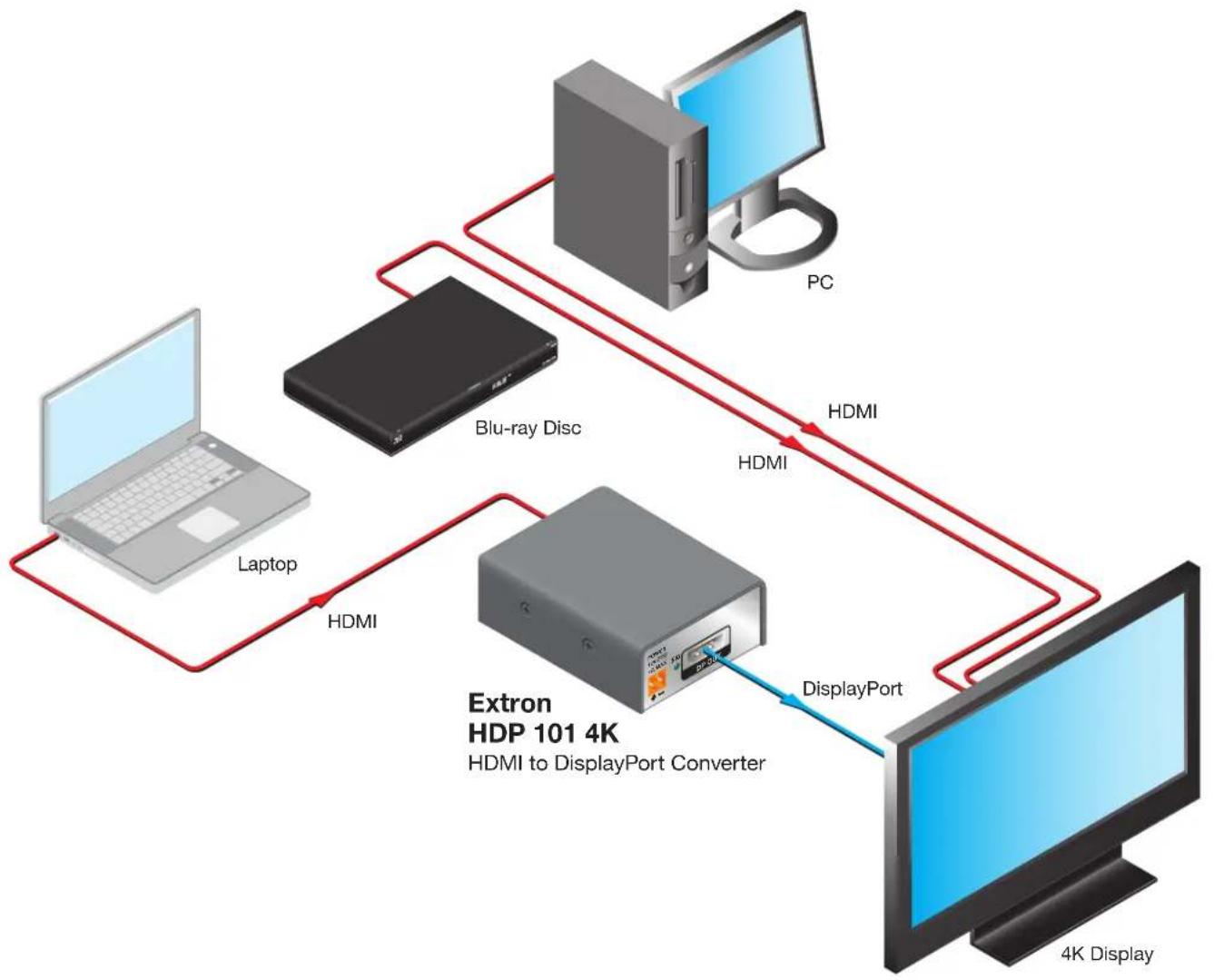
flowchart
graph TD
    PC["PC"] -->|HDMI| Extron["HDP 101 4K\nHDMI to DisplayPort Converter"]
    Extron -->|DisplayPort| 4K["4K Display"]
    Extron -->|HDMI| Laptop["Laptop"]
    Laptop -->|HDMI| Blu-rayDisc["Blu-ray Disc"]
    Blu-rayDisc -->|HDMI| PC
Figure 1. HDP 101 4K Application
Mounting
Use the included hook-and-loop tape to attach the HDP 101 4K to the application surface.
Cabling


A Config port
B HDMI input
Power inlet
D DP output
Figure 2. HDP 101 4K Panels
A Config port — Connect a host computer to this mini-B USB port to configure the HDP 101 4K.
B HDMI input — Connect an HDMI source device to the HDMI input.
NOTE: Extron recommends using HDMI Pro Series cables for 300 Mhz pixel clock (4K/UHD) signals.
Power inlet — Wire the external 12 VDC power supply as shown below, and connect it to the two-pole captive screw Power connector.
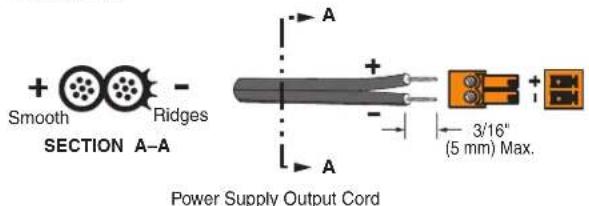
Figure 3. Wiring the Power Connector
ATTENTION:
- Always use a power supply supplied by or specified by Extron. Use of an unauthorized power supply voids all regulatory compliance certification and may cause damage to the supply and the end product.
- If not provided with a power supply, this product is intended to be supplied by a UL Listed power source marked "Class 2" or "LPS" rated 12 VDC, 0.1 A minimum.
- Unless otherwise stated, the AC/DC adapters are not suitable for use in air handling spaces or in wall cavities. The power supply is to be located within the same vicinity as the Extron AV processing equipment in an ordinary location, Pollution Degree 2, secured to the equipment rack within the dedicated closet, podium, or desk.
- The installation must always be in accordance with the applicable provisions of National Electrical Code ANSI/NFPA 70, article 725 and the Canadian Electrical Code part 1, section 16. The power supply shall not be permanently fixed to building structure or similar structure.
D DP output — Connect a DisplayPort device to the DP output.
LED Indicators


Figure 4. HDP 101 4K LED Indicators
A Power and signal LED (front) — Lights amber to indicate power, and lights green to indicate HDMI signal presence.
Output signal LED (rear) — Lights green to indicate signal presence on the DisplayPort output.
Firmware Upgrades
The HDP 101 4K firmware can be upgraded via Product Configuration Software (PCS) or the Extron Firmware Loader program (available at www.extron.com).
SIS Commands
The HDP 101 4K can be configured with specific SIS commands via a USB connection. Use the Extron DataViewer utility or a control system to send SIS commands and receive responses. SIS commands consist of one or more characters per field. No special characters are required to begin or end a command sequence. When the HDP 101 4K recognizes a valid command, it executes the command and sends a response to the host device. All responses from the receiver to the host end the character string with a carriage return and a line feed (CR/LF = ←). A string is one or more characters.
When the HDP 101 4K is first switched on, it sends the message:
© Copyright 2018, Extron Electronics HDP 101 4K, Vx.xx, 60-1739-01
- Vx.xx is the firmware version number.
• 60-1739-01 is the product part number.
Error Responses
When the HDP 101 4K receives a valid SIS command, it executes the command and sends a response to the host device. If the HDP 101 4K is unable to execute the command because the command is invalid or contains invalid parameters, it returns the following error responses to the host:
• E10 – Invalid command
• E13 – Invalid parameter
Using the Command and Response Table
The Command and Response Table for SIS Commands starting on page 6 lists the following:
- Valid ASCII command codes
• The device response to the host
- A description of the command function, or the results of executing the command
The ASCII to hexadecimal conversion table below is for use with the command and response table:
| ASCII to Hex Conversion Table | Esc | 1B | CR | ∅D | LF | ∅A | ||||||||
| 20 | ! | 21 | " | 22 | # | 23 | $ 24 | % | 25 | & | 26 | ' | 27 | |
| ( | 28 | ) | 29 | * | 2A | + | 2B | , 2C | - | 2D | • | 2E | / | 2F |
| ∅ | 30 | 1 | 31 | 2 | 32 | 3 | 33 | 4 | 34 | 5 | 35 | 6 | 36 | 7 |
| 8 | 38 | 9 | 39 | : | 3A | ; | 3B | < | 3C | = | 3D | > | 3E | ? |
| @ | 40 | A | 41 | B | 42 | C | 43 | D | 44 | E | 45 | F | 46 | G |
| H | 48 | | | 49 | J | 4A | K | 4B | L | 4C | M | 4D | N | 4E | O |
| P | 50 | Q | 51 | R | 52 | S | 53 | T | 54 | U | 55 | V | 56 | W |
| X | 58 | Y | 59 | Z | 5A | [ | 5B | \ | 5C] | 5D | ^ | 5E | - | 5F |
| . | 60 | a | 61 | b | 62 | c | 63 | d | 64 | e | 65 | f | 66 | g |
| h | 68 | i | 69 | j | 6A | k | 6B | l | 6C | m | 6D | n | 6E | o |
| p | 70 | q | 71 | r | 72 | s | 73 | t | 74 | u | 75 | v | 76 | w |
| x | 78 | y | 79 | z | 7A | { | 7B | l | 7C} | 7D | ~ | 7E | DEL | 7F |
Command and Response Table for SIS Commands
← = Carriage return and line feed (LF)
← = Carriage return with no line feed
| = Pipe (can be used interchangeably with the ← character).
● = Space
Esc = Escape key
W = Can be used interchangeably with the Esc character.
X1 = Status
∅ = Off/low/undetected
1 = On/high/detected
4= EDID: 1 to 3 (see table)
| X4 | Slot Default EDID Details | |
| 1 Input 1 (Store) Slot HDMI 1080p @ 60 Hz LPCM-2Ch Default | ||
| 2 Output | ||
| 3 User Loaded Slot Manually populated via PCS | ||
x5 = Verbose mode:
∅ = Clear/none
1 = Verbose mode (default)
2 = Tagged responses for queries
3 = Verbose mode and tagged responses for queries
x6 = HDP 101 4K part number 60-1739-01
☒7 = Text string of up to 24 alphanumeric characters and hyphen (-). No spaces allowed, and no distinction between upper and lowercase. First character must be a letter and the last must not be a hyphen. Default is "HDP - 1∅1 - 4K".
NOTE: Upper- and lowercase characters can be used interchangeably in the command field unless otherwise specified.
Command and Response Table for SIS Commands
| Command ASCII Command | (Host to Device) | Response (Device to Host) | Additional Description |
| Signal Status | |||
| Input and output signal status | EscLS←Verbose mode 2/3 | X1●X1←SigX1●X1← | Input●output (unsolicited) |
| EDID Assignment | |||
| Assign EDID slot to input | EscAX4EDID← Edid | A X4← X4: 1 = default | |
| View EDID assignment | EscAEDID←Verbose mode 2/3 | X4←EdidAX4← | |
| Verbose Mode | |||
| Set verbose mode | EscX5CV← Vrb | X5← X5: 1 = default | |
| View verbose mode | EscCV←Verbose mode 2/3 | X5←VrbX5← | |
| Unit Name | |||
| Set the unit name | EscX7CN← Ipn | ●X7← | Up to 24 alphanumeric characters including "-" |
| Set unit name to factory default | Esc●CN← Ipn | ●HDP-101-4K← | |
| View unit name | EscCN←Verbose mode 2/3 | X7←Ipn●X7← | |
| Information and Other Queries | |||
| Query part number | NVerbose mode 2/3 | X6←Pno●X6← | |
| Query Firmware version | Q n.nn | ||
| Query Firmware version with build | *Q n.nn.nnnn | ||
| Query model name | 1iVerbose mode 2/3 | HDP●101●4K←Inf∅1●HDP●101●4K← | |
| Query model description | 2iVerbose mode 2/3 | HDMI●TO●DP●4K●30←Inf∅2●HDMI●TO●DP●4K●30← | |
| Reset to factory default settings | EscZXXX← Zpx← | ||
KEY:
X1 = Status - ∅ = Off/low/undetected, 1 = On/high/detected
X4 = EDID: 1 to 3 (see table on previous page)
5 = Verbose mode - = Clear/none, 1 = Verbose mode (default), 2 = Tagged responses for queries, 3 = Verbose mode and tagged responses for queries
x6 = HDP 101 4K part number 6∅ - 1739 - ∅1
7 = Text string of up to 24 alphanumeric characters and hyphen (-). No spaces allowed, and no distinction between upper and lowercase. First character must be a letter and the last must not be a hyphen. Default is "HDP - 101 - 4K".
Product Configuration Software
The HDP 101 4K uses PCS to configure and reset the unit, as well as upload firmware.
Download Software from the Extron Website
Visit www.extron.com to download the latest version of PCS.
NOTE: Also download the latest versions of software and firmware for the HDP 101 4K. To update firmware, use PCS or download and install Firmware Loader.
- Mouse over the Download tab at the top of the Extron website (see figure 5, ①).
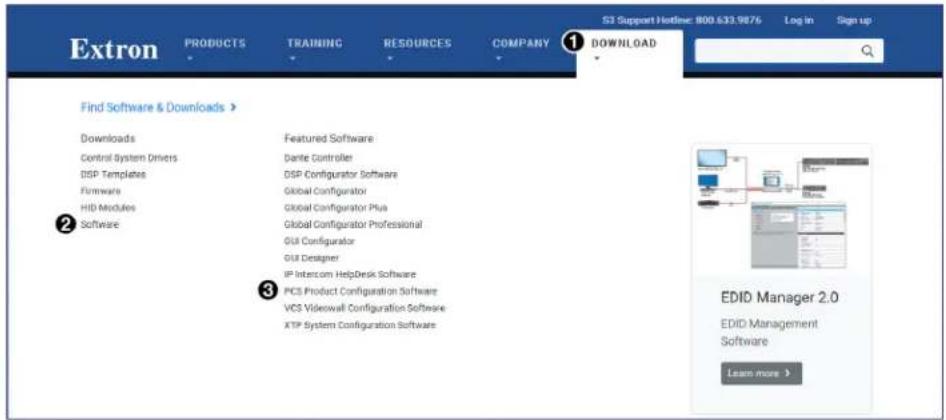
Figure 5. Software and Firmware Links on Download Page
- Click the appropriate link on the drop-down menu.
For software, either click the Software link (②) in the first column or, if the software is listed, click directly on that link (for example, see the PCS link in figure 5, ③).
- If there is no direct link, click on Software or Firmware and scroll down to the alphabetic navigation bar (see figure 6).

Figure 6. Alphabetic Navigation Bar
-
Click the appropriate letter to locate the software or firmware (for example, click H for the HDP 101 4K).
-
Click Download and follow the on-screen instructions.
Using PCS
-
Connect the control PC, with PCS installed, to the HDP 101 4K. The Windows-based PCS communicates with the device via the Front Panel Configuration port (see figure 2, A page 3) with a standard USB mini-B connector.
-
Open PCS on the control PC from the PCS icon loaded on the desktop (optional, see image on the right) or from the Start menu:
Start>Programs>Extron Electronics>Extron Product Configuration Software>Extron Product Configuration Software

The Product Configuration Software opens to the Device Discovery screen:
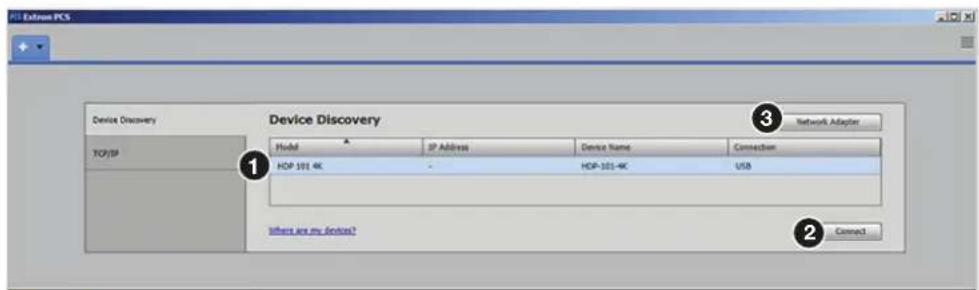
Figure 7. PCS Device Discovery Screen
- Select the HDP 101 4K device by clicking on it to highlight it in the list (see figure 7, ① on the previous page).
NOTE: If the device does not appear in the list and one or more network adapters are being used, click on the Network Adapter button (3) to select the appropriate adapter.
4. Click Connect ( ②).
The Product Configuration Software opens to the device main menu.
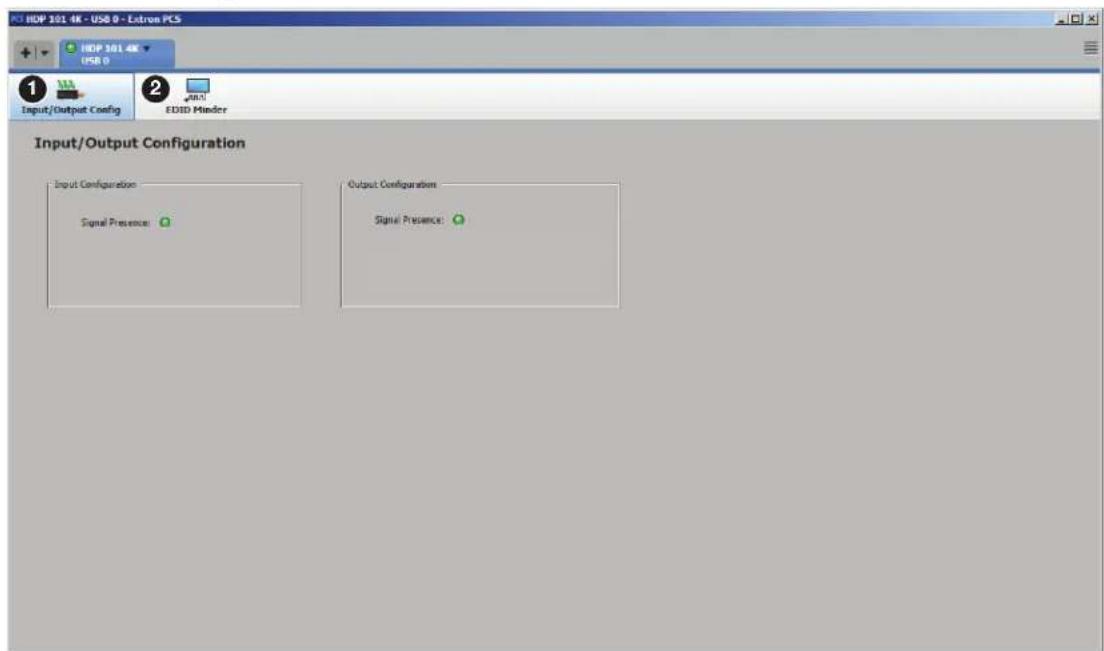
Figure 8. HDP 101 4K PCS Main Menu
The configuration pages have a global navigation bar (see figure 8) from which each of the individual configuration pages can be accessed.
These pages are:
① Input/Output Configuration
② EDID Minder
- Select either of these pages to begin configuring the HDP 101 4K.
Input/Output Configuration
This page allows users to view the status of the input and the output.
Input Configuration

Figure 9. Input Configuration Panel
The Input Configuration panel (see figure 9) allows the user to view the presence of the input signal.
• Signal Presence — Connection status icon shows green when an active HDMI signal is present.
Output Configuration
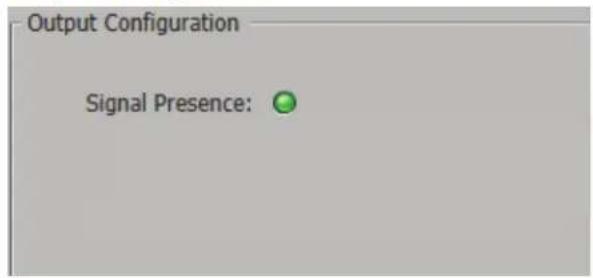
Figure 10. Output Configuration Panel
• Signal Presence — Signal status icon shows green when an active DisplayPort signal is present (see figure 10).
EDID Minder
EDID Minder manages the resolution and refresh rate between the HDP 101 4K HDMI input and the DisplayPort output source. Click the EDID Minder icon (see figure 11, ①) on the global navigation bar to open the EDID Minder page. EDID can be set to match output rate, a custom user-defined EDID, or a factory setting.

Figure 11. EDID Minder Page
Filtering Available EDID
Use the Filter tab (2) to limit the number of available EDID displayed in the Favorites, Connected Output, and Available EDID panels.
- From the Resolution drop-down menu (③), select a specific resolution or Any.
- From the Refresh Rate drop-down menu (4), select a specific refresh rate or Any.
- From the Video Format drop-down menu (5), select HDMI or Any.
- From the Audio Format drop-down menu (6), select LPCM 2-Ch, None or Any.
Assigning EDID
To assign EDID to the input:
- From the Input box on the right (see figure 11, ⑦ on the previous page), select the input.
- From the Favorites, Available EDID, or Connected Output panel on the left, select the desired EDID.
- Then either:
- Click the Assign button ( 8) to assign EDID to the input.
OR
- Drag and drop the EDID image from the Favorites, Available EDID, or Connected Output panels to the Input box.
Adding EDID to the EDID Library
- Click the Add EDID to Library button (see figure 11, 9). The Browse Add EDID to the Library window opens (see figure 12).

Figure 12. Browse Add EDID to the Library Window
- Navigate to the desired EDID file location and select it (see figure 12, ①).
NOTE: Valid EDID files have a .bin file extension.
- Click the Open button ( ②). The EDID is added to the Available EDID panel.
Device Menu
① Disconnect the device from PCS
② View the hardware Settings
③ Reset Device to factory default
4 Update Firmware
⑤ View information About This Module

Extron PCS Help File
For assistance, the Extron PCS Help contains complete information about using the program to configure the HDP 101 4K.
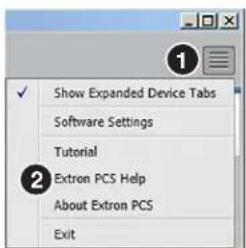
To access Extron PCS Help, click the button in the top right corner of the PCS program screen (see the image on the right, ①) and click on Extron PCS Help (②).


- HDP 101 4K • User Guide
- FCC Class A Notice
- NOTES:
- Specifications
- Features
- Mounting
- Cabling
- ATTENTION:
- LED Indicators
- Firmware Upgrades
- SIS Commands
- Error Responses
- Using the Command and Response Table
- Command and Response Table for SIS Commands
- KEY:
- Product Configuration Software
- Download Software from the Extron Website
- Using PCS
- Click Connect ( ②).
- Input/Output Configuration
- Input Configuration
- Output Configuration
- EDID Minder
- Filtering Available EDID
- Assigning EDID
- Adding EDID to the EDID Library
- Device Menu
- Extron PCS Help File
Brand : Extron
Model : HDP 101 4K
Category : Audio/video converter