
ISK912 - Bluetooth Keyboard ILUV - Free user manual and instructions
Find the device manual for free ISK912 ILUV in PDF.


| Product Type | Portable Bluetooth Speaker |
| Model | ISK912 |
| Brand | iLuv |
| Dimensions (L x W x H) | 6.7 x 2.8 x 2.0 inches |
| Weight | 0.5 kg (1.1 lbs) |
| Power Source | Built-in rechargeable lithium-ion battery |
| Battery Capacity | 2000 mAh |
| Playtime | Up to 10 hours at 50% volume |
| Charging Time | Approximately 3 hours via Micro-USB |
| Bluetooth Version | 5.0 |
| Wireless Range | Up to 33 feet (10 meters) |
| Speaker Driver | 40 mm full-range |
| Output Power | 5W RMS |
| Frequency Response | 100 Hz - 20 kHz |
| Audio Inputs | Bluetooth, 3.5mm AUX |
| Microphone | Built-in for hands-free calling |
| Controls | Power, Volume +/-, Play/Pause, Next/Previous track, Pairing button |
| Indicators | LED for pairing and charging status |
| Materials | Plastic with fabric grille |
| Compatibility | Most Bluetooth-enabled devices |
| What's in the box | Speaker, Micro-USB charging cable, AUX cable, User manual |
| Care & Cleaning | Wipe with a soft, dry cloth. Do not use harsh chemicals. |
| Safety Warnings | Do not expose to water or extreme temperatures. Keep out of reach of children. |
| Spare Parts Availability | Contact iLuv support for replacement parts (if any). |
| Repairability | Not designed for user repair. Contact qualified service. |
Frequently Asked Questions - ISK912 ILUV
User questions about ISK912 ILUV
0 question about this device. Answer the ones you know or ask your own.
Ask a new question about this device
Download the instructions for your Bluetooth Keyboard in PDF format for free! Find your manual ISK912 - ILUV and take your electronic device back in hand. On this page are published all the documents necessary for the use of your device. ISK912 by ILUV.
USER MANUAL ISK912 ILUV
The Professional Portfolio with Bluetooth* Keyboard | iSK912 / 914
Welcome.
WHAT'S INCLUDED 3
↑ GETTING STARTED 4
TO CHARGE 5
TO PAIR 6,7,8,9
WARRANTY 10
WHAT'S INCLUDED
GETTING STARTED

3 NOTE: Clean with dry cloth | DO NOT WASH

4
TO CHARGE

natural_image
Close-up of a black leather keyboard with visible keys and a small inset showing a pair button (no text or symbols on the keyboard itself)5
CHARGING: Charge the keyboard for 3 hours before first use.
Recharge keyboard when the LED blinks red. Continue charging the unit until the charging light (amber LED) goes off.

Pair Button / Light Charging ON / OFF Switch Input
TO PAIR
Go to Settings

2 Switch ON | Push PAIR button (Flashes Blue)

Pair Button / Light Charging ON / OFF Switch Input
6
TO PAIR
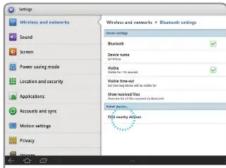
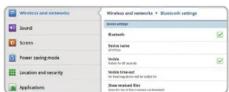
3 Press "Visible"

7
4 Press "Find nearby devices"
TO PAIR
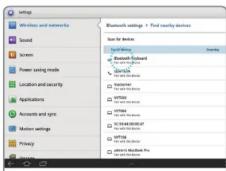
5 Press "Bluetooth Keyboard"
6

"XXXX": GALAXY Tab will prompt and provide PIN code. Type PIN code on keyboard and press return.
8
TO PAIR
7
8 Pairing Successful!
IMPORTANT
When iSK912 / 914 is turned off, connection with paired GALAXY Tab must be re-established when powering back on. Switch to ON and press any key twice to reconnect.
9
WARRANTY
ONE YEAR LIMITED WARRANTY | UNE GARANTIE LIMITEE D'AN GARANTIA LIMITADA DE UM ANO | GARANTÍA LIMITADA DE UM ANO EINEM JAHR EINGESCHRÄNKTE GARANTIE | GARANZIA LIMITATA UN ANNO 1년 제한 보증 | 壹年有限保証 | 一年有限保証 1年 制限保証 | 1 JAAR VOOR BEPERKTE GARANTIE
EUROPEAN UNION
TWO YEAR LIMITED WARRANTY | GARANTIE LIMITEE DE DEUX ANS GARANTIA LIMITADA DE DOIS | ANOSGARANTÍA LIMITADA 2 ANOS DREI JAHREN EINGESCHRÁNKTE GARANTIE | ARANZIA LIMITATA DUE ANNII 2년 제한 보증 | 两年有限保证 2年 割限保証 | 2 JAAR VOOR BEPERKTE GARANTIE
iLUV, Innovative Lifestyle Unquestionable Value* and GreenNology* trademarks are the exclusive properties of iWIN Electronics Corp. and are registered with the U.S. Patent and Trademark Office, and may be registered or pending registration in other countries. All other iLUV trademarks, service marks, and logos may be registered or pending registration in the U.S. or in other countries. Samsung GALAXY Tab is a trademark of Samsung Electronics America and its related entities. The Bluetooth word mark and logos are owned by Bluetooth SIG, Inc. and any use of such marks by iLUV Creative Technology is under license. All other trademarks or registered trademarks are the property of their respective owners. © 2011 iLUV Creative Technology.
10


Brand : ILUV
Model : ISK912
Category : Bluetooth Keyboard