HHTSPT3GM42 - Router Hamlet - Free user manual and instructions
Find the device manual for free HHTSPT3GM42 Hamlet in PDF.


| Product Type | 3G Wi-Fi Hotspot Router |
| Brand | Hamlet |
| Model | HHTSPT3GM42 |
| Network Support | 3G: HSPA+/HSPA/UMTS; 2G: GSM/GPRS/EDGE |
| 3G Frequency | 2100 MHz |
| 2G Frequency | 850/900/1800/1900 MHz |
| Data Rates | Download: up to 43.2 Mbps; Upload: up to 5.76 Mbps |
| Wi-Fi Standard | IEEE 802.11b/g/n, 2.4 GHz |
| Wi-Fi Encryption | WEP, WPA-PSK, WPA2-PSK |
| Max Simultaneous Users | 10 |
| Micro SD Card Support | Up to 32 GB |
| Battery Capacity | 1500 mAh |
| Display | OLED |
| Antenna | Internal |
| Dimensions | 92 x 52 x 17.5 mm |
| Weight | 75 g |
| Operating System Support | Windows, Mac, Linux, iOS, Android |
| Ports | Micro USB (charging) |
| Buttons | ON/OFF, Reset |
| Default IP Address | 192.168.100.1 |
| Default Login Password | hamlet |
| Default SSID | Hamlet-3G-xxxx (xxxx = last 4 chars of MAC) |
| Power Source | USB charging (5V) or power adapter |
| Operating Temperature | 0°C to 35°C |
| Storage Temperature | -10°C to 55°C |
| Package Contents | Router, Li-ion battery, USB cable, User manual |
Frequently Asked Questions - HHTSPT3GM42 Hamlet
User questions about HHTSPT3GM42 Hamlet
0 question about this device. Answer the ones you know or ask your own.
Ask a new question about this device
Download the instructions for your Router in PDF format for free! Find your manual HHTSPT3GM42 - Hamlet and take your electronic device back in hand. On this page are published all the documents necessary for the use of your device. HHTSPT3GM42 by Hamlet.
USER MANUAL HHTSPT3GM42 Hamlet
thanks for choosing an Hamlet product. Please carefully follow the instructions for its use and maintenance and, once this item has run its life span, we kindly ask You to dispose of it in an environmentally friendly way, by putting it in the separate bins for electrical/electronic waste, or to bring it back to your retailer who will collect it for free.

We inform You this product is manufactured with materials and components in compliance with RoHS directive 2011/65/EU, RAEE directive 2002/96/EC, 2003/108/EC Italian Legislative Decree 2005/151 and LVD 2006/95/EC, EMC 2004/108/EC, R&TTE 1999/5/EC directives for the following standards:
EN 60950-1: 2006 + A11: 2009 + A1: 2010 + A12: 2011
This is a Class B product. In a domestic environment, this product may cause radio interference, in which case the user may be required to take adequate measures.

The complete CE declaration of conformity of the product can be obtained by contacting Hamlet at info@hamletcom.com.
The information on the importer for your country are available in the “About Us” section of the Hamlet website at www.hamletcom.com.
Trademarks and changes
All trademarks and company names mentioned in this manual are used for description purpose only and remain property of their respective owners.
The material in this document is for information only and subject to change without notice. Specifications and appearance are subject to change without prior notice.
Safety instructions
- Switch off your device when the device use is prohibited or when the device use may cause interference or danger.
- Switch off your device near medical apparatus. Follow the rules or regulations in hospitals and health care facilities.
- Switch off your device in an aircraft. The device may cause interference to control signals of the aircraft.
- Switch off your device near high-precision electronic devices. The device may affect the performance of these devices.
- Keep your device and its accessories away from children. Do not allow children to use your device without guidance.
- Keep your device away from direct sunlight.
- Keep your device dry and away from liquids.
- Do not use your device with wet hands, which may cause electric shock.
- Do not attempt to disassemble your device or its accessories. Only qualified personnel are allowed to service or repair the device.
- Do not place your device or its accessories in containers with strong electromagnetic field.
- Do not place magnetic storage media near your device. Radiation from the device may erase the information stored on them.
- Do not throw, beat or vibrate your device, which will damage the electron circuit board and performance.
- Keep away from the working device for not less than 20cm.
- Use only approved batteries and chargers to avoid explosion.
- Please observe laws or regulations and respect others' privacy and legal rights when using your device.
- Do not put your device in a high-temperature place.
- Do not place your device where there is danger of explosion, near flammable liquid or gas and explosives.
- It is recommended to use the device only in environments where temperature is between 0°C and 35°C and humidity between 10% and 90%.
- Store the device in environments where temperature is between -10^ and 55^ and humidity between 5% and 95% .
Description
Hamlet 3G Wi-Fi Hotspot allows you to share the 3G Internet connection with up to 10 Wi-Fi devices at the same time. 3G technology provides up to 43.2 Mbps downstream data rate depending on reception and operator. Built-in Micro SD card reader up to 32GB for file storage.
Features
• 3G network: HSPA+/HSPA/UMTS
• 2G network: GSM/GPRS/EDGE
• 3G frequency: 2100MHz
• 2G frequency: 850/900/1800/1900MHz
- Transfer data rates: up to 43.2Mbps (download); up to 5.76Mbps (upload)
• Supporta up to 10 Wi-Fi devices at the same time
• Wi-Fi support: IEEE 802.11b/g/n, 2.4GHz
- Encryption: WEP, WPA-PSK, WPA-PSK2
• Supports Micro SD memory card up to 32GB
- Battery capacity: 1500mAh
- OLED display; Internal antenna
• Dimensions: 92 x 52 x 17.5 mm
- Weight: 75 g
- OS support: Windows, Mac, Linux, iOS, Android
Package content
- 3G Wi-Fi Router
- Li-ion battery
- USB charging cable
- User manuale
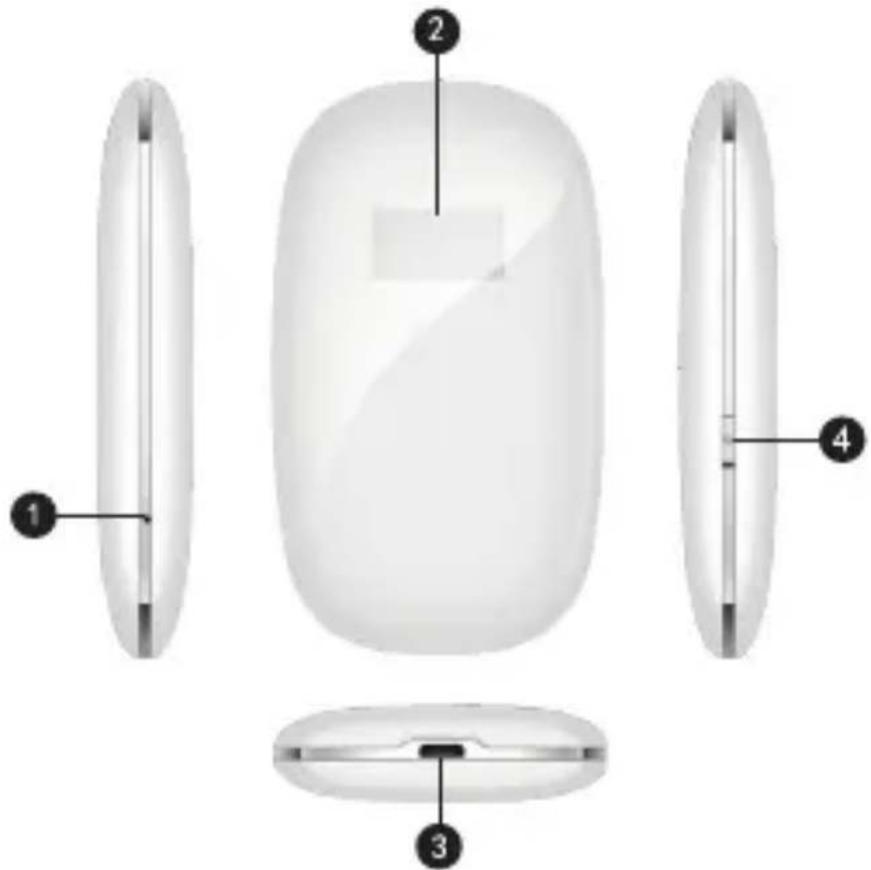
Product overview
- Reset button
- OLED display
- Micro USB port
- ON/OFF button
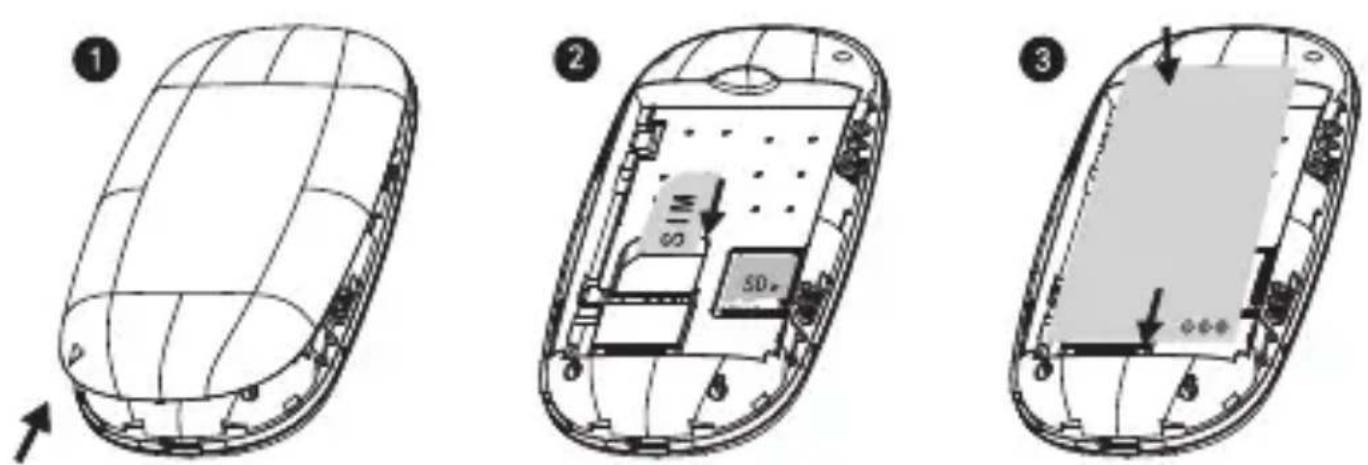
SIM and Micro SD card installation
Ensure that the device is powered off.
Also make sure that the PIN code lock of SIM card is disabled.
- Open the bottom Router upwards as shown in the picture.
- Remove the battery and insert the SIM card and the Micro SD card into their slots.
To insert the Micro SD card, lift the slot's cover up, place the card and move down the slot's cover. - Reinsert the battery making sure to respect the direction of the poles.
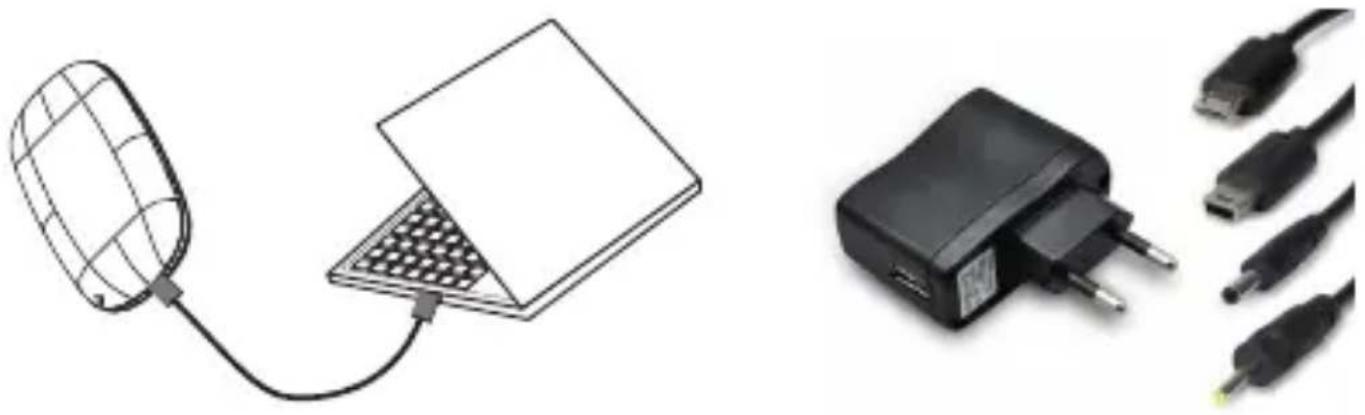
Charging the battery
To charge your device, connect the router to the computer's USB port with the USB cable included or use a USB power adapter such as Hamlet XPW220MOB.
natural_image
Illustration of a laptop connected to a wire mesh device and a black-and-white photo of a charger with three USB cable connectors (no text or symbols)Maximum charging voltage: 4.2V.
LCD display
In the following tablea is described the meaning of the symbols and information that appears on the display.
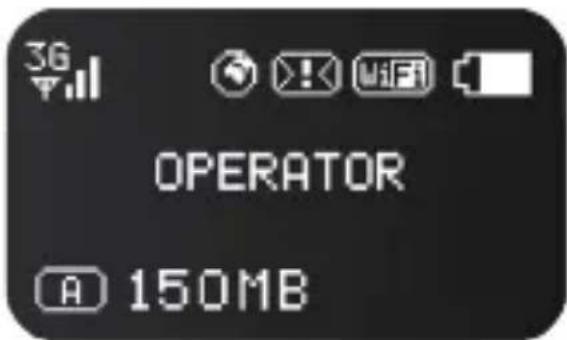
| Items Status | |
| Signal strength | from weak to strong |
| Network | 2G/3G |
| Wi-Fi status | no user connectednumber of users connected |
| Internet connection | |
| SMS new SMS SMS full | |
| Battery level | from empty to full |
| Network operator Name | of mobile network operator |
| Connection mode | Auto Manual |
| Traffic | 00:00MB |
| Roaming Roaming |
Default settings
Please refer to the following default settings of the 3G Router. This information along with the Wi-Fi password are also listed on the back of the product and the inside label.
IP address
• IP address: 192.168.100.1
Web interface login
- Password: hamlet
Wi-Fi network name
• SSID: Hamlet-3G-xxxx
Turn ON/OFF the Router
- To turn on the device, press the power ON/OFF button more than 5s until the Hamlet logo appears on the display.
- To turn off the device, press the power ON/OFF button more than 5s until the "Power Off" message appears on the display.
Reset to factory default settings
If you need to reset the device to factory settings, follow these steps:
- Turn on the device.
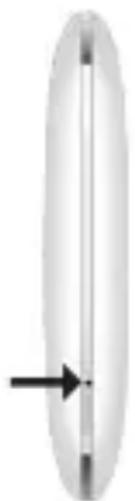
- Use a sharp object such as a paper clip to press and hold the "Reset" button for about 5 seconds.
- Release the "Reset" button and wait for the router to restart.
- The factory default settings will be restored so that you can access the router from your Web browser using the factory defaults.
natural_image
Simple oval shape with a vertical line and a black arrow pointing to its center (no text or symbols)Important
The reset to factory default settings procedure erase all of the configuration settings saved on the router.
Wi-Fi Connection to the Router
You need to establish a direct connection with the router in order to access the web-based configuration utility.
Once you have configured your router, you will be able to connect to the Internet using the Wi-Fi settings that you have specified in the configuration process.
Before starting the setup process, ensure that the router is powered on and has sufficient battery power.
Also make sure your PC is configured to obtain both IP and DNS server addresses automatically.
Please refer to your system's documentation for instructions on how to do this.
To connect to the router using Wi-Fi, follow these steps.
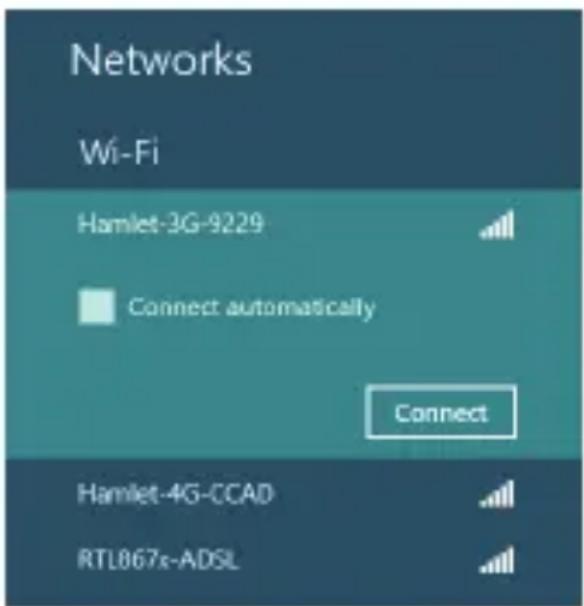
- Open your operating system's wireless networking utility and scan for available networks to connect to.
The default network name (SSID) of the 3G Router is "Hamlet-3G-xxxx", where "xxxx" represents the last four characters of the router's MAC address.
- Once you have located this network, click "Connect" button.
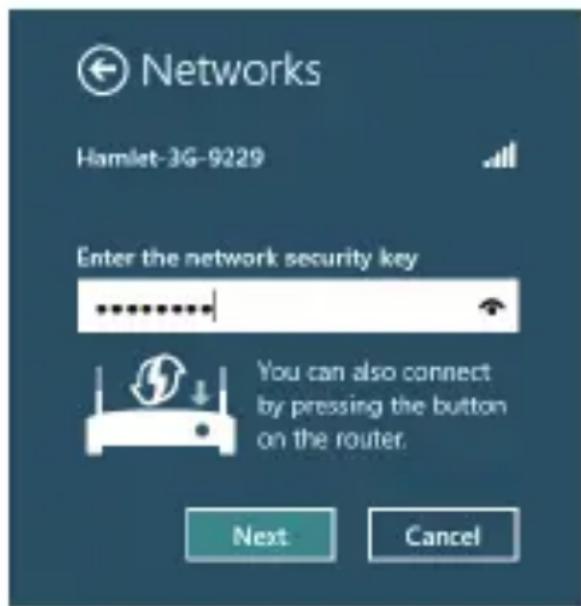
- You will then be prompted to enter the network security key (Wi-Fi Key) for your router.
The Wi-Fi Key is printed on the rear panel of the router.
- Enter the security key and click "OK" or "Next".
The screenshots below refer to Windows 8 operating system.
Router configuration
You can change the settings of the router accessing its web configuration interface via an external device such as a computer or a mobile device.
-
Open your web browser, enter http://192.168.100.1 in the address bar and press "Enter".
-
The login page to the web configuration will appear.
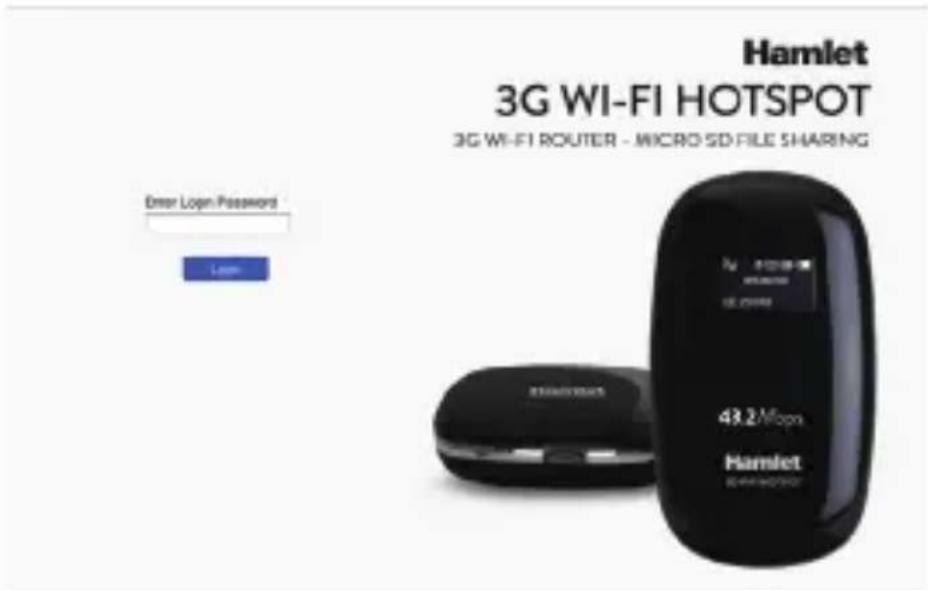
- To access the router configuration, enter your password (hamlet) and click the "Login" button.
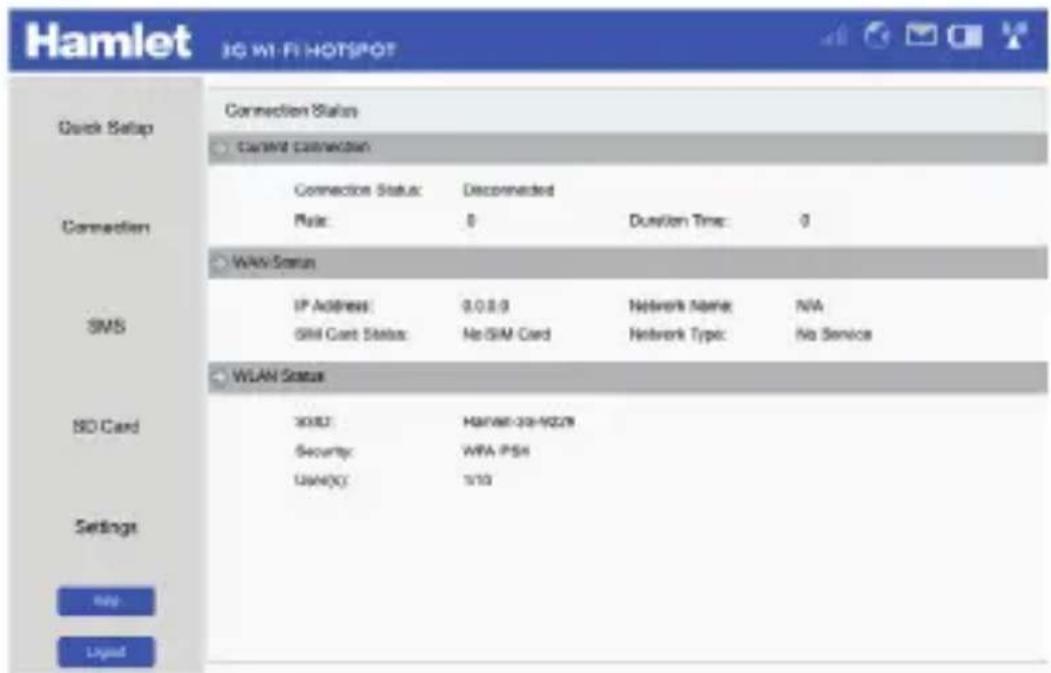
After logging in, you will see the web configuration interface with information on the status of the connection.
The menu on the left allows you to access the different sections of the router's management.
FAQ
Q: Forgot SSID or password.
A: Turn on the device, press the Reset button for at least 5s to restore factory default settings.
Q: You can not connect to the Router via Wi-Fi.
A: Make sure that the wireless card of tablet or other devices is working well, make sure the password is correct.
Q: The Router doesn't turn on.
A: Please make sure that the battery is correctly installed and fully charged.
Q: Can't detect SIM card.
A: Make sure that the SIM Card sia is correctly installed and available.
Q: Can not acces to the Internet.
A: Please make sure you have not exceeded the data limit of your mobile plan and check if there is any balance left in your SIM card.
If the device doesn't work well, please try the following methods.
- Check battery capacity
- Restart the device
- Restore to factory default settings
- Contact local network operator or distributor
- Trademarks and changes
- Safety instructions
- Description
- Features
- Package content
- Product overview
- SIM and Micro SD card installation
- Charging the battery
- LCD display
- Default settings
- IP address
- Turn ON/OFF the Router
- Reset to factory default settings
- Important
- Wi-Fi Connection to the Router
- Router configuration
- FAQ
Brand : Hamlet
Model : HHTSPT3GM42
Category : Router