WP-580RXR - Wall socket Kramer - Free user manual and instructions
Find the device manual for free WP-580RXR Kramer in PDF.


| Product Type | Wall Plate / Wall Socket |
| Brand | Kramer |
| Model | WP-580RXR |
| Form Factor | Single gang Decora style |
| Dimensions (H x W) | 4.5 x 2.8 inches (114 x 71 mm) |
| Depth | 0.6 inches (15 mm) behind wall surface |
| Weight | 0.15 lbs (68 g) |
| Material | High-impact ABS plastic, flame retardant UL94 V-0 |
| Color | Black |
| Operating Temperature | 0°C to 40°C (32°F to 104°F) |
| Storage Temperature | -20°C to 60°C (-4°F to 140°F) |
| Humidity | 10% to 90% non-condensing |
| Installation | Standard junction box with included screws |
| Compliance | CE, RoHS, UL listed |
| Warranty | 2 years limited manufacturer warranty |
| Intended Use | Indoor dry locations |
| Cleaning | Wipe with a soft dry cloth; do not use liquids |
| Repairability | Non-serviceable; replace entire unit if defective |
| Spare Parts | Not available as parts; order whole plate |
| Package Contents | 1 x Wall plate, 2 x mounting screws |
Frequently Asked Questions - WP-580RXR Kramer
User questions about WP-580RXR Kramer
0 question about this device. Answer the ones you know or ask your own.
Ask a new question about this device
Download the instructions for your Wall socket in PDF format for free! Find your manual WP-580RXR - Kramer and take your electronic device back in hand. On this page are published all the documents necessary for the use of your device. WP-580RXR by Kramer.
USER MANUAL WP-580RXR Kramer
This guide helps you install and use your product for the first time. For more detailed information, go to http://www.kramerelectronics.com/support/product_downloads.asp to download the latest manual or scan the QR code on the left.
Step 1: Check what's in the box

WP-580Txr HDMI Line Transmitter and/or
WP-580Rxr HDMI Line Receiver

1 Quick start guide

Power adapter (5V DC) for each device
Save the original box and packaging materials in case you need to return your product for service.
Step 2: Mount the Transmitter and Receiver
Connect the TP cable between the WP-580Txr and WP-580Rxr and then mount them in suitable wall boxes.
Step 3: Connect inputs and outputs
For best results, we recommend that you always use Kramer high-performance cables to connect AV equipment to the WP-580Txr and WP-580Rxr. For optimum range and performance use Kramer's BC-HDKat6a cable. Note that the transmission range depends on the signal resolution, graphics card and display used. The distance using non-Kramer CAT 6 cable may not reach these ranges. Use only shielded cable where both ends of the shield are soldered to ground.
flowchart
graph TD
    A["DVD Player"] -->|HDMI| B["WP-580TXR"]
    B --> C["TP"]
    C --> D["WP-580RXR"]
    D --> E["Display"]
| EIA / TIA 568B | |
| PIN | Wire Color |
| 1 | Orange / White |
| 2 | Orange |
| 3 | Green / White |
| 4 | Blue |
| 5 | Blue / White |
| 6 | Green |
| 7 | Brown / White |
| 8 | Brown |
Twisted Pair Pinout
Step 4: Connect the power
Connect the power adapters to the WP-580Txr and WP-580Rxr and plug the adapters into the mains electricity.
Contents
1 Introduction 1
2 Getting Started 2
2.1 Achieving the Best Performance 2
2.2 Safety Instructions 2
2.3 Recycling Kramer Products 3
3 Overview 4
3.1 About HDBaseT™ Technology 5
3.2 Using Twisted Pair Cable 5
4 Defining the WP-580Txr HDMI Line Transmitter 6
5 Defining the WP-580Rxr HDMI Line Receiver 8
6 Connecting the WP-580Txr and WP-580Rxr 10
6.1 Wiring the RJ-45 Connectors 12
6.2 Grounding the Transmitter/Receiver 13
7 Technical Specifications 14
Figures
Figure 1: WP-580Txr HDMI Line Transmitter for the US and Decora® 6
Figure 2: WP-580Txr HDMI Line Transmitter for Europe (80mm/86mm) 7
Figure 3: WP-580Rxr HDMI Line Receiver for the US and Decora® 8
Figure 4: WP-580Rxr HDMI Line Receiver for Europe (80mm/86mm) 9
Figure 5: Connecting the WP-580Txr/WP-580Rxr Transmitter/Receiver Pair 11
Figure 6: TP PINOUT 12
Figure 7: Grounding Connection Components 13
1 Introduction
Welcome to Kramer Electronics! Since 1981, Kramer Electronics has been providing a world of unique, creative, and affordable solutions to the vast range of problems that confront video, audio, presentation, and broadcasting professionals on a daily basis. In recent years, we have redesigned and upgraded most of our line, making the best even better!
Our 1,000-plus different models now appear in 13 groups that are clearly defined by function: GROUP 1: Distribution Amplifiers; GROUP 2: Switchers and Routers; GROUP 3: Control Systems; GROUP 4: Format/Standards Converters; GROUP 5: Range Extenders and Repeaters; GROUP 6: Specialty AV Products; GROUP 7: Scan Converters and Scalers; GROUP 8: Cables and Connectors; GROUP 9: Room Connectivity; GROUP 10: Accessories and Rack Adapters; GROUP 11: Sierra Video Products; GROUP 12: Digital Signage; and GROUP 13: Audio.
Congratulations on purchasing your Kramer WP-580Txr and WP-580Rxr transmitter/receiver pair (for the US, Europe and/or Decora® wall plates), which is ideal for the following typical applications:
- Projection systems in conference rooms, boardrooms, auditoriums, hotels and churches, production studios
- Rental and staging

Note that WP-580Txr and WP-580Rxr are purchased separately, and can be connected to other HDBaseT certified transmitters and receivers, respectively.
2 Getting Started
We recommend that you:
- Unpack the equipment carefully and save the original box and packaging materials for possible future shipment
- Review the contents of this user manual

Go to http://www.kramerelectronics.com/support/product_downloads.asp to check for up-to-date user manuals, application programs, and to check if firmware upgrades are available (where appropriate).
2.1 Achieving the Best Performance
To achieve the best performance:
- Use only good quality connection cables (we recommend Kramer high-performance, high-resolution cables) to avoid interference, deterioration in signal quality due to poor matching, and elevated noise levels (often associated with low quality cables)
- Do not secure the cables in tight bundles or roll the slack into tight coils
- Avoid interference from neighboring electrical appliances that may adversely influence signal quality
- Position your Kramer WP-580Txr and WP-580Rxr transmitter/receiver pair away from moisture, excessive sunlight and dust

This equipment is to be used only inside a building. It may only be connected to other equipment that is installed inside a building.
2.2 Safety Instructions

Caution: There are no operator serviceable parts inside the unit
Warning: Use only the Kramer Electronics input power wall adapter that is provided with the unit
Warning: Disconnect the power and unplug the unit from the wall before installing
2.3 Recycling Kramer Products
The Waste Electrical and Electronic Equipment (WEEE) Directive 2002/96/EC aims to reduce the amount of WEEE sent for disposal to landfill or incineration by requiring it to be collected and recycled. To comply with the WEEE Directive, Kramer Electronics has made arrangements with the European Advanced Recycling Network (EARN) and will cover any costs of treatment, recycling and recovery of waste Kramer Electronics branded equipment on arrival at the EARN facility. For details of Kramer's recycling arrangements in your particular country go to our recycling pages at http://www.kramerelectronics.com/support/recycling/.
3 Overview
The WP-580Txr and WP-580Rxr are a high-performance, extra range, HDBaseT technology Twisted Pair transmitter and receiver for HDMI signals.
The WP-580Txr converts the HDMI signal to a twisted pair signal.
The WP-580Rxr converts the twisted pair signal back into an HDMI signal.
The WP-580Txr and WP-580Rxr together form an extended transmission and reception system or can separately connect to other certified HDBaseT devices to form the transmission and reception system. For example, the transmitter and receiver system can be composed of WP-580Txr that connects to the Kramer WP-580Rxr to form a transmitter / receiver pair.
The WP-580Txr and WP-580Rxr transmitter/receiver pair features:
- A bandwidth of up to 10.2Gbps (3.4Gbps per graphic channel) in normal mode; up to 4.95Gbps (1.65Gbps per graphic channel) in ultra mode
- System Range - Up to 130m (430ft) normal mode; up to 180m (590ft) ultra mode (1080p @60Hz @24bpp) when using BC-HDKat6a cables

For optimum range and performance using HDBaseT ^™ , use Kramer's BC-HDKat6a cable. Note that the transmission range depends on the signal resolution, source and display used. The distance using non-Kramer CAT 6 cable may not reach these ranges.
• 2K and 4K support in normal mode
- HDBaseT™ technology
• HDTV compatibility and HDCP compliance
- HDMI support - HDMI (deep color, x.v.Color™, lip sync, HDMI uncompressed audio channels, Dolby TrueHD, DTS-HD, CEC, 2K, 4K, 3D)
- 3D pass through
• EDID pass-through -passes EDID/HDCP signals from the source to the display
• LED status indicators for power
• Wall plate size of 2 gang EU/US/Decora®
3.1 About HDBaseT™ Technology
HDBaseT™ is an advanced all-in-one connectivity technology (Supported by the HDBaseT Alliance). It is particularly suitable in the consumer home environment as a digital home networking alternative where it enables you to replace numerous cables and connectors by a single LAN cable used to transmit, for example, uncompressed full high-definition video, audio, IR, as well as various control signals.

The products described in this user manual are HDBaseT certified.
3.2 Using Twisted Pair Cable
Kramer engineers have developed special twisted pair cables to best match our digital twisted pair products; BC-HDKat6a (CAT 6 23 AWG cable) significantly outperforms regular CAT 5 / CAT 6 cables.

We strongly recommend that you use shielded twisted pair cable.
4 Defining the WP-580Txr HDMI Line Transmitter
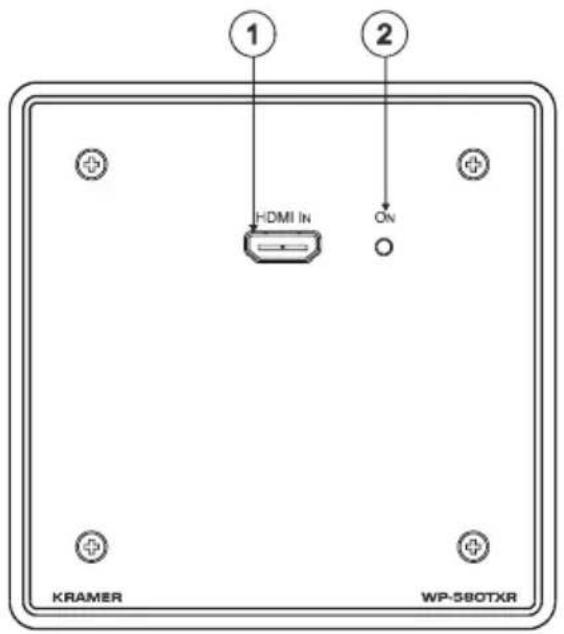
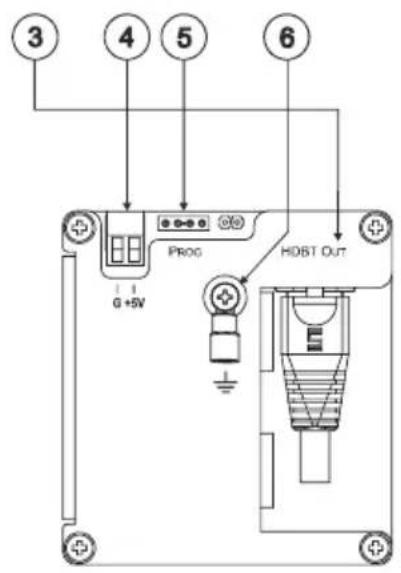
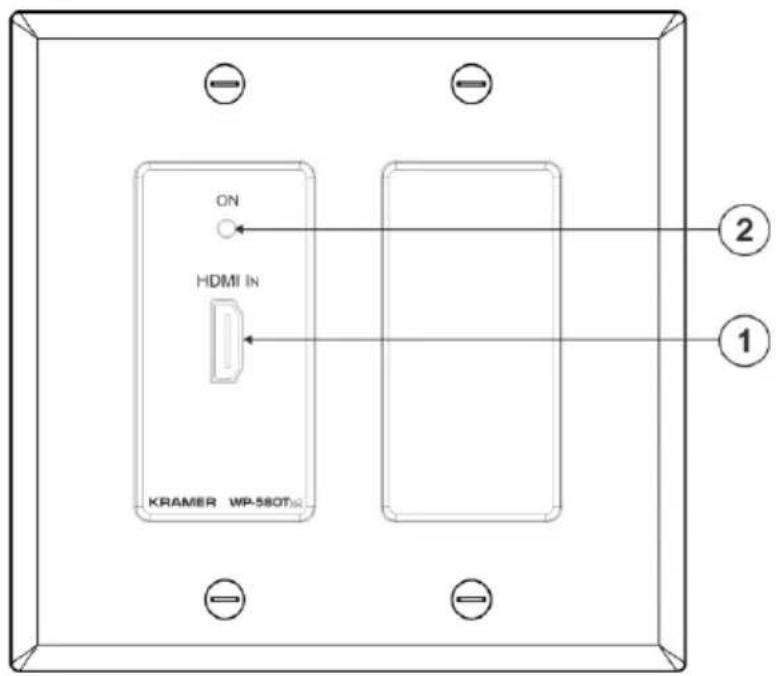
Figure 1: WP-580Txr HDMI Line Transmitter for the US and Decora®

Note that the Decora® type wall plate is supplied with a Midway Size 2 gang frame. You can also fit it into a different sized Decora® frame (not supplied) such as Standard Size or Oversized.
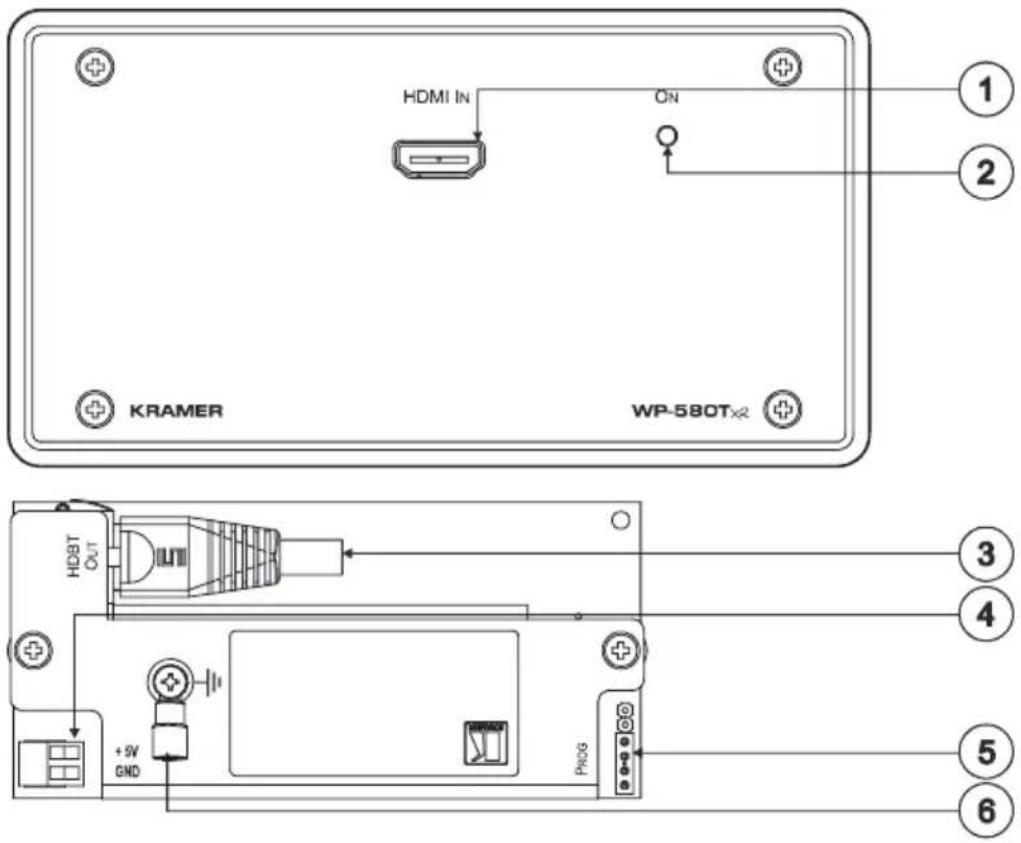
Figure 2: WP-580Txr HDMI Line Transmitter for Europe (80mm/86mm)
| # | Feature | Function |
| 1 | HDMI IN Connector | Connects to the HDMI source |
| 2 | ON LED | Lights red when receiving power only, orange when either input or output and power are attached, and green when both an active input and output are attachedNote, if no input is connected the device invokes the power save mode automatically turning off the power |
| 3 | HDBT OUT RJ-45 Connector | Connects to the HDBT IN RJ-45 connector on the WP-580Rxr |
| 4 | 5V DC | +5V DC connector for powering the unit |
| 5 | PROG 4-pin Connector | For internal use |
| 6 | Grounding Screw | Connect to grounding wire, see Section 6.2 |
5 Defining the WP-580Rxr HDMI Line Receiver
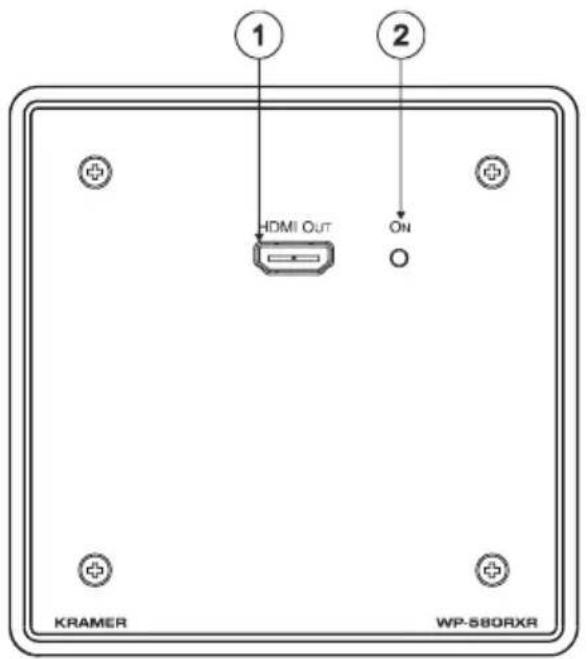
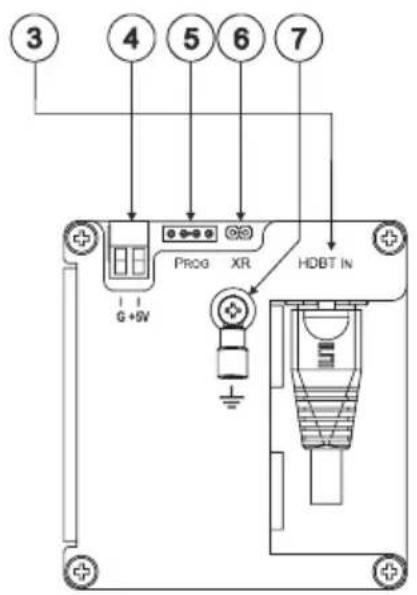
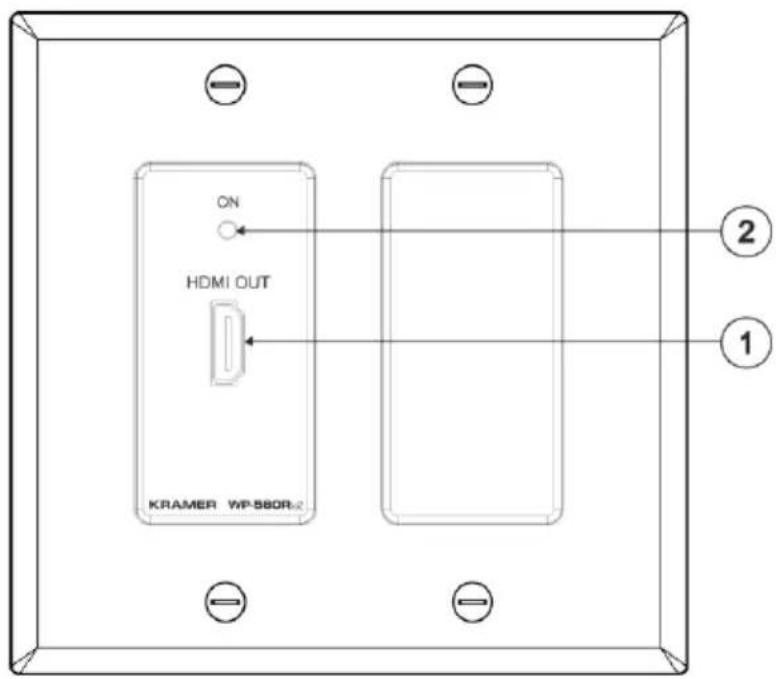
Figure 3: WP-580Rxr HDMI Line Receiver for the US and Decora®

Note that the Decora® type wall plate is supplied with a Midway Size 2 gang frame. You can also fit it into a different sized Decora® frame (not supplied) such as Standard Size or Oversized.
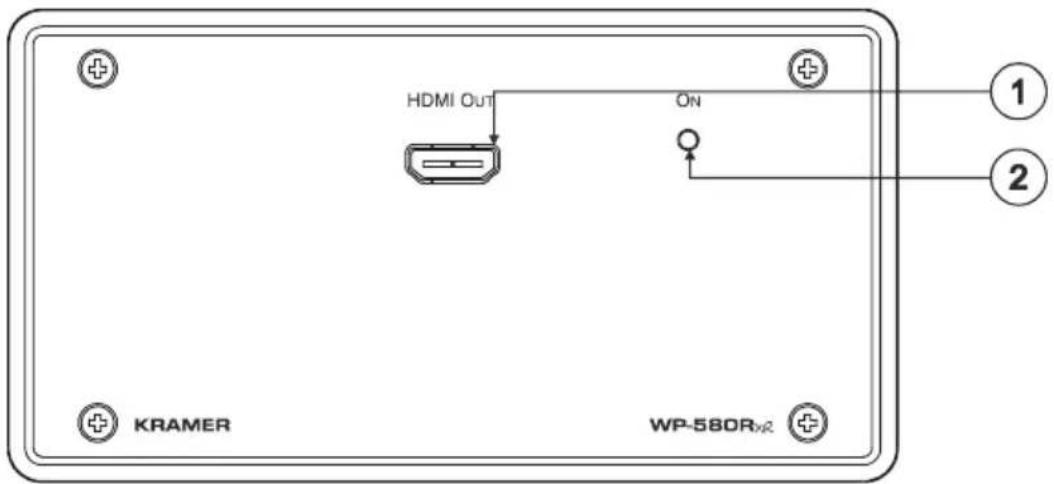
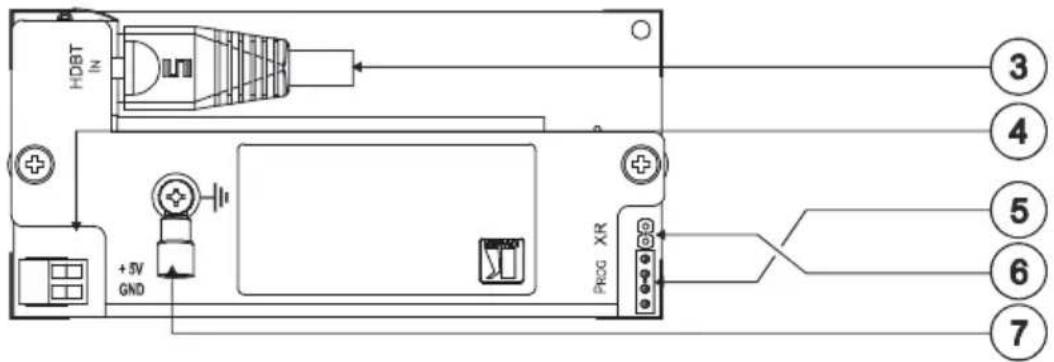
Figure 4: WP-580Rxr HDMI Line Receiver for Europe (80mm/86mm)
| # | Feature | Function |
| 1 | HDMI OUT Connector | Connects to the HDMI acceptor |
| 2 | ON LED | Lights red when receiving power only, orange when either input or output and power are attached, and green when both an active input and output are attachedNote, if no input is connected the device invokes the power save mode automatically turning off the power |
| 3 | HDBT IN RJ-45 Connector | Connects to the HDBT OUT RJ-45 connector on the WP-580Txr |
| 4 | +5V DC | +5V DC connector for powering the unit |
| 5 | PROG 4-pin Connector | For internal use |
| 6 | XR Jumper | For providing extra transmitter-receiver range:With the Jumper: a range of up to 150 meters (490 feet) at 1080p@60Hz@24bppWithout the Jumper: A range of up to 100 meters (330 feet) at 1080p@60Hz@36bpp |
| 7 | Grounding Screw | Connect to grounding wire, see Section 6.2 |
6 Connecting the WP-580Txr and WP-580Rxr

Always switch off the power to each device before connecting it to your transmitter and receiver. After connecting your transmitter and receiver, connect their power and then switch on the power to each device.
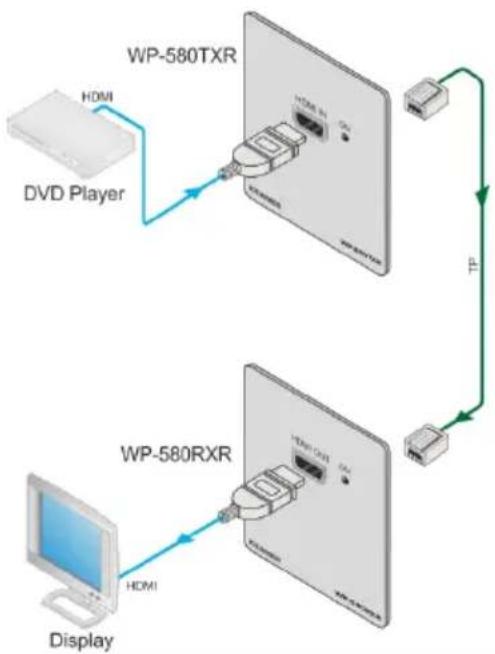
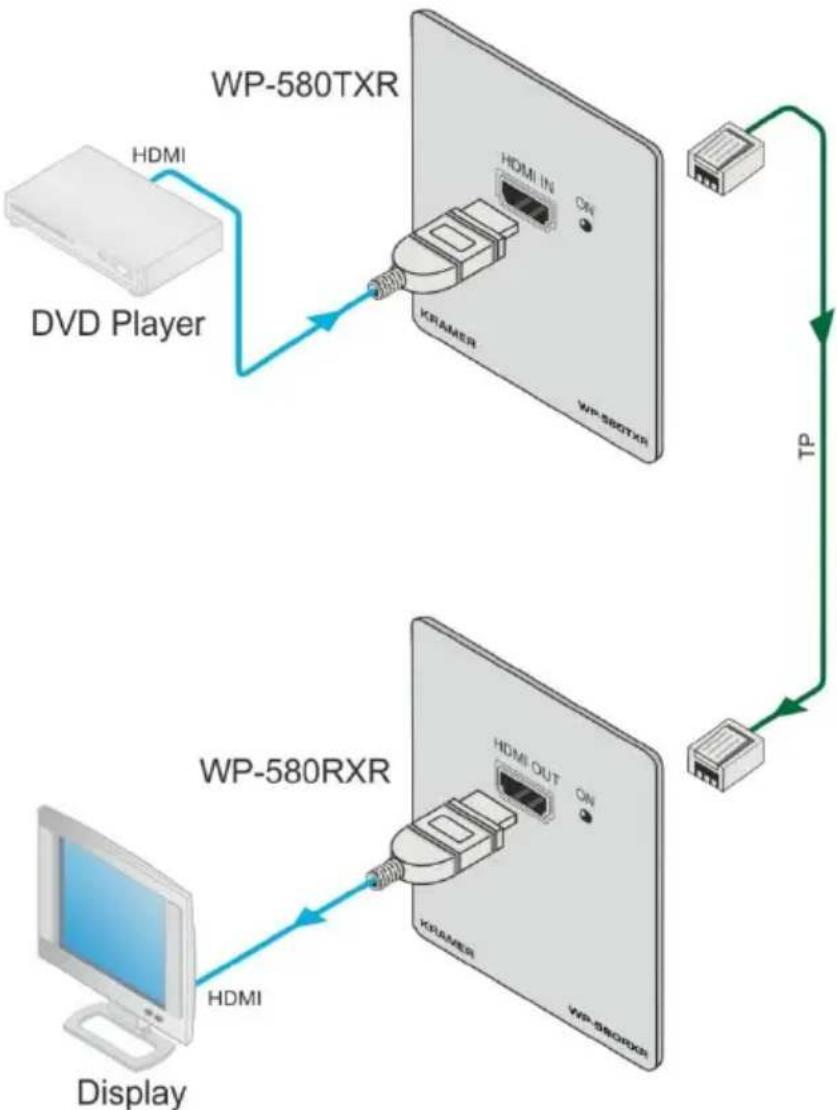
You can use the WP-580Txr HDMI Line Transmitter and the WP-580Rxr HDMI Line Receiver to configure an HDMI transmitter/receiver system, as illustrated in the example in Figure 5.
To connect the WP-580Txr, connect the:
- HDMI source (for example, a DVD player) to the HDMI IN connector.
- HDBT OUT RJ-45 connector over twisted pair to the WP-580Rxr HDBT IN connector.
Alternatively, you can use any other certified HDBaseT receiver device (for example, the Kramer TP-580Rxr) - 5V DC power adapter to the power socket and connect the adapter to the mains electricity (not shown in Figure 5).
To connect the WP-580Rxr, connect the:
- HDMI OUT connector to the HDMI acceptor (for example, a display).
- HDBT IN RJ-45 connector over twisted pair to the WP-580Txr HDBT OUT connector.
Alternatively, you can use any other certified HDBaseT transmitter device (for example, the Kramer TP-580Txr) - Connect the 5V DC power adapter to the power socket and connect the adapter to the mains electricity (not shown in Figure 5).
flowchart
graph TD
    A["HDMI"] -->|HDMI| B["WP-580TXR"]
    C["Display"] -->|HDMI| D["WP-580RXR"]
    B -->|TP| E["WP-580TXR"]
    D -->|TP| F["WP-580RXR"]
    G["DVD Player"] -->|HDMI IN| H["KRAMER"]
    H --> I["WP-580TXR"]
    J["HDMI OUT"] --> K["KRAMER"]
    L["ON"] --> M["WP-580TXR"]
Figure 5: Connecting the WP-580Txr/WP-580Rxr Transmitter/Receiver Pair
6.1 Wiring the RJ-45 Connectors
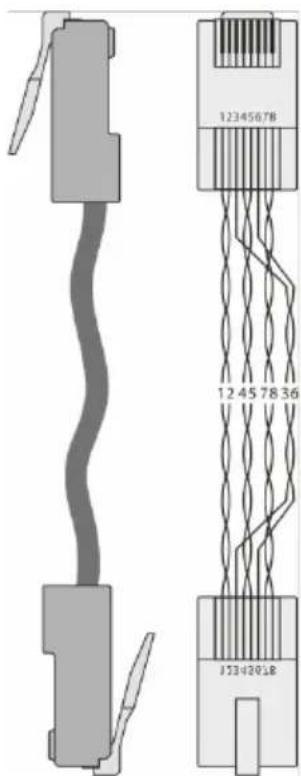
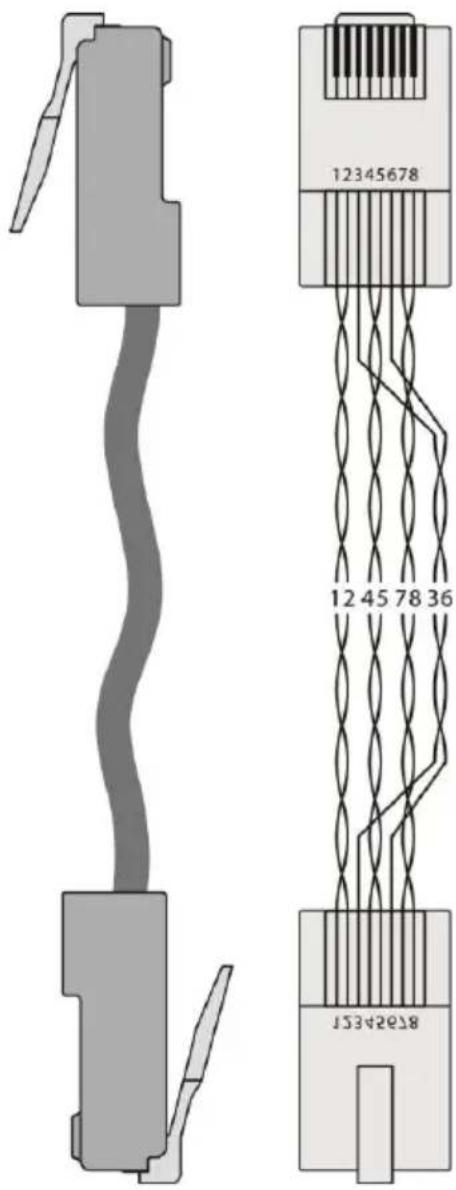
This section defines the TP pinout, using a straight pin-to-pin cable with RJ-45 connectors.

Note, that the cable Ground shielding must be connected / soldered to the connector shield.
| EIA /TIA 568B | |
| PIN | Wire Color |
| 1 | Orange / White |
| 2 | Orange |
| 3 | Green / White |
| 4 | Blue |
| 5 | Blue / White |
| 6 | Green |
| 7 | Brown / White |
| 8 | Brown |
Figure 6: TP PINOUT
6.2 Grounding the Transmitter/Receiver
The grounding screw is used to earth the chassis of the unit to the building ground preventing static electricity from impacting the performance of the unit.
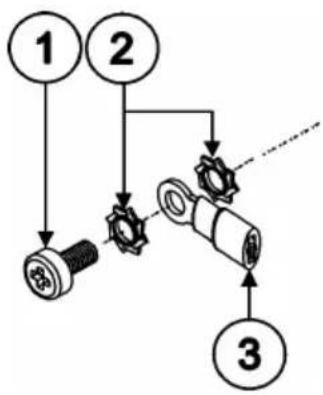
Figure 7 defines the grounding screw components.
flowchart
graph TD
    A["Pin 1"] --> B["Gear"]
    C["Pin 2"] --> D["Gear"]
    B --> E["Component"]
    D --> E
    E --> F["Component"]
    F --> G["3"]
| # | Component Description |
| 1 | M3X6 screw |
| 2 | 1/8" Toothed Lock Washer |
| 3 | M3 Ring Tongue Terminal |
Figure 7: Grounding Connection Components
To ground the room controller:
- Connect the Ring Tongue terminal to the building grounding point wire (it is recommended to use a green-yellow AWG#18 (0.82mm ^4 ) wire, crimped with a proper hand-tool).
- Insert the M3x6 screw through the toothed lock washers and the tongue terminal in the order shown above.
- Insert the M3x6 screw (with the two toothed lock washers and ring tongue terminal) into the grounding screw hole and tighten the screw.
7 Technical Specifications
| WP-580Txr | WP-580Rxr | |
| INPUTS: | 1 HDMI connector | 1 RJ-45 connector |
| OUTPUTS: | 1 RJ-45 connector | 1 HDMI connector |
| BANDWIDTH: | Supports up to 10.2Gbps (3.4Gbps bandwidth per graphic channel) | |
| COMPLIANCE WITH HDMI STANDARD: | Supports HDMI and HDCP | |
| POWER SOURCE: | 5V DC, 390mA | 5V DC, 1.03A |
| OPERATING TEMPERATURE: | 0° to +40°C (32° to 104°F) | |
| STORAGE TEMPERATURE: | -40° to +70°C (-40° to 158°F) | |
| HUMIDITY: | 10% to 90%, RHL non-condensing | |
| DIMENSIONS: | 2 gang for the USA: 11.4cm x 2.6cm x 11.4cm (4.49" x 1.02" x 4.49"), W, D, H2 gang for Europe: 15.2cm x 1.9cm x 8.6cm (5.98" x 0.75" x 3.39"), W, D, H2 gang (Midway Size) for Decora® 12.6cm x 2.5cm x 12.4cm (4.95" x 1" x 4.88"), W, D, H | |
| WEIGHT: | 0.6kg (1.4lbs) approx. | |
| INCLUDED ACCESSORIES: | Power supply | |
| OPTIONS: | Kramer BC-HDKat6a cable | |
| Specifications are subject to change without noticeGo to our Web site at http://www.kramerelectronics.com to access the list of resolutions | ||
LIMITED WARRANTY
The warranty obligations of Kramer Electronics for this product are limited to the terms set forth below:
What is Covered
This limited warranty covers defects in materials and workmanship in this product.
What is Not Covered
This limited warranty does not cover any damage, deterioration or malfunction resulting from any alteration, modification, improper or unreasonable use or maintenance, misuse, abuse, accident, neglect, exposure to excess moisture, fire, improper packing and shipping (such claims must be presented to the carrier), lightning, power surges, or other acts of nature. This limited warranty does not cover any damage, deterioration or malfunction resulting from the installation or removal of this product from any installation, any unauthorized tampering with this product, any repairs attempted by anyone unauthorized by Kramer Electronics to make such repairs, or any other cause which does not relate directly to a defect in materials and/or workmanship of this product. This limited warranty does not cover cartons, equipment enclosures, cables or accessories used in conjunction with this product.
Without limiting any other exclusion herein, Kramer Electronics does not warrant that the product covered hereby, including, without limitation, the technology and/or integrated circuit(s) included in the product, will not become obsolete or that such items are or will remain compatible with any other product or technology with which the product may be used.
How Long Does this Coverage Last
Seven years as of this printing; please check our Web site for the most current and accurate warranty information.
Who is Covered
Only the original purchaser of this product is covered under this limited warranty. This limited warranty is not transferable to subsequent purchasers or owners of this product.
What Kramer Electronics will do
Kramer Electronics will, at its sole option, provide one of the following three remedies to whatever extent it shall deem necessary to satisfy a proper claim under this limited warranty:
-
Elect to repair or facilitate the repair of any defective parts within a reasonable period of time, free of any charge for the necessary parts and labor to complete the repair and restore this product to its proper operating condition. Kramer Electronics will also pay the shipping costs necessary to return this product once the repair is complete.
-
Replace this product with a direct replacement or with a similar product deemed by Kramer Electronics to perform substantially the same function as the original product.
-
Issue a refund of the original purchase price less depreciation to be determined based on the age of the product at the time remedy is sought under this limited warranty.
What Kramer Electronics will not do Under This Limited Warranty
If this product is returned to Kramer Electronics or the authorized dealer from which it was purchased or any other party authorized to repair Kramer Electronics products, this product must be insured during shipment, with the insurance and shipping charges prepaid by you. If this product is returned uninsured, you assume all risks of loss or damage during shipment. Kramer Electronics will not be responsible for any costs related to the removal or re-installation of this product from or into any installation. Kramer Electronics will not be responsible for any costs related to any setting up this product, any adjustment of user controls or any programming required for a specific installation of this product.
How to Obtain a Remedy under this Limited Warranty
To obtain a remedy under this limited warranty, you must contact either the authorized Kramer Electronics reseller from whom you purchased this product or the Kramer Electronics office nearest you. For a list of authorized Kramer Electronics resellers and/or Kramer Electronics authorized service providers, please visit our web site at www.kramerelectronics.com or contact the Kramer Electronics office nearest you.
In order to pursue any remedy under this limited warranty, you must possess an original, dated receipt as proof of purchase from an authorized Kramer Electronics reseller. If this product is returned under this limited warranty, a return authorization number, obtained from Kramer Electronics, will be required. You may also be directed to an authorized reseller or a person authorized by Kramer Electronics to repair the product.
If it is decided that this product should be returned directly to Kramer Electronics, this product should be properly packed, preferably in the original carton, for shipping. Cartons not bearing a return authorization number will be refused.
Limitation on Liability
THE MAXIMUM LIABILITY OF KRAMER ELECTRONICS UNDER THIS LIMITED WARRANTY SHALL NOT EXCEED THE ACTUAL PURCHASE PRICE PAID FOR THE PRODUCT. TO THE MAXIMUM EXTENT PERMITTED BY LAW, KRAMER ELECTRONICS IS NOT RESPONSIBLE FOR DIRECT, SPECIAL, INCIDENTAL OR CONSEQUENTIAL DAMAGES RESULTING FROM ANY BREACH OF WARRANTY OR CONDITION, OR UNDER ANY OTHER LEGAL THEORY. Some countries, districts or states do not allow the exclusion or limitation of relief, special, incidental, consequential or indirect damages, or the limitation of liability to specified amounts, so the above limitations or exclusions may not apply to you.
Exclusive Remedy
TO THE MAXIMUM EXTENT PERMITTED BY LAW, THIS LIMITED WARRANTY AND THE REMEDIES SET FORTH ABOVE ARE EXCLUSIVE AND IN LIEU OF ALL OTHER WARRANTIES, REMEDIES AND CONDITIONS, WHETHER ORAL OR WRITTEN, EXPRESS OR IMPLIED. TO THE MAXIMUM EXTENT PERMITTED BY LAW, KRAMER ELECTRONICS SPECIFICALLY DISCLAIMS ANY AND ALL IMPLIED WARRANTIES, INCLUDING, WITHOUT LIMITATION, WARRANTIES OF MERCHANTABILITY AND FITNESS FOR A PARTICULAR PURPOSE. IF KRAMER ELECTRONICS CANNOT LAWFULLY DISCLAIM OR EXCLUDE IMPLIED WARRANTIES UNDER APPLICABLE LAW, THEN ALL IMPLIED WARRANTIES COVERING THIS PRODUCT, INCLUDING WARRANTIES OF MERCHANTABILITY AND FITNESS FOR A PARTICULAR PURPOSE, SHALL APPLY TO THIS PRODUCT AS PROVIDED UNDER APPLICABLE LAW.
IF ANY PRODUCT TO WHICH THIS LIMITED WARRANTY APPLIES IS A "CONSUMER PRODUCT" UNDER THE MAGNUSON-MOSS WARRANTY ACT (15 U.S.C.A. §2301, ET SEQ.) OR OTHER APPLICABLE LAW, THE FOREGOING DISCLAIMER OF IMPLIED WARRANTIES SHALL NOT APPLY TO YOU, AND ALL IMPLIED WARRANTIES ON THIS PRODUCT, INCLUDING WARRANTIES OF MERCHANTABILITY AND FITNESS FOR THE PARTICULAR PURPOSE, SHALL APPLY AS PROVIDED UNDER APPLICABLE LAW.
Other Conditions
This limited warranty gives you specific legal rights, and you may have other rights which vary from country to country or state to state.
This limited warranty is void if (i) the label bearing the serial number of this product has been removed or defaced, (ii) the product is not distributed by Kramer Electronics or (iii) this product is not purchased from an authorized Kramer Electronics reseller. If you are unsure whether a reseller is an authorized Kramer Electronics reseller, please visit our Web site at
www.kramerelectronics.com or contact a Kramer Electronics office from the list at the end of this document.
Your rights under this limited warranty are not diminished if you do not complete and return the product registration form or complete and submit the online product registration form. Kramer Electronics thanks you for purchasing a Kramer Electronics product. We hope it will give you years of satisfaction.

For the latest information on our products and a list of Kramer distributors, visit our Web site where updates to this user manual may be found.
We welcome your questions, comments, and feedback.
Web site: www.kramerelectronics.com
E-mail: info@kramerel.com



SAFETY WARNING
Disconnect the unit from the power supply before opening and servicin

P/N: 2900-300087

Rev: 4
- Step 1: Check what's in the box
- Step 2: Mount the Transmitter and Receiver
- Step 3: Connect inputs and outputs
- Step 4: Connect the power
- Contents
- Introduction 1
- Getting Started 2
- Overview 4
- Figures
- Introduction
- Getting Started
- Achieving the Best Performance
- Safety Instructions
- Recycling Kramer Products
- Overview
- About HDBaseT™ Technology
- Using Twisted Pair Cable
- Defining the WP-580Txr HDMI Line Transmitter
- Defining the WP-580Rxr HDMI Line Receiver
- Connecting the WP-580Txr and WP-580Rxr
- Wiring the RJ-45 Connectors
- Grounding the Transmitter/Receiver
- Technical Specifications
- LIMITED WARRANTY
- What is Covered
- What is Not Covered
- How Long Does this Coverage Last
- Who is Covered
- What Kramer Electronics will do
- What Kramer Electronics will not do Under This Limited Warranty
- How to Obtain a Remedy under this Limited Warranty
- Limitation on Liability
- Exclusive Remedy
- Other Conditions
Brand : Kramer
Model : WP-580RXR
Category : Wall socket