
WL110 - Lighting ELRO - Free user manual and instructions
Find the device manual for free WL110 ELRO in PDF.


Pick your language and provide your email: we'll send you a specifically translated version.
| Product Type | Security Light with Motion Sensor |
| Model | WL110 |
| Brand | ELRO |
| Power Source | 230V AC, 50Hz |
| Light Source | 10W LED (equivalent to 100W incandescent) |
| Luminous Flux | 800 lumens |
| Color Temperature | 4000K (neutral white) |
| Motion Sensor Type | PIR (Passive Infrared) |
| Detection Angle | 120° |
| Detection Range | Up to 12 meters |
| Time Delay Adjustment | 10 seconds to 3 minutes |
| Dusk-to-Dawn Sensor | Yes, automatic on/off based on ambient light |
| IP Rating | IP44 (splashproof) |
| Housing Material | Polycarbonate and aluminum |
| Dimensions (H x W x D) | 200 x 150 x 100 mm |
| Weight | 0.5 kg |
| Mounting Type | Wall mount (bracket included) |
| Installation | Hardwired, requires connection to mains power |
| Maintenance | Clean with a soft, dry cloth; do not use harsh chemicals |
| Safety Warning | Disconnect power before installation or maintenance |
| Spare Parts Availability | Not available; replace the entire unit if defective |
| Warranty | 2 years |
Frequently Asked Questions - WL110 ELRO
How do I install the ELRO WL110 security light?
Installation must be performed by a qualified electrician. First, disconnect the mains power. Then, mount the bracket to the wall using the provided screws, connect the wires (live, neutral, earth), and attach the light unit. Finally, restore power and test the sensor.
Can the motion sensor be adjusted?
Yes, the sensor has adjustable settings for detection range, time delay, and light sensitivity. Refer to the manual for specific adjustment methods. Typically, you can rotate the sensor head or use dials on the unit.
Why does the light stay on all the time?
This may be due to the dusk-to-dawn sensor being disabled or the time delay set to maximum. Also, check if the sensor is detecting false triggers (e.g., moving branches). Adjust the sensitivity or time delay as needed.
What is the IP rating and can it be used outdoors?
The ELRO WL110 has an IP44 rating, meaning it is splashproof and suitable for outdoor use. However, avoid direct exposure to heavy rain or submersion.
How do I reset the security light?
To reset, switch off the mains power for at least 10 seconds, then turn it back on. This should restore factory settings. If issues persist, contact ELRO support.
What type of bulb does the WL110 use?
The WL110 uses an integrated 10W LED module that is not replaceable. If the LED fails, the entire unit must be replaced.
Can I bypass the motion sensor to have constant light?
Some models have a manual override feature. Check if your unit has a switch or can be set to 'always on' mode. If not, you may need to modify the settings via the sensor controls.
What should I do if the sensor range is too short?
Ensure the sensor lens is clean and not obstructed. Increase the sensitivity setting if available. Also, consider the mounting height: the sensor works best at 2-3 meters above ground.
How do I clean the security light?
Use a soft, dry cloth to wipe the housing and sensor lens. Do not use water, solvents, or abrasive cleaners, as they may damage the unit. Avoid spraying liquids directly onto the light.
Is the WL110 compatible with smart home systems?
No, the ELRO WL110 is a standalone unit and does not support smart home integration. It operates with built-in sensors only.
User questions about WL110 ELRO
0 question about this device. Answer the ones you know or ask your own.
Ask a new question about this device
No questions yet. Be the first to ask one.
Download the instructions for your Lighting in PDF format for free! Find your manual WL110 - ELRO and take your electronic device back in hand. On this page are published all the documents necessary for the use of your device. WL110 by ELRO.
USER MANUAL WL110 ELRO

natural_image
Exterior view of a black plastic ventilation grille with no visible text or symbolsWL110Z

natural_image
White plastic ventilation grater with multiple vertical slots and mounting holes (no text or symbols visible)WL110

Security light

natural_image
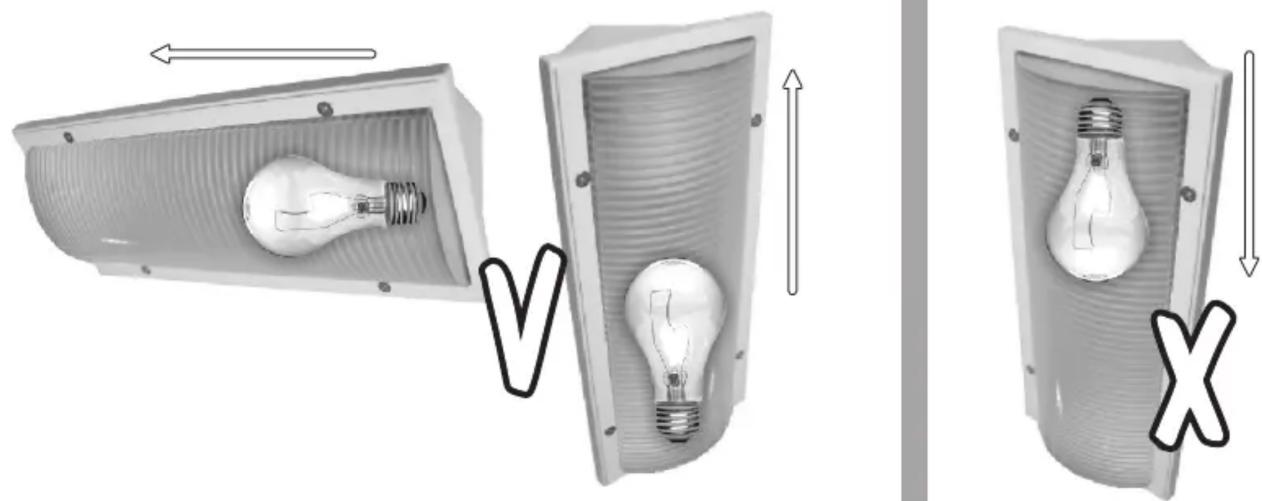
Diagram showing three views of a light bulb inside a device, with arrows indicating direction (no text or symbols)
Table of contents
Click a title to access it
Manual assistant
Powered by Anthropic
Waiting for your message
Product information
Brand : ELRO
Model : WL110
Category : Lighting