
MG25BNM - Microwaves MIDEA - Free user manual and instructions
Find the device manual for free MG25BNM MIDEA in PDF.


| Product Type | Countertop Microwave Oven |
| Brand | Midea |
| Model | MG25BNM |
| Capacity | 25 Liters |
| Dimensions (W x D x H) | 450 x 350 x 250 mm |
| Weight | Approximately 12 kg |
| Power Supply | 230V ~ 50Hz |
| Power Consumption | 1200 W |
| Microwave Power Output | 800 W |
| Control Type | Digital Touch with LED Display |
| Functions | Defrost, Auto Cook, Timer, Clock |
| Turntable | Yes, 315 mm glass turntable |
| Door Opening | Side-swing with handle |
| Child Lock | Yes |
| Interior Light | Yes |
| Cleaning | Wipe with damp cloth and mild detergent |
| Safety Certifications | CE, RoHS |
| Spare Parts Availability | Contact Midea customer service or authorized dealers |
| Repairability Index | Not available, but typical for class |
Frequently Asked Questions - MG25BNM MIDEA
User questions about MG25BNM MIDEA
0 question about this device. Answer the ones you know or ask your own.
Ask a new question about this device
Download the instructions for your Microwaves in PDF format for free! Find your manual MG25BNM - MIDEA and take your electronic device back in hand. On this page are published all the documents necessary for the use of your device. MG25BNM by MIDEA.
USER MANUAL MG25BNM MIDEA
natural_image
Line drawing of a microwave oven with three control knobs and a flat lid (no text or symbols)型號:MG25BNM
額定電壓:220V\~50Hz
額定功率:1500W
部件名稱:
natural_image
Pure technical line drawing of three vertical structural components without any text, numbers, or symbols清潔保養
必
natural_image
Symbol of a trash bin crossed with two crossed lines, no text or labels presentMidea
natural_image
Line drawing of a microwave oven with three control knobs and a front panel (no text or symbols)MODEL:MG25BNM
POWER SUPPLY: 220V\~50Hz
POWER CONSUME: 1500W
BEFORE OPERATING THIS PRODUCT, READ, UNDERSTAND, AND FOLLOW THESE INSTRUCTIONS. ENSURE TO SAVE THIS BOOKLET FOR FUTURE REFERENCE.
IMPORTANT SAFEGUARDS
When using electrical appliance, basic safety precautions should always be followed, including the followings:
- Read all instructions before using.
- To protect against any electrical hazards, DO NOT place unit or cord in water or any other liquids.
- Do not touch any hot surfaces. Use oven mitts for removing or touching any hot parts. Always placing Toast Oven on heat protected surface.
- Unplug the unit from outlet when not use and before cleaning. Always allowing to cool down before attaching or removing any parts.
- The use of accessory attachments are not recommended by the appliance manufacturer may cause injuries.
- Always pulling the plug out from the wall and never pull the cord. Remove the plug from the wall before moving the appliance. Using both hands to move the appliance.
- Do not let cord hang over edge of table, or touch hot surface.
- Do not place the Toaster Oven near the heated oven, a hot flame or electric burner.
- Do not use outdoors.
- If the electric circuit is overloaded with other appliances, this appliance may not operate properly. The Toaster Oven should be operated on a separate electrical circuit from other operating appliances.
- The temperature of accessible surfaces may be high when the appliance is operating.
- If the supply cord is damaged, it must be replaced by midea customer service center in order to avoiding a hazard.
- Store only the accessories provided with this unit inside the oven when not in use. Do not store other materials.
- A fire may occur if the appliance covered or touched the flammable materials, including curtains, draperies, walls, and so on, when in operation. Do not put any items on the top of the appliance when in operation.
- Do not place any cardboards, papers or plastic items inside the oven.
- All containers placed inside the oven must not be airtighted. Also, they need to have enough room to allow for expansion of fluids.
- Clean this appliance regularly because the grease may cause a fire. Make sure that this appliance is not placed near curtains, any drapery, or other flammable materials.
- Do not clean with metal scouring pads. Pieces can break off the pad and touch electrical parts involving a risk of electric shock.
- In order to preventing accidental burns, must use the handle and knobs to operate this appliance.
-
The temperature of the door or outside surface may be high when the appliance operating.
-
Oversize foods or metal utensils must not be inserted in a toast oven as they may create a fire or risk of electric shock.
- Do not cover crumb tray or any part of the oven with metal foil. This will cause overheating of the oven.
- Extreme caution should be exercised when using containers constructed of other than metal or glass.
- This appliance is not intended for use by persons including children with reduced physical, sensory or mental capabilities, or lack of experience and knowledge unless they have been given supervision or instruction concerning use of the appliance by a person responsible for their safety.
- Children should be supervised to ensure that they do not play with the appliance.
- The appliance is not intended to be operated by means of an external timer or separate remote-control system.
- The surface of appliance shall be placed against a wall.
SAVE THESE INSTURCTIONS HOUSEHOLD USE ONLY
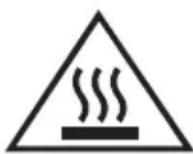
Caution :hot surface
BEFORE FIRST USE
- Remove all accessories and shipping materials packed inside the oven.
- Wash the rack and pan in warm soapy water. Wipe the inside of the oven with a damp cloth or sponge. Blot dry with paper towels to be sure the unit is dry before using.
- Place oven on a flat counter or other stable surface DO NOT OPERATE ON THE SAME CIRCUIT WITH ANOTHER APPLIANCE.
- Make sure the crumb tray is properly installed before using.
For the first time, set the temperature knob to MAX, the timer setting to 10 minutes. This will burn off any oils still on the oven.
NOTE: The oven may smoke during this process. This is normal for a new oven and will not last more than 10-15 minutes.
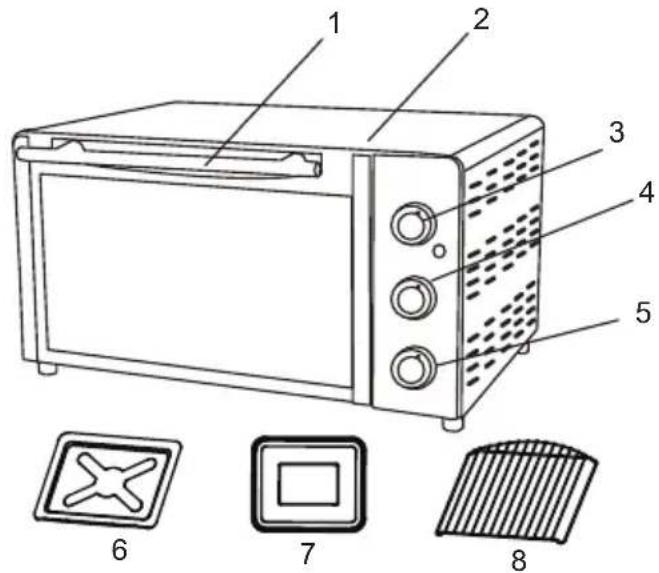
NAME OF PARTS
- Door handle
- Housing
- Temperature knob
- Function knob
- Timer knob
- Crumb tray
- Baking tray
- Baking rack
CONTROL SETTINGS
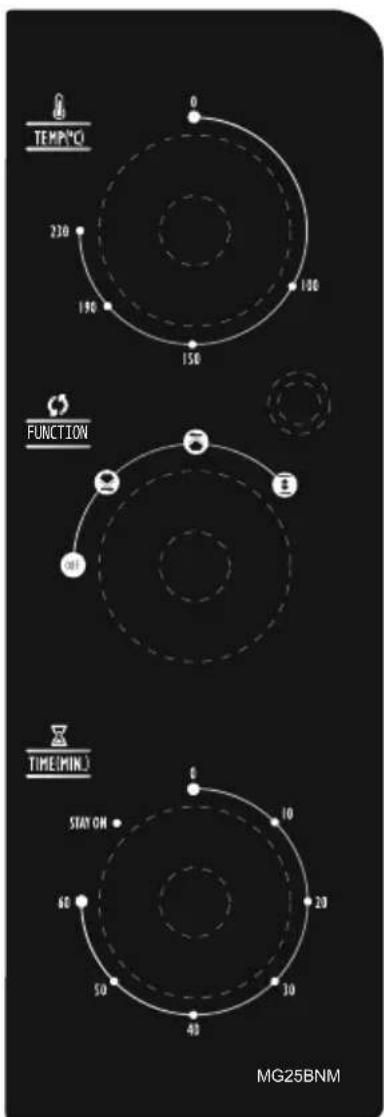
TIME SETTING
0-60 MINUTES: The timer can be set up to 60 minutes.
The oven will not turn on without the timer being set.
When the time knob is in the "0" position, the oven will not operate. To set the time, turn the timer knob to the desired time.
Indicator light is lit only when time has been set.
When the timer has reached the "0" position, a bell sound will be heard. Power supply will be cut off automatically.
TIME ADJUSTING
Timer can be changed during cooking cycle. Just turn the timer knob to the desired time and continue cooking.
NOTE: When setting the timer knob for less than 5 minutes, rotate timer to over 10 minutes and then rotate back to your chosen time.
Ensure a safe and accurate timer setting.
TEMPERATURE SETTING
Turn the temperature knob clockwise to the desired temperature setting. The temperature can be set from 100^ C to 230^ C.
STAY ON
For using the toaster without time control, turn the timer konb to position" STAY ON " In this case, the toaster will work until the timer konb is set to " 0 " position.
Note: The bread may catch fire if the toasting time is setting too long. Close supervision is necessary during toasting.
FUNCTION SETTING
This Oven offer three different functions for versatile cooking all in one appliance.
Bake: 🖼 The lower heating element is working during this function.
Broil: The upper and lower heating elements are working during this cycle.
Toast: The upper and lower heating elements are working during this function. It is perfect for baking pizza, bread and cookies and toasting pork, steaks and toasts.
HOW TO USE
CAUTION: THE OVEN SURFACES ARE HOT DURING AND AFTER USE GENERAL INSTRUCTIONS
- Place the baking rack in position that will accommodate the height of the food to be cooked.
- Set the food on the rack. Make sure that you use an ovenproof container in the oven, never use plastic or cardboard containers in the oven.
- Never use glass or ceramic pans or lids.
- Do not let juices run to the bottom of the oven. Use the drip tray and crumb tray when cooking.
- Set the temperature as suggested by the recipe or as desired.
- Securely shut the door and set the cooking time to begin operating the oven.
BAKE FUNCTION:
Use the bake function for foods such as meats which easy to stew, soups and vegetables.
- Place the baking rack to the desired height.
- Set the function knob to " ☐".
- Select the length of time you want to "Bake" the food.
- Rotate the temperature knob clockwise to desired temperature.
- Continuing baking for desired length of time.
- Check food temperatures before moving to ensure that proper internal temperatures have been reached.
- Always removing food with oven mitts. Food and oven are very hot.
BROIL FUNCTION:
The broil function is ideal for fish, beef, steak, vegetables, etc.
- Place the baking rack to the desired height.
- Set the function knob to" 🔊".
- Select the length of time you want to broil the food.
- Rotate the temperature knob clockwise to desired temperature.
- Continuing broiling for desired length of time.
- Check food temperatures before moving to ensure that proper internal temperatures have been reached.
- Always removing food with oven mitts. Food and oven are very hot.
TOAST FUNCTION:
Use the toast function for foods such as corn, bread, cookies and heating food.
- Place the baking rack to the desired height.
- Set the function knob to " ☐".
- The most length of time you want to Toast for 7 minutes.
- Rotate the temperature knob clockwise to desired temperature.
- Continuing toasting for desired length of time.
- Check food temperatures before moving to ensure that proper internal temperatures have been reached.
- Always removing food with oven mitts. Food and oven are very hot.
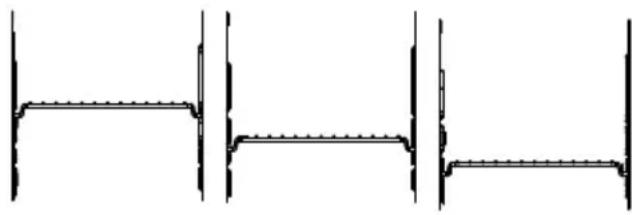
ABOUT RACK LEVELS
There are 3 rack levels. Used on a baking tray is not placed in the mezzanine, can only be placed on the grill.
natural_image
Pure technical line drawing of three identical structural components without any text, numbers, or symbolsCARE AND CLEANING
- Before cleaning unplug the toaster oven and allow it to cool completely.
- Wash all the attachments with mild, soaped water including the rack and the baking Tray.
- Do not use abrasive cleansers, scrubbing brushes and chemical cleaner as this will cause damage to the non-stick coating of baking tray.
- Using a wet cloth to wipe the inner of the oven.
- Clean the door by using a wet cloth saturated with detergent or soap.
- Never immerse the unit in water or other liquid.
- Any other servicing should be performed by mideacustomer service center.
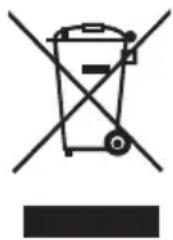
DISPOSAL:
Do not dispose of electrical appliances as unsorted municipal waste, use separate collection facilities. Contact your local government for information regarding the collection systems available. If electrical appliances are disposed of in landfills or dumps, hazardous substances can leak into the groundwater and get into the food chain, damaging your health and well-being.
natural_image
Symbol of a trash bin crossed out by two crossed lines, with a solid black rectangle below (no text or labels)- 部件名稱:
- 清潔保養
- 必
- Midea
- IMPORTANT SAFEGUARDS
- SAVE THESE INSTURCTIONS HOUSEHOLD USE ONLY
- BEFORE FIRST USE
- NAME OF PARTS
- CONTROL SETTINGS
- TIME SETTING
- TIME ADJUSTING
- TEMPERATURE SETTING
- STAY ON
- FUNCTION SETTING
- HOW TO USE
- BAKE FUNCTION:
- BROIL FUNCTION:
- TOAST FUNCTION:
- ABOUT RACK LEVELS
- CARE AND CLEANING
- DISPOSAL:
Brand : MIDEA
Model : MG25BNM
Category : Microwaves