
OPTOMA W515 - Projector

W515 - Projector OPTOMA - Free user manual and instructions

Find the device manual for free W515 OPTOMA in PDF.

📄 96 pages English EN Download 💬 AI Question 10 questions ⚙️ Specs
Notice OPTOMA W515 - page 1
Pick your language and provide your email: we'll send you a specifically translated version.
Product type DLP Projector
Native resolution WXGA (1280 x 800)
Brightness 5000 ANSI lumens
Contrast ratio 20000:1
Lamp life (normal mode) 4000 hours
Lamp life (Eco mode) 10000 hours
Dimensions (W x D x H) 31.5 x 22.4 x 11.4 cm
Weight 3.5 kg
Power supply 100-240 V AC, 50/60 Hz
Power consumption (max) 350 W
Video inputs HDMI 1.4a, VGA, Composite, S-Video
Audio inputs 3.5 mm jack, Stereo RCA
Audio outputs 3.5 mm jack, Built-in speaker (10 W)
Connectivity USB-A (power), RS-232, RJ45 (LAN)
Keystone correction Vertical ± 30°, horizontal ± 30°
Zoom 1.6x optical
Noise level (normal mode) 35 dB
Noise level (Eco mode) 30 dB
Maintenance and cleaning Clean air filter every 1000 hours; use a soft, dry cloth for the lens
Security Kensington lock, security password, cabinet lock
Spare parts and repairability Replacement lamp (model: SP.8A01.001), air filter
General information 2-year manufacturer warranty; compliant with RoHS and CE standards

Frequently Asked Questions - W515 OPTOMA

How to turn the OPTOMA W515 projector on and off?
Press the Power button on top of the projector or on the remote control. To turn off, press the Power button twice or hold it for 2 seconds. The LED indicator will blink and then turn off.
What is the maximum resolution supported by the W515?
The projector has a native resolution of WXGA (1280 x 800). It can accept signals up to 1920 x 1080 (Full HD) via HDMI.
How to connect a computer to the projector?
Use a VGA or HDMI cable. Connect one end to the projector and the other to your computer. Select the corresponding source using the Source button.
What to do if the image is blurry?
Turn the focus ring on the lens. If the image is still blurry, check the projection distance (minimum 1.2 m) and use the zoom if necessary.
How to replace the projector lamp?
Turn off the projector and unplug it. Let it cool for 30 minutes. Unscrew the lamp cover, remove the old lamp, and insert the new one (model SP.8A01.001). Replace the cover and reset the lamp counter via the menu.
The projector does not turn on, what should I check?
Make sure the power cable is properly connected and the outlet works. Check if the Power indicator blinks. If the indicator is solid red, the lamp may be at the end of its life or the projector is overheating.
How to clean the air filter?
Turn off the projector and unplug it. Remove the air filter located on the side. Clean it with a vacuum cleaner or rinse with warm water (let it dry completely before reinstalling). Replace it every 1000 hours of use.
Can I use an HDMI cable to connect a game console?
Yes, connect the console via HDMI. The projector supports 1080p signals. Make sure the image mode is set to Game in the menu to reduce lag.
How to adjust keystone correction?
Go to Settings > Keystone correction. Use the arrow keys to adjust vertical and horizontal. You can also use the correction wheels on top of the projector.
What does the blinking 'Lamp' LED indicator mean?
A fast blink indicates the lamp is at the end of its life and needs replacement. A slow blink means the projector is in standby or cooling down. Refer to the Troubleshooting section of the manual.

User questions about W515 OPTOMA

0 question about this device. Answer the ones you know or ask your own.

Ask a new question about this device

The email remains private: it is only used to notify you if someone responds to your question.

No questions yet. Be the first to ask one.

Download the instructions for your Projector in PDF format for free! Find your manual W515 - OPTOMA and take your electronic device back in hand. On this page are published all the documents necessary for the use of your device. W515 by OPTOMA.

USER MANUAL W515 OPTOMA

TABLE DES MATIÈRES

SÉCURITÉ 4

This Class B digital apparatus complies with Canadian ICES-003.

Diagram of a cable VGA connector with two connectors and cables (no text or symbols on the diagram itself)

Coiled cable with two connectors, labeled 'Câble HDMI' below (no other text or symbols)

UTILISER LE PROJECTEUR

Page d'accueil
Model Optoma Tools Info Help Optoma Power Vol - Mute Vol + SourceList VGA1 VGA2 Video HDMI Flash Drive Menu Auto OK AV Mute Source Freeze Contrast Brightness Color

Page Outils
Model: Optoma Logout Tools Info Help Optoma Crestron Control IP Address 192.168.0.2 IP ID 5 Port 41734 Send Projector Projector Name EX610STi Location Room Name Sir. Send User Password Enabled New Password Confirm Send Default Language Automatic Send DHCP DHCP Enabled IP Address 192.168.0.100 Subnet…

  1. Start (Démarrer) > All Programs (Tous les programmes) > Accessories (Accessoires) > Command Prompt (Invite de commande).
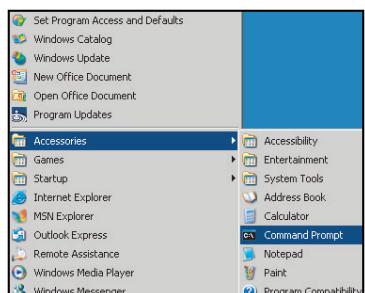
Set Program Access and Defaults Windows Catalog Windows Update New Office Document Open Office Document Program Updates Accessories Games Startup Internet Explorer MSN Explorer Outlook Express Remote Assistance Windows Media Player Windows Messenger Accessibility Entertainment System Tools Address B…

INFORMATIONS SUPPLÉMENTAIRES

info@os-worldwide. www.os-worldwide.com

Taiwan

12F., No.213, Sec. 3, Beixin Rd., Xindian Dist., New Taipei City 231, Taiwan, R.O.C. com.tw www.optoma.com.tw

+886-2-8911-8600 +886-2-8911-6550 services@optoma. asia.optoma.com

Hong Kong

Unit A, 27/F Dragon Centre, 79 Wing Hong Street, Cheung Sha Wan, Kowloon, Hong Kong

+852-2396-8968 +852-2370-1222 www.optoma.com.hk

Chine

5F, No. 1205, Kaixuan Rd., Changning District Shanghai, 200052, China

+86-21-62947376 +86-21-62947375 www.optoma.com.cn
Manual assistant
Powered by Anthropic
Waiting for your message
Product information

Brand : OPTOMA

Model : W515

Category : Projector