
SGPD432 - Browser SYLVANIA - Free user manual and instructions
Find the device manual for free SGPD432 SYLVANIA in PDF.


| Product Type | Portable GPS Navigation Device |
| Display Size | 4.3-inch touchscreen |
| Display Resolution | 480 x 272 pixels |
| Dimensions (W x H x D) | Approximately 4.9 x 3.0 x 0.6 inches |
| Weight | Approximately 5.6 oz (160 g) |
| Battery Type | Rechargeable lithium-ion battery |
| Battery Life | Up to 2 hours of continuous use |
| Power Input | 5V DC via vehicle charger or USB cable |
| Main Functions | GPS navigation, turn-by-turn directions, points of interest (POI), route planning, speed limit alerts, Bluetooth connectivity (hands-free calling) |
| Map Storage | Built-in memory for maps; supports SD card for additional maps |
| Pre-loaded Maps | USA and Canada (continental) |
| Languages Supported | English, French, Spanish |
| Mounting | Windshield suction cup mount and dashboard disk |
| Audio Output | Built-in speaker, 3.5mm headphone jack |
| Connectivity | Bluetooth 2.0, mini-USB |
| Included Accessories | Vehicle power adapter, USB cable, suction mount, quick start guide |
| Maintenance & Cleaning | Clean screen with a soft, dry cloth; avoid liquids; update maps via computer download. |
| Safety Precautions | Do not operate while driving; mount securely; obey traffic laws; keep away from moisture. |
| Spare Parts & Repairability | Replacement chargers, mounts, and batteries available; no user-serviceable parts inside. |
| General Information | Manufacturer: Sylvania; Model: SGPD432; Warranty: 1 year limited |
Frequently Asked Questions - SGPD432 SYLVANIA
User questions about SGPD432 SYLVANIA
0 question about this device. Answer the ones you know or ask your own.
Ask a new question about this device
Download the instructions for your Browser in PDF format for free! Find your manual SGPD432 - SYLVANIA and take your electronic device back in hand. On this page are published all the documents necessary for the use of your device. SGPD432 by SYLVANIA.
USER MANUAL SGPD432 SYLVANIA
Please read this manual before you start using this device 2
General tips for GPS application....2
Function introduction....7
Video Playback 8
Music Playback....9
Picture Display....10
eBook Reading....11
System Setting 12
Language Setting....13
Backlight setting 13
Power Management....14
Sound Setting....14
Time Setting....15
System Resources 15
Coordinates Calibration....15
Update Logo....16
GPS Path 17
USB....18
How to save and allocate files in TF card:....19
Specifications....20
Trouble clearing....21
Please read this manual before you start using this device
Thanks for purchasing our product. Please read this manual carefully before starting to use this device. When you use this device, you are supposed to learn well of this product.
The information in this manual has been verified for its accuracy. But no liability will be applied for the correctness of mapping data of navigation, technical and/or editorial interpretation or illustration, or the printing and translation of this manual, nor liable for any consequence or incidental damages caused by using this manual.
This device is a complicated technical product consisting of OS and third party software. The manufacturer has paid sufficient attention to and fulfill its duty in its hardware manufacture processing and in development and/or application of the software so as to ensure the device work properly. If there is any malfunction or defective of the device, the manufacturer will provide a warranty for the congenital quality problem, but not covering for any loss or damage of property, or any consequence caused by or related to using this device.
The navigation software and mapping data is provided by a third party. Its copyright is protected by laws. A User can only use on this device, any copying or application of the software for other purpose is not allowed.
No explicit and/or implicit guarantee or assurance will be applicable for the validity, integrity, correctness, accuracy of mapping data for navigation used on this device, nor liability for any loss, damage, and/or any consequence caused by or related to defective mapping data or software used on this device.
The copyright of this manual is owned by the company and protected by laws. Any copy or translation of whole or part of its content, including words, figures, signs, phonetic index, etc., is only allowed for the individual customer's reference, but not for public circulation, or other legal and/or commercial purpose. The company reserves the right for final interpretation of this manual.
General tips for GPS application
The following content is tips for GPS device application and operation. Please read it before starting use of the GPS device, so that you may make a better use of the GPS device.
While the GPS device is working, it receives signal from satellites for positioning. The signal from satellite may not be received, or be weakened in room, nearby some big buildings, or under overhead bridges.
When the GPS device is receiving satellite signals, you will get signals from different
satellites when you are in different places, this is called "Satellite Path", a "Satellite Path" only covers a range of 300 KM. If a "Satellite Path" is defined at place A, then turn off the device and move to another place beyond 300 KM away from A, the device is under another "Satellite Path", At this moment, the device needs to search for satellite signal again. To track the new "Satellite Path", this will take quite a long time. To save time for this searching, you may click "GPS Reset" button in menu of "GPS Testing" to clear the previous "Satellite Path".
It will be difficult and taking more time to catch positioning signal from satellite during high speed driving. It is suggested to search the positioning signal by stopping your car for a better and safer effect.
While charging the device, please only use the travel charger or car charger equipped by the manufacturer in its original package. Other chargers may cause damage to this device, and this damage is not covered by our warranty.
Features:
4.3" LCD TFT display with touch screen operations with handwriting input.
Professional portable navigation system, UI design for mobile application, Convenient operation
Most popular Windows OS, World class CPU
TF card of extensible capacity for mapping data, MP4 video, MP3 music, Photo picture, and personal files.
Map for major large and medium scale cities, detailed mapping data, real voice guidance, automatic smooth switching
Built-in high sensitive GPS receiving module and antenna, Faster GPS signal receiving and more accurate positioning
Prompt and accurate positioning applicable for GPS data collection, e.g. Area measuring
Prompt response for both cold and warm start; Re-capture of GPS signal just in 1 second on average, Accuracy of positioning: no more than 10 meters; Accuracy of timing: no more than 1 microsecond
Multimedia entertainment: MP3 music, MP4 video, Photo viewing
Personalized function setting: Language selection, Backlight brightness adjustment; Power management, Coordination calibration.
Warnings:
Please install the device in a right way to avoid driver's sight and airbag to be hindered. Any loss or damage of product, passengers, or other property caused by mistakes of mounting or installing of the device will be not covered within the warranty and not be the responsibility of the manufacturer.
Please do not put on earphone and operate the device when you drive or ride a bike to ensure your safety.
Please consult with airline crew for application of the device if you want to use it during flight.
Please keep the device far away from strong magnetic field which may cause damage or malfunction to the device.
Please protect the device from being dropped, shocked or scratched on or by hard objects to avoid possible damages (scratches on the device face, loose contact of the battery, data loss or other hardware part broken) to the device.
Please do not use earphone with a continuous and large volume for long time, set the volume at a moderate loudness and use it not for a long time to avoid possible damage to your ear audibility.
Please do not use chemical solution or cleaner to clean the device to avoid possible damage to the paint and polish of its surface.
When the device is used as a mobile storage device, please follow right procedures of file management operation to copy or transfer files. The warranty does not cover any mistake, or damage, or loss of files
It will be better for you to make a backup copy of your personal files in the device into your PC or laptop in time
It is prohibited to use higher voltage power supply, to bent or squeeze the power cord with big force so as to avoid possible damage and overheat resulting in fire
Never use wet hands to pull out or plug in the power plug to avoid possible electric shock
Not use the device in an environment over 60^ C, or below -10^ C, and with high humidity as well
The content of this manual is subject to definition, or interpretation, or modification from time to time for improvement on features and function without prior notice.
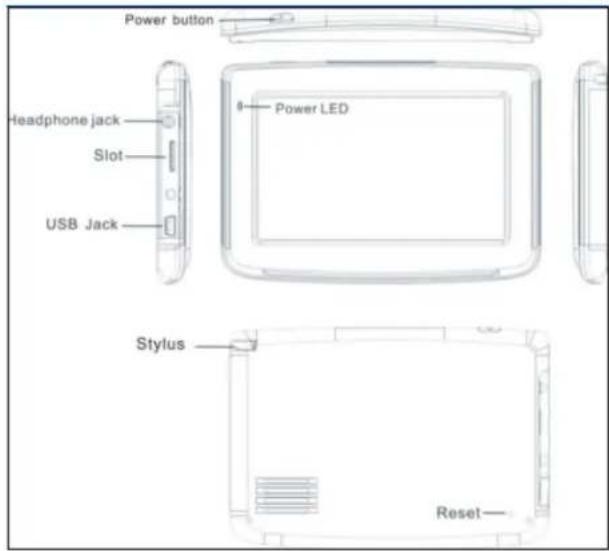
Appearance and Port Description:
Accessories:
Car charger
USB Cable
Bracket
Cradle
User Manual
Warranty card
Map instructions
Illustrations on screen display:
System UI(Projector Screen)
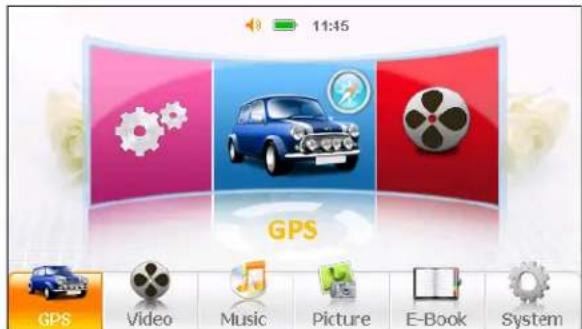
Under this UI, click icon down the screen to enter the function page. Then there will be Looped playback of cartoon, click it to entry this function. If you click the icons beside the function icon you can enjoy the cartoons.
Secondary UI(Projector Screen)
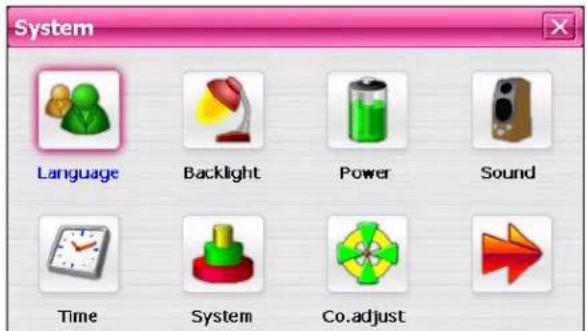
In this interface, click the icons on the screen to enter the corresponding functions; and click the arrow on the right bottom to turn the page. There will be an animation effect when turning the page.
Battery Status Icon:

Full= Drained
When the battery is at low power level, please charge it immediately to ensure the device work normally.
Charging:
Warnings for charging:
- A new battery may be empty and not charged before you get the device.
- To achieve the best performance of the battery, it is better to charge it up to 8 hours in the first three times, but not over 16 hours.
- In normal charging with DC charger, please make sure to charge it for 2 - 2.5 hours to get it fully charged.
A new battery will reach its best performance after a number cycles of charging and discharging. If the device is not used for long time, it is better to charge it to full capacity every 2 or 3 months during storage.
Charger Application:
DC Charger:
Take out the DC charger, plug it into the wall outlet with AC 110V\~240V, then plug in the DC jack into the device DC-in jack.(see the illustration below).
Car Lighter Charger:
Please insert the car charger into car cigarette lighter jack, then plug into the USB jack(see the illustration below).
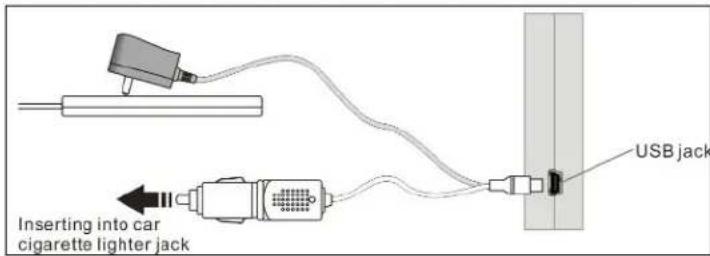
When you use car charger, please start car engine first, then connect it to the device to avoid possible damage to the device due to overloaded pulse current during ignition. Please pull it out when you stop the engine, and plug it in again after next ignition.
Power On the device
In power off status, please press the power button for a while to turn on the device, then the OSD will be displayed on screen.
Sleeping & Power-off
In power-on mode, press the power button on the device for 3-5 seconds then the sleeping mode or confirmation for power-off screen will display as follows:
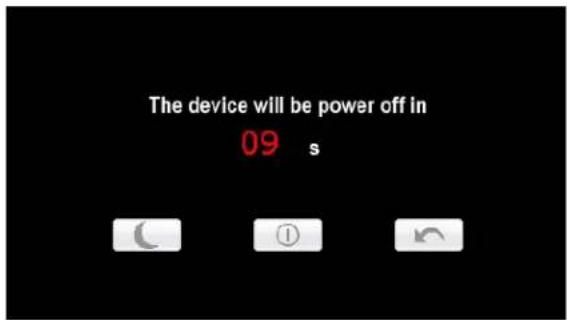
In this UI click the icon will be in sleeping mode, click the icon will power off;
click the icon to back to normal operation.
Waking -up from sleeping mode
When in sleeping mode, press power button of the device will wake up the system. When in sleeping mode, all the procedure in operation will pause but will back to normal status after waking up.
Function introduction
Video Playback
This feature is for video file playing, with the formats: AVI, MPEG, MPG, ASX, ,ASF and WMV.
Operation:
On system main menu, click icon to enter into Video Playback application. Display of UI for file selection:
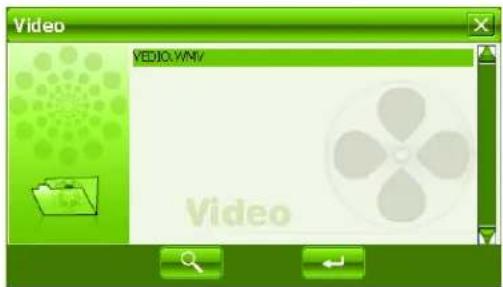
On this UI, click icon to search video files not listed in the appointed video file
folder; Click icon to close and exit from Video Playback application; Double click or
select then click ← icon to open and play this file.
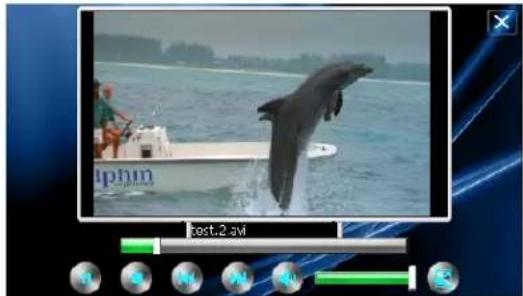
natural_image
Dolphin leaping out of a boat on water, with a speedometer interface showing playback controls (no readable text or symbols)UI and button definition:

Play

Next

Pause

Previous

Stop

Full screen display

Close

Play Progression, drag to a point to start play [V] time tune, click
anterior to set into mute status, click it again to resume, In full screen display, the tool bar at screen bottom will be hidden, you can slightly tap on screen to get it. It will take a
few minutes to search files when video play mode starts if this application has not been used for a long time.
Music Playback
This is for Music Playback with format of MP3, WMA, WAV.
Operation: On system main menu, click Music icon to play music. Screen display is shown as the illustration below:
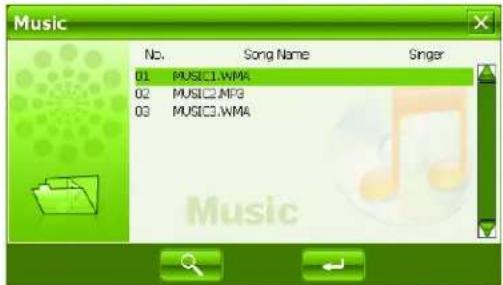
On this UI, click icon to search for music files not in selected folder; click icon
to close this window and exit music play mode; double click, or select then click icon to play this music file. Music play mode is displayed as following diagrams:
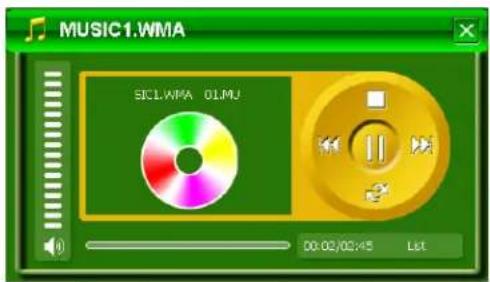
Icon and control in Play Mode:
In music play mode, click 📄 icon to pause, then it becomes Play icon; At this time click 🎨 icon, music play mode will return again; click 📄 icon to stop; click 🎨 icon to jump to the next one, click 🎨 icon to jump to the previous one; click 📄 icon to switch Repeat mode; click 🎨 icon to set mute, then this button will become 📄, click 🎨 again to recover.
Exit from Music play
Click ✗ icon at the upper right corner to exit.
Picture Display
This is for Photo Display with format JPG, BMP and GIF stored in NandFlash or TF card.
Operation:
On system main menu, click 📄icon to enter into Picture Display function. Display of UI for file selection:
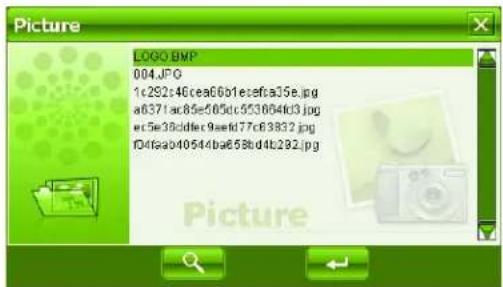
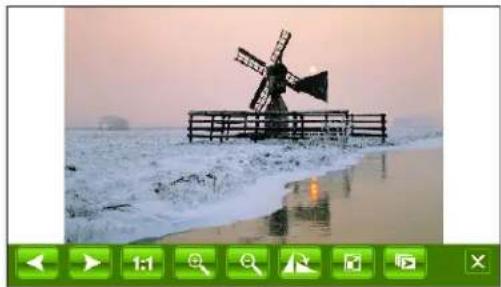
On this UI, click icon to search photo files not listed in the appointed picture file folder; click icon to close current UI and exit Picture Display function; double click or select then click icon to open or play this file. Display shown as the right illustration:
natural_image
Snow-covered landscape with a wooden windmill on a frozen shoreline at dusk, no visible text or symbols.Then, click icon to select previous or next photos; click or icon to zoom in or zoom out photo; click icon for full screen display. In full screen display, tap the screen again to exit full screen display; click icon to back to the original percentage. Click the icon to rotate the photo. is for selecting to set automatic or manual mode to turn page of display.
Exit Photo Display
Click the icon ✗ on upper right corner to exit.
eBook Reading
This if for eBook Reading with format .txt stored in NandFlash or TF card.
Operation:
On system main menu, click E-Book icon to enter into eBook Reading application. Display of UI for file selection:
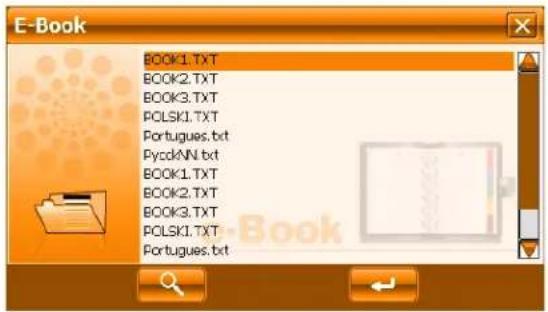
On this menu, click icon to search for txt files not in selected folder; click icon to close this window and exit file reading mode; double click icon, or select then click icon to open this file.
The screen display is shown as follows:
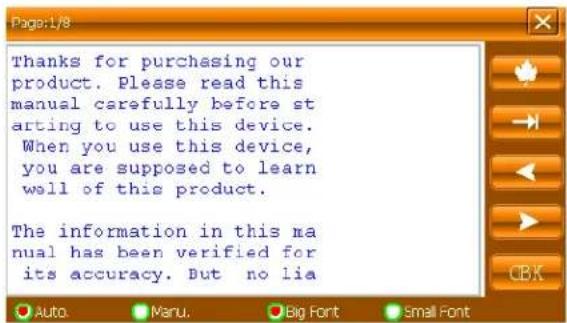
Click ▶ or ◀ icon to turn page up or down; "Manual/Automatic" is set for selecting Manual or Automatic page turning; Font is for selecting letter size of display.
Bookmark
This is for bookmark in reading a voluminous article, marking or jumping to the last time marked page, a humanized design for convenience while reading.
Operation:
In eBook Reading mode, click right icon to enter into bookmark setting, display of dialogueblock is shown as in the illustration below:
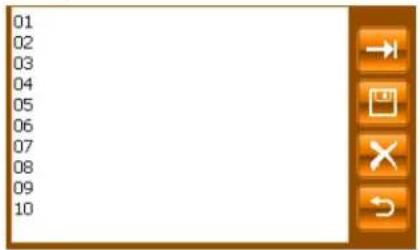
Click 📄 icon to set a bookmark for the current page. Directly click selected bookmark stored in the dialogueblock to remove this bookmark; click → icon to jump to the bookmarked page. Click 📄 icon to exit bookmark setting and return back to eBook Reading mode.
Jump to the appointed page
This is for jumping to the appointed page when reading a voluminous article and no bookmark is set.
Operation:
In eBook Reading mode, click right → icon to enter into Jump function, display of dialogue block is shown as in the illustration below:
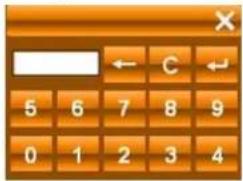
Click the number key on screen to input the page number to jump to, when inputting, click icon to backspace for deleting; click icon to clear input block, after inputting page number click icon to jump to the page of selected number.
System Setting
This is for system setting to change default setting of the system to your personal preference.
Operation:
On system main menu, click System icon to enter into system setting. Screen display is shown as the illustration below:
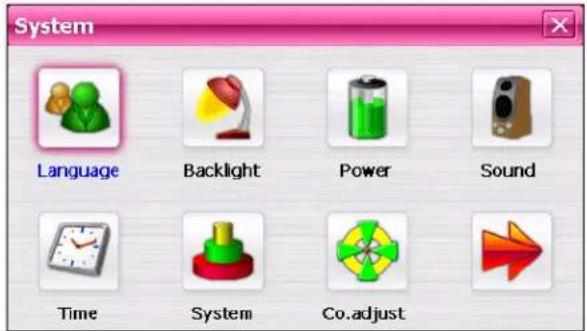
In system setting, there10 items for setting, click directly each item to change setting for it. Details will be described one by one below.
Language Setting
This is for setting of system language, screen display is shown as the illustration below:
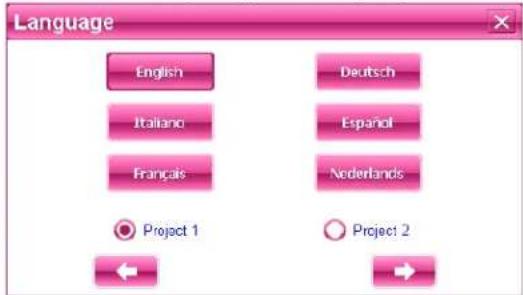
Click the icons of the corresponding language in this interface or choose the interface project, the system will save the setup automatically when the setup is closed, and return to the previous menu. (The system will be required to restart after the interface project is changed.)
Backlight setting
This is for changing backlight brightness of the device screen display, and adjusting time to start screen saver when no operation on the device. Screen display is shown as the illustration below:
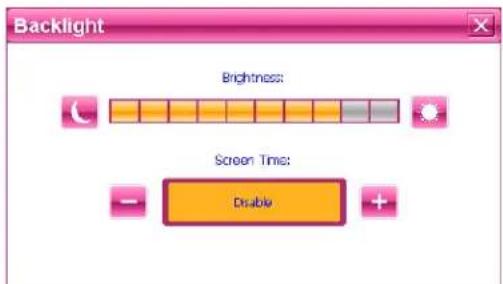
Then, drag the slide block to set. Select No Screen Saver, then the screen saver will be
disabled. After setting, close the current window to save.
Power Management
This is for setting power saving mode, and adjusting time to start power saving when no operation on the device.
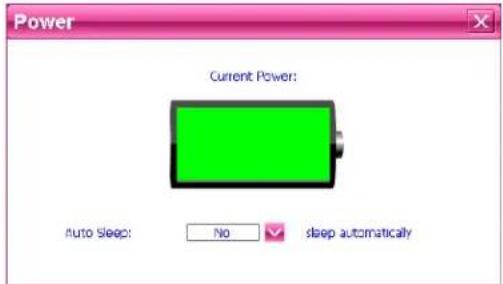
In drag menu to select time, select "No" for disabling this feature. After setting, close the current window to save.
Sound Setting
This is for setting Startup Sound, button operation on screen, and total volume. After entering into this UI, screen display is shown as the illustration below:
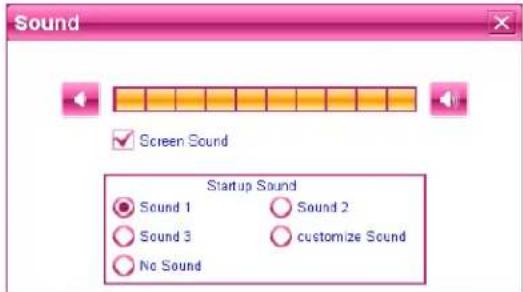
lick "Screen sound" in this interface to enable or disable the sound of screen operations, Click the different options from turn on sound to audition the start-up sound and the general volume can be adjusted the slide directly.
click "customize Sound" then its dialog window will show up, illustrated as below:
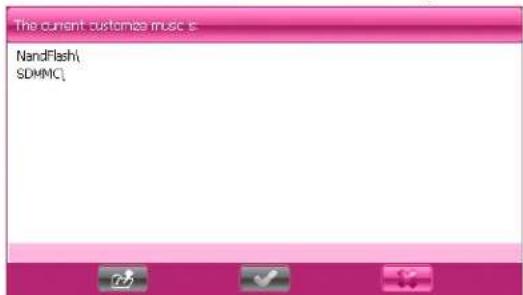
"NandFlash" is the inside memory of the device, "SDMMC" is the TF card. So the start-up music can be selected from both of them. Select one, click the button icon to confirm, then back to the upper-level interface.
Time Setting
This is for setting time of the system. After entering into this UI, screen display is shown as the illustration below:
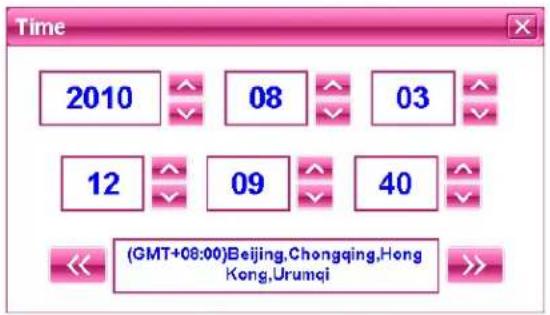
On this UI, click icon on the screen to set. After setting, close the current window to save.
System Resources
This is for checking system resources:
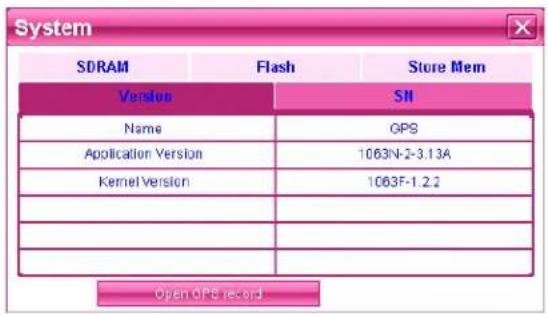
On this UI, click directly at the item on the right to check.
Coordinates Calibration
This is for calibrating the stylus coordinates on touch screen. After entering into this UI, screen display is shown as the illustration below:
Please point the image's center area correctly

On this UI, use stylus to tap at the center of the cross, then tap on other crosses which will move after each tapping until finish.
Update Logo
The function is for updating start-up logo of the device. Please be sure that you have stored the Logo pictures into the TF card. After entering into this UI you will see the interface shown below:
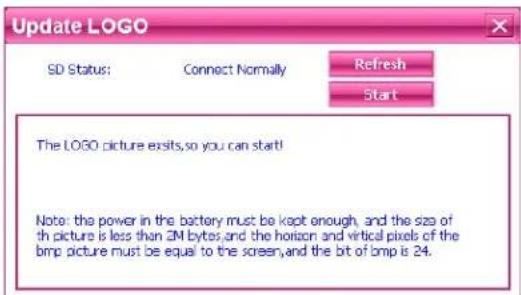
If there is no logo file in the current TF card, please copy the logo file into it or change another TF card having upgrade file, then click Refresh icon, you may see this upgrade file.
During upgrade operation, click Start icon, then a dialogue frame will pop up, shown as the illustration below:
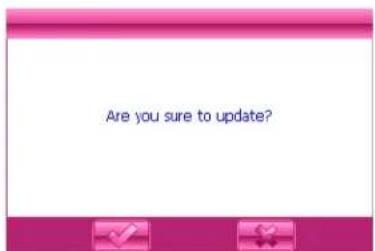
Then click 📄icon to cancel upgrade, or click 🕒icon to proceed with the upgrade processing.
Warning: please be sure that the battery is being full when you are updating. Otherwise, please charge the device fully.
GPS Path
Using this function is to set GPS path for your navigation. Screen display will show as follows:
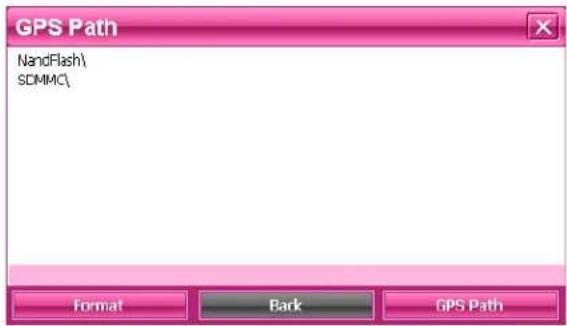
Files listed on the present screen belong to the saved ones in TF card, so click them can read the file.
File folders of TF card will be listed on screen. Click a folder to open it. Select GPS Software If there are two or more maps from different companies on an TF card, then this feature can help you select each of them easily. The way to Select: :In TF card directory, open the file folder to find the map to be used, select navigation software of .exe,(which has different names from each different company, please refer to details from each company of these navigation software. e.g. Careland has NaviOne.exe), then select and click icon, a dialogue frame will pop up on screen, as it shown below:
![The selected path of navigation at present is: [SDMMC\GPS\WINCE_GPS.exe] NOTICE: The last four letters of path must be "exe". Are you sure to change the path into this path? [SDMMC\naviOne\naviOne.exe](/content/2026/05/989959/images/487d1118ed386eb52c6b9c8ee083e97ed4aa5c08b8fcdcb1d6a8821e32d8cba5.jpg)
Then click 📁 icon to abort; click 📁 icon to accept, then display on screen will be:
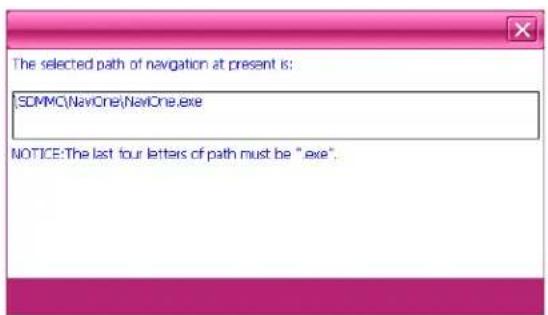
Click icon on the upper right corner to return to GPS path interface..
FLASH formatting functions:
In the path setup interface, as shown:
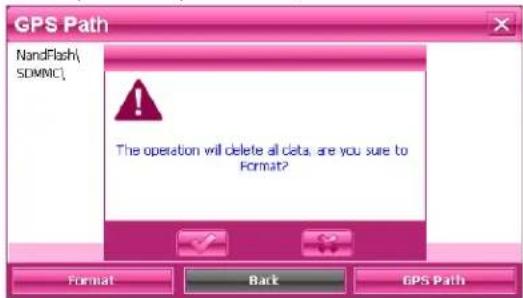
Click the icon, enter the format: interface, as shown:
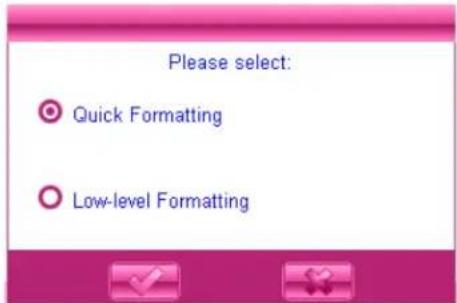
Select the desired formatting and click icon format, as shown:
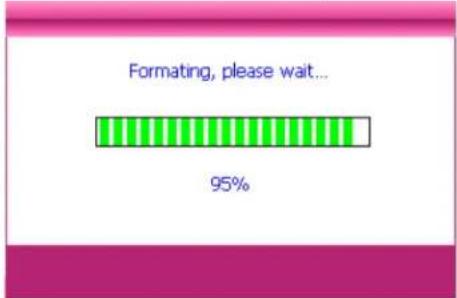
Warm remind
The machine can not use a computer format, you can use the tools inside the machine format, methods of operation: Please select the system configuration / GPS path / formatting functionality mode, you can confirm
USB
This is to set the mode when the USB interface of the device is connected to the computer, in which "U disk" is to set the device as the portable memory, and "ACTIVESYNC" is to use the device for program debug. Pictures are shown as below:
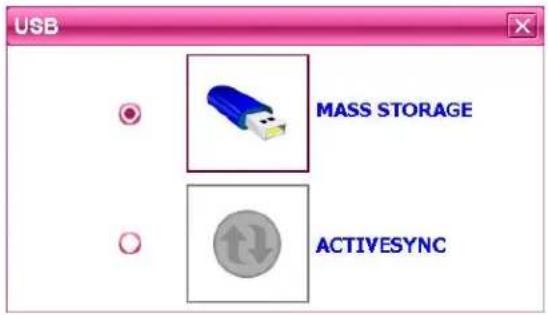
Click the desired connection mode and close the window to save the chosen mode.
How to save and allocate files in TF card:
Usually, the files used by the device are saved in the appointed folders to ensure the access for embedded program of the device. You may save files into other folders or under root directory of the TF card. If the files are saved in the appointed folders, when opening the corresponding application, these files can be seen directly; If not in the folders, then you can not see them for the application, so that you need to click "Search" button, the system will search in all files in un-appointed folders until find it and display the result of search. For the sake of convenience, it is strongly suggested to save the files into the corresponding folders. The function and application of folders in TF card is listed below:

ebook
eBook File

np4
Video File

GPS
Navigation File

picture
Photo File

mp3
Music File
Attention: Navigation software must be saved into GPS directory!
Specifications
| CPU | SiRF Atlas |
| Memory | 64M |
| NandFlash | 2GB |
| Chip | GRF3i+ |
| Antenna Built-in folded antenna | |
| Memory Card Applicable for a Maximum up to 8GB TF card | |
| Screen Type TFT Touch Screen | |
| Screen Size 4.3" | |
| Screen Color 65K colors | |
| Dot Matrix Display 480*272 | |
| Extension Slot TF | |
| Battery Type Li-polymer battery | |
| Battery Capacity 950mAh | |
V
Trouble clearing
| No. | Fault Possible | Cause Solutions | |
| 1 No | power on Battery | drained (The screen has no further display after a blink when pressing power on button.) | Please refer to the description of battery charging in this manual, only use the enclosed charger to charge the device. |
| 2 | Dead Unit | The start interface stays on the screen for long time without changing. | Take out the battery, then put it back, start the device again. |
| No display of the screen, or display on screen is frozen as any button is pressed. | Press and hold the power on button for 5 seconds, then release it to power on. | ||
| Take out the battery, then put it back, start the device again. | |||
| 3 Error in upgrade | Dead | or frozen during upgrade, display on the screen is frozen and no button works. | This fault can only be fixed by the manufacturer. Please return for repair. |
| 4 | Impossible to recharge | During charging, the green LED indicator of the device has no light or no charging sign displayed on the screen. | If the charger is connected properly and powered. |
| Charger is damaged. | |||
| Battery is damaged or full charged. | |||
| It is normal when the green LED is lit on but the charging sign is not on the screen at the same time during charging. | |||
| 5 | Coordinates Calibration failure | The click position is not match with the reaction position after starting up the device. | Power off and then press the power button for 6-9 seconds, select Coordinates Calibration to operate. |
- Please read this manual before you start using this device
- General tips for GPS application
- Features:
- Warnings:
- Accessories:
- Illustrations on screen display:
- Battery Status Icon:
- Charging:
- Charger Application:
- Power On the device
- Sleeping & Power-off
- Waking -up from sleeping mode
- Function introduction
- Video Playback
- Operation:
- UI and button definition:
- Music Playback
- Icon and control in Play Mode:
- Exit from Music play
- Picture Display
- eBook Reading
- Bookmark
- Jump to the appointed page
- System Setting
- Language Setting
- Backlight setting
- Power Management
- Sound Setting
- Time Setting
- System Resources
- Coordinates Calibration
- Update Logo
- GPS Path
- FLASH formatting functions:
- Warm remind
- USB
- How to save and allocate files in TF card:
Brand : SYLVANIA
Model : SGPD432
Category : Browser