
A4010-E - Payment terminal AXIS - Free user manual and instructions
Find the device manual for free A4010-E AXIS in PDF.


| Product Type | Contactless smart card reader for access control |
| Brand | AXIS |
| Model | A4010-E |
| Dimensions (H x W x D) | 85 x 46 x 19 mm (3.35 x 1.8 x 0.75 in) |
| Weight | 128 g (0.28 lb) |
| Power Input | 12–24 VDC, max 2.8 W |
| Power Source Requirements | SELV-compliant limited power source (LPS) with rated output current ≤2 A |
| Identification Types Supported | MIFARE DESFire, MIFARE Classic, iClass, SEOS |
| Communication Protocol | RS485, OSDP |
| Operating Temperature | -30°C to 70°C (-34°F to 158°F) |
| Storage Temperature | -50°C to 70°C (-58°F to 158°F) |
| Humidity | 95% RH (non-condensing) |
| Ingress Protection Rating | IP54 |
| Approvals | EN61000-6-2, EN61000-6-3, ETSI EN300330-2, ETSI EN301489-1, ETSI EN301489-3, CISPR16-2-1, CISPR16-2-3, FCC Part 15 Subpart C, IC RSS-GEN, IC RSS-210, AS/NZS 4268, IEC/EN60950-1, IEC/EN60950-22, EN50581 (RoHS), IEC/EN60529 IP54, PVC free |
| Tampering Alarm | Built-in accelerometer |
| LED Indicators | Red and green LEDs |
| Beeper | Yes (short/long beeps) |
| Mounting | Wall mount with double-sided tape (included) |
| Cable Length (max recommended) | Up to 30 m (98.4 ft) |
| Wire Gauge Range | AWG 27-16 (CSA) or AWG 22-14 (cUL/UL) |
| Warranty | 3-year Axis warranty, optional AXIS Extended Warranty |
| Intended Use | Outdoor use (with protective shield recommended) |
Frequently Asked Questions - A4010-E AXIS
User questions about A4010-E AXIS
0 question about this device. Answer the ones you know or ask your own.
Ask a new question about this device
Download the instructions for your Payment terminal in PDF format for free! Find your manual A4010-E - AXIS and take your electronic device back in hand. On this page are published all the documents necessary for the use of your device. A4010-E by AXIS.
USER MANUAL A4010-E AXIS
InstallationGuide(English)
LiabilityA4010-E
Everycarehasbeentakeninthepreparationofthis document.PleaseinformyourlocalAxisofficeof anyinaccuraciesoromissions.AxisCommunications ABcannotbeheldresponsibleforanytypographical errorsandreservestherighttomakechangesto theproductandmanualswithoutpriornotice.Axis CommunicationsABmakesnowarrantyofany kindwithregardtothematerialcontainedwithin thisdocument,including,butnotlimitedto,the impliedwarrantiesofmerchantabilityandfitness foraparticularpurpose.AxisCommunicationsAB shallnotbeliablenorresponsibleforincidental orconsequentialdamagesinconnectionwiththe furnishing,performanceoruseofthismaterial.This productisonlytobeusedforitsintendedpurpose.
IntellectualPropertyRights
AxisABhasintellectualpropertyrightsrelatingto technologyembodiedintheproductdescribedinthis document.Inparticular,andwithoutlimitation,these intellectualpropertyrightsmayincludeoneormore ofthepatentslistedatwww.axis.com/patent.htmand oneormoreadditionalpatentsorpendingpatent applicationsintheUSandothercountries.
EquipmentModifications
This equipment must be installed and used in strict accordance with the instructions given in the user documentation. This equipment contains no user-serviceable components. Unauthorized equipment changes or modifications will invalidate all applicable regulatory certifications and approvals.
TrademarkAcknowledgments
AXISCOMMUNICATIONS, AXIS, ETRAX, ARTPEC and VAPIXareregisteredtrademarksortrademark applicationsofAxisABinvariousjurisdictions. All other companynamesandproductsaretrademarksor registeredtrademarksoftheirrespectivecompanies.
RegulatoryInformation
Europe

ThisproductcomplieswiththeapplicableCEmarking directivesandharmonizedstandards:
- Electromagnetic Compatibility (EMC) Directive 2014/30/EU. See Electromagnetic Compatibility (EMC) on page 2.
● RadioandTelecommunicationsTerminal Equipment(R&TTE)Directive1999/5/EC.See RadioTransmissiononpage2. - LowVoltage(LVD)Directive2014/35/EU.See Safetyonpage3.
- Restrictions of Hazardous Substances (RoHS) Directive 2011/65/EU. See Disposal and Recycling on page 3.
Acopyoftheoriginaldeclarationofconformity maybeobtainedfromAxisCommunicationsAB.See ContactInformationonpage3.
Electromagnetic Compatibility(EMC)
This equipment has been designed and tested to fulfill applicable standards for:
- Radiofrequencyemissionwheninstalled accordingtotheinstructionsandusedinits intendedenvironment.
- Immunitytoelectricalandelectromagnetic phenomenonwheninstalledaccordingto theinstructionsandusedinitsintended environment.
Europe
Thisproductfulfillstherequirementsforimmunity accordingtoEN61000-6-2industrialenvironments.
This product fulfill therequirements foremission according to EN61000-6-3 residential, commercial and light-industrial environments.
RadioTransmission
This equipment may generate user radio frequency energy. The user could lose the authority to operate this equipment if an unauthorized change or modification is made.
USA
This device complies with Part 15 of the FCC Rules. Operation is subject to the following two conditions: (1) this device may not cause harmful interference, and (2) this device must accept any interference received, including interference that may cause undesirable operation.
ThisproductcomplieswithFCCradiationexposure limitsforanuncontrolledenvironment.This equipmentshallbeinstalledandoperatedwitha minimumdistanceof20cm(7.9in)betweentheuser andthedevice.
Canada
This device complies with Industry Canada licence-exempt RSS standard(s). Operation is subject to the following two conditions: (1) this device may not cause interference, and (2) this device must accept any interference, including interference that may cause undesired operation of the device.
ThisproductcomplieswithICradiationexposure limitsforanuncontrolledenvironment.This equipmentshallbeinstalledandoperatedwitha minimumdistanceof20cm(7.9in)betweenthe userandthedevice.Thisdeviceforoperationinthe frequencyband5150-5250MHzisonlyforindoor usetoreducethepotentialforharmfulinterference toco-channelmobilesatellitesystems. LeprésentappareilestconformeauxCNRd'Industrie Canadaapplicablesauxappareilsradioexempts delicence.L'exploitationestautoriséeauxdeux conditionssuivantes:(1)l'appareilnedoitpas produiredebrouillage,et(2)l'utilisateurdel'appareil doitacceptertoutbrouillageradioélectrique subi,mêmesilebrouillageeestsusceptibled'en compromettrelefonctionnement.
Hereby, Axis Communications AB declares that this product is incompliance with the essential requirements and other relevant provisions of Directive 1999/5/EC.
FR
This equipment can be used in the following countries:
AT,BE,BG,CH,CY,CZ,DE,DK,EE,EL,ES,FI,FR,HR, HU,IE,IS,IT,LI,LT,LU,LV,MT,NL,NO,PL,PT,RO,SE, SI,SK,TR,UK
Safety
ThisproductcomplieswithIEC/EN60950-1and IEC/EN60950-22,SafetyofInformationTechnology Equipment.
DisposalandRecycling
Whenthisproducthasreachedtheendofits usefullife, disposeofitaccordingtolocallaws andregulations. Forinformationaboutyour nearestdesignatedcollectionpoint, contactyour localauthorityresponsibleforwastedisposal. In accordancewithlocallegislation, penaltiesmaybe applicableforincorrectdisposalofthiswaste.
Europe


Thissymbolmeansthattheproductshall sposedoftogetherwithhouseholdor cialwaste. Directive2012/19/EUonwaste alandelectronicequipment(WEEE)is pleintheEuropeanUnionmemberstates. ntpotentialharmtohumanhealthandthe ment,theproductmustbedisposedofinan dandenvironmentallysaferecyclingprocess. mationaboutyournearestdesignated onpoint,contactyourlocalauthority ibleforwastedisposal.Businessesshould theproductsupplierforinformationabout disposeofthisproductcorrectly.
Thisproductcomplieswiththerequirements of Directive2011/65/EUontherestrictionoftheuse of certainhazardoussubstancesinelectrical and electronicequipment(RoHS).
China

Thisproductcomplieswiththerequirements ofthelegislativeactAdministrationontheControlof PollutionCausedbyElectronicInformationProducts (ACPEIP).
ContactInformation
AxisCommunicationsAB
Emdalavägen14
22369Lund
Sweden
Tel:+46462721800
Fax:+4646136130
www.axis.com
Support
Shouldyourequireanytechnicalassistance,please contactyourAxisreseller.Ifyourquestionscannot beansweredimmediately,yourresellerwillforward yourqueriesthroughtheappropriatechannelsto ensurearapidresponse.Ifyouareconnectedtothe Internet,youcan:
- findanswerstoresolvedproblemsintheFAQ database.Searchbyproduct, category, or phrase
• reportproblemstoAxissupportstaffbylogging intoyourprivatesupportarea - chatwithAxissupportstaff
- visitAxisSupportatwww.axis.com/techsup/
LearnMore!
VisitAxislearningcenterwww.axis.com/academy/forusefultrainings,webinars,tutorialsandguides.
SafetyInformation
ReadthroughthisInstallationGuidecarefullybefore installingtheproduct.KeeptheInstallationGuide forfuturereference.
HazardLevels
DANGER
Indicatesahazardoussituationwhich, ifnotavoided, will resultindeathor seriousinjury.
WARNING
Indicatesahazardoussituationwhich, ifnotavoided,couldresultindeathor seriousinjury.
CAUTION
Indicatesahazardoussituationwhich, ifnotavoided,couldresultinminoror moderateinjury.
NOTICE
Indicatesasituationwhich,ifnot avoided,couldresultindamageto property.
OtherMessageLevels
Important
Indicatessignificantinformationwhich isessentialfortheproducttofunction correctly.
Note
Indicates useful information which helps ingetting them most out of the product.
SafetyInstructions
WARNING
●TheAxisproductshallbeinstalledbya trainedprofessional.
NOTICE
●TheAxisproductshallbeusedin compliancewithlocalawsand regulations.
- StoretheAxisproductinadryand ventilatedenvironment.
- Avoid exposing the Axis product to shocks or heavy pressure.
- Donotinstalltheproductonunstable poles,brackets,surfacesorwalls.
- Useonlyapplicabletoolswhen installingtheAxisproduct.Using excessiveforcewithpowertoolscould causedamagetotheproduct.
- Donotusechemicals, causticagents, oraerosolcleaners.
- Useacleanclothdampenedwithpure waterforcleaning.
- Useonlyaccessoriesthatcomplywith thetechnicalspecificationofthe product.ThesecanbeprovidedbyAxis orathirdparty.
- Useonly spare parts provided by or recommended by Axis.
- Donotattempttorepairtheproduct yourself.ContactAxissupportoryour Axisresellerforservicematters.
●Thepowersupplyshallbepluggedin toasocketoutletinstallednearthe productandshallbeeasilyaccessible.
Transportation
NOTICE
- WhentransportingtheAxisproduct, usetheoriginalpackagingorequivalent topreventdamagetotheproduct.
InstallationGuide
This Installation Guide provides instructions for connecting AXISA4010-E Reader to an network door controller. AXISA4010-ERaderisan OSDP reader that is designed to communicate with Axis network door controllers.
InstallationSteps
- Makesurethepackagecontents, toolsandothermaterials necessary for the installation are in order. Seepage5.
- Study the hardware overview. Seepage6.
- Studythespecifications. Seepage7.
- Install the hardware. Seepage 12.
PackageContents
Packagecontents
- YourAxisproduct
•InstallationGuide(thisdocument)
HardwareOverview

1 Frontplate
2 Coreunit
3 Cable
4 RedLED
5 GreenLED
6 Doublesidedtape
ReaderFeedback
Thetableshowsthefeedbacksignalsthatarepreconfiguredinthereader whenconnectedtoanAxisnetworkdoorcontroller.
| Event/state | LEDindicatorBeeperpattern | |
| Doorlocked | ✕ Steadyred | Silent |
| Doorunlocked | ✕ Steadygreen | Silent |
| Accessgranted | ✕ Steadygreen | Oneshortbeep |
| Accessdenied | ✕ Steadyred | Onelongbeep |
| Pre-alarmwarning | ✕ Steadyred | Shortbeepsuntilenteringnewstate |
| Dooropentoolong | ✕ Flashingred | Constantbeep |
Specifications
| Identification types | Seepage9. |
| Power consumption | 12–24VDC,max2.8W |
| Poweranddata cable | Seepage9. |
| Wirearea | Seepage1 1. |
| Operating conditions | Thisproductisintendedforoutdooruse.Toprotectthecardreaderfrompossibleeffects ofweather,useaprotectiveshield. |
| Operatingtemperature:-30°Cto70°C(-34°Fto158°F)Tooperateintemperaturesbelow-30°C(-34°F), thecardreadermustbemountedonaheating pad. | |
| Humidity:95%RH(non-condensing) | |
| Storageand transport conditions | Temperature:-50°Cto70°C(-58°Fto158°F) |
| ApprovalsEN61000-6-2,EN61000-6-3ETSIEN300330-2,ETSIEN301489-1,ETSIEN301489-3CISPR16-2-1,CISPR16-2-3FCCPart15SubpartCICRSS-GEN,ICRSS-210AS/NZS4268IEC/EN60950-1,IEC/EN60950-22EN50581(RoHS)IEC/EN60529IP54PVCfree | |
| Dimensions (HxWxD) | 85x46x19mm(3.35x1.8x0.75in) |
| Weight | 128g(0.28lb) |
| Warranty | Axis3-yearwarrantyandAXISExtended Warrantyoption,seewww axis.com/warranty |
IdentificationTypes
Identification types are portable credential storage devices, pieces of memorized information, or various combinations of the two that determine how users will be granted access to the door. Common identification types include tokens such as cards or key fobs, personal identification numbers (PINs), and request to exit (REX) devices.
Thereadersupportsthefollowingformats:
•MIFARE®DESFire®
•MIFARE®Classic
- iClass®
- SEOS®
ToprogramthereaderforMIFARE®Classicsectorreading,a customer-specificsetupcardisneeded.Formoreinformation,contact AxisSupportatwww.axis.com/techsup.
Power&DataCable
4-wirecableforDCpowerinputanddata.Supports RS485andOSDPprotocolsforcommunicationwiththe doorcontroller.
NOTICE
UseaSafetyExtraLowVoltage(SELV)compliantlimitedpower source(LPS)witharatedoutputcurrentlimitedto≤2A. For example, AXISA1001NetworkDoorControllerfulfillthese requirementswhenpoweredbyPoweroverEthernet(PoE)or aSELV-compliantLPS.
| FunctionWire | Color | Notes | Specifications | |
| DCinput | +V | Green | Powerinput fromcontroller orexternal powersupply. | Min 12VDC(-10%) Max 24VDC(+15%) |
| 0VDCREF | 0VYel- low | |||
| RS485 | AWhiteA | Forhalfduplex RS485(RX/TX) | ||
| BBrown | B | |||
Important
- Therecommendedmaximumcablelengthisupto30m(98.4ft).
ConnectionwithAXISA1001

flowchart
graph LR
    A["A4010-E"] --> B["B"]
    A --> A["A"]
    A --> B["B"]
    A --> A["A"]
    A --> B["B"]
TousethereaderwithAXISA1001,connecttheRS485wiresfromAtoBandfromBtoA.
FormoreinformationaboutAxisnetworkdoorcontrollerconnections,see thehardwarepinchart,generatedthroughthedoorcontroller'shardware configuration,andtheAXISA1001UserManual,availableatwww.axis.com
ForlongwirelengthitisrecommendedtousetwistedpairfortheRS485 AandBwires.
WireArea
NOTICE
Toextendtheexistingcable,eachwireshallhaveanconductor cross-sectionalareathatcorrespondstoanconductorgauge rangeofAWG27-16(CSA)orAWG22-14(cUL/UL).Selectcables incompliancewithyourlocalregulations.
| AWG | Diametermm(in) | Areamm ^2 |
| 27-16 | 0.361-1.29(0.0142-0.0508) | 0.102-1.31 |
| 22-14 | 0.644-1.63(0.0253-0.0641) | 0.326-2.08 |
Tamperingalarm
Thetamperingalarmsensorisanaccelerometer. Whenthereaderis removed from the surfaceitis attached to, analarmeventissent to the door controller. In the door controller, the alarm event can be used to trigger an action. For information, seethedoor controller's User Manual.
Note
MounttheAxisproductfirstandthenconnectthecable.The accelerometer(fortamperingalarm)iscalibratedatpoweron.
RS485Termination
TheAxisproductusesafixedRS485termination.
InstalltheHardware

natural_image
Diagram showing a device connected to a coiled cable with wires, no text or symbols present- Removethefrontplatefromthecoreunit.

- Hold the core unit against the wall and mark your holes with a pencil.
- Drillyourholesinthewallandmountthecoreunittothe wall. Usedrillbits, screwsandplugsthatareappropriatefor thematerial.
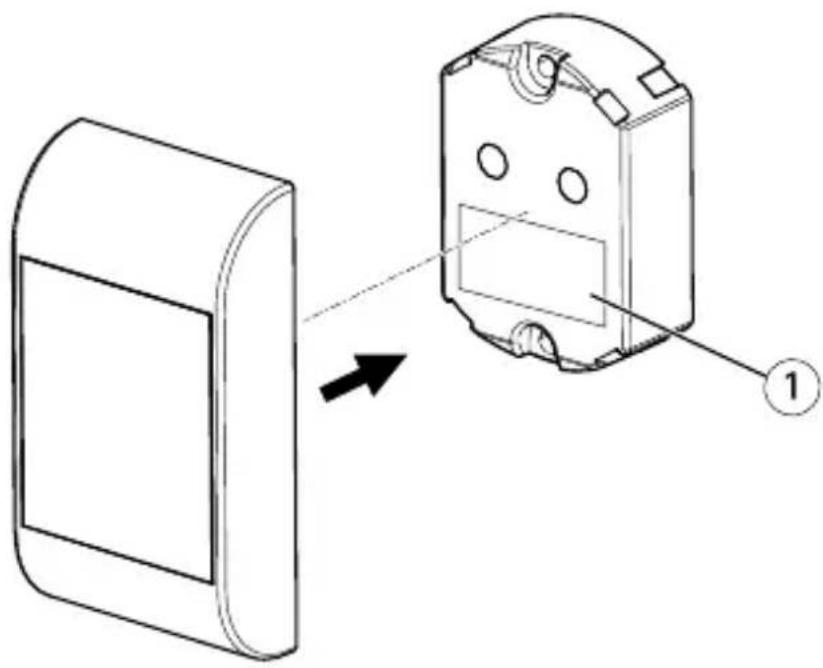
natural_image
Technical line drawing of a device component with an arrow indicating direction, showing internal structure and part number 1 (no text or symbols present)1 Doublesidedtape
- Fastenthedoublesidedtapeontothemainunit.Positionit carefullyunderthetwoLEDs.
5.Pushthefrontplateontothemainunit.
Furtherinformation
- Forthelatestversionofthisdocument,seewww.axis.com
• To check if there is updated firmware available for your product, see www.axis.com/support - Forusefulonlinetrainingsandwebinars,see www.axis.com/academy
WarrantyInformation
ForinformationaboutAxis'productwarrantyandtheretorelated information,seewww.axis.com/warranty/
InstallationGuide(English)
AXISA4010-EReader
©AxisCommunicationsAB,2016
Ver.M1.15
Date:June2016
PartNo.1594648
- LiabilityA4010-E
- IntellectualPropertyRights
- EquipmentModifications
- TrademarkAcknowledgments
- RegulatoryInformation
- Electromagnetic Compatibility(EMC)
- Europe
- RadioTransmission
- USA
- Canada
- FR
- Safety
- DisposalandRecycling
- China
- ContactInformation
- Support
- LearnMore!
- SafetyInformation
- HazardLevels
- DANGER
- WARNING
- CAUTION
- NOTICE
- OtherMessageLevels
- Important
- Note
- SafetyInstructions
- Transportation
- InstallationGuide
- InstallationSteps
- PackageContents
- HardwareOverview
- ReaderFeedback
- IdentificationTypes
- Power&DataCable
- ConnectionwithAXISA1001
- WireArea
- Tamperingalarm
- RS485Termination
- InstalltheHardware
- Doublesidedtape
- Furtherinformation
- WarrantyInformation
Brand : AXIS
Model : A4010-E
Category : Payment terminal