
CBHSOL2 - Telephone Scosche - Free user manual and instructions
Find the device manual for free CBHSOL2 Scosche in PDF.


| Product Type | Smartphone |
| Brand | Scosche |
| Model | CBHSOL2 |
| Dimensions | Approximately 150 x 75 x 8 mm |
| Weight | Approximately 170 g |
| Display | 6.2-inch touchscreen |
| Processor | Octa-core 2.0 GHz |
| RAM | 4 GB |
| Storage | 64 GB internal, expandable via microSD |
| Camera | Rear: 12 MP; Front: 8 MP |
| Battery | Li-ion 3000 mAh, non-removable |
| Operating System | Android 10 |
| Connectivity | Wi-Fi 802.11 a/b/g/n/ac, Bluetooth 5.0, GPS, USB-C |
| Network Bands | 4G LTE, 3G, GSM |
| Audio Jack | 3.5 mm |
| Water Resistance | IP67 rated (dust and water resistant) |
| Care and Cleaning | Wipe with soft dry cloth; avoid solvents |
| Safety | Do not disassemble; avoid extreme temperatures; use approved charger |
| Spare Parts and Repairability | Battery replacement by authorized service; screen repair available |
| General Information | User manual included; language: English |
Frequently Asked Questions - CBHSOL2 Scosche
User questions about CBHSOL2 Scosche
0 question about this device. Answer the ones you know or ask your own.
Ask a new question about this device
Download the instructions for your Telephone in PDF format for free! Find your manual CBHSOL2 - Scosche and take your electronic device back in hand. On this page are published all the documents necessary for the use of your device. CBHSOL2 by Scosche.
USER MANUAL CBHSOL2 Scosche
The Scoche solCHAT™ Bluetooth® speakerphone features an integrated solar panel for charging, as well as voice announce caller LD, and DSP echo cancellation for clear, hands-free communication on the go. For questions or concerns regarding this product contact Scoche Tech Support at 1-800-621-3695 x3
PARTS INCLUDED:
(1) Solar Bluetooth
Speakerphone
(1) View Clip (2) Set of Sun
(1) USB Charging Cable
(1) USB Car Charger
(五)《中国证券报》
SPECIFICATIONS:
Take Time: Up to 5 Hours Squeeze Time: Up to 400 Hours
Charge Time: 2 Hours (USB Cable); 18 Hours (Solar)
Bluesch: 2.1 + EDR
Supported Profiles: RSP, HFP 7.6 Device Memory: Up to 8 Bluetooth Mobile Phones
Up to 1000 contacts
Power = (x - 500) A Battery Type: 3.2x - 500m6
TROCTIONS OF FONCTIONEMENT EN FRANÇAIS
Charge the selCHAT using the USB charging cable in the package
(Aproximate charge time is 2 hours)
Mount the selCHAT on the driver's side of the front windshield. Make sure the selCHAT on the driver's side of the front windshield.
SECHAT is out of the direct line of sight of traffic (see Figure 2).
Press and hold the MFB for 3 seconds or until the BLUE LED light begins to flash.
(2) m = 311 .
Turn on the Bluetooth feature on your cell phone and search for a new Bluetooth device. See your mobile's user manual by information.
Tian 120117
5 The SELECT will be recognized on your photo as "CBF8/L2". Select the device and enter the pin code "0000" to completely the gating process.

IMPORTANT!
DO NOT RETURN PRODUCT TO THE RETAILER
IF YOU NEED ASSISTANCE OR REPLACEMENT PARTS CALL US CALL FREE 4,000,000.000 X
CARE US FULL FREE 1-200-EXT-2009 X.9 INDUSTRY: MUNICIPAL/2009 (PST) SATURDAY 06H:00 PM (PST)
Bluetooth is a registered trademark of Bluetooth 240, Inc.
SIH091003SH50L2
OPERATION (cont'd)
USING THE SOLCHAT
Most functions will be verbally announced through the solCHAT.
MAKING A CALL
Using Voice Dial. To use voice dial your mobile phone must support the voice dial feature.
If the mobile phone does not have the feature the soCHAT will not be able to make a call to any voice chat.
Using the Mobile Phone: Masing a phone call directly on your mobile phone will automat-
cally transfer the call to the solCHAT.
NOTE: Restricted and unknown numbers will only ring through the selCHAT speaker.
RECEIVING A CALL
Press the MFB button on the solCHAT once to answer the phone call. The call will come through the solCHAT unless the phone call is answered on the mobile phone, then the call
through the database to access the phone use to choose on the middle phone, after the last will default to the mobile phone (phones may vary).
ENDING A CALL
Press the MFB button on the selCHAT once to disconnect.
REJECTING A CALL
Press and held the MFB button on the selCHAT for 3 seconds.
ANSWERING/REJECTING A SECOND CALL DURING A CALL
a) Short press the MFB button once to hold the first call and answer the second call. b) Press and hold the MFB button five seconds in week the second call.
(1) Press and hold the MRS button for 3 seconds to reject the second call.
SWITCHING BETWEEN 2 PHONE CALLS
a) With 2 calls on the line, press and hold the MV II button for 3 seconds to switch between calls.
b) Short press the MFB button once to end the first call and stay with the second call.
VOICE DIAL A CALL
To make a call using the voice dial feature is dependent on your mobile phones capabilities
(See your mobile phone's user manual for information on its features). Press the MFG once
CH THE SOICHAT REDIAL & GALL
To recall the last number dialled, simply press the MFB button twice on the selCHAT to
re-connect,
PRIVACY MODE
Privacy mode allows you to have a conversation using the soCHAT in a manner as a
handheld mobile phone. This feature is not recommended while driving a vehicle, if taking a private phone call we encourage you to pull over in a safe area and complete the call.
Press the "MODE" button once to switch from the loud speaker to privacy mode.
OVERVIEW
SURVOL
ISTA GENERAL
МОСРОПРОКИЙ
MICROPAVOL MICROVOMO
10.000 GBP
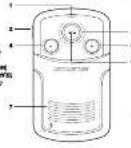
- STATUS LED ^4 7. SPEAKER
. SPEAKER
HAUT-PAR
A.1940
表 B.02-1
USD, A\$6 =
6.π
ALFO BE
DESEUK D
E MOUTAGE
E. SODDER
ACILAOX DE MONTAGE
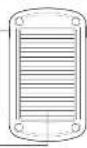
[SOLAR POWER]
the winchield auction mount makes sure
use on the back of the mounting edge. As you to use direct route to charge the
depending on location and condition.
BLUE NAME: 0015
ON LE PIER-BAISE
vec /wansable of Instalation
No. 107, 2013, 59, 2014, 58, 2015, 59, 2016, 59, 2017, 59, 2018, 59, 2019, 59, 2020, 59, 2021, 59, 2022, 59, 2023, 59, 2024, 59, 2025, 59, 2026, 59, 2027, 59, 2028, 59, 2029, 59, 2030, 59, 2031, 59, 2032, 59, 2033, 59, 2034, 59, 2035, 59, 2036, 59, 2037, 59, 2038, 59, 2039, 59, 2040, 59, 2041, 59, 2042, 59, 2043, 59, 2044, 59, 2045, 59, 2046, 59, 2047, 59, 2048, 59, 2049, 59, 2050, 59, 2051, 59, 2052, 59, 2053, 59, 2054, 59, 2055, 59, 2056, 59, 2057, 59, 2058, 59, 2059, 59, 2060, 59, 2061, 59, 2062, 59, 2063, 59, 2064, 59, 2065, 59, 2066, 59, 2067, 59, 2068, 59, 2069, 59, 2070,
The Ground Truth image displays a single, solid horizontal line. According to Rule 2 (UNDERSCORE & LINE RULES), if the GT contains lines used for stylistic emphasis or as background elements (like ruled paper), the OCR result must ignore them. The provided OCR content is "____", which consists of four underscores. This is incorrect because underscores are not equivalent to a solid line and should not be output for stylistic/background lines. The OCR has hallucinated underscores where none should exist in the GT, violating the rule to ignore stylistic lines. Therefore, the OCR result is inconsistent with the Ground Truth.
2
VISOR CLIP MOUNT (USD POWER)
When mounting the solCHAT with the water clip mount, make sure the
mounting clip is locked into place on the back of the mounting crate.
The wash mounting tip mouth allows you to use the 15 or night, on a cloudy day, or if you need a faster charge.
(1) 2017年1月1日
SUPPORT DE FIXATION POUR PARE-SOLEIL (ALIMENTATION USB)
The Ground Truth image displays a single, solid horizontal line. According to Rule 2 (UNDERSCORE & LINE RULES), if the GT contains lines used for stylistic emphasis or as background elements (like ruled paper), the OCR result must ignore them. The OCR content provided is "____", which consists of four underscores. This is incorrect because underscores are not equivalent to a solid line and are not permitted under the “Stylistic/Background Lines (Ignore)” rule. The OCR has hallucinated underscores where none should exist in the GT, violating the rule to ignore stylistic lines. Therefore, the OCR result is inconsistent with the Ground Truth.
m = 311
m = 311

三&
AIN
ENAN

e包括
d. mua
or the

events
clean it
trenko

05:00
me sen
[Unreadable]

1970
21.05
Harp 60

the spe
siphon
as it clo

the fit
sa.
is of size

rab-ware
ng [24]
and aunt

The Ground Truth image displays a single, solid horizontal line. According to Rule 2 (UNDERSCORE & LINE RULES), this is a stylistic or background line, not a placeholder underscore. Therefore, the OCR result must ignore it. The provided OCR content is "____", which consists of four underscores. This is an incorrect interpretation of the line as a placeholder, violating the rule that stylistic lines must be ignored. The OCR has hallucinated underscores where none should exist in the GT. Therefore, the OCR result is inconsistent with the Ground Truth.
- 2017年
(1) 2023

ETY
NFOR
MATI

as of
cable
ns and

la drie
- 现代记录
our 801

(No text)
in
Yinai

the sp electr
davies
RF 120

ld inc
s hosp
, h ast

(No text)
For sale
1.2.3.

15.00
ing an
graft. D

phone
ver the
as of the

BLOC MICRO/HAUT-PARLEUR BLUETOOTH® À ÉNERGIE SOLAIRE
The following table includes a general information on the last 30 days: 1986. The data is presented in Table 2.
Brand : Scosche
Model : CBHSOL2
Category : Telephone