Mistral Heat Pump - Air Conditioning Andrews - Free user manual and instructions
Find the device manual for free Mistral Heat Pump Andrews in PDF.


| Brand | Andrews |
| Model | Mistral Heat Pump |
| Product Type | Wall-mounted Split Air Conditioner with Heat Pump |
| Indoor Unit Dimensions (H x W x D) | 300 x 800 x 200 mm |
| Outdoor Unit Dimensions (H x W x D) | 550 x 800 x 300 mm |
| Indoor Unit Weight | 10 kg |
| Outdoor Unit Weight | 30 kg |
| Power Supply | 220-240 V ~ 50 Hz |
| Cooling Capacity | 3.5 kW (12,000 BTU/h) |
| Heating Capacity | 4.0 kW (13,600 BTU/h) |
| Energy Efficiency Ratio (EER) | 3.2 |
| Seasonal Energy Efficiency Ratio (SEER) | 8.5 |
| Coefficient of Performance (COP) | 3.5 |
| Energy Class (Cooling) | A++ |
| Refrigerant Type | R32 |
| Refrigerant Charge | 0.8 kg |
| Indoor Noise Level (Low/High) | 29 / 45 dB(A) |
| Outdoor Noise Level | 55 dB(A) |
| Airflow Volume (High) | 600 m³/h |
| Installation Type | Split system (requires professional installation) |
| Remote Control | Included (IR) |
| Filter Type | Washable mesh filter |
| Timer Function | 24-hour on/off timer |
| Sleep Mode | Yes |
| Auto Restart | Yes (after power failure) |
| Self-Diagnosis | Yes (LED error codes) |
| Defrost Function | Automatic (heating mode) |
| Maintenance (Filter) | Clean every 2 weeks; replace every 6 months |
| Maintenance (Coils) | Annual professional cleaning recommended |
| Safety Features | Overheat protection, overcurrent protection, auto shut-off |
| Warranty | 2 years (parts and labor) |
| Spare Parts Availability | Available through Andrews service centers |
| General Notes | Designed for residential use; requires adequate ventilation for outdoor unit |
Frequently Asked Questions - Mistral Heat Pump Andrews
User questions about Mistral Heat Pump Andrews
0 question about this device. Answer the ones you know or ask your own.
Ask a new question about this device
Download the instructions for your Air Conditioning in PDF format for free! Find your manual Mistral Heat Pump - Andrews and take your electronic device back in hand. On this page are published all the documents necessary for the use of your device. Mistral Heat Pump by Andrews.
USER MANUAL Mistral Heat Pump Andrews
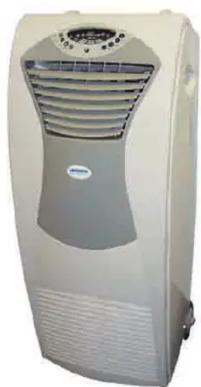
Mistral Heat Pump Air Conditioner
natural_image
Exterior view of a white industrial air conditioner unit with ventilation grilles and control panel (no visible text or symbols)Operating Instructions & Safety Guide

ANDREWS
AIR CONDITIONING
0800 211 611
andrews-sykes.com
General Safety
This equipment should only be used by a competent person who has read and understood these instructions.
Check condition of equipment before use. If unit is showing any signs of damage contact your supplier immediately.
Never operate this equipment if you are ill, feeling tired or under the influence of alcohol or drugs.
- Keep all vents and grills clear of obstructions.
- Keep children and animals away from air conditioning units. Never leave them alone when the unit is in use.
Make sure equipment is switched off and unplugged after use.
Do not use the unit where sunlight is shining directly on to it
Electrical Safety
This unit requires a 230 volt electrical supply. It plugs into standard domestic 13 amp socket.
Always inspect plugs and power cables for damage before plugging into power supply.
DO NOT USE IF ANY DAMAGE IS FOUND.
Ensure cables are installed to prevent hazards.
If an extension lead is used, ensure it is of the correct standard and fully uncoiled before use.
Cables must not be laid in wet or damp areas.
Do not move equipment while operating.
Do not pull equipment by the power lead.
It is recommended that this equipment is protected by an RCD when in use.
Maintenance
- Disconnect from electrical supply before any cleaning or maintenance.
Do not use chemical solvents to clean the surface of the unit. Use a clean damp cloth.
Check the Air filter every week. (Fig 4)
Remove the air filter, the element may be vacuumed clean or washed in a neutral and detergent mix (40°C).
Rinse and dry the filter before replacing.
Do not dry in direct sunlight.
Laying Up
- Clean Filter.
-
Clean surfaces.
-
Drain water from unit. Please note water will drain from the low level water drain (fig5) when the stopper is removed. Run in fan mode until the pipe is dry.
DO NOT DO THIS ON ANY INDOOR FLOOR SURFACES.
- When the unit is clean and drained, store in a clean, dry area. Stow cable.
Getting Started and Operation
Never operate the unit in very hot or cold conditions – it works properly at temperatures between 15°C and 31°C.
Always allow the unit to stand/settle for 15 minutes before switching on when either setting or restarting.
Position the mobile air conditioner in a flat location where the air outlets cannot be covered up. Place the unit no less than 50cm away from a wall or other obstacle.
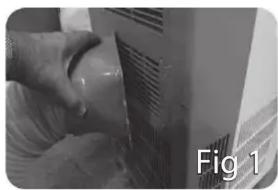
Fit the square end of the exhaust duct to the exhaust terminal of the unit (fig 1)
Put the other end (discharge) out of the nearest window. The length of the air exhaust between 550 – 1500mm. Use the minimum length when working. When mounting, try and keep the air exhaust hose vertical or horizontal, sloping up or down. Never operate if the hose is kinked or sagging. (fig2 & 3).
If mounting exhaust duct through a wall, the height of the hole should be 40 – 130cm.
Before Starting the unit
- Select a suitable location, with access to a 13amp 230volt 50Hz socket outlet. Plug in and switch on.
- Install the flexible exhaust hose to outside atmosphere. Note: Step 2 is only required when cooling mode is selected.
- Connect the pumped condensate drain hose to suitable drain point or container. If the display shows fault E4, remove the lower drain plug at the rear of the base of the unit to drain excess condensate.
Cooling Operation
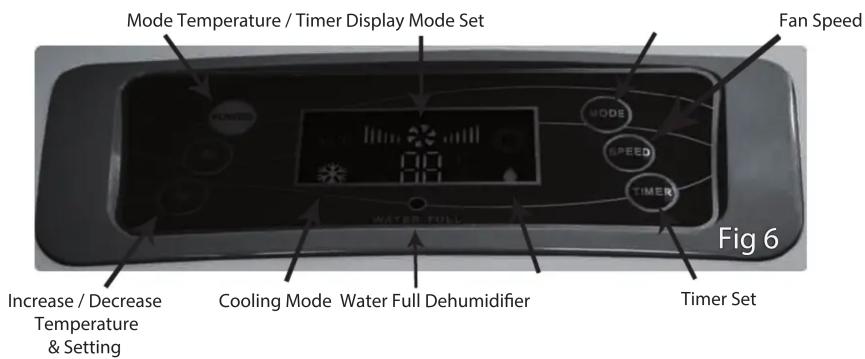
- Switch on unit by pressing the Power Button.
- Press the mode select button until the cooling mode symbol illuminates on the display panel.
- Press the Temperature Up / Down buttons to set the desired room temperature between 15^ C – 31^ C. After a few seconds the display will change to show the actual room temperature.
- Press the Speed button to set the desired fan speed.
Dehumidifier Operation
- Switch on the unit by pressing the Power Button.
- Press the mode select button until the dehumidifying mode symbol illuminates on the display panel. Note the temperature and fan speed will regulate automatically.
Auto Mode
Auto mode will maintain the room temperature at 24^ C and automatically select the fan speed.
Setting Timer ON
With the air conditioner turned ON, press the timer button and select (with the temp + and temp- buttons) a time the unit is required to start.
Setting Timer OFF
With the air conditioner turned ON, press the timer button and select (with the temp+ and temp- buttons) a time the unit is required to turn OFF.
natural_image
Close-up of a hand cleaning a wall with a pipe, labeled 'Fig 1' (no other text or symbols)
natural_image
Close-up of a white electronic device with a blue checkmark and label 'Fig 2' (no readable text or symbols on the device itself)
natural_image
Close-up of a white industrial pipe with a blue 'X' mark and label 'Fig 3' (no readable text or symbols on the pipe itself)
natural_image
Close-up of a hand holding a screwdriver inserted into a white ventilation grille (no text or symbols visible)
natural_image
Close-up of a mechanical component with a textured surface and a small protrusion, labeled 'Fig 5' (no readable text or symbols on the object itself)If sleep mode is selected the unit will automatically turn off after 8 hours. By activating swing mode the air deflection lovers will swing 120^ .
- Mistral Heat Pump Air Conditioner
- Operating Instructions & Safety Guide
- General Safety
- Electrical Safety
- Maintenance
- Laying Up
- DO NOT DO THIS ON ANY INDOOR FLOOR SURFACES.
- Getting Started and Operation
- Before Starting the unit
- Cooling Operation
- Dehumidifier Operation
- Auto Mode
- Setting Timer ON
- Setting Timer OFF
Brand : Andrews
Model : Mistral Heat Pump
Category : Air Conditioning