Inverter CTXS07JVJU - Air Conditioning DAIKIN - Free user manual and instructions
Find the device manual for free Inverter CTXS07JVJU DAIKIN in PDF.


| Product Type | Wall-Mounted Inverter Air Conditioner |
| Model | Inverter CTXS07JVJU |
| Brand | Daikin |
| Cooling Capacity | 7,000 BTU/hr (0.7 ton) |
| Heating Capacity | 8,000 BTU/hr (heat pump) |
| Power Supply | 208-230 V / 1 Phase / 60 Hz |
| Indoor Unit Dimensions (WxHxD) | Approx. 30 x 10 x 9 inches (762 x 254 x 229 mm) |
| Outdoor Unit Dimensions (WxHxD) | Approx. 28 x 22 x 12 inches (711 x 559 x 305 mm) |
| Indoor Unit Weight | Approx. 18 lbs (8.2 kg) |
| Outdoor Unit Weight | Approx. 55 lbs (25 kg) |
| Refrigerant Type | R-410A |
| Inverter Technology | Yes (DC Inverter) |
| Modes | Cool, Heat, Dry, Fan, Auto |
| Fan Speeds | 3 speeds (Low, Med, High) + Auto |
| Swing Function | Automatic horizontal and vertical louver swing |
| Remote Control | Infrared wireless remote with LCD display |
| Timer | On/Off timer (24-hour) |
| Sleep Mode | Yes, gradual temperature adjustment |
| Air Filter | Washable, high-density mesh filter |
| Self Diagnosis | LED error codes display |
| Auto Restart | Yes, after power failure |
| Warranty | 10 years on compressor, 1 year on parts |
| Maintenance | Clean filter every 2 weeks; professional cleaning recommended annually |
Frequently Asked Questions - Inverter CTXS07JVJU DAIKIN
User questions about Inverter CTXS07JVJU DAIKIN
0 question about this device. Answer the ones you know or ask your own.
Ask a new question about this device
Download the instructions for your Air Conditioning in PDF format for free! Find your manual Inverter CTXS07JVJU - DAIKIN and take your electronic device back in hand. On this page are published all the documents necessary for the use of your device. Inverter CTXS07JVJU by DAIKIN.
USER MANUAL Inverter CTXS07JVJU DAIKIN
natural_image
Black-and-white photo of an adult and a baby smiling together, both looking upward (no text or symbols visible)CONTENTS
READ BEFORE OPERATION
Safety Precautions 2
Name of Parts 4
Preparation before Operation 8
OPERATION
AUTO · DRY · COOL · HEAT · FAN Operation .....10
Adjusting the Airflow Direction 12
INTELLIGENT EYE Operation 14
POWERFUL Operation 16
OUTDOOR UNIT QUIET Operation 17
HOME LEAVE Operation ....18
TIMER Operation ....20
Note for Multi System 22
CARE
Care and Cleaning 24
TROUBLESHOOTING
Troubleshooting....28
Safety Precautions
- Read these safety considerations for operations carefully before installing air conditioning equipment. After completing the installation, make sure that the unit operates properly during the startup operation. Instruct the customer on how to operate and maintain the unit.
Inform customers that they should store this operation manual with the installation manual for future reference.
Meanings of DANGER, WARNING, CAUTION, and NOTE Symbols:

DANGER WARNING ⒶCAUTION
Indicates an imminently hazardous situation which, if not avoided, will result in death or serious injury.
Indicates a potentially hazardous situation which, if not avoided, could result in death or serious injury.

Indicates a potentially hazardous situation which, if not avoided, may result in minor or moderate injury. It may also be used to alert against unsafe practices.

Never do.

Be sure to ground the air conditioner.

Never touch the air conditioner (including the remote controller) with a wet hand.

Be sure to follow the instructions.

Never allow the air conditioner or remote controller to get wet.

DANGER
For refrigerant leakage, consult your dealer.
Refrigerant gas is heavier than air and replaces oxygen. A massive leak could lead to oxygen depletion, especially in basements, and an asphyxiation hazard could occur leading to serious injury or death.
- Refrigerant gas may produce a toxic gas if it comes in contact with fire such as from a fan heater, stove or cooking device. Exposure to this gas could cause severe injury or death.
- Any abnormalities in the operation of the air conditioner such as smoke or fire could result in severe injury or death. Turn off the power and contact your dealer immediately for instructions.
- Do not install the unit in an area where flammable materials are present due to risk of explosion resulting in serious injury or death.
- If equipment utilizing a burner is used in the same room as the air conditioner, there is the danger of oxygen deficiency which could lead to an asphyxiation hazard resulting in serious injury or death.
Be sure to ventilate the room sufficiently to avoid this hazard.
Safely dispose of the packing materials.
Packing materials, such as nails and other metal or wooden parts, may cause stabs or other injuries. Tear apart and throw away plastic packaging bags so that children will not play with them. Children playing with plastic bags face the danger of death by suffocation.

WARNING

- It is not good for health to expose your body to the air flow for a long time.
- Do not put your finger or other objects into the air outlet or inlet as the fan is rotating at high speed and could cause injury. Always keep small children away from the unit during operation.
- Do not attempt to repair, relocate, modify or reinstall the air conditioner by yourself. Incorrect work or modifications could cause electric shocks, fire or other damage.
For repairs and reinstallation, consult your Daikin dealer for advice and information.

- If the air conditioner is not cooling (heating) properly, the refrigerant may be leaking, contact your authorized dealer or qualified service repairman.
When making repairs which requires adding refrigerant, consult with your authorized dealer or qualified service repairman.
- Do not attempt to install the air conditioner by yourself. Improper installation could result in water leakage, electric shocks or fire. For installation, consult your authorized dealer or a qualified technician.

CAUTION

- The air conditioner must be grounded. Improper grounding may result in electric shocks. Do not connect the grounding wire to a gas pipe, water pipe, lightning rod, or a telephone ground line. Follow all local and state electrical codes.

- Do not use this unit for cooling precision instruments, food, plants, animals or works of art.
- Never expose little children, plants or animals directly to the air flow.
- Do not block air inlets nor outlets. Impaired air flow may result in poor performance or equipment problems.
- Do not stand, sit, or place objects on the outdoor unit. To avoid injury, do not remove the fan guard.

CAUTION

- Do not place anything under the indoor or outdoor unit that must be kept away from moisture, such as electrical or electronic equipment. In certain conditions, moisture in the air may condense and drip.
Check the unit stand and fittings for damage annually. - Do not touch the air inlet and aluminum fins of outdoor unit. It may cause injury and/or damage the heat transfer surface. This appliance is NOT intended for use by young children or impaired persons without proper supervision.
- Young children should be supervised to ensure that they DO NOT play with or near the air flow of this appliance.
- Do not pull at the conduit or hang anything on it. Otherwise it will cause fire or electric shock.
- Do not touch the heat exchanger fins. Improper handling may result in injury.
- Do not turn off the power immediately after stopping operation. Always wait at least 5 minutes before turning off the power to avoid water leakage or other problems.

- To avoid personal injury or equipment damage be sure to stop the operation, turn the breaker off or pull out the supply cord before cleaning or servicing the unit. NOTE: More than one disconnect may be required to shut off all power.
- Do not connect the air conditioner to a power supply different from the one specified. It may cause improper operation or fire.
- Depending on the environment, state and local electrical codes, a ground fault circuit interrupter may be required. Improper grounding or lack of a ground fault circuit interrupter may result in electrical shock, injuries, or death.
It is recommended to install a ground fault circuit interrupter if one is not already available. • This helps prevent electrical shocks or fire. - Arrange the drain hose to ensure smooth drainage. Improper drainage may cause water damage to the building, or its furnishing.
- Depending on the usage environment, water may leak from the air conditioner. If this happens, contact your Daikin Dealer.
- The remote controller should be installed in such away that children cannot play with it.
- Do not place objects in direct proximity of the outdoor unit and do not let leaves and other debris accumulate around the unit. Leaves are a hotbed for small animals which can enter the unit. Once in the unit, such animals can cause malfunctions, smoke or fire when making contact with electrical parts.

- Do not operate the air conditioner with wet hands.

- Do not wash the indoor unit with excessive water, only use a slightly wet cloth. - Do not place things such as vessels containing water or anything else on top of the unit. Water may penetrate into the unit and degrade electrical insulations, resulting in an electric shock.
Installation site.
■ Operate the air conditioner in a sufficiently ventilated area and not surrounded by obstacles. Do not use the air conditioner in the following places.
a. Places with a mist of mineral oil, such as cutting oil.
b. Locations such as coastal areas where there is a lot of salt in the air.
c. Locations such as hot springs where there is a lot of sulfur in the air.
d. Locations such as factories where the power voltage varies a lot.
e. In cars, boats, and other vehicles.
f. Locations such as kitchens where oil may splatter or where there is steam in the air.
g. Locations where equipment produces electromagnetic waves.
h. Places with an acid or alkaline mist.
i. Places where fallen leaves can accumulate or where weeds can grow.
Consider the nuisance of noise to your neighbors.
■ Pay Attention to Operating Sound. Be sure to use the following places:
a. Places that can sufficiently withstand the weight of the air conditioner yet can suppress the operating sound and vibration of the air conditioner.
b. Places where warm air from the air outlet of the outside unit or the operating sound of the outside unit does not annoy neighbors. Make sure that there are no obstacles close to the outside unit. Obstacles close to the outside unit may drop the performance of the outside unit or increase the operating sound of the outside unit.
Consult your dealer if the air conditioner in operation generates unusual noise.
Electrical work.
- For power supply, be sure to use a separate power circuit dedicated to the air conditioner.
System relocation.
■ Relocating the air conditioner requires specialized knowledge and skills. Please consult the dealer if relocation is necessary for moving or remodeling.
Name of Parts
Indoor Unit
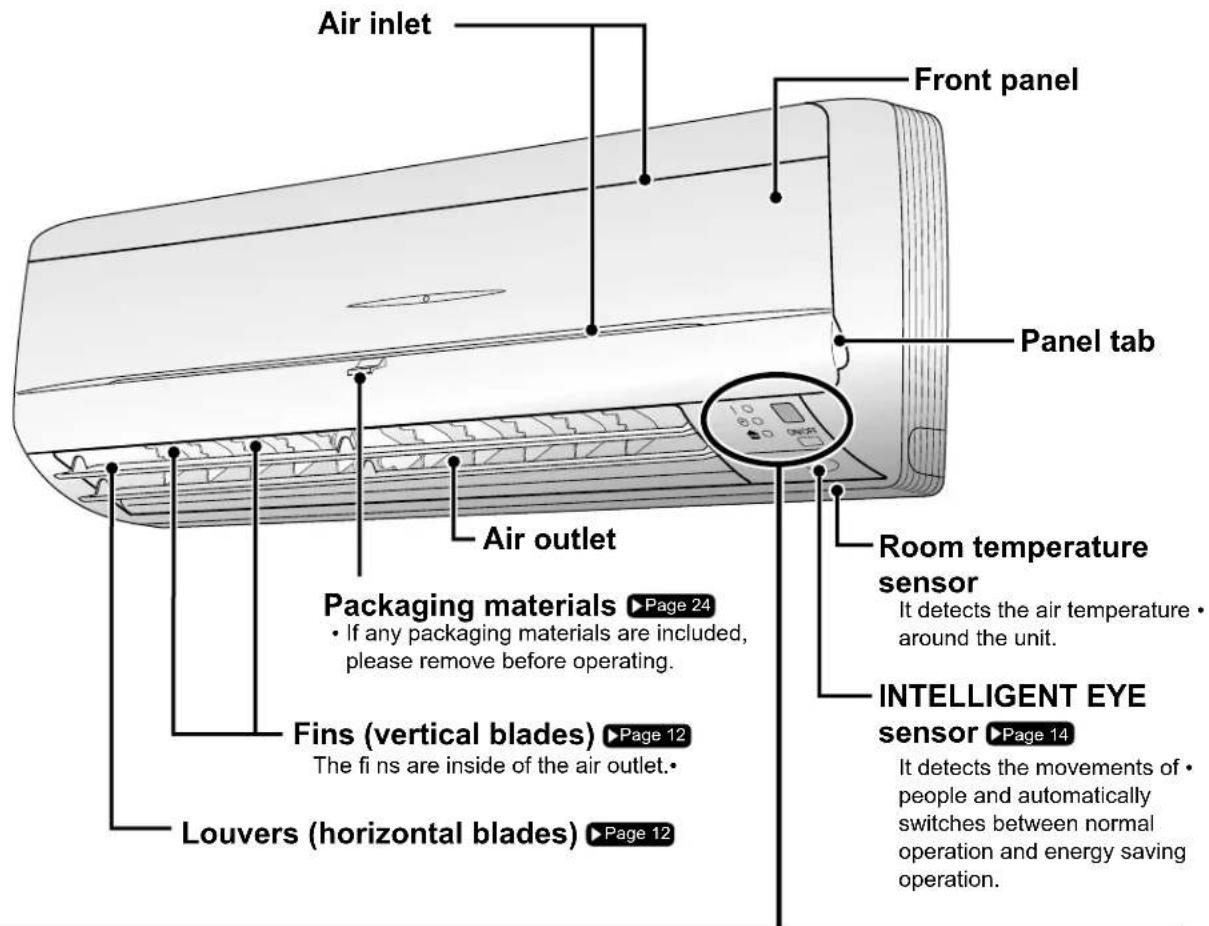
Display
Signal receiver
It receives signals from the remote • controller.
When the unit receives a signal, • you will hear a short beep.
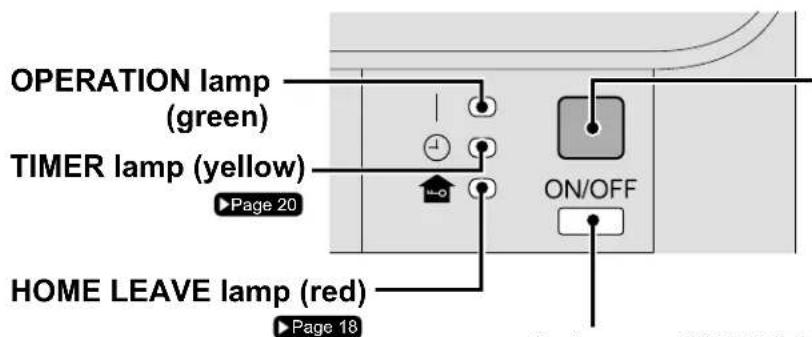
Operation start•
Settings changed•
Operation stop•
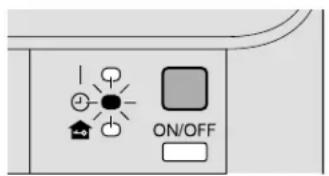
• Lights up when you use HOME LEAVE operation.
Indoor unit ON/OFF switch
Press this switch once to start operation. Press once again to stop it.
- The operation mode refer to the following table.
| Mode | Temperature setting | Airflow rate |
| AUTO | 77°F (25°C) | AUTO |
- This switch is useful when the remote controller is missing.
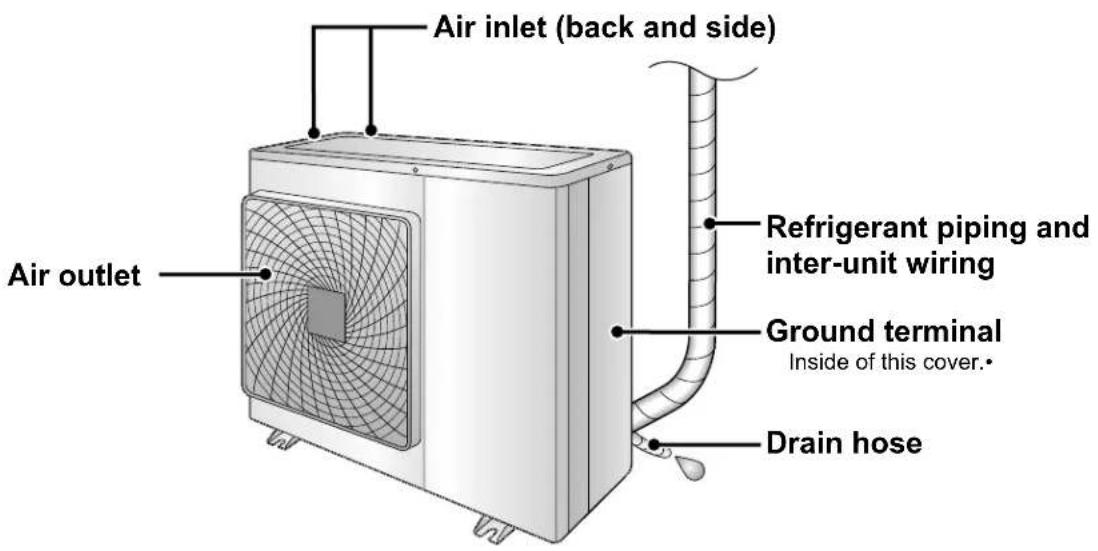
Outdoor Unit
Appearance of the outdoor unit may differ from some models.
Name of Parts
Remote Controller: ARC452A9
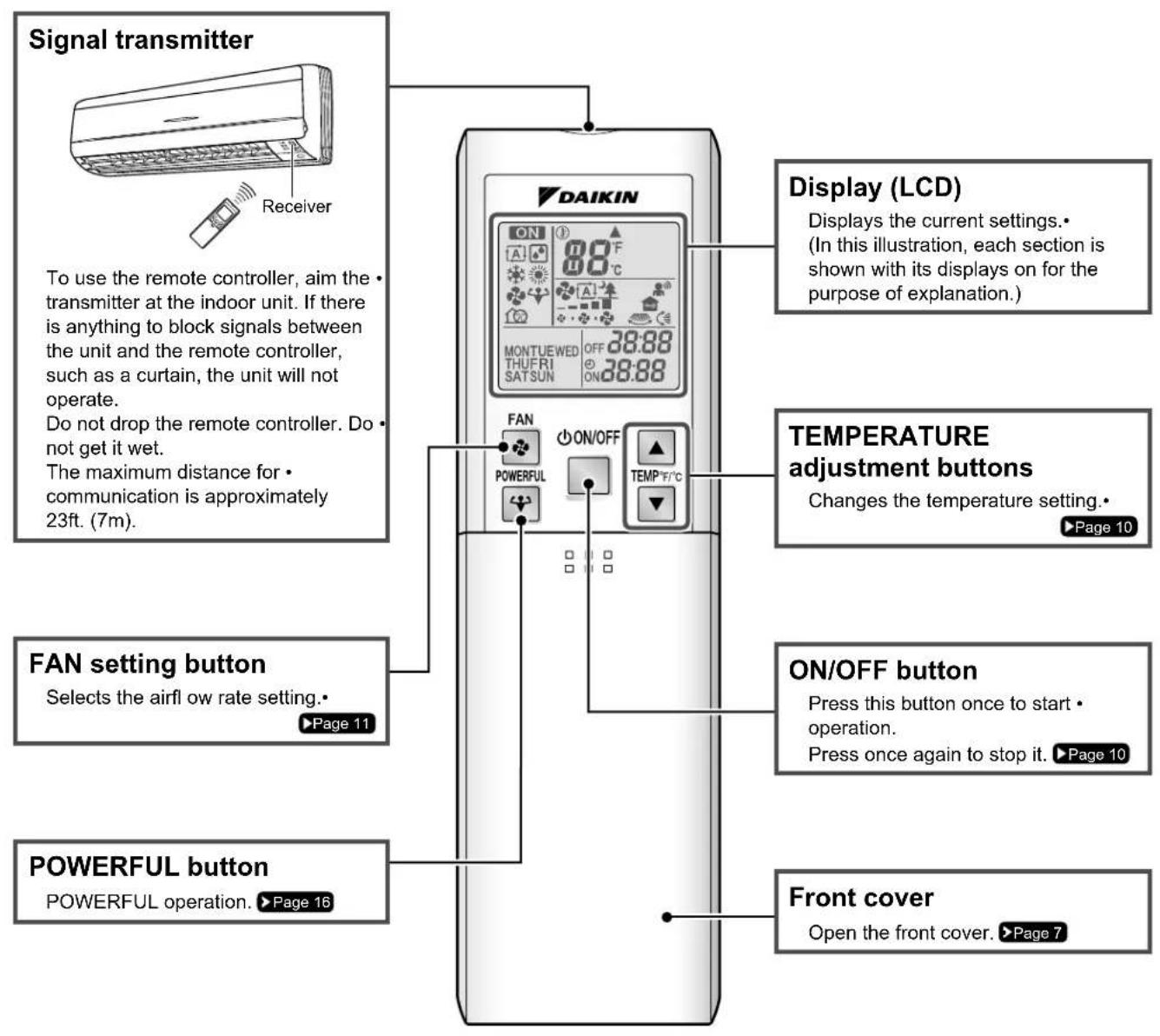
Open the front cover
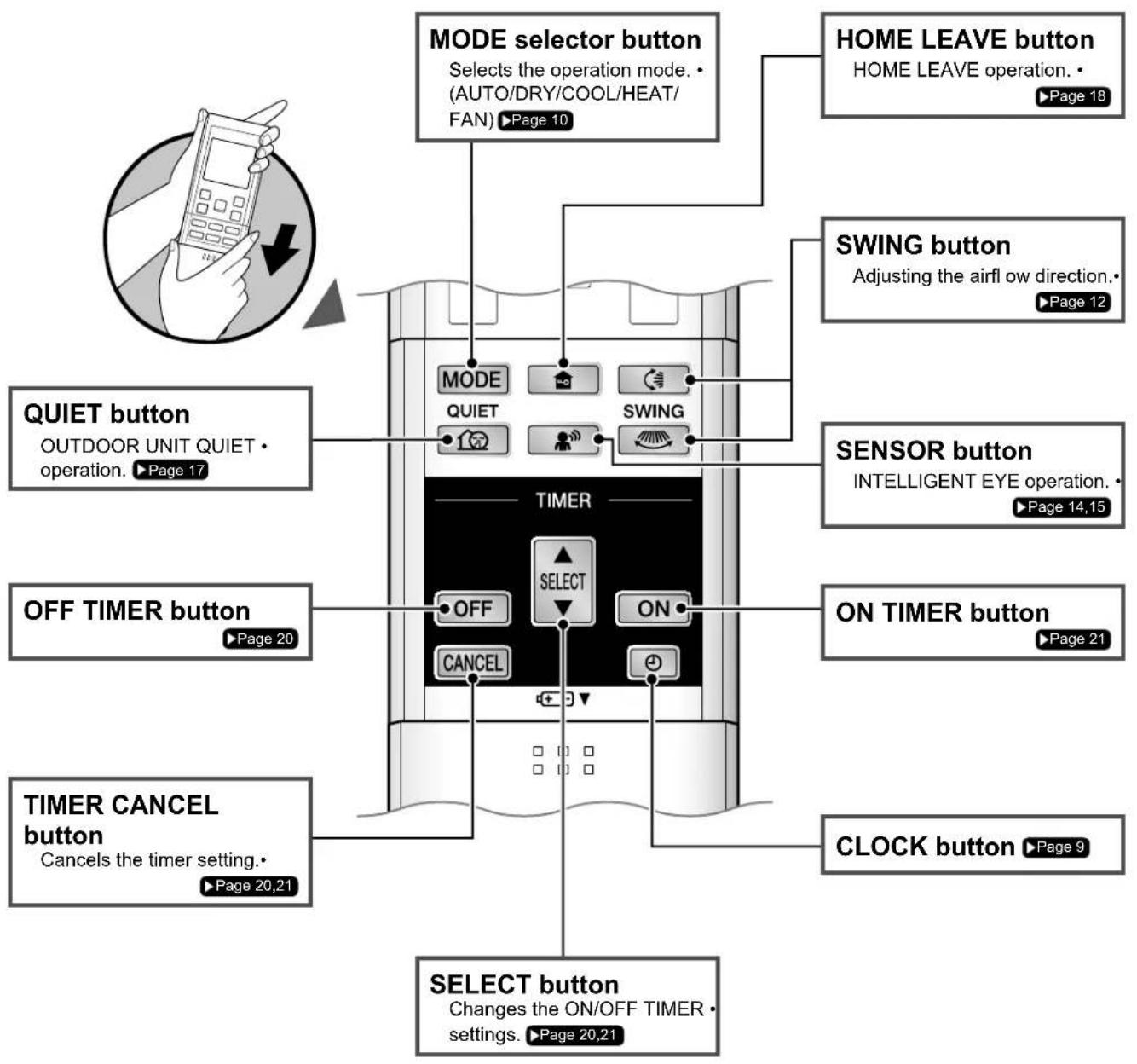
Preparation before Operation
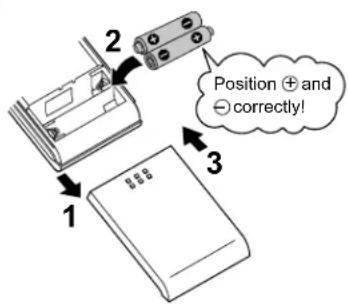
■ To set the batteries
Slide the front cover to take it off.1.
Set two dry batteries AAA.LR03 (alkaline).2.
Set the front cover as before.3.
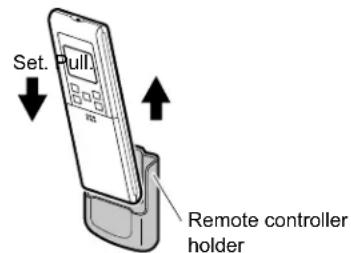
■ To fix the remote controller holder on the wall
Choose a place from where the signals reach 1. the unit.
- Fix the holder to a wall, a pillar with the screws supplied with the holder.
- Place the remote controller in the remote controller holder.
Celsius/Fahrenheit display switch

The Celsius or Fahrenheit display is selectable with the following buttons.

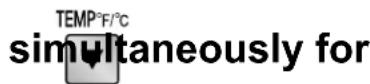
5 seconds.
The temperature will be displayed in Fahrenheit if it is presently displayed in Celsius, and vice versa.
ATTENTION
■ About batteries
- When replacing the batteries, use batteries of the same type, and replace both batteries at the same time.
- When the system is not used for a long time, take the batteries out.
- The attached batteries are provided for the initial use of the system. The usable period of the batteries may be short depending on the manufactured date of the air conditioner.
- The batteries will last for approximately 1 year. If the remote controller display begins to fade and the degradation of reception performance occurs within a year, however, replace both batteries with new, size AAA.LR03 (alkaline).
■ About remote controller
- Never expose the remote controller to direct sunlight.
- Dust on the signal transmitter or receiver will reduce the sensitivity. Wipe off dust with a soft cloth.
- Signal communication may be disabled if an electronic-starter-type fluorescent lamp (such as inverter-type lamps) is in the room. Consult the shop if that is the case.
- If the remote controller signals happen to operate another appliance, move that appliance somewhere else, or consult the service shop.
■ Celsius/Fahrenheit display change function of remote controller
- The set temperature may increase when the display is changed to Celsius from Fahrenheit, because a fraction of 0.5^ is rounded up.
• Example: A set temperature of 64^ F (equivalent to 18.5^ C) will be converted into 19^ C.
When the display is changed to Fahrenheit again, the set temperature will be converted into 66^ F (equivalent to 19^ C) instead of the original set temperature ( 64^ F) but a set temperature of 66^ F (equivalent to 19^ C) will be converted into 19^ C with no temperature change. - A reception sound will go off for the transmission of set temperature to the indoor unit at the time of setting the Celsius/Fahrenheit display change function.
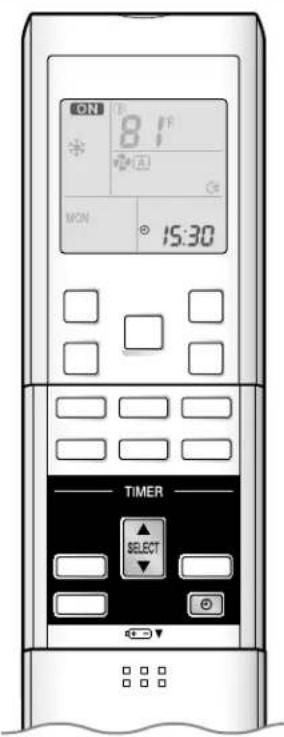
Turn the breaker on

Turning on the breaker closes the louvers. (This is a normal procedure.)
To set the clock

Press 1.
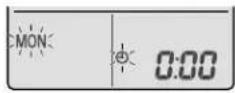
"0:00" is displayed.
"MON" and "①" blinks.
Press 2 ELECT
to set the current day of the week.
3. Press
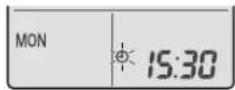
"blinks.
Press 4ECT to set the clock to the present time.
Holding down ▲ or ▼apidly increases or decreases the time display.
Press 5. .
- Always point the remote controller at the indoor unit when pressing the buttons when setting the indoor unit's internal clock.
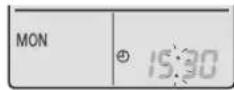
" "blinks.
NOTE
Tips for saving energy
- Be careful not to cool (heat) the room too much.
Keeping the temperature setting at a moderate level helps save energy.
- Cover windows with a blind or a curtain.
Blocking sunlight and air from outdoors increases the cooling (heating) effect.
- Clogged air filters cause inefficient operation and waste energy. Clean them once in about every 2 weeks.
■ Please note
- The air conditioner always consumes 50-120btu/h (15-35W) of electricity even while it is not operating.
- If you are not going to use the air conditioner for a long period, for example in spring or autumn, turn the breaker off.
- Use the air conditioner in the following conditions.
| Mode | Operating conditions | If operation is continued out of this range |
| COOL | Outdoor temperature : 14-115°F (-10-46°C)Indoor temperature : 64-90°F (18-32°C)Indoor humidity : 80% max. | A safety device may work to stop the operation.(In multi system, it may work to stop the operation of the outdoor unit only.)Condensation may occur on the indoor unit and drip. |
| HEAT | Outdoor temperature : 5-64°F (-15-18°C)Indoor temperature : 50-86°F (10-30°C) | A safety device may work to stop the operation. |
| DRY | Outdoor temperature : 14-115°F (-10-46°C)Indoor temperature : 64-90°F (18-32°C)Indoor humidity : 80% max. | A safety device may work to stop the operation.Condensation may occur on the indoor unit and drip. |
Operation outside this humidity or temperature range may cause a safety device to disable the system.
| Recommended temperature setting |
| For cooling: 78-82°F (26-28°C) |
| For heating: 68-75°F (20-24°C) |
The air conditioner operates with the operation mode of your choice.
From the next time on, the air conditioner will operate with the same operation mode.
To start operation

Press MODE and select a operation mode.
Each pressing of the button advances the mode setting in sequence.

flowchart
graph LR
    A["A"] --> B["Light Bulb"]
    B --> C["Light Bulb with Solar Radiation"]
    C --> D["Solar Radiation"]
    D --> E["Solar Radiation"]
    E --> F["Light Bulb with Solar Radiation"]
    F --> G["Solar Radiation"]
    G --> H["Light Bulb with Solar Radiation"]
    H --> I["Solar Radiation"]
    I --> J["Light Bulb with Solar Radiation"]
    J --> K["Solar Radiation"]
    K --> L["Light Bulb with Solar Radiation"]
    L --> M["Solar Radiation"]
    M --> N["Light Bulb with Solar Radiation"]
    N --> O["Solar Radiation"]
    O --> P["Light Bulb with Solar Radiation"]
    P --> Q["Solar Radiation"]
    Q --> R["Light Bulb with Solar Radiation"]
    R --> S["Solar Radiation"]
    S --> T["Light Bulb with Solar Radiation"]
    T --> U["Solar Radiation"]
    U --> V["Light Bulb with Solar Radiation"]
    V --> W["Solar Radiation"]
    W --> X["Light Bulb with Solar Radiation"]
    X --> Y["Solar Radiation"]
    Y --> Z["Light Bulb with Solar Radiation"]
    Z --> AA["Solar Radiation"]
    AA --> AB["Light Bulb with Solar Radiation"]
    AB --> AC["Solar Radiation"]
    AC --> AD["Light Bulb with Solar Radiation"]
    AD --> AE["Solar Radiation"]
    AE --> AF["Light Bulb with Solar Radiation"]
    AF --> AG["Solar Radiation"]
"ON is displayed on the LCD.
The OPERATION lamp lights up.
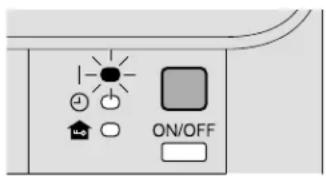
Display
To stop operation

"ON is no longer displayed on the LCD.
• The OPERATION lamp goes off.
To change the temperature setting
Press

TEMP°F/°C


- The displayed items on the LCD will change whenever either one of the buttons is pressed.
| DRY or FAN operation | COOL operation | HEAT operation | AUTO operation |
| The temperature setting is not variable. | 64-90°F(18-32°C) | 50-86°F(10-30°C) | 64-86°F(18-30°C) |
| Press ▲ to raise the temperature and press ▼ to lower the temperature. | |||
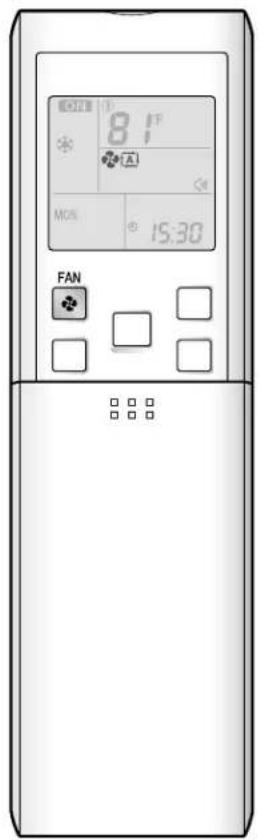
To change the airflow rate setting
Press

| DRY operation AUTO or COOL | or HEAT or FAN operation |
| The airflow rate setting is not variable. | 5 levels of airflow rate setting from “to” plus “and” are available.  |
Indoor unit quiet operation•
When the airflow is set to “▲”, the noise from the indoor unit will become quieter.
Use this when making the noise quieter.
The unit might lose capacity when the airflow rate is set to a weak level.
• Each pressing of the button advances the airflow rate setting in sequence.

flowchart
graph LR
    A["Input Image"] --> B["Add Text"]
    B --> C["Delete Text"]
    C --> D["Add Text"]
    D --> E["Delete Text"]
    E --> F["Add Text"]
    F --> G["Delete Text"]
    G --> H["Add Text"]
NOTE
■ Notes on HEAT operation
- Since this air conditioner heats the room by taking heat from outdoor air to indoors, the heating capacity becomes smaller in lower outdoor temperatures. If the heating effect is insufficient, it is recommended to use another heating appliance in combination with the air conditioner.
- The heat pump system heats the room by circulating hot air around all parts of the room. After the start of HEAT operation, it takes some time before the room gets warmer.
- In HEAT operation, frost may occur on the outdoor unit and lower the heating capacity. In that case, the system switches into defrosting operation to take away the frost.
- During defrosting operation, hot air does not flow out of indoor unit.
■ Note on COOL operation
- This air conditioner cools the room by blowing the hot air in the room outside, so if the outside temperature is high, the performance of the air conditioner drops.
■ Note on DRY operation
- The computer chip works to rid the room of humidity while maintaining the temperature as much as possible. It automatically controls temperature and airflow rate, so manual adjustment of these functions is unavailable.
■ Notes on AUTO operation
- In AUTO operation, the system selects a temperature setting and an appropriate operation mode (COOL or HEAT) based on the room temperature at the start of the operation.
- The system automatically reselects setting at a regular interval to bring the room temperature to user-setting level.
■ Note on FAN operation
• This is valid for fan only.
■ Note on airflow rate setting
- At smaller airflow rates, the cooling (heating) effect is also smaller.
Adjusting the Airflow Direction
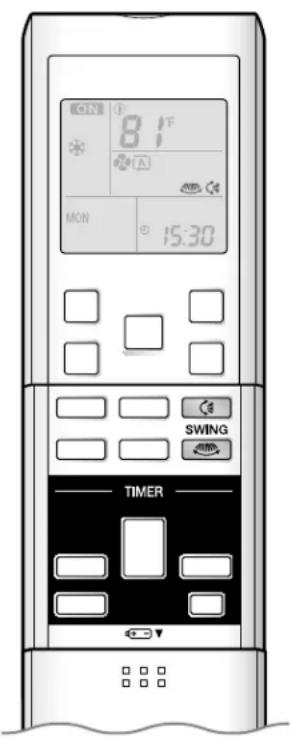
You can adjust the airflow direction to increase your comfort.
Adjusting the upper and lower airflow direction
To adjust the louvers (horizontal blades)
Press
“💡” is displayed on the LCD and the louvers will begin to swing.
When the louvers have reached the desired 2. position, press once more.
The louvers will stop moving.
“◀” is no longer displayed on the LCD.
Adjusting the right and left airflow direction
■ To adjust the fins (vertical blades)
Press

" is displayed on the LCD.
4. When the fins have reached the desired position, press 🤒 once more.
• The fins will stop moving.

" is no longer displayed on the LCD.
To start 3-D airfl ow

-
- Press the 📊 and the 🌐 the “ 🔊 and “ ” display will light up and the louvers and fi ns will move in turn.
To cancel 3-D airflow

2.4. Press either the
or the
NOTE
Note on the angles of the louvers ■
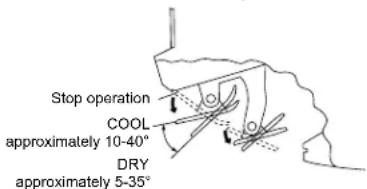
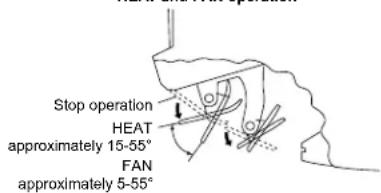
- When [icon] is selected, the louvers swinging range depends on the operation. (See the figure.)
■ Note on 3-D airflow
- Using 3-D airflow circulates cold air, which tends to collected at the bottom of the room, and hot air, which tends to collect near the ceiling, throughout the room, preventing areas of cold and hot developing.
ATTENTION
- Always use a remote controller to adjust the angles of the louvers and fins. If you attempt to move it forcibly with hand when it is swinging, the mechanism may be broken.
- Always use a remote controller to adjust the fins angles. Inside the air outlet, a fan is rotating at a high speed.
COOL and DRY operation
HEAT and FAN operation
INTELLIGENT EYE Operation
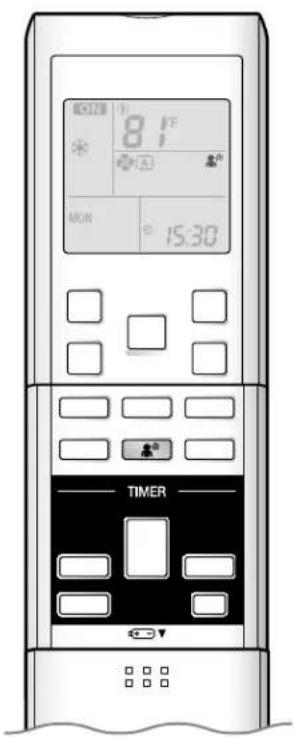
"INTELLIGENT EYE" is the infrared sensor which detects the human movement.
To start INTELLIGENT EYE operation
Press

is displayed on the LCD.
To cancel INTELLIGENT EYE operation
Press

is no longer displayed on the LCD.
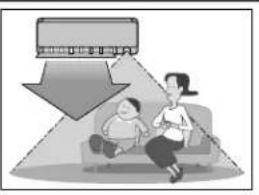
[Example]
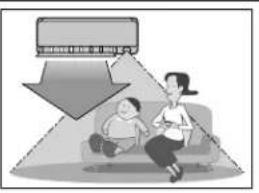
When somebody in the room
- Normal operation
The air conditioner is in normal operation while the sensor is detecting the movement of people.
natural_image
Illustration of a woman and child sitting on a couch with a large downward arrow pointing to a wall (no text or symbols)
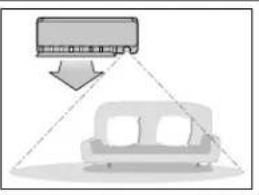
When nobody in the room
• 20 minutes after, start energy saving operation.
The set temperature is shifted in ±3.6^ ( ±2^ ) steps.
natural_image
Diagram showing a car with a roof-mounted unit and a sofa, connected by dashed lines (no text or symbols)
Somebody back in the room
- Back to normal operation.
The air conditioner will return to normal operation when the sensor detects the movement of people again.
natural_image
Illustration of a family watching a car with a downward arrow (no text or symbols)"INTELLIGENT EYE" is useful for energy saving
Energy saving operation ■
- Change the temperature -3.6^ (-2^) in HEAT / +3.6^ (+2^) in COOL / +1.8^ (+1^) in DRY operation from set temperature.
- Decrease the airflow rate slightly in FAN operation only.
If no presence detected in the room for 20 minutes.
NOTE
Notes on INTELLIGENT EYE operation
Application range is as follows.
Vertical angle 90°
(Side view)
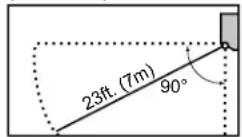
Horizontal angle 110° (Top view)
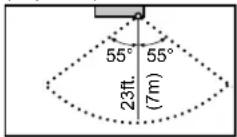
Sensor may not detect moving objects further than 23ft. (7m) away. (Check the application range.)
- Sensor detection sensitivity changes according to indoor unit location, the speed of passersby, temperature range, etc.
- The sensor also mistakenly detects pets, sunlight, fluttering curtains and light reflected off of mirrors as passersby. INTELLIGENT EYE operation will not go on during POWERFUL operation.
NIGHT SET mode ▶Page 20 will not go on during use of INTELLIGENT EYE operation.

CAUTION
Do not place large objects near the sensor.
Also keep heating units or humidifiers outside the sensor's detection area. This sensor can detect undesirable objects.
- Do not hit or forcefully push the INTELLIGENT EYE sensor. This can lead to damage and malfunction.
POWERFUL Operation
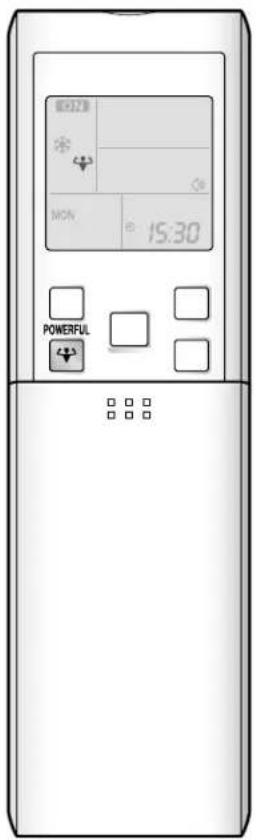
POWERFUL operation quickly maximizes the cooling (heating) effect in any operation mode. You can get the maximum capacity.
To start POWERFUL operation
Press during operation.
POWERFUL operation ends in 20 minutes. Then the system automatically operates again with the previous settings which were used before POWERFUL operation.
“◀” is displayed on the LCD.
When using POWERFUL operation, there are some functions which are not available.
To cancel POWERFUL operation
Press again.
“♥” is no longer displayed on the LCD.
NOTE
Notes on POWERFUL operation
POWERFUL operation cannot be used together with QUIET operation.
Priority is given to the function of whichever button is pressed last.
In COOL and HEAT operation•
To maximize the cooling (heating) effect, the capacity of outdoor unit must be increased and the airflow rate be fixed to the maximum setting. The temperature and airflow settings are not variable.
• In DRY operation
The temperature setting is lowered by 4.5°F (2.5°C) and the airflow rate is slightly increased.
• In FAN operation
The airflow rate is fixed to the maximum setting.
• In AUTO operation
To maximize the cooling (heating) effect, the capacity of outdoor unit must be increased and the airflow rate be fixed to the maximum setting.
- POWERFUL operation will not increase the capacity of the air conditioner if the air conditioner is already in operation with its maximum capacity demonstrated.
OUTDOOR UNIT QUIET Operation
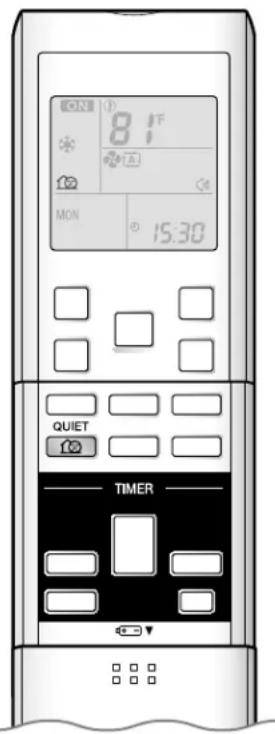
OUTDOOR UNIT QUIET operation lowers the noise level of the outdoor unit by changing the frequency and fan speed on the outdoor unit. This function is convenient during night.
To start OUTDOOR UNIT QUIET operation
Press .
"123" is displayed on the LCD.
To cancel OUTDOOR UNIT QUIET operation
Press again.
"17" is no longer displayed on the LCD.
NOTE
Notes on OUTDOOR UNIT QUIET operation
- If using a multi system, this function will work only when the OUTDOOR UNIT QUIET operation is set on all operated indoor units.
However, if using priority room setting, see note for multi system. ▶ Page 22
This function is available in COOL, HEAT, and AUTO operation.
(This is not available in FAN and DRY operation.)
- POWERFUL operation and OUTDOOR UNIT QUIET operation cannot be used at the same time.
Priority is given to the function of whichever button is pressed last.
- If operation is stopped using the remote controller or the indoor unit ON/OFF switch when using OUTDOOR UNIT QUIET operation, "Remain on the remote controller display.
- OUTDOOR UNIT QUIET operation will drop neither the frequency nor fan speed if the frequency and fan speed have been already dropped low enough.
HOME LEAVE Operation
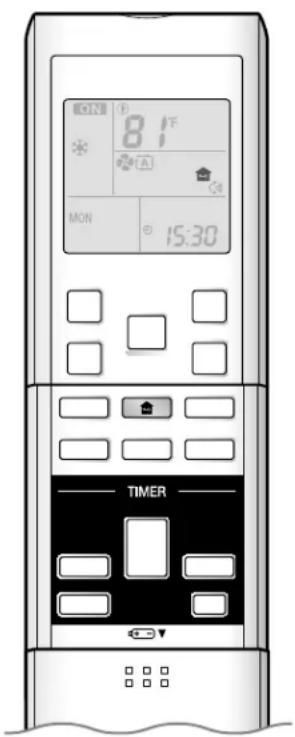
HOME LEAVE operation is a function which allows you to record your preferred temperature and airflow rate settings.
To start HOME LEAVE operation
Press
“” is displayed on the LCD.
The HOME LEAVE lamp lights up.
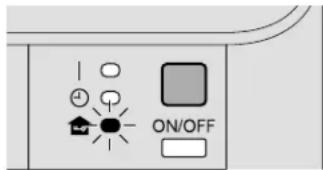
Display
To cancel HOME LEAVE operation
Press 2 again.
“” is no longer displayed on the LCD.
The HOME LEAVE lamp goes off.
Before using HOME LEAVE operation.
■ To set the temperature and airflow rate for HOME LEAVE operation
When using HOME LEAVE operation for the first time, please set the temperature and airflow rate for HOME LEAVE operation. Record your preferred temperature and airflow rate.
| Initial setting | Selectable range | |||
| Temperature | Airflow rate | Temperature | Airflow rate | |
| Cooling | 77°F (25°C) | AUTO | 64-90°F (18-32°C) | 5 step, “ [A]” and “ [▲]” |
| Heating | 77°F (25°C) | AUTO | 50-86°F (10-30°C) | 5 step, “ [A]” and “ [▲]” |
- Press 🏠 . Make sure “ 🔊 ” is displayed in the remote controller display.
- Adjust the set temperature with ▲ or ▼ as you like.
- Adjust the airflow rate with FAN setting button as you like.
HOME LEAVE operation will run with these settings the next time you use the unit. To change the recorded information, repeat steps 1 – 3.
What's the HOME LEAVE operation?
Is there a set temperature and airflow rate which is most comfortable, a set temperature and airflow rate which you use the most? HOME LEAVE operation is a function that allows you to record your favorite set temperature and airflow rate. You can start your favorite operation mode simply by pressing 🙏 on the remote controller. This function is convenient in the following situations.
Useful in these cases
Use as an energy-saving mode.1.
Set the temperature 3-5^(2-3^) higher (COOL) or lower (HEAT) than normal. Setting the fan speed to the lowest setting allows the unit to be used in energy-saving mode. Also convenient for use while you are out or sleeping.
Every day before you leave the house...
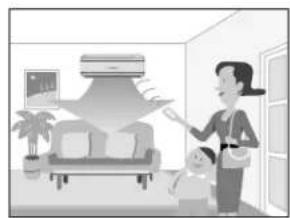
natural_image
Illustration of a woman and child in an indoor setting with a ceiling fan and wall-mounted screens (no text or symbols)When you go out, press and the air conditioner will adjust capacity to reach the preset temperature for HOME LEAVE operation.
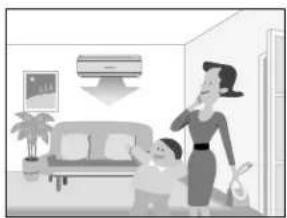
natural_image
Illustration of a woman and child in a living room with a wall-mounted air conditioner (no text or symbols)When you return, you will be welcomed by a comfortably air conditioned room.
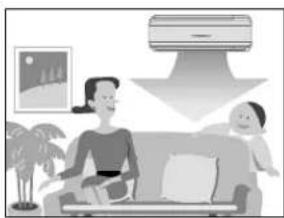
natural_image
Illustration of a family with a sofa and a cloud device, no text or symbols presentPress again, and the air conditioner will adjust capacity to the set temperature for normal operation.
Before bed...
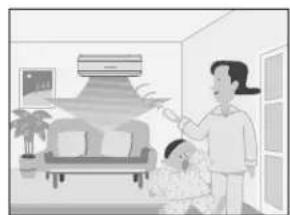
natural_image
Illustration of a woman and child in a living room with a ceiling-mounted unit (no text or symbols visible)Set the unit to HOME LEAVE operation before leaving the living room when going to bed.
natural_image
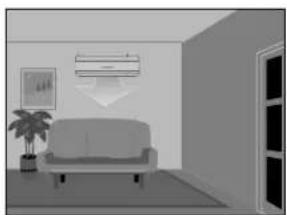
Interior view of a modern living room with sofa, wall-mounted air conditioner, and potted plant (no text or symbols)The unit will maintain the temperature in the room at a comfortable level while you sleep.
natural_image
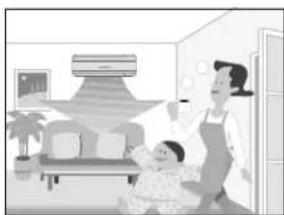
Illustration of a family in a living room with a woman and child, no visible text or symbolsWhen you enter the living room in the morning, the temperature will be just right. Disengaging HOME LEAVE operation will return the temperature to that set for normal operation. Even the coldest winters will pose no problem!
Use as a favorite mode.2.
Once you record the temperature and airflow rate settings you most often use, you can retrieve them by pressing 🙏. You do not have to make all the selections again.
NOTE
- Once the temperature and airflow rate for HOME LEAVE operation are set, those settings will be used whenever HOME LEAVE operation is used in the future. To change these settings, please refer to the before using HOME LEAVE operation section above.
• HOME LEAVE operation is only available in COOL and HEAT operation. It cannot be used in AUTO, DRY, and FAN operation.
• HOME LEAVE operation runs in accordance with the previous operation mode (COOL or HEAT) before using HOME LEAVE operation.
• HOME LEAVE operation and POWERFUL operation cannot be used at the same time. Last button that was pressed has priority. - The operation mode cannot be changed while HOME LEAVE operation is being used.
- When operation is shut off during HOME LEAVE operation, using the remote controller or the indoor unit ON/OFF switch, "③" will remain on the remote controller display.
TIMER Operation
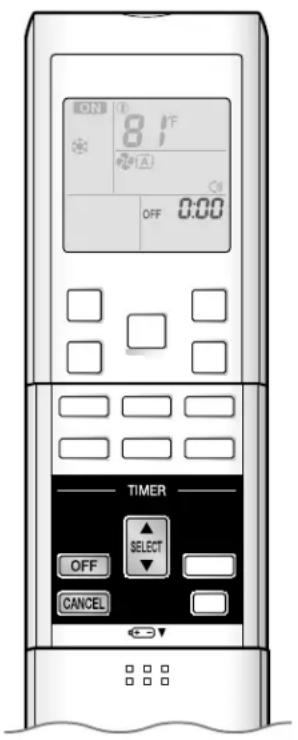
Timer functions are useful for automatically switching the air conditioner on or off at night or in the morning. You can also use OFF TIMER and ON TIMER in combination.
To use OFF TIMER operation
Check that the clock is correct.
If not, set the clock to the present time. ▶Page 9
Press 1OFF
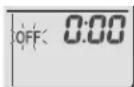
"0:00" is displayed.
"OFF" blinks.
Press 2▲ SELECT until the time setting reaches the point
you like.
Each pressing of either button increases or decreases the time setting by 10 minutes. Holding down either button changes the setting rapidly.
Press 30FFagain.
The TIMER lamp lights up.
Display
To cancel OFF TIMER operation
Press CANCEL
The TIMER lamp goes off.
NOTE
Notes on TIMER operation
- When TIMER is set, the present time is not displayed.
- Once you set ON/OFF TIMER, the time setting is kept in the memory. (The memory is canceled when remote controller batteries are replaced.)
- When operating the unit via the ON/OFF TIMER, the actual length of operation may vary from the time entered by the user. (Maximum approximately 10 minutes)
■ NIGHT SET mode
- When the OFF TIMER is set, the air conditioner automatically adjusts the temperature setting (0.9°F (0.5°C) up in COOL, 3.6°F (2.0°C) down in HEAT) to prevent excessive cooling (heating) for your pleasant sleep.
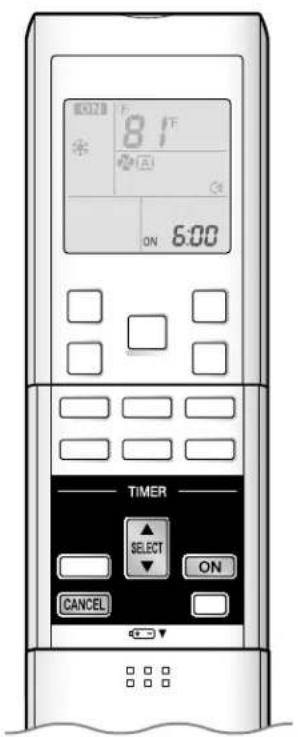
To use ON TIMER operation
Check that the clock is correct.
If not, set the clock to the present time.

Press
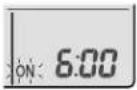
"6:00" is displayed.
"ON" blinks.
until the time setting reaches the point
you like.
Each pressing of either button increases or decreases the time setting by 10 minutes. Holding down either button changes the setting rapidly.
Press
The TIMER lamp lights up.
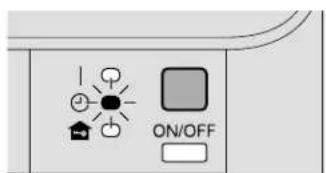
Display
To cancel ON TIMER operation
The TIMER lamp goes off.
To combine ON TIMER and OFF TIMER
- A sample setting for combining the two timers is shown below.

ATTENTION
■ In the following cases, set the timer again.
• After a breaker has turned off.
• After a power failure.
• After replacing batteries in the remote controller.
Note for Multi System
What is a multi system?
This system has one outdoor unit connected to multiple indoor units.
Selecting the operation mode
With the priority room setting present but1. inactive or not present.
When more than one indoor unit is operating, priority is given to the first unit that was turned on.
In this case, set the units that are turned on later to the same operation mode (*1) as the first unit.
Otherwise, they will enter the standby state, and the
OPERATION lamp will flash: this does not indicate malfunction. (*1)
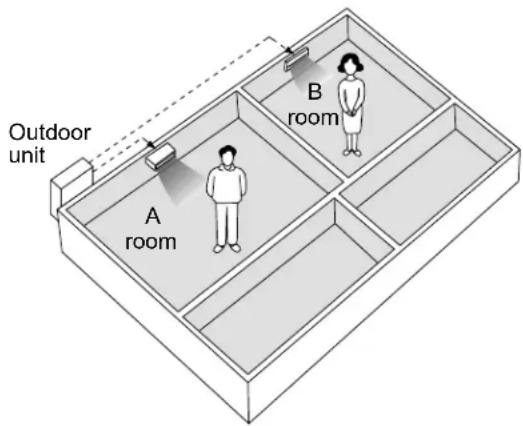
COOL, DRY and FAN operation may be used at the same time.
AUTO operation automatically selects COOL operation or HEAT operation based on the room temperature.
Therefore, AUTO operation is available when selecting the same operation mode as that of the room with the first unit to be turned on.

CAUTION
- Normally, the operation mode in the room where the unit is first run is given priority, but the following situations are exceptions, so please keep this in mind.
If the operation mode of the first room is FAN operation, then using HEAT operation in any room after this will give priority to HEAT operation. In this situation, the air conditioner running in FAN operation will go on standby, and the OPERATION lamp will flash.
With the priority room setting active.2.
See priority room setting on the next page.
NIGHT QUIET mode (Available only for COOL operation)
NIGHT QUIET mode requires initial programming during installation. Please consult your retailer or dealer for assistance.
NIGHT QUIET mode reduces the operation noise of the outdoor unit during the nighttime hours to prevent annoyance to neighbors.
The NIGHT QUIET mode is activated when the temperature drops 9^ F ( 5^ C) or more below the highest temperature recorded that day. Therefore, when the temperature difference is less than 9^ F ( 5^ C), this function will not be activated.
- NIGHT QUIET mode reduces slightly the cooling efficiency of the unit.
OUTDOOR UNIT QUIET operation ▶Page 17
With the priority room setting present but inactive or not present.1.
When using the OUTDOOR UNIT QUIET operation feature with the multi system, set all indoor units to OUTDOOR UNIT QUIET operation using their remote controllers.
When clearing OUTDOOR UNIT QUIET operation, clear one of the operating indoor units using its remote controller.
The OUTDOOR UNIT QUIET operation display remains on the remote controller for other rooms.
We recommend you release all rooms using their remote controllers.
With the priority room setting active.2.
See priority room setting.
COOL/HEAT mode lock (Available only for heat pump models)
The COOL/HEAT mode lock requires initial programming during installation. Please consult your authorized dealer for assistance. The COOL/HEAT mode lock sets the unit forcibly to either COOL or HEAT operation. This function is convenient when you wish to set all indoor units connected to the multi system to the same operation mode.
Priority room setting
The priority room setting requires initial programming during installation. Please consult your authorized dealer for assistance. The room designated as the priority room takes priority in the following situations;
Operation mode priority.1.
As the operation mode of the priority room takes precedence, the user can select a different operation mode from other rooms.
* Room A is the priority room in the examples.
When COOL operation is selected in room A while operating the following modes in room B:
| Operation mode in room B Status of room B when the unit in room A is in COOL operation | |
| COOL or DRY or FAN Current operation mode maintained | |
| HEAT The unit enters standby mode. Operation resumes when the room A unit stops operating. | |
| AUTO | If the unit is set to COOL operation, it continues. If the unit is set to HEAT operation, it enters standby mode. Operation resumes when the room A unit stops operating. |
Priority when POWERFUL operation is used.2.
* Room A is the priority room in the examples.
The indoor units in rooms A and B are all operating. If the unit in room A enters POWERFUL operation, operation capacity will be concentrated in room A. In such a case, the cooling (heating) efficiency of the units in room B may be slightly reduced.
Priority when using OUTDOOR UNIT QUIET operation.3.
* Room A is the priority room in the examples.
Just by setting the unit in room A to QUIET operation, the air conditioner starts OUTDOOR UNIT QUIET operation.
You don't have to set all the operated indoor units to QUIET operation.
Care and Cleaning

CAUTION
Before cleaning, be sure to stop the operation and turn the breaker off.
Units
Indoor unit, outdoor unit and remote controller Wipe them with a soft cloth when dirty.

Front panel
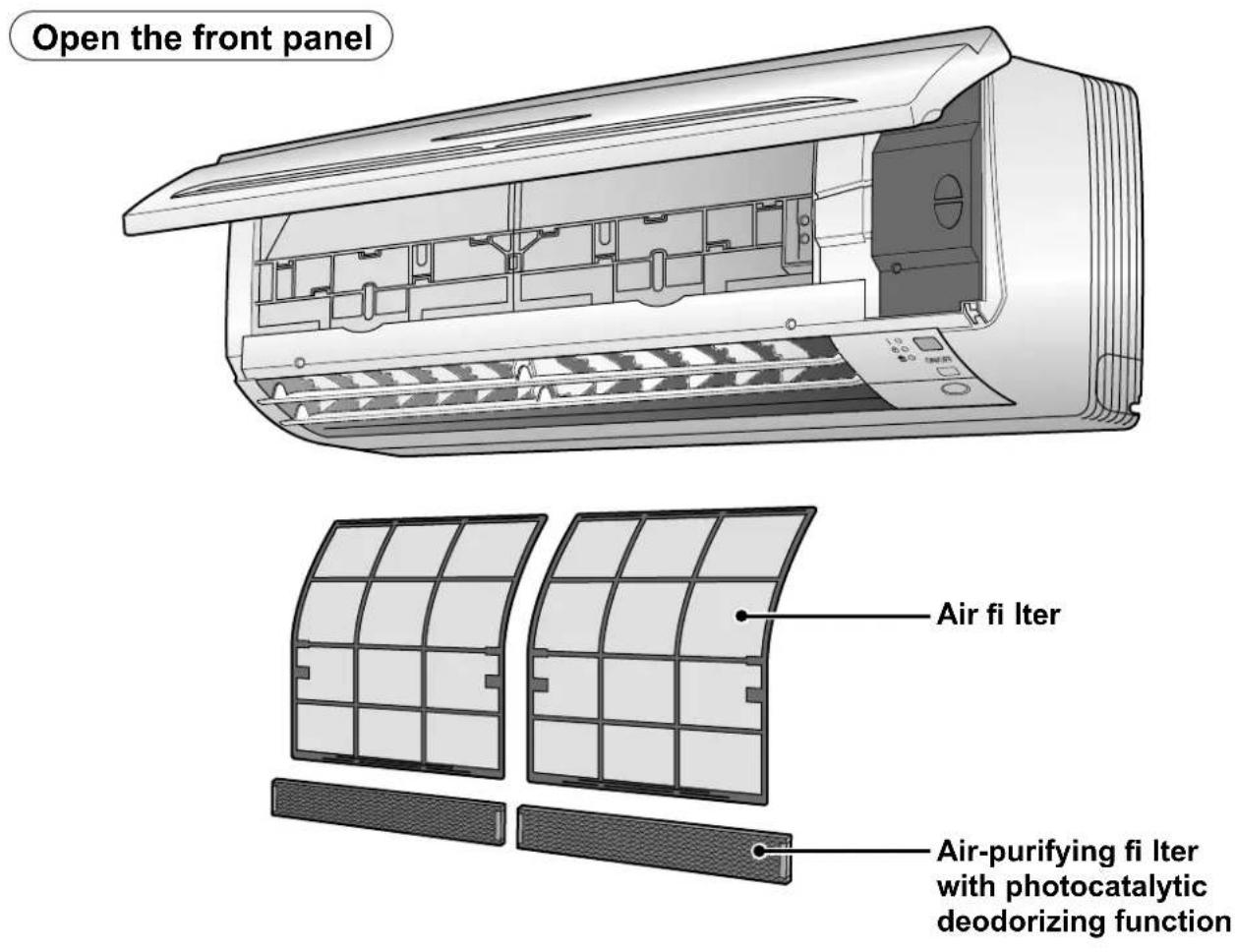
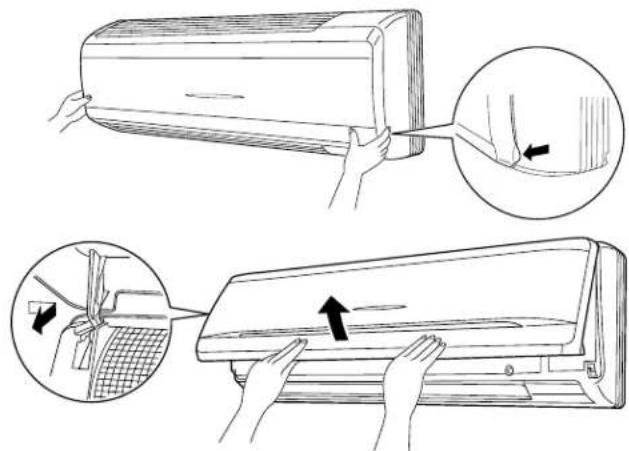
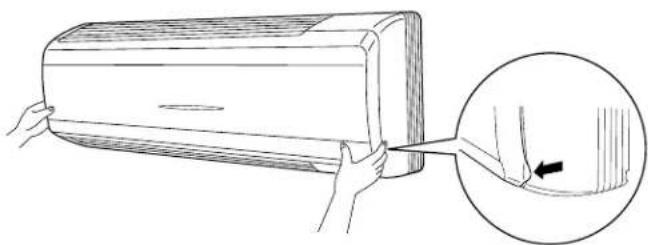
Open the front panel.1.
Hold the front panel by the panel tabs on the both sides • and open it.
Remove the front panel.2.
Slide the front panel to either the left or right and pulling it toward you.
This will disconnect the rotation dowel on one side.
Disconnect the front panel shaft on the other side in the same manner.
Clean the front panel.3.
Wipe it with a soft cloth soaked in water.
Only neutral detergent may be used.
If you wash the panel with water, wipe it with a dry soft cloth, and allow to dry in the shade.
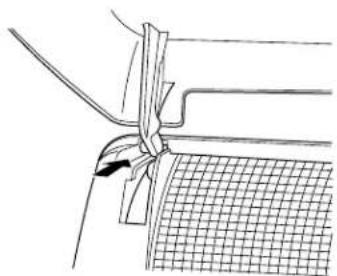
Attach the front panel.4.
Align the front panel shaft on the left and right of the front panel with the slots, then push them all the way in.
Close the front panel slowly. (Press the panel at both sides and the center.)
natural_image
Line drawing of a mechanical joint or bracket with a grid pattern and a black arrow indicating force or movement (no text or symbols)
CAUTION
When the packaging materials are attached to the front panel, please remove them.
- Do not touch the metal parts of the indoor unit. If you touch those parts, this may cause an injury.
- When removing or attaching the front panel, use a robust and stable stool and watch your steps carefully.
- When removing or attaching the front panel, support the panel securely with hand to prevent it from falling.
- For cleaning, do not use hot water above 104^ (40^) , benzine, gasoline, thinner, nor other volatile oils, polishing compound, scrubbing brushes, nor other hand stuff.
• After cleaning, make sure that the front panel is securely fixed.
natural_image
Illustration of a car air conditioner with a hand holding a clip, showing the correct handle and angle (no text or symbols)Filters
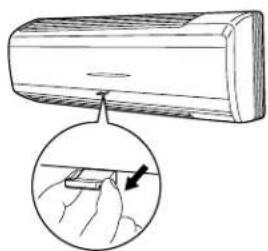
Open the front panel. 1 Page 24
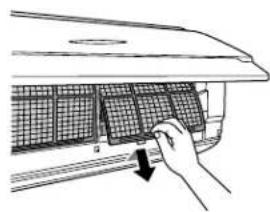
Pull out the air fi Iters.2.
- Push a little upwards the tab at the center of each air filter, then pull it down.
natural_image
Line drawing of a car air conditioner with hands holding the panel, showing a magnified inset of the handle (no text or symbols)Take off the air-purifying 3. fi Iter with photocatalytic deodorizing function.
Press the top of the air-cleaning fi iter onto the tabs • (3 at top). Then press the bottom of the fi iter up slightly, and press it onto the tabs (2 at bottom).
natural_image
Hand placing a grid array into a car air vent (no text or symbols visible)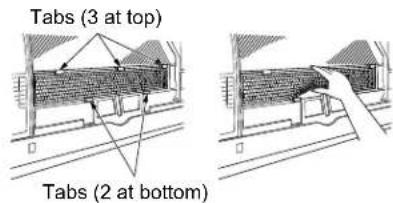
Clean or replace each fi Iter.4.
See figure.
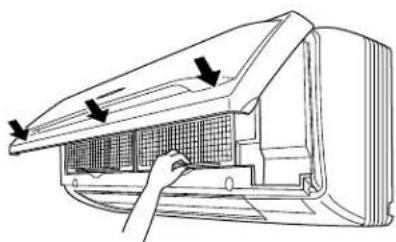
5. Set the air filter and the air-purifying filter with photocatalytic deodorizing function as they were and close the front panel.
Press the front panel at both sides and the center.
natural_image
Diagram of a car air conditioner unit with airflow arrows indicating airflow direction (no text or symbols)
CAUTION
- Do not touch the aluminum fins by bare hand at the time of dismounting or mounting the filter.
Care and Cleaning
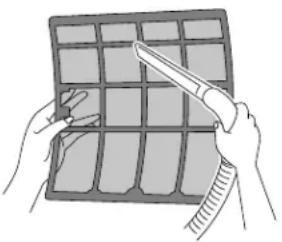
Air fi Iter
Wash the air fi Iters with water or clean them with vacuum cleaner.
- If the dust does not come off easily, wash them with neutral detergent thinned with lukewarm water, then dry them up in the shade.
It is recommended to clean the air filters every 2 weeks.
natural_image
Illustration of hands holding a grid-based object with a tool, no text or symbols presentAir-purifying fi Iter with photocatalytic deodorizing function
The air-purifying filter with photocatalytic deodorizing function can be renewed by washing it with water once every 6 months. We recommend replacing it once every 3 years.
[Maintenance]
Vacuum dust, and soak in warm water or water for about 10 to 15 minutes if dirt is heavy.
Do not remove filter from frame when washing with water.
After washing, shake off remaining water and dry in the shade.2.
- Since the material is made out of paper, do not wring out the filter when removing water from it.
[Replacement]
- Remove the tabs on the filter frame and replace with a new filter.
- Dispose of the old filters as flammable waste.
NOTE
Operation with dirty fi Iters:•
cannot deodorize the air,1)
cannot clean the air,2)
results in poor heating or cooling,3)
may cause odor.4)
- To order air-purifying filter with photocatalytic deodorizing function contact to the service shop there you purchased the air conditioner.
- Dispose of the old filters as flammable waste.
| Item Part No. | |
| Air-purifying filter with photocatalytic deodorizing function (without frame) 1 set | KAF952A42 |
ATTENTION
- Do not throw away the filter frame. Reuse the filter frame when replacing the air-purifying filter with photocatalytic deodorizing function.
CHECK
- Check that the base, stand and other fittings of the outdoor unit are not decayed or corroded.
- Check that nothing blocks the air inlets and the outlets of the indoor unit and the outdoor unit.
- Check that the drain comes smoothly out of the drain hose during COOL or DRY operation.
- If no drain water is seen, water may be leaking from the indoor unit. Stop operation and consult the service shop if this is the case.
Before a long idle period
-
Operate the FAN only for several hours on a nice day to dry out the inside.
-
Press MODE and select "♣" operation.
-
Press ON/OFF and start operation.
-
After operation stops, turn off the breaker for the room air conditioner.
- Clean the air filters and set them again.
- Take out batteries from the remote controller.
Troubleshooting
These incidents are not malfunctions.
The following incidents do not indicate a malfunctioning air conditioner and have explanations. The air conditioner can continue to operate.
Case Explanation
Operation does not start soon.
When "ON/OFF" button was pressed soon after operation was stopped.
- When the mode was reselected.
Hot air does not flow out soon after the start of HEAT operation.
The HEAT operation stops suddenly and a flowing sound is heard.
The outdoor unit emits water or steam.
Mist comes out of the indoor unit.
The indoor unit gives out odor.
The outdoor fan rotates while the air conditioner is not in operation.
Operation stopped suddenly. (OPERATION lamp is on.)
No remote controller signals are displayed.
Remote controller sensitivity is low. Display is low in contrast or blacked out. Display runs out of control.
This is to protect the air conditioner.
You should wait for about 3 minutes.
The air conditioner is warming up. You should wait for 1 to 4 minutes.
(The system is designed to start discharging air only after it has reached a certain temperature.)
The system is taking away the frost on the outdoor unit.
You should wait for about 4 to 12 minutes.
In HEAT operation ■
The frost on the outdoor unit melts into water or steam when the air conditioner is in • defrost operation.
In COOL or DRY operation
Moisture in the air condenses into water on the cool surface of outdoor unit piping and • drips.
■ This happens when the air in the room is cooled into mist by the cold airflow during COOL operation.
■ This is because the air in the room is cooled by the heat exchanger and becomes mist during defrost operation.
■ This happens when smells of the room, furniture, or cigarettes are absorbed into the unit and discharged with the airflow.
If this happens, it is recommended to have the indoor unit washed by a technician. Consult the service shop where you purchased the air conditioner.
After operation is stopped
- The outdoor fan continues rotating for another 60 seconds for system protection.
While the air conditioner is not in operation
- When the outdoor temperature is very high, the outdoor fan starts rotating for system protection.
- For system protection, the air conditioner may stop operating on a sudden large voltage fluctuation.
It automatically resumes operation in about 3 minutes.
- The batteries are dying and the remote controller is malfunctioning. Replace all the batteries with new size batteries, AAA.LR03 (alkaline). For details, refer to set the batteries of this manual. ▶Page 8
Case Explanation
Possible sounds.
Flowing water
- Generated because the refrigerant in the air conditioner is flowing.
This is a pumping sound of the water in the air conditioner and heard when the water is • pumped out from the air conditioner in cooling or drying operation. - The refrigerant flows in the air conditioner even if the air conditioner is not working when the indoor units in other rooms are in operation.
Blowing ■
- Generated when the flow of the refrigerant in the air conditioner is switched over.
Pinging ■
Generated when the size of the air conditioner slightly expands or shrinks as a result of temperature changes.
Check again.
Please check again before calling a repair person.
Case Check
The air conditioner does not operate. (OPERATION lamp is off.)
Is a breaker off or a fuse blown?
Is there a power failure?•
Are batteries set in the remote controller?•
Is the timer setting correct?•
Cooling (Heating) effect is poor.
Are the air filters clean?•
- Is there anything to block the air inlet or the outlet of the indoor and the outdoor units?
- Is the temperature setting appropriate?
- Are the windows and doors closed?
- Are the airflow rate and the airflow direction set appropriately?
Operation stopped suddenly. (OPERATION lamp flashes.)
- Are the air filters clean?
- Is there anything to block the air inlet or the outlet of the indoor and the outdoor units?
- Clean the air filters or take all obstacles away and turn the breaker off. Then turn it on again and try operating the air conditioner with the remote controller. If the lamp still flashes, call the service shop where you purchased the air conditioner.
- Are operation modes all the same for indoor units connected to outdoor units in the multi system?
If not, set all indoor units to the same operating mode and confirm that the lamps flash. Moreover, when the operating mode is in AUTO, set all indoor unit operating modes to COOL or HEAT for a moment and check again that the lamps are normal.
If the lamps stop flashing after the above steps, there is no malfunction. ▶Page 22
An abnormal functioning happens during operation.
- The air conditioner may malfunction with lightning or radio waves. Turn the breaker off, turn it on again and try operating the air conditioner with the remote controller.
The louvers do not immediately swing. The louvers move soon after startup.
- The air conditioner is adjusting the louvers position. The louvers will start moving soon.
Troubleshooting
Call the service shop immediately.


WARNING
■ When an abnormality (such as a burning smell) occurs, stop operation and turn the breaker off.
Continued operation in an abnormal condition may result in malfunctioning, electric shocks or fire.
Consult the service shop where you purchased the air conditioner.
Do not attempt to repair or modify the air conditioner by yourself.

Incorrect work may result in electric shocks or fire.
Consult the service shop where you purchased the air conditioner.
If one of the following symptoms occurs, call the service shop immediately.
The power cord is abnormally hot or damaged. ■
An abnormal sound is heard during operation.
The safety breaker, a fuse, or the ground leakage breaker cuts off the operation frequently.
A switch or a button often fails to work properly.
There is a burning smell.
Water leaks from the indoor unit. ■
Turn the breaker off and call the service shop.

After a power failure ■
The air conditioner automatically resumes operation in about 3 minutes. Wait for it to restart.
Lightning
If lightning may strike the neighboring area, stop operation and turn the breaker off for system protection.
Disposal requirements
- Dismantling the unit, and treatment of refrigerant, oil, and other parts, should be done in accordance with the relevant local and national regulations.
We recommend periodic maintenance.
In certain operating conditions, the inside of the air conditioner may get soiled after several seasons of use, resulting in poor performance. It is recommended to have periodic maintenance by a specialist aside from regular cleaning by the user.
For specialist maintenance, contact the service shop where you purchased the air conditioner.
The maintenance cost must be born by the user.
Fault diagnosis.
Fault diagnosis by remote controller
The remote controller can receive a corresponding error code from the indoor unit.
When CANCEL is held down for 5 seconds, a “” indication blinks on the temperature display section.
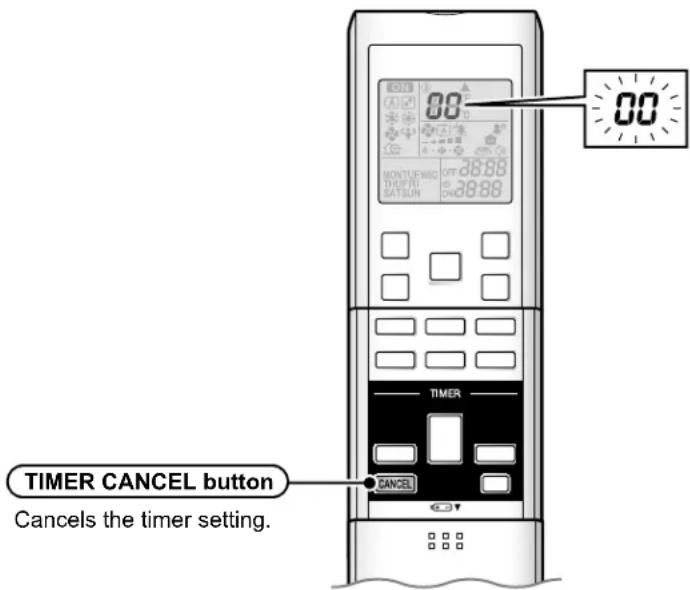
Press 2ANCEL repeatedly until a continuous beep is produced.
- The code indication changes as displayed in the following table, and notifies with a long beep.
| CODE MEANING | |
| SYSTEM | 00 NORMAL |
| U0 REFRIGERANT SHORTAGE | |
| U2 DROP VOLTAGE OR MAIN CIRCUIT OVERVOLTAGE | |
| U4 FAILURE OF TRANSMISSION (BETWEEN INDOOR UNIT AND OUTDOOR UNIT) | |
| INDOOR UNIT | A1 INDOOR PCB DEFECTIVENESS |
| A5 HIGH PRESSURE CONTROL OR FREEZE-UP PROTECTOR | |
| A6 FAN MOTOR FAULT | |
| C4 FAULTY HEAT EXCHANGER TEMPERATURE SENSOR | |
| C9 FAULTY SUCTION AIR TEMPERATURE SENSOR | |
| OUTDOOR UNIT | EA COOLING-HEATING SWITCHING ERROR |
| E5 OL STARTED | |
| E6 FAULTY COMPRESSOR START UP | |
| E7 DC FAN MOTOR FAULT | |
| E8 OVERCURRENT INPUT | |
| F3 HIGH TEMPERATURE DISCHARGE PIPE CONTROL | |
| H6 OPERATION HALT DUE TO FAULTY POSITION DETECTION SENSOR | |
| H8 DC CURRENT SENSOR FAULT | |
| H9 FAULTY SUCTION AIR TEMPERATURE SENSOR | |
| J3 FAULTY DISCHARGE PIPE TEMPERATURE SENSOR | |
| J6 FAULTY HEAT EXCHANGER TEMPERATURE SENSOR | |
| L4 HIGH TEMPERATURE AT INVERTER CIRCUIT HEATSINK | |
| L5 OUTPUT OVERCURRENT | |
| P4 FAULTY INVERTER CIRCUIT HEATSINK TEMPERATURE SENSOR |
NOTE
A short beep and two consecutive beeps indicate non-corresponding codes.
To cancel the code display, hold CANCEL for 5 seconds. The code display also cancel itself if the button is not pressed for 1 minute.
MEMO

DAIKIN INDUSTRIES, LTD.
Head office:
Umeda Center Bldg., 2-4-12, Nakazaki-Nishi,
Kita-ku, Osaka, 530-8323 Japan
Tokyo office:
JR Shinagawa East Bldg., 2-18-1, Konan,
Minato-ku, Tokyo, 108-0075 Japan
http://www.daikin.com/global_ac/