MC-X S6 - Loudspeaker ModeCom - Free user manual and instructions
Find the device manual for free MC-X S6 ModeCom in PDF.


| Product type | Portable Bluetooth speaker |
| Model | MC-X S6 |
| Brand | ModeCom |
| Dimensions (approx.) | 20 x 10 x 10 cm |
| Weight | 500 g |
| Power source | Rechargeable lithium-ion battery (5V/1A micro USB charging) |
| Battery life | Up to 8 hours (depending on volume) |
| Wireless connectivity | Bluetooth 5.0 |
| Wired connectivity | 3.5mm auxiliary input |
| Controls | Power, volume, play/pause, skip tracks, hands-free call |
| Speaker driver | Full-range 40mm driver |
| Frequency response | 100 Hz - 20 kHz |
| Output power | 2 x 3W (stereo) |
| Hands-free function | Built-in microphone for calls |
| Water resistance | IPX5 (splash-proof) |
| Compatible devices | Smartphones, tablets, PCs, MP3 players with Bluetooth or aux |
| Maintenance | Clean with a soft, dry cloth. Avoid moisture and direct sunlight. |
| Safety precautions | Do not disassemble. Keep away from heat sources and water beyond rated IPX5. |
| Spare parts | Not user-serviceable. No replaceable parts available. |
| Warranty | 1 year limited warranty |
Frequently Asked Questions - MC-X S6 ModeCom
User questions about MC-X S6 ModeCom
0 question about this device. Answer the ones you know or ask your own.
Ask a new question about this device
Download the instructions for your Loudspeaker in PDF format for free! Find your manual MC-X S6 - ModeCom and take your electronic device back in hand. On this page are published all the documents necessary for the use of your device. MC-X S6 by ModeCom.
USER MANUAL MC-X S6 ModeCom
natural_image
Black MGDCOM audio player with blue lens and circular head (no text or symbols on device body)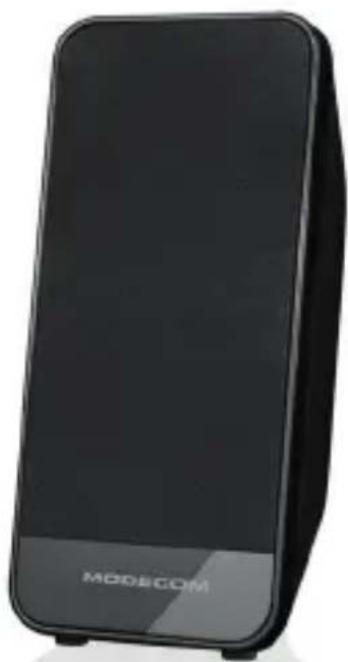
natural_image
Black MODECOM device with front panel and logo (no visible text or symbols on body)MODECOM
MODECOM MC-XS6

2.0 MULTIMEDIA ACTIVE STEREO SPEAKERS
Въведение
flowchart
graph LR
    A["Device"] --> B["Wireless Signal"]
    B --> C["Air/Audio Icon"]
MODECOM MC-XS6 speaker set was designed for those seeking compact size speakers for their desks while still delivering above average quality sound. Speakers are very convenient as they are powered directly from your PCs USB port and are equipped with easy access volume control.
Specification.
Dimensions: 90mm x 76mm x 180mm
Drivers: 2.5"
RMS Power: 4W x 2
Frequency response: 150Hz-20kHz
Sensitivity: 60dB
Length of the power cable: 150 cm
Speakers connection cable: 100 cm
Net weight: 580g
Installation.
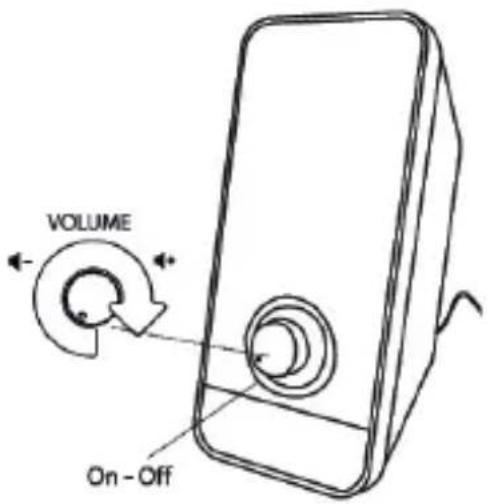
Before you begin the installation make sure that volume control knob is in the maximum left position (rotate it counterclockwise).
Place the speakers such satellite speakers should form equilateral triangle (each satellite should be in the same distance from the listeners ears).
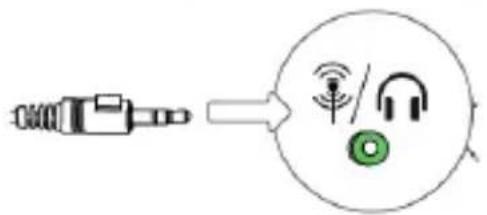
Connect the signal cable Mini-Jack 3.5mm to the appropriate output port of your sound source (for example output of your PC's soundcard).
flowchart
graph LR
    A["Device"] --> B((Circular Interface))
    B --> C["Wireless Signal"]
    B --> D["Audio/Headphones"]
    B --> E["Green Audio Icon"]
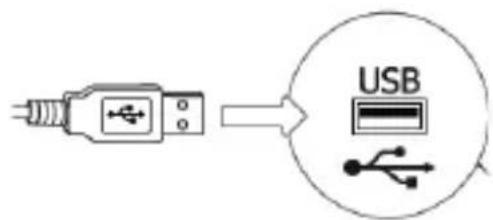
Connect the USB cable to any available USB port of your PC / notebook.
Start playing sound using your connected sound source. Using the volume knob set up desired volume level.
This device was designed and made of high-quality reusable materials and coamponents. If the device, its packaging, user's manual, etc. are marked with crossed waste container, it means they are subject to segregated household waste collection in compliance with the Directive 2012/19/UE of the European Parliament and of the Council. This marking informs that electric and electronic equipment shall not be thrown away together with household waste after it's been utilised. The user is obliged to bring the utilised equipment to electric and electronic waste collection point. Those running such collection points, including local collection points, shops or commune units, provide convenient system enabling to scrap such equipment. Appropriate waste management aids in avoiding consequences which are harmful for people and environment and result from dangerous materials used in the device, as well as improper storage and processing. Segregated household waste collection aids recycle materials and components of which the device was made. A household plays crucial role in contributing to recycling and reusing the waste equipment. This is the stage where the basics are shaped which largely influence the environment being our common good. Households are also one of the biggest users of small electrical equipment. Reasonable management at this stage aids and favours recycling. In the case of improper waste management, fixed penalties may be imposed in accordance with national legal regulations.
The full text of the EU declaration of conformity is available at the following internet address: deklaracje.modecom.eu
MODECOM MC-XS6

2.0 MULTIMEDIA ACTIVE STEREO SPEAKERS
Introducción
Dimensions: 90 x 76 x 180mm
MODECOM MC-XS6
SI
2.0 MULTIMEDIA ACTIVE STEREO SPEAKERS
Predstavitev.
UWAGA.
It is not recommended to set the volume and bass and treble at maximum because of the diversity that the quality and compression of songs. Listening to music at maximum levels set both in speakers and audio source, may cause severe and irreversible damage to the speakers, drivers and electronic components. MODECOM cannot be held responsible for this type of damage and they will be considered as violation of the warranty terms.
Brand : ModeCom
Model : MC-X S6
Category : Loudspeaker