
W501 - Projector OPTOMA - Free user manual and instructions
Find the device manual for free W501 OPTOMA in PDF.


| Product Type | DLP Projector |
| Brand | Optoma |
| Model | W501 |
| Display Technology | DLP Texas Instruments 0.65 inch |
| Native Resolution | WXGA (1280 x 800) |
| Aspect Ratio | 16:10 (adjustable 4:3, 16:9, LBX, native, auto) |
| Input Connectors | 2x VGA/YPbPr, HDMI, DVI-D, S-Video, Composite Video, USB Type B, RJ45, RS-232, Audio Input (3.5mm, RCA L/R), Microphone Input |
| Output Connectors | VGA Output, Audio Output (3.5mm), 12V Output |
| Main Features | 3D Projection (DLP Link/IR), Vertical Keystone Correction, Optical Zoom, Manual Focus, Vertical Lens Shift, Built-in Speaker (1x), RJ45 Network Control, USB Display, USB Photo Viewer |
| Quick Summary | Instant restart within 100 seconds after shutdown |
| Eco+ Mode | Reduces power consumption (80% to 30%) and extends lamp life |
| Security | Kensington Lock, Password (4-digit), Clock Security, Keypad Lock |
| Power Supply | AC 100-240 V, 50/60 Hz (built-in power supply) |
| Standby Power Consumption | < 0.5 W (Eco mode), < 10 W (Active mode) |
| Lamp | Replaceable lamp, variable life (not specified) |
| Dust Filter | Removable, cleaning or replacement recommended every 500 hours |
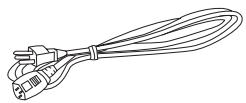
| Package Contents | Power cord, VGA cable, remote control with batteries, carrying case, dust filter (region specific), documentation (manual, warranty card, WEEE card) |
| Maintenance and Cleaning | Unplug before cleaning; housing: damp cloth; lens: soft cloth; filter: gentle vacuum or replacement |
| Repairability | Lamp and filter user-replaceable; other repairs by qualified technician |
| Compatibility | NTSC, PAL, SECAM, HDTV, Macintosh, PC (up to 1920x1080) |
Frequently Asked Questions - W501 OPTOMA
User questions about W501 OPTOMA
0 question about this device. Answer the ones you know or ask your own.
Ask a new question about this device
Download the instructions for your Projector in PDF format for free! Find your manual W501 - OPTOMA and take your electronic device back in hand. On this page are published all the documents necessary for the use of your device. W501 by OPTOMA.
USER MANUAL W501 OPTOMA
natural_image
Illustration of a projector with visible lens and control buttons (no text or symbols)Projecteur
natural_image
Line drawing of a cord with three leads tied together (no text or symbols)natural_image
Line drawing of a multi-pin electrical connector with terminal blocks (no text or symbols)natural_image
Line drawing of a portable backpack with a strap and front panel (no text or symbols)① Trapèze (▼/▲)
13 AUDIO-IN 1/AUDIO-IN 2
natural_image
Illustration of a mechanical component with a red arrow indicating direction (no text or symbols)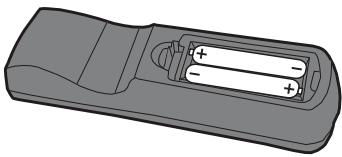
natural_image
Illustration of a remote control casing with two batteries and a handle (no text or symbols)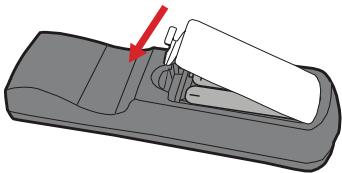
natural_image
Diagram of a remote control device with a red arrow pointing to the handle (no text or symbols present)
Attention
natural_image
Technical line drawing of an electronic device casing with mounting brackets and a control panel (no text or symbols)Pieds de réglage
flowchart
graph TD
    A["USB Interface"] --> B["Device"]
    B --> C["Data Flow"]
    C --> D["User Interface"]
natural_image
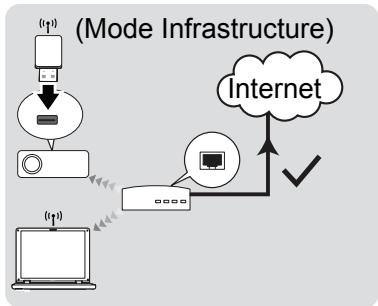
Simple line drawing of a laptop with a signal icon above it (no text or symbols on the device itself)flowchart
graph TD
    A["Device Icon"] --> B["Node"]
    B --> C["Interface Icon"]
    C --> D{Switch}
    D -->|Yes| E["Internet"]
    D -->|No| F["User Interface"]
    F --> G["User Interface"]
    G --> H["User Interface"]
    H --> I["User Interface"]
    I --> J["User Interface"]
    J --> K["User Interface"]
    K --> L["User Interface"]
    L --> M["User Interface"]
    M --> N["User Interface"]
    N --> O["User Interface"]
    O --> P["User Interface"]
    P --> Q["User Interface"]
    Q --> R["User Interface"]
    R --> S["User Interface"]
    S --> T["User Interface"]
    T --> U["User Interface"]
    U --> V["User Interface"]
    V --> W["User Interface"]
    W --> X["User Interface"]
    X --> Y["User Interface"]
    Y --> Z["User Interface"]
flowchart
graph TD
    A["Device"] --> B["Server"]
    B --> C["Internet"]
    C --> D["Network"]
    D --> E["Internet"]
    style A fill:#f9f,stroke:#333
    style B fill:#ccf,stroke:#333
    style C fill:#cfc,stroke:#333
    style D fill:#fcc,stroke:#333
    style E fill:#ffc,stroke:#333
Important
roomview_connected_embedded_projectors_devices/resources.asp
natural_image
Close-up photo of a koala with visible eye and mouth, no text or symbols presentRemarque
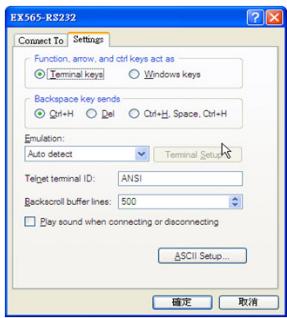
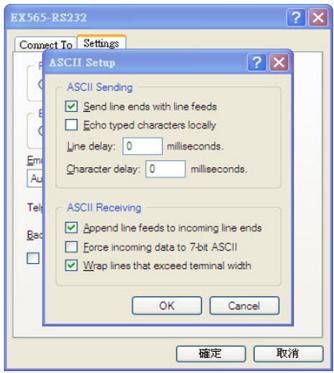
Commandes PJLink
SEND from projector automatically
| 232 ASCII Code | HEX Code | Function | Projector Return | Description |
when Standby/Warming/Cooling/Out of Range/Lamp fail/Fan Lock/Over Temperature/Lamp Hours Running Out/Cover Open
INFOn n : 0/1/2/3/4/6/7/8/ = Standby/Warming/Cooling/Out of Range/Lamp fail/Fan Lock/Over Temperature/Lamp Hours Running Out/Cover Open
READ from projector
| 232 ASCII Code | HEX Code | Function | Projector Return | Description |
| ~XX121 1 | 7E 30 30 31 32 31 20 31 0D | Input Source Commands | OKn | n: 0/1/2/3/4/5/6/7/8/9 = None/VGA1/VGA2/Video/S-Video/HDMI/DVI/Flash drive/Network display/USB display |
| ~XX122 1 | 7E 30 30 31 32 32 20 31 0D | Software Version | OKddd | dddd: FW version |
| ~XX123 1 | 7E 30 30 31 32 33 20 31 0D | Display Mode | OKn | n: 0/1/2/3/4/5/6/7/8/ |
| None/Presentation/Bright/Movie/sRGB/User/Blackboard/DICOM SIM./3D | ||||
| ~XX124 1 | 7E 30 30 31 32 34 20 31 0D | Power State | OKn | n: 0/1 = Off/On |
| ~XX125 1 | 7E 30 30 31 32 35 20 31 0D | Brightness | OKn | |
| ~XX126 1 | 7E 30 30 31 32 36 20 31 0D | Contrast | OKn | |
| ~XX127 1 | 7E 30 30 31 32 37 20 31 0D | Format | Okn | (W501) n: 0/1/2/3/4/5 = 4:3/16:9/16:10/LBX/Native/AUTO(EH501) n: 0/1/2/3/4 =4:3/16:9/LBX/Native/AUTO(X501) n: 0/1/2/3 =4:3/16:9/Native/AUTO |
| *16:9 or 16:10 depend on Screen Type setting | ||||
| ~XX128 1 | 7E 30 30 31 32 38 20 31 0D | Color Temperature | OKn | n: 0/1/2 = Warm/Medium/Cold |
| ~XX129 1 | 7E 30 30 31 32 39 20 31 0D | Projection Mode | OKn | n: 0/1/2/3 = Front-Desktop/ Rear-Desktop/ Front-Ceiling/ |
| Rear-Ceiling | ||||
| ~XX150 1 | 7E 30 30 31 35 30 20 31 0D | Information | OKabbbbccdddde | |
| a: 0/1 = Off/On | ||||
| bbbb: LampHour | ||||
| cc: source 00/01/02/03/04/05/06/07/08/09 = | ||||
| None/VGA1/VGA2/Video/S-Video/HDMI/DVI/Flash Drive/Network display/USBdisplay | ||||
Dépannage
42 Caxton Way, The Watford Business
Park
Watford, Hertfordshire,
WD18 8QZ, GB
www.optoma.eu
Tél service: +44 (0)1923 691865
+44 (0) 1923 691 800
昌 +44 (0) 1923 691 888
service@tsc-europe.com
France
Bâtiment E
81-83 avenue Edouard Vaillant
92100 Boulogne Billancourt, France
+33 1 41 46 12 20
昌 +33 1 41 46 94 35
savoptoma@optoma.fr
Espagne
C/ Jose Hierro,36 Of. 1C
28522 Rivas Vacia Madrid,
Espagne
+34 91 499 06 06
昌 +34 91 670 08 32
Allemagne
Wiesenstrasse 21 W
D40549 Dusseldorf,
Allemagne
+49 (0) 211 506 6670
昌 +49 (0) 211 506 66799
info@optoma.de
Scandinavie
Lerpeveien 25
3040 Drammen
Norvège
PO.BOX 9515
3038 Drammen
Norvège
+47 32 98 89 90
昌 +47 32 98 89 99
info@optoma.no
Amérique du Sud
3178 Laurelview Ct.
Fremont, CA 94538, USA
www.optoma.com.br
888-289-6786
www.optoma.com.mx
Corée
WOOMI TECH.CO.,LTD.
4F, Minu Bldg.33-14, Kangnam-Ku,
Séoul,135-815, COREE
+82+2+34430004
昌 +82+2+34430005
Japon
東京都足立区綾瀬 3-25-18
株式会社オーエス
info@os-worldwide.com
www.os-worldwide.com
Taiwan
12F., No.215, Sec. 3, Beixin Rd.,
Xindian Dist., New Taipei City 231,
Taiwan, R.P.C.
www.optoma.com.tw
+886-2-8911-8600
昌 +886-2-8911-6550
services@optoma.com.tw
asia.optoma.com
Hong Kong
Unit A, 27/F Dragon Centre,
79 Wing Hong Street,
Cheung Sha Wan,
Kowloon, Hong Kong
+852-2396-8968
昌 +852-2370-1222
www.optoma.com.hk
中国
上海市长宁区
凯旋路 1205 号 5 楼
琉璃奥图码
+86-21-62947376
昌 +86-21-62947375
www.optoma.com.cn
natural_image
Symbol of a trash bin crossed with no text or labels, accompanied by a solid black rectangle below (no text or symbols present)Brand : OPTOMA
Model : W501
Category : Projector