
PCLRMU2 - Pedometer Pyle - Free user manual and instructions
Find the device manual for free PCLRMU2 Pyle in PDF.


| Product Type | Pedometer with 3D Accelerometer |
| Brand | Pyle |
| Model | PCLRMU2 |
| Power Source | 1 x CR2032 battery (included) |
| Display | Digital LCD with backlight |
| Sensor Type | 3D accelerometer (USA-made) |
| Step Counting Range | 0 - 99,999 steps |
| Distance Range | 0 - 999.99 km / 999.99 miles |
| Calorie Range | 0 - 9999.9 kcal |
| Exercise Time Range | 0 - 23 hr 59 min 59 sec |
| Memory | 7-day data memory |
| PC Connectivity | USB PC Link interface with data analysis software |
| Intelligent Step Filter | Yes (ignores motion under 10 seconds) |
| Target Step Alert | Yes (visual and beep alarm when target reached) |
| User Settings | Time, units (cm/inch), stride length (30-213 cm / 12-84 in), weight (20-227 kg / 50-500 lbs), target steps (0-99,000) |
| Low Battery Detection | Yes |
| Energy Saving | Auto power-off after 3 minutes of inactivity |
| Clock | 12/24 hour format |
| Reset Function | Press four buttons simultaneously to reset (or remove battery) |
| Application | Walking, running, daily activity tracking |
| Recommended Use | Clip to waistband or carry in pocket |
Frequently Asked Questions - PCLRMU2 Pyle
User questions about PCLRMU2 Pyle
0 question about this device. Answer the ones you know or ask your own.
Ask a new question about this device
Download the instructions for your Pedometer in PDF format for free! Find your manual PCLRMU2 - Pyle and take your electronic device back in hand. On this page are published all the documents necessary for the use of your device. PCLRMU2 by Pyle.
USER MANUAL PCLRMU2 Pyle
This unit is operated by four keys:
- MODE / -
- RESET / +
- SET
• EL
FEATURES:
• Time
- Intelligent Step Filter Function
- 7 Days Data Memory Record
● Target Step Alert Alarm
- Exercise Time
- Total Distance
- Total Calories
- User Setting
- USB PC Link Interface Program
● Low Battery Detection
● Energy Saving Function
● 3D SENSOR FROM USA -
● MEASURES YOUR MOVEMENT ACCURATELY
- BACK LIGHT
- The 3D technology in the accelerator is an accelerometer sensor that detects and measures acceleration in walking or running.
- 3D Sensor has intelligent step filter function-steps which only starts counting when the unit detects continuous movement for over 10 seconds.
- 3D Sensor allows users to customize to their specific body type for Walking/Running style.
PERSONAL TRAINER
Thank you for choosing AnyRun as your personal trainer. In order to make the best use of this device, please read the instruction manual carefully. Do not discard keep the manual for future reference.
Important: Please note that the watch is NOT a medical device and is not to be used as such.
CONTENTS
Getting Start 2
Using the unit function.... 2
Mode Flow 3
Step Counting Mode.... 3
Distance Mode.... 4
Calories Burnt Mode 4
Exercise Time Mode 4
Memory Data Mode.... 5
Total Mode.... 5
User Setting 6
Download/Installation PC-Link Program 8
PC-Link Program Operation....9
Installing the Battery.... 12
Specification....13
Caution....13
IMPORTANT!
For energy saving purposes, the watch unit will automatically switch off if no buttons are pressed for 3 minutes. To turn it on again, press
any keys or sensor receive motion. The pedometer mode will also be off during transportation for energy saving purposes.
IDEAL PLACEMENT
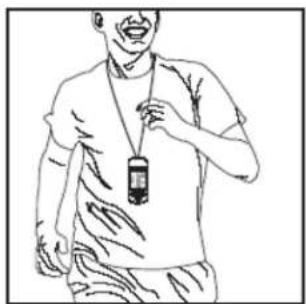
natural_image
Line drawing of a person wearing a lanyard and holding a device (no text or symbols)
natural_image
Line drawing of a person wearing a bandage and holding a mobile device (no text or symbols)NORMAL WALKING MEASUREMENT
Before you track the number of steps you take as you go about your normal daily life, you need to preset the following personal information before using the unit.
● The Units You Want To Use
● Your Normal Walking Stride Length
- Your Current Weight
- Set your Target Distance
MODE FLOW
STEP COUNTING MODE - DISTANCE MODE - CALORIES BURNT MODE - EXERCISE TIME MODE - MEMORY DATA MODE - TOTAL MODE
STEP COUNTING MODE
- Press MODE button until you have reached the STEP data with the clock.

- The unit may take a bit of time before it starts to sense that you are
walking. During that time, it will not display a step count. Once the watch determines that you are walking, it will display your entire step count from the beginning of your walk, including the steps you took while the watch was not displaying a step count. This is the intelligent step filter system to prevent the inclusion of false motion.
- The step counting data are saved automatically at midnight each day and all data are cleared to zero. Note that the unit only maintains the last seven days of data, so the earliest data is deleted automatically whenever data excess from 8 days is saved. We recommend user to upload the data to PC weekly.
- To clear the daily step counting, press and hold Reset/+ button for 3 seconds
DISTANCE MODE
- Press the MODE button until you have reached the Distance Mode.

- To clear the daily distance, press and hold Reset/+ button for 3 seconds
CALORIES BURNT MODE
- Press the MODE button until you have reached the Calories Burnt Mode

- To clear the calories data, press and hold Reset/+ button for 3 seconds
EXERCISE TIME MODE
- Press the MODE key until you have reached the Exercise Time Mode

- To clear the exercise time, press and hold Reset/+ button for 3 seconds
Note: Removal of any of the above set of data will remove all the data for that day.
MEMORY DATA MODE
- Press the MODE key until you have reached the Memory Data Mode

- Press Reset/+Set Button to select the date you want to view
- Press Set Button to view the data: Step - Distance - Calories Burnt - Exercise Time
TOTAL MODE
- Press the MODE key until you have reached the Total Mode
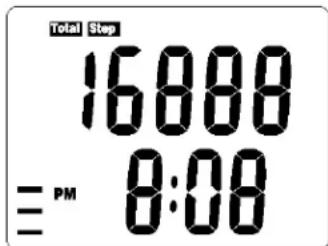
- Press Set Button to view the data: Total Step – Total Distance – Total Calories Burnt – Total Exercise Time
- To clear all the data (include daily step counting & memory data mode), press and hold Reset/+ button for 3 seconds
USER SETTING
Time Setting
- Press the MODE key until you have reached the Step Counting Mode

- Press and hold Set Button for 3 seconds to set the TIME FORMAT
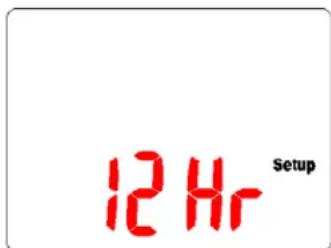
- Press MODE/- or RESET/+ button to change the format
- Press the SET button to enter next setting - HOUR

- Press MODE/- or RESET/+ button to increment or decrement the setting data
- Press the SET button to enter next setting - MINUTE
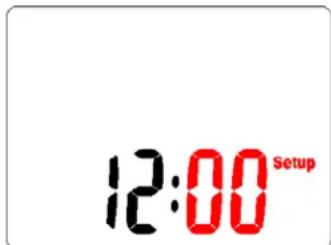
- Press MODE/- or RESET/+ button to increment or decrement the setting data.
- Press the SET button to enter next setting - UNIT

-
Press MODE/- or RESET/+ button to select CM or INCH
-
Press the SET button to enter next setting - STRIDE LENGTH

-
Press MODE/- or RESET/+ button to increment or decrement the setting data. (Default:80cm/30", Range:30-213cm/12"-84")
-
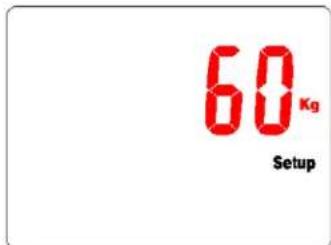
Press the SET button to enter next setting - WEIGHT
-
Press MODE/- or RESET/+ button to increment or decrement the setting data. (Default:45kg/100lb, Range:20-227kg/50-500lbs)
-
Press the SET button to enter next setting - TARGET STEP

-
Press MODE/- or RESET/+ button to increment or decrement the setting data. (Default: 5,000 steps, Range: 0-99,000 steps)
-
The adjustment should be 1,000 steps for each increment or decrement, when target is below 1,000 steps, it will become 100 steps for each adjustment
-
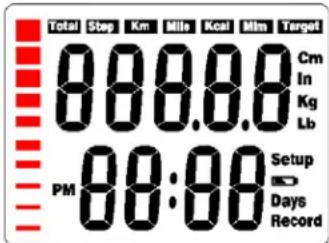
There are 10 icons show the percentage of your step to target steps.
When you finished the target steps (100%), the icon will be full of 10 icons and will flash together with a beeping alarm for 30 seconds
Note:
No buttons pressed or held for 60 seconds will automatically trigger the unit to return to step counting mode.
DOWNLOADING/INSTALLATING PC-LINK PROGRAM
Please visit our website at http://www.anyrun.com/k515m.htm
to download the interface program or from the provided CD
PROGRAM PROVIDES:
● Full processing and analysis of your exercise data
● History of your personal training data
● Graphical analysis of data information
- Email data file with Excel Format
First User:
- Click “New” button to create a new USER NAME and enter your personal information then save it for confirmation


PC LINK COMMUNICATION
- Unit will automatically upload the data to PC once plugged into the computer

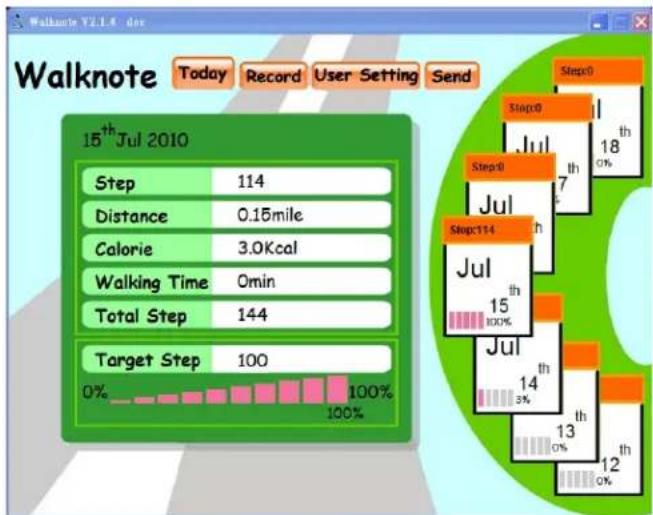
- Login the program and enter to the Main Screen
bar
Walknote V2.1.4 dex | Metric | Value | | :--- | :--- | | Step | 114 | | Distance | 0.15 mile | | Calorie | 3.0Kcal | | Walking Time | 0min | | Total Step | 144 | | Target Step | 100 | | Percentage (%) | 0% to 100% | | Step0 | 18 | | Step0 | 17 | | Step114 | 15 | | Step114 | 14 | | Step0 | 13 | | Step0 | 12 | Step0 | 11 | Step0 | 10 | Step0 | 9 | Step0 | 8 | Step0 | 7 | Step0 | 6 | Step0 | 5 | Step0 | 4 | Step0 | 3 | Step0 | 2 | Step0 | 1 | Step0 | 0 | Step0 | -1 | Step0 | -2 | Step0 | -3 | Step0 | -4 | Step0 | -5 | Step0 | -6 | Step0 | -7 | Step0 | -8 | Step0 | -9 | Step0 | -10 | Step0 | -11 | Step0 | -12 | Step0 | -13 | Step0 | -14 | Step0 | -15 | Step0 | -16 | Step0 | -17 | Step0 | -18 | Step0 | -19 | Step0 | -20 | Step0 | -21 | Step0 | -22 | Step0 | -23 | Step0 | -24 | Step0 | -25 | Step0 | -26 | Step0 | -27 | Step0 | -28 | Step0 | -29 | Step0 | -30 | Step0 | -31 | Step0 | -32 | Step0 | -33 | Step0 | -34 | Step0 | -35 Step0 | Step0: 18 | Step0: 17 | Step0: 16 | Step0: 15 | Step0: 14 | Step0: 13 | Step0: 12 | Step0: 11 | Step0: 10 | Step0: 9 | Step0: 8 | Step0: 7 | Step0: 6 | Step0: 5 | Step0: 4 | Step0: 3 | Step0: 2 | Step0: 1 | Step0: 0 | Step0: -1 | Step0: -2 | Step0: -3 | Step0: -4 | Step0: -5 | Step0: -6 | Step0: -7 | Step0: -8 | Step0: -9 | Step0: -10 | Step0: -11 | Step0: -12 | Step0: -13 | Step0: -14 | Step0: -15 | Step0: -16 | Step0: -17 | Step0: -18 | Step0: -19 | Step0: -20 | Step0: -21 | Step0: -22 | Step0: -23 | Step0: -24 | Step0: -25 | Step0: -26 | Step0: -27 | Step0: -28 | Step0: -29 | Step0: -30 | Step0: -31 | Step0: -32 | Step0: -33 | Step0: -34 | Step0: -35 | Step0: -36 | Step0: -37 | Step0: -38 | Step0: -39 | Step0: -40 | Step0: -41 | Step0: -42 | Step0: -43 | Step0: -44 | Step0: -45 | Step0: -46 | Step0: -47 | Step0: -48 | Step0: -49 | Step0: -50 | Step0: -51 | Step0: -52 | Step0: -53 | Step0: -54 | Step0: -55 | Step0: -56 | Step0: -57 | Step0: -58 | Step0: -59 | Step0: -60 | Step0: -61 | Step0: -62 | Step0: -63 | Step0: -64 | Step0: -65 | Step0: -66 | Step0: -67 | Step0: -68 | Step0: -69 | Step0: -70 | Step0: -71 | Step0: -72 | Step0: -73 | Step0: -74 | Step0: -75 | Step0: -76 | Step0: -77 | Step0: -78 | Step0: -79 | Step0: -80 | Step0: -81 | Step0: -82 | Step0: -83 | Step0: -84 | Step0: -85 | Step0: -86 | Step0: -87 | Step0: -88 | Step0: -89 | Step0: -90 | Step0: -91 | Step0: -92 | Step0: -93 | Step0: -94 | Step0: -95 | Step0: -96 | Step0: -97 | Step0: -98 | Step0: -99 | Step0: -100| Step114 (Jul) Step114 (Jul) Step114 (Jul) Step114 (Jul) Step114 (Jul) Step114 (Jul) Step114 (Jul) Step114 (Jul) Step114 (Jul) Step114 (Jul) Step114 (Jul) Step114 (Jul) Step114 (Jul) Step114 (Jul) Step114 (Jul) Step- Click any button to select the desired report or data.

line
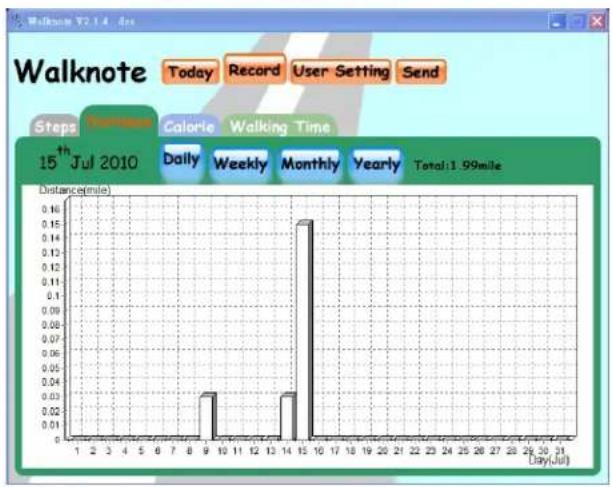
| Day(Jul) | Steps | | -------- | ----- | | 1 | 0 | | 2 | 0 | | 3 | 0 | | 4 | 0 | | 5 | 0 | | 6 | 0 | | 7 | 0 | | 8 | 0 | | 9 | 0 | | 10 | 150 | | 11 | 0 | | 12 | 0 | | 13 | 0 | | 14 | 0 | | 15 | 150 | | 16 | 0 | | 17 | 0 | | 18 | 0 | | 19 | 0 | | 20 | 0 | | 21 | 0 | | 22 | 0 | | 23 | 0 | | 24 | 0 | | 25 | 0 | | 26 | 0 | | 27 | 0 | | 28 | 0 | | 29 | 0 | | 30 | 0 | | 31 | 0 |Step - Distance - Calories - Exercise Time
bar
Walknote V2.1.4 | Day(Jul) | Distance(mile) | |---|---| | 9 | 0.03 | | 10 | 0.00 | | 14 | 0.03 | | 15 | 0.15 | | 31 | 0.00 |
bar
Walknote T2.1.4 4cs | Day(Jul) | Calories(Kcal) | |---|---| | 1 | 0.1 | | 2 | 0.2 | | 3 | 0.1 | | 4 | 0.1 | | 5 | 0.1 | | 6 | 0.1 | | 7 | 0.1 | | 8 | 0.1 | | 9 | 3.2 | | 10 | 0.1 | | 11 | 0.1 | | 12 | 0.1 | | 13 | 0.1 | | 14 | 0.8 | | 15 | 3.1 | | 16 | 0.1 | | 17 | 0.1 | | 18 | 0.1 | | 19 | 0.1 | | 20 | 0.1 | | 21 | 0.1 | | 22 | 0.1 | | 23 | 0.1 | | 24 | 0.1 | | 25 | 0.1 | | 26 | 0.1 | | 27 | 0.1 | | 28 | 0.1 | | 29 | 0.1 | | 30 | 0.1 | | 31 | 0.1 |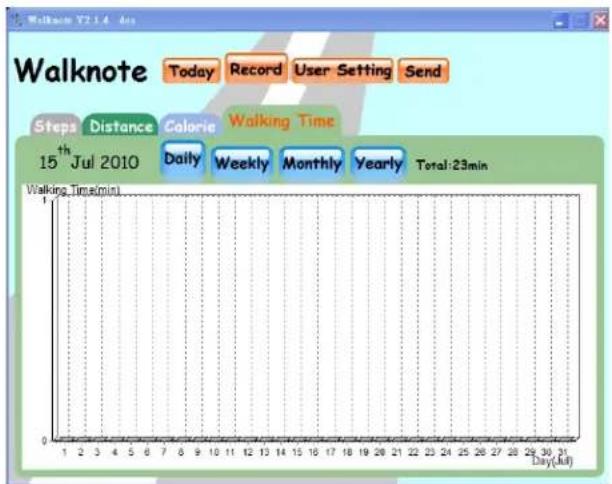
- Press the SEND button to export the excel data file by email.
INSTALLING THE BATTERY
The Watch uses 1 piece CR 2032 batteries. Use only the recommended batteries.
NOTE: Changing the battery will erase the data in the watch previously input into the device and you can then/will need to re-set the watch all over again.
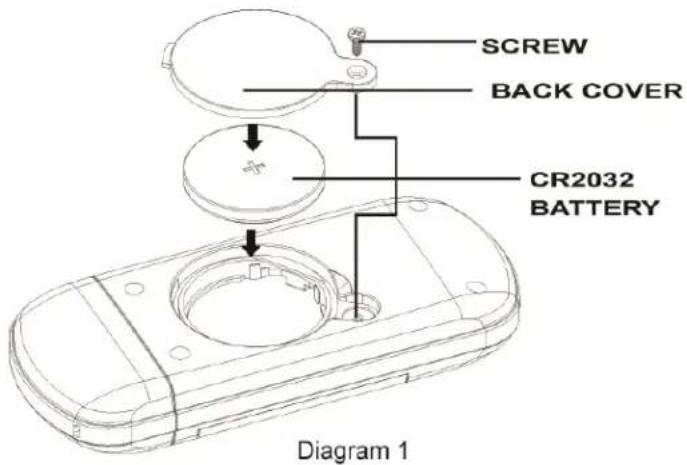
- The battery compartment is located at the back of the unit
- To install/replace the battery, unscrew the battery compartment with the screw driver and simply slide afterwards
- Take out the old battery and dispose of properly
- Gently place a new battery into the battery slot of the battery compartment, make sure that the poles are correctly placed
Screw back the battery compartment, when finished as in the diagram below
IMPORTANT BATTERY INFORMATION
● Battery installation and removed should be performed by an adult
- Use only batteries recommended in this instruction sheet
- Be sure to install the batteries with the correct polarity, as indicated.
- Remove all batteries when replacing the old batteries with new batteries
- Only batteries of the same and equivalent type as recommended are to be used
- Do not short-circuit the supply terminals
● Exhausted batteries should be removed from the product
● Non-rechargeable batteries are not to be recharged
● Rechargeable batteries are to be removed from the product before being charged
● Rechargeable batteries are only to be charged under adult supervision
- Different types of batteries, new and used batteries are not to be mixed.
SPECIFICATIONS
Time Format: Hour, Minute, 12/24 hours
Features: Step Counting, Distance, Calories
Consumption, Exercise time
Measurement Range: Calories Consumption: 0-9999.9 kcal
Number of step: 0-99999
Distance:0-999.99 km/999.99 Mile
Exercise Time: 0-23 hr 59 m 59 s 99
Memory Date: 7 Memory Records
CAUTION
Should you encounter any problems with the unit (e.g. malfunctioning of a parameter, static electricity, interferences within the product or the need to re-set the device), please press four buttons at the same time to reset the unit (the unit should not connect with computer). All data previously input into the device will be erased and you can then/will need to re-set the unit all over again. Should this fail to correct the situation, remove the batteries and then put them back into the battery compartment.
Then follow all the steps mentioned above in order to input the necessary data once more. The content of this manual is subject in order to change without further notice. Due to printing limitation, the displays shown in this manual may differ from the actual display. The manufacturer and its suppliers hold no responsibility to you or any other persons for any damage expenses, lost-profits, or any other claims arisen by using this product. The contents of this manual may not be reproduced without the permission of the manufacturer.
- This unit is operated by four keys:
- FEATURES:
- - BACK LIGHT
- PERSONAL TRAINER
- CONTENTS
- IMPORTANT!
- IDEAL PLACEMENT
- NORMAL WALKING MEASUREMENT
- MODE FLOW
- STEP COUNTING MODE
- DISTANCE MODE
- CALORIES BURNT MODE
- EXERCISE TIME MODE
- MEMORY DATA MODE
- TOTAL MODE
- USER SETTING
- Time Setting
- Note:
- DOWNLOADING/INSTALLATING PC-LINK PROGRAM
- PROGRAM PROVIDES:
- First User:
- INSTALLING THE BATTERY
- IMPORTANT BATTERY INFORMATION
- SPECIFICATIONS
- CAUTION
Brand : Pyle
Model : PCLRMU2
Category : Pedometer