
MVC-SC861B - Vacuum Cleaner MIDEA - Free user manual and instructions
Find the device manual for free MVC-SC861B MIDEA in PDF.


| Product Type | Canister Vacuum Cleaner |
| Model | MVC-SC861B |
| Brand | Midea |
| Dimensions (L x W x H) | Approx. 40 cm x 25 cm x 30 cm |
| Weight | Approx. 5.5 kg |
| Power Consumption | 1200 W |
| Power Supply | 220-240 V, 50/60 Hz |
| Dust Capacity | 2.0 L (bagless) |
| Filtration System | HEPA filter (washable) |
| Cord Length | 5.0 m |
| Cleaning Radius | Approx. 8.5 m |
| Suction Power | 220 AW (max) |
| Noise Level | ≤ 76 dB |
| Attachments Included | Crevice tool, upholstery brush, combination floor head |
| Maintenance | Empty dust container after each use; wash filter monthly |
| Replacement Parts | HEPA filter, pre-motor filter, floor head (available) |
| Safety Features | Thermal overload protection, automatic shut-off |
Frequently Asked Questions - MVC-SC861B MIDEA
User questions about MVC-SC861B MIDEA
0 question about this device. Answer the ones you know or ask your own.
Ask a new question about this device
Download the instructions for your Vacuum Cleaner in PDF format for free! Find your manual MVC-SC861B - MIDEA and take your electronic device back in hand. On this page are published all the documents necessary for the use of your device. MVC-SC861B by MIDEA.
USER MANUAL MVC-SC861B MIDEA
natural_image
Exterior view of a white and black electric vacuum cleaner (no text or symbols visible)Dear Customer,
Congratulations on your purchase of a Handheld and Floor Vacuum Cleaner! As a handheld vacuum cleaner it is always ready waiting if you want to remove a few crumbs or give your upholstery a clean. As a floor vacuum cleaner it can also easily cope with large areas. The scope of supply also includes a floor nozzle attachment and a crevice nozzle to cater for a wide range vacuum cleaner it is always ready waiting if you want to remove a few crumbs or give your of uses. We are sure that this appliance will do sterling service for many years.

Before using the device for the first time, please read the instructions through carefully and store them in a safe place. If the device is given to someone else, it should always be accompanied by these instructions. The manufacturer and importer will not accept liability if the directions in these instructions are not observed!
We reserve the right to modify the product, packaging or enclosed documentation at any time in conjunction with our policy of continuous development.
Symbols used in the manual:

Warning about hazards involving major risk.

Tips and recommendations are marked with this symbol.
Safety information
Proper use
The appliance is used to vacuum up the dust occurring in any home. It is only designed for

Warning about improper use
□ Under no circumstances should the appliance be used on the following:
– Liquids or wet materials (e. g. carpet shampoo when wet)
– Glowing ash, cigarette ends, matches etc.
- Combustible or inflammable substances
– Very fine dust (e. g. concrete dust) or toner
– Hard, pointed objects such as large splinters of glass

Risk to children
□ Keep the appliance out of the reach of children. Improper use may result in injury or electric shock.
□ Keep packaging away from children (risk of suffocation).
This appliance is not designed to be used by people (including children) with limited physical, sensory or mental capabilities or people without adequate experience and/or understanding unless supervised by someone responsible for their safety.
□ Children must be supervised to ensure that they do not play with the appliance.

Risk of electrocution
□ Never immerse the appliance in water or other liquids as there is a risk of electric shock.
☐ Never touch the appliance with wet hands. Do not use the appliance outside or in rooms with high humidity levels.
☐ When using the appliance as a handheld vacuum cleaner to clean cars, make sure it is not exposed to rain or moisture.
□ Never vacuum up liquids.
☐ Only store the appliance indoors in a dry place.
☐ Immediately remove the power plug from the electrical outlet in the event of any damage or malfuncon.
☐ CAUTION: Acute danger to life from electrocuon! Never try to repair an electrical appliance yourself. For your own safety take or send it in to your nearest customer service centre / specialist repair shop. This also applies to the power cable.
☐ Do not use the appliance if there is damage to the cable, plug or the vacuum cleaner itself.
☐ Never drag on the power cable or carry the appliance by the cable. Always handle the power cable with care. Make sure the cable does not get caught in doors or dragged over sharp edges or corners. Keep the cable away from hot surfaces.
Before connecng the appliance to the electrical outlet, make sure the voltage matches the specicaons on the nameplate of the appliance.
☐ The appliance must be switched off when the power plug is removed or inserted in the wall outlet.
☐ Disconnect the plug from the wall outlet during storms.
☐ When removing the plug from the outlet, always pull on the plug and NOT the cable, Only touch the plug with dry hands.
☐ The appliance should never be used outside.

Risk of injury
☐ Never hold the crevice nozzle close to the body or it may sick to the skin. If the nozzle does get stuck, set the On/O switch to 0 immediately.

Caution when in use
□ After rinsing, the dust filter and motor protection filter must be completely dry before being reinserted.
☐ Only use the appliance again once it has been fully reassembled and both filters (dust filter and motor protection filter) have been reinserted.
For your own safety, check the appliance for damage before use. If defective, the appliance should not be used until it has been repaired by a qualified technician. If the power cord is damaged, it should be replaced by a qualified technician to avoid risk.
☐ Once connected, the power cord should be placed so that no one can trip over them.
☐ Do not insert anything into the openings / nozzles of the appliance and make sure that they do not become blocked.
Before changing nozzles, always switch the vacuum cleaner off beforehand.
□ Never leave the appliance unattended when switched on.
☐ When interrupting work and after use switch the appliance off and unplug.
□ Only use genuine manufacturer accessories.

Caution with malfunctions
Before checking the appliance for blockages or dealing with them, switch the vacuum cleaner off and remove the plug.
☐ Do not insert objects in the appliance: they might touch live parts.
☐ If liquids or foreign bodies get inside the appliance, unplug immediately. Have the appliance checked before reusing.

Damage to property / appliance
□ Never place heavy objects on the appliance.
☐ Protect the appliance from heat, naked flame, direct sunlight and shocks. Do not drop the appliance.

Caution when cleaning appliance
□ Clean the filters regularly, especially when you notice the suction has weakened. The motor might otherwise become overloaded.
□ Always unplug the appliance from the wall outlet before cleaning.
The dust filter and motor filter should not be cleaned in the washing machine.
□ Always allow filters to dry in the air. Never use a hair dryer.
☐ Do not use caustic or abrasive products to clean the housing or you may damage the surface.
Warranty Terms
The following are excluded from the warranty: all defects caused by improper handling, damage or unauthorized attempts to repair. The same applies for normal wear.
☐ Length of Warranty: 90 days from date of purchase.
□ Within 90 days from date of purchase, return product to place of purchase along with the original receipt.
List of parts
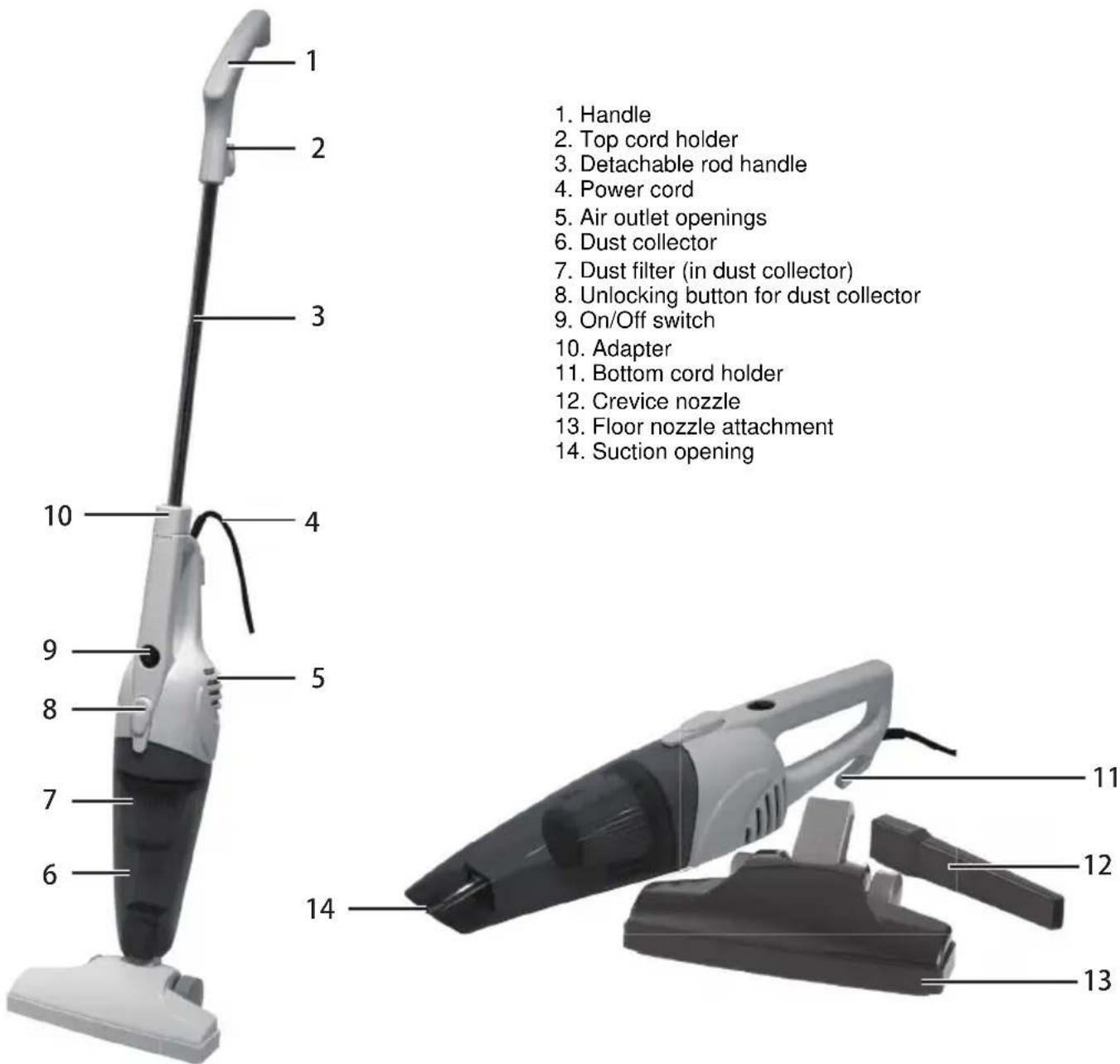
Assembly
Conversion from handheld to floor vacuum cleaner
Remove all parts from the packaging and place carefully on a flat area. If necessary, put protective sheeting underneath to avoid harm to easily damaged surfaces. Carefully remove all packing materials. Compare the contents with the list of parts.
natural_image
Close-up of a white hand holding a small object against a textured dark background (no visible text or symbols)Using as a handheld vacuum cleaner
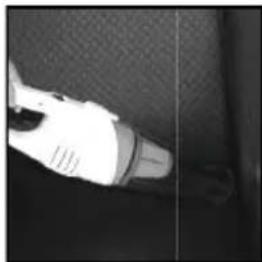
The 2 in 1 Vacuum Cleaner is ready for use as a handheld appliance as soon as it has been unpacked.
Using as a floor vacuum cleaner
natural_image
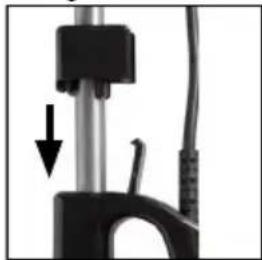
Close-up of a mechanical device with a black component and a black arrow pointing to a detail (no visible text or symbols)- Open the little flap on the handle of the handheld vacuum cleaner.
- Insert the rod handle in the opening in the handle and push in as far as it will go.
natural_image
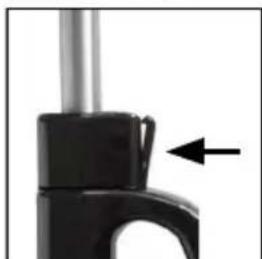
Close-up of a black mechanical component with a black arrow pointing to a small handle (no text or symbols visible)- Press the flap against the adapter so that it snaps into place.
Removing rod handle
-
Open the flap.
-
Pull out the rod handle.
-
Close the flap on the handle again.
Accessories
Fitting and removing nozzles

CAUTION
Before changing nozzles, always switch the vacuum cleaner off first.
- When fitting nozzles, insert in the suction opening.
● To remove nozzles, pull out of the suction opening.
Floor nozzle attachment
natural_image
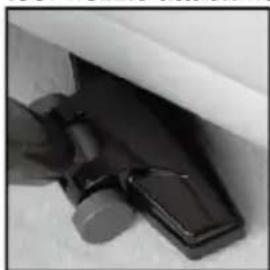
Close-up of a hand holding a dark object with a small protrusion, possibly part of a device or tool (no visible text or symbols)The floor nozzle attachment is suitable for both carpets and smooth floors.
Crevice nozzle
CAUTION
Risk of injury! Never hold the crevice nozzle close to the body or it may stick to the skin. If the nozzle does get stuck, set the On/Off switch to immediately.
The crevice nozzle is designed for upholstery, cleaning the interior of cars and for getting into all corners and cracks that are inaccessible with the floor nozzle attachment or without a nozzle.
Preparing to use the appliance
CAUTION
Only switch the vacuum cleaner on once you have checked that all parts are fully assembled and all filters correctly inserted.
Under no circumstances should the appliance be used on the following:
– Liquids or wet materials (e. g. carpet shampoo when wet)
- Glowing ash, cigarette ends, matches etc.
- Combustible or in flammable substances
– Very fine dust (e. g. concrete dust) or toner
– Hard, pointed objects such as large splinters of glass
-
Fit or remove the rod handle depending on whether you want to use the vacuum cleaner as a handheld or a floor appliance.
-
You can use the vacuum cleaner either without a nozzle or fit one of the nozzles to the suction opening.
-
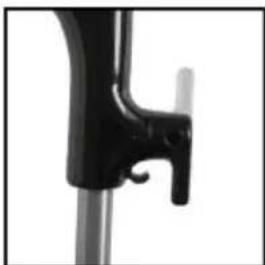
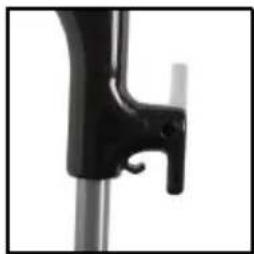
To quickly unwind the cable from the floor vacuum cleaner, twist down the cord holder on the top handle.
-
Insert the power plug in a wall outlet.
- Set the On/Off switch to
- Move the suction opening or nozzle over the surface to be cleaned.
- After finishing vacuuming, set the On/Off switch to and unplug.
- After use, always empty the dust collector and clean the dust filter.
Cleaning
CAUTION
□ Remove the power plug before cleaning and / or putting away.
☐ Do not use caustic or abrasive products to clean the housing or you may damage the surface.
□ Never immerse the appliance in water.
Emptying dust collector and cleaning dust filter.
-
Hold down the unlocking button for the dust collector and carefully remove.
-
Hold the dust collector over a dustbin, carefully remove the dust filter and empty the dust collector.
-
Bang the dust filter gently.
-
Then wash the dust filter under cold running water.
CAUTION: Do not wash the dust filter in the washing machine. - Leave the dust filter to dry in the air for 24 hours until completely dry before reinserting. CAUTION: Never use a hair dryer.
-
Press the dust filter firmly back into the dust collector so it fits closely all round the wall of the housing. CAUTION: Never use the vacuum cleaner without the dust filter inserted.
-
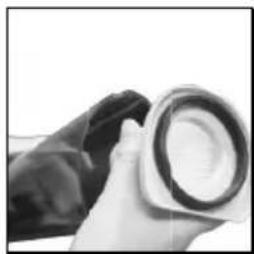
First insert the dust filter in the bottom of the appliance and then close. Press the unlocking button for the dust collector to engage. The dust collector must have securely engaged at the top and bottom of the appliance.
Cleaning or replacing motor protection filter
Once you have removed the dust collector, you will find a piece of non-woven material on the open side of the appliance. This is the motor protection filter. It needs to be cleaned from time to time.
- Remove the motor protection filter from the appliance and bang off the dust.
- Rinse with lukewarm water.
- Then give the motor protection filter a good shake and leave to dry off completely.
CAUTION: Never insert the motor protection filter while still damp. - Check the motor protection filter for damage and replace with a new one if necessary.
- Reinsert the motor protection filter.
Cleaning housing
Clean the housing with a slightly damp, soft cloth if necessary.
Storage
natural_image
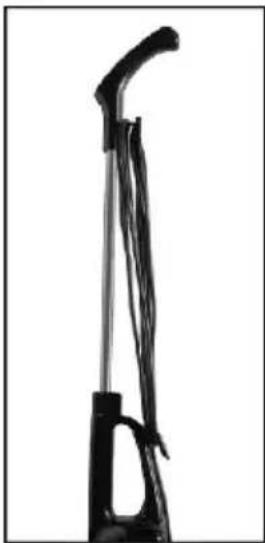
Silhouette of a mechanical device with curved handle and lever (no text or symbols visible)- Once you have fitted the rod handle, you can wind the cord around the two cord holders before putting away.
natural_image
Close-up of a black mechanical lever handle and lever arm (no text or symbols visible)- To quickly unwind the cable next time you use it, twist down the cord holder on the top handle.
- The vacuum cleaner should be stored indoors in a cool, dry place.
Troubleshooting
If your appliance does not function, is damaged or requires a spare part, please do not make any repairs yourself for your own safety.
The following table contains tips on how to deal with minor problems yourself:
| Problem | Causes, Solutions, Tips |
| No suction action. | Check that the power plug is inserted properly in the wall socket. |
| The suction capacity is too weak. | • Is the dust collector full?Empty the dust collector.• Is the dust filter heavily soiled?Clean the filter and leave to dry for 24 hours.• Is the suction opening or nozzle blocked?Unplug and remove the blockage. |
| Dust escapes from the appliance during use. | • Is the dust collector full?Empty the dust collector.• Has the dust filter not been inserted properly?Press the dust filter firmly into the dust collector so it fits closely all-round the wall of the housing. |
| Strange smell | When the appliance is used for the first time, it is normal for it to smell new: this will disappear over time. |
Technical specifications
Model: MVC-SC861R & MVC-SC861B
Power supply: 220-240V\~50/60Hz
Power consumption: 600 W
Protection class: II
natural_image
Exterior view of a white and black electric vacuum cleaner (no text or symbols visible)尊敬的顾客,
natural_image
Close-up of a white plastic tool partially embedded in a dark textured surface, with no visible text or symbols.手持式吸尘器
natural_image
Close-up of a mechanical device with a black lever and cable, showing a downward arrow (no text or symbols visible)推杆式吸尘器
natural_image
Close-up of a black mechanical component with a curved handle and an arrow pointing to a detail (no text or symbols visible)- 将手柄开关关闭,并且按牢。
拆除手柄杆
natural_image
Close-up of a black plastic bag attached to a white surface, with no visible text or symbols.地刷组件
natural_image
Close-up of a medical or laboratory procedure showing a needle inserted into tissue (no visible text or symbols)natural_image
Close-up of a white handheld device attached to a dark surface (no visible text or symbols)- 您可根据实际情况选择是否使用吸嘴。
natural_image
Close-up of a black mechanical lever or bracket component against a white background (no text or symbols visible)natural_image
Close-up of a mechanical component with a downward arrow indicating a feature (no visible text or symbols)- 按住尘杯开启按钮,从机身上取出尘杯
natural_image
Close-up of a hand holding a circular object with a ring, possibly a lens or lens (no visible text or symbols)natural_image
Close-up of a mechanical component with a downward arrow indicating a specific part (no text or symbols visible)5.
natural_image
Top-down view of a dark, rounded object with a central square and horizontal line (no text or symbols visible)natural_image
Silhouette of a mechanical device with lever and handle (no text or symbols visible)natural_image
Close-up of a black mechanical lever handle and lever arm against a white background (no text or symbols visible)- Dear Customer,
- Symbols used in the manual:
- Safety information
- Proper use
- Warning about improper use
- Risk to children
- Risk of electrocution
- Risk of injury
- Caution when in use
- Caution with malfunctions
- Damage to property / appliance
- Caution when cleaning appliance
- Warranty Terms
- List of parts
- Assembly
- Conversion from handheld to floor vacuum cleaner
- Using as a handheld vacuum cleaner
- Using as a floor vacuum cleaner
- Removing rod handle
- Accessories
- Fitting and removing nozzles
- CAUTION
- Floor nozzle attachment
- Crevice nozzle
- Preparing to use the appliance
- Cleaning
- Emptying dust collector and cleaning dust filter.
- Cleaning or replacing motor protection filter
- Cleaning housing
- Storage
- Troubleshooting
- Technical specifications
- 手持式吸尘器
- 推杆式吸尘器
- 拆除手柄杆
Brand : MIDEA
Model : MVC-SC861B
Category : Vacuum Cleaner