
iB14 - Headphones IHOME - Free user manual and instructions
Find the device manual for free iB14 IHOME in PDF.


| Product Type | Over-ear wireless headphones |
| Brand | iHome |
| Model | iB14 |
| Color | Black (common) |
| Driver Size | 40 mm |
| Impedance | 32 Ohms |
| Frequency Response | 20 Hz - 20 kHz |
| Connectivity | Bluetooth 5.0, 3.5 mm auxiliary input |
| Bluetooth Range | Up to 33 ft (10 m) |
| Battery Type | Rechargeable lithium-ion |
| Battery Capacity | 300 mAh |
| Charging Time | Approximately 2 hours |
| Playback Time | Up to 12 hours |
| Microphone | Built-in for hands-free calls |
| Controls | Power, volume, track skip, play/pause, answer/end call |
| Weight | Approximately 0.5 lb (227 g) |
| Dimensions (folded) | 6.5 x 5.5 x 2.5 inches |
| Cable Length (aux) | 4 ft (1.2 m) |
| Charging Port | Micro USB |
| Ear Cushion Material | Leatherette |
| Headband Padding | Foam |
| Foldable Design | Yes, for portability |
| Care Instructions | Wipe with a soft, dry cloth; do not use liquids |
| Safety Warnings | Avoid prolonged exposure to high volume to prevent hearing damage |
| Spare Parts Available | Replacement ear pads (contact iHome support) |
Frequently Asked Questions - iB14 IHOME
User questions about iB14 IHOME
0 question about this device. Answer the ones you know or ask your own.
Ask a new question about this device
Download the instructions for your Headphones in PDF format for free! Find your manual iB14 - IHOME and take your electronic device back in hand. On this page are published all the documents necessary for the use of your device. iB14 by IHOME.
USER MANUAL iB14 IHOME
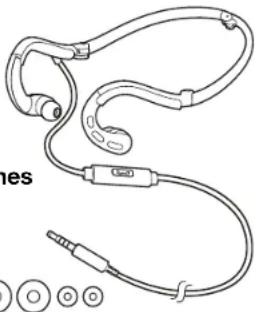
folding behind-the-neck fitness earphones with in-line mic+remote and pouch
natural_image
Line drawing of a pair of earphones with connectors and earplugs, no text or symbols presentCord Management
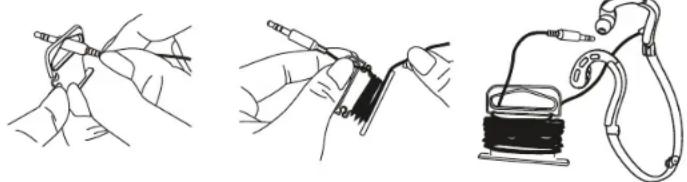
The hang tag at the top of the package also functions as a convenient cord management device. Pass the earphone's plug through the opening in the hang tag as shown and then wind the earphone cord around the hang tag. This will keep your earphones cord tangle free and always ready to use.
natural_image
Three-step line drawings showing hands using a tool to connect wires, holding a coiled cable, and connecting a solenoid to a wire (no text or symbols present)Using Your iHome Earphones
Your i-Home earphones feature a foldable neckband for compact storage. Unfold the neckband completely, place it behind your neck with the cord on your right side and insert the earphones into your ears.
NOTE: Your iB14 earphones are supplied with three different size silicon tips (S-M-L) for maximum comfort and to seal out unwanted noise. The "M" (medium) size tips were installed at our factory. If you find that the installed tips are too small or too large for your ears, you may remove them and replace them with the larger or smaller size accessory tips. To replace the tips simply pull them off the earpieces. To install different size tips, push them on to the earpieces and make sure they are fully seated on each earpiece so that they do not come off when you remove the earpiece from your ear. If one of the tips remains in your ear when you remove the earphones, remove the tip carefully and avoid pushing it further into your ear canal. Seek medical assistance if one of the tips becomes lodged in your ear and you are unable to remove it.
Connect the earphones plug to the earphone jack of your music player. Be sure that the plug is fully inserted into the jack. If the plug is not fully inserted you may only hear sound from one earpiece.
In-Line Control with Microphone
Model iB14 includes an in-line, one-button controller that allows you to answer and end phone calls 'hands-free'. You may also be able to record voice memos and control the music playback if your specific phone model provides for control of those features through the earphone jack.
NOTE: Not all of the hands free functions are available on all phones. You may find that some functions may work with your phone while others do not. This is due to the design of your specific phone and is not an indication of any problem with the iB14 earphones.
Answer / End Calls
When an incoming call is received briefly press the controller button once to answer the call and speak into the microphone. To end the call, briefly press the controller button again.
Music Playback Control
If your phone or music player provides for this feature through its earphone jack press the controller button once to begin playback and once again to pause playback. Press the controller button twice to skip to the next track, or three times to skip back to the previous track.
Voice Memo Recording
If your phone or music player provides for this feature through its earphone jack, place your phone in the Voice Memo Recording mode, then press the controller button briefly to begin voice recording and speak into the microphone. Press again to end the recording. Note: To listen to your voice memo recording you must use the controls on your phone. You cannot access recorded voice memos from the iB14 in-line controller.
IMPORTANT! Listening at high volume for long periods of time can result in long-term hearing damage. For your safety, do not use earphones if they would prevent you from hearing warning sounds, such as while driving a car or motorcycle, riding a bike, etc. Remember that earphones such as the IB14 are very effective in blocking outside noise, including warning sounds. Always be aware of your surroundings and do not use these earphones in situations that require you to hear warning sounds.
NOTE: In extremely cold or dry air conditions you may notice a slight 'tingling' feeling in your ears when using in-ear earphones. This is the result of the build-up of static electricity in your body. This is normal and not an indication of any problem with your earphones.
Limited Lifetime Warranty Information
iHome Products, a division of SDI Technologies Inc. (hereafter referred to as SDI), warrants this product to be free from defects in workmanship and materials, under normal use and conditions, for the lifetime of the product from the date of original purchase.
Should this product fail to function in a satisfactory manner, it is best to first return it to the store where it was originally purchased. Should this fail to resolve the matter and service still be required by reason of any defect or malfunction during the warranty period, SDI will repair or, at its discretion, replace this product without charge. This decision is subject to verification of the defect or malfunction upon delivery of this product to the Factory Service Center authorized by SDI Customer Service. The product must include proof of purchase, including date of purchase. An out-of-warranty fee for service will be charged for units that are received without proof of purchase.
Before returning this product for service, please first replace the batteries (if applicable) with fresh ones, as exhausted or defective batteries are the most common cause of problems encountered. If service is still required:
- Call SDI Customer Service at 1-800-288-2792 for Return Authorization and for the address of the Factory Service Center.
- Remove the batteries (if applicable) and pack the unit in a well padded, heavy corrugated box. SDI is not responsible for damage that occurs during shipping to the Factory Service Center.
- Enclose a photocopy of your sales receipt, credit card statement, or other proof of the date of purchase, if within the warranty period. Also include your name and address information, a brief description for why the unit is being returned, and the return authorization number. No unit can be processed without a return authorization number.
- Write the return authorization number on the side of the shipping package and send the unit prepaid and insured to the Factory Service Center address authorized by SDI Customer Service.
Disclaimer of Warranty
NOTE: This warranty is valid only if the product is used for the purpose for which it was designed. It does not cover (i) products which have been damaged by negligence or willful actions, misuse or accident, or which have been modified or repaired by unauthorized persons; (ii) cracked or broken cabinets, or units damaged by excessive heat; (iii) damage to digital media players, CD's or tape cassettes (if applicable); (iv) the cost of shipping this product to the Factory Service Center and its return to the owner.
This warranty is valid only in the United States of America and does not extend to owners of the product other than to the original purchaser. In no event will SDI or any of its affiliates, contractors, resellers, their officers, directors, shareholders, members or agents be liable to you or any third party for any consequential or incidental damages, any lost profits, actual, exemplary or punitive damages. (Some states do not allow limitations on implied warranties or exclusion of consequential damages, so these restrictions may not apply to you.) This warranty gives you specific legal rights, and you may also have other rights which vary from state to state.
Your acknowledgement and agreement to fully and completely abide by the above mentioned disclaimer of warranty is contractually binding to you upon your transfer of currency (money order, cashier's check, or credit card) for purchase of your SDI product.
© 2014 SDI Technologies, Inc. All rights reserved.
Questions? Visit www.ihome.com
or call 1-800-288-2792 Toll Free
Brand : IHOME
Model : iB14
Category : Headphones