
LERK03 - Keyboard Leotec - Free user manual and instructions
Find the device manual for free LERK03 Leotec in PDF.


| Product Type | 2.4GHz Mini Wireless QWERTY Keyboard with TouchPad |
| Dimensions (L x W x H) | 154 x 62.5 x 19 mm |
| Weight | 110 g |
| Power Source | Built-in Lithium-Ion Rechargeable Battery |
| Operating Voltage | 3.3 V |
| Operating Current | < 50 mA |
| Charging Current | < 300 mA |
| Sleep Current | < 1 mA |
| Wireless Range | Up to 10 meters |
| Wireless Technology | 2.4 GHz RF with USB Receiver |
| TouchPad | Yes, with horizontal/vertical mode switching via Fn+Alt |
| Laser Pointer | Yes, activated by pressing Laser Switch (do not point at eyes) |
| Auto Sleep/Wake | Yes, after period of inactivity; wake by pressing any key |
| Compatibility | Android TV, Windows PC, Xbox 360, PS3, Smart TV, iPad, etc. |
| Operating System Support | Windows 2000/XP/Vista/7/CE, Linux (Debian, Redhat, Ubuntu, Fedora) |
| Charging Method | Via USB cable (use approved charger) |
| Battery Charge Time | Approximately 2-3 hours (first charge fully) |
| Battery Life | Typical use several days; low voltage indicator flashes when low |
| Warranty | 24 months (battery: 6 months) |
| Cleaning Instructions | Use damp cloth with mild soap; avoid solvents |
| Safety Precautions | Turn off on planes, near gas stations, hospitals; avoid water/humidity; no disassembly |
Frequently Asked Questions - LERK03 Leotec
User questions about LERK03 Leotec
0 question about this device. Answer the ones you know or ask your own.
Ask a new question about this device
Download the instructions for your Keyboard in PDF format for free! Find your manual LERK03 - Leotec and take your electronic device back in hand. On this page are published all the documents necessary for the use of your device. LERK03 by Leotec.
USER MANUAL LERK03 Leotec
natural_image
Black remote control keyboard with various function keys and a red cord, no visible text or symbols on the main body.To avoid injury, death of personnel or damage to the equipment the operator must refer to the explanations in this User's Manual. Battery: There is a lithium-ion rechargeable battery in this device. Don't water this device, or put it in a humid environment for a long time or the device will be damaged.

Attention to traffic safety
(CAR PC): Do not use the device while driving. When you want to use it, please park your car.

Turn off this device on planes
This Electronic wireless product can disturb the communications systems of planes. Please turn if off before boarding.

In vicinity of dangerous goods to be shut down
In gas station and close to fuel and chemical agents and other hazardous materials areas, please turn the device off.

Turn off this device in hospital
Please turn the device off in areas with "no wireless device" indication.
Wireless devices may interfere with implanted cardiac pacemakers, hearing aids and other. Medical implant devices.

Interference
All wireless devices may be subject to interference, thus affecting the performance of this product.

Accessories
Only use factory specified parts. Please use the supplied travel charging cable.the use of other charging devices may be dangerous.

Do not point the laser beam on human or animal eyes directly to avoid damage to the eye.
Overview
This is a great combo, 2.4GHz Mini Wireless QWERTY keyboard, TouchPad combo, with USB interface Adapter.
Allows you to control compatible devices within a radius of 10 m including: Android TV, Xbox 360, PS3, Windows PC, Smart TV (HTPC / IPTV), etc.. Ideal for managing your remote PC or Notebook for presentations or if you use it as a media center, very convenient and practical for use with Android TV Box or stick and also very useful for chatting, browsing and other Smart TV functions.
Introduction Product overview
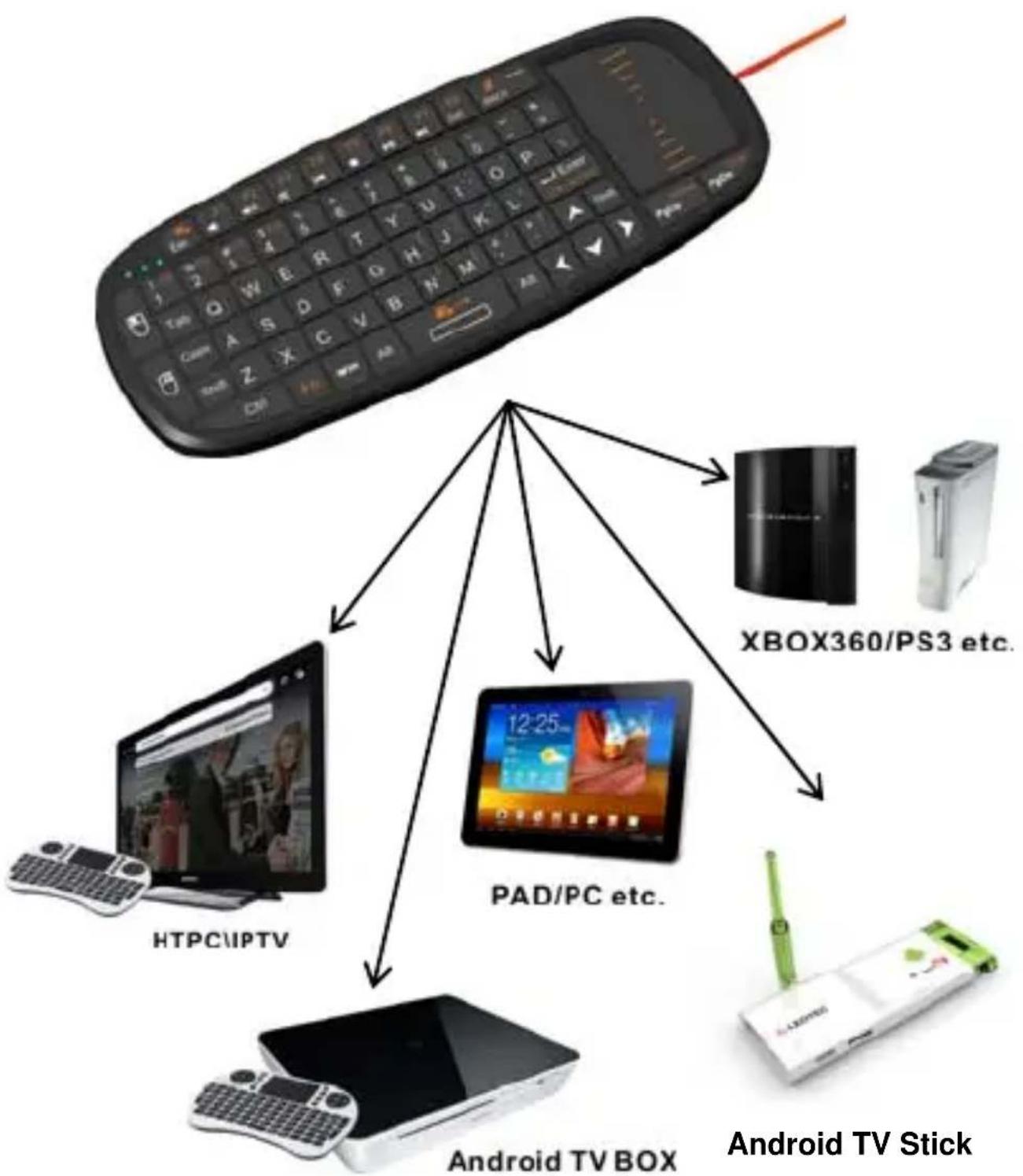
flowchart
graph TD
    A["Remote Control Device"] --> B["HD/PC IPTV"]
    A --> C["iPad/PC etc."]
    A --> D["Android TV BOX"]
    A --> E["XBOX360/PS3 etc."]
    A --> F["Android TV Stick"]
Touchpad
The touchpad can be used in a horizontal or vertical position. To switch between horizontal or vertical mode, hold the Fn key and hit the Alt key.

Connecting the receiver
Slide the receiver out from the side of keyboard, and insert to the devices with a standard USB interface. Once connected, slide the power switch to the "ON" position located on the left side of the unit to establish the connection.
Auto sleep and wake feature
The keyboard also features an auto sleep and auto wake mode. If there is a long period of inactivity, the keyboard will automatically go into a sleep mode. During the sleep mode, the user can wake the unit up by pressing any key. The 2.4 GHz receiver and keyboard's RF indicator will continue to flash and will not power down.
Switching off the keyboard after use
After finishing using the keyboard, push the switch to the off position. This turns off the power, of the keyboard. The USB receiver should be plugged out from the PC and then inserted back in the keyboard so it is being kept safely.
Charging the battery
The device with built-in lithium-ion battery, please use only approved data lines and chargers.
Fully charge the unit before operating for the first time. This device can be used when charging, but will extend the charging time;
When the battery is low, the low-voltage light will flash to warn the user. The unit will automatically turn off if the battery has been depleted.
Laser pointer
Using the laser pointer only requires that the keyboard will be turned on. Press the Laser Switch as long as you want to use the laser pointer.
Appendix
Technical parameters
Specification
- Measurements (L x W x H): 154 x 62.5 x 19mm
· Weight (grams): 110g
· Operational Range: up to 10 meters - Transmit power : +5db Max.
· Operation voltage: 3.3V
· Operation current: < 50mA - Charging current: < 300mA
- Sleep current: < 1mA
Computer system requirements
- Windows 2000
- Windows XP
- Windows Vista ,Windows CE, Windows 7
· Linux(Debian-3.1, Redhat-9.0 Ubuntu-8.10
Fedora-7.0 tested)
Maintenance
- Do not attempt to disassemble the device or replace rechargeable battery. Doing so will void the warranty.
- The battery will discharge if stored for a long period of time without usage.
- Use the specified charger. Disconnect the device after the battery has been fully charged.
Overcharging the battery will shorten the life span of the battery. - Do not expose the device in extreme heat or cold. Extreme temperatures will cause the life span of the battery to shorten.
- Use only a damp cloth with mild soap to clean the device. Solvents and other cleaning agents may cause damage to the device.
Troubleshooting
Below are some basic troubleshooting scenarios for the device. Please contact support from the place of purchase if you are unable to resolve any issues with the device.
| Problem | Possible | issue Solution |
| Unit does not respond. | 1. Low battery power.2. Unit is not turned on. | 3. Charge the device for at least 15 minutes.4. Check if the switch selected to the “ON” position. |
| Keyboard cannot establish a connection to the receiver. | 1. The receiver may not be inserted correctly. | 1. Disconnect and reconnect the receiver to the USB port. |
| The mouse pointer moves erratically and/or unresponsive. | 1. Device may not be within optimal range of the receiver2. Low voltage3. Dust or oil on the touchpad. | 1. Bring the unit closer to the receiver.2. Please recharge battery3. Clean the touchpad with a damp cloth. |
| The unit does not charge (only for Configure A) | 1. Defective battery.2. Check connections. | 1. Contact your local dealer for replacements.2. Verify if the device is securely connected to the charger. |
Notes:
- Since devices using 2.4G technology communicate using radio waves, your device and the other devices do not need to be in direct line-of-sight. The connection can be subject to interference from obstructions, such as walls, or other electronic devices.
- In line with the policy of continued development the manufacturer reserves the right to amend the specifications without prior notification. The pictures are for reference only.
Guarantee and responsibility
All LEOTEC products have a 24 month warranty from the invoice date to the end customer, except in the included accessories. The manufacturer guarantees the consumer that its products are free from defects in materials and workmanship at the time of purchase.
The batteries have 6 months warranty. Batteries whose maximum load capacity is equal to or less than 50% within that period are considered defective.
The warranty offered only covers defects in workmanship or materials that the product could have. Defects or failures caused by misuse, breakage, wear are excluded.
Manipulating of the product by anyone other LEOTEC technical service, software updates not provided by LEOTEC and all faults or defects caused by natural disasters will void the warranty.
The warranty is valid only when the user has the ticket or proof of purchase and it is within the deadline
Support and Technical Service
For any technical consultation you can go to the place of purchase or contact the technical service of LEOTEC.
Visit our website and stay always updated in the download section of your product
There is more available information in the website: www.leotec.com or by means of the e-mail: support@leotec.com
DECLARATION OF CONFORMITY
Brand: LEOTEC
Supplier name: World Driver S.A.
Address: Ctra de l'Hospitalet 66 - 68
We declare under our sole responsibility that the product: WIRELESS MINI KEYBOARD LERK03
Country of manufacture: China
Referred to this statement, with the standard (s) or other document (s) policy (s) in accordance with the provisions of Directive 93/68/EEC, the European Parliament and of the Council of 22 July 1993, transposed into Spanish law by Royal Decree 1950/1995, of December 1, 1995.

Reference symbol both in the product and its user manual, indicates that at the end of life electrical and / or electronic, they should be recycled separately from your household waste. There are adequate means to collect this material for proper recycling. For more information, contact the local authority or your retailer where you purchased the product.
Note: The device LERK03 may contain links to web sites or pages operated by parties other than LEOTEC and / or World Driver SA. These links are included and are available for your information, LEOTEC and / or World Driver SA not responsible for their availability, content, adequacy or accuracy. These external sites may contain or reference trademarks, patents, proprietary information, technologies, products, processes, or other property rights belonging to others. All copyrights are property of their respective owners.
- Attention to traffic safety
- Turn off this device on planes
- In vicinity of dangerous goods to be shut down
- Turn off this device in hospital
- Interference
- Accessories
- Overview
- Touchpad
- Connecting the receiver
- Auto sleep and wake feature
- Switching off the keyboard after use
- Charging the battery
- Laser pointer
- Appendix
- Technical parameters
- Specification
- Computer system requirements
- Maintenance
- Troubleshooting
- Notes:
- Guarantee and responsibility
- Support and Technical Service
Brand : Leotec
Model : LERK03
Category : Keyboard