
RS88B - Safe Avanti - Free user manual and instructions
Find the device manual for free RS88B Avanti in PDF.


| Product Type | Safe |
| Brand | Avanti |
| Model | RS88B |
| External Dimensions (H x W x D) | 25 cm x 35 cm x 25 cm |
| Internal Dimensions (H x W x D) | 24 cm x 34 cm x 24 cm |
| Weight | 12 kg |
| Material | Steel body with powder coating |
| Lock Type | Electronic keypad with backup key |
| Power Supply | 4 x AA batteries (not included) |
| Number of Bolts | 2 live locking bolts |
| Color | Black |
| Mounting Option | Pre-drilled holes for floor mounting |
| Security Features | Electronic lock, override key, anti-pry design |
| Battery Low Indicator | Yes, LED warning |
| Fire Resistance | Not fire-rated |
| Warranty | 1 year limited warranty |
| Cleaning Instructions | Wipe with a damp cloth; do not use abrasives |
| Repair and Spare Parts | Contact Avanti customer service for authorized parts |
| Package Contents | Safe, 2 keys, mounting hardware, user manual |
Frequently Asked Questions - RS88B Avanti
User questions about RS88B Avanti
0 question about this device. Answer the ones you know or ask your own.
Ask a new question about this device
Download the instructions for your Safe in PDF format for free! Find your manual RS88B - Avanti and take your electronic device back in hand. On this page are published all the documents necessary for the use of your device. RS88B by Avanti.
USER MANUAL RS88B Avanti
Your Avanti Room Security Safe is supplied with the following:
1 – Security Safe Unit
4-1.5V Batteries
2 – Emergency Access Keys
1-Felt Liner
1 – Installation / Usage Guide
Installation Screws
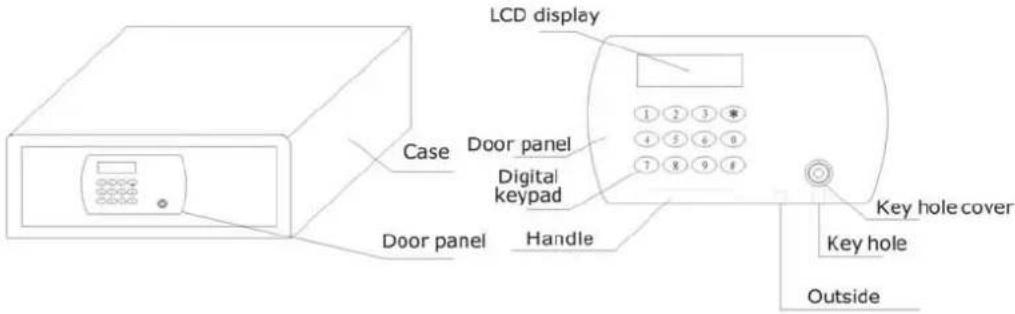
INSTALLING YOUR SECURITY SAFE
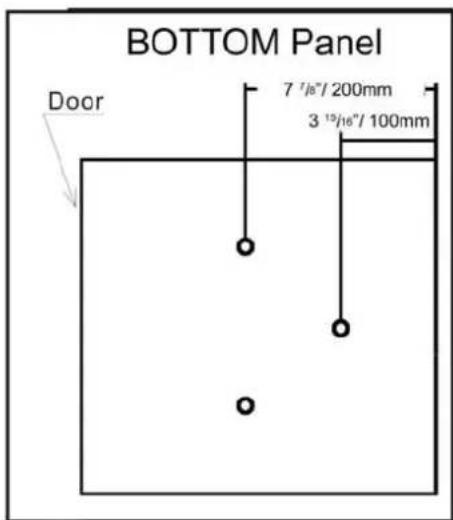
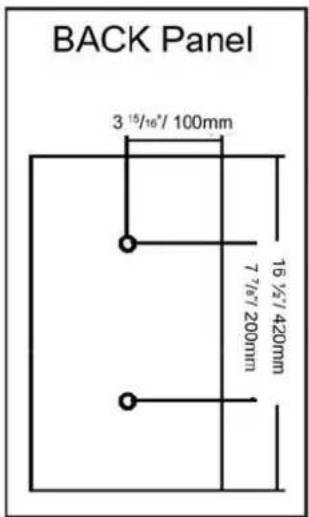
When installing your safe, be sure the location is sturdy enough to support the unit and is both secure and easy to access.
Safe can be installed onto either a concrete or wooden surface.
When installing use a 25/64" (10mm) drill bit and screws.
To prevent removal of your security safe, it is recommended to use Allen type screws (not included) to affix the unit to the installation location.
INITIAL SETUP AND CONFIGURATION.
After you have installed the unit in its final location, proceed to set up digital access controls.
1) Using the emergency Access Key, open the safe.
2) Open the battery compartment cover.
3) Following the image shown in the battery compartment install 4 AA size batteries.
4) Close the battery compartment cover.
5) The words "ALL READY" will be displayed on the LCD display for approximately 1 second; the security safe will then go into "STANDBY Mode".
6) Once in "STANDBY Mode" the LCD display will show the date and time (YY, MM, DD).
7) Using the keypad, enter the initial setup password "1234" or the administrator password "8888".
NOTE:
Battery Life / Level indicator: The battery indicator on the LCD display will show the current status of the batteries. Always replace all of the batteries at the same time. If at any time the battery level is too low to operate the security safe, use the emergency access key.
GUEST / USER CODE SETUP
To reset the access code read and follow the steps below.
1) With the door open, enter a new 4-8 digits code and press the “#” key to confirm the new pass code.
2) You will hear and see the security lock engage and the word "CLOSE" will be displayed on the LCD screen.
3) Enter the new pass code and press the “#” key again to open the security safe. The security lock will disengage and the word “OPEN” will be displayed on the LCD screen.
4) Close the door and enter the new code set up in step # 1 and press the “#” key. The word “CLOSE” will be displayed on the LCD screen and the security lock will engage.
5) If the Guest / User enters the wrong pass code three (3) times in a row the alarm will sound for 1 minute and will continue to sound in 1 minute intervals until the correct code is entered or the emergency access key is used to open the safe.
RESETTING THE ADMINISTRATOR PASSWORD
To reset the access code read and follow the steps below.
1) With the door open, press the “#” key to activate the keypad, then press the “0” key twice, then press the “red” button on the battery compartment once to enter the programming mode.
2) Once in the programming mode you will hear a "DI" sound and "----" will be shown in the LCD display.
3) Enter the new 4-8 digits administrator password and press the “#” key to confirm.
4) The word "INTO" will show on the LCD display to confirm the new password has been set up successfully.

Avanti Products, Miami, FL 33172
Service Issues: 1 - 800 - 220 - 5570
Brand : Avanti
Model : RS88B
Category : Safe