
CDR 830 - Dash cam COBRA - Free user manual and instructions
Find the device manual for free CDR 830 COBRA in PDF.


| Product Type | Dash Cam |
| Brand | Cobra |
| Model | CDR 830 |
| Dimensions (approx) | 80 x 55 x 35 mm |
| Weight (approx) | 90 g |
| Power Supply | 5V DC via USB car charger |
| Battery | Built-in rechargeable battery |
| Video Resolution | Full HD 1080p |
| Lens Angle | 140° wide-angle |
| Loop Recording | Yes, automatic overwriting of oldest files |
| G-Sensor | Built-in gravity sensor for incident detection |
| Night Vision | Infrared LEDs for low-light recording |
| Display | 2.7-inch LCD screen |
| Storage | MicroSD card up to 32 GB (not included) |
| GPS | Not integrated |
| Mounting | Suction cup mount for windshield |
| Cleaning | Use a soft, dry cloth |
| Safety Warning | Do not install where it obstructs driver's view |
| Spare Parts Available | Power cable, suction mount, USB charger |
Frequently Asked Questions - CDR 830 COBRA
User questions about CDR 830 COBRA
0 question about this device. Answer the ones you know or ask your own.
Ask a new question about this device
Download the instructions for your Dash cam in PDF format for free! Find your manual CDR 830 - COBRA and take your electronic device back in hand. On this page are published all the documents necessary for the use of your device. CDR 830 by COBRA.
USER MANUAL CDR 830 COBRA
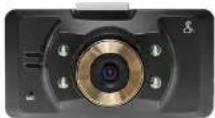
CDR 830
Product Manual
NOTE: The CDS is compared with part of FCS fields. Application is not to be following the main result in all the results and costs of the field, including the application and the results of the main result. Furthermore, the distribution of parts is supported by the FCS fields. Application may include FCS fields and its authority to create this equipment. The resulting fields with FCS-012 of industry Canada. Application is required to be identified that this data does not cause additional interference. CANADA, TITO.


Thank you for purchasing Drive HD by Cobra. The CDR 830 is a 1080P HD Digital Video Recorder and Dash Cami designed to protect your vehicle and give you peace of mind.
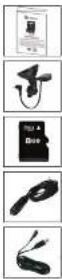
Package Contents Include:
• CDR 830 Dash Cam (not shown)
• Product Manual
- Heavy Duty Suction Cup Mount with GPS Antenna
- 8GB Micro SD Card
- Cigarette Lighter Adapter
USB Cable
Please take a moment to read through this product manual to fully understand how to properly mount and operate your CDR 830.
CDR 830 Functions Mounting the CDR 830
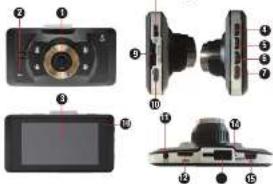
- Camera Lens
- Microphone
- LCD Display
- Menu Button
- Up/Fast Forward/Zoom In
Toggle microphone button - DownRewind/Zoom Out/Lock Eio Bullan
- ModeTension
- Microscrew Oil/Off Boats
- Power Tonsel IR/LEDs
-
POWER TUGGLE IN LEDS Button
-
Micro SD Slot
- Record/Enter Button
- GPS Input Port
- HDMI Interface
- Mounting Bracket Slot
- Reset Button
- USB Interface
- Power Indicator
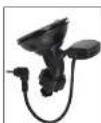
Suction Cup Bracket
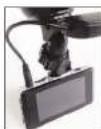
GPS Connected
The CDR 830 should be mounted to the windshield using the included Suction Cup Mount. Make sure to line the unit up so that it has a clear view of the road and the sky.
The unit's GPS engine is housed within the suction cup mount. Make sure to insert the barrel plug coming from the mount into the GPS input port at the top of the dash cam in order to record GPS location.
When the unit detects that the GPS is connected a white icon Ⓧ will appear on the screen. When it has achieved GPS Lock the icon will turn green ⚙.
Operation
Turn on/off: press the Power button to turn the unit on, press and hold the Power button to turn the unit off.
Continuous Cyclical Recording: Cyclical recording means that once the memory card is full this camera will continuously overwrite the oldest footage recorded. To protect a clip so that it will not be overwritten, press the Lock File Button. The 🔒 icon will show on the screen.
Navigating the Menu: Press the Menu Button to enter into the menu. Press the Menu Button again to cycle through basic and mode specific settings lists. To navigate through the menus use the Up and Down buttons, which double as Mic and Lock File respectively. Press the Rec Button to enter specific settings and select specific options. Pressing the Menu Button again will exit the menu screen.
Video: Pressing the Mode Button multiple times will cycle the unit between Video, Photo and Playback modes. While in Video mode, press the Record Button to start recording you will notice the red dot indicator icon ● flashing press the Record Button again to stop recording and the tile will be saved automatically.
Photograph: Press the Mode Button to enter Photo Mode. Press the Rec/Enter Button to snap still photos.
View Videos and Photographs: Press the Mode Button to enter Playback mode. You can then cycle through your recordings using the updown arrows and play or stop a clip by pressing the Rec Button.
Operation (continued)
G-Sensor: The G-Sensor is an accelerometer that can detect if you are in an accident. If the G-Sensor is triggered, the current video segment will automatically be locked so that it is not overwritten by cyclical recording. The sensitivity of the G-Sensor can be adjusted in sellings.
LED Headlight: To turn on the LED headlights simply tap the ON/ OFF button while in recording mode.
HDMI OUT: Plugging a mini HDMI cable (not included) into the HDMI OUT port allows you to broadcast the Dash Cam's screen in HD on a TV or monitor that accepts HDMI Signals. The Dash Cam will operate normally.
Battery: The battery in this unit is intended to operate the unit for 15 seconds after power loss due to an accident or crash. If the unit is turned on without the Cigarette Lighter Adapter attached you can manually start recording and the camera will operate for approximately 1.5 hours on battery power.
Reset: Use a sharp point to press this button if the unit freezes or does not turn on for any reason. Reset will not erase video recordings or customized settings.
Exporting Photos/Videos
USB is used to power the IWI as well as allow connection to a PC for file transfers. Connect the product to your computer with the included USB cord to view and manage video and image files.
Choose Mass Storage to view files or PC Camera if you would like to use the dash cam as a video camera. If Mass Storage is selected you will be able to navigate to "Removable Disk" on your computer. Video files located in the DCIM folder are AV format and can be played using most video players.
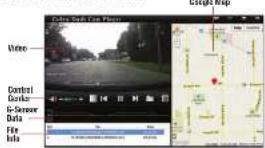
To view videos along with GPS information you will need to download and install the Cobra Dash Cam Player. This can be downloaded at www.cobra.com/dashcamsoftware. Follow the instructions to install the player.
Note: Cobra Dashcam Player is currently available only for PC.
Once the program is running, click the icon to open your desired video file. Location information will be shown on the Google Map next to the video as it is playing
Note: When GPS is connected to the DVR a text file is created that is associated with each video file. Moving or deleting an associated text file will eliminate the GPS data.
Specifications
| Visual Angle | 140 degrees |
| Lens Degrees Rotation | 200 degrees |
| Sensor | 5 MP CMOS |
| Video resolution | 1060P/1080PHD720P/WVSA |
| Video Format | VSA |
| HUA | 720P/30fps/WVGA/30fps |
| Picture Format | JPEG |
| Picture Resolution | 2592 x 1944 (Max. 12MP) |
| Web Camera | Supported |
| Motion Detection | Supported |
| Removable Disk | Supported |
| Sound Recording | Synchronous video and sound |
| recorlonly video without sound (optional) | |
| MicroSD Card | 86B included |
| Player Software | Color Dash Cam Player |
| USB Interface | USB 2.0 |
| Display Screen | 2.0" TFT |
| Capacity of Battery | 250 mAh |
| Charging Current | 200-300MA |
| Charging Time | 1 hour |
Customer Assistance
Should you encourage any users with this product, or not understand to many
believe clear role in the man's normal if you require further answers after
The following table is in Chinese.
For Assistance in the Automated Holo Dock
Sollabria, 21 kron a. rev. 1 day a vaxi phone (77-815-111)
Column Axillary (Incorpus)
English and Spanish. 5:00 p.m. to 5:30 p.m. Central Time, Monday through Friday
[Unreadable]
Questions:
King and Sperman, lives not to remain at 713-623-7209.
Technical Assistance
English only. www.ecm.com (on-line, frequently, based questions) English and Spanish alphabet/other company
Ica Ablance Outside the USA
Far Insurance Lincoln the Data Contact Your Local Dealer
Conduct 100 gm to 50 gm
Trademark Acknowledgement
Color ^2 and the main series are registered research of Color Doctor in
(1)
Cerel Echelt, 1986.
Limited 5-Year Warranty
For Products Purchased in the USA
Coun: "Tecranian, Caozian, Kandai, Hain in Condominal Cereve, and the compared term (in a) and in a) in a. A. Caozian, Kandai, Hain in Condominal Cereve (in a) and in a)
In course purchase, "The work, may be extended by the first member partner, provided that
or polarized
Covall, without course, was a replace, at the entry, detective Distrated Center, and which or
The following text in the image is a non-textual, stylized graphic with no discernible characters or punctuation. According to Rule 4 (Edge Noise Strategy), since there is no actual text content present in the source image, the OCR should not output any character. Therefore, the corrected OCR text is:
[No text detected]
To record 20/20 and the following change is due to the past in the American, but the
that changes of the U.S. government, Florida, is not at the national level.
right, and/or now also have other rights and any other degree.
Figures 1.1.2.3 (Figure 1).
-
用 R 的量纲,即 R 的量纲。
-
If the set of number boxes shown, defined or removed
-
If known of the case, we do not be
All imp. invariance, india de variance of nonverbality, and fitness for a particular purpose are
In addition to the following flow
Crona del nucleable loc my individual, consequential or other damages located at the
The following table provides the information in English:
la, you
Product Service
For the quality of the quality of the quality of the quality of the quality of the quality of the quality of the quality of the quality of the quality of the quality of the quality of the quality of the quality of the quality of the quality of the quality of the quality of the quality of the quality of the quality of the quality of the quality of the quality of the quality of the quality of the quality of the quality of the quality of the quality of the quality of the quality of the quality of the quality of
Take all areas the benefit of a short time or any report. It takes place for the product used to be
fasting, the following was to be involved to having the product used and carried.
The following table provides the information in English:
2.2014
- Does a description what is happen with respect, include types of such printed work
and the of which is a power to be removed, which are not equivalent for power.
Controller, (SXC Meri Condex Street, Tokyo, Min 16707 U.S.)
a the male summer house located in a school, school of
depend up on the mask. Please use a spot to make it - 1 week before contacting Colors for this
The quick brown fox jumps over the lazy dog.
The following table is in Chinese:
The quick brown fox jumps over the lazy dog.
Brand : COBRA
Model : CDR 830
Category : Dash cam