
W415e - Projector OPTOMA - Free user manual and instructions
Find the device manual for free W415e OPTOMA in PDF.


| Product Type | DLP Projector |
| Native Resolution | WXGA (1280 x 800) |
| Input Connectors | 2 x HDMI, 1 x VGA (D-sub), 1 x Composite Video, 1 x Audio (3.5 mm), 1 x RS232, 1 x RJ45, 1 x USB (5V/1.5A) |
| Built-in Speaker | Yes, adjustable volume |
| Keystone Correction | Vertical, ±40° |
| Optical Zoom | Manual, with variable |
| Focus | Manual |
| Lens Shift | Vertical, adjustable via wheel (except short throw 1080p) |
| 3D Function | DLP Link and IR, formats Side-by-Side, Top-Bottom, Frame Sequential |
| Power Supply | 100-240 V AC, 50/60 Hz (standard estimate) |
| Power Consumption (Standby) | < 0.5 W in Eco mode |
| Approx. Weight | 2.8 kg (estimate) |
| Approx. Dimensions | 31.5 x 22.4 x 10.2 cm (estimate) |
| Lamp Type | Replaceable lamp (module) |
| Lamp Life | Up to 5000 h in Eco mode (typical estimate) |
| Cleaning | Dry soft cloth, disconnect before cleaning |
| Ceiling Mount | M4 screws, max length 11 mm |
| Security | Password lock, Kensington lock, clock security |
| Included Accessories | Remote control, 2 AAA batteries, VGA cable, power cable, user guide, warranty card |
Frequently Asked Questions - W415e OPTOMA
User questions about W415e OPTOMA
0 question about this device. Answer the ones you know or ask your own.
Ask a new question about this device
Download the instructions for your Projector in PDF format for free! Find your manual W415e - OPTOMA and take your electronic device back in hand. On this page are published all the documents necessary for the use of your device. W415e by OPTOMA.
USER MANUAL W415e OPTOMA
+ ⋯ Introduction....7
+···Installation....11
Options | Remote Settings 48
Options | Avancé....49
Options | Paramètres Lampe 51
LAN_RJ45 53
- + Annexes 63
Dépannage 63
Image 63
Autres....64
natural_image
Illustration of a projector with a circular lens beside it (no text or symbols)natural_image
Coiled cable with two connectors and a terminal outlet, no text or symbols visiblenatural_image
Line drawing of a closed suitcase with open lid and side buttons (no text or symbols)Mallette de transport
Documentation :
natural_image
Technical illustration of a car air vent assembly with mounting holes and a magnified inset showing the component (no text or symbols present)Ajuster la position verticale de l'image
| Power | Switch | |
| Freeze | ||
| L | R | |
| Enter | ||
| Page-Keystone | Laser | Page+Volume |
| 1 | 2 | 3 |
| 4 | 5 | 6 |
| HDMI | VGA | Video |
| 7 | 8 | 9 |
| User1 | User2 | User3 |
| 0 | ||
| Source | Resync | |

Options | Remote Settings
Utilisateur1
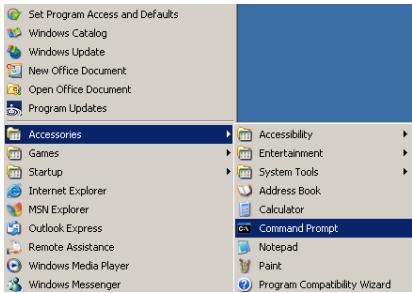
- Démarrer => Tous les programmes => Accessoires => Invite de commandes.
Annexes
? Etats LED
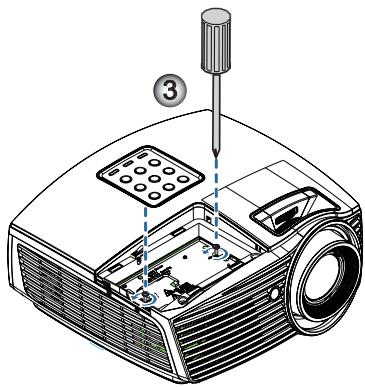
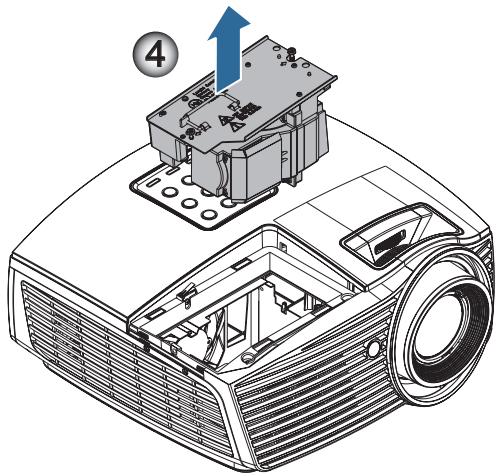
Lamp is approaching the end of its useful life
natural_image
Illustration of a projector with a screwdriver inserted, labeled with number 1 (no text or symbols on the device itself)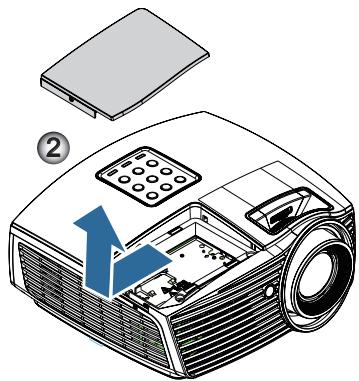
SEND to emulate Remote
| ~XX140 10 | 7E 30 30 31 34 30 20 31 30 OD |
| ~XX140 11 | 7E 30 30 31 34 30 20 31 31 OD |
| ~XX140 12 | 7E 30 30 31 34 30 20 31 32 OD |
| ~XX140 13 | 7E 30 30 31 34 30 20 31 33 OD |
| ~XX140 14 | 7E 30 30 31 34 30 20 31 34 OD |
| ~XX140 15 | 7E 30 30 31 34 30 20 31 35 OD |
| ~XX140 16 | 7E 30 30 31 34 30 20 31 36 OD |
| ~XX140 17 | 7E 30 30 31 34 30 20 31 37 OD |
| ~XX140 18 | 7E 30 30 31 34 30 20 31 38 OD |
| ~XX140 19 | 7E 30 30 31 34 30 20 31 39 OD |
| ~XX140 20 | 7E 30 30 31 34 30 20 32 30 OD |
| ~XX140 21 | 7E 30 30 31 34 30 20 32 31 OD |
| ~XX140 28 | 7E 30 30 31 34 30 20 32 38 OD |
| ~XX140 47 | 7E 30 30 31 34 30 20 34 37 OD |
Up
Left
Enter (for projection MENU)
Right
Down
Keystone +
Keystone –
Volume -
Volume +
Brightness
Menu
Zoom
Contrast
Source
SEND from projector automatically
| 232 ASCII Code | HEX Code | Function | Projector Return | Description |
| when Standby/Warming/Cooling/Out of Range/Lamp fail/Fan Lock/Over Temperature/Lamp Hours Running Out/Cover Open | ||||
| INFOn | n : 0/1/2/3/4/6/7/8/ = Standby/Warming/Cooling/Out of Range /Lamp fail/Fan Lock/Over Temperature/Lamp Hours Running Out/Cover Open | |||
READ from projector
| 232 ASCII Code | HEX Code | Function | Projector Return | Description |
| ~XX121 1 | 7E 30 30 31 32 31 20 31 0D | Input Source Commands | OKn | n: 0/2/3/4/5/7/15 = None/VGA1/VGA2/Video/S-Video/HDMI/ DisplayPort |
| ~XX122 1 | 7E 30 30 31 32 32 20 31 0D | Software Version | OKddd | ddd: FW version |
| ~XX123 1 | 7E 30 30 31 32 33 20 31 0D | Display Mode | OKn | n : 0/1/2/3/4/5/6/7/8/ None/Presentation/Bright/Movie/sRGB/ User/Blackboard/DICOM SIM./3D |
| ~XX124 1 | 7E 30 30 31 32 34 20 31 0D | Power State | OKn | n : 0/1 = Off/On |
| ~XX125 1 | 7E 30 30 31 32 35 20 31 0D | Brightness | OKn | |
| ~XX126 1 | 7E 30 30 31 32 36 20 31 0D | Contrast | OKn | |
| ~XX127 1 | 7E 30 30 31 32 37 20 31 0D | Format | OKn | n: 1/2/3/5/6/7 = 4.3/16.9/16:10/LBX/Native/AUTO *16:9 or 16:10 depend on Screen Type setting |
| ~XX128 1 | 7E 30 30 31 32 38 20 31 0D | Color Temperature | OKn | n :3/0/1/2 = Warm/Standard/Cool/Cold |
| ~XX129 1 | 7E 30 30 31 32 39 20 31 0D | Projection Mode | OKn | n : 0/1/2/3 = Front-Desktop/ Rear-esktop/ Front-Ceiling/ Rear-Ceiling |
| ~XX150 1 | 7E 30 30 31 35 30 31 20 31 0D | Information | OKabbbbccdddde | a : 0/1 = Off/On bbbb: LampHour cc: source 00/02/03/04/05/07/08/15 = None/VGA1/VGA2/Video/S-Video/HDMI /DisplayPort dddd: FW version e : Display mode 0/1/2/3/4/5/7/12/9 = None/Presentation/Bright/Movie/sRGB/ User/Blackboard/ DICOM SIM /3D |
| ~XX151 1 | 7E 30 30 31 35 31 20 31 0D | Model name | OKn | |
| ~XX108 1 | 7E 30 30 31 30 38 20 31 0D | Lamp Hours | OKbbbb | |
| ~XX108 2 | 7E 30 30 31 30 38 20 31 0D | Cumulative Lamp Hours | OKbbbb | |
| ~XX87 1 | 7E 30 30 38 37 20 31 0D | Network Status | Okn | n=0/1 Disconnected/Connected |
| ~XX87 3 | 7E 30 30 38 37 20 33 0D | IP Address | Okaaa_bbb_ccc_ddd | |
| ~XX351 0 | 7E 30 30 33 35 31 20 30 0D | Fan1 speed(blower) | Oka | a=0000~9999 |
| ~XX352 1 | 7E 30 30 33 35 32 20 31 0D | System temperature | Oka | a=000~999 |
| ~XX353 1 | 7E 30 30 33 35 33 20 31 0D | Serial number | Okaaaaaaaaaaaaaaaaaaa | a=serial number string |
| ~XX354 1 | 7E 30 30 33 35 34 20 31 0D | Closed Captioning | Oka | a: 0/1/2 = off/cc1/cc2 |
| ~XX355 1 | 7E 30 30 33 35 35 20 31 0D | AV Mute | Oka | a : 0/1 = Off/On |
| ~XX356 1 | 7E 30 30 33 35 36 20 31 0D | Mute | Oka | a : 0/1 = Off/On |
| ~XX357 1 | 7E 30 30 33 35 37 20 31 0D | LAN FW version | Okeeee | eeee: LAN FW version |
| ~XX358 1 | 7E 30 30 33 35 38 20 31 0D | Current lamp watt | Okaaaa | a : 0000~9999 |
Commandes Telnet
| Command | Description | Remark (Parameter) |
| Device-UUID | MAC address (Hex value without‘:’ separator) | 12 digits |
| Device-SKDClass | The Duet DeviceSdk class name | VideoProjector |
| Device-Make | Maker name | MakerPXLW |
| Device-Model | Model name | Projector |
| Config-URL | Device's IP addressLAN IP address is shown up if LAN IP address is valid.Wireless LAN IP address is shown up if Wireless LAN IP address is valid. | http://xxx.xxx.xxx.xxx/index.html |
| Revision | The revision must follow a major.minor.micro scheme. The revision is only increased if the command protocol is modified. | 1.0.0 |

| Command | Description | Remark (Parameter) |
| POWR | Power control | 0 = Standby |
| 1 = Power on | ||
| POWR? | Inquiry about the power state | 0 = Standby |
| 1 = Power on | ||
| 2 = Cooling down | ||
| 3 = Warming up | ||
| INPT | INPT Input switching | 11 = VGA1 |

| Command | Description | Remark (Parameter) |
| INPT? | Inquiry about input switching | 12 = VGA2 |
| 13 = Component | ||
| 14 = BNC | ||
| 21 = VIDEO | ||
| 22 = S-VIDEO | ||
| 31 = HDMI 1 | ||
| 32 = HDMI 2 | ||
| AVMT | Mute control | 30 = Video and audio mute disable |
| AVMT? | Inquiry about the mute state | 31 = Video and audio mute enable |
| ERST? | Inquiry about the error state | 1st byte: Fan error, 0 or 2 |
| 2nd byte: Lamp error, 0 to 2 | ||
| 3rd byte: Temperature error, 0 or 2 | ||
| 4th byte: Cover open error, 0 or 2 | ||
| 5th byte: Filter error, 0 or 2 | ||
| 6th byte: Other error, 0 or 2 | ||
| 0 to 2 mean as follows:0 = No error detected, 1 = Warning,2 = Error | ||
| LAMP? | Inquiry about the lamp state | 1st value (1 to 5 digits):Cumulative LAMP operating time (This item shows a lamp operating time (hour) calculated based on that LAMP MODE is LOW.) |
| 2nd value: 0 = Lamp off, 1 = Lamp on | ||
| INST? | Inquiry about the available inputs | The following value is returned.“11 12 21 22 31 32” |
| NAME? | Inquiry about the projector name | The projector name set on the NETWORK menu or the ProjectorViewSetup window is returned |
| INF1? | Inquiry about the manufacturer name | “Optoma” is returned. |
| INF2? | Inquiry about the model name | “EH7700” is returned. |
| INF0? | Inquiry about other information | No other information is available. No parameter is returned. |
| CLSS? | Inquiry about the class information | “1” is returned. |
Trademarks
▶ DLP is trademarks of Texas Instruments.
IBM is a trademark or registered trademark of International Business Machines Corporation.
Macintosh, Mac OS X, iMac, and PowerBook are trademarks of Apple Inc., registered in the U.S. and other countries.
Microsoft, Windows, Windows Vista, Internet Explorer and PowerPoint are either a registered trademark or trademark of Microsoft Corporation in the United States and/or other countries.
HDMI, the HDMI Logo and High-Definition Multimedia Interface are trademarks or registered trademarks of HDMI Licensing LLC.
▶ AMX Device Discovery
The projector is monitored and controlled by the control system of AMX.
Crestron RoomView Connected™
The projector is monitored and controlled by the control system and software of Crestron Electronics, Inc.
PJLink™
PJLink trademark is a trademark applied for registration or is already registered in Japan, the United States of America and other countries and areas.
This projector supports standard protocol PJLink™ for projector control and you can control and monitor projector's operations using the same application among projectors of different models and different manufacturers.
Annexes
Other product and company names mentioned in this user's manual may be the trademarks or registered trademarks of their respective holders.
About Crestron RoomView Connected™
Electronics, Inc. to facilitate configuration of the control system of Crestron and its target devices.
For details, see the website of Crestron Electronics, Inc.
URL http://www.crestron.com
URL http://www.crestron.com/getroomview/
42 Caxton Way, The Watford Business Park
Watford, Hertfordshire,
WD18 8QZ, UK Tél: +44 (0) 1923 691 800
www.optoma.eu Télécopie: +44 (0) 1923 691 888
Tél service: +44 (0)1923 691865 Service: service@tsc-europe.com
Benelux BV
Randstad 22-123 Tél: +31 (0) 36 820 0252
1316 BW Almere Télécopie: +31 (0) 36 548 9052
Pays-Bas
www.optoma.nl
France
Bâtiment E Tél: +33 1 41 46 12 20
81-83 avenue Edouard Vaillant Télécopie: +33 1 41 46 94 35
92100 Boulogne Billancourt, France Service: savoptoma@optoma.fr
Espagne
C/ José Hierro,36 Of. 1C Tél: +34 91 499 06 06
28529 Rivas VaciaMadrid, Télécopie: +34 91 670 08 32
Espagne
| Deutschland | |
| Wiesenstrasse 21 WD40549 Düsseldorf,Allemagne | Tél: +49 (0) 211 506 6670Télécopie: +49 (0) 211 506 66799Service: info@optoma.de |
| Scandinavie | |
| Lerpeveien 253040 DrammenNorway | Tél: +47 32 98 89 90Télécopie: +47 32 98 89 99Service: info@optoma.no |
| PO.BOX 95153038 DrammenNorway | |
| Taiwan | |
| 12F., No.213, Sec. 3, Beixin Rd.,Xindian Dist., New Taipei City 231,Taiwan, R.O.C.www.optoma.com.tw | Tél: +886-2-8911-8600Télécopie: +886-2-8911-6550Service: services@optoma.com.twasia.optoma.com |
| Hong Kong | |
| Unit A, 27/F Dragon Centre, 79 Wing Hong Street,Cheung Sha Wan Kowloon, Hong KongTél: +852-2396-8968www.optoma.com.hk | Télécopie: +852-2370-1222 |
| Chine | |
| 5F, No. 1205, Kaixuan Rd.,Changning DistrictShanghai, 200052, China | Tél: +86-21-62947376Télécopie: +86-21-62947375www.optoma.com.cn |
| Japon | |
| 東京都足立区綾瀬 3-25-18株式会社オーエスE-Mail: info@osscreen.com | コンタクトセンター:0120-380-495Service: info@os-worldwide.comwww.os-worldwide.com |
| Corée | |
| WOOMI TECH.CO.,LTD.4F, Minu Bldg.33-14, Kangnam-Ku,seoul,135-815, KOREA | Tél: +82+2+34430004Télécopie: +82+2+34430005 |
Brand : OPTOMA
Model : W415e
Category : Projector