
Covert Executive Camera Pen NOPEN-4GB-B - Security Camera Night Owl - Free user manual and instructions
Find the device manual for free Covert Executive Camera Pen NOPEN-4GB-B Night Owl in PDF.


| Product Type | Covert Security Camera Pen |
| Brand | Night Owl |
| Model | NOPEN-4GB-B |
| Memory | 4GB built-in |
| Video Recording | Yes, with press-and-hold button control |
| Recording Indicator | Blue LED on power-up, yellow flashing during recording |
| Connection | USB 2.0 (removable disk, no drivers needed) |
| Power Source | Rechargeable battery via USB |
| Charging Time | 4 hours for first use, 2 hours subsequently |
| System Requirements | Windows 2000/XP/Vista/7, Mac OS 10.3+, available USB port |
| Pen Function | Yes, includes 3 black ink refills |
| Time Reset | Via 'Timecfg' file in root directory (format: TIME,YYYY/MM/DD/HH:MM:SS;) |
| Reset Method | Press reset key gently with a pin |
| Warranty | 1 year limited (manufacturing defects) |
| FCC Compliance | Class B digital device, Part 15 |
| Included Accessories | Pen camera, USB cable, 3 ink refills, user manual |
| Maintenance | Clean with a soft, dry cloth |
Frequently Asked Questions - Covert Executive Camera Pen NOPEN-4GB-B Night Owl
User questions about Covert Executive Camera Pen NOPEN-4GB-B Night Owl
0 question about this device. Answer the ones you know or ask your own.
Ask a new question about this device
Download the instructions for your Security Camera in PDF format for free! Find your manual Covert Executive Camera Pen NOPEN-4GB-B - Night Owl and take your electronic device back in hand. On this page are published all the documents necessary for the use of your device. Covert Executive Camera Pen NOPEN-4GB-B by Night Owl.
USER MANUAL Covert Executive Camera Pen NOPEN-4GB-B Night Owl
FCC RADIATION NORM:
FCC
This equipment has been tested and found to comply with limits for Class B digital device pursuant to Part 15 of Federal Communications Commission (FCC) rules.
FCC Compliance Statement
These limits are designed to provide reasonable protection against frequency interference in residential installation. This equipment generates, uses, and can radiate radio frequency energy, and if not installed or used in accordance with the instructions, may cause harmful interference to radio communication. However, there is no guarantee that interference will not occur in television reception, which can be determined by turning the equipment off and on. The user is encouraged to try and correct the interference by one or more of the following measures:
■ Reorient or relocate the receiving antenna
- Increase the separation between the equipment and the receiver
- Connect the equipment into an outlet on a circuit different from that to which the receiver is connected to.

CAUTION!
The Federal Communications Commission warns the user that changes or modifications to the unit not expressly approved by the party responsible for compliance could void the user's authority to operate the equipment.
PACKAGE CONTENTS:
Your new Security CAMERA will ship with the following items.
- Pen Camera with 4GB Built-in Memory
- USB Cable
- 3 Black Ink Refills
- User's Manual
SYSTEM REQUIREMENTS:
Please be sure the computer that you install the included software with complies with the following specifications:
- IBM PCs or 100% Compatibles
- Windows® 2000, XP, Vista, 7
- Mac® OS 10.3 and above
- Available USB Port
HRADWARE DESCRIPTION

RECORDING VIDEO
-
Press and hold the button at the top of your CAMERA pen for 3 seconds, the blue LED indicator light will turn on to show your CAMERA pen is turned on, after 3 seconds, the blue light of the LED turns to yellow and it will flash for several seconds when your CAMERA pen starts to record.
-
Press and hold the button at the top of your CAMERA pen for 3 seconds again, the yellow LED will flash rapidly for several seconds and your CAMERA pen will stop recording and turn off.
CONNECTING TO COMPUTER
For All Operating Systems
-
Turn on your computer.
-
Plug the USB cable into an available USB port on your computer

- Connect your CAMERA pen with the enclosed USB cable or directly to your computer.

- Your computer will detect and install the necessary drivers automatically.
NOTE: Your CAMERA pen can be used as a removable disk, you will find it in "Devices with Removable Storage" under "My computer"
TIME RESET
NOTE: When your CAMERA pen battery is too low, the time stored will reset to factory default. You will need to reset the time again if you want to record videos with correct time.
- Connect your CAMERA pen with your computer.
- Edit or create a file named "Timecfg" in the root directory of your CAMERA pen. The format of the time must be set in "TIME,YYYY/MM/DD/HH:MM:SS;" as shown in the following pictures.
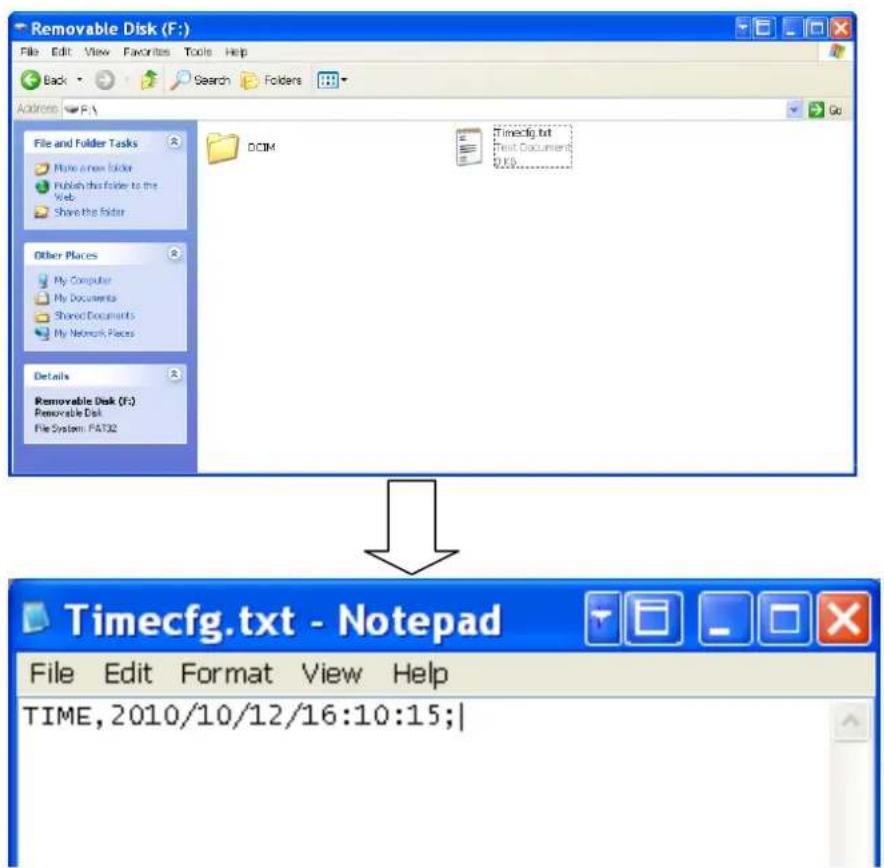
- Safely remove the pen from your computer. Turn on the pen once to initiate the reset.
CHARGING YOUR CAMERA PEN
- Connect your CAMERA pen with your computer.
- The blue LED of your CAMERA pen will flash when your CAMERA pen is charging, It is recommend to fully charge your CAMERA pen for 4 hours before first use and for 2 hours for repeated usage.
RESETING YOUR CAMERA PEN
NOTE: When your CAMERA pen can not work or stop working because of improper operations or other impacts, please reset your CAMERA pen by pressing the reset key of your CAMERA pen gently with a pin.
WARRANTY
NIGHT OWL, LLC (“Night Owl”) provides the following warranty to the original retail purchaser only (the “Purchaser”) with respect to this product (the “Product”):
For a period of one (1) year after the date of sale, the Product shall be free from manufacturing defects in material and workmanship. In the event that the Product is defective, the Purchaser must return the Product at Purchaser's cost (no CODs) to the address below, with the original proof of purchase receipt. In its sole discretion, Night Owl will either repair or replace the Product at no additional cost to the Purchaser. Any replacement Product (or parts) will be covered by the same warranty as the original Product through the expiration date of the original warranty period.
Exclusions:
This warranty does not apply to the following parts or upon the following events:
- Bulbs, LEDs and batteries;
- The Product was not used or installed in the manner described in the installation instructions;
- Negligent use of the Product, or misuse or abuse of the Product;
• Electrical short circuits or power surges; - Use of replacement parts not supplied by Night Owl;
- Product is either tampered with, modified, or repaired by another service provider;
• Product has not been maintained in accordance with the instructions; - Accident, fire, flood or other acts of God;
- Failure to use Night Owl approved accessories;
- Defects or damages arising by use of the Product in other than normal conditions (including normal atmospheric, moisture and humidity conditions).
EXCEPT AS OTHERWISE PROHIBITED BY LAW, THIS WARRANTY IS IN LIEU OF OTHER WARRANTIES, EXPRESS OR IMPLIED, AND NIGHT OWL NEITHER ASSUMES NOR AUTHORIZES ANY PERSON TO ASSUME FOR IT ANY OTHER OBLIGATION OR LIABILITY IN CONNECTION WITH THE SALE OR SERVICE OF THE PRODUCT.
IN NO EVENT SHALL NIGHT OWL BE LIABLE FOR ANY SPECIAL OR CONSEQUENTIAL DAMAGES ARISING FROM THE USE OF THE PRODUCT OR ARISING FROM THE MALFUNCTIONING OR NON-FUNCTIONING OF THE PRODUCT, OR FOR ANY DELAY IN THE PERFORMANCE OF THIS WARRANTY DUE TO ANY CAUSE BEYOND ITS CONTROL. THIS WARRANTY SHALL NOT APPLY TO INSTALLATION OR THE REMOVAL AND REINSTALLATION OF PRODUCTS AFTER REPAIR.
Night Owl does not make any claims or warranties of any kind whatsoever regarding the Product's potential, ability or effectiveness to prevent, minimize, or in any way affect personal or property damage or injury. Night Owl is not responsible for any personal damage, loss or theft related to the Product or to its use for any harm, whether physical or mental related thereto. Any and all claims or statements, whether written or verbal, by
salespeople, retailers, dealers or distributors to the contrary are not authorized by Night Owl, and do not affect this provision of this warranty.
Returns under this Warranty
In order to obtain service, please make sure that you have registered your product on-line no later than thirty (30) days after purchase at www.NightOwlSP.com in the warranty registration section or in any other matter described in the instructions.
TOLL FREE CUSTOMER SERVICE
North America: 1-866-390-1303
1-774-256-7250
Email: Support@NightOwlSP.com
Website: www.NightOwlSP.com
Email: Support@NightOwlSP.com
TOLL FREE: 1-866-390-1303
Rev 04-2010

CUSTOMER SUPPORT

ONLINE
24/7 PRODUCT SUPPORT INCLUDING:
. USER MANUALS
- SOFTWARE UPDATES
QUICK START UP GUIDES
FREQUENTLY ASKED QUESTIONS
VISIT US AT: www.NightOwlSP.com/Support
PLEASE REGISTER YOUR PRODUCT ON OUR WEBSITE TO RECEIVE UPDATES AND INFORMATION REGARDING YOUR NIGHT OWL SECURITY SYSTEM.

CUSTOMER SERVICE / TECHNICAL SUPPORT FOR:
- TECHNICAL ISSUES
• INSTALLATION ISSUES
WARRANTY - REPLACEMENT PARTS
- ACCESSORY SALES
CONTACT US AT: Support@NightOwlSP.com

PHONE
CUSTOMER SERVICE / TECHNICAL SUPPORT
FOR ALL OTHER ISSUES
CONTACT US AT: 1-866-390-1303 or 1-774-256-7250
PROFESSIONAL INSTALLATION
DON'T FEEL LIKE INSTALLING THE SYSTEM YOURSELF?
Let InstallerNet do the work for you.
INSTALL CARD INSIDE EVERY NIGHT OWL SECURITY KIT BOX.
CONTACT US AT: 1-800-806-5513
VISIT US AT: www.NightOwlSP.com/Installation

- FCC RADIATION NORM
- FCC
- FCC COMPLIANCE STATEMENT
- CAUTION
- PACKAGE CONTENTS
- SYSTEM REQUIREMENTS
- HRADWARE DESCRIPTION
- RECORDING VIDEO
- CONNECTING TO COMPUTER
- FOR ALL OPERATING SYSTEMS
- TIME RESET
- CHARGING YOUR CAMERA PEN
- RESETING YOUR CAMERA PEN
- WARRANTY
- EXCLUSIONS
- RETURNS UNDER THIS WARRANTY
- TOLL FREE CUSTOMER SERVICE
- TOLL FREE: 1-866-390-1303
- CUSTOMER SUPPORT
- ONLINE
- PHONE
- PROFESSIONAL INSTALLATION
Brand : Night Owl
Model : Covert Executive Camera Pen NOPEN-4GB-B
Category : Security Camera