
AZ392 - CD Player PHILIPS - Free user manual and instructions
Find the device manual for free AZ392 PHILIPS in PDF.


| Product Type | Portable CD Player |
| Brand | Philips |
| Model | AZ392 |
| Disc Compatibility | CD, CD-R, CD-RW |
| Playback Modes | Play, Pause, Stop, Skip, Repeat, Program |
| Dimensions (approx.) | 135 x 135 x 28 mm |
| Weight (approx.) | 250 g (without batteries) |
| Power Supply | 2x AA batteries or AC adapter (3V DC) |
| Battery Life | Approximately 10 hours (alkaline) |
| Audio Output | 3.5mm headphone jack |
| Display | LCD with track number, elapsed time, battery indicator |
| Controls | Play/Pause, Stop, Skip, Volume, Hold, Program, Repeat |
| Anti-Shock Protection | Yes (ESP - Electronic Skip Protection) |
| Warranty | 1 year (depending on region) |
| Cleaning | Clean lens with CD lens cleaner; wipe exterior with dry cloth |
| Safety Precautions | Do not disassemble; keep away from moisture and heat |
| Spare Parts Available | Batteries, AC adapter, earphones |
| Repairability | Limited; consult authorized service center |
| Environmental Conditions | Operating temperature: 5°C to 35°C; storage: -20°C to 60°C |
| Accessories Included | Earphones, user manual, batteries may not be included |
Frequently Asked Questions - AZ392 PHILIPS
User questions about AZ392 PHILIPS
0 question about this device. Answer the ones you know or ask your own.
Ask a new question about this device
Download the instructions for your CD Player in PDF format for free! Find your manual AZ392 - PHILIPS and take your electronic device back in hand. On this page are published all the documents necessary for the use of your device. AZ392 by PHILIPS.
USER MANUAL AZ392 PHILIPS
Always there to help you
Register your product and get support at www.philips.com/support

AZ391
AZ392

User manual
PHILIPS
Contents
1 Important 2
2 Your CD Soundmachine 3
Introduction 3
What's in the box 3
Overview of the main unit 4
3 Get started 6
Connect power 6
Turn on 7
Turn off 7
4 Play 8
Play disc 8
Play from USB device 8
Play from an external device 8
Listen to FM or AM (MW) radio 9
Adjust volume 9
5 Play options 10
Repeat or shuffle play 10
Program tracks 10
6 Product information 11
Specifications 11
Maintenance 11
USB playability information 12
7 Troubleshooting 13
1 Important
- Read these instructions.
- Follow all instructions.
- Do not block any ventilation openings. Install in accordance with the manufacturer's instructions.
Do not install near any heat sources such as radiators, heat registers, stoves, or other apparatus (including amplifiers) that produce heat.
Protect the power cord from being walked on or pinched, particularly at plugs, convenience receptacles, and the point where they exit from the unit.
Only use attachments/accessories specified by the manufacturer.
Unplug this unit during lightning storms or when unused for long periods of time.
Refer all servicing to qualified service personnel. Servicing is required when the unit has been damaged in any way, such as power-supply cord or plug is damaged, liquid has been spilled or objects have fallen into the apparatus, the unit has been exposed to rain or moisture, does not operate normally, or has been dropped.
Battery usage CAUTION – To prevent battery leakage which may result in bodily injury, property damage, or damage to the unit:
Install all batteries correctly, + and - as marked on the unit. Do not mix batteries (old and new or carbon and alkaline, etc.). Remove batteries when the unit is not used for a long time.
Batteries (battery pack or batteries installed) shall not be exposed to excessive heat such as sunshine, fire or the like.
The unit shall not be exposed to dripping or splashing.
Do not place any sources of danger on the unit (e.g. liquid filled objects, lighted candles).
- Where the MAINS plug or an appliance coupler is used as the disconnect device, the disconnect device shall remain readily operable.

This 'bolt of lightning' indicates uninsulated material within your unit may cause an electrical shock. For the safety of everyone in your household, please do not remove product covering.
The 'exclamation point' calls attention to features for which you should read the enclosed literature closely to prevent operating and maintenance problems.
WARNING: To reduce the risk of fire or electric shock, this apparatus should not be exposed to rain or moisture and objects filled with liquids, such as vases, should not be placed on this apparatus.
CAUTION: To prevent electric shock, match wide blade of plug to wide slot, fully insert.

Warning
- Never remove the casing of this apparatus. - Never place this apparatus on other electrical equipment. - Ensure that you always have easy access to the power cord, plug or adaptor to disconnect the apparatus from the power.

Caution
- Use of controls or adjustments or performance of procedures other than herein may result in hazardous radiation exposure or other unsafe operation.
2 Your CD Soundmachine
Introduction
With this unit, you can:
- enjoy audio from discs, USB devices, and other external devices;
- listen to FM or AM (MW) radio
What's in the box
Check and identify the contents of the package:
- Main unit
- AC power cord
- Short User Manual
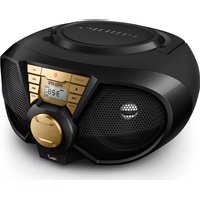
Overview of the main unit


① Source selector
• Select a source: CD, USB, or RADIO. - Turn the CD sound machine off.
② -VOLUME +
- Adjust volume.
③ MODE
- Select repeat or shuffle mode.
④ PROG
- Program tracks.
⑤ ▲ / ▼
- Skip to the previous/next album.
- Select a preset radio station.
⑥ Disc compartment
⑦
Connect a USB device.
⑧ Display panel ⑨ /
- Skip to the previous or next track. Search within a track.
⑩ ■
- Stop play.
- Erase a program.
11 ▶ II
Start or pause play.
⑫ TUNING
Tune to radio stations.
⑬ FM/MW
Select FM or AM (MW) tuner.
⑭ AUDIO IN
- Connect an external audio device.
⑮ AC ~
- Connect AC power.
⑯ Antenna
- Improve radio reception.
3 Get started
Always follow the instructions in this chapter in sequence.
If you contact Philips, you will be asked for the model and serial number of this apparatus. The model number and serial number are on the bottom of the apparatus. Write the numbers here:
Model No.
Serial No.
Connect power
You can use either AC power or battery as power supply of this unit.
AC power

Warning
- Risk of product damage! Make sure that the power supply voltage corresponds to the voltage printed on the back or the underside of the unit.
- Risk of electric shock! When you disconnect the AC power, always pull the plug or adaptor from the socket. Never pull the cord.
1 Adjust the voltage selector at the bottom of the unit to correspond to the local power voltage.
2 Connect the AC power cord to:
- the AC ~ socket on the unit.
- the wall outlet.

Battery power

Caution
- Risk of explosion! Keep batteries away from heat, sunshine or fire. Never discard batteries in fire.
- Batteries contain chemical substances, so they should be disposed of properly.

Note
• Batteries are not supplied with the accessories.
1 Open the battery compartment. 2 Insert 6 batteries (type: R14/ UM2/ C CELL) with correct polarity (+/-) as indicated. 3 Close the battery compartment.


Note
- Position the antenna as far as possible from TV, VCR or other radiation source.
- For better reception, fully extend and adjust the position of the antenna.
Turn on
Switch the source selector to CD, USB, or RADIO.
Turn off
Switch the source selector to OFF.
4 Play
Play disc
1 Switch the source selector to CD. 2 Lift to open the disc compartment. 3 Insert a disc with the printed side facing up, then close the disc compartment. 4 Press ▶ to start play.
• To pause or resume play, press ▶II. - To stop play, press ■ - For MP3 tracks, press ▲ / ▼ to select an album. • To select a track, press ◀◀/▶▶ - To search within a track, press and hold ◀◀/▶, then release to resume normal play.
Play from USB device

Note
- Make sure that the USB device contains playable audio content.
1 Switch the source selector to USB.


2 Insert the USB device into the 3 socket.
→ Play starts automatically. If not, press
II.
Play from an external device
With this unit, you can also listen to an external audio device such as an MP3 player.
1 Switch the source selector to CD, USB, or RADIO. 2 Connect the audio in cable (not supplied) to:
- the AUDIO IN socket on the CD sound machine.
- the headphone socket on an external device.
3 Play the external device (see the device's user manual).


Note
• The AUDIO IN socket is not for headphones.
Listen to FM or AM (MW) radio

Note
- Position the antenna as far as possible from TV, VCR or other radiation source.
- For better reception, fully extend and adjust the position of the antenna.
1 Switch the source selector to RADIO. 2 Adjust the FM/MW slider to select FM or AM (MW) tuner. 3 Rotate TUNING to tune to a radio station.


Adjust volume
During play, rotate - VOLUME + to adjust volume.
5 Play options
Repeat or shuffle play
Repeat play
1 During play, press MODE repeatedly to select:
• : play the current track repeatedly. • ALL : play all tracks repeatedly. • ALB : Play all tracks in the album.
2 To resume normal play, press MODE repeatedly until the repeat icons disappear.
Shuffle play
1 During play, press MODE repeatedly until the icon ✗ is displayed.
All tracks are played randomly.
2 To resume normal play, press MODE again.
Program tracks
You can program a maximum of 20 tracks.
1 Press ■o stop playback.
2 Press PROG to activate the programming mode.
→ [P01] is displayed.
3 For MP3 tracks, press ▲ to select an album.
4 Press ◀◀ to select a track, and then press PROG to confirm.
5 Repeat steps 3 to 4 to program more tracks.
6 Press ▶ to play the programmed tracks. → During play, [P] (program) and the preset number are displayed.
• To erase the program, when playback is stopped, press ■.
6 Product information

Note
- Product information is subject to change without prior notice.
Specifications
Amplifier
| Rated Output Power 2 x 1W RMS |
| Frequency Response 63 Hz - 20 kHz, ±3 dB |
| Signal to Noise Ratio >62 dBA |
| Total Harmonic Distortion <1 % |
| Audio In 650 mV |
Disc
| Laser type Semiconductor | |
| Disc diameter 8/12 cm | |
| Support discs CD-DA, CD-R, CD-RW, MP3-CD | |
| Audio DAC 24 Bits, 44.1 kHz | |
| Total Harmonic Distortion | <1 % |
| Frequency Response | 63Hz -20kHz, ±3 dB |
| S/N Ratio | >62 dBA |
Tuner
| Tuning Range | FM: 87.5 - 108 MHzAM (MW):530-1700 kHz |
| Sensitivity | |
| - FM(26dB S/N Ratio) | <22dBf |
| - AM(26dB S/N Ratio) | <3250uV/m |
| Total Harmonic Distortion | <3% |
| Signal to Noise Ratio | FM: >55dBAM(MW): >40dB |
General
| Power supply | 110-127 V ~, |
| - AC Power | 220-240 V ~, |
| - Battery | 50/60 Hz |
| 6 × 1.5 V R14/UM2/C Cell | |
| Operation Power Consumption | 10 W |
| Dimensions | |
| - Main Unit (W × H × D) | 243 × 124 × 199 mm |
| Weight | |
| - Main Unit | 1.3 kg |
| - With Packing | 1.8 kg |
Maintenance
Clean the cabinet
- Use a soft cloth slightly moistened with a mild detergent solution. Do not use a solution containing alcohol, spirits, ammonia or abrasives.
Clean discs
- When a disc becomes dirty, clean it with a cleaning cloth. Wipe the disc from the centre out.

- Do not use solvents such as benzene, thinner, commercially available cleaners, or antistatic spray intended for analogue records.
Clean the disc lens
- After prolonged use, dirt or dust may accumulate at the disc lens. To ensure good play quality, clean the disc lens with Philips CD lens cleaner or any commercially available cleaner. Follow the instructions supplied with cleaner.
USB playability information
Compatible USB devices:
• USB flash memory (USB1.1) • USB flash players (USB1.1) • memory cards (requires an additional card reader to work with this unit)
Supported formats:
• USB or memory file format: FAT12, FAT16, FAT32 (sector size: 512 bytes) • MP3 bit rate (data rate): 32-320 Kbps and variable bit rate - Directory nesting up to a maximum of 8 levels • Number of albums/ folders: maximum 99 • Number of tracks/titles: maximum 999 • ID3 tag v2.0 or later - File name in Unicode UTF8 (maximum length: 16 bytes)
Unsupported formats:
• Empty albums: an empty album is an album that does not contain MP3 files, and is not be shown in the display. - Unsupported file formats are skipped. For example, Word documents (.doc) or MP3 files with extension .dlf are ignored and not played.
• AAC, WAV, PCM audio files - DRM protected WMA files (.wav, .m4a, .m4p, .mp4, .aac) - WMA files
7 Troubleshooting

Warning
• Never remove the casing of this device.
To keep the warranty valid, never try to repair the system yourself.
If you encounter problems when using this device, check the following points before requesting service. If the problem remains unsolved, go to the Philips Web page (www.philips.com/support). When you contact Philips, make sure that the device is nearby and the model number and serial number are available.
No power
- Ensure that the AC power plug of the unit is connected properly.
- Ensure that there is power at the AC outlet.
- Insert the batteries with their polarities (+/- signs) aligned as indicated.
- Replace the battery.
No sound
- Adjust the volume.
No response from the unit
• Take out the batteries and turn on the unit again. - Disconnect and reconnect the AC power plug, then turn on the unit again.
No disc detected
- Insert a disc.
- Check if the disc is inserted upside down.
- Wait until the moisture condensation at the lens has cleared.
- Replace or clean the disc.
- Use a finalized CD or correct format disc.
Poor radio reception
- Increase the distance between the unit and your TV or VCR. Fully extend the FM antenna.
Cannot display some files in USB device
The number of folders or files in the USB device has exceeded a certain limit. This phenomenon is not a malfunction.
The formats of these files are not supported.
USB device not supported
The USB device is incompatible with the unit. Try another one.
8 Notice
Any changes or modifications made to this device that are not expressly approved by Gibson Innovations may void the user's authority to operate the equipment.
Disposal of your old product

Your product is designed and manufactured with high quality materials and components, which can be recycled and reused. Do not throw away the product with the normal household waste at the end of its life, but hand it in at an official collection point or recycling. By doing this, you help to preserve the environment.
Environmental information
All unnecessary packaging has been omitted. We have tried to make the packaging easy to separate into three materials: cardboard (box), paper pulp (buffer) and polyethylene (bags, protective foam sheet.)
Your system consists of materials which can be recycled and reused if disassembled by a specialized company. Please observe the local regulations regarding the disposal of packaging materials, exhausted batteries and old equipment.
This apparatus includes these labels:

Class II equipment symbol

This symbol indicates that the apparatus has a double insulation system.

Note
- The type plate is located on the bottom of the apparatus.

2015 © Gibson Innovations Limited. All rights reserved.
This product has been manufactured by, and is sold under the responsibility of Gibson Innovations Ltd., and Gibson Innovations Ltd. is the warrantor in relation to this product.
Philips and the Philips Shield Emblem are registered trademarks of Koninklijke Philips N.V. and are used under license from Koninklijke Philips N.V.

- ALWAYS THERE TO HELP YOU
- CONTENTS
- IMPORTANT
- YOUR CD SOUNDMACHINE
- GET STARTED
- PLAY
- PLAY OPTIONS
- PRODUCT INFORMATION
- TROUBLESHOOTING
- WARNING
- CAUTION
- INTRODUCTION
- WITH THIS UNIT, YOU CAN
- WHAT'S IN THE BOX
- OVERVIEW OF THE MAIN UNIT
- CONNECT POWER
- AC POWER
- BATTERY POWER
- NOTE
- TURN ON
- TURN OFF
- PLAY DISC
- PLAY FROM USB DEVICE
- PLAY FROM AN EXTERNAL DEVICE
- LISTEN TO FM OR AM (MW) RADIO
- ADJUST VOLUME
- REPEAT OR SHUFFLE PLAY
- REPEAT PLAY
- SHUFFLE PLAY
- PROGRAM TRACKS
- SPECIFICATIONS
- MAINTENANCE
- CLEAN THE CABINET
- CLEAN DISCS
- CLEAN THE DISC LENS
- USB PLAYABILITY INFORMATION
- COMPATIBLE USB DEVICES
- SUPPORTED FORMATS
- UNSUPPORTED FORMATS
- NO POWER
- NO SOUND
- NO RESPONSE FROM THE UNIT
- NO DISC DETECTED
- POOR RADIO RECEPTION
- CANNOT DISPLAY SOME FILES IN USB DEVICE
- USB DEVICE NOT SUPPORTED
- NOTICE
- ENVIRONMENTAL INFORMATION
Brand : PHILIPS
Model : AZ392
Category : CD Player