
K-062 - Beard trimmer KING - Free user manual and instructions
Find the device manual for free K-062 KING in PDF.


| Product Type | Beard Trimmer |
| Brand | King |
| Model | K-062 |
| Power Source | Rechargeable battery (cordless) |
| Charging Time | 8 hours |
| Operating Time | Approximately 60 minutes |
| Blade Material | Stainless steel |
| Blade Type | Washable and removable |
| Comb Attachments | 2 adjustable combs (4-20 mm and 24-40 mm) |
| Thinning Function | Yes, with dedicated switch |
| Waterproof | Yes, fully waterproof |
| Charging Method | Charging base with AC adapter |
| Accessories Included | AC adapter, oil, comb, cleaning brush, scissors, charging base |
| Safety Features | Overcharge protection, charging temperature 0-40°C |
| Maintenance | Clean and lubricate blade after several uses |
Frequently Asked Questions - K-062 KING
User questions about K-062 KING
0 question about this device. Answer the ones you know or ask your own.
Ask a new question about this device
Download the instructions for your Beard trimmer in PDF format for free! Find your manual K-062 - KING and take your electronic device back in hand. On this page are published all the documents necessary for the use of your device. K-062 by KING.
USER MANUAL K-062 KING
natural_image
Red background with a white crown and ring design (no text or symbols)king
K 062
Styler
Saç Kesme Makinası
Styler Waterproof Hair Clipp


natural_image
Red background with a white crown and ring design (no text or symbols)king
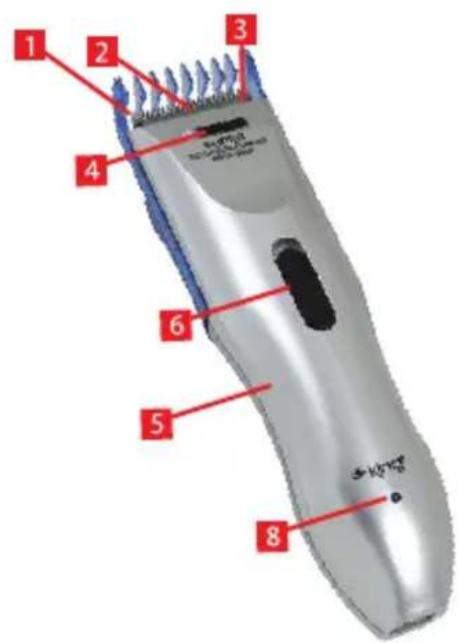
MAIN PARTS

- 2 Pcs Adjustable comb (1. 4, 8, 12, 16, 20 mm 2.24, 28, 32, 36, 40 mm)
- Washable Blade
- Thinning Function
- Switch On / Off For Thinning Function
- Appliance Waterproof
- Switch
- Charge Base
- Indicate Light
- Adaptor
Accessories
Adaptor
Oil bottle
Comb
Cleaning brush
Scissor
Charging base

natural_image
Red background with a white crown and ring design (no text or symbols)king
IMPORTANT SAFETY INSTRUCTIONS
■ Never charge the battery when the temperatures are below 0 C or above 40 C.
- Avoid recharging the battery in direct sunlight or near a radiating heat source.
■ Never charge the battery continuously over 12 hours.
■ Never put the adaptor into water. To clean the housing, use only a cloth slightly dampened with water or mild soap solution.
■ Do not dip the appliance in the water for a long time.
It's normal if the clipper become warm in using or recharging.
- Do not hold only the power cord to move the clipper, for it may become detached and damage the clipper.
- Keep the clipper out reach of children
- Do not attempt to repair or move any part of the clipper by yourself. If there's anything irregular about the clipper, please have it inspected at an authorized service center.
- Do not open the adaptor to repair by yourself when it is mangled. Neither collocate a new adaptor random. If there is necessary to change the adaptor, pls have it inspected at an authorized service center.
natural_image
Line drawing of hands using a tool to apply material (no text or symbols)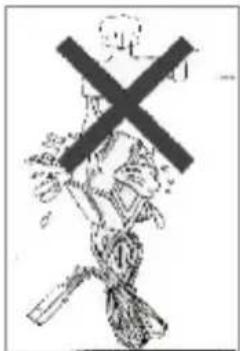

Function
This is a professional hair clipper, latest design comfortable touch, low noise, and sharp stainless steel blade will be your best choice cordless design you can work with it at any place and never worry about the limited of cord the blade is separable, it is convenient of clean up and adding oil.

natural_image
Line drawing of a car connected to a wall socket (no text or symbols)
natural_image
Red background with a white crown and ring design (no text or symbols)king
Using rechargeable battery
Make sure that the switch is at OFF, then put the hair clipper into the recharging holder, insert the plug of the power cord of the AC adaptor, into the socket on the side of the recharging holder, then plug the AC adapter into an AC outlet, and it begin to recharge the battery. The clipper can work for about 60 minutes after being recharged for 8 hours.
To use
Simply push the switch to ON, and the clipper works.

natural_image
Line drawing of a device with a red arrow pointing to a circular feature (no text or symbols)Using comb attachment
Pull the comb attachment into the grooves on both sides of housing, hold the clipper with downside upwards, and select the cutting length you want. This hair clipper have 2 comb attachment.
- 4, 8, 12, 16, 20 mm
2.24, 28, 32, 36, 40 mm
natural_image
Diagram showing two views of a car body with an arrow indicating direction (no text or symbols)Blade Care
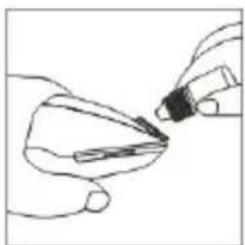
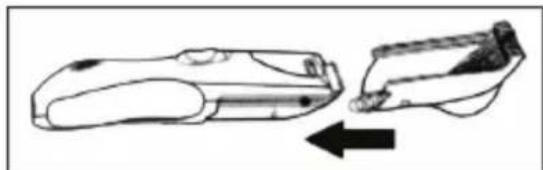
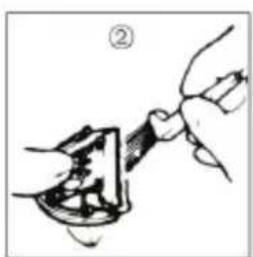
Hold the clipper with the observe side facing downwards. Push the blade to make it apart from the housing. Clean the blade with the cleaning brush, then press the cleaning lever to open the blade and sweep away hair that remained between the blades. After that, put 2 or 3 drops of oil between the two blades to lubricate them. It is necessary to clean and lubricate the blade after every few times uses to keep the clipper in good condition. Following the procedure that reverses the above to reassemble the clipper, pushing the blade until it firmly clicks into position.

natural_image
Illustration of a hand holding a small object with a tool, no visible text or symbols
natural_image
Illustration of a hand holding a tool with a handle, no text or symbols present
natural_image
Red background with a white crown and ring design (no text or symbols)king
PARÇALARI

natural_image
Red background with a white crown and ring design (no text or symbols)king
natural_image
Line drawing of hands using a tool to apply material or tools (no text or symbols present)

natural_image
Simple line drawing of a device with a plug and cable, no text or symbols present
natural_image
Red background with a white crown and ring design (no text or symbols)king
Kullanımı
natural_image
Simple line drawing of a device with a red arrow pointing to its side (no text or symbols)1.4, 8, 12, 16, 20 mm.
2.24, 28, 32, 36, 40 mm.

natural_image
Diagram showing two mechanical components with directional arrows indicating movement or force (no text or symbols)Biçağın bakımı
natural_image
Illustration of two hand gestures with arrows indicating movement (no text or symbols)
natural_image
Illustration of a hand holding a tool interacting with a mechanical component (no text or symbols visible)
natural_image
Illustration of a hand holding a tool interacting with a mechanical component (no text or symbols visible)
natural_image
Red background with a white crown and ring design (no text or symbols)king
PARÇALARI
natural_image
Red background with a white crown and ring design (no text or symbols)king
إرشادات سلامة هامة
natural_image
Line drawing of hands using a tool to apply material (no text or symbols)

وظيفة
natural_image
Simple line drawing of a medical device connected to a wall socket (no text or symbols)
natural_image
Red background with a white crown and ring design (no text or symbols)king
natural_image
Line drawing of a handheld device with a red arrow pointing to the left side (no text or symbols)natural_image
Diagram showing two mechanical components with an arrow indicating direction (no text or symbols)شفرة رعاية
natural_image
Illustration of two hands performing a finger manipulation technique (no text or symbols)
natural_image
Illustration of a hand holding a tool interacting with a mechanical component (no text or symbols visible)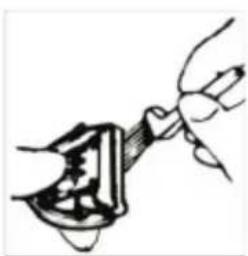
natural_image
Illustration of a hand holding a tool interacting with a mechanical component (no text or symbols visible)
natural_image
Red background with a white crown and circular swirl design (no text or symbols)king
SATIŞ SONRASI SERVİS
natural_image
Symbol of a trash bin with crossed lines indicating no waste or discharge (no text or labels)natural_image
Red background with a white crown and ring design (no text or symbols)king
Üretici Firma:
KING PAZARLAMA VE DIŞ TİCARET A.Ş.
İbrahimağa Cad.2. Emintaş Sanayi Sitesi. No: 20 Daire/2
Bayrampaşa / İSTANBUL
Tel: 0212 544 51 52 Faks: 0212 544 30 32

king
natural_image
Red background with a white crown and circular swirl design (no text or symbols)king
GARANTI BELGESİ ŞARTLARI
Brand : KING
Model : K-062
Category : Beard trimmer