
CT14-A0 - Laptop VIZIO - Free user manual and instructions
Find the device manual for free CT14-A0 VIZIO in PDF.


| Product Type | Laptop |
| Brand | VIZIO |
| Model | CT14-A0 |
| Dimensions (approx.) | 13.4 x 9.1 x 0.8 inches |
| Weight | 3.5 lbs (1.6 kg) |
| Power Supply | AC adapter, 65W |
| Battery Type | Lithium-ion, 3-cell |
| Processor | Intel Core i5 or equivalent |
| Memory | 8GB DDR4 |
| Storage | 256GB SSD |
| Display | 14-inch Full HD |
| Operating System | Windows 10 Home |
| Primary Functions | Web browsing, productivity, media playback |
| Care and Cleaning | Wipe screen with soft microfiber cloth; use compressed air for keyboard |
| Safety | Do not block vents; avoid liquid exposure; use only approved charger |
| Spare Parts & Repairability | Contact VIZIO support for replacement parts; some components user-replaceable (battery, RAM, SSD) |
| Warranty | Limited 1-year warranty |
Frequently Asked Questions - CT14-A0 VIZIO
User questions about CT14-A0 VIZIO
0 question about this device. Answer the ones you know or ask your own.
Ask a new question about this device
Download the instructions for your Laptop in PDF format for free! Find your manual CT14-A0 - VIZIO and take your electronic device back in hand. On this page are published all the documents necessary for the use of your device. CT14-A0 by VIZIO.
USER MANUAL CT14-A0 VIZIO
14" and 15.6" Thin + Light
Table of Contents
Package Contents .... 1
Getting Started 2
Getting to Know Your PC Ports 6
Function Keys .... 8 Touchpad .... 10
Connecting a USB Device ....14
Connecting a Bluetooth ^® Device 18
Troubleshooting....22
Limited Warranty 24
Regulatory Information 26
Greener Methods....27
Legal Notices....28
PRINTED ON BAMBOO PAPER
RENEWABLE • RECYCLABLE • RESPONSIBLE

Package Contents

natural_image
Illustration of a silver laptop with a black screen and keyboard (no text or symbols visible)VIZIO Thin + Light

natural_image
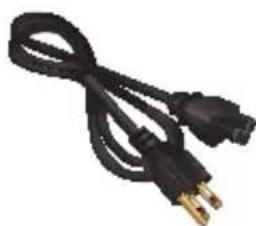
Black electronic device with attached cable and connector (no visible text or symbols)AC Adapter Power Cable
natural_image
Coiled black electrical plug with two gold pins (no text or symbols visible)
This Quick Start Guide
Getting Started
When light on connector is orange, PC is charging.

When light on connector is green, PC is fully charged.

natural_image
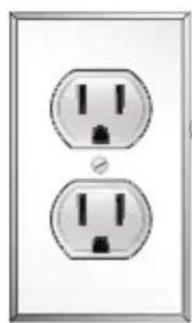
Two identical electrical socket plugs with two leads, one double and one single, shown without any text or symbols.
natural_image
Close-up of a black and white electrical outlet plug with three leads (no text or symbols visible)
natural_image
Illustration of a laptop connected to an electric plug and a battery, with a magnified inset showing the plug being inserted (no text or symbols present)1 Connect the Power Cord to the AC Adapter, then connect to the PC. Plug the Power Cord into an electrical outlet.
IMPORTANT: Use only the VIZIO AC Adapter and Power cord with your PC. Using other adapters may cause damage to your PC.

natural_image
Illustration of a silver laptop with a black screen and keyboard (no text or symbols visible)
natural_image
Illustration of a wireless router with signal waves (no text or symbols)2
If you plan to connect to your network wirelessly, make sure you know your router or modem's* wireless password. Have this information ready.
*Router/Modem/Internet service sold separately.

3
Press the Power button on the PC, then follow the on-screen instructions to setup Windows.

natural_image
Laptop displaying a sunset over water with distant mountains, no visible text or symbols on the device screen.4
Your PC is ready to use. Save the product packaging. It can be used to ship the PC if servicing is needed.
Getting to Know Your PC - Ports
Right Side
natural_image
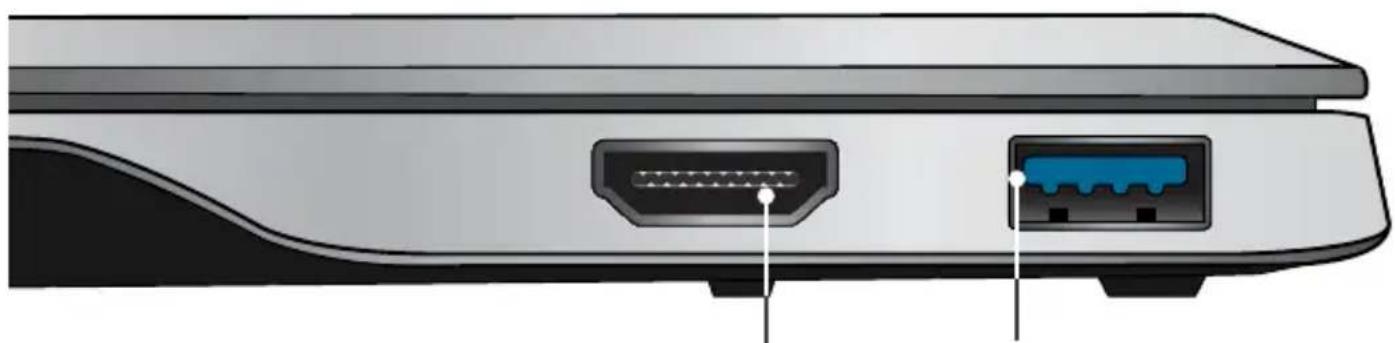
Illustration of a USB device rear panel showing port and socket (no text or symbols)USB 3.0 - Connect USB devices. (Thumb drives, tablets, phones, mp3 players, printers etc.)
HDMI Out - Connect to HDMI TVs or monitors to share video, presentations, or to use dual displays.
Left Side

natural_image
Front view of a beige electronic device rear panel with ports and a central port (no text or symbols visible)Power - Connect AC adapter here.
Headphone - Connect 3.5mm headphone jack. This port can be used with headsets that have a microphone.
USB 3.0 - Connect USB devices. (Thumb drives, tablets, phones, mp3 players, printers etc.)
Getting to Know Your PC - Function Keys
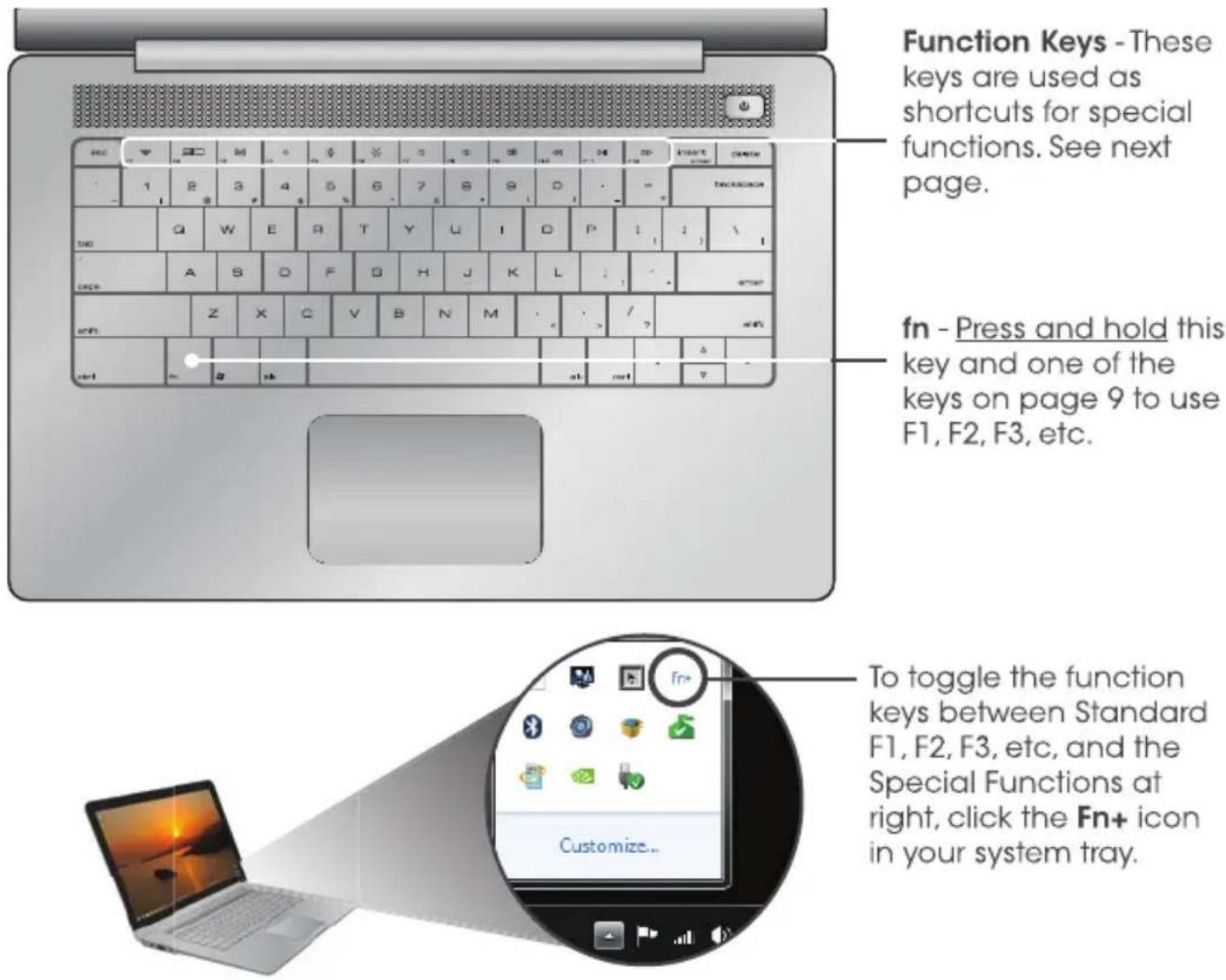

V Key - Lauch VIZIO experience page. (Internet access required)

Mute - Turn speakers off or on.

Display Toggle - Switch between PC screen and external monitor or TV.

Volume Down - Decrease loudness of speakers.

Wireless - Turn the wireless on or off. This key affects both WiFi and Bluetooth.
Volume Up - Increase loudness of speakers.

Brightness Off - Turn brightness of Display completely off. Press again to return to previous setting.
Previous - When playing media, go to the last chapter or track.

Brightness Down - Decrease the brightness of the Display.
Play/Pause - When playing media, stop or resume playback.

Brightness Up - Increase the brightness of the Display.
Next - When playing media, advance to next chapter or track.
Getting to Know Your PC - Touchpad
![0 100 20 30 40 50 60 70 80 90 100 >1 110 Insert change Delete 1 2 3 4 5 6 7 8 9 10 - = clockwise top G W E R T Y U I Q P [ ] \ space A S D F G H J K L : : width Z X C V B N M . / ? shift curl m # sk ak curl < A > V](/content/2026/05/987826/images/d4365160ea541c2f814744493a11754c8aebd37c76b35a908c6ebe3425274853.jpg)
Left Click Area Right Click Area
natural_image
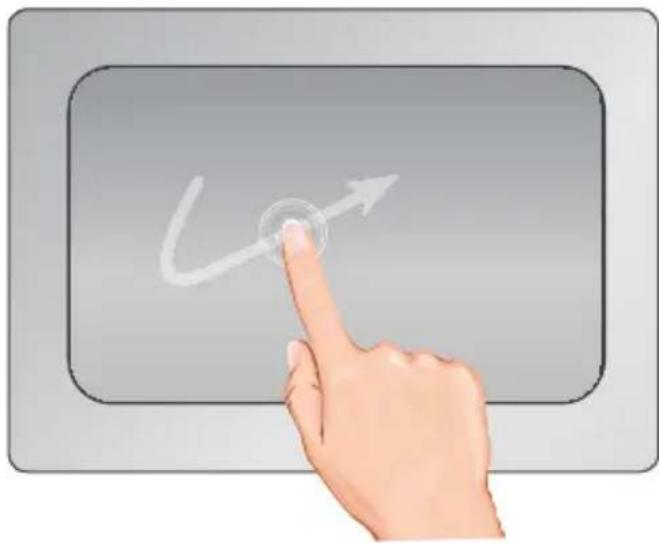
Hand pointing at a digital interface with a curved arrow icon (no text or symbols)To move the on-screen cursor, gently slide the tip of your finger across the Touchpad.
To select an item, tap the Touchpad or press the Left Click Area.
natural_image
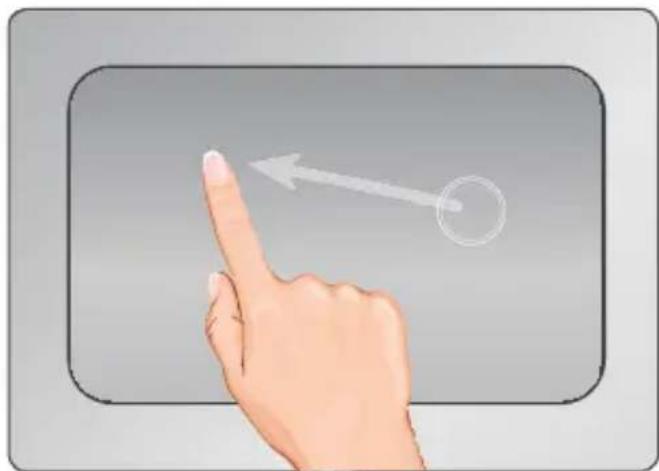
Hand pointing at a button with an arrow icon (no text or symbols)To drag an item, tap twice, then slide your finger without lifting. Lift finger to drop item.

natural_image
Hand pressing a button with two upward arrows on a screen (no text or symbols)To scroll pages up/down, gently slide two fingers up/down the Touchpad.
natural_image
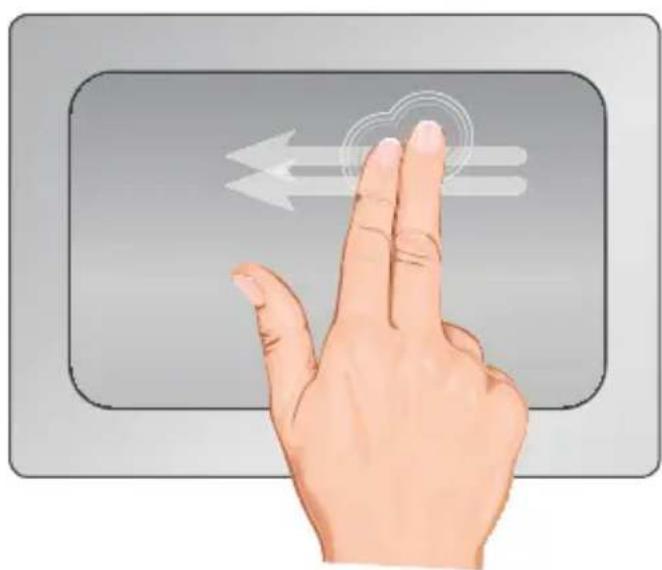
Hand interacting with a touchscreen device displaying a circular icon and directional arrows (no text or symbols)To scroll pages left/right, gently slide two fingers left/right across the Touchpad.
natural_image
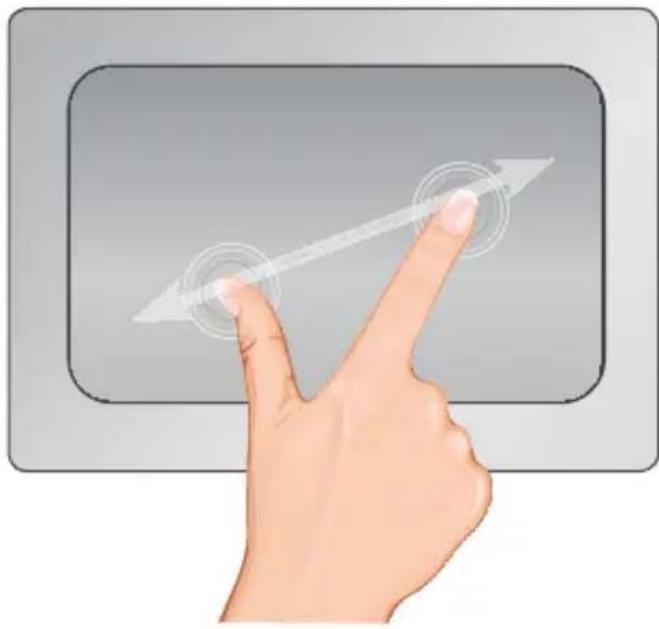
Hand pointing at a digital interface with a circular button and arrow icon (no text or symbols)To zoom out, gently spread two fingers across the Touchpad.

natural_image
Hand pointing at a digital interface with circular icons on a screen (no text or symbols)To zoom in, gently pinch two fingers together across the Touchpad.
Connecting a USB Device

natural_image
Open book with blank pages, no visible text or symbols on the pages1
Before connecting your USB device, consult its user manual. Some USB devices require drivers to be installed. Drivers are often available from the USB device manufacturer's website.

natural_image
Illustration of a floppy disk and a laptop computer, with an arrow pointing to the disk (no text or symbols present)2
Connect your USB device or cable to one of the USB ports. The USB logo ⬇ on the cable or device should be facing up.

natural_image
Laptop displaying a sunset over water with mountains in the background (no text or symbols visible)3
Follow Windows on-screen instructions to begin using your device.
4
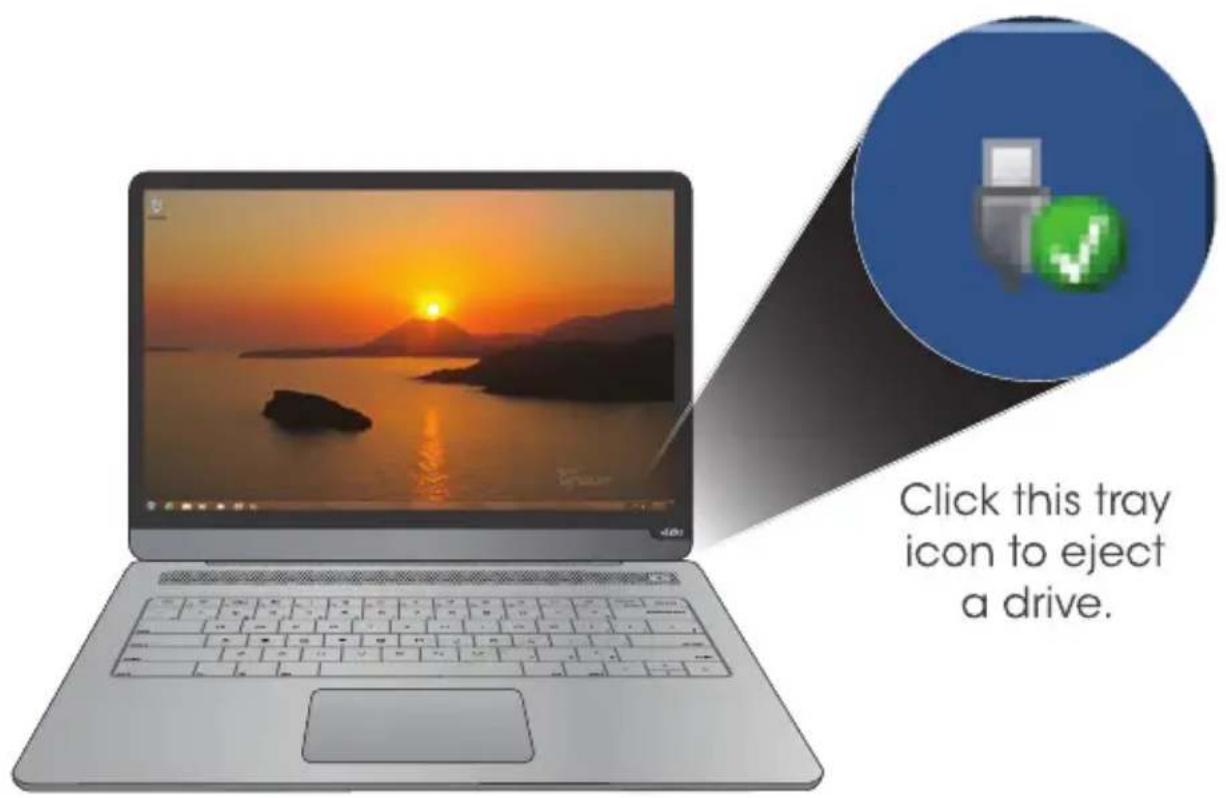
Before removing storage devices, such as flash drives, external hard drives, be sure to eject the drive in Windows. This can prevent data loss.
Pairing a Bluetooth® Device

natural_image
Open book with blank pages, no visible text or symbols on the pages7
Before pairing your Bluetooth-enabled device, consult its user manual. The methods for pairing Bluetooth devices may vary.
2
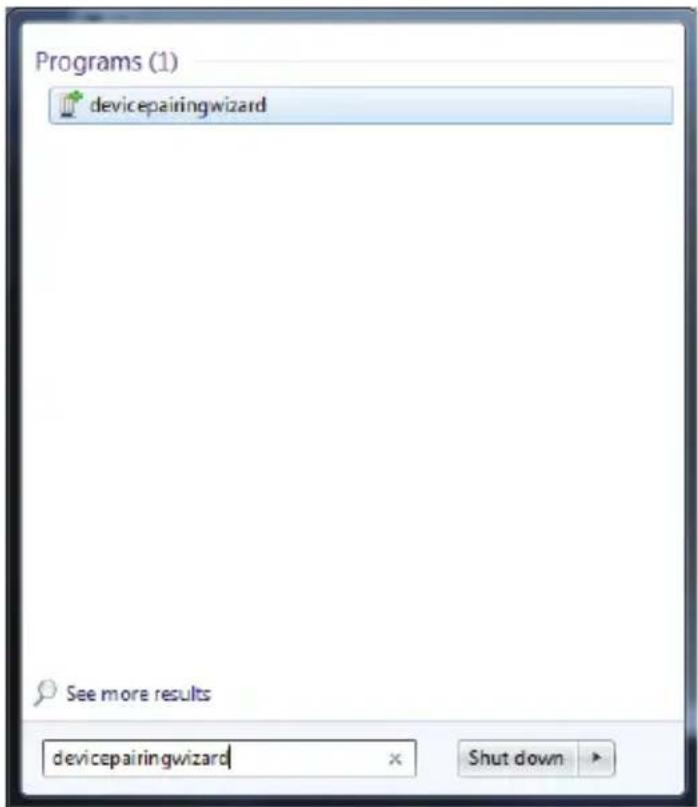
Press the Start button in the lower left corner of your screen. Type devicepairingwizard in the search box and press Enter.

natural_image
Black V8200 earband device with wireless signal icon above (no text or symbols on device body)3
Set your Bluetooth-enabled device to discoverable mode.
(Consult your device's user manual for details.)

4
Select your Bluetooth-enabled device from the Add a Device dialog box, then follow the on-screen instructions.
Troubleshooting

Most issues with the Windows operating system can be resolved using the built-in help system. Press the Start button, then select Help & Support.
I am having trouble connecting to the Internet.
- Be sure WiFi is enabled. Press the F3 special function key to toggle on/off.
• If you are using a wireless connection, check the placement of your router/modem to ensure the best wireless signal.
• Call your Internet Service Provider (ISP) for assistance.
Can I manually reset the laptop?
• Yes. If your PC is not responding, you can perform a reset by inserting a paper clip into the RESET hole on the bottom of the PC and holding for 10 seconds.
My PC is powering off when I don't want it to.
• If the exhaust vents near the hinge are obstructed, the PC may overheat and shut down to prevent damage. Ensure these vents are never blocked. It is best to place your PC on a hard surface when using.
I can't connect my Bluetooth device.
- Ensure Bluetooth is enabled on your PC. Go to the system tray in the lower right corner of your screen and click the Bluetooth ✉ icon. Turn Bluetooth on.
- Follow the instructions on p18 along with the instructions that came with your Bluetooth device.
There is no sound from my PC's speakers.
- Increase the volume using the function keys (F8 and F9).
- Ensure the volume is not muted. Press F7 to toggle the mute function.
- Increase the volume control in Windows.
- If you are using external speakers or headphones, ensure they are securely connected to the PC. If they have a manual volume control, increase the volume using that control.
I am having trouble with my PC. How do I perform a system restore?
Sometimes installing a program or driver can make Windows run slowly or unpredictably. System Restore can return your PC's system files and programs to a time when everything was working fine, potentially preventing hours of troubleshooting. It won't affect your documents, pictures, or other data.
- Before you start System Restore, save any open files and close all programs. System Restore will restart your PC.
- Open System Restore by clicking the Start button. In the search box, type System Restore, and then, in the list of results, click System Restore. If you're prompted for an administrator password or confirmation, type the password or provide confirmation.
- Follow the steps in the wizard to choose a restore point and restore your computer.
Limited Warranty
This limited warranty covers VIZIO computers purchased as new in the United States, Canada, Mexico, and Puerto Rico. VIZIO provides a one-year limited warranty and up to one year of complimentary telephone technical support to the original purchaser of new computers against defects in materials and workmanship for a period of one (1) year of normal consumer (non-commercial) usage and up to ninety (90) days for commercial use. This limited warranty is non-transferrable. If a computer covered by this limited warranty is determined to be defective within the warranty period, VIZIO will, unless otherwise required by applicable law, either repair or exchange the computer at its sole option and discretion.
How to Obtain Warranty Service (Pre-authorization required)
To obtain warranty service, contact VIZIO Technical Support via email: TechSupport@VIZIO.com (an email agent will respond to your inquiry within one business day) or via phone at 877.698.4946 from 5:00AM to 7:00PM PST, or visit www.VIZIO.com. PRE-AUTHORIZATION MUST BE OBTAINED BEFORE SENDING ANY COMPUTER TO A VIZIO SERVICE CENTER. Proof of purchase in the form of a purchase receipt or copy thereof is required to show that the computer is within its warranty period.
Exchange
Should VIZIO elect to exchange a computer due to a covered defect during the warranty period, the replacement unit may, at VIZIO's sole option and discretion, be new one which has been recertified, reconditioned, refurbished or otherwise remanufactured from new or used parts and is functionally equivalent to the original computer.
Repair: Parts and Labor
There will be no charge for parts or labor to repair a computer for a covered defect during the warranty period. Replacement parts may, at VIZIO's sole option and discretion, be new, used, reconditioned, refurbished or otherwise remanufactured or recertified as functionally equivalent replacement parts.
Remaining Warranty
Repaired or exchanged units are warranted for the remaining portion of the computer's original warranty or for ninety (90) days from warranty service or exchange, whichever is longer. Any upgrade to the original computer will be covered only for the duration of the original warranty period.
Returning Your Computer for Warranty Service
VIZIO is not responsible for transportation costs to the service center, but VIZIO will cover return shipping to the customer. Computer(s) returned to VIZIO's service center must include all parts and accessories and must be shipped in a single shipment in either the original carton box and shipping material or in packaging that affords an equal degree of protection. Replacement boxes and shipping material may be available from, or required by, VIZIO. VIZIO Technical Support will provide instructions for packing and shipping the covered computer to the VIZIO service center. Please read the "Software, Personal Data, and Other User Stored Information" section below for very important warnings regarding data loss on Computers returned for any type of warranty service (repair or exchange).
Exclusions
VIZIO's one-year limited warranty only covers defects in materials and workmanship. This limited warranty does not cover, for example: abuse, accident, acts of God, consumable parts such as batteries (unless the battery's or fully charged capacity falls below 50% of its rated capacity within the first year from the date of purchase) and protective coatings, cosmetic damage (e.g. scratches, dents, cracks), damage caused by use with non-VIZIO products (e.g. accessories, housing, parts or software), damages from shipping, improper installation or operation, improper voltage supply or power surges, lack of reasonable use, misuse, modifications or alterations, normal wear and tear or aging, all software including but not limited to operating system software and any and all applications even if distributed by VIZIO, as well as installation and setup issues or any tampering or repairs attempted by anyone other than by a VIZIO authorized service center. Computers
with unreadable or removed serial numbers or requiring routine maintenance are not covered. This limited warranty does not cover any items that are in one or more of the following categories: software; external devices (except as specifically noted); accessories or parts added to a VIZIO system after the system is shipped from VIZIO; accessories or parts that are not installed in the VIZIO factory. All monitors, keyboards, and mice not shipped as original equipment with your computer are not covered. This one year limited warranty does not cover computers sold "AS IS", "FACTORY RECERTIFIED", or by a non-authorized reseller.
Limitations
THERE ARE NO EXPRESS WARRANTIES OTHER THAN THOSE LISTED OR DESCRIBED ABOVE. ANY IMPLIED WARRANTIES, INCLUDING ANY IMPLIED WARRANTY OF MERCHANTABILITY AND FITNESS FOR A PARTICULAR PURPOSE, SHALL BE LIMITED IN DURATION TO THE PERIOD OF TIME SET FORTH ABOVE. VIZIO'S TOTAL LIABILITY FOR ANY AND ALL LOSSES AND DAMAGES RESULTING FROM ANY CAUSE WHATSOEVER INCLUDING VIZIO'S NEGLIGENCE, ALLEGED DAMAGE, OR DEFECTIVE GOODS, WHETHER SUCH DEFECTS ARE DISCOVERABLE OR LATENT, SHALL IN NO EVENT EXCEED THE PURCHASE PRICE OF THE COMPUTER. VIZIO SHALL NOT BE RESPONSIBLE FOR LOSS OF USE, INFORMATION OR DATA INCLUDING THAT CONTAINED IN OR STORED ON ANY DEVICE RETURNED TO VIZIO, WORK STOPPAGE, COMPUTER FAILURE OR MALFUNCTION, FAILURE OF OTHER EQUIPMENT OR COMPUTER PROGRAMS TO WHICH THE COMPUTER IS CONNECTED, COMMERCIAL LOSS, LOST REVENUE OR LOST PROFITS, LOSS OF GOODWILL, LOSS OF REPUTATION, LOSS OF, DAMAGE TO, OR CORRUPTION OF INFORMATION, DATA SOFTWARE OR APPLICATIONS (INCLUDING ANY COSTS ASSOCIATED WITH RECOVERING, PROGRAMMING, OR REPRODUCING ANY INFORMATION, DATA SOFTWARE, OR APPLICATIONS STORED ON OR USED WITH VIZIO PRODUCTS, OR ANY FAILURE TO MAINTAIN THE CONFIDENTIALITY OF ANY INFORMATION OR DATA STORED ON THE COMPUTERS), OR OTHER INCIDENTAL OR CONSEQUENTIAL DAMAGES. NO ORAL OR WRITTEN REPRESENTATIONS MADE BY VIZIO OR ANY SELLER, RESELLER OR DISTRIBUTOR OF THE PRODUCT, INCLUDING EMPLOYEES AND AGENTS THEREOF, SHALL CREATE ANY ADDITIONAL WARRANTY
OBLIGATIONS, INCREASE THE SCOPE, OR OTHERWISE MODIFY IN ANY MANNER THE TERMS OF THIS LIMITED WARRANTY. TO THE EXTENT PERMITTED BY APPLICABLE LAW, VIZIO DOES NOT WARRANT THAT THE OPERATION OF ANY COMPUTERS OR SOFTWARE COVERED UNDER THIS LIMITED WARRANTY WILL MEET YOUR REQUIREMENTS, WORK IN COMBINATION WITH ANY HARDWARE OR SOFTWARE APPLICATIONS OR THIRD PARTY SERVICES, BE UNINTERRUPTED, ERROR-FREE, OR WITHOUT RISK TO, OR LOSS OF, ANY INFORMATION, DATA, SOFTWARE OR APPLICATIONS CONTAINED THEREIN, OR THAT DEFECTS IN THE PRODUCTS OR SOFTWARE WILL BE CORRECTED. SOME STATES DO NOT ALLOW LIMITATIONS ON HOW LONG AN IMPLIED WARRANTY LASTS OR THE EXCLUSION OF INCIDENTAL OR CONSEQUENTIAL DAMAGES, SO THE ABOVE LIMITATIONS OR EXCLUSIONS MAY NOT APPLY TO YOU. THIS WARRANTY GIVES YOU SPECIFIC LEGAL RIGHTS, AND YOU MAY ALSO HAVE OTHER RIGHTS, WHICH VARY FROM STATE TO STATE. THIS LIMITED WARRANTY IS SUBJECT TO CHANGE WITHOUT NOTICE. CHECK www.VIZIO.com FOR THE MOST CURRENT VERSION OF THIS WARRANTY.
In the event that any term or provision contained in this limited warranty is found to be invalid, illegal or unenforceable by a court of competent jurisdiction, then such provision shall be deemed modified to the extent necessary to make such provision enforceable by such court, taking into account the intent of the parties. The invalidity in whole or in part of any portion of this limited warranty shall not impair or affect the validity or enforceability of the remaining provisions of this limited warranty.
Regulatory Information
FCC Compliance Statement
VIZIO computers are classified by the Federal Communications Commission (FCC) as Class B digital devices.
This device complies with Part 15 of the FCC Rules. Operation is subject to the following two conditions:
(1) This device may not cause harmful interference, and
(2) This device must accept any interference received, including interference that may cause undesired operation.
Federal Communications Commission Declaration of Conformity
This equipment has been tested and found to comply with the limits for a Class B digital device, pursuant to part 15 of the FCC Rules. These limits are designed to provide reasonable protection against harmful interference in a residential installation. This equipment generates, uses and can radiate radio frequency energy and, if not installed and used in accordance with the instructions, may cause harmful interference to radio communications. However, there is no guarantee that interference will not occur in a particular installation. If this equipment does cause harmful interference to radio or television reception, which can be determined by turning the equipment off and on, the user is encouraged to try to correct the interference by one or more of the following measures:
- Reorient or relocate the receiving antenna.
- Increase the separation between the equipment and receiver.
- Connect the equipment into an outlet on a circuit different from that to which the receiver is connected.
- Consult the dealer or an experienced radio/TV technician for help."
FCC Caution
Changes or modifications not expressly approved by the party responsible for compliance could void the user's authority to operate the equipment.
Canada Notice for Licence-Exempt Radio Apparatus
This device complies with RSS-210 of the Industry Canada Rules. Operation is subject to the following two conditions:
(1) This device may not cause harmful interference, and (2) this device must accept any interference received, including interference that may cause undesired operation. Ce dispositif est conforme à la norme CNR-210 d'Industrie Canada applicable aux appareils radio exempts de licence. Son fonctionnement est sujet aux deux conditions suivantes:
The following information is provided on the device or devices covered in this document in compliance with FCC regulations:
- Model number(s):
- Contact for FCC matters:
VIZIO, Inc.
39 Tesla
Irvine, CA 92618
Wireless Radio Use
This device is restricted to indoor use when operating in the 5.15 to 5.25 GHz frequency band.
FCC Bluetooth Wireless Compliance
The antenna used with this transmitter must not be co-located or operated in conjunction with any other antenna or transmitter subject to the conditions of the FCC Rules set forth above.
Exposure to Radio Frequency
Wireless radios and Bluetooth devices emit radio frequency electromagnetic energy like other radio devices. While the level of energy is less than other wireless devices (such as mobile phones), you are advised to use the wireless equipment in such a manner that the potential for human contact during normal operation is minimized.
Hard Disk Drive (HDD) Capacity Computer (Internal) HDD Capacity
The HDD capacity on VIZIO computers may appear to be smaller than the size stated in the product specifications, documentation or on the packaging. This is because manufacturers describe and advertise HDD space in terms of decimal capacity, a base of powers of 10. For example, one Gigabyte (GB) means 10^9 = 1,000,000,000 bytes.
However, Microsoft® Windows and other operating systems and programs report storage capacity using powers of two. Thus, 1 GB = 2 ^0 = 1,073,741,824 bytes, and shows less storage space. Smaller capacity may also be reported by the Windows Explorer tool based on information about only one partition of the HDD at a time, with free space reduced by a hidden service or system recovery partition. Available storage capacity will also be less if the computer includes one or more pre-installed operating systems, pre-installed software applications or media content. The storage capacity of the HDD is as advertised but the actual formatted capacity may vary.
Greener Methods
ENERGY STAR®
The Environmental Protection Agency's (EPA) ENERGY STAR® program is a joint effort between the EPA and manufacturers to promote energy-efficient products. Any VIZIO product bearing the ENERGY STAR emblem on the product or during a start-up screen has been certified to comply with the EPA ENERGY STAR requirements as shipped by VIZIO.
The Power Management feature enables the computer to enter a low-power (or "sleep") mode after a period of inactivity. To take advantage of this energy savings, the Power Management feature has been preset to power down the computer and monitor after the following specified periods of inactivity:
| Operating System | Computer Monitor | ||
| On Battery | Windows 7 10 | minutes 2 minutes | |
| Plugged In | Windows 7 15 | minutes 5 minutes | |
Both the computer and monitor can be woken from sleep mode through user interaction with any of the computer input devices (mouse, keyboard, and so on). You can help reduce electricity usage by shutting down your computer when it is not in use for longer periods of time, such as at night and on weekends. For more information on the ENERGY STAR program, visit: www.energystar.gov.
Screen Savers and Power Settings
Screen savers may prevent your computer from going to sleep and as a result waste power. Screen savers may also reduce the life of your monitor by increasing the number of hours the LCD backlight is on. The power settings of your computer are set to minimize energy use while maintaining optimal performance. Because of this VIZIO recommends that you do not disable the power settings.
Reduced Paper Use
For some products, VIZIO provides online-only user manuals. This enables us to reduce our carbon footprint and cut down on paper waste. It also allows us to make frequent product updates, and ensures that you always have the most recent product information. Products with an online-only user manual are packaged with a printed Quick Start Guide to help you get up and running quickly.
Legal Notices
Software, Personal Data, and Other User Stored Information
ALL INFORMATION, DATA, SOFTWARE OR OTHER APPLICATIONS, INCLUDING BUT NOT LIMITED TO PERSONAL CONTACTS, ADDRESS BOOKS, GAMES, MUSIC, PICTURES, AND VIDEOS MAY BE ERASED DURING THE EXCHANGE OR REPAIR PROCESS, AND MAY NOT BE RETrieved, RECOVERED, BACKED UP OR REINSTALLED BY VIZIO OR ANY VIZIO AUTHORIZED SERVICE CENTER. To avoid losing such information, data, software or other applications please create a backup before you return or send your computer for warranty service, and disable any and all security passwords. You will be responsible for reinstalling all such information, data, software, other applications, and passwords.
This limited warranty does not cover the following: uninterrupted or error-free operation of a computer, loss of, or damage to your data by a product or any software programs, whether provided with the computer or installed subsequently.
Your computer or replacement computer will be returned to you as your computer was configured when originally purchased, subject to applicable software updates. VIZIO may install operating system software updates as part of warranty service that may prevent the computer from reverting to an earlier version of the operating system software. Third party applications installed on the computer may not be compatible or work with the computer as a result of the operating system update. VIZIO and VIZIO service centers are NOT RESPONSIBLE for the loss of, or inability to use, such information, data, software or other applications.
Software License
All software is provided subject to a software license agreement and you agree that you will be bound by such license agreement in addition to these terms. Title to software remains with the applicable licensors.
Export Regulations
Customer acknowledges that the VIZIO products, which include technology and software, are subject to customs and export control laws in the United States ("US"). The products may also be subject to the customs and export control laws and regulations of the country in which the products are manufactured and/or received. Under US law, the products may not be sold, leased or transferred to a restricted user or to restricted countries. Further, the products may not be sold, leased or transferred to or used by a user engaged in activities related to weapons of mass destruction, including but not limited to, activities related to the development, design, manufacture or use of nuclear weapons, materials or facilities, missiles or the support of missile projects, or chemical or biological weapons.
VIZIO Return Policy - Direct Sales
If you purchased your computer from a retail store, then returns or exchanges of your computer are controlled by the return policies of such retail store where you purchased your computer. Please contact the store for more information. If you purchased your computer online or directly from VIZIO, you may return your computer to VIZIO, within the applicable return policy period.
This return policy sets out the terms and procedures for returns for direct purchases of new computers from VIZIO. PLEASE DO NOT RETURN YOUR COMPUTER TO VIZIO WITHOUT PRIOR AUTHORIZATION.
VIZIO's return policy allows for computers purchased directly from VIZIO to be returned by the original purchaser during the initial 30 day period following the date of purchase. First, you must obtain a VIZIO
return authorization number for each item and part to be returned as provided below. The refund will be the purchase price actually paid by the purchaser, less shipping and handling and any applicable restocking fee. For partial returns, your credit may be less than the invoice or individual component price based on bundled pricing or any promotional discounts or other reductions.
Unless the computer is defective or the return is a direct result of a VIZIO error, VIZIO may charge up to 10% of the purchase price paid as a restocking fee per each item returned. Shipping and handling for returning the computer to VIZIO must be paid for by you and is not refundable.
The return authorization number must first be obtained from VIZIO's Customer Service by emailing CustomerSupport@VIZIO.com or by calling (877) 698-4946, 5:00AM to 7:00PM Pacific Time. Please note that holiday hours may vary. For up to date information, please visit www.VIZIO.com.
Computers must be returned to the address specified by VIZIO Customer Service and must be shipped in the original packaging, with freight prepaid to VIZIO, and must be received in new and unused condition, along with all media, cables/ cords or other accessories, documentation and any other items included in the original purchase shipment. The returned computer must be complete and as received, thus you agree not to remove or modify any originally loaded software and/or hardware parts. All return authorization numbers must be included in the packaging. VIZIO reserves the right to assess fees for any damaged or missing parts in addition to the 10% restocking fee. Return authorization numbers are valid for only 15 days from issuance. This means that you must ship the computer(s) and/or part(s) to VIZIO within 15 days of your receipt of the return authorization number. You are responsible for and must prepay all shipping charges and assume all risk of loss or damage to the computer while in transit to VIZIO. If the computer is returned to VIZIO: (1) without a VIZIO return authorization number; and/or (2) beyond the 15 day period; and/or (3) without proper packaging, VIZIO retains the right to refuse delivery of such return, or may return the computer to you at your expense with no refund issued.
Upon receipt of your return, as long as such return complies with this return policy and as authorized by VIZIO in its sole discretion, VIZIO will issue a credit or a refund of the purchase price paid, less shipping and handling and any applicable restocking fees.
For defective products, please see VIZIO's "Limited Warranty".
Warning: Before returning a computer to VIZIO, please remove all personal, confidential and proprietary information from the computer and remove any removable/ external devices, such as compact discs, memory cards, memory sticks or flash drives. VIZIO is not responsible for any personal, confidential or proprietary information left on your computer, loss of or damage to data, or lost or damaged removable devices that are included with your returned computer.
Before returning a computer for service, make sure to back up any data on the hard drive(s) and on any other storage device in the computer. Computers returned for service may have the data erased from their hard drives and restored to their original state. VIZIO is not responsible for any reinstallation or restoration of software programs not originally installed
on the computer when manufactured.
Internet Connectivity
High speed internet connectively required and sold separately. Network conditions, environmental and other factors may negatively affect connectivity and the resulting video quality, if any.
Information in this Quick Start Guide is subject to change without notice. To review the most updated version of this Quick Start Guide and the associated User Manual, go to http://www.vizio.com.
© 2012 VIZIO, Inc. All Rights Reserved.
This Quick Start Guide may not be copied in whole or in part without the written permission of VIZIO, Inc.
The following terms are trademarks in the United States, other countries or both, as used in this Quick Start Guide:
VIZIO, the VIZIO logo, and the V logo are trademarks of VIZIO, Inc.
Intel, Pentium and Celeron are registered trademarks of the Intel Corporation or its subsidiaries in the United States or other countries.
Microsoft and Windows are registered trademarks of the Microsoft Corporation.
HDMI and High Definition Multimedia Interface are registered trademarks of HDMI Licensing LLC.
Bluetooth is a registered trademark of Bluetooth SIG, Inc.
SRS Premium Sound HD is a trademark of SRS Labs, Inc. Premium Sound HD technologies are incorporated under license from SRS Labs, Inc.
This product qualifies for ENERGY STAR in the "factory default" setting and this is the setting in which power savings will be achieved. Changing the factory default picture settings or enabling other features will increase power consumption that could exceed the limits necessary to qualify for ENERGY STAR rating.
NVIDIA, the NVIDIA logo, GeForce, and NVIDIA nForce are trademarks and/or registered trademarks of NVIDIA Corporation in the United States and other countries.
Other names of companies, products, and services used in this Quick Start Guide may be trademarks, trade names or service marks of others and VIZIO, Inc. disclaims any interest in trademarks, trade names or service marks other than its own. Mention of non-VIZIO products is for informational purposes only.
Traveling with Your Computer
Please consult and follow air travel restrictions applicable to electronic devices and the use and transportation of battery packs. In-flight use of computers is at the discretion of the airline. Please check with the airline in advance.
For best results, follow these additional traveling and shipping tips:
To prepare the computer for traveling or shipping: (1) Back-up your data, (2) Remove all discs and all external media/ digital cards, (3) Shut down and then disconnect all external devices, and (3) Shut down the computer. Make and bring a back-up of your data, but keep the back-up separate from the computer.

Caution: To reduce the risk of damage to the computer, damage to a drive, or loss of data, remove the data from a drive before removing the drive from a drive bay and before shipping, storing or traveling with that drive.
When traveling by airplane, bring the computer as carry-on luggage and do not check the computer in with your checked-in luggage.

Caution: Avoid exposing a drive to magnetic fields. Security devices with magnetic fields may include airport walk-through devices and security wands. Airport conveyor belts or similar security devices that check carry-on luggage generally use X-rays and should not cause magnetic damage to drives.
If you are traveling internationally, check the customs regulations for computer use for each country you will visit, and check the power cord and adapter requirements for each location in which you plan to use the computer as voltage, frequency and plug configurations may vary.

Warning: To reduce risk of electric shock, fire or damage to your computer or other property, do not attempt to power the computer with a voltage converter kit sold for appliances.
If the computer will be unused and disconnected from external power for more than 2 weeks, remove the battery and store separately. If shipping the computer, use appropriate protective packaging and label the package "FRAGILE."
Battery Disposal

Caution: Battery cells may explode. Do not dispose of the battery in a fire or with ordinary household waste. Dispose of batteries promptly. Replace the battery only with the same or equivalent type of battery recommended by VIZIO. Contact MRM or your local waste disposal agency to assist with battery recycling for any spent or damaged battery.
Laptop computers use a lithium-ion or a nickel metal hydride battery and a built-in battery that operates as a reserve battery. The Laptop computer built-in battery is an extended-life battery and might not need to be replaced. However, should you need to replace it, the procedure must be performed by an authorized service technician.
Caution: Risk of explosion if battery is replaced by an incorrect type. Dispose of used batteries properly. Contact MRM or your local waste disposal agency to assist with battery recycling for any spent or damaged battery.
natural_image
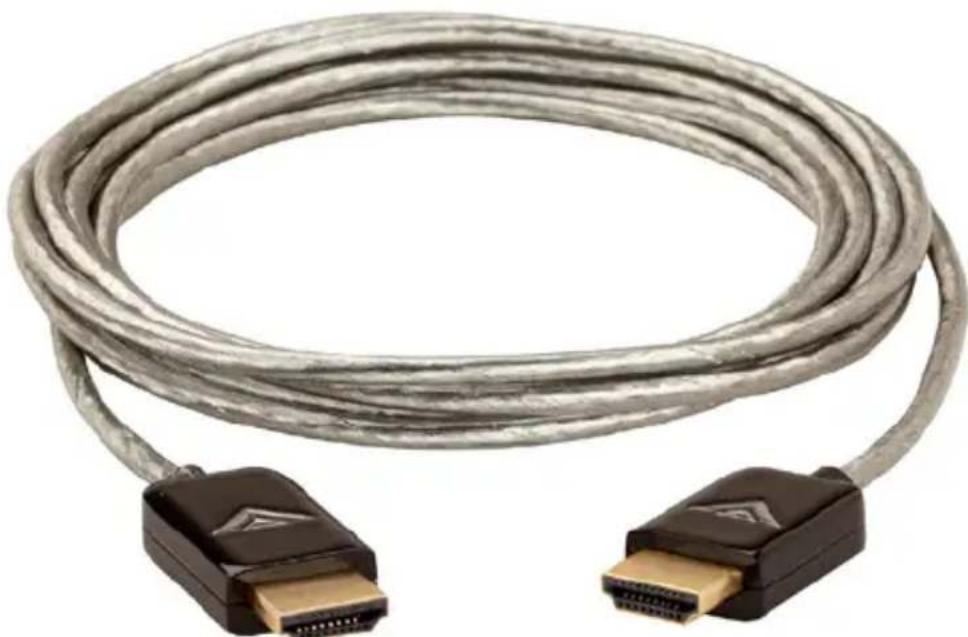
Coiled network cable with two USB connectors (no text or symbols visible)Do Even More with Your Thin + Light!
VIZIO High Speed HDMI Cables - Extreme Slim Series allow you to output video at Full HD 1080p for presentations, sharing video, using a secondary monitor, and more. This all-in-one ultra-thin cable delivers HD video + audio from your PC to any HDMI-enabled screen.
Available at www.VIZIO.com
Worry-Free Hassle-Free 90 Days Free!

natural_image
Laptop displaying a sunset over water with visible islands and window controls (no text or symbols)Microsoft®
Signature
• Up and running in minutes
- Peak performance
• A cleaner PC
• World class security
For US and Canada: (877) 274-1140
For Mexico: (800) 563-0602
Email: PCsupport@VIZIO.com
Technical support provided by Microsoft for first 90 days.
Upgrade to Microsoft Premium Tech Support for only \$99\*
• Adds 1-Year Microsoft Support
- Adds 1-Year of anti-theft tracking system
Go to www.microsoftstore.com/VIZIOpremium to sign up now.
*Plus applicable tax
Your product information:

- 14" and 15.6" Thin + Light
- Table of Contents
- Package Contents
- Getting Started
- 2
- 3
- 4
- Getting to Know Your PC - Ports
- Getting to Know Your PC - Function Keys
- Getting to Know Your PC - Touchpad
- Connecting a USB Device
- Pairing a Bluetooth® Device
- Troubleshooting
- Limited Warranty
- How to Obtain Warranty Service (Pre-authorization required)
- Exchange
- Repair: Parts and Labor
- Remaining Warranty
- Returning Your Computer for Warranty Service
- Exclusions
- Limitations
- Regulatory Information
- FCC Compliance Statement
- Federal Communications Commission Declaration of Conformity
- FCC Caution
- Canada Notice for Licence-Exempt Radio Apparatus
- Wireless Radio Use
- FCC Bluetooth Wireless Compliance
- Exposure to Radio Frequency
- Hard Disk Drive (HDD) Capacity Computer (Internal) HDD Capacity
- Greener Methods
- ENERGY STAR®
- Screen Savers and Power Settings
- Reduced Paper Use
- Legal Notices
- Software, Personal Data, and Other User Stored Information
- Software License
- Export Regulations
- VIZIO Return Policy - Direct Sales
- Internet Connectivity
- Traveling with Your Computer
- Battery Disposal
- Do Even More with Your Thin + Light!
- Worry-Free Hassle-Free 90 Days Free!
- Signature
- Upgrade to Microsoft Premium Tech Support for only \$99\*
Brand : VIZIO
Model : CT14-A0
Category : Laptop