USER MANUAL SPK325-BK Manta
natural_image
Abstract black-and-white circular logo with interlocking curved shapes (no text or symbols)
MANTA
GŁOŚNIK BLUETOOTH
BLUETOOTH SPEAKER
NYX
SPK325-BK

natural_image
Black cylindrical device with textured body and handle, no visible text or symbols
INSTRUKCJA OBSŁUGI
USER MANUAL
MANUAL DE USUARIO
KORISNIČKI PRIRUČNIK
NAVODILA ZA UPORABO
- Before using the product, please read the instructions included with the product.
- Please read all warnings carefully.
- Please follow all instructions carefully.
- Do not use the device near water, in very dusty places, or in places exposed to strong vibrations.
- The device should only be cleaned with a dry cloth.
- Do not cover the ventilation openings of the device. Installation should be carried out in accordance with the manufacturer's instructions.
- The speaker should be placed on an even, flat surface. The speaker placed on a sloped surface may tip over or fall, causing injury or failure.
- The speaker should not be placed near heat sources such as radiators, radiators, stoves or other devices (including amplifiers) that produce heat.
- Protect the power cord from kinking or pinching; this especially applies to the connection points to the plug and around the outlet from the device. As with all electrical appliances, do not run power cords under carpets or place heavy objects on them.
- Only additional devices/accessories indicated by the manufacturer should be used.
- Unplug the device if there is an electrical storm or if it will not be used for an extended period of time. When unplugging the power cord from the AC outlet, never pull the cord. When you do not plan to use the speaker for an extended period of time, unplug the plug from the AC power outlet.
- All service activities should be performed by qualified service technicians. Service is required if the appliance is damaged in any way, including: the power cord or plug is damaged; liquid has entered the device or an object has fallen on the speaker; the device has been exposed to rain or moisture; the device is not working properly or has been dropped.
- Even if the speaker is not used for an extended period of time, the battery should be fully charged at least once every 30 days to maintain its performance.
- Do not use or store the speaker at very low or very high temperatures (below 5°C and above 35°C). If the speaker is used or left at temperatures outside the above range, the speaker may be damaged.
- If water enters the device, immediately disconnect it from the AC power source and consult an authorized service center.
- To extend the life of the product and protect your hearing, avoid listening to songs at maximum volume for long periods of time.
ATTENTION
- Please make sure the power source is correct.
- Do not touch the power cord or plug with wet hands when connecting or disconnecting the cord.
- A damaged power cord poses a significant risk of electric shock or fire; never use a damaged cable.
This product (including its accessories) contains magnet(s) that may interfere with the operation of pacemakers or other medical devices. Do not place
the product near people who use these medical devices. If these medical devices are used, seek medical advice before using this product.
Do not place the product near medical devices.
EPILEPSY WARNING
Some people may experience epileptic shocks from flashing lights.
EN-SPK325-BK NYX
To use the device correctly, please read the user manual carefully first. The contents of the manual are subject to change without notice. The company is not responsible for typographical errors in the contents of the manual or situations not covered in the manual.
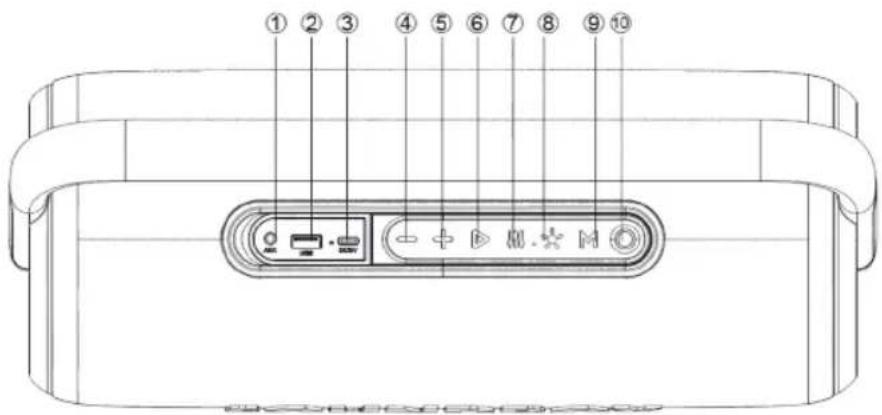
FUNCTION DESCRIPTION:
- AUX input
- USB port for playing music/charging external devices
- USB-C charging port
- Previous track / reduce volume
- Next track / boost volume
- Play /Pause
- Equalizer
- Choice mode backlight
- Choice mode / TWS / BT / USB / AUX-IN
- ON/OFF
ON/OFF
Long press the power button to turn the device on or off.
Bluetooth:
- Turn on the speaker. The device will automatically enter Bluetooth mode. The blue LED on the speaker will flash.
- Activate Bluetooth on your mobile device and search for the device name "SPK325 MANTA NYX", then select the speaker and pair the devices. The blue LED on the speaker will light steadily.
• Play music from your mobile device.
- Long press the + or - button on the device or on the mobile device to select a song.
- Short press the + or - button on the device or on the mobile device to adjust the volume.
- Short press the ▶ button to play/pause music.
• To disconnect a paired device, long press the ▶ button on the speaker
Note: If the smartphone is disconnected from the speaker due to switching off or changing the mode, the speaker will automatically connect to the smartphone again after switching on or switching to Bluetooth mode.
TWS function :
• Turn on the two identical SPK325 speakers you want to pair, both in Bluetooth mode. You only need to set one of the two units.
- Press and hold the M button on one speaker to pair, and you will hear a sound after pairing successfully.
- Establish Bluetooth connection with your mobile phone to play music through the two paired speakers.
- Press and hold the M button again to exit TWS function.
EN-SPK325-BK NYX
Playing music from USB memory:
- Turn on the speaker.
- Insert the USB drive into the appropriate slot.
- The speaker will automatically play the stored music.
- In playback mode, long press the + or - button to select a song. Press + or - briefly to increase or decrease the volume.
- Short press ▶ to play or pause.
- The speaker supports USB drives with a maximum capacity of 128 GB.
Charging external devices (Power Bank function):
- Turn on the speaker.
- Connect another device to the charging port (external device charging port) 5V/2A or 9V/2A (fast charging) on the speaker using the charging cable.
- For other compatible music devices, use the supplied audio cable to connect the devices to the SPK325 speaker.
• In any playback mode, when you use the audio cable to connect the device, it will automatically switch to AUX mode.
- When using an external device, all functions can be controlled from the external device.
AUX-IN mode:
Equalizer :
The device offers 2 types of sound effects. Press the mode button 📄 to change EQ modes.
RGB backlighting:
The RGB backlight lights up when the speaker is turned on, the user can short press the button ✗ to turn on three different modes or . To turn off the backlight completely, long press the button ✗.
Voice assistant
- Establish a Bluetooth connection to your mobile phone.
- Press and hold the ▶ button on the speaker to activate Google Voice Assistant/ Siri.
ATTENTION! For the Google voice assistant/ Siri function to work, the appropriate settings must be enabled on your phone. They are individual depending on the phone model.
Hands-free call
- In Bluetooth mode, when you have connected your mobile phone with the speaker, if there is an incoming call, the user can short press the ▶ button to accept the call and talk through the speaker which has a built-in microphone. Or long press the ▶ button to reject the call.
- During a call, the user can long press the ▶ button to go to the phone call.
- Briefly press the ▶ button or use your mobile phone to end the call.
Factory settings
In any mode, press and press the button— for 5 seconds to clear the Bluetooth connection and factorysettings. The speaker is also turned off.
Charging:
- When the battery voltage is low, the speaker will make a sound and the red power indicator will flash.
- The charger is not included in the package, please charge the speaker by a charger rated 5V/2A or by computer. Fast charger (rated 9V/2A) is also supported.
• After connecting the charging cable and starting charging, the red power indicator will light steadily.
EN-SPK325-BK NYX
• The maximum charging time should be 5 hours. When the speaker is fully charged, the red power indicator will turn off.
- The maximum working time in battery mode is 8 hours. The working time of the speaker depends on many factors, including the type of audio source, volume level, power level, ambient temperature, whether the backlight is on.
• To protect the battery, do not use the speaker while charging.
- Low battery may distort the sound or not play at all, so always charge the battery in time.
- To prolong the battery life, charge it immediately after it is discharged. If the device is not used for a long time, the battery will gradually discharge. It is recommended to fully charge the battery at least once every 30 days.
• Turn off the device after use to extend the battery life.
- When playing music and charging at the same time, please set the volume to a maximum of 50%, because for some songs with strong bass, the charger may temporarily not be able to charge the speaker below the maximum volume.
• If the speaker is not connected in Bluetooth mode and is not used, it will automatically turn off after 10 minutes.
ATTENTION!
Product design and technical specifications are subject to change without prior notice. This applies primarily to technical parameters, software, photos and the user manual. This user manual is intended to provide general guidance on how to use the product. The manufacturer and distributor shall not be liable for any inaccuracies resulting from errors in the descriptions contained in this user manual.
ES-SPK325-BK NYX
OPIS FUNKCIJE:
| Power output | 80W peak power |
| Playback | MP3 |
| Bluetooth | 5.3 + TWS |
| Connectivity | USB, AUX |
| Functions | BluetoothTrue Wireless StereoGoogle Assistant, SiriSuper BassHands free setLed lightsPower bank function |
| Waterproof class | IPX4 |
| Frequency response | 60Hz-20KHz |
| Sensitivity | 80dB±3dB |
| Weight | 3,10 kg |
| Dimensions | 386 * 197 * 152 mm |
| Power supply | DC 5V/2A, 9V/2ABuilt-in battery 7.4V 4800 mAhWorking time in battery mode max. 8h |
| Set contains | Manual, warranty card, USB-C cable, Audio 3,5mm cable |
| Bluetooth transmitter frequency range | 2402-2480MHz |
| Bluetooth transmitter power | ≤ 8 dBm |
ES
MANTA S.A. hereby declares that appliance SPK325-BK NYX is compliant with Directives RED 2014/53/EU, ROHS 2011/65/EU. The full the EU declaration of conformity is available the following website: www.manta.com.pl
INFOLINIA SERWISOWA
from Monday to Friday, 9:00-17:00
The manufacturer reserves the right to make changes to product specifications without notice.
Uwaga!

