
Bridge X_TS mini - Unknown Digital Forecast - Free user manual and instructions
Find the device manual for free Bridge X_TS mini Digital Forecast in PDF.


| Product Type | Network Bridge |
| Dimensions (approx.) | 130 x 80 x 25 mm |
| Weight | 150 g |
| Power Supply | 5V DC via USB-C |
| Main Function | Extends network range, bridges wireless signals |
| Connectivity | Wireless 2.4/5 GHz, Ethernet port |
| Setup | Plug and play, web interface configuration |
| LED Indicators | Power, Signal, Network status |
| Maintenance | Wipe with a soft dry cloth |
| Safety | Keep away from moisture and extreme temperatures |
| Spare Parts | Not user-replaceable; contact support for repairs |
| Repairability | Professional repair only |
| General Info | Brand: Digital Forecast, Model: Bridge X_TS mini |
Frequently Asked Questions - Bridge X_TS mini Digital Forecast
User questions about Bridge X_TS mini Digital Forecast
0 question about this device. Answer the ones you know or ask your own.
Ask a new question about this device
Download the instructions for your Unknown in PDF format for free! Find your manual Bridge X_TS mini - Digital Forecast and take your electronic device back in hand. On this page are published all the documents necessary for the use of your device. Bridge X_TS mini by Digital Forecast.
USER MANUAL Bridge X_TS mini Digital Forecast
TROUBLESHOOTER series: Conversion and Measurement at Once
Bridge X_TS for All Format Conversion with Measurement
Bridge X_TS mini for SDI & HDMI with Enhanced Measurement

DIGITAL FORECAST
303, SK APT FACTORY, 55, Seongsuillo, Seongdong-gu,
Seoul 04779, South Korea www.dfcast.co.kr
HDLive™ Kalypso Bridge" Bridge"X T ^s
ENGLISH
Copyrights : 2020 DIGITAL FORECAST Co., Ltd. All rights reserved.
CONTENTS
1 Chapter 1. OVERVIEW
1 SUMMARY
2 FEATURE
3 APPLICATION
4 UNPACKING
6 Chapter 2. SEPCIFICATION
6 INTERFACE / CONNECTION
7 LCD SPECIFICATION
7 VIDEO STANDARDS
7 DIMENSION / WEIGHT
8 OPERATING ENVIRONMENT
9 Chapter 3. OPERATION
9 MAIN MENU
10 FULL/SPLIT SCREEN
10 STATUS ON/OFF
11 SUB MENU
11 IN/OUT
12 TPG : Test Pattern
12 SET OUTPUT
13 MEASURE
16 CONFIG
OVERVIEW
Chapter 1
SUMMARY
Bridge X TS is Multi-Platform Signal Converter with Measurement and Test Pattern Generator.
Bridge X_TS can be effectively used in the installation and maintenance service of video and audio signal. Very handy but powerful functions of Bridge X_TS series enables to conveniently check a variety of signal status through 5" LCD touch screen from video display up to SDI jitter and Cable conditions.
![DIGITAL FORECAST In : SDI [ 1080159.94 ] Status Fieset count Loss Err OK 0000 EAV Err OK 0000 L Num Err OK 0000 Y CRC Err OK 0000 C CRC Err OK 0000 Run 00 : 00H : 09M :45S TS Trouble Shooter](/content/2026/05/986842/images/4a3cc43e3d3fa3e246fa053212c0a0bdc0bcf31b273f5226c58c452a3af2a38c.jpg)
FEATURE
- Up / Down / Cross / Scan Converter
- Standard Video / Audio signal supported SDI, HDMI, CVBS, COMPONENT, VGA, DVI, Analog Audio, AES / EBU
• Analog Audio Mux / DeMux - Jitter Measurement for SDI signal (720p, 1080i, 1080p)
• Test Pattern Generator : 8 types provided
• SDI signal integrity check (Loss, TSR, CRC, Line number)
• HDMI signal integrity check (Loss, Resolution, HDCP)
• Audio Level Monitoring (up to 8 channels) - 5" Touch Screen LCD (800x480)
- Battery Mounting Plate for Sony and Cannon type (optional)
APPLICATION

flowchart
graph TD
    A["Trouble Shooter"] -->|Analog Audio| B["Mixer Speaker"]
    A -->|VGA| C["Monitor"]
    A -->|A/V System Composite or AES/EBU| D["Switcher"]
    A -->|SDI| E["CCTV"]
    A -->|Analog Audio| F["Camera"]
    A -->|HDMI| G["Projector"]
    A -->|HDMI| H["Microphone"]
    A -->|VGA| I["PC System"]
    A -->|SDI| J["DVD/DVR"]
UNPACKING : X\_TS pack (Hardcase Accessory Package)

natural_image
Exterior view of a black BUROCA medical device with attached cables and components (no visible text or symbols)- 1pc x Hard case
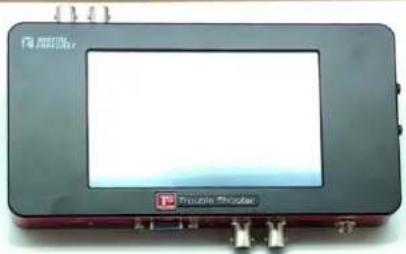
- 1pc x Bridge X_TS : Product
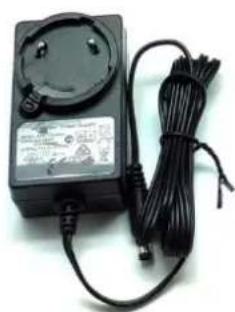
- 1set x Universal Power Supply
• 1pc x Battery Plate (Sony Type / Option : Cannon Type)
• 1pc x VGA to Component jack cable
• 1pc x Analog audio jack cable - 1pc x HDMI cable
- 1pc x SDI cable
• 2sets x Accessory mounting screws
① : Short screw (3x6mm) for mounting the Battery Plate ONLY
② : Long screw (3x8mm) for mounting both the Battery Plate and the Stand
UNPACKING : X\_TS (Standard Package)



natural_image
Black electrical adapter with attached cable and power plug (no visible text or symbols)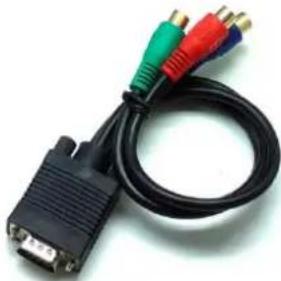
natural_image
Black V1G cable with three colored connectors (red, green, blue) attached to a white connector (no text or symbols visible)
- 1pc x Bridge X_TS : Product
• 1set x Universal Power Supply
• 1pc x VGA to Component jack cable
• 1pc x Analog audio jack cable
SPECIFICATION
Chapter 2
INTERFACE / CONNECTION

LCD SPECIFICATION
- Size: 5.0 Inch
- Resolution: 800 × 480
• Pixel area : 0.135mm(W) x 0.135mm(H)
• Display Area : 108mm(W) x 64.8(H)
VIDEO STANDARDS
• HDMI v1.3 format Support
• Multi-rate SDI format Support
• SD format : 525/29.97(NTSC), 625/25(PAL), 480P, 576P
• HD format : 720P(24/25/30/50/59.94/60)
1080i(50/59.94/60)
1080p(24/25/30/sf24/50/59.94/60)
DIMENSION / WEIGHT

OPERATING ENVIRONMENT
| Supply Power | + 12 VDC |
| Power Consumption | 13 Watts (Maximum: 15Watts) |
| Operation temperature | 0°C ~ 70°C |
| humidity | 0% ~ 95% RH, Non-condensing |
OPERATION
Chapter 3
MAIN MENU
![L R SDI EMB 1080i59.94 Fixed 1080i HDCP In : SDI [ 1080i59.94 ] Status Reset count Loss Err OK EAV Err OK L Num Err OK Y CRC Err OK C CRC Err OK Run 00 : 00H : 09M :45S IN/OUT SET OUTPUT MEASURE CONFIG EXIT SPLIT SCREEN STATUS ON ① IN/OUT SET OUTPUT MEASURE CONFIG EXIT SPLIT SCREEN STATUS ON](/content/2026/05/986842/images/cf38a1f75b9f915f40769f96ba69bab1f584f5673eb7b0170ca63e95048d5966.jpg)
① IN/OUT Selects the Input signal type, Output Resolution/Frame Rate, and Test Pattern Generator.
② SET OUTPUT Selects Output Color Mode and Aspect Ratio.
③ MEASURE Selects the monitoring of Waveform, Audio Level, Vector Scope, Jitter with Error Count.
④ CONFIG Adjusts the LCD Brightness, LCD Contrast, Audio Volume, Auto Sleep.
⑤ EXIT Saves the setting, and goes out of Main Menu.
⑥ FULL/SPLIT Selects whether to display as Full Screen Mode (Video) or Split Screen Mode (Video/Measurements)
⑦ STATUS Selects whether to display Status Icons on the top row.
⑧ HDCP Indicates whether HDCP is activated.
FULL/SPLIT SCREEN


FULL SCREEN MODE
Displays the video on the whole screen.

natural_image
Evening view of a brightly lit European-style commercial complex with illuminated buildings and a canal, reflecting in the water (no visible text or signage)SPLIT SCREEN MODE
Displays the video on the left area while the measuring elements are shown on the right area.
![5760 1080u60 In : SDI [ 1080i59.94 ] Status Reset count Loss Err OK 0000 EAV Err OK 0000 L Num Err OK 0000 Y CRC Err OK 0000 C CRC Err OK 0000 Run 00 : 00H : 09M :45S -10 -20 -30 -40 -50 -60 -70 1 2 3 4 5 6 7 8](/content/2026/05/986842/images/e0a63901ab0624de5c1ec86db788ca4d86820a0aefea3472e32729a224494431.jpg)


| STATUS ICONS | |
| Audio Level Bar | Shows the Audio Signal Level Bar of Group 1 : Channel 1, 2 - L/R signal. |
| Battery Status | Indicates the residual battery capacity. |
| Auto Sleep Mode | Indicates the activation/deactivation of Auto Sleep Mode. |
| Auto Input Mode | Indicates the activation/deactivation of Auto Input Detection Mode. |
| Input Source Type | Indicates the type of Input Signal : SDI, HDMI, Pattern |
| Input Resolution /Frame Rate | Indicates the Resolution/Frame Rate of Input Signal |
| Conversion Indication | Indicates the direction of Conversion : from a Conversion Source to the Converted Output. |
| Output Resolution /Frame Rate | Indicates the Resolution/Frame Rate of Output Signal |
SUB MENU
IN/OUT


INPUT
: Selects an input among SDI, HDMI, COMP, VGA, CVBS, Pattern, Audio AUTO, Audio AES, Audio L/R.
AUTO Embed
: Embeds the Audio of SDI or HDMI when selecting the relevant input.
AES/EBU
: MUXing AES/EBU with the selected Input video signal
L/R
: MUXing Analog Audio with the selected Input video signal
OUTPUT
: Sets an output resolution, or Selects a type of Test Pattern. After the setting is done, "SET" button should be selected to apply.
Test Pattern


natural_image
Color test pattern with multiple solid and dotted bars in various colors (no text or symbols)SMPTE Color Bar

Pathological
Gray
Black

natural_image
Colorful pixelated image with no discernible text, symbols, or structured contentSMPTE + Move

natural_image
Simple geometric shape with a pink rectangle and white square on a gray background (no text or symbols)Pathological + Move
natural_image
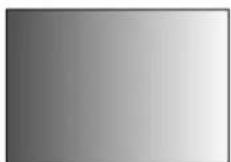
Simple gray gradient background with a single white square in the center (no text or symbols)Gray + Move
Black + Move
SET OUTPUT


Color Mode
Sets the output color mode
ARC Mode
Converts Aspect Ratio.
**Note**
Please Do NOT change "Color Mode" from YUV422 (default value) unless using VGA.
Since SDI. CVBS and Component are supporting YUV422, it doesn't provide a prop output in case of applying RGB444.


flowchart
graph TD
    A["Waveform"] --> B["Audio"]
    A --> C["Vector"]
    A --> D["Mirror"]
    A --> E["Jitter"]
    F["Measure Window"] --> G["OFF"]
    H["EXIT"] --> I["End"]
Waveform
Measure Window
Selects YCbCr or RGB waveform displayed at the bottom left.
Selects a display of Audio Level, Vector scope, Jitter during Split Mode.
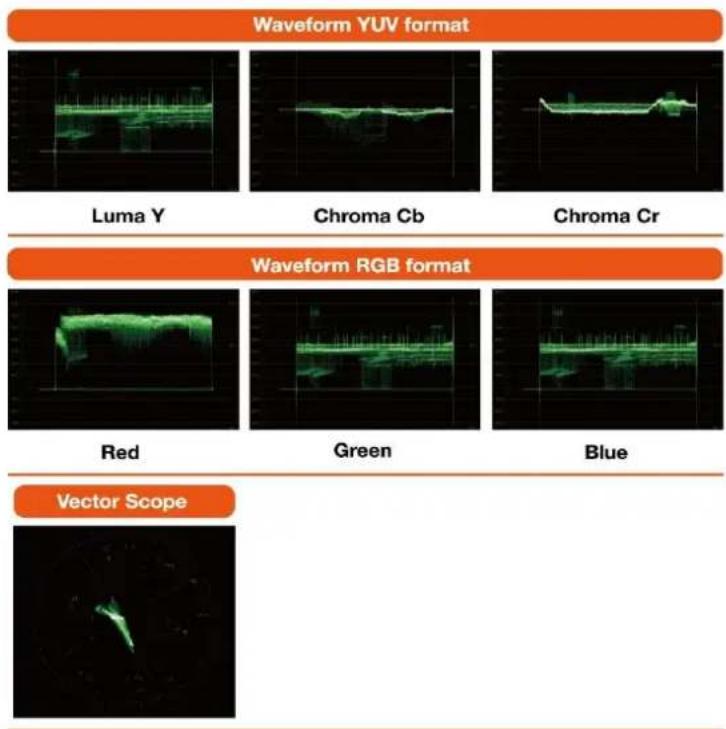
1) Audio Level Display
- Up to 8 channel monitoring of Input source.
- Indicated as dbFS reference

bar_stacked
| Category | Green (dBFS) | Yellow (dBFS) | Red (dBFS) | |---|---|---|---| | 1 | -30 | -25 | -15 | | 2 | -30 | -25 | -15 | | 3 | -30 | -25 | 0 | | 4 | -30 | -25 | 0 | | 5 | 0 | 0 | 0 | | 6 | 0 | 0 | 0 | | 7 | 0 | 0 | 0 | | 8 | 0 | 0 | 0 |2) Vector Scope
• Displays the Vector Scope
3) Cable Length
• Indicates an input SDI cable length
| 0~39m | 40~79m | 80m~ |
| Good | Normal | Bad |
• Color Gauge Bar indicates the increase of a Good Normal Bad possibility of error occurrence pursuant to a long distance (used for a parameter, Does NOT indicate the cable condition itself)

4) Jitter
- Indication a pseudo eye pattern with jitter
- Peak to Peak Jitter
: Simulated Physical Eye jitter - Max 1 UI Check
• Indication by Good, Normal, Bad
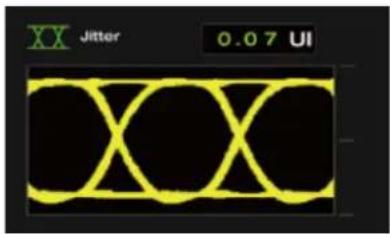
INFORMATION PANEL

other
| Status | Reset Count | Err | OK | Err | | :--- | :--- | :--- | :--- | :--- | | In : SDI | 1080i59.94 | 1 | 1 | 1 | | Status | Count | 2 | 3 | 3 | | Loss | Err | 0001 | 0001 | 0001 | | EAV | 0001 | 0001 | 0001 | 0001 | | L Num | Err | 0001 | 0001 | 0001 | | Y CRC | 0001 | 0001 | 0001 | 0001 | | C CRC | 0001 | 0001 | 0001 | 0001 | | 352M | 85:06:00:01 | 85:06:00:01 | 85:06:00:01 | 85:06:00:01 | | Run 04: 00H : 09M :45S | 45S | 45S | 45S | 45S | In : HDMI [ 1080P59.94 ] Status Reset count Sync Err OK 0000 Hactive 1920 Vactive MODE HDMI HDCP ON AUD Freq 48 Khz Run 00 : 00H : 09M :45S| 1 Input Information | Indicates Input source signal type and Resolution/Frame Rate. |
| 2 Reset | Initializes the Error Count and Runtime when pressing the button. |
| 3 Error Count | Indicates the count of the relevant error occurrence. |
| 4 Run Time | Indicates the total elapsed operating time as dd/HH/mm/ss. |
SDI : ERROR COUNT ITEMS
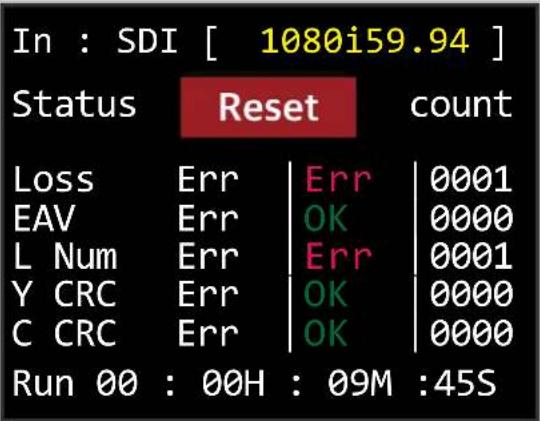 | ||
| Loss Err | : Counts the Signal Loss error | |
| EAV Err | : Counts the EAV error of TRS signal | |
| L Num Err | : Counts the Line number marking error | |
| Y CRC | : Counts the CRC error of Y signal | |
| C CRC Err | : Counts the CRC error of Cb,Cr signal | |
| 352M | : Shows the SMPTE352M Payload | |
HDMI : ERROR COUNT ITEMS
![In : HDMI [ 1080P59.94 ] Status Reset count Sync Err OK 0000 Hactive | 1920 Vactive | 1080 MODE | HDMI HDCP | ON AUD Freq 48 Khz Run 00 : 00H : 09M :45S](/content/2026/05/986842/images/0eafa6ae6d5eb710af0638e771cf0ff9946032468565f6ec49cc18223f00dbd1.jpg)
| Sync | : Counts the Sync error |
| H active | : Counts the Horizontal resolution |
| V active | : Counts the Vertical resolution |
| MODE | : Shows the status of HDMI or DVI mode |
| HDCP | : Shows the status of HDCP |
| AUD Freq | : Shows the Audio sampling frequency |
CONFIG

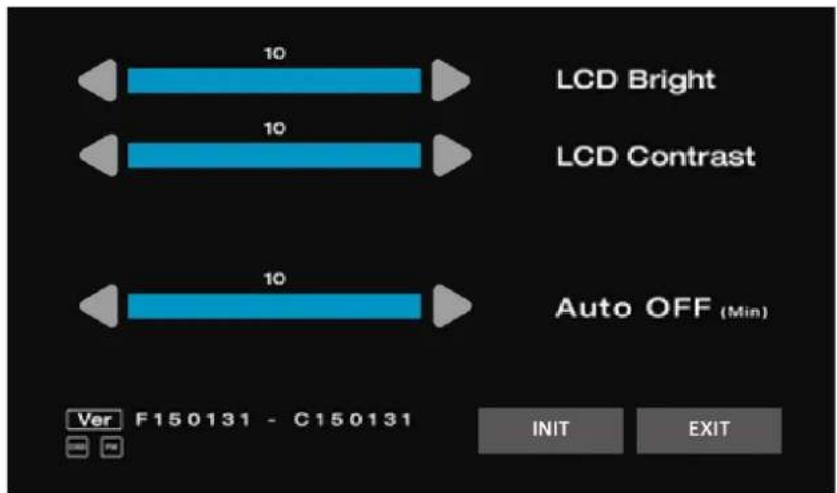
LCD Bright
Adjusts the brightness of LCD Touch Screen
LCD Contrast
Adjusts the Contrast of LCD Touch Screen
Auto OFF(min)
Sets the time(minute) for the Sleep Mode of LCD Touch Screen.
After the set time, the LCD is automatically turned off for energy saving.
Ver
Indicates the System Version.

- ENGLISH
- CONTENTS
- OVERVIEW
- Chapter 1
- SUMMARY
- FEATURE
- APPLICATION
- UNPACKING : X\_TS pack (Hardcase Accessory Package)
- UNPACKING : X\_TS (Standard Package)
- SPECIFICATION
- Chapter 2
- INTERFACE / CONNECTION
- LCD SPECIFICATION
- VIDEO STANDARDS
- DIMENSION / WEIGHT
- OPERATION
- Chapter 3
- MAIN MENU
- FULL/SPLIT SCREEN
- FULL SCREEN MODE
- SPLIT SCREEN MODE
- SUB MENU
- IN/OUT
- INPUT
- AUTO Embed
- AES/EBU
- 1) Audio Level Display
- 2) Vector Scope
- 3) Cable Length
- 4) Jitter
- CONFIG
Brand : Digital Forecast
Model : Bridge X_TS mini
Category : Unknown