
VORTEX X2 ARGB - Computer Cooling Component Savio - Free user manual and instructions
Find the device manual for free VORTEX X2 ARGB Savio in PDF.


| Product Type | CPU Air Cooler |
| Model | VORTEX X2 ARGB |
| Brand | Savio |
| Fan Quantity | 2 |
| Fan Dimensions | 120 x 120 x 25 mm |
| Fan Speed | 800 - 1800 RPM ±10% |
| Airflow (Max) | 72 CFM |
| Noise Level | 18 - 32 dBA |
| Bearing Type | Hydro Dynamic Bearing |
| Connector | 4-pin PWM + 3-pin ARGB |
| ARGB Voltage | 5V |
| ARGB Header | 3-pin Addressable RGB |
| Heat Sink Material | Aluminum fins, copper heat pipes |
| Heat Pipe Count | 4 |
| Max TDP | 200W |
| Socket Compatibility | Intel LGA1700/1200/115x, AMD AM5/AM4 |
| Cooler Dimensions (WxDxH) | 120 x 88 x 158 mm |
| Weight | 800 g |
| Power Consumption per Fan | 2.4 W (0.2A @ 12V) |
| Fan Control | PWM |
| RGB Synchronization | Yes (motherboard software) |
| Installation Configuration | Push-pull |
| Package Contents | Cooler, 2 fans, mounting kit, thermal paste, manual |
| Warranty | 2 years |
Frequently Asked Questions - VORTEX X2 ARGB Savio
User questions about VORTEX X2 ARGB Savio
0 question about this device. Answer the ones you know or ask your own.
Ask a new question about this device
Download the instructions for your Computer Cooling Component in PDF format for free! Find your manual VORTEX X2 ARGB - Savio and take your electronic device back in hand. On this page are published all the documents necessary for the use of your device. VORTEX X2 ARGB by Savio.
USER MANUAL VORTEX X2 ARGB Savio
The warranty covers a period of 24 months. Independent repairs and modifications result in automatic loss of the warranty. Warranty card is available for download on our website: www.savio.pl/en/service
Gwarancja:
Information of the utilization of electrical and electronic equipment
This symbol indicates that electrical appliances should not be discarded with other household waste. Used equipment should be handed over to a local collection point for this type of waste or to a recycling center. Please contact your local authorities for information about disposal methods available in your area. Waste electrical equipment may contain hazardous substances (e.g. mercury, lead, cadmium, chromium, phthalates) which can get into air, soil and groundwater when leaking from used appliances. Environmental pollution with these substances leads to their bioaccumulation, pollution of a disease living organisms, which would pose a risk to human and animal health or life. Households may contribute to environmental protection by proper waste collection. In such way, hazardous substances from the equipment are neutralized and valuable secondary raw materials are reused for production of new equipment.
Information for customers and contractors and communication regarding complaints:
Pursuant to Article 13 section 1 and 2 of the General Data Protection Regulation (EU) 2016/679 of the European Parliament and of the Council of 27 April 2016 (hereinafter referred to as GDPR), please be advised that Elmak Sp. z o.o., with its registered seat at al. Zolnierzy I Armii WP 208; 35-301 Rzeszów becomes the Administrator of your personal data. The Specialist for General Data Protection (SODO) can be contacted in writing to: SODO, Elmak Sp. z o.o., al. Zolnierzy I Armii WP 208; 35-301 Rzeszów, via e-mail address: sodo@elmak.pI, and by phone at +48 (17) 854 98 14. Your personal data will be processed in order to perform the contract, in accordance with Article 6(1)(b) of the aforementioned regulation, to the extent resulting from tax laws and financial regulations. Recipients of your personal data include entities authorized by legal regulations to obtain personal data as well as processing entities providing services to Elmak Sp. z o.o. Your personal data will be stored on the basis of Administrator's legitimate interest. You have the right to access your data, and the right to rectify, delete or limit processing of your data. You have the right to lodge a complaint to the supervisory body if you believe that the processing violates the GDPR. The provision of personal data is voluntary, however, a failure to provide such data may result in a refusal to conclude or in termination of a contract. Your personal data will not be subjected to automated decision making, including profit ling referred to in Article 22 section 1 and 4 of the GDPR of April 27, 2016.
Thank you for choosing Savio product!
If our product meets your expectations, share your opinion with other people on the portal ceneo.pl, social media or on the website of the store where you made the purchase. If you want to show our device on SAVIO Facebook Page, we will be very pleased.
If there is something that we could improve on our products, please write to us at support@savio.pl
Thanks to your feedback, we will be able to better adapt the product to your expectations.
Before starting the use of purchased device it is recommended to read the whole manual.
2. Technical specification:
• TDP: 180 W
- Cooler dimensions with fan: 122 × 76.5 × 157 mm
• Number of heat pipes: 4 pcs
• Fan size: 120 mm
• LED connector 3-pin (female)
• Fan connector: 4-pin (PWM) (male + female)
• Fan speed: 800-1800 RPM
• Max noise level: 31 dBA
• Intel compatibility: LGA 1200 / 1151 / 1150 / 1155 / 1156 / 1366 / 1700 / 2011 / 2066
- AMD compatibility: AM3(+) / AM2(+) / FM2(+) / FM1 / AM4 / AM5

Sovio
POLSKI
Place the mounting backplate on the back of the mother board and adjust its ends to the series of your processor.
STEP
1. Dismantle fan.
The Ground Truth image displays a single, solid horizontal line. According to Rule 2 (UNDERSCORE & LINE RULES), if the GT contains lines used for stylistic emphasis or as background elements (like ruled paper), the OCR result must ignore them. The OCR content provided is "____", which represents four underscores. This is incorrect because underscores are not equivalent to a solid line and are not permitted under the “Stylistic/Background Lines (Ignore)” rule. The OCR has hallucinated text (underscores) where none should exist, violating the rule to ignore stylistic lines. Therefore, the OCR result is inconsistent with the Ground Truth.
KROK 2 1. Zdemontuj wentylator
, , ,
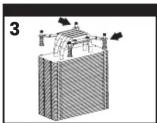
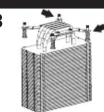
STEP 3
- Install the appropriate mounting bracket for your processor series.
- Secure it with the screws included in the kit.
-
Clean the processor IHS surface with a dry cloth or isopropyl alcohol
-
Apply thermal grease (to get the lowest temperatures use SAVIO GLACIER thermal grease).
-
Remove protective film from the heat sink base and clean it with a dry cloth or isopropyl alcohol.
KROK 4
- Place the heat sink on the processor.
- Secure the heat sink with the screws integrated in the mounting bracket.
The Ground Truth image displays a single, solid horizontal line. According to Rule 2 (UNDERSCORE & LINE RULES), if the GT contains lines used for stylistic emphasis or as background (like ruled paper), the OCR result must ignore them. The provided OCR content is "____", which consists of four underscores. This is incorrect because underscores are not equivalent to a solid line and are not permitted under the “Stylistic/Background Lines (Ignore)” rule. Outputting underscores for a stylistic line is incorrect because it misinterprets the line as a fill-in-the-blank placeholder. Therefore, the OCR result is inconsistent with the Ground Truth.
KROK 5
- Clean the processor IHS surface with a dry cloth or isopropyl alcohol
- Apply thermal grease (to get the lowest temperatures use SAVIO GLACIER thermal grease).
- Remove protective film from the heat sink base and clean it via a dry cloth or isopropyl alcohol.
get the lowest temperatures use (ase)
m the heat sink base and clean it w ohol.
KROK 3
STEP 7 1. Connect the fan to the 3-pin ARGB 5 V and 4-pin 12 V sockets on the motherboard.
STEP1
1. Dismantle fan.
KROK1
1. Zdemontui wentylator.
STEP 2 1. Install the appropriate mounting bracket for your processor series. 2. Secure it with the screws included in the kit.
face with a dry cloth or isopropyl
STEP 4 1. Place the heat sink on the processor. 2. Secure the heat sink with the screws integrated in the mounting bracket.
STEP 4
1. Clean the processor IUS surface with a dry cloth or isopropyl
1. Clean the processor IHS surface with a dry cloth of isopropyl alcohol.
2. Apply thermal grease (to get the lowest temperatures use SAVIO GLACIER thermal grease).
3. Remove protective film from the heat sink base and clean it with a dry cloth or isopropyl alcohol.
KROK 4
1.1 Connect the fan to the 3-pin ARGB 5 V and 4-pin FAN 12 V sockets on the motherboard
1.2 The backlight and fan speed can be controlled using dedicated motherboard software.
NOTE1
NOTE: If there is no 5 V connector on the motherboard, after connecting the 4-pin 12 V connector, the fan will backlight in a rainbow colour. One mode will be available without the possibility of changing it.
Safety conditions for thermal gr
- Keep out of reach of children.
- It is forbidden to consume the product.
- In case of skin contact, the contaminated area should be wash with
soap and water.
• In the case of contact with eyes, rinse with plenty of water. - If vapours enter the respiratory system go to fresh air.
- In case of ingestion it is not necessary to induce vomiting. Rinse your mouth with plenty of water.
• In the case of any undesirable symptoms during the situations described above, seek urgent medical attention.
SCHOOL COSTS, BOOK ARGENT MEDICAL ASSOCIATION
Safety conditions for heat sink and fan


Brand : Savio
Model : VORTEX X2 ARGB
Category : Computer Cooling Component