
NT-25GA - Network card / adapter Sabrent - Free user manual and instructions
Find the device manual for free NT-25GA Sabrent in PDF.


| Product Type | Network Adapter |
| Brand | Sabrent |
| Model | NT-25GA |
| Interface | USB 3.0 Type-A |
| Network Standard | IEEE 802.3, 802.3u, 802.3ab |
| Data Transfer Rate | 10/100/1000 Mbps |
| Connector | RJ45 Ethernet |
| Chipset | Realtek RTL8153 |
| Cable Length | 30 cm (USB cable) |
| Dimensions | 7.5 x 2.5 x 1.5 cm |
| Weight | 30 g |
| Power Source | USB bus-powered |
| LED Indicators | Link / Activity |
| Operating Temperature | 0°C to 40°C |
| Storage Temperature | -20°C to 70°C |
| Operating Systems Supported | Windows, macOS, Linux, Chrome OS |
| Plug and Play | Yes (drivers included) |
| Compliance | FCC, CE, RoHS |
| Maintenance | Wipe with a dry cloth |
| Safety Precautions | Avoid liquids, keep away from heat |
| Spare Parts | Not replaceable |
| Repairability | Non-repairable, replace unit |
Frequently Asked Questions - NT-25GA Sabrent
User questions about NT-25GA Sabrent
0 question about this device. Answer the ones you know or ask your own.
Ask a new question about this device
Download the instructions for your Network card / adapter in PDF format for free! Find your manual NT-25GA - Sabrent and take your electronic device back in hand. On this page are published all the documents necessary for the use of your device. NT-25GA by Sabrent.
USER MANUAL NT-25GA Sabrent
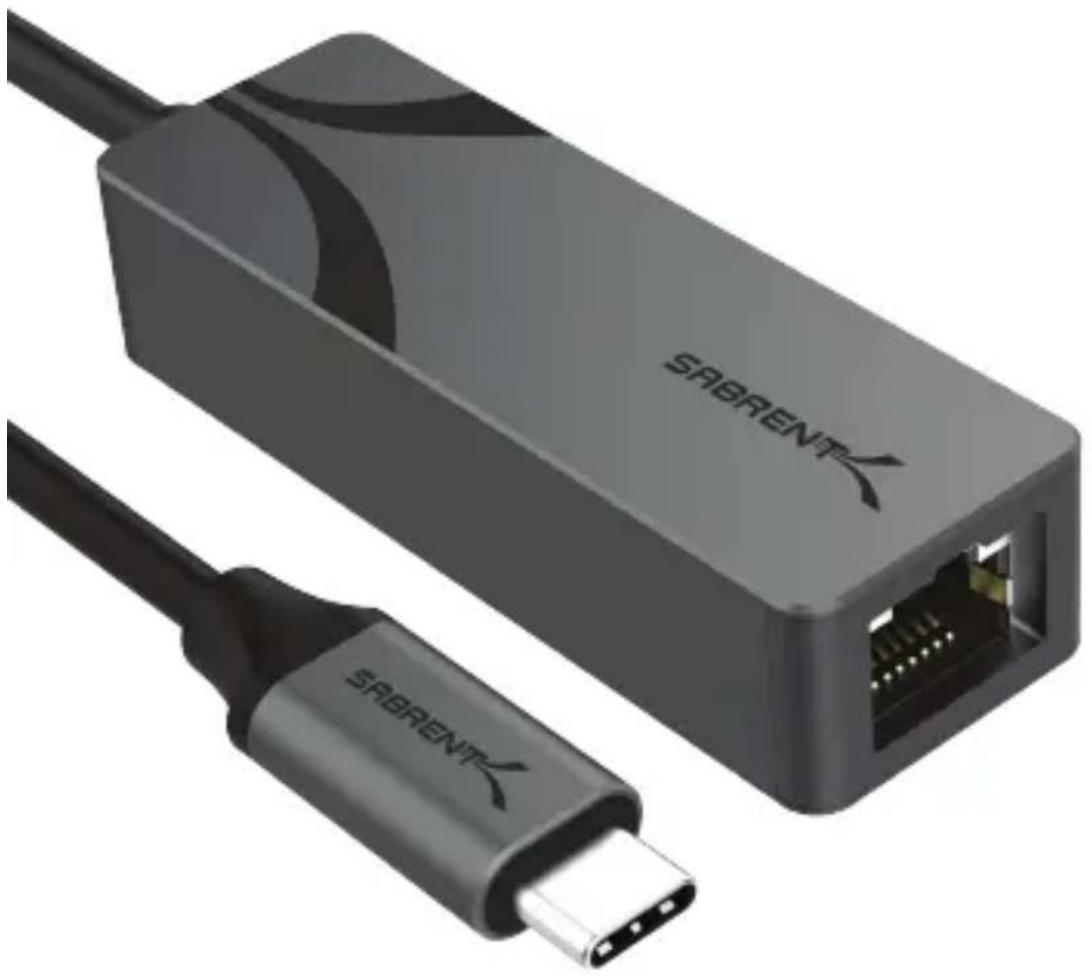
USB-C TO 2.5 GIGABIT ETHERNET ADAPTER
natural_image
Close-up of a SABRENT device with a USB cable and connector port (no text or symbols visible on the device body)
FEATURES
- Convert any USB Type-C port into a standard RJ-45 2.5 Gigabit Ethernet (2.5GbE) port
- Provides speeds of up to 2.5Gbps for up to at least 100 meters with Cat 5e-compliant or better cabling
- Fully compliant with the IEEE 802.3bz (2.5GBASE-T) standard with UEFI PXE boot support for compatible systems
• Backward compatible with slower Ethernet connections, devices, and cables - Rugged aluminum construction for durability and maximum heat dissipation
- Bus-powered, eliminating the need for external power adaptors
• LED indicators for connection and speed status
• USB-C to 2.5 Gigabit Ethernet Adapter
- User manual
PRODUCT OVERVIEW
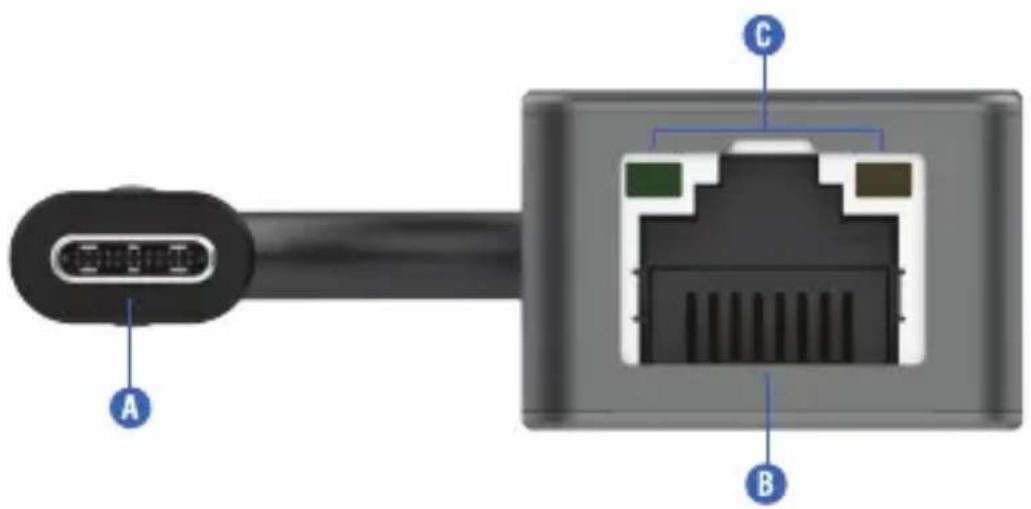
A. Integrated USB-C cable for host connectivity
B. RJ-45 port for Ethernet connection to network device
C. Green and orange LEDs for connection speed and data transfer status
LED STATUS INDICATORS
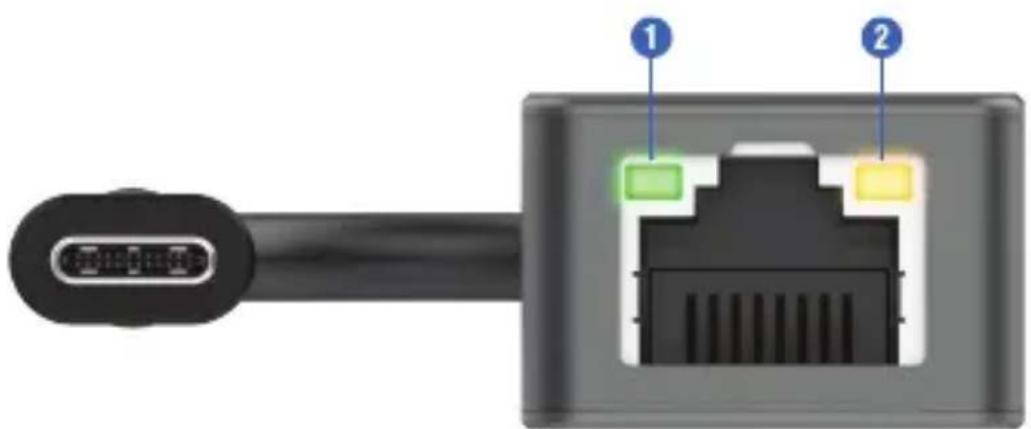
| # | Color | Function | Description |
| 1 | Green | Data transfer/ Network connection | Blinking: transferring at 10/100Mbps speedsOn: operational |
| 1/2 | Orange/Green | Data transfer/ Network connection | Synchronized blinking: transferring at 1 Gigabit speedsOn: operational |
| 2 | Orange | Data transfer/ Network connection | Blinking: transferring at 2.5 Gigabit speedsOn: operational |
GETTING STARTED
natural_image
Simple line drawing of a laptop computer with blank screen and base (no text or symbols)Step 1. Connect the USB-C Ethernet adapter to the host system.

natural_image
Illustration of a USB cable with a connector (no text or symbols)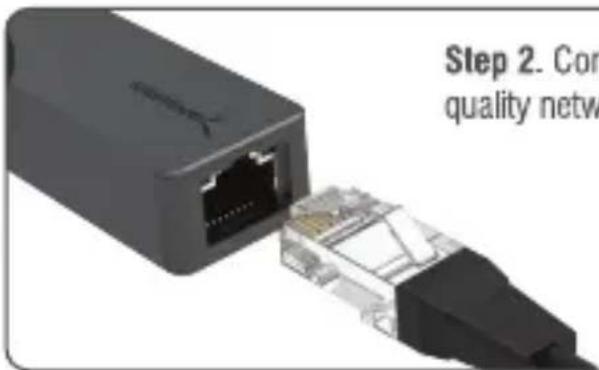
Step 2. Connect a CAT5e or better, quality network cable into the RJ-45 port.
Step 3. The adapter should work as plug and play. If your host operating system or UEFI requires a driver for the adapter, it may be downloaded from Realtek's website (https://www.realtek.com/en/downloads).
Step 3b. The driver is listed on Realtek's website under USB 2.5GbE as RTL8156 / RTL8156B with driver support for Windows, macOS, UEFI, and Linux. After downloading the appropriate version, proceed through the installation process and click "Finish." You may then start using your device.
Step 3c. Optionally, download Realtek's Dragon Intelligent Bandwidth Control Software for additional features from Sabrent.com. These additional features include bandwidth management and traffic prioritization.
FREQUENTLY ASKED QUESTIONS
Q. Do I have to do anything special to get this adapter to work?
A. Your operating system should automatically provide working drivers for the adapter and updates will be pushed as necessary. This adapter uses the Realtek 8156BG network adapter chipset which fixes the problems associated with earlier revisions. It is, however, possible to get drivers for the chipset (RTL8156 / RTL8156B) from Realtek if necessary.
Q. Does this adapter have any additional features?
A. This adapter supports the Realtek Dragon Intelligent Bandwidth Control Software (Realtek Dragon Utility or "Dragon Feature"). Please review Realtek's guide for proper use of this software. The software allows for intelligent management of system bandwidth through the prioritization of specific applications and the monitoring of network traffic characteristics.
Q. How do I improve VPN performance?
A. Please make sure you have the newest driver version installed. If you are using IKEv2 and still have performance issues, please set receiver buffers to 128 and receive URBs (USB Request Blocks) to 64, then transmit buffers to 64 and transmit URBs to 32. This should optimize the connection.
Q. What's the actual maximum transfer rate of the adapter?
A. Performance is given in bits, so 2.5Gbps equates to a theoretical maximum of 312.5MBps. Actual transfer speeds will depend on your host and network hardware, overhead, and the type of transfer.
SABRENT
FOR HELP, COMMENTS, QUESTIONS OR CONCERNS PLEASE CONTACT OUR TECH SUPPORT TEAM VIA OUR WEBSITE
WWW.SABRENT.COM

Brand : Sabrent
Model : NT-25GA
Category : Network card / adapter