
CA-HM-ALFA.001S - Car kit PIONEER - Free user manual and instructions
Find the device manual for free CA-HM-ALFA.001S PIONEER in PDF.


| Product Type | Car Audio Installation Kit |
| Brand | Pioneer |
| Model | CA-HM-ALFA.001S |
| Compatible Vehicles | Alfa Romeo models (2005-2015) |
| Dimensions (W x H x D) | 10 x 5 x 2 in (25.4 x 12.7 x 5.1 cm) |
| Weight | 1.2 lbs (0.55 kg) |
| Power Supply | 12V DC (vehicle electrical system) |
| Connectors Included | ISO, antenna adapter, speaker connectors |
| Mounting Brackets | DIN and double-DIN compatible |
| Wiring Harness | Color-coded, length: 4 ft (1.2 m) |
| Functions | Enables aftermarket head unit installation, steering wheel control retention (if equipped) |
| Material | ABS plastic, steel brackets |
| Color | Black |
| Operating Temperature | -20°C to 60°C |
| Certifications | CE, RoHS |
| Maintenance & Care | Clean with a soft, dry cloth; avoid moisture and solvents |
| Safety Instructions | Disconnect car battery before installation; follow wiring diagram; avoid short circuits |
| Spare Parts Availability | Not available separately; contact Pioneer support for replacements |
| Reparability | Not user-serviceable; professional installation recommended |
| Package Contents | Mounting brackets, wiring harness, antenna adapter, screws, instruction manual |
Frequently Asked Questions - CA-HM-ALFA.001S PIONEER
User questions about CA-HM-ALFA.001S PIONEER
0 question about this device. Answer the ones you know or ask your own.
Ask a new question about this device
Download the instructions for your Car kit in PDF format for free! Find your manual CA-HM-ALFA.001S - PIONEER and take your electronic device back in hand. On this page are published all the documents necessary for the use of your device. CA-HM-ALFA.001S by PIONEER.
USER MANUAL CA-HM-ALFA.001S PIONEER
ALFA ROMEO GIULIETTA (Compatible with double DIN devices)
Installation Manual Double DIN Kit
- Unclip the trim frame surrounding the OEM headunit and remove it by pulling it in your direction.

natural_image
Interior view of a car dashboard and infotainment system (no visible text or symbols)- Remove the OEM Radio
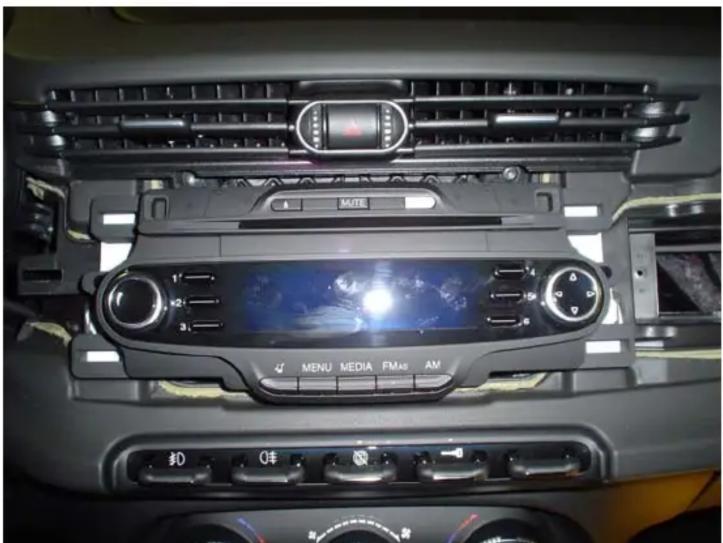
natural_image
Interior view of a car dashboard with air conditioner, navigation controls, and a digital display (no readable text or symbols)- Cut the plastic frame and remove it, see the picture below:
Picture A (before cut the plastic frame)
Picture B (after cut the plastic frame)
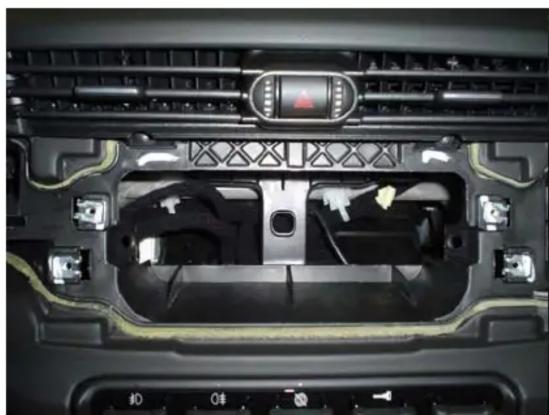
natural_image
Interior view of a car dashboard with visible air vent, buttons, and ventilation grilles (no text or symbols)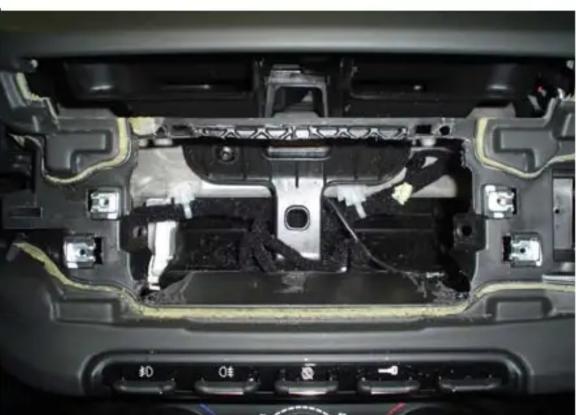
natural_image
Interior view of a car showing internal components and wiring (no visible text or symbols)- Put the mounting brackets on the Double DIN Radio and fix it with the supplied screws
Place the Double-DIN Radio and fix in the car with the radio frame

natural_image
Interior view of a car dashboard and infotainment system (no visible text or symbols)


Brand : PIONEER
Model : CA-HM-ALFA.001S
Category : Car kit