
5283423 - Scale Taylor - Free user manual and instructions
Find the device manual for free 5283423 Taylor in PDF.


| Product Type | Digital Scale |
| Brand | Taylor |
| Model Number | 5283423 |
| Maximum Capacity | 500 lb / 226.7 kg / 35 st 10 lb |
| Weight Increments | 0.1 lb / 0.05 kg |
| Units of Measurement | Pounds (lb), Kilograms (kg), Stones (st) |
| Power Source | 3 AAA batteries (included) |
| Battery Type | Alkaline (recommended) |
| Display Type | Digital LCD |
| Auto-Off | Yes |
| Low Battery Indicator | Displays "Lo" |
| Overload Protection | Displays "Err" if capacity exceeded |
| Warranty | 5-Year Limited Warranty |
| FCC Compliance | Part 15 Class B |
| Recommended Use | Household, not legal for trade |
| Platform Material | Tempered glass (typical) |
| Cleaning | Soft damp cloth, mild soap |
| Storage Conditions | Cool, dry place; avoid cleaning chemicals |
| Country of Origin | China |
| Bottom Button Function | Unit selection (lb/kg/st) |
Frequently Asked Questions - 5283423 Taylor
User questions about 5283423 Taylor
0 question about this device. Answer the ones you know or ask your own.
Ask a new question about this device
Download the instructions for your Scale in PDF format for free! Find your manual 5283423 - Taylor and take your electronic device back in hand. On this page are published all the documents necessary for the use of your device. 5283423 by Taylor.
USER MANUAL 5283423 Taylor
Party issuing Supplier's Declaration of Conformity &
Responsible party – U.S. Contact information:
Taylor division of Lifetime Brands Inc.
2311 W. 22nd Street, Suite 200
2011 W. 22nd Street Oak Brook, IL 60523
Equipment:
Product Name: Digital Scale
Model No. 5283/23
Model No.: 5265425 Trade Name: Taylor
Trade Name: Taylor
We declare under our sole responsibility that the above referenced product has been tested according to FCC requirements and this device complies with part 15 of the FCC Rules. Operation is subject to the following two conditions: (1) this device may not cause harmful interference, and (2) this device must accept any interference received, including interference that may cause undesired operation.
Caution: Changes or modifications not expressly approved by the party responsible for compliance could void the user's authority to operate the equipment.
Note: This equipment has been tested and found to comply with the limits for a Class B digital device, pursuant to part 15 of the FCC rules. These limits are designed to provide reasonable protection against harmful interference in a residential installation. This equipment generates, uses and can radiate radio frequency energy and, if not installed and used in accordance with the instructions, may cause harmful interference to radio communications. However, there is no guarantee that interference will not occur in a particular installation. If this equipment does cause harmful interference to radio or television reception, which can be determined by turning the equipment off and on, the user is encouraged to try to correct the interference by one or more of the following measures:
- Reorient or relocate the receiving antenna.
- Increase the separation between the equipment and receiver.
- Connect the equipment into an outlet on a circuit different from that to which the receiver is connected.
- Consult the dealer or an experienced radio/TV technician for help.
Five (5) Year Limited Warranty
This scale is warranted against defects in materials of workmanship (excluding batteries) for five (5) years for the original purchaser from date of retail purchase. It does not cover damages or wear resulting from accident, misuse, abuse, commercial use, or unauthorized adjustment and/or repair. Do not return to retailer. For product support & warranty information: Please contact us with proof of purchase (purchase receipt) at:
TAYLOR
2220 Entrada Del Sol, Suite A
Las Cruces, New Mexico 88001 USA
Phone: 1-866-843-3905
Email: taylorusa@lifetimebrands.com
There are no express warranties except as listed above. This warranty gives you specific legal rights, and you may have other rights which vary from state to state.
For additional product information, or warranty information outside the USA, please contact us through www.taylorusa.com.
© 2021 Taylor division of Lifetime Brands Inc. All rights reserved.
Made to our exact specifications in China.
Not legal for trade.
CP5283423 6.21 WC
REF# 5283423 / 5285990
Model # 5283423
TAYLOR®
Digital Scale
INSTRUCTIONS FOR USE & WARRANTY INFORMATION
CUSTOMER SERVICE INFORMATION PLEASE READ!
For questions regarding this product, please contact us at:
TAYLOR, a division of Lifetime Brands, Inc.
2220 Entrada Del Sol, Suite A | Las Cruces, New Mexico 88001 USA
1-866-843-3905 | www.taylorusa.com
Email: taylorusa@lifetimebrands.com
We value your thoughts on our product and services. Please post an on-line review to help us continue to meet your needs and expectations.
Please contact us before returning to retailer.
When Initially Setting Up Your Scale
- Place your scale on a hard, flat surface, do not use on uneven tile, flooring or carpeting. Try to keep your scale in the same location or position as much as possible.
- Step on the scale with one foot applying enough pressure to turn the scale on - then remove your foot.
- The digital readout should show dashes or zeros.
- The scale will automatically turn off.
- Now your scale is ready for you to take a weight reading. Step on the scale evenly with both feet. NOTE: If you've weighed yourself and a "C" is displayed after the zero, weigh yourself again for a more accurate reading. Your weight cannot be locked-in if you do not stand still.
- If you pick up, move or bump your scale, please repeat the steps above for best accuracy.
2311 W. 22nd Street, Suite 200
Oak Brook, IL 60523
Equipo:
- Place your feet in the same position every time you weigh yourself. Stand still during measurement.
- Weigh yourself without clothing whenever possible. Clothes can vary in weight.
- Move the scale to a location where it won't be bumped. If your scale is bumped while being activated or while in use, an inaccurate reading may occur.
- For the most consistent readings, weigh yourself at the same time of day. Allow for weight fluctuations due to food or drink in your system.
Preparation Before Use
INSERT THE BATTERIES
- Use 3 AAA batteries (included. Remove any plastic wrap from the batteries before proceeding). Always replace all batteries at the same time; do not combine old and new batteries. Do not mix Alkaline, carbon-zinc (standard) or Nickel-Cadmium (rechargeable) batteries.
- Open the battery compartment on the bottom of the scale.
- Place the new batteries into the battery compartment according to the "+" and "-" polarity symbols at the bottom of the compartment.
- Replace the battery compartment cover.
WEIGHT UNIT SETTING
- Your scale is set at the factory to weigh in pounds (lb).
- You may select kilograms or stone (st lb) (1 stone = 14 pounds) units of measurement by pressing the button on the bottom of the scale while the scale is on. (Press lightly on the platform to turn the scale on.)
- Some models have a static cling label on the LCD lens to prevent scratching. Remove before use.
SET THE SCALE IN THE RIGHT POSITION
• Always use the scale on a flat and hard floor surface. Do not use on carpets.

START-UP THE SCALE
ress firmly once on the scale platform to start-up the scale. The display shows "0.0" and then turns off. The scale is ready for use.
Note: If you move the scale at all, please repeat the steps above for best accuracy.

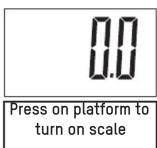

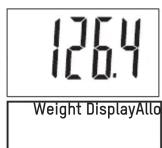
• The scale will turn off automatically.
Battery Warnings!
• Always purchase the correct size and grade of battery most suitable for the intended use.
• NOTE: Please recycle or dispose of batteries per local regulations.
- WARNING: Batteries may pose a choking hazard. As with all small items, do not let children handle batteries. If swallowed, seek medical attention immediately.
• PRECAUTION: Do not dispose of batteries in fire. Batteries may explode or leak.
- Remove the batteries if the product will not be used for a long period of time. Remove used batteries promptly.
- Clean the battery contacts and also those of the device prior to battery installation.
• Always replace all batteries at the same time; do not mix old and new batteries. Do not mix alkaline, standard (carbon-zinc) or rechargeable (ni-cad, ni-mh, etc.) batteries.
- When batteries of different brand or type are used together, or new and old batteries are used together, some batteries may be over-discharged due to a difference of voltage or capacity. This can result in venting, leakage, and rupture and may cause personal injury.
Error Icons

This scale has a low battery indicator. It will display "Lo" or readings will grow dim or become irregular if the batteries need replacement.
"Err" indicates an overload warning. ThThe maximum capacity of this scale is 500 lbs/226.7kgs/35st 10 lbs. Should "Err" appear on the display during a weighing, this indicates that the maximum weighing capacity of the scale has been exceeded. Remove the weight immediately; otherwise, permanent damage may occur.
Precautions
- Clean exposed parts with a soft, slightly damp cloth. To remove stains, use a mild soap. Never use detergents, excess water, treated cloths, harsh cleaning agents, or sprays. Do not attempt to lubricate or open scale casing as this will void your warranty.
- Although your scale is designed to be maintenance-free, it contains sensitive electronic parts. Avoid rough treatment. Do not drop, kick, or jump on it. Treat it with care to ensure the best performance.
- This scale is designed to read weights between 9 and 500lbs / 4.5 and 226.7kgs / 9lbs and 35st10lbs . To prevent damage, do not place more than 500lbs / 226.7kgs / 35st10lbs on it.
- Do not store scale where you store cleaning chemicals. The vapors from some household products may affect the electronic components of your scale. Do not store scale on its side.
- This scale is an extremely sensitive weighing device. In order to prevent run down of the batteries, do not store anything on the scale.
- Five (5) Year Limited Warranty
- Digital Scale
- INSTRUCTIONS FOR USE & WARRANTY INFORMATION
- CUSTOMER SERVICE INFORMATION PLEASE READ!
- When Initially Setting Up Your Scale
- Preparation Before Use
- INSERT THE BATTERIES
- WEIGHT UNIT SETTING
- SET THE SCALE IN THE RIGHT POSITION
- START-UP THE SCALE
- Battery Warnings!
- Error Icons
- Precautions
Brand : Taylor
Model : 5283423
Category : Scale