T24021 - Microwaves Tower - Free user manual and instructions
Find the device manual for free T24021 Tower in PDF.


| Product Type | Microwave Oven |
| Brand | Tower |
| Model | T24021 |
| Capacity | 25 Liters |
| Power Output | 900 Watts |
| Power Levels | 10 Levels |
| Dimensions (W x D x H) | 480 mm x 350 mm x 280 mm |
| Weight | 12 kg |
| Voltage | 230 V |
| Frequency | 50 Hz |
| Functions | Defrost, Auto Cook, Quick Start, Timer, Turntable On/Off |
| Turntable Diameter | 270 mm |
| Display | LED Digital Display |
| Interior Light | Yes |
| Door Type | Side Opening with Safety Interlock |
| Child Lock | Yes |
| Cleaning | Wipe interior with damp cloth; use mild detergent |
| Safety Features | Auto Shut-off, Door Safety Switch |
| Included Accessories | Glass Turntable, Rotating Ring, User Manual |
Frequently Asked Questions - T24021 Tower
User questions about T24021 Tower
0 question about this device. Answer the ones you know or ask your own.
Ask a new question about this device
Download the instructions for your Microwaves in PDF format for free! Find your manual T24021 - Tower and take your electronic device back in hand. On this page are published all the documents necessary for the use of your device. T24021 by Tower.
USER MANUAL T24021 Tower
over 100 YEARS of quality
T24021 / T24021W / T24021PS
800W Microwave Oven
3 ^*
YEAR
GUARANTEE
GREAT BRITISH
DESIGN SINCE 1912
SAFETY AND INSTRUCTION MANUAL
PLEASE READ CAREFULLY
*Subject to registering your Extended Guarantee online at www.towerhousewares.co.uk.
Towerbrand
GREAT BRITISH DESIGN, INNOVATION AND EXCELLENCE SINCE 1912
Since the turn of the 20th century, Tower has been designing, developing and manufacturing housewares and small appliances used by millions of households throughout the UK and beyond. During the 1960s, the rise in popularity of pressure cooking saw Tower become the UK's largest producer of pressure cookers, right through into the late 1980s. In recent years the Tower brand has been reborn with an exciting and varied range of housewares and electrical appliances that have quickly reinstated the brand's richly deserved status as a household name.
TOWER
Visit
www.towerhousewares.co.uk
for more fantastic products.
Contents:
Thank you for purchasing this appliance from the Tower range.
Please read this manual carefully BEFORE using the appliance for your own safety.
It has been designed to provide many years of trouble-free use.
There are many benefits to using a Tower Microwave:
- With a large 20 litre capacity you can cook quick and easy meals for the whole family.
- The manual 60 minute timer allows for easy time control and adjustments.
-
6 power levels including a defrost setting, simply adjusted to suit a variety of functions.
-
Specifications
Components and structure -
Technical Data
-
Important Safety Information
-
Before First Use
-
Using your Appliance
-
Troubleshooting
-
Recycling
-
Cleaning & Care
-
Wiring Safety
-
Warranty Information
-
Your Receipt
See back page for Customer Service Information.
1 - Specifications:
This box contains: Instruction Manual Microwave Oven Roller Ring Glass Tray
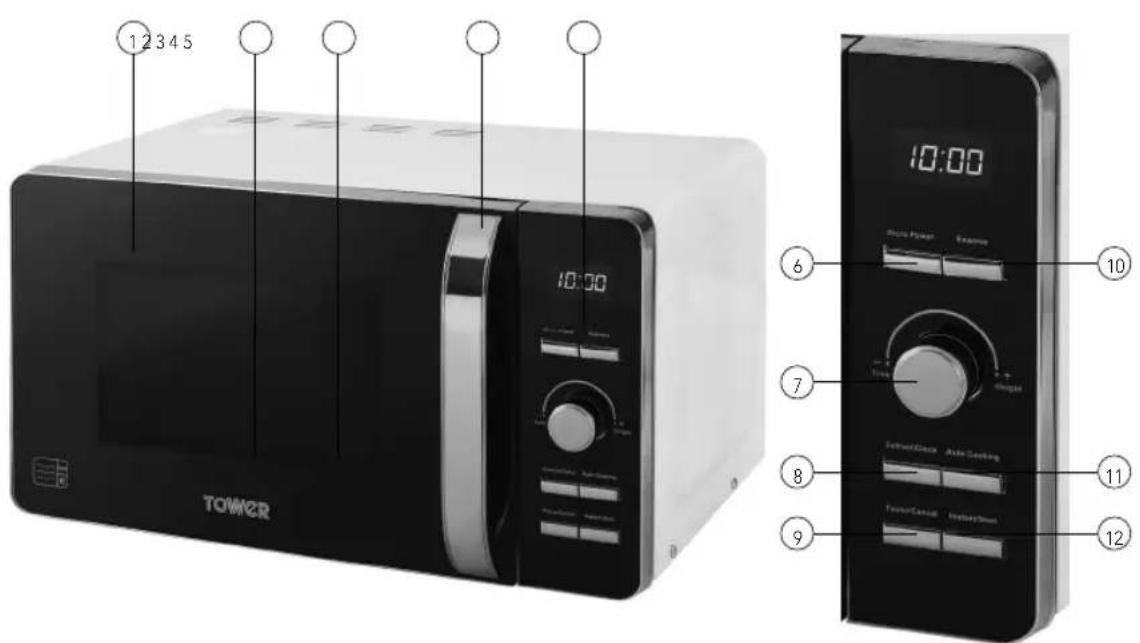
Structure of your appliance:
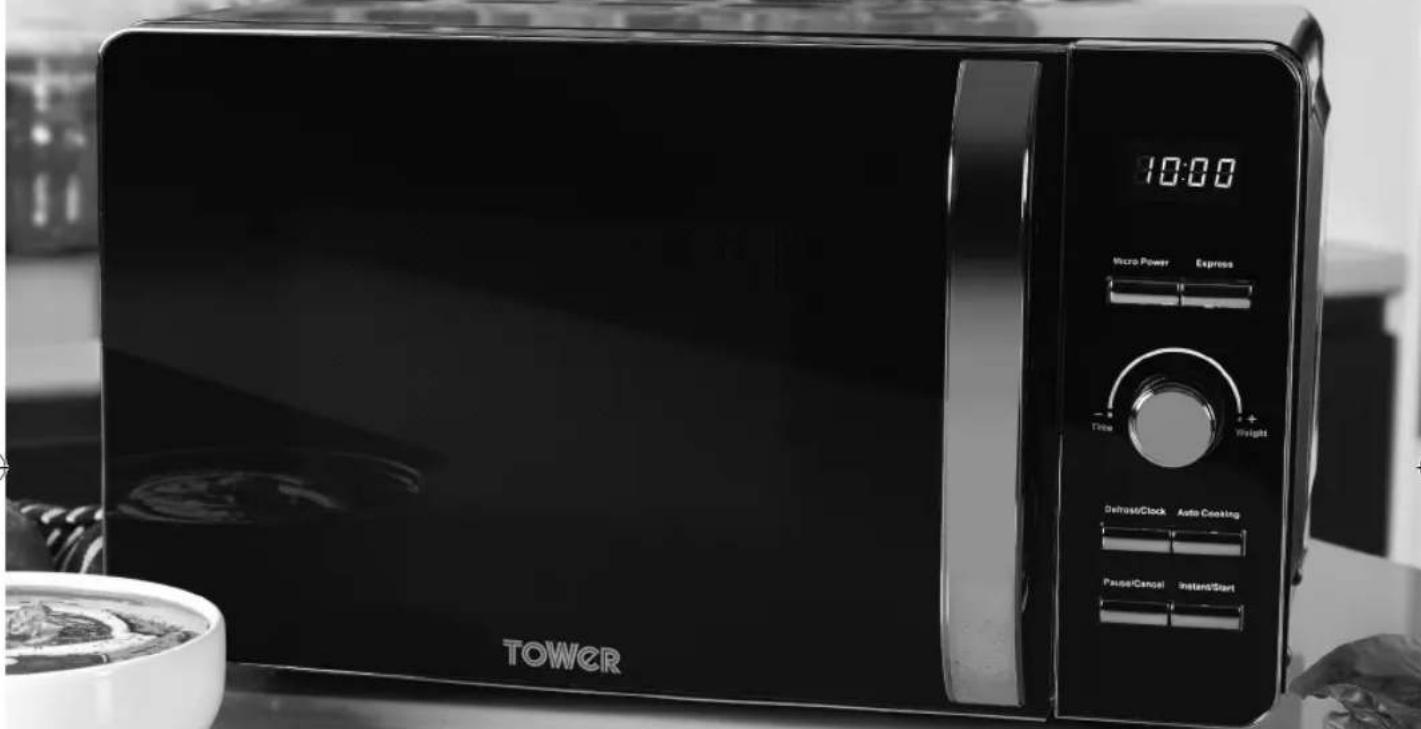
- Oven Window
- Roller Ring (inside)
- Glass Tray (inside)
-
Door Handle
-
Control Panel
- Power Button
- Timer/Weight Dial
-
Defrost/Time Button
-
Pause/Cancel Button
- Express Button
- Auto Cook Button
- Instant/Start Button
2 - Technical Data:
Description: 20L Digital Microwave
Model: T24021/T24021W/T24021PS
Rated Voltage: 220-240v
Frequency: 50Hz
Power Input: 1280W
Power Output: 800W
Documentation
We declare that this product conforms to the following product legislation in accordance with the following directive(s):
2014/30/EU Electromagnetic Compatibility Directive.
2014/35/EU Low Voltage Directive.
2011/65/EU Restriction of Hazardous Substances Directive.
1935/2004/EC Materials & Articles in Contact With Food (LFGB section 30 & 31).
2009/125/EC Eco-Design of Energy Related Products.
RK Wholesale LTD Quality Assurance, United Kingdom.
| SPARE PARTS(not included, available to order via website/customer service should you require replacements) | |
| Part No | Description |
| T24012001 | Wave Guide Cover |
| T24012002 | Roller Ring |
| T24012003 | Glass Turntable |
| T24001001 | Wave Guide Cover |
| T24001002 | Roller Ring |
| T24001003 | Glass Turntable |
Should you encounter problems or require a replacement part, contact the Tower Customer Support Team: +44 (0) 333 220 6066.
Some spare parts may be ordered from the Tower website.
Your warranty becomes void should you decide to use non Tower spare parts.
Spare parts can be purchased from www.towerhousewares.co.uk
Guarantee for spare parts:
The spares and accessories are guaranteed for 1 year from date of purchase.
The main body and housing are guaranteed for the extended free warranty subject to registration.
If any defect arises due to faulty materials of workmanship, the faulty products must be returned to the place of purchase within 12 months from the date of purchase.
Refund or replacement is at the discretion of the retailer.
3 - Important Safety Information:
Please read these notes carefully BEFORE using your Tower appliance
- Check that the voltage of the main circuit corresponds with the rating of the appliance before operating.
- If the supply cord or appliance is damaged, stop using the appliance immediately and seek advice from the manufacturer, its service agent or a similarly qualified person.
• DO NOT let the cord hang over the edge of a table or counter or let it come into contact with any hot surfaces.
• DO NOT carry the appliance by the power cord.
• DO NOT use any extension cord with this appliance.
• DO NOT pull the plug out by the cord as this may damage the plug and/or the cable.
- Switch off at the wall socket then remove the plug from the socket when not in use or before cleaning.
- Switch off and unplug before fitting or removing tools/attachments, after use and before cleaning.
- Close supervision is necessary when any appliance is used by or near children.
• Children should not play with the appliance.
- This appliance can be used by children aged from 8 years and above and persons with reduced physical, sensory or mental capabilities or lack of experience and knowledge if they have been given supervision or instruction concerning use of the appliance in a safe way and understand the hazards involved.
• Cleaning and user maintenance should not be undertaken by children without supervision.
• Take care when any appliance is used near pets
• DO NOT use this product for anything other than its intended use.
• This appliance is for household use only.
CAUTIONS
- DO NOT operate the microwave with the door open, due to the safety interlocks built into the door mechanism. It is important not to tamper with the safety interlocks (safety interlocks automatically switch off any cooking activity when the door is opened). This could result in harmful exposure to excessive microwave energy.
- DO NOT place any object (such as kitchen towels, napkins, etc.) between the microwave front face and the door or allow food or cleaner residue to accumulate on sealing surfaces.
- DO NOT operate the microwave if it is damaged. It is particularly important that the microwave door closes properly and that there is no damage to the: Door Hinges and latches. Door seals and sealing surfaces.
- Please ensure cooking times are correctly set. Small amounts of food require shorter cooking or heating time. Over cooking may result in the food catching on fire and subsequent damage to the microwave.
- When heating liquids, e.g. soups, sauces and beverages in your microwave, avoid using straight sided containers with narrow necks. Stir the liquid before placing the container in the microwave and again halfway through the heating time. After heating, let it stand, stir or shake it again carefully and check the temperature of it before consuming to avoid burns (especially, contents of feeding bottles and baby food jars).
- An exhaust outlet is located on the top, bottom or side of the microwave. Don't block the outlet. It could result in damage to your microwave and poor cooking results.
- DO NOT operate the microwave when empty. It is best to leave a glass of water in the microwave when not in use. The water will safely absorb all microwave energy if the microwave is accidentally started.
- Improper use could result in damage to the microwave.
- DO NOT use wooden containers and ceramic containers that have metallic (e.g. gold or silver) inlays. Always remove metal twist ties. Check that the utensils are suitable for use in the microwave before use. They may heat up and char. Metal objects in particular may arc in the microwave, which can cause serious damage.
• DO NOT rinse the glass tray by placing it in water just after cooking. This may cause breakage or damage.
- Before cooking pierce the skin of potatoes, apples or any such fruit or vegetables. They could burst.
• DO NOT cook eggs in their shell. Eggs in their shell and whole hard-boiled eggs should not be heated in the microwave since they may explode, even after microwave heating has ended. Pressure will
build up inside the egg which will burst.
• DO NOT attempt deep fat frying in your microwave. This could result in a sudden boil over of hot liquid.
- If smoke is observed, switch off or disconnect the microwave from the power supply and keep the microwave door closed in order to stifle any flames. It can cause serious damage such as fire or electric shock.
- When food is heated or cooked in disposable containers made of plastic, paper or other combustible materials keep an eye on the microwave and check it frequently.
- The microwave should be cleaned regularly and any food deposits should be removed. Failure to maintain the microwave in a clean condition could lead to deterioration of the surface. This could adversely affect the life of the appliance and possibly result in a hazardous situation.
- Follow exact directions given by each manufacturer for their popcorn product. DO NOT leave the oven unattended while corn is being popped. If corn fails to pop after the suggested times, discontinue cooking. Never use a brown paper bag for popping corn. Never attempt to pop leftover kernels. Overcooking could result in the corn catching fire.
• DO NOT use harsh abrasives cleaners or sharp metal scrapers to clean the microwave door glass. They can scratch the surface, which may result in the glass shattering.
• After cooking, the container is very hot. Use gloves to take out the food and avoid steam burns by directing steam away from the face and hands.
• This appliance is intended to be used in household and similar applications such as:
- Staff kitchen areas in shops. Offices and other working environments.
- Farm houses.
- By clients in hotels, motels and other residential environments, bed & breakfast type environments.
- The microwave oven is intended for heating food and beverages. Drying of food or clothing and heating of warming pads, slippers, sponges, damp cloth and similar may lead to risk of injury, ignition or fire.
- The door or outer surface may get hot when the appliance is operating
- In the unlikely event the appliance develops a fault, stop using it immediately and seek advice from the Customer Support Team: +44 (0) 333 220 6066
4 - Before First Use
• Take out all of the packaging. If there is a safe film over the oven, tear it off before use. Check carefully for damage. Should you find any, immediately notify your dealer or contact our Customer Service Team.
- Microwave ovens must be placed under dry and non-corrosive environments and kept away from heat and humidity sources, such as gas burners or water tanks.
• To ensure sufficient ventilation, the distance from the back of the microwave to the wall should be at least 10 cm, the distance from the side of the microwave to the wall at least 5 cm and the free distance above the top surface at least 20 cm. The distance from the microwave to the ground should be at least 85 cm.
• The microwave should be positioned away from TVs, radios and other antennae, as this may cause interference or disturbance in the signal.
- The appliance must be positioned so that the plug is accessible, and has a good grounding in case of leakage. A ground loop can be formed to avoid electric shock.
• The microwave oven must be operated with the door closed.
- The microwave oven must not be placed in a cabinet.
- The microwave oven is intended to be used free-standing.
- During first use, the microwave oven may omit an odour and a slight amount of smoke. This is due to manufacturing residue or oil on the heating element or oven cavity. This is normal and should not occur after several uses. Keep doors and windows open when first using the microwave to ensure good ventilation. We recommend placing a cup of water on the glass tray and operating the microwave oven several times on the highest setting to help clean the microwave of residue.
5 - Using Your Appliance
Child Lock Function
Use this feature to lock the control panel when you are cleaning or so that children cannot use the oven unsupervised. All the buttons are rendered inoperable in this mode.
- Set lock: Long-press the Pause/Cancel button for about 5 seconds when the microwave is in standby.
- Cancel lock: Long-press the Pause/Cancel button again while the lock is activated.
Setting the Clock:
- To set the correct time on the unit's built-in clock, first press and hold the Defrost/Time button for about 5 seconds, until the Hours digits on the unit's LCD screen begin to flash.
- Once the hours are highlighted and flashing, rotate the Timer/Weight dial to cycle through and set the correct hours.
- When the correct hour has been set, short-press the Defrost/Time button again. The minutes digits will begin to flash.
- Once the minutes are highlighted and flashing, rotate the Timer/Weight dial to cycle through and set the correct minutes.
- When both times have been correctly set, short-press the Defrost/Time button again to save the settings to memory.
Timer:
The maximum cooking time is 60 minutes.
Use the Time/Weight dial to adjust the cooking time after setting the microwave power.
Express Mode:
- This microwave is equipped with an Express function, which allows for heating cycles of between 0:30 and 1:30, making it ideal for re-heating beverages or small food portions.
- Press the Express button on the unit's control panel to activate the Express function. The text '0:30' will show on the unit's LCD display to indicate this function has been selected.
- Once the Express function has been activated, repeatedly press the Express button to cycle through the 3 heating length options. The corresponding text will show on the unit's LCD display to indicate each length has been selected.
- Press the Pause/Cancel button at any time to exit Express mode and return the unit to Standby mode. The LCD display will revert back to displaying the current set time on the clock to show this function has been cancelled.
Power Levels:
- This microwave is equipped with 6 power levels including a defrost setting.
- Press the Micro Power button to activate the power level selection function. Once this function has been activated, repeatedly press the Micro Power button to cycle through the available power levels. The corresponding text will appear on the unit's LCD screen to show each power level has been activated.
The available power levels are as follows:
- High - 100% power, suitable for quick and thorough cooking. When this power level is selected, the text '100P' will be displayed on the unit's LCD screen.
Medium High - 80% power, suitable for express cooking. When this power level is selected, the text '80P' will be displayed on the unit's LCD screen.
• Medium - 60% power, suitable for steaming food. When this power level is selected, the text '60P' will be displayed on the unit's LCD screen.
• Medium Low - 40% power, suitable for defrosting. When this power level is selected, the text '40P' will be displayed on the unit's LCD screen. - Low - 20% power, suitable for keeping warm. When this power level is selected, the text '20P' will be displayed on the unit's LCD screen.
Stop/Cancel:
The Stop/Cancel button can be used to pause and/or cancel the current operation.
- Press the Stop/Cancel button or open the microwave door during cooking to pause the current operation.
- Close the door and press Start/Quick Start to resume.
- Press Stop/Cancel twice to cancel the current operation.
Auto Defrost:
The microwave has an Auto Defrost setting for defrosting meat, poultry and seafood. The time and defrosting power are adjusted automatically once the weight of the food has been entered.
• The weight range of frozen foods is between 100g and 1800g.
- Press the Auto Defrost button once.
- Use the Time/Weight dial to select the required weight.
- Press Start/Quick Start once.
Note: During Auto Defrost, the microwave will pause and beep to prompt you to turn over the food inside.
Quick Start:
The Quick Start feature allows you to begin cooking quickly. In standby mode, repeatedly press the Start/Quick Start button to set the cooking time. Once you have set the time, the microwave will begin cooking on full power. The maximum cooking time in Quick Start mode is 12 minutes.
During cooking, use the Time/Weight dial to increase or decrease the current cooking time.
Auto Cook:
With the Auto Cook function you do not need to program the microwave power or set the timer.
You are only required to select the type and weight of the food.
To use Auto Cook:
- Press the Auto Cook button repeatedly until you have reached the corresponding menu code.
- Turn the Time/Weight dial to the required weight.
- Press the Start/Quick Start button.
Auto Cook Menu:
It is always recommended to check your food during cooking. If the cooking result is not to your taste, please adjust the cooking time accordingly.
Menu Code / Food
- Milk/Coffee (200ml/cup)
- Rice (g)
- Spaghetti (g)
- Potatoes (230g/unit)
- Auto Reheat (g)
- Fish (g)
- Popcorn (99g)
- Pizza (g)
Note: Turn the Time/Weight dial to indicate weight of food or number of servings. For milk/coffee and potato, the screen will show the number of servings.
The result of auto cooking depends on factors such as the shape and size of food, your personal preference as to the doneness of certain foods and even how well you happen to place food in the oven.
For spaghetti add boiling water before cooking.
During cooking, you can query the current cooking menu by pressing the Auto Cook button.
Utensils guideline:
It is strongly recommended to only use containers which are suitable and safe for microwave cooking. Generally speaking, containers made of heat-resistant ceramic, glass or plastic are suitable for microwave cooking. Never use metal containers for microwave cooking and combination cooking as sparks are likely to occur and there is a risk of fire or injury. When cooking microwave meals, always check the packaging to see which parts are microwave safe. Use the below table as reference:
| Material | Microwave Safe | Notes |
| Heat resistant ceramic | Yes | Never use ceramics that are decorated with a metal rim or glazed. |
| Heat resistant plastic | Yes | Cannot be used for extended periods of time when microwave cooking. |
| Heat resistant glass | Yes | |
| Plastic film Yes | Not to be used when cooking meat or chops as, the high temperature may damage the film. | |
| Grill rack No | ||
| Metal container No | Never to be used in the microwave. Microwaves cannot penetrate through metal. Microwaving with a metal container can result in fire. | |
| Lacquer No | Poor heat resistance. Cannot be used for high temperature cooking | |
| Bamboo wood and paper | No | Poor heat resistance. Cannot be used for high temperature cooking |
| Cling film Yes | Cling film can be used as long as it is pierced to let steam escape, and it not touching the food. |
CAUTION:
There are a number of accessories available on the market. Before you buy, make sure they are suitable for microwave use. When you put food into the microwave, ensure that the food supports and/or covering do not come in direct contact with any of the internal walls or the ceiling of the cavity since discolouration may take place.
Some plastics are heat-proof only up to certain temperatures. Check carefully!
Always remove the lids of jars and containers, including take away food containers, before you cook using your microwave. If you don't remove the lids, steam and pressure can build up inside and cause an explosion even after microwave cooking has stopped.
Do not use straight sided containers with narrow necks when heating liquid. Use extreme care when inserting a spoon or other utensils into the container.
Cooking tips:
The following factors may affect the cooking result:
Food arrangement:
Place thicker areas towards the outside of the dish with the thinner parts towards the centre. Spread it evenly and avoid overlap if possible.
Cooking time length:
Begin cooking on a shorter time setting and evaluate the food after it times out. Extend the time as necessary. Over cooking may result in burnt food and smoke.
Piercing:
Food such as potatoes, fish, chicken and sausages all need to be pierced in several places before cooking, so that steam does not build up and cause the food to explode.
Cooking food evenly:
Food such as chicken, burgers or steak should be turned once during cooking. Depending on the type of food, if applicable, stir from outside to the centre of the dish once or twice during cooking.
Allow standing time:
Once the cooking time has finished, allow food to stand in the microwave for a few minutes. This allows the food to complete its cooking cycle and to cool down naturally.
If the food is cooked fully:
The colour and firmness of food help to determine whether it done. The following signs show that the food is ready:
- Steam coming out from all parts of the food, not just the edge
- Joints of poultry can be moved easily
- Pork or poultry show no signs of blood
- Fish is opaque and can be sliced easily with a fork
Browning dish:
When using a browning dish or self-heating container, always place a heat-resistant insulator, such as a porcelain plate, under it to prevent damage to the turntable and rotating ring.
Microwave safe plastic wrap:
When cooking food with high fat content, do not allow the plastic wrap to come into contact with food as it may melt.
Microwave safe plastic cookware:
Some microwave safe plastic cookware might not be suitable for cooking foods with high fat and sugar content. The preheating time specified in the dish instruction manual must not be exceeded.
CAUTION:
- Food should be turned over partway through the cooking process to ensure even cooking.
- Defrosting will typically take longer than cooking.
• Defrosting can be considered complete when the food can be cut with a knife. - Microwaves penetrate around 4cm into most foods.
- Defrosted food should be consumed as soon as possible; it is not advisable to put it back into the refrigerator. DO NOT refreeze food that has been previously defrosted.
6 - Troubleshooting
| Questions Answers | |
| Is it normal for the glass tray to turn in either direction? | Yes. The glass tray can rotate clockwise or anti-clockwise, depending on the rotation of the motor when the cooking cycle starts. |
| Can I operate my microwave whilst it is empty? | No, never run it empty or with a very small load for a long period of time, as this will damage the microwave. |
| Can I open the door whilst the microwave is running? | You can open the door at any point during cooking.The microwave energy will automatically switch off when the door is opened, and the time setting will pause until the door is closed. |
| Why is my microwave sparking? | If you see sparks in your microwave, turn it off immediately.Sparks can be caused by:metal or aluminium foil that touches the interior of the microwave, metal from a closing strip or tableware with metallic edges, recycled paper that contains small metal particles and aluminium foil that is not correctly covering the food.Remove anything from the microwave that may contain metal. Refer to the Utensils Guideline in this manual for reference of what containers are microwave safe. |
| I am trying to cook eggs and they are popping. What do I do? | When you bake or poach eggs, the yolk can pop due to a build-up of steam inside the yolk membrane. Pierce the yolk with a toothpick before cooking. Never cook eggs without first piercing their shells. |
| My microwave is taking longer to cook food than the cooking guide says. | Variations in the size, shape and weight of your food can affect cooking times.Cooking guide times and heat settings should be used as suggestions to help prevent over-cooking. If you find the cooking time or temperature is not suited to your ingredients, adjust accordingly. |
| Can I operate my microwave without the glass tray? | No. If you remove the glass tray you will get poor cooking results. Ensure that all dishes used in the microwave fit correctly on to the glass tray. |
| What does standing time mean and why is it recommended? | Standing time means that food should be removed from the microwave and allowed to 'stand' for an additional time to let it finish cooking.This is important because with microwave cooking, the heat is held in the food, not in the oven. Many foods build up enough internal heat to allow the cooking process to continue, even after the food is removed from the oven. Standing time for joints of meat, large vegetables and cakes is to allow the inside to cook completely, without overcooking the outside.Most directions on microwavable food will note how much standing time is required. |
7 - Servicing safeguards - Microwave radiation
It is hazardous for anyone, other than a qualified service technician, to carry out any service for repairing operation which involves removal of any cover which gives protection against exposure to microwave energy.
The temperature of accessible surfaces may be high when the appliance is operating.
The high voltage capacitor remains charged after disconnection; short the negative terminal of a H.V capacitor to the oven chassis (use a screwdriver) to discharge before touching.
Magnetron
High voltage transformer
High voltage capacitor
High voltage diode
High voltage fuse
The following conditions may cause undue microwave exposure during servicing.
Improper fitting of magnetron;
Improper matching of door interlock, door hinge and door;
Improper fitting of switch support;
Door, door seal or enclosure has been damaged.
8 - Recycling
DISPOSAL OF THE UNIT
Appliances bearing the symbol shown here may not be disposed of in domestic rubbish. You are required to dispose of old electrical and electronic appliances like this separately.
Please visit www.recycle-more.co.uk or www.recyclenow.co.uk for access to information about the recycling of electrical items.
Please visit www.weeeireland.ie for access to information about the recycling of electrical items purchased in Ireland.
The WEEE directive, introduced in August 2006, states that all electrical items must be recycled, rather than taken to landfill.
Please arrange to take this appliance to your local Civic Amenity site for recycling, once it has reached the end of its life.
9 - Cleaning & Care
- The microwave should be cleaned regularly and any food deposits removed.
- Remove the power cord from the wall outlet before cleaning. Don't immerse the appliance in water or other fluids when cleaning.
- Failure to maintain the microwave in a clean condition could lead to deterioration of the surface. This could adversely affect the life of the appliance and possibly result in a hazardous situation.
- Never use hard detergent, gasoline, abrasive powder or metal brush to clean any part of the appliance.
- Do not remove the waveguide cover.
• After lengthy use, it is possible for odours to emit from the microwave.
The following 2 points are some methods to remove odours or unpleasant smells:
- Place several lemon slices in a cup, then heat on High power for 2-3 minutes.
- Put some orange peel into the microwave, and then heat them on High power for 1 minute.
NEVER IMMERSE THE MICROWAVE, CORD, OR PLUG IN WATER OR ANY OTHER LIQUID.
Tips for cleaning
If the seal of the microwave is dirty, it may stop the door from closing properly. Keep the seal clean.
Spicy sauces such as ketchup and mustard, or salty dishes such as salted meat, contain ingredients that can erode the surface. After use, you should always clean the oven interior.
Food residue from spillovers or splatters will attract microwave energy, causing it to burn onto the surface. This could reduce the efficiency of the microwave and may cause bad odours.
Details for cleaning door seals, cavity and adjacent parts:
- Exterior: Wipe the appliance with a damp soft cloth.
- Door: Using a damp soft cloth, wipe clean the door and window. Wipe the door seals and adjacent parts to remove any spills. Wipe the control panel with a slightly dampened soft cloth.
- Interior walls: Wipe clean the interior with a damp soft cloth. Wipe clean the waveguide cover to remove any food remnants.
- Glass tray / Rotation ring / Rotation axis: Wash with mild soap water. Rinse with clean water and allow it to dry thoroughly.
NOTE!
Do not remove the waveguide cover during cleaning. Make sure the waveguide cover is installed correctly and has not been damaged during cooking.
10 - Wiring Safety for UK Use Only
IMPORTANT
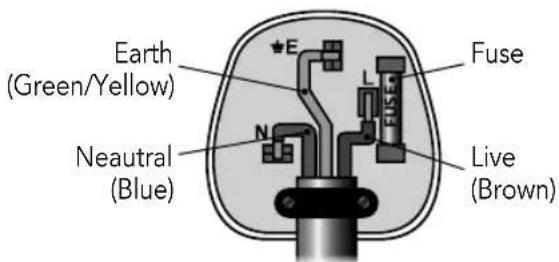
As the colours in the mains lead of this appliance may not correspond with the coloured markings identifying the terminals in your plug, please proceed as follows:
The wires in the mains lead are labelled in accordance with the following code:
Blue neutral [N] Brown live [L] Green/Yellow [EARTH]
Plug Fitting Details (Where Applicable).
The wire labelled blue is the neutral and must be connected to the terminal marked [N].
The wire labelled brown is the live wire and must be connected to the terminal marked [L].
The wire labelled green/yellow must be connected to the terminal marked with the letter [E].
On no account must either the brown or the blue wire be connected to the [EARTH] terminal.
Always ensure that the cord grip is fastened correctly.
The plug must be fitted with a fuse of the same rating already fitted and conforming to BS 1362 and be ASTA approved.
If in doubt consult a qualified electrician who will be pleased to do this for you.
Non-Rewireable Mains Plug.
If your appliance is supplied with a non-rewireable plug fitted to the mains lead and should the fuse need replacing, you must use an ASTA approved one (conforming to BS 1362 of the same rating).
If in doubt, consult a qualified electrician who will be pleased to do this for you.
If you need to remove the plug - disconnect it from the mains - then cut it off of the mains lead and immediately dispose of it in a safe manner. Never attempt to reuse the plug or insert it into a socket outlet as there is a danger of an electric shock.
WARNING:
This appliance MUST be earthed!
11 - Warranty
GREAT BRITISH DESIGN SINCE 1912
As a thank you for purchasing one of our fantastic products, we are offering you an extra 2 years peace of mind in addition to your 1 year guarantee.
To receive your extra 2 year guarantee, register your appliance online within 28 days of purchase by visiting www.towerhousewares.co.uk
natural_image
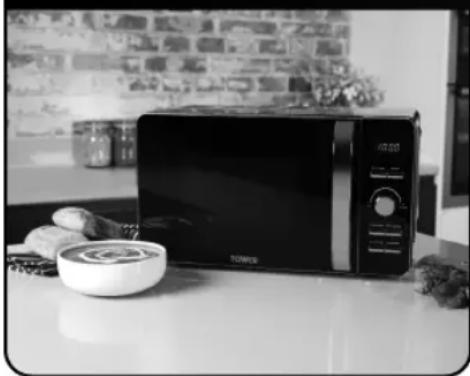
Black-and-white photo of a modern microwave oven on a kitchen counter with a bowl and food items nearby (no visible text or symbols)This product is guaranteed for 12 months from the date of original purchase. If any defect arises due to faulty materials of workmanship, the faulty products must be returned to the place of purchase. Refund or replacement is at the discretion of the retailer.
The Following Conditions Apply:
- The product must be returned to the retailer with proof of purchase or a receipt.
- The product must be installed and used in accordance with the instructions contained in this instruction guide.
- It must be used only for domestic purposes.
- It does not cover wear and tear, damage, misuse or consumable parts.
- Tower has limited liability for incidental or consequential loss or damage.
This guarantee is valid in the UK and Eire only.
The standard one year guarantee is only extended to the maximum available for each particular product upon registration of the product within 28 days of purchase. If you do not register the product with us within the 28 day period, your product is guaranteed for 1 year only.
To validate your extended warranty, please visit www.towerhousewares.co.uk and register with us online.
Please note that length of extended warranty offered is dependent on product type and that each qualifying product needs to be registered individually in order to extend its warranty past the standard 1 year.
Extended warranty is only valid with proof of purchase or receipt.
12 - Your Receipt
Affix your store receipt to this page for safe keeping.
NOTES
TOWER®
over 100 YEARS of quality
thank you!
We hope you enjoy your appliance for many years. As a thank you for purchasing one of our fantastic products, we are offering you an extra 2 years peace of mind.
*To receive your extra 2 years guarantee, register your appliance online within 28 days of purchase by visiting:
www.towerhousewares.co.uk
Should you have a problem with your appliance, or need any spare parts, please call our Customer Support Team:
+44 (0) 333 220 6066
Your warranty becomes void should you decide to use non Tower spare parts.
Spare parts can be purchased from
www.towerhousewares.co.uk
GREAT BRITISH DESIGN SINCE 1912
0120.V7
- Towerbrand
- Contents:
- - Specifications:
- Structure of your appliance:
- - Technical Data:
- Documentation
- Guarantee for spare parts:
- - Important Safety Information:
- Please read these notes carefully BEFORE using your Tower appliance
- CAUTIONS
- - Before First Use
- - Using Your Appliance
- Child Lock Function
- Setting the Clock:
- Timer:
- Express Mode:
- Power Levels:
- Stop/Cancel:
- Auto Defrost:
- Quick Start:
- Auto Cook:
- To use Auto Cook:
- Auto Cook Menu:
- Menu Code / Food
- Utensils guideline:
- CAUTION:
- Cooking tips:
- Food arrangement:
- Cooking time length:
- Piercing:
- Cooking food evenly:
- Allow standing time:
- Browning dish:
- Microwave safe plastic wrap:
- Microwave safe plastic cookware:
- - Servicing safeguards - Microwave radiation
- Magnetron
- - Recycling
- DISPOSAL OF THE UNIT
- - Cleaning & Care
- Tips for cleaning
- NOTE!
- - Wiring Safety for UK Use Only
- IMPORTANT
- Blue neutral [N] Brown live [L] Green/Yellow [EARTH]
- Plug Fitting Details (Where Applicable).
- Non-Rewireable Mains Plug.
- WARNING:
- This appliance MUST be earthed!
- - Warranty
- GREAT BRITISH DESIGN SINCE 1912
- The Following Conditions Apply:
- - Your Receipt
- TOWER®
- thank you!
Brand : Tower
Model : T24021
Category : Microwaves