
NU-CTS2 - Air conditioner PAC - Free user manual and instructions
Find the device manual for free NU-CTS2 PAC in PDF.


| Product Type | Navigation Unlock Integration Interface |
| Dimensions (approx) | 3 x 2 x 1 inches |
| Weight (approx) | 0.2 lbs |
| Power Supply | 12V DC from vehicle |
| Compatibility | Cadillac CTS (2008-2009) and CTS-V (2008-2009) |
| Main Functions | Enables navigation use by passenger while driving; enables reverse camera display on navigation screen |
| Activation Method | Steering wheel controls (CTS) or mirror controls (CTS-V) |
| Installation | Plug-and-play with 44-pin harness; VSS wire cutting required for 2008-2009 vehicles |
| Safety Features | Driver must not use systems while driving; passenger use only |
| Maintenance | None required |
| Spare Parts & Repairability | Not user-serviceable; replacement only |
| General Information | Disables OnStar Turn-by-Turn display when active; intended for off-road and passenger use only |
Frequently Asked Questions - NU-CTS2 PAC
User questions about NU-CTS2 PAC
0 question about this device. Answer the ones you know or ask your own.
Ask a new question about this device
Download the instructions for your Air conditioner in PDF format for free! Find your manual NU-CTS2 - PAC and take your electronic device back in hand. On this page are published all the documents necessary for the use of your device. NU-CTS2 by PAC.
USER MANUAL NU-CTS2 PAC
The NU-CTS2 is a Navigation Unlock integration interface that allows the factory navigation features of your Cadillac CTS radio or the reverse camera to be used by the passenger at anytime.
Installation
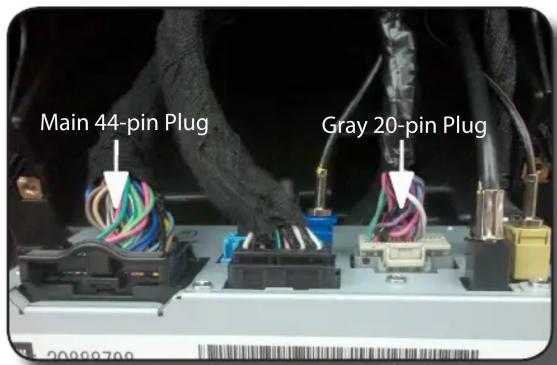
Installation: Disconnect the black 44-pin main harness from the back of the radio (see fig. A) Plug the male connector on the NU-CTS2 harness into the 44-pin port on the back of the radio. Connect the factory 44-pin harness into the female connector on the NU-CTS2 harness. Plug the Black micro-fit 24-pin connector on the NU-CTS2 harness into the NU-CTS2.
2008-2009 Vehicles Only: Locate the vehicles VSS wire in pin 20 of the gray 20-pin plug on the back of the radio (see fig. A & B). This wire will need to be cut then connected as follows: The green/black wire from the NU-CTS2 should be connected to the radio/plug side of the VSS wire and the green/white wire from the NU-CTS2 should be connected to the vehicle side of the VSS wire.

Operation
Activating the Navigation Unlock
Cadillac CTS: Press and hold the “Source” button on the steering wheel controls (SWC) for two seconds to activate the NU-CTS2. You will hear one chime and the driver information center on the instrument cluster will display “Confirm Safe Use”. Press the “Source” button on the SWC again to acknowledge “safe use”, agreeing that use will be performed only by the passenger whenever the vehicle is in motion, and activate the NU-CTS2. To de-activate the NU-CTS2 simply press and hold the “Source” button on the SWC until two chimes are heard. PLEASE NOTE: The NU-CTS2 text will not be displayed when the OnStar Turn-by-Turn Navigation is being used.
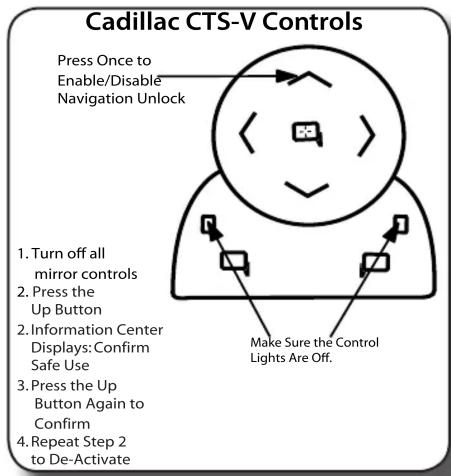
Cadillac CTS-V: Make sure that both of the mirror control lights are off on the driver door. Press the Up button on the mirror controls to activate the NU-CTS2. You will hear one chime and the driver information center on the instrument cluster will display "Confirm Safe Use". Press the Up button on the mirror controls again to acknowledge "safe use", agreeing that use will be performed only by the passenger whenever the vehicle is in motion, and activate the NU-CTS2. To de-activate the NU-CTS2 simply press the Up button on the mirror control. PLEASE NOTE: The NU-CTS2 text will not be displayed when the OnStar Turn-by-Turn Navigation is being used.
WARNING: In order to avoid distraction, which could lead to an accident, the driver should never utilize systems unlocked by the NU-CTS2 when the vehicle is in motion. Even when operated by the passenger, the vehicle driver should maintain their attention on the road at all times.

Operation (cont.)
Activating the Reverse Camera Unlock
Activate the navigation unlock using the SWC. Make sure that both control lights on the rearview mirror controls on the driver door are off and not controlling either mirror. Press down on the control pad, the rearview camera image will now display on the navigation screen.
WARNING: In order to avoid distraction, which could lead to an accident, the driver should never utilize systems unlocked by the NU-CTS2 when the vehicle is in motion. Even when operated by the passenger, the vehicle driver should maintain their attention on the road at all times.
Activating the Reverse Camera
Press Once to
Activate Reverse
Camera
- Turn off all
mirror controls
- Enable Navigation
Unlock Through
the SWC
- Press Down Once
to Enable Reverse
Camera
- Repeat Step 3 to
De-Activate

flowchart
graph TD
    A["Central Node"] --> B["Arrow Right"]
    A --> C["Arrow Left"]
    A --> D["Arrow Up"]
    A --> E["Arrow Down"]
    A --> F["Arrow Up"]
    A --> G["Arrow Down"]
    A --> H["Terminal Device"]
Make Sure the Control
Lights Are Off.
DISCLAIMER: Under no circumstances shall the manufacture or the distributors of the NU-CTS2 be held liable for claims of any loss or damage, consequential, direct or indirect, arising from the sale, installation, or use of the NU-CTS2. The manufacture and its distributors will not, nor will they authorize any representative or any other individual, to assume obligation or liability in relation to the NU-CTS2 other than its replacement.
AGREEMENT: End user agrees to use this product in compliance with the instructions and terms of use above and with all State and Federal laws. PAC provides instructions and safety warnings with respect to this product and disclaims all liability for any use not in conformity with those instructions or other misuse of its product. If you do not agree, please discontinue use immediately and return product to place of purchase. This product is intended for off-road use and passenger use only.
Brand : PAC
Model : NU-CTS2
Category : Air conditioner