
CSV-TYS - Security Camera CRUX - Free user manual and instructions
Find the device manual for free CSV-TYS CRUX in PDF.


Pick your language and provide your email: we'll send you a specifically translated version.
| Product Type | Security Camera |
| Brand | CRUX |
| Model | CSV-TYS |
| Video Resolution | 1080p (1920x1080) at 30fps |
| Lens | 3.6mm fixed lens, 90° field of view |
| Night Vision | IR LEDs up to 30m (98ft) range |
| Video Output | Analog CVBS (1Vp-p, 75 Ohm) via BNC connector |
| Power Supply | DC 12V ±10%, 500mA (adapter included) |
| Power Consumption | Max 6W (with IR active) |
| Dimensions | 70mm x 70mm x 120mm (2.8" x 2.8" x 4.7") |
| Weight | 320g (11.3 oz) |
| Mounting | Wall/ceiling bracket with adjustable angle |
| Weatherproof Rating | IP65 (outdoor use) |
| Motion Detection | Built-in PIR sensor with alarm output |
| Operating Temperature | -20°C to 50°C (-4°F to 122°F) |
| Maintenance | Clean lens with soft, dry cloth; do not use harsh chemicals |
| Safety Precautions | Disconnect power before cleaning or installing |
| Spare Parts Availability | Power adapter and mounting kit available via CRUX support |
| Warranty | 1 year limited warranty against defects |
Frequently Asked Questions - CSV-TYS CRUX
How do I connect the CSV-TYS camera to my DVR?
Connect the BNC video cable from the camera to a video input on the DVR. Then connect the power adapter to the camera and plug into a power outlet. Ensure the DVR is set to the correct channel and video format (NTSC/PAL).
The night vision is not working. What should I check?
First, verify the power supply is providing 12V DC. Check that the IR LEDs are not blocked by dirt or obstructions. Also, ensure the camera is not in a location with strong light sources that may disable IR auto-switching.
Can I use this camera outdoors?
Yes, the CSV-TYS has an IP65 weatherproof rating, meaning it is protected against dust and low-pressure water jets. It can be used outdoors but avoid direct exposure to heavy rain or submersion.
How do I reset the camera to factory defaults?
This analog camera does not have a reset button. To restore default settings, ensure the camera is powered off, then power it on again. For any configuration, adjustments are made at the DVR level.
What is the maximum cable length for video transmission?
For reliable video quality, use RG59 coaxial cable and keep the length under 300 meters (984 ft). Longer runs may require a video amplifier or balun.
The image is blurry. How can I fix it?
Check the lens for dirt or smudges and clean with a soft cloth. Also, adjust the focus ring on the lens (if available) until the image is sharp. Ensure the camera is securely mounted and not vibrating.
Does this camera support audio?
The CSV-TYS does not have a built-in microphone. For audio recording, you need a separate audio input on your DVR or an external microphone connected to the camera's audio input (if available; check specifications).
How do I mount the camera on a wall?
Use the included mounting bracket. Mark the drilling holes, drill and insert wall anchors, then screw the bracket to the wall. Attach the camera to the bracket and adjust the angle. Make sure the camera is stable and facing the desired area.
What voltage does the camera need?
The camera requires DC 12V power supply with a minimum current of 500mA. Always use the supplied adapter or a regulated 12V power source to avoid damage.
Where can I find the user manual for the CSV-TYS?
The user manual can be downloaded for free from notice-facile.com in PDF format. Visit the product page and click the 'Download' button.
User questions about CSV-TYS CRUX
0 question about this device. Answer the ones you know or ask your own.
Ask a new question about this device
No questions yet. Be the first to ask one.
Download the instructions for your Security Camera in PDF format for free! Find your manual CSV-TYS - CRUX and take your electronic device back in hand. On this page are published all the documents necessary for the use of your device. CSV-TYS by CRUX.
USER MANUAL CSV-TYS CRUX
- OEM style camera pods for the left and right side mirrors.
- Includes adjustable angle cameras.
PARTS INCLUDED:

natural_image
Two black plastic mechanical components with spiral grooves and central bore (no text or symbols visible)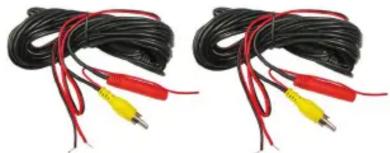
natural_image
Two black cables with red and yellow connectors, no visible text or symbolsINSTALLATION PROCEDURE:

natural_image
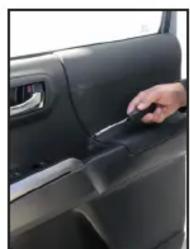
Interior view of a car showing a hand holding a small object near the door (no visible text or symbols)- Remove the felt liner inside the door pull and remove the screw.
natural_image
Close-up of a hand inserting a plastic clip into a car door (no visible text or symbols)
natural_image
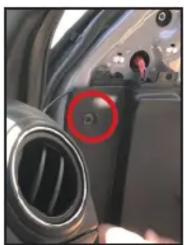
Close-up of a hand interacting with a car's door panel, showing the handle and control buttons (no text or symbols visible)- Use a plastic pry bar to remove the window sail. Remove the trim panel clips.
natural_image
Interior view of a car dashboard with a red circular button highlighting the left side (no visible text or symbols)
natural_image
Close-up of a hand holding a plastic clip, no visible text or symbols- Use a hooked pick tool to remove the OEM side mirror cover. Fish the camera cable through the hole.

natural_image
Close-up of hands inserting a small object into a car's side panel (no visible text or symbols)- Remove the door unlock handle cover and remove the screw.

natural_image
Interior view of a car showing a hand interacting with a small electronic device on the backrest (no visible text or symbols)
natural_image
Interior view of a car showing a person's hand interacting with the dashboard (no visible text or symbols)
natural_image
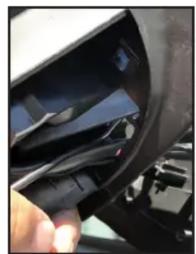
Person wearing a helmet and glasses, holding a tool near a textured surface (no visible text or symbols)- Unhook the door panel by pulling it upward. Unplug the speaker and doorlock harness.
natural_image
Close-up of a hand inserting a black cable into a car wheel (no visible text or symbols)- Tuck in the camera cable inside the cavity and snap in the CSV-TYS side mirror cover with camera.

natural_image
Close-up of hands touching a car's side panel (no visible text or symbols)VEHICLE APPLICATIONS:
TOYOTA
2018 - Up Sienna
Table of contents
Click a title to access it
Manual assistant
Powered by Anthropic
Waiting for your message
Product information
Brand : CRUX
Model : CSV-TYS
Category : Security Camera