Black SRT4 GEN2 - Hi-Fi System OSD Audio - Free user manual and instructions
Find the device manual for free Black SRT4 GEN2 OSD Audio in PDF.


| Product Type | Bookshelf Hi-Fi System |
| Model | Black SRT4 GEN2 |
| Brand | OSD Audio |
| Amplifier Power | 50W RMS per channel (estimated) |
| Speaker Configuration | 2-way bookshelf speakers with tweeter and woofer |
| Frequency Response | 50Hz - 20kHz (estimated) |
| Inputs | Bluetooth, AUX (3.5mm), RCA, USB |
| Outputs | Headphone jack, Speaker terminals |
| Dimensions (each speaker) | 7.5 x 5.5 x 9.0 inches (190 x 140 x 230 mm) |
| Weight (system) | 12.5 lbs (5.7 kg) |
| Power Supply | AC 100-240V, 50/60Hz |
| Remote Control | Included IR remote |
| Supported Audio Formats | MP3, WMA, WAV, FLAC |
| Main Functions | Bluetooth streaming, FM radio, USB playback, AUX input, volume/bass/treble control |
| Cleaning | Wipe with a soft, dry cloth. Do not use liquids or abrasives. |
| Safety | Do not expose to moisture or extreme temperatures. Unplug during storms. |
| Spare Parts & Repairability | Contact OSD Audio support or authorized service centers for replacement parts. |
| Warranty | 2 years limited warranty |
Frequently Asked Questions - Black SRT4 GEN2 OSD Audio
User questions about Black SRT4 GEN2 OSD Audio
0 question about this device. Answer the ones you know or ask your own.
Ask a new question about this device
Download the instructions for your Hi-Fi System in PDF format for free! Find your manual Black SRT4 GEN2 - OSD Audio and take your electronic device back in hand. On this page are published all the documents necessary for the use of your device. Black SRT4 GEN2 by OSD Audio.
USER MANUAL Black SRT4 GEN2 OSD Audio
OSD – The Best Value in Sound
Thanks for joining the OSD owners club.
Thank you for purchasing the Black SRT4 Gen2 4 Zone Wi-Fi Smart Preamp Streamer. This multi-zone preamp is ideal for commercial and residential applications. The SRT4 Gen2 is compatible with the OSD Player app for control over all your Zones/Sources individually or all zones together in multi-room audio mode.
Remove the SRT4 Gen2 from the box and inspect the device to make sure it is free of any damage and that all package contents are accounted for before proceeding.
If you have any questions about your SRT4 GEN2, please contact us directly.
www.osdaudio.com
email: support@osdaudio.com
Phone: 888-779-4968
In The Box
QR Manual Card Qty: 1
12V 2A US Power Adapter Qty: 1
Network LAN Cables Qty: 1
Rack Mount Ears Qty: 2
Screws Qty: 6
WARNING
• TO PREVENT FIRE OR SHOCK HAZARD, DO NOT USE THIS PLUG WITH AN EXTENSION CORD, RECEPTACLE OR OTHER OUTLET UNLESS THE BLADES CAN BE FULLY INSERTED TO PREVENT BLADE EXPOSURE.
• TO PREVENT FIRE OR SHOCK HAZARD, DO NOT EXPOSE THIS APPLIANCE TO RAIN OR MOISTURE.
• TO PREVENT ELECTRICAL SHOCK, MATCH WIDE BLADE PLUG TO WIDE SLOT, FULLY INSERT.

This lighting flash with arrowhead symbol, within an equilateral triangle, is intended to alert the use to the presence of un-insulated dangerous voltage within the products enclosure that may be of sufficient magnitude to constitute a risk of electric shock to persons.
CAUTION
RISK OF ELECTRIC SHOCK DO NOT OPEN
This lighting flash with arrowhead symbol, within an equilateral triangle, is intended to alert the use to the presence of un-insulated dangerous voltage within the products enclosure that may be of sufficient magnitude to constitute a risk of electric shock to persons.

The exclamation point within the equilateral triangle is intended to alert the user to the presence of important operating and maintenance (servicing) instructions in the literature accompanying appliance.
IMPORTANT SAFTEY INSTRUCTIONS
- Read these instructions.
- Keep these instructions.
3 Read all warnings.
4 Follow all Instruction. - Do not use this apparatus near water.
- Clean only with dry cloth.
- Do not block any ventilation openings. Install in accordance with the manufacturers instructions.
- Do not install near heat sources such as radiators, heat registers, stoves, or other apparatus (including amplifiers) that produce heat.
-
Do not defeat the safety purpose of the polarized or grounding type plug. A polarized plug has two blades with one wider than the other. A grounding type plug has two blades and a third grounding prong. If the provided plugs does not fit into your outlet, consult an electrician for replacement of the obsolete outlet.
-
Protect the power cord from being walked on or pinched particularly at the plugs, convenience receptacles, and at the point where they exit form the appliance.
-
Only use attachments or accessories specified by the manufacturer.
-
Unplug the apparatus during lightning storms or when unused for long periods of time.
-
Refer all servicing to qualified personnel. Servicing is required when the apparatus has been damaged in anyway, such as power supply cord or plug is damaged, liquid has been spilled or objects have fallen into the apparatus, the apparatus has been exposed to rain or moisture, does not operate normally, or has been dropped.
Front Panel Description
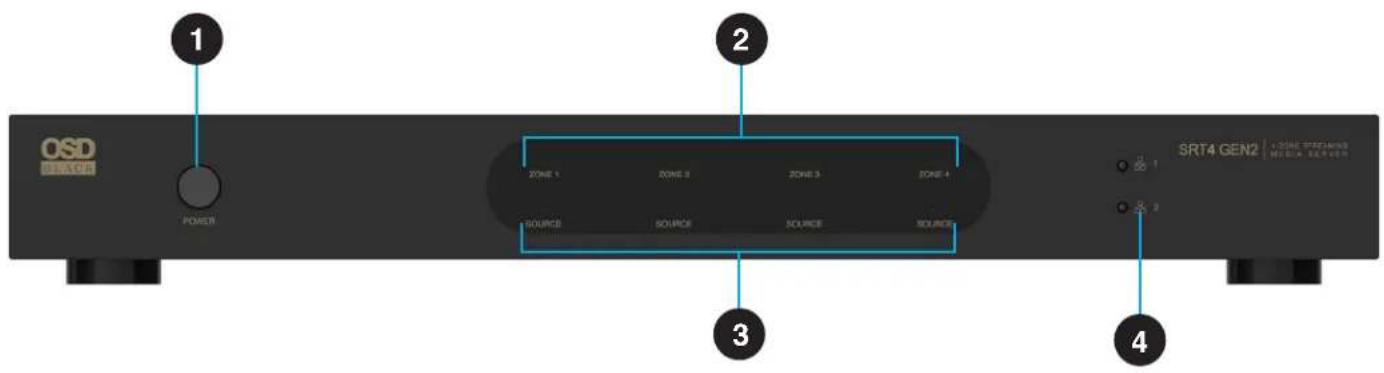
- Power Switch
-
Four Zone Active Indicator
-
Four Source Indicator
- Network Status Lights
Rear Panel Description
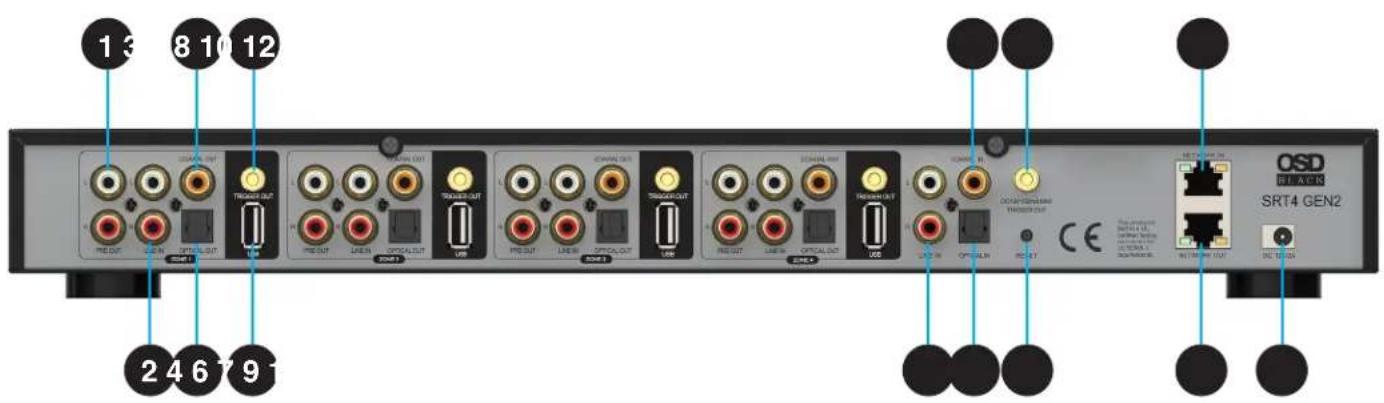
- Pre-Out (Zone1-4) RCA Stereo Output
- Line-in (Zone 1-4) RCA Stereo Input
- Digital Output (Zone 1-4) Single RCA Coaxial
- Digital Output (Zone 1-4) Fiber Optical
- 12V Trigger Output (Zone 1-4)
- USB Input (Zone 1-4))Read U Disk
-
Line-in (Universal Bus) RCA Stereo Input
-
Digital Input (Universal Bus) Single RCA Coaxial
- Digital Input (Universal Bus) Fiber Optical
- 12 Volt Trigger Universal Bus
- Reset Button Factory Reset
- Ethernet Lan Network Input
- Ethernet Lan Network Output
- Power Connection CD12V2/A DC Input
Placement
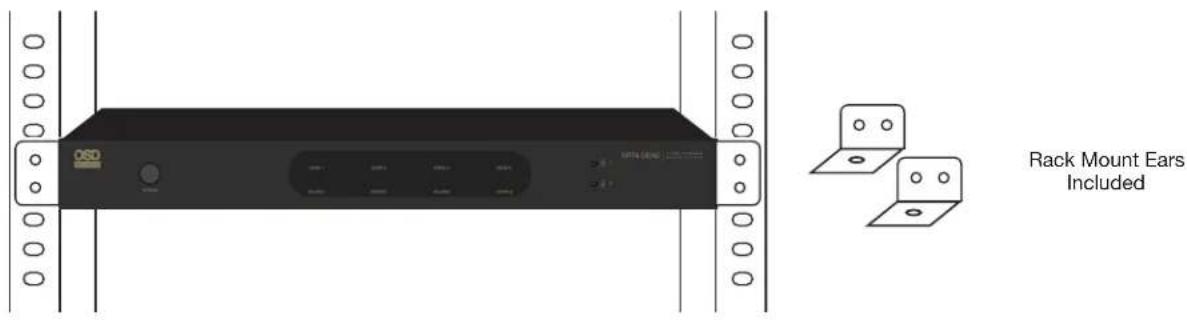
The SRT4 Gen2 is a Four Zone Preamp Audio Streamer that works well with our MX Gen2 Series of Multi-Channel Power Amplifiers. The SRT4 Gen2 should be placed close to the Multi Channel Power Amplifier. The SRT4 Gen2 is designed to fit a 1U equipment rack for easy installation. Attach the optional Rack Mount Ears included in the box on both sides of the main chassis. It is designed to mount in a standard EIA certified equipment rack.
Remove the two screws on each side of the SRT4 Gen2. Align the rack mounts with the screw holes and make sure the screw are tightly secured.
Connecting with Multi Channel Options
The following two wiring diagrams features a straight Four Zone to Four Zone connection utilizing our MX880 Gen2 Power Amp with the SRT4 Gen2. And a second diagram featuring a Four Zone to our Six Zone MX1280 Gen2 Multi-Zone Power Amp with two direct Zone connections and Two Zones Connecting to Four Zones utilizing the Dual Universal Bus Inputs.
SRT4 GEN2 SRT4 GEN2
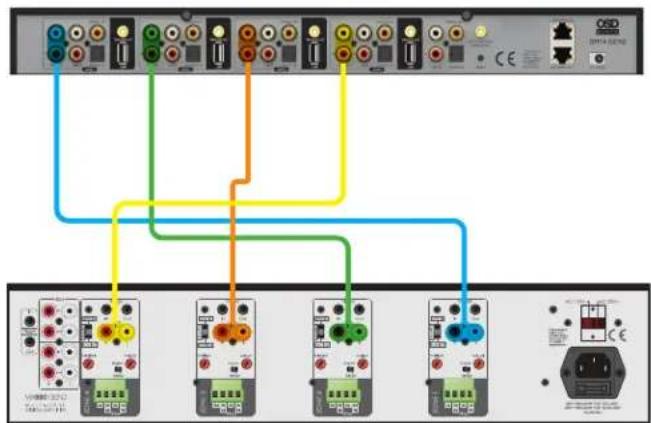
Input 4 Input 3 Input 2 Input 1 Input 6 Input 3
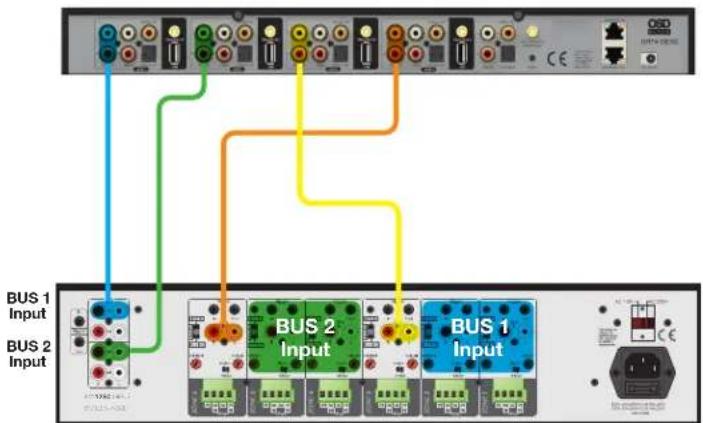
MX880 4-ZONE AMP
MX1280 6-ZONE AMP
Connect to AVR/Amplifier or Subwoofer
Connect the LINE Out output to the input on your amplifier or AV receiver using the appropriate cable. The SRT4 Gen2 supports both analog output (RCA) and digital output (Optical & Coaxial)
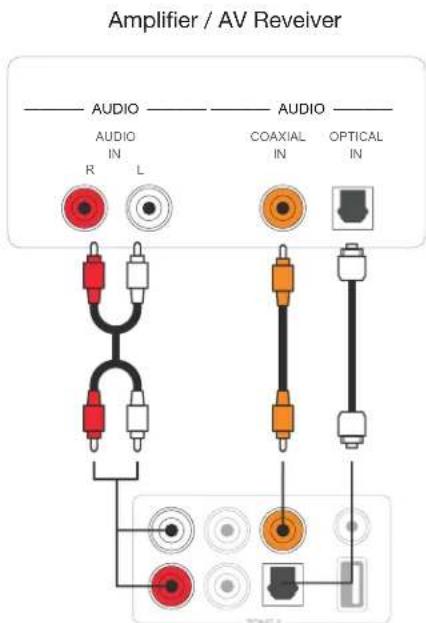
SRT4 Gen2
Adding a Powered Subwoofer to a Zone.
Connect a zone LINE OUT output to your LINE IN input of your Active Powered Subwoofer. Use the sub's line out to connect to the amplifier.
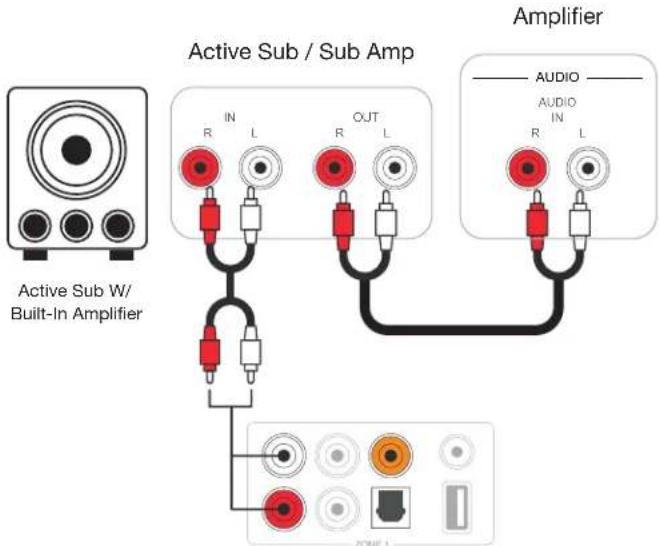
SRT4 Gen2
Trigger Control
If the audio amplifier connected to the SRT4 Gen2 has a trigger input connector, you can connect it to the TRIGGER OUT of the SRT4 gen2 using a 3.5mm cable (not included). A 12V150mA signal is output from the TRIGGER OUT port. Use a monaural mini-plug cable for connecting the TRIGGER OUT port. Do not use a stereo (AUX) mini-plug cable.
Connect to USB Device Connect to a Network / or Slect Smart Home Control
To play music stored in a USB storage device, just plugin a USB Jump/Pen drive storage device containing music files to the USB port of the Zone you want them to play through.
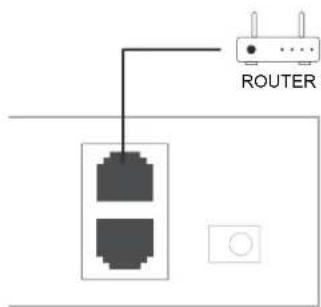
Connect SRT4 Gen2 to your home router using a LAN network cable. Wi-Fi not supported. You can use the NETWORK OUT port to connect another device to the same network.
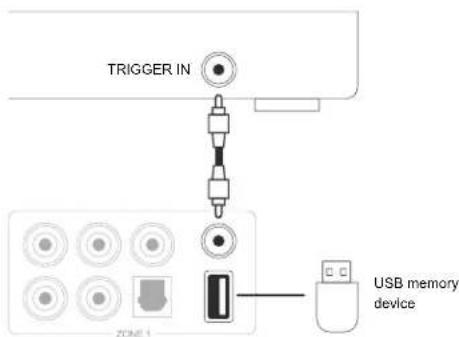
Connect to Audio Playback Devices
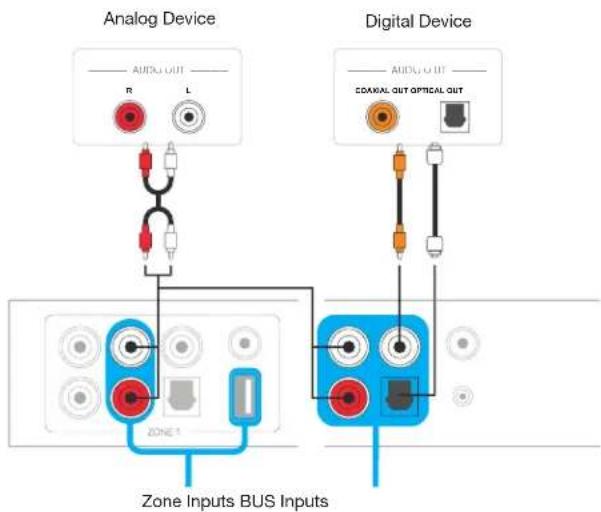
Connect the LINE IN in each zone or LINE IN, COAXIAL IN, OPTICAL IN in the Universal bus Input area to an audio playback device, it can be a CD Player, portable Music Player or any device with Audio Output using the same connector.
In the APP, LINE IN in each zone is represented as Line in 1, LINE IN in the Universal input area is noted as Line in 2.
Setup & Operation
Once the SRT4 Gen2 is connected and in the desired location, plug the included power supply into the SRT4 Gen2 and into an available outlet.
(Note, you will need direct access to your network router for the LAN connection)
The next step is to connect the SRT4 Gen2 to your network for streaming and control of each zone using the OSD Player App.
LAN Direct Wire/Cable connectivity for SRT4 Gen2
- Download and install the OSD app by scanning the QR code or search "OSD Player" in the App store/Google Play store.

- Connect the SRT4 Gen2 to your network router using the RJ45 Ethernet port on the rear panel
- Lan connection will automatically setup all zones. Ensure your mobile device is connected to the same network and open the OSD Player control app.
SRT4 Gen2 Streaming Services:
Listen to Online Music
The SRT4 Gen2 can work with many popular streaming music services like Spotify, Tidal, Napster, and AMAZON MUSIC. Plus, Internet Radio Apps like TuneIn, iHeartradio, and VTuner. You can easily stream music or playlists from your account wirelessly and listen on your home audio system.
Spotify
To use Spotify, you will need to have Spotify premium account. You will find the OSD Audio Streaming device in the device list in Spotify Application and choose that device you want to stream.
AMAZON Music
To use AMAZON Music like Spotify, you will need to have an AMAZON Music premium account as well. You will find the OSD Audio Streaming device in the device list in AMAZON Music Application and choose that device you want to stream.
Airplay 1
The device supports Airplay1, you can choose Airplay1 in iOS device and play music.
Listen to local music
The SRT4 Gen2 can stream local music stored in your Smartphone, USB storage device, NAS using DLNA protocol, PC software like iTunes, or UPnP/DLNA 3rd party software. Click on “My Music” to select the local device you want to play from.
Note: iOS-based devices have blocked the access to iTunes library.
Our system only supports NAS using DLNA protocol.
Using the SRT4 Gen2
Once you have connected your mobile to network and installed the OSD Audio Player App in your mobile device, you can start playing music to different rooms or the same music in all rooms in sync.
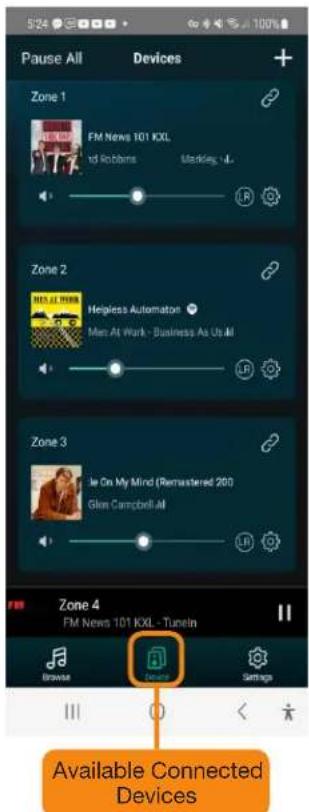
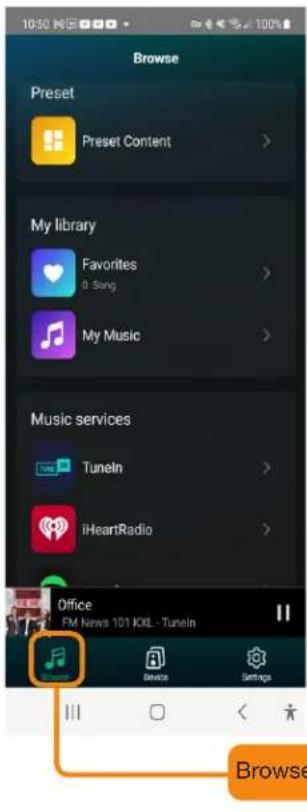
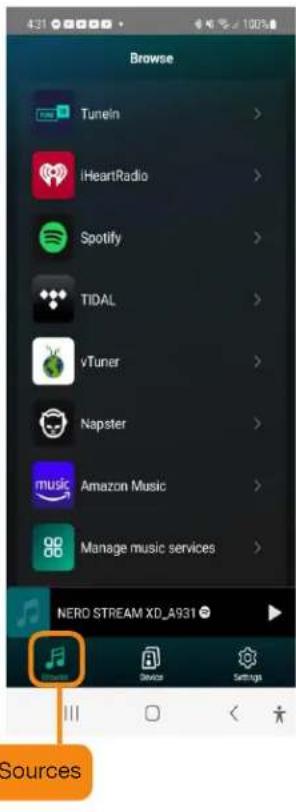
Selecting a Zone
In the OSD Audio Player APP you will see all the connected devices in the same network
- Select the device you want to control; A green rectangle will highlight the selected Device
- Select Browse on left side of the Bottom Tool Bar, note the highlighted selection turns dark green
- From the Browse Screen, Select an online or local music source from the list to start streaming your music (Some sources will need a subscription)
Play the Same Music in Multiple Rooms
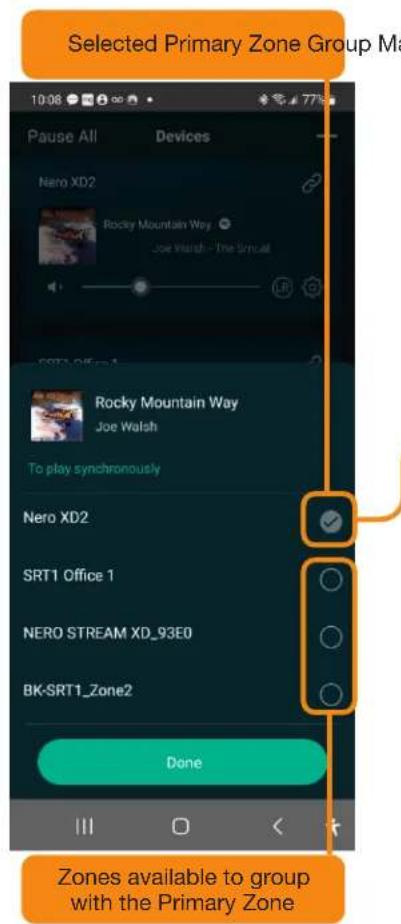
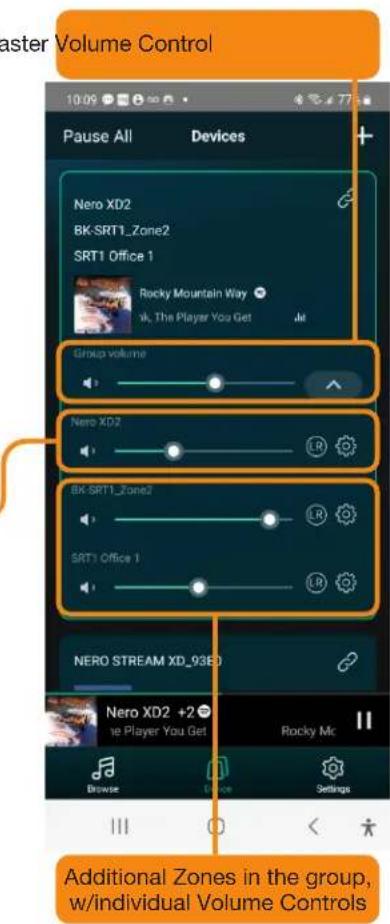
Using the OSD Audio Player App, you can play the same music in multiple rooms simultaneously by grouping two or more devices. First, in the Device screen, you select the primary Device (Highlighted by a green rectangle).
Select the Link in the upper right corner of the highlighted Device. A new screen will then appear featuring the selected Primary device and a blank circle for each additional device available to group with it. Just select the devices you want to add and Press the Done Button. Another Screen shows The Group Volume Master control, followed by the primary individual volume control and the independent volume for each grouped Zone.
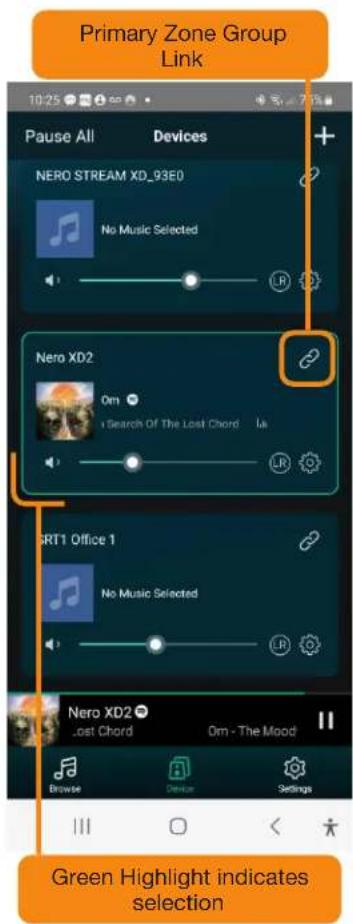
Selecting a Zone
In the OSD Audio Player APP you will see all the connected devices in the same network.
- Select the device you want to control; A green rectangle will highlight the selected Device
- Select Browse on left side of the Bottom Tool Bar, note the highlighted selection turns dark green
- From the Browse Screen, Select an online or local music source from the list to start streaming your music (Some sources will need a subscription)
| Specifications SRT4 Gen2 | ||
| I/O Interface | DC Input DC12V2A | |
| Analog Audio Input RCA R&L/Universal Bus | ||
| Digital Audio Input Digital Optical Input/Universal Bus | ||
| Analog Audio Output RCA 2V RMS Outputs X 4 Zones | ||
| Digital Audio Output Digital (Coaxial & Fiber Optic) X 4 Zones | ||
| Trigger Output 12V x 4 Zones/1 each Universal Bus | ||
| USB Connect USB for Jump Drive x 4 Zones | ||
| Ethernet Lan Connection 1 Input/1 Output | ||
| LED Indicator | Front Panel Status LED/4 Zone/Wi-Fi/Line In/Optical In/ Optical In/USB x 4/Network Strength | |
| Reset Button Reset Button | ||
| Network | Wireless Network IEE 802 11 b / g / n2.G | |
| Wired Network Ethernet RJ45 | ||
| Streaming Protocols AirPlay / DLNA / Spotify Connect | ||
| Audio Parameter | Music Format | FLAC / MP3 / AAC / AAC + / ALAC / APE / WAV |
| Audio Decode | 16/24 Bit / 44kHz to 192 kHz | |
| Frequency Response | 20Hz - 20kHz | |
| THD + N | 0.0003 | |
| SNR | 100dB | |
| LinkPlay Module | LinkPlay A31 | |
| Application | OSD Player App/LinkPlay | Updated OSD Player App |
| iTunes | For MAC & Windows PC | |
| Foobar2000 and other support UPnP, DLNA 3rd party program | For MAC & Windows PC | |
| Audio Source | Online Music Streaming Services | Spotify / Napster / Tidal /Tuneln / iHeart Radio / AMAZON Music / vTuner |
| Local Storage | Music file store in Mobile phone, NAS & USB disk drive | |
| Analog Input | RCA R&L Analog | |
| Digital Input | Digital (Optical & Fiber Optic) Universal Bus | |
| General | Dimension 430mm W x 200mm D x 53mm H | |
| Inches | 16.9" W x 7.87" D x 2.08" H | |
| Weight | 2.3KG/5.07LBS | |
| Power | 12Volt 2A AC DV 100-240V FCC and UL external | |
The information contained in this guide is believed to be accurate and reliable. OSD assumes no responsibility for any errors contained in this guide. OSD reserves the rights to make changes in the specifications and/or design of the above-mentioned product without prior notice. The diagrams contained in this guide may not fully represent the product that you are using, and they are for illustration purpose. OSD assumes no responsibility for any differences between the product mentioned in this guide and the product you may have.
Warranty Info
All OSD BLACK electronics products have a (2) year Limited Warranty against defects in materials and workmanship. Proof of purchase must accompany all claims. During the warranty period OSD AUDIO will replace any defective part and correct any defect in workmanship without charge for either parts or labor OSD AUDIO may replace returned speakers with a product of equal value and performance. In such cases, some modification to the mounting may be necessary and are not OSD AUDIO's responsibility.
For this warranty to apply, the unit must be installed and used according to its written instructions. If necessary, repairs must be performed by OSD AUDIO. The unit must be returned to OSD AUDIO at the owner's expense and with prior written permission. Accidental damage and shipping damage are not considered defects, nor is damaged resulting from abuse or from servicing performed by an agency or person not specifically authorized in writing by OSD Audio
OSD AUDIO sells products only through authorized dealers and distributors to ensure that customers obtain proper support and service. Any OSD AUDIO product purchased from an unauthorized dealer or other source, including retailers, mail over dealers and on-line sellers will not be honored or serviced under existing OSD AUDIO warranty policy. Any sale of product by an unauthorized source or other manner not authorized by OSD AUDIO shall void the warranty on the applicable product.
Damage to or destruction of components due to application of excessive power voids the warranty on those parts. In these cases, repairs will be made on the basis of the retail value of the parts and labor. To return for repairs, you must email customer service at RMA@audiogeargroup.com for a Returned Merchandise Authorization (RMA) number# then the unit must be shipped to OSD AUDIO at the owner's expense, along with a note explaining the nature of service required. Be sure to pack the unit(s) in a corrugated container with at least 3 inches of resilient material to protect the unit from damage in transit.
This Warranty Does Not Cover:
Damage caused by abuse, accident, misuse, negligence, or improper operation (installation) • Any products that have been altered or modified • Any product whose identifying number of decal, serial #, etc. has been altered, defaced or removed • Normal wear and maintenance.
- In The Box
- WARNING
- CAUTION
- RISK OF ELECTRIC SHOCK DO NOT OPEN
- IMPORTANT SAFTEY INSTRUCTIONS
- Placement
- Connecting with Multi Channel Options
- Connect to AVR/Amplifier or Subwoofer
- Adding a Powered Subwoofer to a Zone.
- Trigger Control
- Connect to USB Device Connect to a Network / or Slect Smart Home Control
- Connect to Audio Playback Devices
- Setup & Operation
- LAN Direct Wire/Cable connectivity for SRT4 Gen2
- SRT4 Gen2 Streaming Services:
- Listen to Online Music
- Spotify
- AMAZON Music
- Airplay 1
- Listen to local music
- Using the SRT4 Gen2
- Selecting a Zone
- Play the Same Music in Multiple Rooms
- Warranty Info
Brand : OSD Audio
Model : Black SRT4 GEN2
Category : Hi-Fi System