PRE 1 - Hi-Fi System OSD Audio - Free user manual and instructions
Find the device manual for free PRE 1 OSD Audio in PDF.


| Product Type | Preamplifier / Hi-Fi System Component |
| Brand | OSD Audio |
| Model | PRE 1 |
| Dimensions (H x W x D) | 3.5 x 17 x 12 inches |
| Weight | 8 lbs |
| Power Supply | 110-120V AC, 50/60Hz |
| Power Consumption | 15W |
| Audio Inputs | 4 x RCA (line level), 1 x Phono (optional) |
| Audio Outputs | 2 x RCA (main out), 1 x RCA (record out) |
| Frequency Response | 20Hz - 20kHz ±0.5dB |
| Signal-to-Noise Ratio | >90dB |
| Total Harmonic Distortion | <0.01% |
| Chassis Material | Aluminum front panel, steel chassis |
| Controls | Volume knob, input selector, power switch |
| Indicators | Power LED (blue/red) |
| Compatibility | Works with all standard audio sources and amplifiers |
| Maintenance | Clean with a soft, dry cloth. Do not use liquids. |
| Safety Precautions | Do not expose to moisture or extreme temperatures. Unplug before cleaning. |
| Spare Parts & Repairability | Contact OSD Audio customer service for replacement parts and service. |
| Warranty | 2 years limited warranty |
Frequently Asked Questions - PRE 1 OSD Audio
User questions about PRE 1 OSD Audio
0 question about this device. Answer the ones you know or ask your own.
Ask a new question about this device
Download the instructions for your Hi-Fi System in PDF format for free! Find your manual PRE 1 - OSD Audio and take your electronic device back in hand. On this page are published all the documents necessary for the use of your device. PRE 1 by OSD Audio.
USER MANUAL PRE 1 OSD Audio
PRE 1
STEREO PRE AMPLIFIER INSTALL GUIDE
Front Panel Description
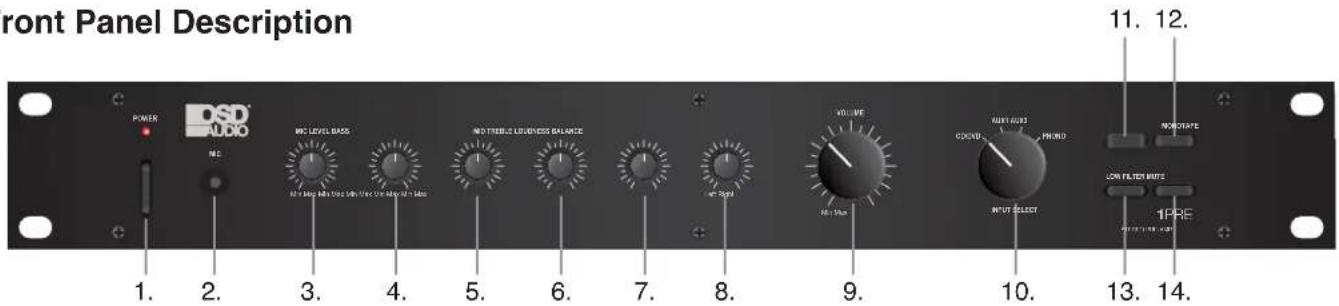
- Power ON / OFF
- Microphone Jack Input
- Mic Level Control
- Bass Control: To boost or attenuate low frequency sound.
- Midrange Control: To boost or attenuate midrange frequency sound.
- Treble Control: To boost or attenuate high frequency sound.
- Loudness: To compensate for the non-linear response of the human ear at low volume.
- Balance: Controls the relative volume between the left/right speakers and headphone.
- Master Volume: Adjusts the main output volume level of speakers and headphones.
- Input Selector: Switch between multiple input sources.
- Tape: Input for an analog tape deck
- Mono: Switch between mono or stereo signal
- Low Frequency Filter: Eliminates low frequency distortion from a turntable or warped record.
- Mute: Reduce the volume level by 20dB. Useful when changing records, tapes or changing sources.
Back Panel Description
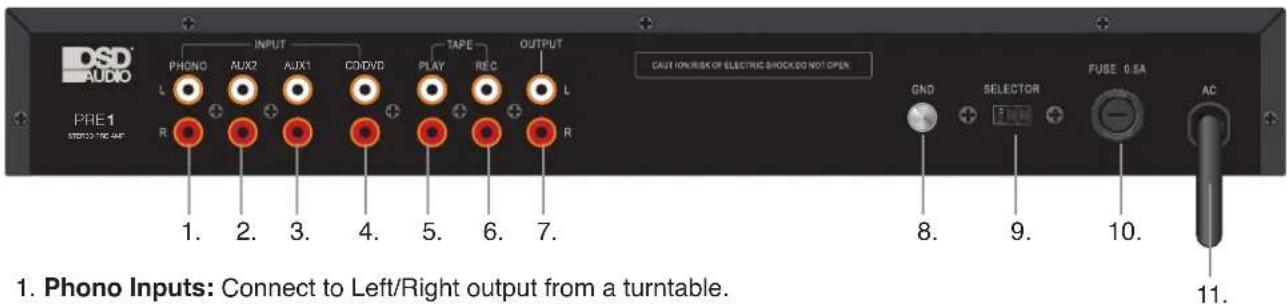
- Phono Inputs: Connect to Left/Right output from a turntable.
- Aux Input 2: Auxiliary source input.
- Aux Input 1: Auxiliary source input.
- CD/DVD Input: Connect to Left/Right output from a CD or DVD player.
- Tape Play: Connect to a tape decks output jacks.
- Tape Rec: Connect to a tape decks input jacks.
- Output: Used to connect to a signal processing unit, such as a graphic equalizer or can be connected to a power amplifier with higher output power.
- Ground Screw: Connect the ground wire from a turntable here to avoid hum or feedback from the speakers.
- AC Selector: Switch between 110V-220V AC.
- Fuse Holder: Contains primary AC fuse If fuse blows replace only with the same amperage fuse.
- AC Power Cord: Plug the AC cord into a nearby AC outlet or surge protector.
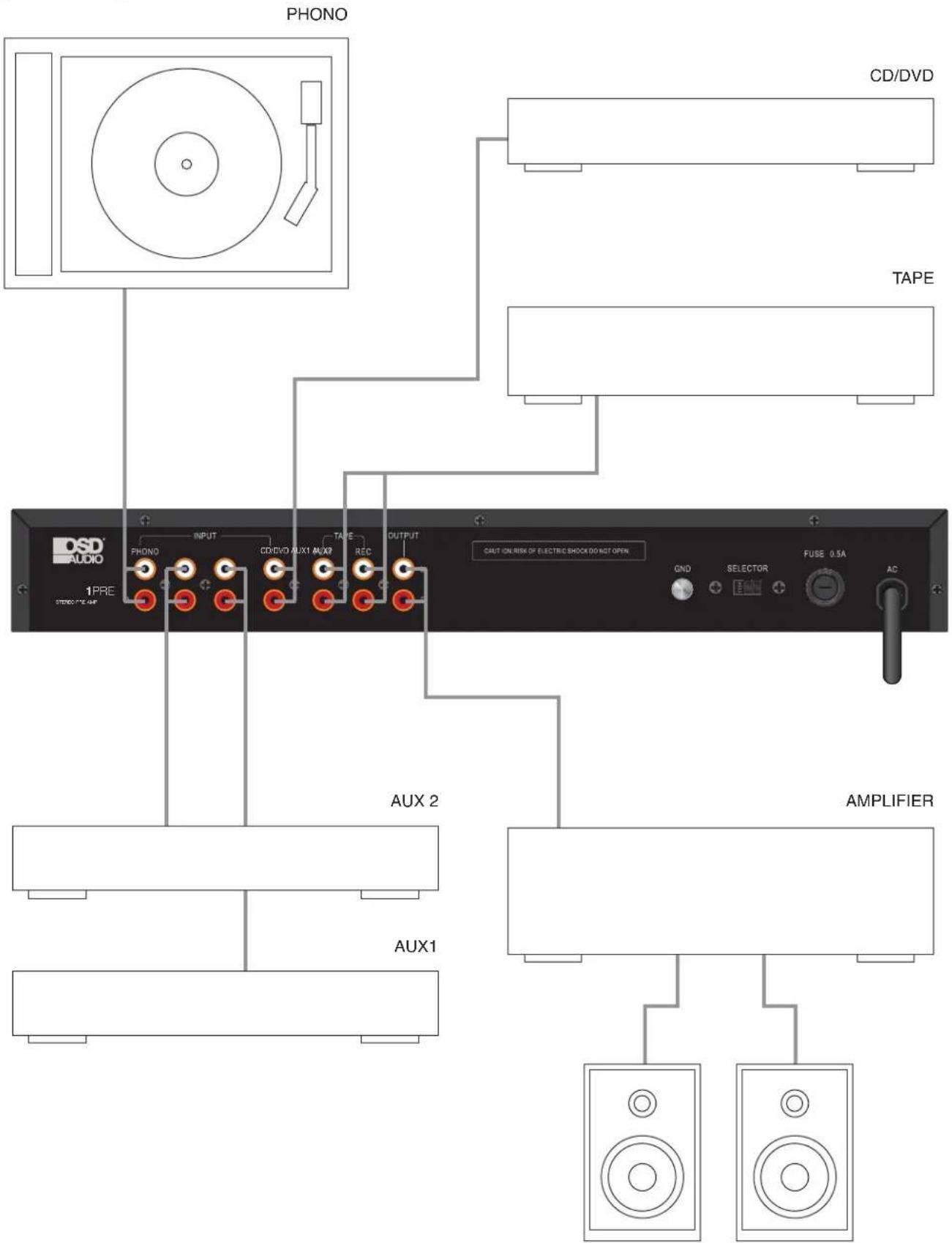
System Diagram
Specifications
| Input Sensitivity/Impedance | ||||||
| Mic | 0.5V/600 | Ohms | ||||
| Phono | 3mV/47k | Ohms | ||||
| Tape,Tuner, | CD/DVD, | Aux | 150mV/47k | Ohms | ||
| Output Level/Impedance | ||||||
| Tape | Rec | 150mV/100k | Ohms | |||
| Pre | Output | 500mV/47k | Ohms | |||
| Total Harmonic Distortion | ||||||
| Mic | less | than | 0.4% | |||
| Phono | less | than | 0.4% | |||
| Tape,Tuner, | CD/DVD, | Aux | less | than | 0.2% | |
| Signal to Noise Ratio | ||||||
| Mic | more | than | 50dB | |||
| Phono | more | than | 70dB | |||
| Tape,Tuner, | CD/DVD, | Aux | more | than | 80dB | |
| Frequency | Response | 5Hz - 30kHz +0 -3dB | ||||
| Tone Control | ||||||
| Bass | ± | 12dB | @ | 100Hz | ||
| Midrange | ± | 6dB | @ | 1kHz | ||
| Treble | ± | 12dB | @ | 10kHz | ||
| Loudness | Control | +4/0/+2dB @ 100/1k/10kHz | ||||
| Power | Requirements | AC 120V 60Hz / 220V 50Hz | ||||
| Dimensions | 18.9" x 2.36" x 8.25" | |||||
Warranty Information
All OSD AUDIO electronics have (2) year Limited Warranty against defects in materials and workmanship. Proof of purchase must accompany all claims. During the warranty period OSD AUDIO will replace any defective part and correct any defect in workmanship without charge for either parts or labor
OSD AUDIO may replace returned electronics with a product of equal value and performance. In such cases, some modifications to the mounting may be necessary and are not OSD AUDIO's responsibility.
For this warranty to apply, the unit must be installed and used according to its written instructions. If necessary, repairs must be performed by OSD AUDIO. The unit must be returned to OSD AUDIO at the owner's expense and with prior written permission. Accidental damage and shipping damage are not considered defects, nor is damaged resulting from abuse or from servicing performed by an agency or person not specifically authorized in writing by OSD Audio
OSD AUDIO sells products only through authorized dealers and distributors to ensure that customers obtain proper support and service. Any OSD AUDIO product purchased from an unauthorized dealer or other source, including retailers, mail order dealers and online sellers will not be honored or serviced under existing OSD AUDIO warranty policy. Any sale of product by an unauthorized source or other manner not authorized by OSD AUDIO shall void the warranty on the applicable product.
Damage to or destruction of components due to application of excessive power voids the warranty on those parts. In these cases, repairs will be made on the basis of the retail value of the parts and labor. To return for repairs, you must email customer service at RMA@OSDAUDIO.com for a Returned Merchandise Authorization (RMA) number then the unit must be shipped to OSD AUDIO at the owner's expense, along with a note explaining the nature of service required. Be sure to pack the product(s) in a corrugated container with at least 3 inches of resilient material to protect the unit from damage in transit.
This Warranty Does Not Cover: Damage caused by abuse, accident, misuse, negligence, or improper operation (installation) • Any products that have been altered or modified • Any product whose identifying number of decal, serial #, etc. has been altered, defaced or removed • Normal wear and maintenance.
Brand : OSD Audio
Model : PRE 1
Category : Hi-Fi System