Active 2 Lite - Smartwatch Kogan - Free user manual and instructions
Find the device manual for free Active 2 Lite Kogan in PDF.


| Product Type | Smartwatch |
| Brand | Kogan |
| Model | Active 2 Lite |
| Display | 1.4-inch TFT LCD touchscreen |
| Dimensions | 45 x 38 x 10 mm |
| Weight | Approx. 40 g (including strap) |
| Battery Capacity | 200 mAh lithium polymer |
| Charging Time | Approx. 2 hours |
| Battery Life | Up to 7 days typical use |
| Water Resistance | IP68 (swim-proof, up to 1.5m for 30 min) |
| Connectivity | Bluetooth 5.0 |
| Compatibility | Android 5.0+ / iOS 10.0+ |
| Sensors | Heart rate, accelerometer, gyroscope |
| Main Functions | Heart rate monitor, step counter, sleep tracking, notifications, call alerts, sedentary reminder, stopwatch, timer, alarm |
| Sport Modes | Walking, running, cycling, skipping, badminton, basketball, football, etc. |
| Strap Material | Removable silicone strap |
| Care and Cleaning | Wipe with a soft, dry cloth; avoid soaps and solvents |
| Safety Precautions | Consult a doctor before using health features; keep away from children; do not attempt to repair |
| Spare Parts and Repairability | Not user-serviceable; contact Kogan support |
Frequently Asked Questions - Active 2 Lite Kogan
User questions about Active 2 Lite Kogan
0 question about this device. Answer the ones you know or ask your own.
Ask a new question about this device
Download the instructions for your Smartwatch in PDF format for free! Find your manual Active 2 Lite - Kogan and take your electronic device back in hand. On this page are published all the documents necessary for the use of your device. Active 2 Lite by Kogan.
USER MANUAL Active 2 Lite Kogan
(COMPATIBLE WITH APPLE FIND MY)
KASHAIRTG1B
SAFETY & WARNINGS
Ensure to read all instructions and warnings in this user guide prior to first use. Retain this user guide for future reference.
Battery Safety
- There is a risk of explosion if the battery is modified or replaced with an incorrect type.
- Dispose of used batteries according to local regulations.
- This device is an aid to assist in locating your item. There is no guarantee that your item will be found.
- The location shown on the map is usually accurate but only shows the tag's last known location.
- The tag's location will be updated if another Apple device is near it. The tag cannot update its own location.
- Using this product to track other people is strictly prohibited. If you suspect that you or someone else is being tracked with this product, contact the authorities immediately.
CE Compliance
This device complies with the essential requirements and other relevant provisions of Directive 2014/53/EU.
WARNING – KEEP BATTERIES OUT OF REACH OF CHILDREN

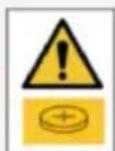
- Swallowing may lead to serious injury or death in as little as 2 hours, due to chemical burns and potential perforation of the oesophagus.
- If you suspect your child has swallowed or inserted a button battery immediately call the 24-hour Poisons Information Centre on 13 11 26 (Australia) or 0800 764 766 (New Zealand) for fast, expert advice.
- Examine devices and make sure the battery compartment is correctly secured, e.g. that the screw or other mechanical fastener is tightened. Do not use if compartment is not secure.
- Dispose of used button batteries immediately and safely. Flat batteries can still be dangerous.
• Tell others about the risk associated with button batteries and how to keep their children safe.
OPERATION
Pairing with Your iOS Device
- Open the Find My app on your iOS device.
- Tap the 'Items' icon at the bottom of the screen.
- Select 'Add Item' and then choose 'Other Supported Item'.
- Your iOS device will now search for your 'Skytag II' smart tag.
- Once found, follow the on-screen prompts to complete the pairing process.
Replacing the Battery
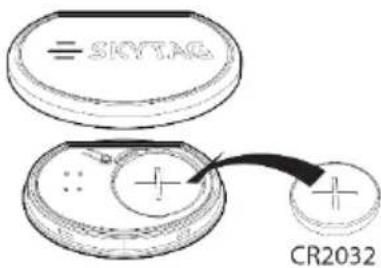
- Pry apart the battery cover using a small screwdriver or your fingernail.
- Remove the old battery and insert a new CR2032 battery.
- Ensure the battery cover is securely reattached.
Factory Resetting the Device
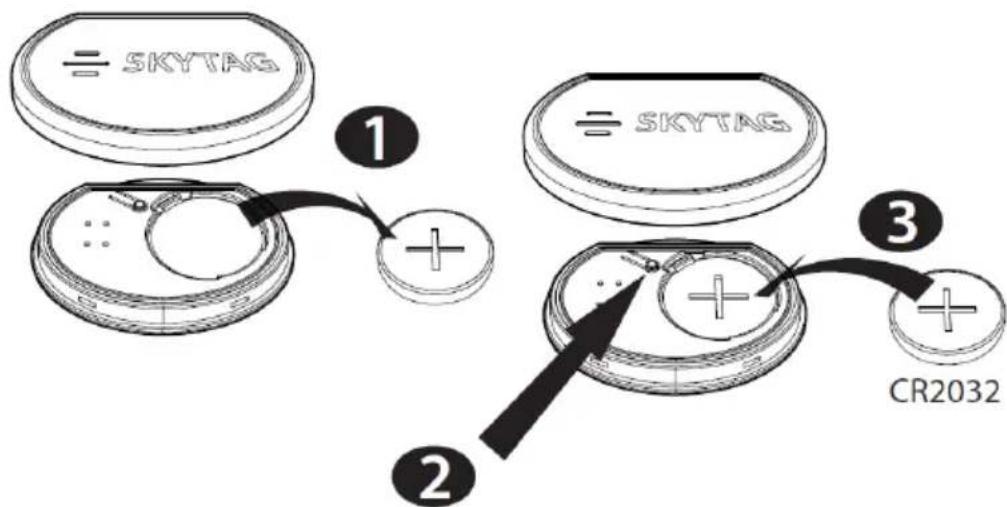
- Remove the battery cover and take out the battery.
- While pressing the button, reinsert the battery into the compartment.
- Continue holding the button until you hear the reset tone.
- The device is now reset to factory settings.
Need more information?
We hope that this user guide has given you the assistance needed for a simple set-up.
For the most up-to-date guide for your product, as well as any additional assistance you may require, head online to help.kogan.com
kogan.com
Brand : Kogan
Model : Active 2 Lite
Category : Smartwatch