PAK Dock Pro - Audio recorder AJA - Free user manual and instructions
Find the device manual for free PAK Dock Pro AJA in PDF.


| Product Type | Audio Recorder |
| Brand | AJA |
| Model | PAK Dock Pro |
| Dimensions (W x H x D) | 150 x 40 x 100 mm |
| Weight | 500 g |
| Power Source | USB-C (5V/2A) or internal rechargeable battery |
| Battery Life | Up to 8 hours continuous recording |
| Recording Media | SD/SDHC/SDXC card (up to 512 GB) |
| Recording Formats | WAV, MP3, FLAC |
| Sample Rates | 44.1 kHz, 48 kHz, 96 kHz |
| Bit Depth | 16-bit, 24-bit |
| Microphone Input | 3.5mm stereo mini jack (plug-in power supported) |
| Line Input | 3.5mm stereo mini jack |
| Headphone Output | 3.5mm stereo mini jack |
| Built-in Speaker | Mono, 0.5W |
| Display | 2.0 inch color TFT LCD |
| Connectivity | USB-C (data and charge), microSD slot |
| Supported Operating Systems | Windows, macOS, Linux |
| Controls | Buttons for record, play, pause, stop, menu navigation |
| Included Accessories | USB-C cable, user manual, quick start guide |
Frequently Asked Questions - PAK Dock Pro AJA
User questions about PAK Dock Pro AJA
0 question about this device. Answer the ones you know or ask your own.
Ask a new question about this device
Download the instructions for your Audio recorder in PDF format for free! Find your manual PAK Dock Pro - AJA and take your electronic device back in hand. On this page are published all the documents necessary for the use of your device. PAK Dock Pro by AJA.
USER MANUAL PAK Dock Pro AJA
natural_image
Black electronic device with a green indicator light and 'SIA' logo on its side (no readable text or symbols beyond branding)Installation and Operation Guide
Trademarks
AJA^® and Because it matters. are registered trademarks of AJA Video Systems, Inc. for use with most AJA products. AJA^TM is a trademark of AJA Video Systems, Inc. for use with recorder, router, software and camera products. Because it matters. is a trademark of AJA Video Systems, Inc. for use with camera products.
Corvid Ultra ^® , Io ^® , Ki Pro ^® , KONA ^® , KUMO ^® , ROI ^® and T-Tap ^® are registered trademarks of AJA Video Systems, Inc.
AJA Control Room™, KiStor™, Science of the Beautiful™, TruScale™, V2Analog™ and V2Digital™ are trademarks of AJA Video Systems, Inc.
All other trademarks are the property of their respective owners.
Copyright
Copyright © 2021 AJA Video Systems, Inc. All rights reserved. All information in this manual is subject to change without notice. No part of the document may be reproduced or transmitted in any form, or by any means, electronic or mechanical, including photocopying or recording, without the express written permission of AJA Video Systems, Inc.
Contacting AJA Support
When calling for support, have all information at hand prior to calling. To contact AJA for sales or support, use any of the following methods:
| Telephone +1.530.271.3190 |
| FAX +1.530.271.3140 |
| Web https://www.aja.com____ |
| Support Email support@aja.com____ |
| Sales Email sales@aja.com____ |
Contents
Notices 2
Trademarks 2
Copyright 2
Contacting AJA Support 2
Chapter 1 – PAK Dock Pro. . . . . . . . . . . . . . . . . . . . . . . . . . . . . . . . . . . . . . . . . . . . . . . . . . . . . . . . . . . . . . . . . . . . . . . 4
Introduction. 4
Features....4
AJA PAK Media 5
Installation....5
What's In The Box? 5
PAK Dock Pro Installation Procedure. 5
Formatting PAK Media 6
Operation 6
Inserting Media 6
Unmounting Procedure....6
Disconnecting the PAK Dock Pro 7
Appendix A – Tech Specs .....8
PAK Dock Pro Tech Specs 8
Appendix B – Safety and Compliance .....9
Warranty and Liability Information....16
Introduction
AJA's PAK Dock Pro is a media reader/writer that works with AJA's PAK Media. PAK Dock Pro attaches to a host computer using a USB 3.2 Gen2 cable connection. Because PAK Dock Pro is bus powered, no other connections are required for operation.
PAK Media is used by AJA's Ki Pro Ultra 12G tapeless video recorders, as well as AJA's legacy Ki Pro Ultra, Ki Pro Ultra Plus, and Ki Pro Quad recorders. Files recorded onto PAK Media by any of these video recorder models can also be read by PAK Dock Pro.
Features
- Compact and rugged industrial-strength case, suitable for studio or field use
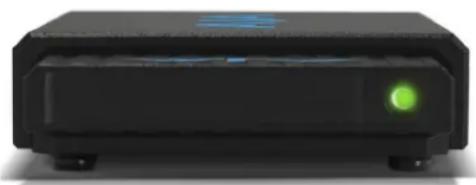
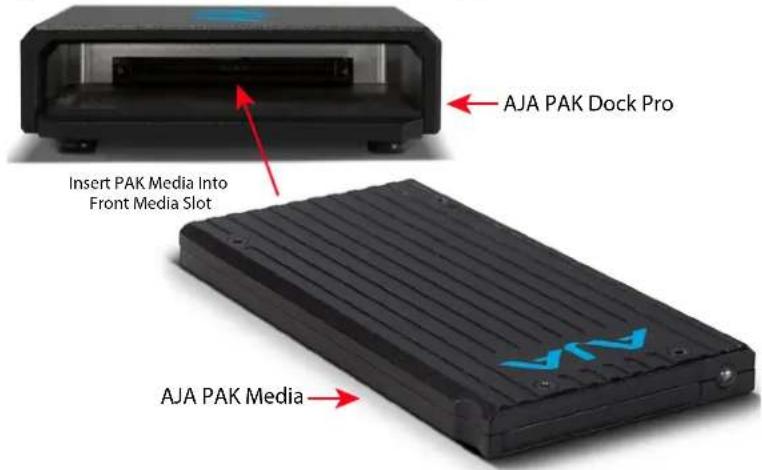
- Single front slot for the insertion of AJA PAK Media
- Compatible with all AJA PAK Media for convenient file transfers
- USB 3.2 Gen2 for transfer speeds up to 10Gbps
• Actual transfer speed dependent on the type of PAK Media - Reversible USB Type-C connector for quick and easy connection
- Bus powered
- USB cables included
Figure 1. PAK Dock Pro Front View with PAK Media Inserted
natural_image
Black rectangular electronic device with a green indicator light on the side (no visible text or symbols)Figure 2. PAK Dock Pro Rear View
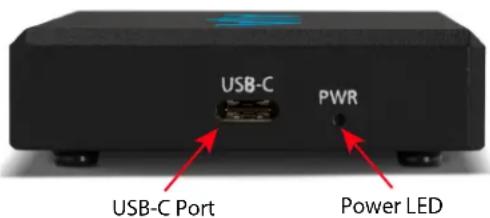
Figure 3. PAK Dock Pro Front View with Empty Media Slot
AJA PAK Media
AJA's Ki Pro Ultra 12G video recorder lets you record edit-friendly 4K, 2K, or HD files directly to removable AJA PAK Media. Once removed from the Ki Pro Ultra 12G, the PAK Media can be inserted in the PAK Dock Pro, allowing you to rapidly transfer files that can be used immediately in your non-linear editing system.
NOTE: When you order your PAK Media you can choose the formatting, either HFS+ or ExFAT.
AJA PAK Options
The PAK 256, PAK 512, PAK 1000, and PAK 2000 options are high-capacity Solid State Drives encased in a protective housing with rugged connection engineered to handle the rigors of repeated use in the field.
NOTE: The newer PAK 256 and PAK 512 (R1 and above), and the PAK 1000 and PAK 2000 media support recording all formats and frame rates up to and including 4K/UltraHD 50, 59.94,60 at ProRes 422 (HQ). Legacy PAK 256 (R0) and PAK 512 (R0) media have slightly lower capabilities, and are able to record up to 4K/UltraHD 30.
Installation
What's In The Box?
When you unpack your product you'll find the following components:
- AJA PAK Dock Pro Unit
- USB 3.2 Gen2 cable - Type-A to Type-C
- USB 3.2 Gen2 cable - Type-C to Type-C
Please save all packaging in case you need to ship the product in the future.
PAK Dock Pro Installation Procedure
-
Unpack and place the PAK Dock Pro on a flat, stable surface near your host computer.
-
Connect the PAK Dock Pro to your host computer using one of the supplied USB 3.2 Gen2 cables.
Formatting PAK Media
PAK Media is available pre-formatted either as HFS+ (native to the macOS file system) or ExFAT (suitable for PCs).
Re-formatting PAK Media is best accomplished using your Ki Pro video recorder, as that creates the correct directory structure for playback and recording (a root folder named "AJA"). Refer to your AJA Ki Pro recorder's documentation for detailed formatting instructions.
PAK Media can also be directly formatted using a computer, by mounting the media in your connected PAK Dock Pro and using standard computer media formatting procedures, but you will need to manually create an AJA folder at the root of the drive.
NOTE: To use PAK Media which is formatted as HFS+ in a Windows OS computer, a third party HFS+ application such as Mediafour's MacDrive is required.
Valid Transfer Files
Valid media files must have video formats and frame rates supported by your Ki Pro recorder model, be it full raster or proxy, and if audio is included it must be 24-bit 48kHz. Files copied to PAK Media that do not meet these criteria may not appear in your Ki Pro recorder's web UI or front panel UI when you review clips.
Media files should only be transferred to and from the "AJA" folder on PAK Media. Files located elsewhere on that PAK Media, even if they are valid, will not appear in your Ki Pro recorder's web UI or front panel UI.
Operation
Inserting Media
To properly insert media into the PAK Dock Pro, orient the media so that the side with the AJA logo is facing you and the logo is inverted. Then place the connector end of the media into the PAK Dock Pro slot. Push the PAK Media all the way into the slot gently, but firmly, until you feel the connector seat solidly.
Once the PAK Media is inserted into the PAK Dock Pro, your operating system should mount the PAK Media the same as any other external volume or disk drive. Depending upon your operating system version, you may see a disk icon appear on the desktop or within the operating system file manager.
After the PAK Media is mounted by your host computer's operating system, you can copy files from and to the PAK Media. You may also delete files from the PAK Media. You may copy virtually any file to the PAK Media outside of the "AJA" folder.
To add files to the PAK Media for playback on your AJA Ki Pro recorder, you must properly encode the files as QuickTime and place them in the "AJA" folder on the PAK Media.
Unmounting Procedure
To remove PAK Media from your operating system, use the methods typically used for gracefully un-mounting/ejecting any type of removable media.
Disconnecting the PAK Dock Pro
Before disconnecting the PAK Dock Pro, be sure to first un-mount/eject the media using the proper procedure as noted earlier for your operating system.
PAK Dock Pro Tech Specs
File Transfers
- Compatible with all AJA PAK media
User Interface
- USB 3.2 Gen2 for transfer speeds up to 10Gbps*
- Reversible USB Type-C connector
- Bus powered
* Actual transfer speed is dependent on the PAK media used
Size (w x d x h)
- 4.4" x 2.4" x 0.6" (110 x 60 x 15 mm)
Weight
• 0.4 lb (0.2 kg), no PAK media inserted
Power
- Approx. 0.5W when idle, no PAK media inserted
Environment
- Safe Operating Temperature Range: 0 to 40 C (32 to 104 F)
- Safe Storage Temperature (Power OFF): -40 to 60 C (-40 to 140 F)
- Operating Relative Humidity: 10-90% noncondensing
- Operating Altitude: <3,000 meters (<10,000 feet)
Appendix B – Safety and Compliance
Federal Communications Commission (FCC) Compliance Notices
Class B Interference Statement
This equipment has been tested and found to comply with the limits for a Class B digital device, pursuant to Part 15, Subpart B of the FCC Rules. These limits are designed to provide reasonable protection against harmful interference in a residential installation. This equipment generates, uses, and can radiate radio frequency energy and, if not installed and used in accordance with the instructions, may cause harmful interference to radio communications. However, there is no guarantee that interference will not occur in a particular installation. If this equipment does cause harmful interference to radio or television reception, which can be determined by turning the equipment off and on, the user is encouraged to try to correct the interference by one or more of the following measures:
- Reorient or relocate the receiving antenna.
- Increase the separation between the equipment and receiver.
- Connect the equipment into an outlet on a circuit different from that to which the receiver is connected.
- Consult the dealer or an experienced radio/TV technician for help.
FCC Caution
This device complies with Part 15 of the FCC Rules. Operation is subject to the following two conditions: (1) This device may not cause harmful interference, and (2) this device must accept any interference received, including interference that may cause undesired operation.
Canadian ICES Statement
Canadian Department of Communications Radio Interference Regulations
This digital apparatus does not exceed the Class B limits for radio-noise emissions from a digital apparatus as set out in the Radio Interference Regulations of the Canadian Department of Communications. This Class B digital apparatus complies with Canadian ICES-003.
European Union and European Free Trade Association (EFTA) Regulatory Compliance
This equipment may be operated in the countries that comprise the member countries of the European Union and the European Free Trade Association. These countries, listed in the following paragraph, are referred to as The European Community throughout this document:
AUSTRIA, BELGIUM, BULGARIA, CYPRUS, CZECH REPUBLIC, DENMARK, ESTONIA, FINLAND, FRANCE, GERMANY, GREECE, HUNGARY, IRELAND, ITALY, LATVIA, LITHUANIA, LUXEMBOURG, MALTA, NETHERLANDS, POLAND, PORTUGAL, ROMANIA, SLOVAKIA, SLOVENIA, SPAIN, SWEDEN, UNITED KINGDOM, ICELAND, LICHTENSTEIN, NORWAY, SWITZERLAND
Declaration of Conformity
Marking by this symbol indicates compliance with the Essential Requirements of the EMC Directive of the European Union 2014/30/EU.

This equipment meets the following conformance standards:
This equipment meets the following conformance standards:
Safety
EN 62368-1: 2014 + A11 (T-Mark License),
IEC 62368-1: 2014 (CB Scheme Report/Certificates)
Additional licenses issued for specific countries available on request.
Emissions
EN 55032: 2015 + A11: 2020, CISPR 32: 2015
Immunity
EN 55103-2: 2009
EN 61000-4-2: 2009, EN 61000-4-3: 2006+A1: 2008+A2: 2010,
EN 61000-4-4: 2012, EN 61000-4-6: 2013
Environments: E2, E3 and E4
The product is also licensed for additional country specific standards as required for the International Marketplace.

Warning! This is a Class B product. In a domestic environment, this product may cause radio interference, in which case, the user may be required to take appropriate measures.
This symbol on the product or its packaging indicates that this product must not be disposed of with your other household waste. Instead, it is your responsibility to dispose of your waste equipment by handing it over to a designated collection point for the recycling of waste electrical and electronic equipment. The separate collection and recycling of your waste equipment at the time of disposal will help conserve natural resources and ensure that it is recycled in a manner that protects human health and the environment. For more information about where you can drop off your waste for recycling, please contact your local authority, or where you purchased your product.
Korea KCC Compliance Statement
사용자안내문
This is a Class B product based on the standard of the Bureau of Standards, Metrology and Inspection (BSMI) CNS 13438, Class B. In a domestic environment this product may cause radio interference in which case the user may be required to take adequate measures.
Japan Compliance Statement
This is a Class B product based on the standard of the VCCI Council (VCCI 32: 2016). If this is used near a radio or television receiver in a domestic environment, it may cause radio interference. Install and use the equipment according to the instruction manual.
Translated Warning and Caution Messages
The following caution statements, warning conventions, and warning messages apply to this product and manual.

Warning Symbol

Caution Symbol

Warning! Read and follow all warning notices and instructions marked on the product or included in the documentation.
Warning! Do not use this device near water and clean only with a dry cloth.
Warning! Do not block any ventilation openings. Install in accordance with the manufacturer's instructions.
Warning! Do not install near any heat sources such as radiators, heat registers, stoves, or other apparatus (including amplifiers) that produce heat.
Warning! Only use attachments and accessories specified and/or sold by the manufacturer.
Warning! Refer all servicing to qualified service personnel. Servicing is required when the device has been damaged in any way, such as power-supply cord or plug is damaged, liquid has been spilled or objects have fallen into the device, the device has been exposed to rain or moisture, does not operate normally, or has been dropped.
Warning! Do not open the chassis. There are no user-serviceable parts inside. Opening the chassis will void the warranty unless performed by an AJA service center or licensed facility.
NOTE: The messages below apply only to the host computer that the PAK Dock Pro is connected to.

Warning! Since the Mains plug is used as the disconnection for the device, it must remain readily accessible and operable.
Warning! Protect the power cord from being walked on or pinched particularly at plugs, convenience receptacles, and the point where they exit from the device.
Warning! Unplug this device during lightning storms or when unused for long periods of time.
Warning! Disconnect the external AC power supply line cord(s) from the mains power before moving the unit.
Warning! Do not defeat the safety purpose of the polarized or grounding-type plug. A polarized plug has two blades with one wider than the other. A grounding type plug has two blades and a third grounding prong. The wide blade or the third prong are provided for your safety. If the provided plug does not fit into your outlet, consult an electrician for replacement of the obsolete outlet.
Warranty and Liability Information
Limited Warranty on Hardware
AJA Video Systems, Inc. (AJA Video) warrants that the hardware product, not including storage modules or software components, will be free from defects in materials and workmanship for a period of three years from the date of purchase. AJA Video warrants that the storage modules provided as part of the hardware product will be free from defects in materials and workmanship for a period of one year from the date of purchase. AJA Video provides a separate software warranty as part of the license agreement applicable to software components.
If the Customer brings a valid claim under this limited warranty for a hardware product or storage module (hereafter, a "product") during the applicable warranty period, AJA Video will, at its sole option and as the Customer's sole remedy for breach of the above warranty, provide one of the following remedies:
- Repair or facilitate the repair the product within a reasonable period of time, free of charge for parts and labor.
- Replace the product with a direct replacement or with a product that performs substantially the same function as the original product.
- Issue a refund of the original purchase price less depreciation to be determined based on the age of the product at the time remedy is sought under this limited warranty.
To obtain service under this warranty, the Customer must notify AJA Video of the defect before expiration of the warranty period and make suitable arrangements for the performance of service by contacting AJA Video support through the channels set forth on the support contacts web page at https://www.aja.com/support. Except as stated, the Customer shall bear all shipping, packing, insurance and other costs, excluding parts and labor, to effectuate repair. Customer shall pack and ship the defective product to a service center designated by AJA Video, with shipping charges prepaid. AJA Video shall pay to return the product to Customer, but only if to a location within the country in which the AJA Video service center is located. SOME JURISDICTIONS DO NOT ALLOW THE EXCLUSION OF IMPLIED WARRANTIES OR LIMITATIONS ON APPLICABLE STATUTORY RIGHTS OF A CONSUMER, SO SOME OR ALL OF THE TERMS OF THIS PARAGRAPH MAY NOT APPLY TO YOU.
Limitation of Liability
Under no circumstances shall AJA video BE LIABLE IN ANY WAY FOR ANY LOST, CORRUPTED OR DESTROYED DATA, FOOTAGE OR WORK, OR FOR ANY OTHER INDIRECT, SPECIAL, INCIDENTAL OR CONSEQUENTIAL DAMAGES OR LOST PROFITS, OR FOR ANY THIRD PARTY CLAIM, IN CONNECTION WITH THE PRODUCT, WHETHER RESULTING FROM DEFECTS IN THE PRODUCT, SOFTWARE OR HARDWARE FAILURE, OR ANY OTHER CAUSE WHATSOEVER, EVEN IF AJA VIDEO HAS BEEN ADVISED OF THE POSSIBILITY OF SUCH DAMAGES. AJA VIDEO'S LIABILITY IN CONNECTION WITH THE PRODUCT SHALL UNDER NO CIRCUMSTANCES EXCEED THE PURCHASE PRICE PAID FOR THE PRODUCT. The foregoing limitations apply even if any remedy set forth in this LIMITED WARRANTY fails of its essential purpose. SOME JURISDICTIONS DO NOT ALLOW THE LIMITATION OF LIABILITY FOR PERSONAL INJURY, OR OF INCIDENTAL OR CONSEQUENTIAL DAMAGES, SO SOME OR ALL OF THE TERMS OF THIS PARAGRAPH MAY NOT APPLY TO YOU.
Governing Law and Language; Your Rights
This limited warranty is the only warranty provided by AJA Video on the hardware product. It supersedes all prior or contemporaneous understandings regarding such subject matter. No amendment to or modification of this warranty will be binding unless in writing and signed by AJA Video. The laws of the State of California, USA will govern this warranty and any dispute arising from it. Any translation of this Agreement is intended for convenience and to meet local requirements and in the event of a dispute between the English and any non-English versions, the English version of this warranty will govern. This limited warranty gives you specific legal rights and you may have other rights that vary from jurisdiction to jurisdiction, some of which are noted above.
- Installation and Operation Guide
- Trademarks
- Copyright
- Contacting AJA Support
- Contents
- Introduction
- Features
- AJA PAK Media
- AJA PAK Options
- Installation
- What's In The Box?
- PAK Dock Pro Installation Procedure
- Formatting PAK Media
- Valid Transfer Files
- Operation
- Inserting Media
- Unmounting Procedure
- Disconnecting the PAK Dock Pro
- PAK Dock Pro Tech Specs
- File Transfers
- User Interface
- Size (w x d x h)
- Weight
- Power
- Environment
- Appendix B – Safety and Compliance
- Federal Communications Commission (FCC) Compliance Notices
- Class B Interference Statement
- FCC Caution
- Canadian ICES Statement
- European Union and European Free Trade Association (EFTA) Regulatory Compliance
- Declaration of Conformity
- Korea KCC Compliance Statement
- Japan Compliance Statement
- Translated Warning and Caution Messages
- Warranty and Liability Information
- Limited Warranty on Hardware
- Limitation of Liability
- Governing Law and Language; Your Rights
Brand : AJA
Model : PAK Dock Pro
Category : Audio recorder