E401 - Elliptical bike Horizon Fitness - Free user manual and instructions
Find the device manual for free E401 Horizon Fitness in PDF.


| Product Type | Elliptical Bike |
| Brand | Horizon Fitness |
| Model | E401 |
| Dimensions (L x W x H) | 68 x 30 x 66 inches (173 x 76 x 168 cm) |
| Weight | 150 lbs (68 kg) |
| Maximum User Weight | 300 lbs (136 kg) |
| Resistance Type | Magnetic |
| Resistance Levels | 16 |
| Display Type | 5-inch LCD |
| Display Metrics | Time, Distance, Calories, Heart Rate, RPM |
| Heart Rate Monitor | Hand grip pulse sensors |
| Programs | 10 pre-set programs |
| Power Source | Self-powered (generator) or AC adapter |
| Stride Length | 18 inches (46 cm) |
| Pedal Spacing | 2 inches (5 cm) |
| Water Bottle Holder | Yes |
| Transport Wheels | Yes |
| Warranty | Frame: Lifetime; Parts and labor: 1 year |
| Approval | FCC, CE |
Frequently Asked Questions - E401 Horizon Fitness
User questions about E401 Horizon Fitness
0 question about this device. Answer the ones you know or ask your own.
Ask a new question about this device
Download the instructions for your Elliptical bike in PDF format for free! Find your manual E401 - Horizon Fitness and take your electronic device back in hand. On this page are published all the documents necessary for the use of your device. E401 by Horizon Fitness.
USER MANUAL E401 Horizon Fitness
natural_image
Line drawing of an outdoor fitness equipment with levers and legs (no text or symbols)HORIZON SERIES
FOR MODEL :
E401

ELLIPTICAL USER'S GUIDE
INTRODUCTION
CONGRATULATIONS and THANK YOU for your purchase of this Horizon elliptical!
Whether your goal is to win races or simply enjoy a fuller, healthier lifestyle, a Horizon elliptical can help you attain it adding club-quality performance to your at-home workouts, with the ergonomics and innovative features you need to get stronger and healthier, faster. Because we're consulted to designing fitness equipment from the inside out, we use only the highest quality components. It's a commitment we back with one of the strongest frame-to-brake warranty packages in the industry.
You want exercise equipment that offers the most comfort, the best reliability and the highest quality in its class.
The Horizon E401 delivers.
TABLE OF CONTENTS
| Important Precautions | 4 |
| Assembly | 5 |
| Before You Begin | 14 |
| Elliptical Operation | 15 |
| Conditioning Guidelines | 20 |
| Troubleshooting & Maintenance | 27 |
| Limited Warranty | 31 |
CONTACT INFORMATION Back Panel
IMPORTANT PRECAUTIONS
SAVE THESE INSTRUCTIONS
Read all instructions before using this elliptical. When using an electrical product, basic precautions should always be followed, including the following: Read all instructions before using this elliptical. It is the responsibility of the owner to ensure that all users of this elliptical are adequately informed of all warnings and precautions. If you have any questions after reading this manual, contact Customer Tech Support at the number listed on the back panel of this manual.

To reduce the risk of burns, fire, electrical shock or injury to persons:
- If you experience any kind of pain, including, but not limited to chest pains, nausea, dizziness, or shortness of breath, stop exercising immediately and consult your physician before continuing.
- Maintain a comfortable pace. Do not sprint above 80 rpms on this machine.
• The heart rate displayed may be inaccurate and should be used for reference only. - To maintain balance, it is recommended to keep a grip on the handlebars while exercising, mounting or dismounting the machine.
- Do not wear clothes that might catch on any part of the elliptical.
• Do not turn pedal arms by hand.
• Make sure handlebars are secure before each use. - Do not insert or drop any object into any opening.
- Unplug elliptical before moving or cleaning it. To clean, wipe surfaces down with soap and slightly damp cloth only; never use solvents. (See MAINTENANCE)
- This elliptical should not be used by persons weighing more than 275 pounds. Failure to comply will void the warranty.
- This elliptical is intended for in-home use only. Do not use this elliptical in any commercial, rental, school or institutional setting. Failure to comply will void the warranty.
- Do not use a elliptical in any location that is not temperature controlled, such as, but not limited to garages, porches, pool rooms, bathrooms, car ports or outdoors. Failure to comply may void the warranty.
• Use the elliptical only as described in this manual - Keep the topside of the foot support clean and dry.
- Care should be taken when mounting or dismounting the equipment. Before mounting or dismounting, move the pedal on the mounting or dismounting side to its lowest position and bring the machine to a complete stop.
- Disconnect all power before servicing the equipment.

At NO time should pets or children under the age of 12 be closer to the elliptical than 10 feet. At NO time should children under the age of 12 use the elliptical. Children over the age of 12 should not use the elliptical without adult supervision.
It is essential that your elliptical is used only indoors, in a climate controlled room. If your elliptical has been exposed to colder temperatures or high moisture climates, it is strongly recommended that the elliptical is warmed up to room temperature before first time use. Failure to do so may cause premature electronic failure.
ASSEMBLY
IMPORTANT: READ THESE SAFETY INSTRUCTIONS BEFORE USE!

There are several areas during the assembly process of a elliptical that special attention must be paid. It is very important to follow the assembly instructions correctly and to make sure all parts are firmly tightened. If the assembly instructions are not followed correctly, the elliptical could have frame parts that are not tightened and will seem loose and may cause irritating noises. To prevent damage to the elliptical, the assembly instructions must be reviewed and corrective actions should be taken.
UNPACKING
Unpack the product where you will be using it. Place the product on a level flat surface. It is recommended that you place a protective covering on your floor. During each assembly step, ensure that ALL nuts and bolts are in place and partially threaded in before completely tightening any ONE bolt.
NOTE: A light application of grease may aid in the installation of hardware. Any grease, such as lithium bike grease is recommended.
Before proceeding, find your elliptical's serial number located on the front stabilizer tube and enter it in the space provided below. Also locate the model name which is located on the side cover badge.
ENTER YOUR SERIAL NUMBER AND MODEL NAME IN THE BOXES BELOW:
SERIAL NUMBER :
MODEL NAME:

natural_image
Technical line drawing of a mechanical device with lever and handle (no text or symbols)* Refer to the SERIAL NUMBER and MODEL NAME when calling for service.
* Also enter this serial number on your Warranty Card.
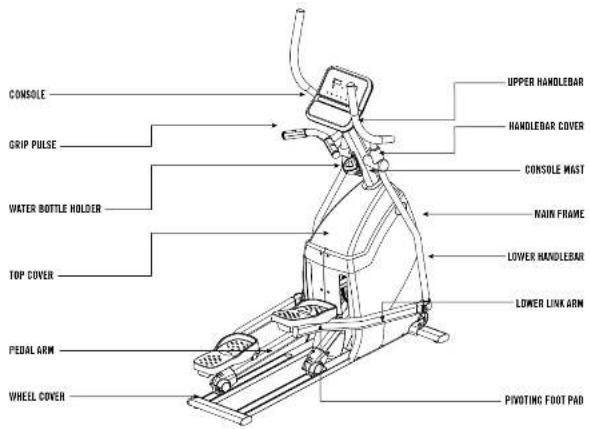
TOOLS INCLUDED PARTS INCLUDED
5mm Allen Wrench
□ 6mm Allen Wrench
□ Phillips Screw Driver
□ 13/15mm Flat Wrench
□ 1 Console
□ 1 Console Mast
□ 1 Front Stabilizer Tube
□ 2 Upper Handlebars
□ 2 Lower Handlebars
□ 2 Lower Link / Pivoting Foot Pads
□ 2 Handlebar Cover Sets
□ 2 Top Covers
□ 1 HORIZON FITNESS
12-Volt Power Adapter
□ 1 Water Bottle Holder
□ 4 Hardware Bags
If you have questions or if there are any missing parts, contact Customer Tech Support.
Contact information is located on the back panel of this manual.
For a complete exploded diagram, visit us at www.horizonfitness.com
ASSEMBLY STEP 1
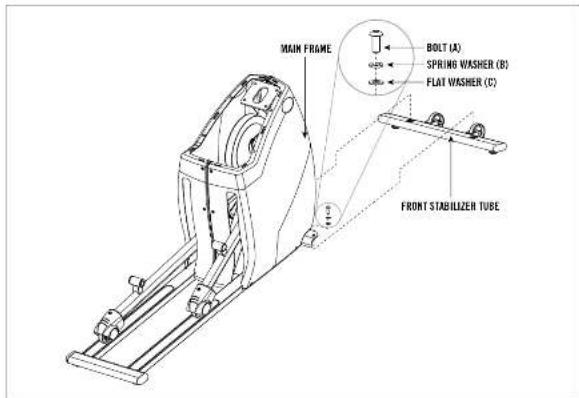
A Open HARDWARE BAG FOR STEP 1.
B Attach the FRONT STABILIZER TUBE to the MAIN FRAME using 2 BOLTS (A), 2 SPRING WASHERS (B) and 2 FLAT WASHERS (C).
HARDWARE BAG FOR STEP 1 CONTENTS:

ASSEMBLY STEP 2

A Open HARDWARE BAG FOR STEP 2.
B Carefully pull the CONSOLE WIRES through the CONSOLE MAST using the twist tie located inside the CONSOLE MAST.
C Attach the CONSOLE MAST to the MAIN FRAME using 4 BOLTS (A), 4 SPRING WASHERS (B) and 4 FLAT WASHERS (C).
D Insert the TOP FRONT COVER, followed by the TOP BACK COVER and soap them together.
E Slide CONSOLE MAST BOOT down to seal the console mast hole. DO NOT PINCH WIRES!
HARDWARE RAG FOR STEP 2 CONTENTS

BOLT (A)
20 mm
Qty: 4

SPRING WASHER (B)
18 mm
Qty: 4

FLAT WASHER (C)
20 mm
Qty: 4
ASSEMBLY STEP 3

NOTE: There is NO hardware bag for this step. All hardware is pre-installed.
A Remove PRE-ATTACHED BOLT & WASHERS from CONSOLE MAST.
B Slide LOWER HANDLEBARS onto CONSOLE MAST and attach by re-inserting PRE-ATTACHED BOLT & WASHERS.
C Slide UPPER HANDLEBARS onto LOWER HANDLEBARS and align NOTCH with TAB making sure handlebars are joined together completely. Secure UPPER HANDLEBARS to LOWER HANDLEBARS using PRE-ATTACHED SET SCREWS.
D Repeat on other side.

After handlebars are assembled they will rotate freely - be cautious. Until the machine is fully assembled, do not grab the handlebars for support.
ASSEMBLY STEP 4
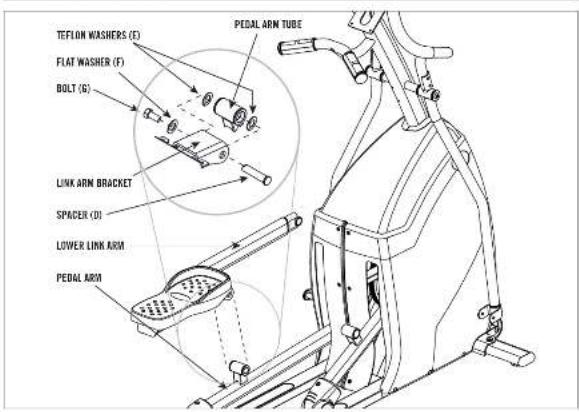
A Open HARDWARE BAG FOR STEP 4.
B Align the bracket on the LEFT LOWER LINK ARM with the tube on the LEFT PEDAL ARM.
C Slide the SPACER (D) through the LINK ARM BRACKET and the PEDAL ARM so it can't rotate.
D Insert 2 TEFLON WASHERS (E) between the PEDAL ARM and the LINK ARM BRACKET.
E Secure the joint with a FLAT WASHER (F) and BOLT (G).
F Repeat on the other side.
HARDWARE BAG FOR STEP 4 CONTENTS

ASSEMBLY STEP 5
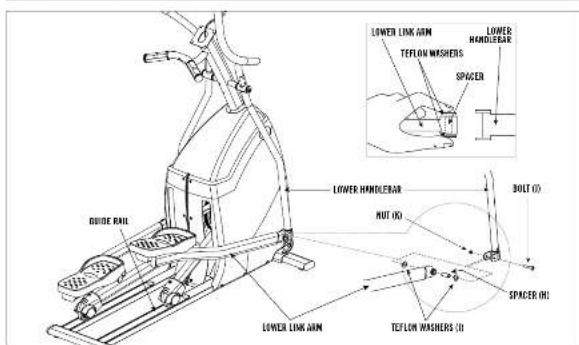
A Open HARDWARE BAG FOR STEP 5.
B Slide SPACER (H) into LOWER LINK ARM.
C Place TEFLON WASHERS (I) on either side of SPACER (H). While holding TEFLON WASHERS (I) slide LOWER LINK ARM into bottom end of LOWER HANDLEBAR.
D Insert BOLT (J) into LOWER HANDLEBAR and secure using NUT (K).
E Repeat on other side.
HARDWARE BAG FOR STEP 5 CONTENTS:

ASSEMBLY STEP 6

NOTE: There is NO hardware bag for this step. All hardware is pre-installed.
A Attach WATER BOTTLE CAGE to CONSOLE MAST using PRE ATTACHED SCREWS.
8 Soap the front and back HANDLEBAR COVERS together onto the UPPER HANDLE BARS. Note the position of the snap tabs on the covers before snapping into position.
C Repeat on other side.
ASSEMBLY STEP 7
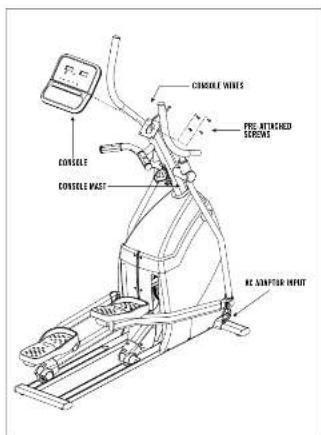
NOTE: There is NO hardware bag for this step. All hardware is pre-installed.
A Attach the CONSOLE MAST wires to the CONSOLE.
B Carefully tuck the CONSOLE WIRES into the CONSOLE MAST before attaching the CONSOLE.
C Attach CONSOLE to the CONSOLE MAST using the 4 PRE-ATTACHED SCREWS (screws will have to be removed from the CONSOLE first).
* NOTE: Be careful not to pinch any wires while installing the console.
Connect AC ADAPTOR to the AC ADAPTOR INPUT, located at front of the main frame. Connect ADAPTOR to a power outlet.
YOU'RE FINISHED!
CONGRATULATIONS!
sustaining an exercise program! Your elliptical is a tremendously effective tool for achieving your personal fitness goals. Regular use of your elliptical can improve the quality of your life in so many ways.
HERE ARE JUST A FEW OF THE HEALTH BENEFITS OF EXERCISE:
- Weight Loss
• A Healthier Heart - Improved Muscle Tone
- Increased Daily Energy Levels
The key to reaping these benefits is to develop an exercise habit. Your new elliptical will help you eliminate obstacles that prevent you from exercising. Inclement weather and darkness won't interfere with your workout when you use your elliptical in the comfort of your home. This guide provides you with basic information for using and enjoying your new machine.
LOCATION OF THE ELLIPTICAL
Place the elliptical on a level surface. There should be 6 feet of clearance behind the elliptical, 3 feet on each side and one foot in front for the power cord (See diagram to the right). Do not place the elliptical in any area that will block any vent or air openings. The elliptical should not be located in a garage, covered patio, near water or outdoors.

Your programmable elliptical is powered by a power supply. The power must be plugged into the power jack, which is located in the front of the machine near the STABILIZER TUBE.

Do not operate the elliptical if the power cord or plug is damaged. If the elliptical appears to not be working properly, do not use the elliptical.

natural_image
Line drawing of a person standing beside a large object with a peace sign (no text or symbols)MOVING
Your elliptical has a pair of transport wheels built into the FRONT STABILIZER TUBE. To move, first remove the power supply and firmly grasp the REAR STABILIZER BAR, carefully tilt and roll. Note: Be sure to grab the bar and not the plastic cover.

Our ellipticals are well built and heavy, weighing up to 200 lbs! Use care and additional help if necessary when moving.
FOOT POSITIONING
Your elliptical offers a variety of foot positions. Moving your foot to the forward most position of the foot pad increases your step height, which will create a feel similar to a step machine. Placing your foot toward the back of the foot pad decreases your step height and creates more of a gliding feel, similar to a smooth walk or run.
Your elliptical also allows you to pedal both forward and backwards to offer a variation to your workout and to focus on other major leg muscle groups such as your hamstrings and calves.
CONSOLE DISPLAY

Note: There is a thin protective sheet of clear plastic on the overlay of the console and should be removed.
A) LED WINDOWS: Display workout feedback.
B) FEEDBACK LEDS: Indicate what workout feedback is currently being displayed.
C) PROGRAM LEDS: Indicate what program is currently selected.
D) SELECT PROGRAM BUTTON: Press to select a program.
E) QUICK TIME BUTTONS: Press to select workout time. You may also adjust the time by using the -/+ buttons.
F) CHANGE DISPLAY BUTTON: Press to change feedback displayed in LED windows. When the SCAN LED lights up, the console will scroll through the 3 lines of feedback automatically.
6) -/+ KEYS: Used to adjust time & resistance levels.
H) START: Press to start your workout. QUICK START: to workout in manual mode, press before selecting program.
I) STOP: Press to pause or end your workout. Hold for 3 seconds to reset the console.
NOTE: If the unit is inactive for 10 minutes, the console display will shot off.
Press any key or ride the elliptical to restart the display. Program will be reset.
CONSOLE OPERATION
QUICK START
1) Plug in elliptical.
2) Press START button and begin exercising.
3) Program will automatically default to MANUAL (P1), the time will count up from 0:00, and the resistance will default to level 1.
4) The resistance level can be adjusted during the workout.
SELECTING PROGRAMS
1) Press SELECT PROGRAM BUTTON to scroll through programs.
2) Press a QUICK TIME BUTTON to select your workout time. You may also adjust the time using the -/+ BUTTONS
4) Press the START button to begin program.
HEART RATE
PULSE GRIPS
Place the palm of your hands directly on the grip pulse handlebars. Both hands must grip the bars for your heart rate to register. It takes 5 consecutive heart beats (15-20 seconds) for your heart rate to register. When gripping the pulse handlebars, do not grip tightly. Holding the grips tightly may elevate your blood pressure. Keep a loose, capping hold. You may experience an erratic readout if consistently holding the grip pulse handlebars. Make sure to clean the pulse sensors to ensure proper contact can be maintained.
IMPORTANT: The heart rate function on this product is not a medical device. While heart rate grips can provide a relative estimation of your actual heart rate, they should not be relied on when accurate readings are necessary. Some people, including those in a cardiac rehab program, may benefit from using an alternate heart rate monitoring system like a chest or wrist strap. Various factors, including movement of the user, may affect the accuracy of your heart rate reading. The heart rate reading is intended only as an exercise aid in determining heart rate trends in general. Please consult your physician.
PROGRAM PROFILES
If the resistance is adjusted up or down during the workout, the rest of the profiles will adjust up or down by the same amount.
P1: MANUAL
Allows you to adjust the resistance level to your preference, without a preset program. Time-based goal.
P2: INTERVALS
Improves your strength, speed and endurance by raising and lowering the resistance levels through-out your workout to involve both your heart and muscles.
| INTERVALS WARM UP PROGRAM - SEGMENTS REPEAT | ||||||||||||||||||||||||||||||||||||||||||||||||||||||||||||||||||||||||||||||||||||||||||||||||||||||||||||||||||||||||||||||||||||||||||||||||||||||||||||||||||||||||||||||||||||||||||||||||||||||||||||||||
| SECONDS | 62.07 | 62.50 | 62.30 | 60.20 | 62.20 | 62.50 | 62.30 | 62.20 | 60.65 | 62.07 | — | — | — | — | — | — | — | — | — | — | — | — | — | — | — | — | — | — | — | — | — | — | — | — | — | — | — | — | — | — | — | — | — | — | — | — | — | — | — | — | — | — | — | — | — | — | — | — | — | — | 1.00 | 1.00 | 1.00 | 1.00 | 1.00 | 1.00 | 1.00 | 1.00 | 1.00 | 1.00 | 1.00 | 1.00 | 1.00 | 1.00 | 1.00 | 1.00 | 1.00 | 1,00 | 1.00 | 1.00 | 1.00 | 1.00 | 1.00 | 1.00 | 1.00 | 1.00 | 1.00 | 1.00 | 1.00 | 1.00 | 1.00 | 1.00 | 1.00 | 1.00 | $1.00 | 1.00 \) | 1.00 \) | 1.00 \) | 1.00 \) | 1.00 \) | 1.00 \) | 1.00 \) | 1.00 \) | 1.00 \) | 1.00 \) | 1.00 \) | 1.00 \) | $1.0 | ||||||||||||||||||||||||||||||||||||||||||||||||||||||||||||||||||||||||||||||||||||||||||||||||||||
| SEGMENT | 1.2 | 2.5 | 6.5 | 7.8 | 5.5 | 6.7 | 11.7 | 12.4 | 15.1 | 17.1 | 19.7 | 70 | ||||||||||||||||||||||||||||||||||||||||||||||||||||||||||||||||||||||||||||||||||||||||||||||||||||||||||||||||||||||||||||||||||||||||||||||||||||||||||||||||||||||||||||||||||||||||||||||||||||
P3: MOUNTAIN
Simulates climbing mountains by increasing and decreasing the resistance.
| MOUNTAIN WARM UP PROGRAM - SEGMENTS REPEAT | |||||||||||||||||||||||||||||||||||||||||||||||||||||||||||||||||||||||||||||||||||||||||||||||||||||||||||||
| SECONDS | 区位电压和功率 | ||||||||||||||||||||||||||||||||||||||||||||||||||||||||||||||||||||||||||||||||||||||||||||||||||||||||||||
| SEGMENT | 1.2 | P4.5 | P7.8 | P9.6 | P11.2 | P13.4 | P15.6 | P17.8 | P19.20 | ||||||||||||||||||||||||||||||||||||||||||||||||||||||||||||||||||||||||||||||||||||||||||||||||||||
| RESISTANCE | 1.1 | P2.6 | P4.9 | P6.3 | P8.6 | P9.9 | P11.2 | 1.1 | |||||||||||||||||||||||||||||||||||||||||||||||||||||||||||||||||||||||||||||||||||||||||||||||||||||
P4: WEIGHT LOSS
Promotes weight loss by raising and lowering the resistance level, while keeping you in your fat burning zone.
| WEIGHT LOSS WARM UP PROGRAM SEGMENTS REPEAT | ||||||||||||||||||
| SECONDS | 06 | 07 | 08 | 09 | 10 | 11 | 12 | 13 | 14 | 15 | 16 | 17 | 18 | 19 | 20 | 21 | 22 | 23 |
| SEGMENT | 1 2 | 2 3 | 3 4 | 4 5 | 5 6 | 6 7 | 7 8 | 9 0 | 10 11 | 11 12 | 12 13 | 13 14 | 14 15 | 15 16 | 16 17 | 17 18 | 18 19 | 19 20 |
| RESISTANCE | 1 2 | 2 3 | 3 4 | 4 5 | 5 6 | 6 7 | 7 8 | 9 0 | 10 11 | 11 12 | 12 13 | 13 14 | 14 15 | 15 16 | 16 17 | 17 18 | 18 19 | 19 20 |
High intensity program that promotes Carbohydrate burn and taxes the Cardiovascular system.
| CARDIO CHALLENGE | WARM DP | PROGRAM - SEGMENTS REPEAT | |||||||||||||||||||
| SECONDS | 66.69 | 02.03 | 30.30 | 05.30 | 20.30 | 30.30 | 30.30 | 30.03 | 60.69 | — | — | — | — | — | — | — | — | — | — | — | — |
| SEGMENT | 1.2 | 4.4 | 67.8 | 3.0 | 12.2 | 12.14 | 13.16 | 17.10 | 20 | ||||||||||||
| RESISTANCE | 1.1 | 2.2 | 3.4 | 4.3 | 3.4 | 5.1 | 7 | 1 | |||||||||||||
P6: ENDURANCE CHALLENGE
High intensity program that tones muscle and challenges the Cardiovascular system.
| ENDURANCE CHALLENGE | WARM UP | PROGRAM - SEGMENTS REPEAT | ||||||||||||||||||||||||||||||||||||||||||||||||||||||||||||||||||||||||||||||||||||||||||||||||||||
| SECONDS | 60 40 82 50 70 90 30 12 15 18 30 40 50 60 70 80 90 12 15 18 30 40 50 60 70 80 90 12 15 18 30 40 50 60 70 80 90 12 15 18 30 40 50 60 70 80 90 12 15 19 20 20 20 20 20 20 20 20 20 20 20 20 20 20 20 20 20 20 20 20 20 20 20 20 20 20 20 20 20 20 20 20 20 20 | 60 | 82 | 50 | 70 | 90 | 30 | 12 | 15 | 18 | 30 | 40 | 50 | 60 | 70 | 80 | 90 | 12 | 15 | 18 | 30 | 40 | 50 | 60 | 70 | 80 | 90 | 12 | 15 | 18 | 30 | 40 | 50 | 60 | 70 | 80 | 90 | 12 | 15 | 18 | 30 | 40 | 50 | 60 | 70 | 80 | 90 | 12 | 15 | 19 | 20 | 20 | 20 | 20 | 20 | 20 | 20 | 20 | 20 | 20 | 20 | 20 | 20 | 20 | 20 | 20 | 20 | 20 | 20 | 20 | 20 | 20 | 20 | 20 | 20 | 20 | 20 | 20 | 20 | 20 | 20 | 20 | 20 | 20 | ||||||||||||||||||
| SEGMENT | 1.2 4.5 6.7 8.5 11.2 12.15 13.15 17 19 20 | |||||||||||||||||||||||||||||||||||||||||||||||||||||||||||||||||||||||||||||||||||||||||||||||||||||
| RESISTANCE | 1.1 2.3 3.4 4.5 6.5 6.4 7.3 7.1 | |||||||||||||||||||||||||||||||||||||||||||||||||||||||||||||||||||||||||||||||||||||||||||||||||||||
CONDITIONING GUIDELINES
ALWAYS CONSULT YOUR PHYSICIAN BEFORE BEGINNING AN EXERCISE PROGRAM.
HOW OFTEN? (Frequency of Workouts)
The American Heart Association recommends that you exercise at least 3 to 4 days per week to maintain cardiovascular fitness. If you have other goals such as weight or fat loss, you will achieve your goal faster with more frequent exercise. Whether it's 3 days or 6 days, remember that your ultimate goal should be to make exercise a lifetime habit. Many people are successful staying with a fitness program if they set aside a specific time of day to exercise. It doesn't matter whether it's to the morning before breakfast, during lunch hour or while watching the evening news. What's more important is that it's a time that allows you to keep a schedule, and a time when you won't be interrupted. To be successful with your fitness program, you have to make it a priority in your life. So decide on a time, pull out your day planner and pencil in your exercise times for the next month!
HOW LONG? (Duration of Workouts)
For aerobic exercise benefits, it's recommended that you exercise from between 24 and 60 minutes per session. But start slowly and gradually increase your exercise times. If you've been sedentary during the past year, it may be a good idea to keep your exercise times to as little as five minutes initially. Your body will need time to adjust to the new activity. If your goal is weight loss, a longer exercise session at lower intensities has been found to be most effective. A workout time of 48 minutes or more is recommended for best weight loss results.
HOW HARD? (Intensity of Workouts)
How hard you workout is also determined by your goals. If you use your machine to prepare for a 5K workout, you will probably work out at a higher intensity than if your goal is general fitness. Regardless of your long term goals, always begin an exercise program at low intensity. Aerobic exercise does not have to be painful to be beneficial! There are two ways to measure your exercise intensity. The first is by monitoring your heart rate using the grip pulse handlebars and the second is by evaluating your perceived exertion level (this is simpler than it sounds!).
PERCEIVED EXERTION LEVEL
A simple way to gauge your exercise intensity is to evaluate your perceived exertion level. While exercising, if you are too winded to maintain a conversation without gasping, you are working out too hard. A good rule of thumb is to work to the point of excitation, not exhaustion. If you cannot catch your breath, it's time to slow down. Always be aware of these warning signs of overexertion.
TARGET HEART RATE ZONE CHART
What is Target Heart Rate Zone?
Target Heart Rate Zone tells you the number of times per minute your heart needs to beat to achieve a desired workout effect. It is represented as a percentage of the maximum number of times your heart can beat per minute.
Target Zone will vary for each individual, depending on age, current level of conditioning, and personal fitness goals. The American Heart Association recommends working-out at a Target Heart Rate Zone of between 60% and 75% of your maximum heart rate. A beginner will want to workout in the 60% range while a more experienced exerciser will want to workout in the 70-75% range. See chart for reference.

EXAMPLE:
For a 42-year-old user: Find age along the bottom of the chart (round to 40), follow age column up to the target zone bar. Results: 60% of maximum Heart Rate = 108 Beats Per Minute, 75% of maximum Heart Rate = 135 Beat Per Minute.
ALWAYS CONSULT YOUR PHYSICIAN BEFORE BEGINNING AN EXERCISE PROGRAM.

STRETCHING
STRETCH FIRST
Before using your product, it is best to take a few minutes to do a few gentle stretching exercises. Stretching prior to exercise will improve flexibility and reduce chances of exercise related injury. Ease into each of these stretches with a slow gentle motion. Do not stretch to the point of pain. Make sure not to bounce while doing these stretches.
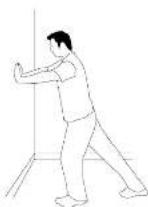
1. STANDING CALF MUSCLE STRETCH
Stand near a wall with the toes of your left foot about 18° from the wall, and the right foot about 12° behind the other foot. Lean forward, pushing against the wall with your palms. Keep your heels flat and hold this position for a count of 15 seconds. Make sure that you do not bounce while stretching. Repeat on the other side.

2. STANDING QUADRICEP STRETCH
Using a wall to provide balance, grasp your left ankle with your left hand and hold your foot against the back of your thigh for 15 seconds. Repeat with your right ankle and hand.
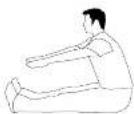
3. SITTING HAMSTRING & LOWER BACK MUSCLE STRETCH
Sit on the floor with your legs together and straight out in front of you. Do not lock your knees. Extend your fingers towards your toes and hold for a count of 15 seconds. Make sure that you do not bounce while stretching. Sit upright again. Repeat one time.
THE IMPORTANCE OF WARM UP & COOL DOWN
WARM UP
The first 2 to 5 minutes of a workout should be devoted to warming up. The warm-up will limber your muscles and prepare them for more strenuous exercise. Make sure that you warm-up on your product at a slow pace. The warm up should gradually bring your heart rate into your Target Heart Rate Zone.
COOL DOWN
Never stop exercising suddenly! A cool-down period of 3-5 minutes allows your heart to readjust to the decreased demand. Make sure that your cool down period consists of a very slow pace to allow your heart rate to lower. After the cool-down, repeat the stretching exercises listed above to loosen and relax your muscles.

ACHIEVING YOUR FITNESS GOALS
An important step in developing a long term fitness program is to determine your goals. Is your primary goal for exercising to lose weight? Improve muscle? Reduce stress? Prepare for the spring racing schedule? Knowing what your goals are will help you develop a more successful exercise program. Below are some common exercise goals:
- Weight Loss - lower intensity, longer duration workouts
- Improve Body Shape and Tone - interval workouts, alternate between hi and low intensities
- Increased Energy Level - more frequent daily workouts
- Improved Sports Performance - high intensity workouts
- Improved Cardiovascular Endurance - moderate intensity, longer duration workouts
If possible try to define your personal goals in precise, measurable terms, and then put your goals in writing. The more specific you can be, the easier it will be to track your progress. If your goals are long term, divide them up into monthly and weekly segments. Longer term goals can lose some of the immediate motivation benefits. Short term goals are easier to achieve. Your console provides you with several readouts that can be used to record your progress. You can track Distance, Calories or Time.
KEEPING AN EXERCISE DIARY
To make your personal exercise log book, photocopy the weekly and monthly log sheets, which are located on the following pages, or you can print them off of your computer by going to:
www.horizonfitness.com/guides/weeklylog.pdf www.horizonfitness.com/guides/monthlylog.pdf
As your fitness improves, you can look back and see how far you've come!
WEEKLY LOG SHEETS
| WEEK # WEEKLY GOAL | |||||
| DAY | DATE | DISTANCE | CALORIES | TIME | COMMENTS |
| S 00 DAY | |||||
| M 00 DAY | |||||
| T 00 S0 DAY | |||||
| W 00 NE S0 DAY | |||||
| T 00 RS DAY | |||||
| F 01 DAY | |||||
| S AT OR GAY | |||||
| WEEKLY TOTALS : | |||||
| WEEK # WEEKLY GOAL | |||||
| DAY | DATE | DISTANCE | CALORIES | TIME | COMMENTS |
| S ON DAY | |||||
| M ON DAY | |||||
| T UE SO DAY | |||||
| W CD NE SO DAY | |||||
| T H U O S DAY | |||||
| F R I D A Y | |||||
| S AT OR DAY | |||||
| W E E K L Y T O T A L S : | |||||
| WEEK # WEEKLY GOAL | ||||
| DAY | DATE | DISTANCE | CALORIES | TIME COMMENTS |
| S OW DAY | ||||
| M ON DAY | ||||
| TUE SOAY | ||||
| W ED NE SOAY | ||||
| THU RS DAY | ||||
| F AVI DAY | ||||
| S AT OR DAY | ||||
| WEEKLY TOTALS : | ||||
| WEEK # WEEKLY GOAL | |||||
| DAY | DATE D | STANCE | CALORIES | TIME COMMENTS | |
| S UN DAY | |||||
| NO ON DAY | |||||
| T U E S D A Y | |||||
| W E O N E S D A Y | |||||
| T H U R S D A Y | |||||
| F R I D A Y | |||||
| S A T U R D A Y | |||||
| W E E K L Y TOTALS : | |||||
| WEEK # WEEKLY GOAL | |||||
| DAY | DATE D | STANCE | CALORIES | TIME COMMENTS | |
| S UN DAY | |||||
| NO ON DAY | |||||
| T U E S D A Y | |||||
| W E D N E S D A Y | |||||
| T H U R S D A Y | |||||
| F R I D A Y | |||||
| S A T U R D A Y | |||||
| W E E K L Y TOTALS : | |||||
| WEEK # WEEKLY GOAL | ||||
| DAY | DATE D | STANCE CALORIES | TIME COMMENTS | |
| S UN DAY | ||||
| NO ON DAY | ||||
| TUE SD DAY | ||||
| WED NE SD DAY | ||||
| THU RS DAY | ||||
| FRY DAY | ||||
| SATUR DAY | ||||
| WEEKLY TOTALS : | ||||
MONTHLY LOG SHEETS
| MONTH MONTHLY GOAL | |||
| WEEK # DISTANCE CALORIES TIME | |||
| MONTHLY TOTAL$ : | |||
| MONTH MONTHLY GOAL | |||
| WEEK # DISTANCE CALORIES TIME | |||
| MONTHLY TOTALS : | |||
| MONTH MONTHLY GOAL | |||
| WEEK # DISTANCE CALORIES TIME | |||
| MONTHLY TOTAL$ : | |||
TROUBLESHOOTING
Your Horizon Series elliptical is designed to be reliable. However, if you do experience problems with your elliptical, please reference the troubleshooting guide listed below.
PROBLEM: The console does not turn on.
SOLUTION: Verify the following:
- The outlet the machine is plugged into is functional. Double check that the breaker has not tripped.
- The correct adapter is being used. Only use the adapter provided or authorized by Horizon Fitness.
- The adapter is not pinched or damaged and is properly plugged into the outlet AND the machine.
- Unplug power cord. Remove the console and check that all connections to the console are secure and not damaged or pinched.
NOTE: if your console uses batteries, they may need to be replaced.
PROBLEM: The console turns on but the Time/RPM's do not count.
SOLUTION: Verify the following:
- Unplug power cord. Remove the console and check that all connections to the console are secure and not damaged or pinched.
- If doing the above does not in the problem, the speed sensor and/or magnet may have become dislodged or damaged.
PROBLEM: The resistance levels seem to be incorrect, seeming too hard or too easy.
SOLUTION: Verify the following:
- The correct adapter is being used. Only use the adapter provided or authorized by Horizon Fitness.
- Reset the console and allow the resistance to reset to the default position. Restart and relay the resistance levels.
PROBLEM: The roller wheels appear to be leaving particles on the guide rails.
SOLUTION: This is considered normal wear of the elliptical wheels
To remove, simply wipe off the roller wheels and guide rails with a damp cloth.
PROBLEM: The elliptical makes a squeaking or chirping noise.
SOLUTION: Verify the following:
• The elliptical is on a level surface.
- Loosen all bolts attached during the assembly process, grease the threads, and tighten again.
HEART RATE TROUBLESHOOTING
PROBLEM: There is no heart rate reading.
SOLUTION: Remove the console and verify that the heart rate cables are attached properly, making sure that the cables are securely inserted into the console.
YOU MAY EXPERIENCE AN ERRATIC HEART RATE READOUT UNDER THE FOLLOWING CONDITIONS:
- Gripping the heart rate handlebars too tight. Try to maintain moderate pressure while holding onto the heart rate handlebars.
- Constant movement and vibration due to constantly holding the heart rate grips while exercising.
- When you are breathing heavily during a workout.
- When your hands are constricted by wearing a ring.
- When your hands are dry or cold. Try moistening your palms or rubbing them together to warm.
• Anyone with heavy arrhythmia. - Anyone with arteriosclerosis or peripheral circulation disorder.
- Anyone whose skin on the measuring palms is especially thick.
NOTE: Check your exercise environment for sources of interference such as high power lines, large motors, etc. Outside interference sources such as computers, motors and fluorescent lights may cause the heart rate reading to be erratic.
If the above troubleshooting section does not remedy the problem, discontinue use and turn the power off.
CALL CUSTOMER TECH SUPPORT AT THE NUMBER ON THE BACK PANEL WHEN YOU ARE NEAR THE EQUIPMENT.
The following information may be asked of you when you call. Please have these items readily available:
- Model Name
- Serial Number
• Date of Purchase (receipt or credit card statement)
In order for Customer Tech Support to service your elliptical they may need to ask detailed questions about the symptoms that are occurring. Some troubleshooting questions that may be asked are:
• How long has this problem been occurring?
- Does this problem occur with every use? With every user?
- If you are hearing a noise, does it come from the front, back or inside? What kind of noise is it (thumping, grinding, squeaking, chirping etc.)?
- If you are having a resistance problem what is occurring? Is the resistance always too hard or too easy? Does the resistance respond when pushing the buttons on the console? Does the resistance constantly cycle through the levels during the workout?
- Has the machine been maintained per the maintenance schedule?
- Does the problem occur when using the handlebars? Without using the handlebars?
Answering these and other questions will give the technicians the ability to send proper replacement parts and the service necessary to get you and your Horizon Fitness elliptical rooning again!
COMMON PRODUCT QUESTIONS
ARE THE SOUNDS MY ELLIPTICAL MAKES NORMAL?
Our ellipticals are some of the quietest available because they use belt drives and friction free magnetic resistance. We use the highest grade bearings and belts to minimize noise. However, because the resistance system itself is so quiet, you will occasionally hear other slight mechanical noises. Unlike older, louder technologies, there are no fans, friction belts, or alternator noises to mask these sounds on our ellipticals. These mechanical noises, which may or may not be intermittent, are normal and are caused by the transfer of significant amounts of energy to a rapidly spinning flywheel. All bearings, belts and other rotating parts will generate some noise which will transmit through the casing and frame. It is also normal for these sounds to change slightly during a workout and over time because of thermal expansion of the parts.
WHY IS THE ELLIPTICAL I HAD DELIVERED LOUDER THAN THE ONE AT THE STORE?
All fitness products seem quieter in a large store showroom because there is generally more background noise than to your home. Also, there will be less reverberation on a carpeted concrete floor than on a wood overlay floor. Sometimes a heavy rubber mat will help reduce reverberation through the floor. If a fitness product is placed close to a wall, there will be more reflected noise.
HOW LONG WILL THE DRIVE BELT LAST?
The computer modeling we have done indicated virtually thousands of maintenance free hours. Belts are now commonly used in far more demanding applications such as motorcycle drives.
CAN I MOVE THE TRAINER EASILY ONCE IT IS ASSEMBLED?
Your elliptical has a pair of transport wheels built into the front legs. It is easy to move your elliptical by rolling it on the front transport wheels. It is important that you place your elliptical in a comfortable and inviting room. Your elliptical is designed to use minimal their space. Many people will place their ellipticals facing the TV or a picture window. If at all possible, avoid putting your elliptical in a unfinished basement. To make exercise a desirable daily activity for you, the elliptical should be in a comfortable setting.
CAN I PEDAL BACKWARDS ON MY ELLIPTICAL?
Your elliptical allows you to pedal both forward and backwards to exercise and strengthen a wider range of muscles.
MAINTENANCE
WHAT KIND OF ROUTINE MAINTENANCE IS REQUIRED?
We use sealed bearings throughout our ellipticals so lubrication is not needed. The most important maintenance steps are to tighten all assembly bolts and simply wipe your perspiration off the trainer after each use.
HOW DO I CLEAN MY ELLIPTICAL?
Clean with soap and water cleaners only. Never use solvents on plastic parts.
Cleanliness of your elliptical and its operating environment will keep maintenance problems and service calls to a minimum. For this reason, Horizon Fitness recommends that the following preventive maintenance schedule be followed.
AFTER EACH USE (DAILY)
- Turn off the elliptical by unplugging the power cord from the wall outlet.
- Wipe down the elliptical with a damp cloth. Never use solvents, as they can cause damage to the elliptical.
- Inspect the power cord. If the power cord is damaged, contact Horizon Fitness.
- Make sure the power cord is not underneath the elliptical or in any other area where it can become pinched or cut.

To remove power from the elliptical, the power cord must be disconnected from the wall outlet.
WEEKLY
Clean underneath the elliptical, following these steps:
• Turn off the elliptical
- Move the elliptical to a remote location.
- Wipe or vacuum any dust particles or other objects that may have accumulated underneath the elliptical.
- Return the elliptical to its previous position.
EVERY MONTH
- Inspect all assembly bolts and pedals on the machine for proper tightness.
- Clean any debris off of the pedal arm wheels and guide rails.
HORIZON HOME-USE WARRANTY
WEIGHT CAPACITY = 275 lbs.
FRAME • LIFETIME
Horton Fitness warrants the frame against defects in workmanship and materials for the lifetime of the original paper. (The frame is defined as the welded metal base of the unit and does not include any parts that can be removed.)
BRAKE • 15 YEARS
Horizon Fitness warrants the brake against defects in workmanship and materials for the period of fifteen years of the original owner.
ELECTRONICS & PARTS • 1 YEAR
Horizon Fitness warrants the electronic components and all original parts for a period of one year from the date of original purchase, so long as the device remains in the possession of the original owner.
LABOR • 7 YEAR
Horizon Fitness shall cover the labor cost for the repair of the device for a period of one year from the date of the original purchase, so long as the device remains in the possession of the original owner.
EXCLUSIONS AND LIMITATIONS
Who is covered:
- The original owner and is not transferable
What IS covered
- Repair or replacement of a defective motor, electronic component, or defective part and is the sole remedy of the warranty.
What IS NOT covered
- Normal wear and tear, improper assembly or maintenance, or installation of parts or accessories not originally intended or compatible with the equipment as sold.
- Damage or failure due to accidental, abuse, corrosion, discoloration of paint or plastic, neglect, theft, vandalism, fire, food, wind, lighting, freezing, or other natural disasters of any kind, power reduction, fluctuation or failure from whatever cause, unusual atmospheric conditions, collision, introductions of foreign objects into the covered unit, or modifications that are unauthorized or not recommended by Horizon Fitness.
- Incidental or consequential damages. Horizon Fitness is not responsible or liable for indirect, specialist or consequential damages, economic loss, loss of property, or profits, loss of enjoyment or use, or other consequential damages of whatsoever nature in connection with the purchase, use, repair or maintenance of the product.
• Equipment used for commercial purposes or any use other than a single family or Household, unless endorsed by Horizon Fitness for coverage.
• Equipment owner or operated outside the US and Canada. - Delivery, assembly, installation, setup for original or replacement units or labor or other costs associated with removal or replacement of the covered unit.
- The allowed to retain this equipment contains a risk of injury (e.g., Fibrous
- Any attempt to repair this equipment treats a risk of injury. Horizon Fitness is not responsible or liable for any damage, loss or liability arising from any personal injury incurred during the course of, or as a result of any repair or attempted repair or your fitness equipment by other than an authorized service technician. All repairs attempted by you on your fitness equipment are undertaken AT YOUR OWN RISK and Horizon Fitness shall have no liability for any injury to the person or properly arising from such repairs.
SERVICE/RETURNS
- In-home service is available within 150 miles of the nearest authorized repair center (Mileage beyond 150 miles from an authorized service center is the responsibility of the consumer).
- All returns must be pre-authorized by Italian Fitness.
- Horizon Fitness' obligation under this warranty is limited to replacing or repairing, at Horizon Fitness' option, the same or comparable model at one of its authorized service centers.
• A Horizon Fitness authorized service center must receive all equipment for which a warranty claim is made. This equipment must be received with all freight and other transportation charges prepaid, accompanied by sufficient profit of purchase. - Replacement units, parts and electronic components reconditioned to As-new Condition by Horizon Fitness or its renders may sometimes be supplied as warranty replacement and constitutive fulfillment of warranty forms.
- This warranty gives you specific legal rights, and your rights may vary from slate to stale.
CUSTOMER TECH SUPPORT

DO NOT RETURN TO THE RETAILER
if you have any problems during assembly or if parts are missing.
For fast and friendly service, please contact one of our trained customer technicians via phone, email or our website.
Customer Tech Support Hotline: 1-877-501-4327
Email: comments@horizonfitness.com
Website: www.horizonfitness.com
Every employee at Horizon Fitness takes pride in providing you with a high quality product. We want to know if you have a problem and we want to have an opportunity to correct it for you.
NOTE: Please read the TROUBLESHOOTING section before contacting Customer Tech Support. To receive additional product information, visit us at www.horizonfitness.com

HORIZON
FITNESS
1620 Landmark Drive,
Cottage Grove WI, 53527
Tel: 1.877.501.4327
- INTRODUCTION
- IMPORTANT PRECAUTIONS
- SAVE THESE INSTRUCTIONS
- ASSEMBLY
- IMPORTANT: READ THESE SAFETY INSTRUCTIONS BEFORE USE!
- UNPACKING
- ENTER YOUR SERIAL NUMBER AND MODEL NAME IN THE BOXES BELOW:
- TOOLS INCLUDED PARTS INCLUDED
- CONGRATULATIONS!
- LOCATION OF THE ELLIPTICAL
- MOVING
- FOOT POSITIONING
- CONSOLE OPERATION
- QUICK START
- SELECTING PROGRAMS
- HEART RATE
- PULSE GRIPS
- PROGRAM PROFILES
- P1: MANUAL
- P2: INTERVALS
- P3: MOUNTAIN
- P4: WEIGHT LOSS
- P6: ENDURANCE CHALLENGE
- CONDITIONING GUIDELINES
- ALWAYS CONSULT YOUR PHYSICIAN BEFORE BEGINNING AN EXERCISE PROGRAM.
- HOW OFTEN? (Frequency of Workouts)
- HOW LONG? (Duration of Workouts)
- HOW HARD? (Intensity of Workouts)
- PERCEIVED EXERTION LEVEL
- TARGET HEART RATE ZONE CHART
- What is Target Heart Rate Zone?
- EXAMPLE:
- STRETCHING
- STRETCH FIRST
- STANDING CALF MUSCLE STRETCH
- STANDING QUADRICEP STRETCH
- SITTING HAMSTRING & LOWER BACK MUSCLE STRETCH
- THE IMPORTANCE OF WARM UP & COOL DOWN
- WARM UP
- COOL DOWN
- ACHIEVING YOUR FITNESS GOALS
- KEEPING AN EXERCISE DIARY
- TROUBLESHOOTING
- PROBLEM: The console does not turn on.
- HEART RATE TROUBLESHOOTING
- YOU MAY EXPERIENCE AN ERRATIC HEART RATE READOUT UNDER THE FOLLOWING CONDITIONS:
- CALL CUSTOMER TECH SUPPORT AT THE NUMBER ON THE BACK PANEL WHEN YOU ARE NEAR THE EQUIPMENT.
- COMMON PRODUCT QUESTIONS
- ARE THE SOUNDS MY ELLIPTICAL MAKES NORMAL?
- WHY IS THE ELLIPTICAL I HAD DELIVERED LOUDER THAN THE ONE AT THE STORE?
- HOW LONG WILL THE DRIVE BELT LAST?
- CAN I MOVE THE TRAINER EASILY ONCE IT IS ASSEMBLED?
- CAN I PEDAL BACKWARDS ON MY ELLIPTICAL?
- MAINTENANCE
- WHAT KIND OF ROUTINE MAINTENANCE IS REQUIRED?
- HOW DO I CLEAN MY ELLIPTICAL?
- AFTER EACH USE (DAILY)
- WEEKLY
- EVERY MONTH
- HORIZON HOME-USE WARRANTY
- WEIGHT CAPACITY = 275 lbs.
- FRAME • LIFETIME
- BRAKE • 15 YEARS
- ELECTRONICS & PARTS • 1 YEAR
- LABOR • 7 YEAR
- EXCLUSIONS AND LIMITATIONS
- Who is covered:
- What IS covered
- What IS NOT covered
- SERVICE/RETURNS
- CUSTOMER TECH SUPPORT
- DO NOT RETURN TO THE RETAILER
Brand : Horizon Fitness
Model : E401
Category : Elliptical bike